
NotebookLM Pricing 2026: Free, Plus, Pro and Limits

Oct 29, 202614 min read
According to AI Alley Way, NotebookLM costs $0 on Free, $4.99 a month on Plus and $19.99 a month on Pro, and the metered unit is the seat, which means your tool cost scales with each new hire, much as it does when a team wires up automations in something like Activepieces.
Ultra's price isn't published in the sources checked.
NotebookLM is Google's research notebook, where you upload documents and ask questions answered from those sources.
Read the limits that decide when you upgrade from Google's own plan screen, because the prices are not confirmed by Google. The table below is current as of 29 October 2026.
| Plan | Monthly price | Annual price | Notebooks | Sources per notebook | Daily chat | Audio/video overviews | Sharing | Source URL |
|---|---|---|---|---|---|---|---|---|
| Free | $0 | not published | not published | not published | not published | not published | not published | https://aialleyway.com/notebooklm-pricing/ |
| Plus | $4.99 | not published | not published | not published | not published | not published | not published | https://aialleyway.com/notebooklm-pricing/ |
| Pro | $19.99 | not published | not published | not published | not published | not published | not published | https://aialleyway.com/notebooklm-pricing/ |
| Ultra | not published | not published | not published | not published | not published | not published | not published | not published |
Look at the step from Plus to Pro. It adds $15.00 per seat per month, so Pro costs four times what Plus does.
Not one of these prices comes from Google. All three come from AI Alley Way, a third-party pricing page rather than Google's own.
Free at $0 means a solo researcher pays nothing to find out which cap they hit first. Plus at $4.99 is $59.88 a year per person. Pro at $19.99 is $239.88 a year per person.
NotebookLM standalone vs Google AI bundle or Workspace
Compare like with like before trusting a quote, because the prices above are for the NotebookLM plan on its own. I have no confirmed figures for Google's AI bundles or for Workspace add-ons.
Put five people on Plus and it costs $24.95 a month; put the same five on Pro and it costs $99.95, meaning Pro costs an extra $15 per person monthly. The multiplication happens per seat.
A team still pays per seat for NotebookLM itself, but the plumbing around it needs no hire: describe the weekly intake to the chat in Activepieces and it publishes a live flow, running under the same RBAC and audit logs as a hand-built one, with a run trace anyone can read.
The $75.00 monthly gap is what you accept the day a daily cap stops the team mid-task, which means this isn't optional spending anymore.
Your team hitting the Free ceiling
When a daily chat cap lands mid-brief, the team loses hours it can't get back, and that is how the $75.00 gap gets paid. The timeline below is illustrative: a three-person consultancy loads interview transcripts on a Monday.
- 9:00, load transcripts. The team uploads the interview transcripts as sources. Hours lost: none, and the uploads fit comfortably.
- 9:40, daily chat cap hit mid-brief. Questions to the notebook stop returning answers. Hours lost: the brief is half-written, and the clock is now running against a client deadline.
- 10:30, wait or split accounts. Someone suggests personal accounts. Hours lost: fifty minutes since the cap, spent deciding rather than working.
- Late morning, rework. Answers from separate accounts don't match in wording or emphasis. Hours lost: a reconciliation pass that the original brief never needed.
- Afternoon, finish late. The brief ships after the planned time. Hours lost: the rest of the morning's plan.
There is no warning before the cap. It arrives as a refusal in the middle of a question, after the team has loaded the sources and half-built the argument.
Splitting across personal accounts keeps people typing, but each account holds its own chat history. Three people now hold three partial versions of the analysis, and someone has to merge them by hand.

What the morning cost in hours
Count it up and the loss is mostly merging and idling, not the limit itself. Fifty minutes went to indecision, and the reconciliation pass was work the team wouldn't have done with one shared, uninterrupted notebook.
The first paid tier would have prevented it, because it raises the daily ceiling the team actually hit, which is the only reason to buy it.
If you are running this arithmetic for your own team, see what the same workload costs on Activepieces.
What each plan costs at realistic usage
Buy on the daily chat allowance. It runs from 50 chats on Free to 5,000 on the top Ultra tier, so you're buying headroom per day, not a feature set.
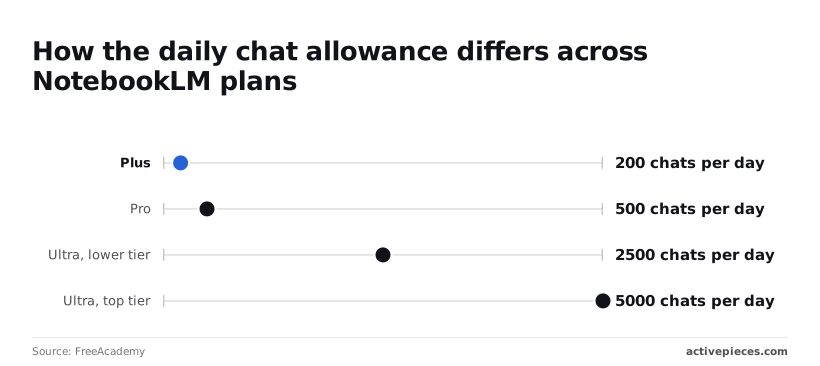
These figures predate the 2 September 2026 move to compute-based limits, so recheck them on Google's own pages before you budget around them.
For one person doing casual research, 50 chats a day's enough.
Paying only makes sense if you regularly stop mid-task because the cap ran out.
A small team: where the first paid tier pays back
Four times the Free ceiling: that is what Plus allows, 200 chats per day. Three people sharing one working pattern each use their own allowance, so the cap bites when one person runs a long session of follow-up questions.
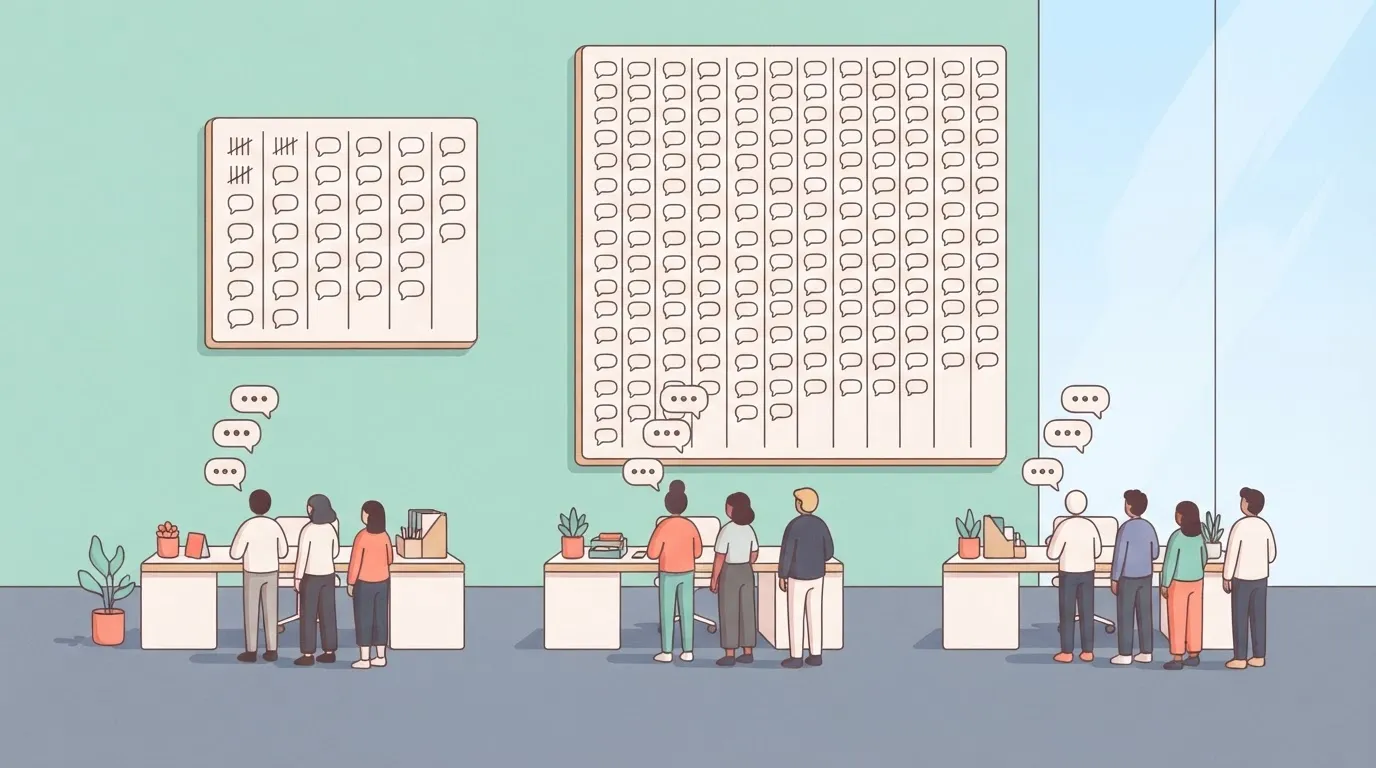
The day the cap stops someone partway through a deliverable, the upgrade has paid for itself, because that person's idle hour costs more than the difference.
At 500 chats per day, Pro covers a researcher who works through documents all day. Ultra's lower tier allows 2,500 and its top tier 5,000. Buy those only if you've actually hit 500, since a ceiling you never approach buys you nothing.
The daily chat count isn't the only meter. Source caps, sharing rules and differences between Workspace and personal accounts can each constrain a team before chats do, and the compute-based change may shift which limit you reach first.
Check each against the current help documentation before paying for a whole team.
viz type=step title="What NotebookLM costs per person each month, by plan" unit="$ per month" source="AI Alley Way - https://aialleyway.com/notebooklm-pricing/"9.99, so the second step costs far more than the first." Free: 0 Plus: 4.99 Pro: 19.99
Compare NotebookLM pricing and limits to competitors
NotebookLM's paid tier is the best buy only when your work is grounded in your own files and you want audio or video summaries from them.
None of these prices is confirmed here, so the table below shows the unit each vendor charges and caps, not a dollar figure. Read it as a guide to which limit you'll reach first.
| Product | Monthly price | Grounding files | Usage cap and reset | Citations | Audio/video output | Team features |
|---|---|---|---|---|---|---|
| NotebookLM Plus/Pro | Per user, per month | Sources inside a notebook | Daily caps on chats and generations | Inline, to passages in your sources | Audio and video overviews | Shared notebooks |
| ChatGPT Business | Per seat, per month | Files in projects and chats | Rolling message caps by model | Mainly on web search and research | Voice conversation, no overview format | Admin console, shared workspace |
| Claude | Per seat on team plans | Files in projects | Session-based message limits | Cites document passages | None native | Shared projects |
| Perplexity | Per user, per month | Files in spaces | Caps on advanced searches | Web sources on nearly every answer | None native | Shared spaces |
Compare the one you'll exhaust, not the headline price.
NotebookLM source grounding and citations vs alternatives
NotebookLM answers from the sources you load and points back to the passage it used. That makes checking a claim a matter of clicking.
Claude and ChatGPT can work from uploaded files too, but a project there is a general assistant with files attached, so it may also draw on what it already knows. Perplexity cites the open web best, which suits questions where the sources aren't yours.
When a NotebookLM alternative is the better buy
Buy ChatGPT Business if your team needs an admin console, mixed work such as drafting and analysis, and one login for everything. Buy Claude if long documents and careful writing matter more than audio output.
Buy Perplexity if most questions need fresh web answers with visible links.
Stay with NotebookLM if the work's a fixed pile of documents and the output's a briefing someone will listen to. Then confirm the cap on the vendor's page before the whole team subscribes.
Worth checking against a plan that does not meter every step: one credit covers a whole run on Activepieces.
Feed NotebookLM weekly sources automatically with Activepieces
If the week's transcripts and PDFs arrive by email, Drive or a form, Activepieces can collect them into one folder on its free plan, which allows unlimited flows, so that your upload to NotebookLM is a single step. It doesn't raise any NotebookLM limit.
That distinction matters for the cap you're trying to confirm. A tidier intake changes how much hand-work goes into each upload, not how many sources, queries or notebooks the plan allows.
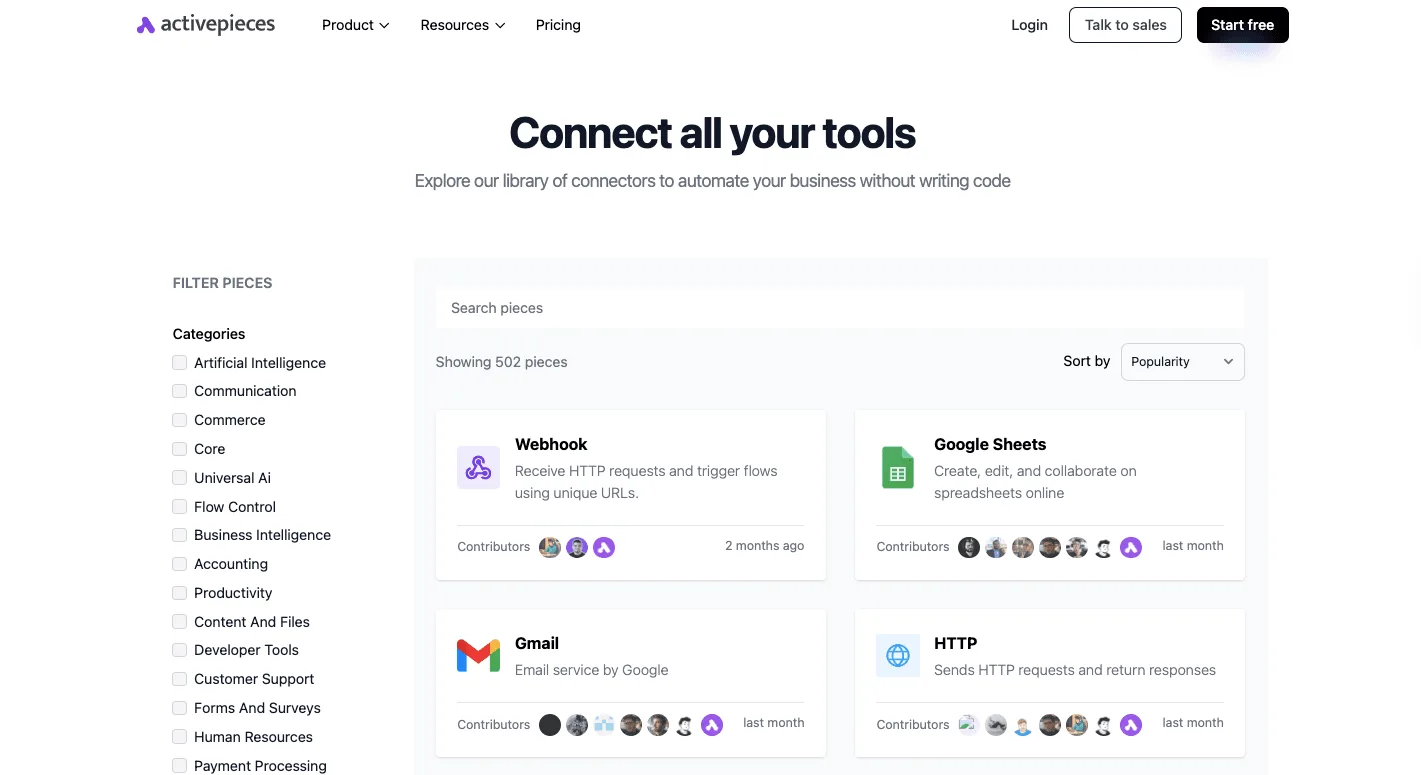
Activepieces is an MIT-licensed core automation platform with 774 integrations, and you build a flow there from a trigger followed by actions. Its connectors library groups those integrations by category, and the ones this job needs sit near the top of the popularity sort:
- Webhook for receiving a form submission
- Gmail for pulling attachments from a mailbox
- Google Sheets for logging what arrived
- a generic HTTP integration for anything without its own connector

When an integration isn't in the library, you'll be wiring it by hand through HTTP, which makes the library page a useful first check. Once the integrations are chosen, the flow's short enough to describe in a line.
What the NotebookLM source workflow does
The flow does three things. It watches a source, such as a shared inbox, a Drive folder or a form.
It copies each new transcript or PDF into one named folder. Optionally, it writes a row to a sheet so someone can see what came in this week.
It doesn't touch NotebookLM itself. Whether a source can be pushed into a notebook automatically depends on what NotebookLM's documentation supports today, and you should read that before building anything that assumes it.
If a Drive folder is a supported source type for your plan, the folder the flow fills can be added directly. If not, a person still does the final upload, and the flow has saved only the gathering.
Hold the cost question the same way.
A run of a flow costs 1 credit however many steps it has, and the free plan includes 1,000 credits a month, so count the runs a busy inbox would trigger against that before pointing it at the flow.
A team that already uploads by hand from one tidy folder can skip this section; the flow earns its place only when collecting files is the slow part.
When to upgrade NotebookLM from Free
Buy the first paid seat when a daily cap stops your team twice in a fortnight, and not before. A single hit's an annoyance, two's a pattern you can price. Five steps get you there on Monday:
**Buy the first paid seat when a daily cap stops your team twice in a fortnight, and not before.
- Start a shared log and record every cap hit with its date, who hit it, and what task stalled.
- Set the trigger in writing: the same cap hit twice in a fortnight means you upgrade.
- Name one person as the paid seat holder, so the purchase has an owner.
- Apply the notebook source-cap convention below.
- Book a quarterly pricing re-check in the calendar.
Tracking NotebookLM daily limits before upgrading
Count how often you run out of the daily allowance, whether the plan counts it as chats, queries or generations, and treat that count as the only input.
A log entry with a date lets you separate one bad Tuesday from a limit you reach every week.
Name the seat holder now, because the person who hits the wall is rarely the person who can expense the fix. Then the upgrade takes minutes instead of a thread.
Notebook habits that stay under the caps
Keep one notebook per project, not one per person or one catch-all. Load only the sources the current question needs, and retire a source once its question is answered.
Merge overlapping files before upload, since two near-duplicate documents spend two slots to carry one set of facts.
When a notebook feels crowded, split it instead of stacking more sources in. This convention often postpones the upgrade, which is the point: you should buy the plan because of real demand, not because the sources got messy.
When to recheck NotebookLM pricing and limits
Next quarter the limit you hit today may not be the one on the page, because plan names and limits change. Put a quarterly entry in the calendar, open the vendor's own pricing page, and compare it with your log.
If the cap you keep reaching has moved, your trigger may have moved with it.
Frequently asked questions
Read every answer below the same way: each is short, and each points to the page that settles it, because plan terms change faster than articles do.
Is NotebookLM free to use in 2026?
Yes. The free plan's a real working tier, not a trial, and it covers one person's casual research. The limits you'll notice are daily caps on chats and generated outputs, and those are the point where a small team starts to feel pinched.
If you haven't hit a cap mid-task, you have no reason to pay yet.
Does a paid plan keep my notebooks out of Google training? Paying isn't what decides this. Google's stated position is that your uploaded sources and queries aren't used to train its models, and that position isn't tied to a paid tier.
Read the NotebookLM privacy help page for your account type before uploading client material. Personal and Workspace accounts are covered by different terms.
Can I cancel or switch NotebookLM plans mid-month?
Generally yes. Google's subscriptions can be cancelled from your account's subscription settings, and access normally runs to the end of the period you already paid for.
Moving between tiers is handled in the same place. Whether you get a prorated credit or wait for the next cycle is a billing-page detail, so check it there before you switch on the day a cap hits.
Is NotebookLM included with a Google Workspace subscription?
For many Workspace editions, yes, but an administrator has to turn it on, and your limits follow the edition and any AI add-on your organization has bought.
If you sign in with a work account and see no access, ask whoever manages your Workspace admin console before you buy a personal plan. Two subscriptions for one person is a common and avoidable cost.
Do students get a discount on NotebookLM?
Sometimes. Google's run student offers on its AI plans, but they vary by country and by period, and I wouldn't plan around one.
Check the student offer on Google's plans page for your region. Verify that your school account qualifies, and note the date any promotional period ends so the full price doesn't catch you off guard.
Related reading
References
Running the numbers
See what the same workload costs here.
Free forever plan, and every paid plan self-hosts at no extra cost.
See pricing Talk to sales