
Netlify Pricing: Plans, Limits and Costs (2026)

Oct 20, 202615 min read
The listed tier price is only the first line of a Netlify bill.
Pricing is a plan fee plus metered usage (bandwidth, build minutes, function invocations, form submissions) plus per-seat charges, and teams that route those form submissions into automations through tools like Activepieces should count that traffic too. This table reflects the plan structure as of 2026-10-20.
Netlify plans, prices and limits
Plan-by-plan table (Free, Personal, Pro, Enterprise)
Read the table below as a map of where overage can appear. It shows which meter each plan charges against, and the allowance on each row is what you'll actually test your traffic against.
| Plan | Monthly and annual price | Seats | Credits or bandwidth | Build minutes | Functions | Forms | Support |
|---|---|---|---|---|---|---|---|
| Free | No fee | Minimal, for solo or trial use | Fixed allowance, no room to grow | Small allowance | Small allowance | Small allowance | Community |
| Personal | Flat fee, monthly or annual | One person | Larger allowance | Larger allowance | Larger allowance | Larger allowance | Standard |
| Pro | Fee per month, with an annual option | Unlimited seats, no per-seat charge | Team-sized allowance, overage metered | Team-sized allowance, overage metered | Metered beyond the allowance | Metered beyond the allowance | Standard, with team features |
| Enterprise | Negotiated contract | Negotiated | Negotiated | Negotiated | Negotiated | Negotiated | Dedicated |

Your own numbers decide the tier. A site with heavy traffic but few deploys hits the bandwidth meter first, while a monorepo with frequent builds hits build minutes first.
Pro has no per-member billing, so a team that adds reviewers and contractors does not raise the bill; traffic and usage do.
Credit-based versus legacy usage pricing
Netlify has moved toward a credit model, where one pool of credits is spent across several meters, while older accounts may still sit on separate per-meter allowances.
The practical difference is that a credit pool lets one heavy meter drain what you expected to spend elsewhere. Legacy allowances cap each meter separately and make overage easier to attribute.

Before comparing tiers, check which model your account is on.
Price the remaining meters from your last three months of real usage.
If you are running this arithmetic for your own team, see what the same workload costs on Activepieces.
What Netlify costs at three realistic usage levels
Run the same credit formula over three different sites and the bills diverge, because the plan fee shrinks as a share of the total once deploys, bandwidth and seats grow.
The table shows each profile's shape rather than invented volumes, so take the pattern from it and substitute your own numbers, using credits = 15 per production deploy + 20 per GB of bandwidth.
| Profile | GB bandwidth | Production deploys | Credits used (15 per deploy, 20 per GB) | Plan needed | Monthly bill |
|---|---|---|---|---|---|
| Hobby site | Low | A handful | Small; barely registers | Entry tier | Roughly the plan fee alone |
| Five-person daily team | Moderate | Many, roughly one per merge | Deploys dominate | Paid tier with unlimited seats | Plan fee, with possible overage |
| High-traffic site | Very high | Moderate | Bandwidth dominates | Top tier, or a negotiated contract | Metered usage can exceed the plan fee |
The rows differ in which meter drives the cost, and that determines which tier to price first.
A site that ships occasionally and serves few visitors uses very little, at 15 credits per deploy and 20 per GB. The bill's effectively the plan fee, so the only decision is whether the entry tier covers your needs.
A five-person team shipping daily
Here deploys become the main meter, since every production merge costs 15 credits and five people pushing daily multiplies that quickly.
Seats add a second multiplier, because each added teammate raises the fee before any usage is counted. Price the seat count and the deploy cadence together, and check whether the credit allowance on that tier survives a busy sprint.
In a high-traffic production site, bandwidth outweighs deploys at 20 credits per GB. A single traffic spike, such as a launch or a viral link, can push usage well past the included allowance.

At this level, compare the metered total against a negotiated plan before accepting the listed tier.
Hidden Netlify costs and limits teams hit first
The first costs to surface are credit meters, led by bandwidth, then build and deploy limits, plus seat charges you should verify against current docs rather than assume.
Seats and who counts as a member
Under the old $20-per-seat Pro model, 5, 10 and 20 developers cost $100, $200 and $400 a month. The chart sets that against today's flat $20 Pro plan, so the gap's a seat charge you may no longer owe.

Check the current docs before budgeting. According to Netlify, if the flat plan applies to you, a 20-person team that copies old per-seat advice overestimates by $380 a month, which means they're allocating $380 monthly based on the wrong pricing model.
On the Makerkit Netlify pricing calculator, production deploys for a 250,000-visitor site use 600 credits a month. A team that merges often is paying for every merge.
Deploy previews build on every pull request, so review-heavy teams multiply that figure. Concurrent builds also matter: when several developers push at once, builds can queue, and waiting costs time even when it costs no credits.
Netlify bandwidth costs and credit usage
Bandwidth dominates. The same calculator puts it at 4,292 credits a month, against 1,580 for web requests and 222 for compute.

That makes bandwidth about 64% of the 6,694-credit total, so heavy images and uncached assets are your biggest lever. Function compute is the smallest meter, so optimizing functions first saves little.
Find out before you reach it what happens when credits run out: whether usage is billed as overage, throttled, or paused.
A site that stops serving is a different risk from a surprise invoice, and the answer decides whether you buy headroom or negotiate a larger plan.
Ways to lower your Netlify bill
Most of the savings come from six changes, each aimed at one meter. The first job is to match the fix to whichever line item is growing fastest on your invoice.
If the risk's an outage you can't tolerate, you buy headroom; if it's the invoice itself, these changes shrink the thing being billed before you ask for a bigger plan.
Every unnecessary build is a direct charge, because build minutes are metered by how long each build runs. Skipping builds when only docs or config changed, and limiting deploy previews to branches that need review, cuts that meter without touching the site.
Caching and compression matter more than any plan setting, since bandwidth is metered by bytes served. Long cache lifetimes on hashed assets and Brotli or gzip on text mean returning visitors and large pages move fewer bytes.
Video and large images are usually the heaviest payload, and moving them to separate storage or a dedicated CDN takes that traffic off the Netlify bandwidth meter entirely. The cost is a second vendor bill you should price first.
Seats, alerts and billing terms
Seats are no longer a meter on Pro; usage credits are what drive the bill, so review usage rather than headcount.
Usage notifications don't reduce any meter, but they tell you which one is climbing while you can still fix it. An Enterprise negotiation once your usage is steady may lower the rate you pay per unit rather than the units themselves.
The table below pairs each fix with the meter it reduces and the work involved, so you can start with the cheapest effort against your largest line item.
| Fix | Meter reduced | Effort |
|---|---|---|
| Fewer builds and previews | Build minutes | Low: ignore rules and branch settings |
| Caching and compression | Bandwidth | Low to moderate: headers and config |
| Media on separate CDN | Bandwidth | Moderate to high: migration and a second bill |
| Seat audit | Per-member seats | Low: a periodic review |
| Usage alerts | None directly; surfaces overspend early | Low: set once |
| Annual billing | Rate per unit, not usage | Low: a commitment decision |
Work down the table from low effort to high, and re-read the invoice after each change to confirm the meter moved.
Worth checking against a plan that does not meter every step: one credit covers a whole run on Activepieces.
Netlify against Vercel, Cloudflare Pages and Render
Netlify wins on value when your team is small and your traffic modest, and a competitor wins when a single meter, usually bandwidth or seats, dominates your invoice. The same line-by-line pricing you just did for Netlify applies to each rival.
Comparison table on price and limits
The table below sets the four hosts side by side on the units each one meters: seats, gigabytes of bandwidth, build minutes and function invocations.
Read it for which meter each vendor charges on, since that decides which one punishes your traffic shape. I left out dollar figures because they change, so price each cell against your own numbers.
| Entry price | Free limits | Seat price | Bandwidth and overage | Build limits | Function limits | Check date | |
|---|---|---|---|---|---|---|---|
| Netlify | Paid plan fee plus usage | Free tier with capped usage | Per member on paid plans | Allowance, then per-GB overage | Metered build minutes | Metered invocations and runtime | Confirm on purchase day |
| Vercel | Paid plan fee plus usage | Free tier for personal projects | Per member on paid plans | Allowance, then per-GB overage | Metered build minutes | Metered invocations and duration | Confirm on purchase day |
| Cloudflare Pages | Account-level plan | Free tier for static hosting | Not priced per developer | Static assets not metered per GB | Capped builds per month | Metered through Workers requests | Confirm on purchase day |
| Render | Per service or instance | Free static sites | Per workspace member on paid plans | Allowance, then per-GB overage | Metered pipeline minutes | Runs as a service, not per invocation | Confirm on purchase day |
Multiply each column by your own monthly traffic, builds and headcount, and the ranking usually reorders itself.
Netlify pays off when forms, identity, deploy previews and functions come from one vendor, because each separate service you avoid is a bill you don't carry. It also suits a team of a few people with steady traffic, where seats and overage both stay small.
If your site is bandwidth-heavy and static, Cloudflare Pages costs less, since serving assets isn't metered per gigabyte.
Render costs less when you need a long-running backend, because a flat instance fee beats paying per invocation. Vercel makes sense mainly when your framework is Next.js and you accept its seat and usage charges in exchange.
Netlify deploy and usage alerts with Activepieces
Activepieces won't lower your Netlify bill, but it can show you what's driving it, so you can cut costs strategically.
Its core is MIT-licensed, and its 742 integrations are counted straight from the public GitHub monorepo, which has 25,126 stars, with roughly 60% contributed by the community, which means the numbers are openly auditable.
If the connector you need for a Netlify event isn't there, you don't wait on a vendor's roadmap: Activepieces can build the missing integration with AI, and it stays private to your own instance.
Netlify's webhooks and API can feed failed-deploy and usage alerts into Slack or email and log usage to a sheet.
Activepieces allows unlimited flows on every plan, and each flow is a trigger followed by actions. Credits meter AI usage, and Bring-Your-Own-Key moves model spend to your own provider bill.
That's the same shape as the one in the screenshot below, where a Stripe "Payment Failed" trigger feeds a Slack "Send Message To A Channel" action and the run detail shows the step completed.
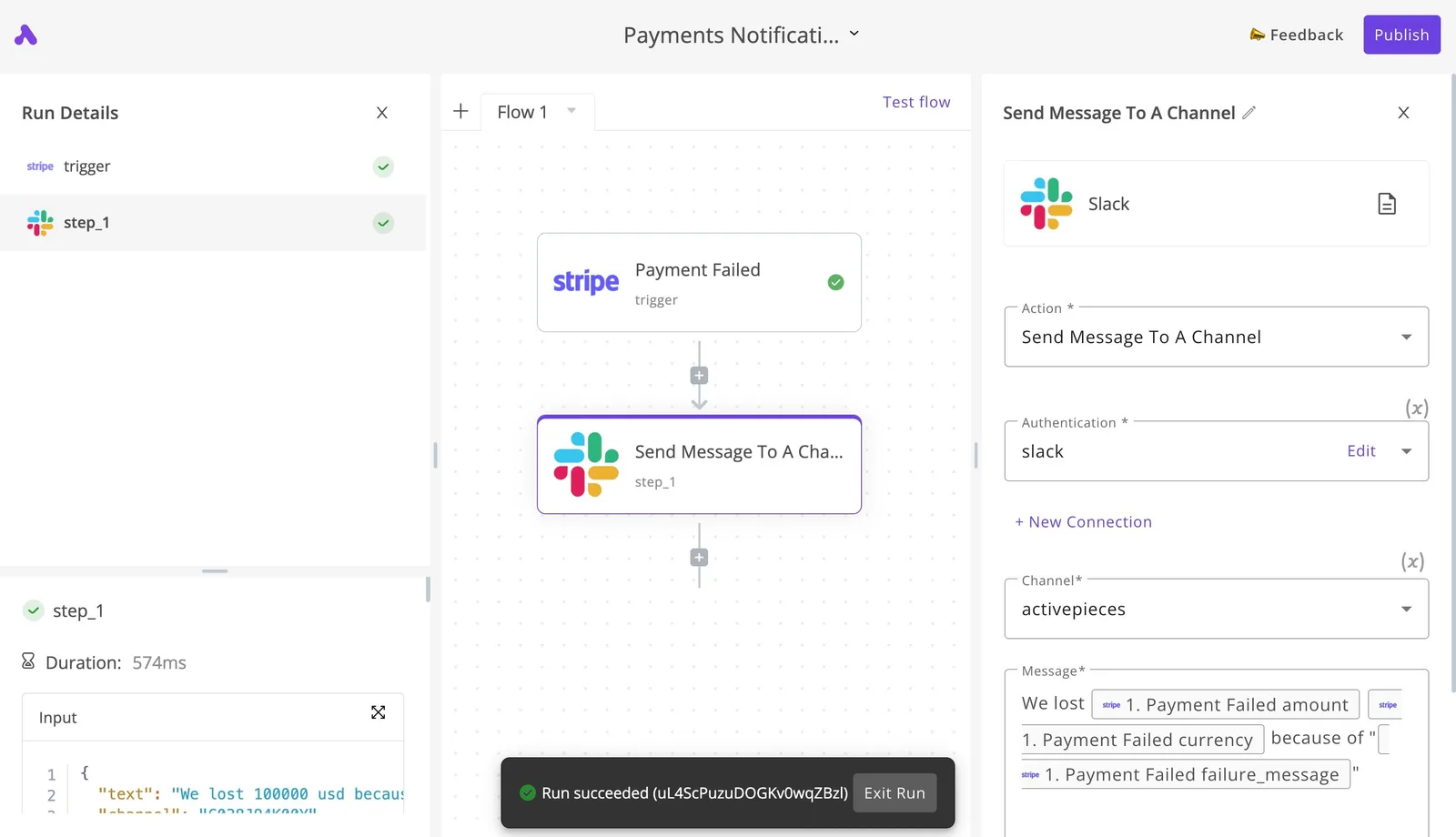
The screenshot shows a two-step flow completing, which is the whole pattern. Swap Stripe for a Netlify event and you'll have a failed-build alert in a channel your team already reads.
What follows is what the flow does for each kind of reader. It monitors spend. It doesn't change the price or choose a plan for you.
For a personal or hobby site, one flow is enough: a failed-deploy message to your email or a Slack channel. You aren't trying to control a bill here, only to avoid finding out days later that a build broke.
Because you can see every run, you also learn how often you deploy, and that's the number to compare against any plan's build allowance.
Builds and seats are where the bill grows for this team, so log them. Send each deploy event to a sheet, with a row per build, and review it monthly.
Your own build count then replaces a guess, and you can check it against the tier you're considering before a seat or an extra build minute surprises you.
A failed-deploy alert to the team channel also stops people re-running broken builds, which wastes metered build time.
Netlify usage alerts for high-traffic production sites
Usage is the line item that moves here. Poll Netlify's API on a schedule and write bandwidth and request figures to the sheet, then alert when a reading crosses a threshold you set.
You get a warning mid-cycle instead of an invoice afterward. The limit is that you choose the threshold, so set it from your own traffic history, not from a plan's headline allowance.
A Monday-morning checklist for choosing a Netlify plan
Start with your own usage history. Pull last month's numbers and work through the steps below in order, before you look at any price.
The list moves from what you consumed, to what you'd pay for it, to how you keep that estimate honest. Each step produces a number or a decision you need for the next one.
- Open the usage page and read last month's credits consumed, bandwidth served and build minutes used. These are the three meters that move the bill, and each is billed in its own unit, so write them down separately rather than as one "usage" figure.
- Count seats. Include everyone who deploys or edits, such as contractors and part-time reviewers, because per-seat charges grow with headcount and not with traffic.
- Compare those totals to the plan table, one meter at a time. For each plan, note which meters fit inside the included allowance and which spill into overage, then add the seat charges to get a monthly total.
- Pick the lowest plan that clears your peak month, not your average one. If a launch or a campaign pushed usage up, that month tells you what the plan must absorb without surprise charges.
- Set usage alerts below the point where overage begins. An alert that fires at the limit is a notice that you've already crossed it.
- Recheck on a schedule. Pricing pages change, and your traffic, build frequency and team size change faster, so a plan that fit in spring may not fit by autumn.
Frequently asked questions
Free plan and per-user charges
Is Netlify really free?
Yes, there's a free plan with no monthly fee, but it comes with a fixed allowance of usage credits rather than unlimited use.
Every deploy, build minute and unit of bandwidth draws that allowance down, so a site with real traffic or frequent builds can exhaust it, and you then pay or stop.
Does Netlify charge per user?
On paid plans, yes. Team members are not billable seats on Pro, so a five-person team pays only the plan price.
A contractor you add for one sprint costs nothing extra on Pro, though you may still want to remove people when the work ends.
Commercial use, discounts and downgrading
Can I use Netlify's free plan for a commercial site?
The free plan isn't restricted to hobby projects as far as the pricing page shows, so a business site can run on it. The practical limit is the usage allowance, not the type of site.
Read the current terms of service before you commit a revenue-bearing site to it.
Does Netlify offer discounts for annual billing or nonprofits?
I couldn't confirm a standard annual-billing discount or a nonprofit rate from Netlify's public pricing pages. If either matters to your budget, ask their sales team and get the answer in writing.
Until then, model your costs at the monthly list rates so a discount, if you get one, is a bonus and not an assumption.
What happens if I downgrade my Netlify plan?
You lose whatever the higher tier included: features gated to that plan, larger usage allowances, and seats beyond what the lower tier supports.
Before downgrading, list the features your team uses and the seats you hold, and compare them with the lower tier. Anything missing becomes a migration task or a workaround you need to plan for.
Related reading
References
Running the numbers
See what the same workload costs here.
Free forever plan, and every paid plan self-hosts at no extra cost.
See pricing Talk to sales