
Comparing Make.com Pricing 2026 Plans and Real Costs

Oct 12, 202613 min read
Make.com utilizes a tiered subscription model where the primary constraint is a monthly credit allowance. This means every automated step or data transfer consumes a portion of a prepaid quota.
This granular accounting forces a trade-off between workflow complexity and monthly overhead, as even a simple logic check counts against the total.
Make.com pricing structures and plan tiers
The Free plan entry point
The Free plan provides 1,000 credits per month at a cost of $0, which means you can automate basic tasks without any financial commitment. This allows you to experiment with basic triggers without an immediate financial commitment Make.
While this is a low-friction starting point, the limit includes every operation. A single run of a ten-step workflow can only execute 100 times before the account halts until the next billing cycle.
Core, Pro, and Teams tiers compared
As your automation needs grow, you'll move into paid tiers. These tiers unlock higher execution speeds and advanced features: priority scenario processing is one example.
Recent pricing adjustments have lowered the entry barrier for high-volume users.
| Plan Tier | Monthly Cost (10k Credits) | Primary Benefit |
|---|---|---|
| Core | $12 | Unlimited active scenarios for basic builders. |
| Pro | $21 | Custom variables and full-text search in execution history. |
| Teams | $38 | Shared folders and team-based permission sets. |
Prices and plan limits checked against make.com on October 12, 2026.
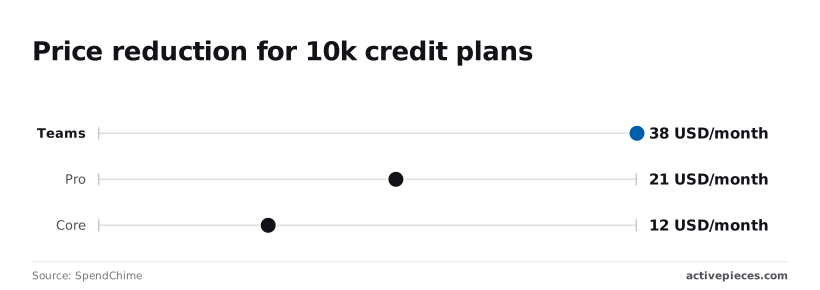
The Core plan at $9 per month (down from $12) is the baseline for you if you need more than two active workflows SpendChime, so you save $36 annually compared to the previous pricing.
Upgrading to the Pro tier at $21 per month enables the use of custom variables, allowing you to build more complex logic, which means your automation budget stretches further than it did under the previous pricing.
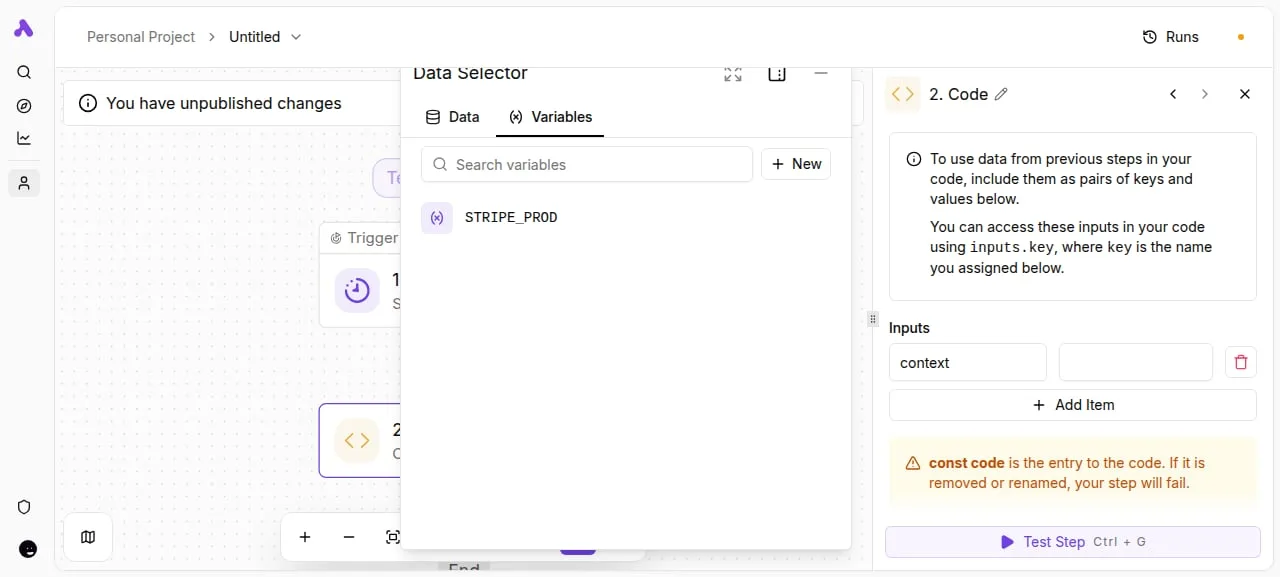
You can store environment-specific data like API keys without hardcoding them into every module.
The Teams tier starts at $38 per month, providing the controls needed for scaling your operations, so you can expand your team's capacity without increasing your overhead.
It provides the administrative controls necessary for multiple staff members to collaborate on the same canvas. The visual builder allows for complex logic, but as steps increase, so does the credit consumption.
The screenshot below displays the Data Selector modal where you can map these variables. The "STRIPE_PROD" variable shown ensures that an Activepieces or Make workflow can switch between environments without manual edits. This variable management is essential for maintaining clean code steps within the flow.
Make.com enterprise pricing and scaling costs
For high-volume operations, Make’s mid-market pricing remains significantly lower than many competitors. It lacks the flat-rate predictability of self-hosted alternatives.
The Teams plan starts at $38 per month, which means you can scale your automation infrastructure without a heavy initial financial commitment.
This is a fraction of the $103.50 required for a Zapier Team plan or the $800 entry point for n8n Business [SaaS True Cost], indicating significant potential savings for your budget, as you are avoiding the premium costs associated with those competitors, which means you can reallocate capital to other growth-driving initiatives.

High-frequency polling or heavy data processing triggers custom pricing based on total operation volume.
If you are running this arithmetic for your own team, see what the same workload costs on Activepieces.
Direct comparison of Make.com plan features and limits
Make.com structures its pricing to provide 1,000 operations at the entry level. It positions itself as a high-capacity starting point for developers.
While Zapier Free offers 100 tasks/month, Make’s Free tier provides 1,000 operations, giving you ten times the automation capacity at no additional cost, so you can build more complex workflows immediately. You can build ten times as many basic automations before hitting a paywall.
The Free plan is a sandbox. Its limitations appear quickly when you're using advanced AI models like GPT-6 Luna for high-volume classification.
Make counts every filter check and data routing step as an operation. A single run involving a Gemini 3.5 Flash-Lite call and a subsequent Slack notification can consume three or more operations.

Moving to paid tiers reveals the widest gap in market value for entry-level users.
The Make Core plan provides 10,000 tasks/month [SaaS Offers], ensuring you have enough volume to handle high-frequency workflows without hitting immediate limits, allowing for consistent performance as your business grows, so your automation infrastructure remains stable during periods of high demand.
This is over thirteen times the 750 tasks/month included in the Zapier Professional plan [SaaS Offers], effectively removing the risk of unexpected service interruptions due to volume caps, meaning your automated processes can scale significantly without requiring a costly mid-month plan upgrade.
This discrepancy allows small businesses to run frequent polling triggers without exhausting their budget in the first week.
The following table illustrates how these limits and support levels scale as your automation complexity grows:
| Plan Name | Monthly Cost (Annual) | Operations Included | Rate Limit (Ops/Min) | Support Level |
|---|---|---|---|---|
| Free | $0 | 1,000 | 120 | Community |
| Core | $9 | 10,000 | 60 | Standard |
| Pro | $16 | 10,000+ | 120 | Priority |
| Teams | $29 | 10,000+ | 240 | Priority + Technical |
As operations scale, the rate limit becomes the primary constraint for you if you're running synchronous webhooks.
At the Enterprise level, the granularity of operation-based pricing becomes a "scaling tax" for data-heavy organizations.
Processing a large CSV file with 5,000 rows using Claude Haiku 5.5 for sentiment analysis would consume 5,000 operations in a single run, leaving you with only half of a typical monthly allocation for other tasks. This quickly pushes you toward custom contracts.
For these high-volume agentic workflows, the predictability of per-run pricing often outweighs the granular control of the operation model.
Hidden costs of operation-based automation billing
Operation-based billing models transform every logical step of a workflow into a metered expense. This often decouples the value of an automation from its monthly cost.
Operation-based billing models transform every logical step of a workflow into a metered expense.
How operations are actually counted
In a metered environment like Make.com, an "operation" is consumed every time a module performs a task. This happens regardless of whether that task successfully moves data.
This includes every search that returns no results, every filter that stops a bundle, and every error handler that triggers to keep a scenario running.
A single execution of a complex workflow can consume dozens of operations. The consequence for you is a "complexity tax" where robust error handling and multi-branch logic directly accelerate the consumption of the prepaid tier.
How loop iterations drain Make.com credits
While internal logic steps are often the focus, the most significant hidden cost arises from iterative processing. If you use a 'Loop' or 'Foreach' step to process a list, every single iteration counts as an additional task or run against your quota.

A flow that imports a 100-row CSV does not cost one credit; it costs at least 100 credits because each row is treated as a distinct operation.
This behavior is standard across most automation platforms and can quickly deplete a monthly allowance during bulk data migrations.
Pricing that rises with granularity punishes the exact discipline good automation depends on, which is why MoneyGram and FundingSocieties run Activepieces in production.
The meter is the run, not the steps inside it; the published pricing page shows 1 credit per flow run regardless of whether the flow contains two steps or twenty, so you are incentivized to build complex, multi-stage workflows without incurring additional usage fees.
This ensures that building reliable, multi-step logic doesn't increase the cost of a single execution.
The price of data transfer limits
Beyond the count of operations, platforms often impose caps on the total volume of data moved within a billing cycle.
When a workflow uses Claude Sonnet 5.5 to process large PDF transcripts, the size of those payloads can trigger data transfer ceilings before the operation count is exhausted. Claude Sonnet 5.5 is a model designed for balanced speed and intelligence.
Reaching these limits typically results in the immediate suspension of all active scenarios.
Calculating the cost of high-frequency polling
Polling-based triggers create a constant drain on operation quotas because they must execute on a schedule to check for new information.
While a Webhook-based trigger only consumes an operation when an event actually occurs, a polling trigger checking an inbox or database every few minutes will consume thousands of operations per month.
- A Webhook: is event-driven and only runs when data is sent, resulting in low cost impact.
- Polling: is schedule-driven and runs at fixed intervals, resulting in high quota depletion regardless of activity.
To maintain low latency without exhausting a budget, you're frequently pushed toward higher-tier plans.

Worth checking against a plan that does not meter every step: one credit covers a whole run on Activepieces.
Comparing Make.com against Zapier and Activepieces alternatives
Activepieces addresses the "scaling tax" by decoupling the execution engine from the per-operation billing model through an open-source core. This architecture allows teams to move high-frequency workflows onto self-hosted infrastructure.
Activepieces ships the same product for cloud and self-hosted deployments, ensuring features like RBAC and audit logs remain available regardless of where the flow runs.
The Git Sync and Releases feature allows teams to promote flows between environments or move them to their own infrastructure without rewriting logic.
The following benchmarks illustrate how these platforms diverge when moving from simple triggers to high-volume production environments.
| Metric | Make.com | Zapier | Activepieces |
|---|---|---|---|
| Cost for 100k tasks/ops | Lowest entry point | Highest premium | Competitive mid-tier |
| Self-hosting availability | No | No | Yes |
| App Directory size | 3,500+ | 7,000+ | 739+ (Open Ecosystem) |
Activepieces sacrifices the sheer volume of niche integrations for a modular framework. You can build your own integrations using TypeScript.
As workflows grow to include advanced reasoning steps via Gemini 3.8 Flash, the cost of every individual operation becomes the primary driver of your automation strategy.
For organizations prioritizing cost efficiency in complex, multi-step workflows, Activepieces is the better choice for scaling without the penalty of per-task billing.
By charging only for the flow run regardless of the number of internal steps, it eliminates the financial friction found in Zapier and Make's operational models. This makes it the superior fit for high-volume production environments where predictability and infrastructure control are paramount.
Select the right Make.com plan size
To avoid immediate overage penalties, you must select a plan based on your current peak monthly operations plus a 20% growth buffer.
The Free plan is a functional sandbox for prototyping single-step automations or testing basic API connections.
Because it limits the total number of operations and the frequency of execution checks, it's unsuitable for production environments where data must move in real-time.
Moving beyond the entry level requires balancing the need for execution priority against the complexity of your organizational structure.
Core is best for solo operators who need unlimited active scenarios but don't require complex branching logic.
Pro is designed for small teams that need "Custom Variables" to store state across different executions, which reduces the need for external database lookups.
Teams is necessary for departments requiring "High Priority" execution queues so that mission-critical syncs aren't delayed by lower-priority background tasks.
To determine if your current tier supports your roadmap, perform a 20% Growth Buffer Audit:
- Peak monthly operations in the last 90 days, which means you must account for your highest historical usage to ensure your current plan capacity is not exceeded.
- Projected new scenario deployments.
- Average operations per execution.
- Safety margin (Peak x 1.2).
Enterprise plans remove the standard limits on execution duration and offer log retention policies required for SOC2 compliance. For high-volume users, this tier is a requirement for security. It provides dedicated technical support and regional data residency.
Frequently asked questions about Make.com billing
Can I roll over unused operations to the next month?
Unused operations on Make.com expire at the end of every billing cycle. Any capacity you paid for but didn't consume is lost rather than credited to your next month. This reset forces you to estimate your peak monthly usage rather than your average.
What happens if I hit my operation limit mid-month?
When you reach your account’s operation ceiling, all active scenarios immediately stop running. This halts the data flow between your connected services until you manually intervene.
You must either wait for the next billing cycle to begin or purchase an on-demand "booster" pack to resume services.
Is there a discount for annual Make.com billing?
Make.com offers a lower effective monthly rate for you if you commit to a full year of service upfront. This reduces the total cost of ownership for established workflows. By paying annually, you lock in your operation volume at a fixed price.
Does Make.com charge extra for AI tokens?
Make.com doesn't sell AI tokens directly; instead, it consumes operations for every request sent to a model provider like OpenAI or Anthropic.
When you use a module for GPT-6 Luna or Claude Sonnet 5.5, you're billed twice. You pay Make.com for the execution of the step and the AI vendor for the tokens processed.
Optimize your Make.com spend
You can stabilize your automation budget by identifying high-frequency scenarios that consume operations on repetitive logic rather than meaningful data movement. Make.com bills for every step executed.
To prevent these overages from pausing your critical business infrastructure, you must establish automated guardrails within the platform's administrative console. The following sequence allows you to monitor consumption in real-time so you can intervene before hitting hard limits:
- Navigate to Organization Settings.
- Select the 'Usage' tab.
- Click 'Add notification'.
- Set threshold to 80%, which means one in five occurrences will be ignored.
- Enter admin email for delivery.
Managing runaway scenarios
This alert is your primary defense against "runaway" scenarios. It prevents a sudden spike in webhook data from resulting in a surprise invoice.
Once the alert is active, audit your most expensive workflows for redundant operations. If you're using a frontier-class model like Claude Sonnet 5.5 to classify incoming support tickets, ensure you aren't running the "Search Rows" module in Google Sheets inside a loop.
Moving the search outside the loop or using a "Get Cell" module instead can significantly reduce the total operation count per execution. By consolidating these steps, you reduce the 'scaling tax' that accumulates as your data volume grows.
Related reading
References
Running the numbers
See what the same workload costs here.
Free forever plan, and every paid plan self-hosts at no extra cost.
See pricing Talk to sales