Notion Pricing 2026: Plans, AI and What Each Costs

Oct 31, 202614 min read
Notion sells four plans: Free, Plus, Business and Enterprise, and teams that wire it up to other tools with Activepieces tend to notice the same tiers apply no matter how they connect it.
Notion pricing is the tiered subscription structure that sets what a workspace pays, combining a per-seat price with plan-specific limits on guests, permissions, page history, AI and automation, so the real cost is the cheapest plan that avoids those limits for your team size.
Pay monthly and you pay more per seat on every paid tier except Enterprise, which is quoted. The figures below come from notion.com/pricing, and the gap between the two billing options is the first place a budget drifts.
At $0, Free means no spend but also the tightest limits on guests, history and automation. Plus is $10 per seat per month billed annually and $12 billed monthly, so a flexible billing choice adds about a fifth to the bill.
Step up to Business and the rate is $20 per seat per month billed annually, double Plus, so a team that needs it pays twice the base rate for every member, not just the ones who need the features.

Notion pricing today
Enterprise is quote only, so you can't model this tier until you've sat through a sales call.
Checked 2026-10-31 against the public pricing page.
How Notion charges: per member, per workspace
Add someone as a full member and they take a paid seat. Notion pricing is a per-member subscription attached to a single workspace, and the plan applies to the whole workspace rather than to individual users.
So one team needing a higher tier lifts the price for everyone in that workspace.
Every plan name and price here was read from notion.com/pricing on 2026-10-31.
If you are running this arithmetic for your own team, see what the same workload costs on Activepieces.
Every Notion plan compared in one table
The table
The table lists each plan against its annual and monthly seat price, file upload limit, page history length and guest allowance. It also covers block or storage limits, permissions and admin features, AI inclusion, and automation features.
Read it by row, not by column. The cheapest plan that clears every limit your team will actually hit is your plan, and the seat price only tells you what that clearing costs.
Two cells deserve suspicion. The gap between annual and monthly pricing is a commitment premium: you pay it if you can't predict headcount twelve months out.
And if the Enterprise price cell says to contact sales, treat it as unpriced. A tier you can't cost without a call can't go into a spreadsheet, so budget it as a question rather than a number.

Recent changes to Notion pricing and bundled features
If anything has moved, it is the newest rows, AI inclusion and automation features.
Far more often than they touch the base seat price, vendors adjust what's bundled, what's metered and what becomes an add-on. Guest allowances and history length move less often, but a change there costs more, because it can push a team up a tier.
So when you compare this table with Notion's live pricing page, check the AI and automation rows first, then guests.
Notion pricing at 5, 25 and 100 seats
At 5, 25 and 100 seats, Plus costs $480 to $12,000 a year and Business $900 to $24,000, depending on headcount and billing, which means you cannot estimate your cost without knowing your target team size.
Notion's pricing puts Plus at $10 per seat per month and Business at $20.
viz type=range title="Notion per-seat prices on Plus and Business, before and after" unit="$ per seat per month" source="Notion - https://www.notion.com/releases/2024-06-26"0 per seat and Business from Read the saving column first, because it's the cost of paying monthly out of habit.
| Seats | Plus monthly billing | Plus annual billing | Business monthly billing | Business annual billing | Annual saving (Plus / Business) | Enterprise |
|---|---|---|---|---|---|---|
| 5 | $600 | $480 | $1,200 | $900 | $120 / $300 | Quote only |
| 25 | $3,000 | $2,400 | $6,000 | $4,500 | $600 / $1,500 | Quote only |
| 100 | $12,000 | $9,600 | $24,000 | $18,000 | $2,400 / $6,000 | Quote only |
What each team size pays
, which means you know exactly what you'll pay however you prefer to think about it.
, so buy it only if your team will actually hit one.
At 25 seats, Plus costs $2,400 a year and Business $4,500, making the tier choice a real business decision rather than a rounding error. The $2,100 difference is roughly one extra salary-month in many small firms, so the tier choice becomes a hiring budget decision.

Settle guest and permission needs before you commit.
At 100 seats, Business on annual billing is $18,000, against $24,000 monthly, so the month-to-month option carries a significant cost penalty. Enterprise publishes no list price.
Ask for a quote only when Business demonstrably falls short, and get the figure in writing so you can compare it with $18,000.
20% off Plus and 25% off Business is what annual billing buys. The catch is commitment: if headcount may shrink, unused seats are paid for anyway, so the saving is smaller than it looks.

Hidden costs and limits driving upgrades
Past the seat count, guest access, history depth, AI, security controls and what a downgrade removes all add to the bill.
When someone needs to edit across the workspace, they are a paid member; someone invited to a few pages can usually be a guest.
Misclassify a client or contractor and you either overpay for a seat or hit the plan's guest ceiling. Count both groups separately before you price anything.
Share large design files or recordings on Free and you will feel the cap on individual file uploads before you feel the seat price.
On history the ladder is clearest: Notion's release notes give Free 7 days, Plus 30 days and Business 90 days, with Enterprise unlimited, so you cannot restore anything deleted beyond these windows.

A deleted page nobody notices for three weeks is gone on Free but recoverable on Plus.
If mistakes surface within a week, seven days is enough. Anyone with monthly reporting cycles needs at least Plus, and quarterly ones need Business.
Whether AI is a per-member add-on or bundled at higher tiers depends on the plan, and an add-on multiplies across every member who uses it, so check which applies at your tier.
Security controls and downgrades
If a security review demands SAML single sign-on, the jump to Enterprise is forced regardless of headcount, because that is where it sits. Finer permission controls are similarly tiered. Ask the question early, because a compliance requirement overrides any per-seat saving.
Drop a tier and your history window shrinks, and features your pages depend on can lock. Export what you need first, since the lower plan's limits apply to what you keep.
Worth checking against a plan that does not meter every step: one credit covers a whole run on Activepieces.
Notion against Coda, ClickUp, Confluence and Obsidian
No alternative beats Notion Business on every axis, but each one avoids a limit that Notion's tiers make you pay around.
I've left exact prices out because I can't confirm them here, so check each vendor's pricing page and be wary of any tier that only resolves on a sales call.
Read the price column as a billing model, not a number, and read the other columns as the limit you would hit first.
| Tool | Price per seat | Free plan limits | Docs vs database | AI included | Automation |
|---|---|---|---|---|---|
| Notion Business | Per seat, published | Capped history and guest access | Balanced | Yes | Built-in database automations |
| Coda/Superhuman Docs Team | Per maker seat | Caps on doc size and automation | Database-leaning | Metered by plan | Automations plus integrations |
| ClickUp Business | Per seat, published | Caps on storage and feature uses | Tasks strong, docs thinner | Paid add-on | Monthly run caps by plan |
| Confluence | Per user, tiered by team size | Free tier capped by user count | Docs strong, databases weak | On higher tiers | Rules expand with tier |
| Obsidian | Core app free; sync and publishing paid | No seat cap | Notes strong, no shared database | None built in | Plugins only |
Go by the row whose weakest column you never touch; that is the cheapest one.
If your team lives in linked tables and would otherwise buy Notion's higher tier for database depth, Coda suits you.
ClickUp suits teams whose real work is tasks, with documents as an afterthought. Its AI sits outside the base seat price, so the sticker understates the total.
When documents outnumber databases and the team already runs Atlassian's other tools, Confluence earns its place. Obsidian costs almost nothing, but it has no shared database and no native automation. That's a fit for one person, not a team workspace.
When your guest count is high, your work is mostly tasks, or your docs need no database at all, Notion loses. In those cases, price the alternative's cheapest tier against the limit you would actually hit.
Notion automation limits and where Activepieces fits
If a team only needs cross-app workflows, it has no reason to move up a Notion tier for them: the Activepieces pricing page lists unlimited flows on every plan from Free through Ultimate, so the number of flows is never what you pay for; the meter is credits, and a run is 1 credit however many steps it has, whereas Zapier's pricing page bills a task per action and Make's a credit per module.

What Notion's built-in automations cover
Inside the database they live in, Notion's native automations act: a page is added, a property changes, and Notion edits another property, creates a page, or sends a notification.
If your process stays inside Notion, use them. Paying for a second tool to do what a built-in trigger already does is waste, and you add a failure point for nothing.
When the work touches a system Notion doesn't own, the limits show up.
Paying for a second tool to do what a built-in trigger already does is waste, and you add a failure point for nothing.
When a support ticket arrives in a CRM, someone needs a categorized summary in a chat channel. When a status flips to "Blocked", the team should hear about it somewhere other than a database view.
Those cases are where teams start reading the pricing page for a higher plan, and where the upgrade may be solving the wrong problem.
Connecting Notion to other apps
Through its Notion connector, Activepieces, an AI automation platform, can take a Notion event as a trigger or an action alongside other apps.
Two patterns cover most of what teams ask for: a form submission becomes a new database row, and a status change becomes a Slack message to the right channel.
The connector is one of the 746 integrations in the open source monorepo, about 60% of them community-contributed, under an MIT-licensed core, so its source sits in the packages/pieces/community directory on GitHub.
Here is the shape of the flow. It starts with a HubSpot trigger for a new ticket, passes the content through two AI steps that rewrite and categorize it, so every ticket arrives at your team already rewritten and categorized.
Then a Router sends it down one of two branches, or an Otherwise path, to three Slack message steps.
Once the trigger is selected, its panel shows a connection field and a button to load sample data. Swap the trigger for a Notion event and the structure holds, so you can test each step against real sample data before anything goes live.
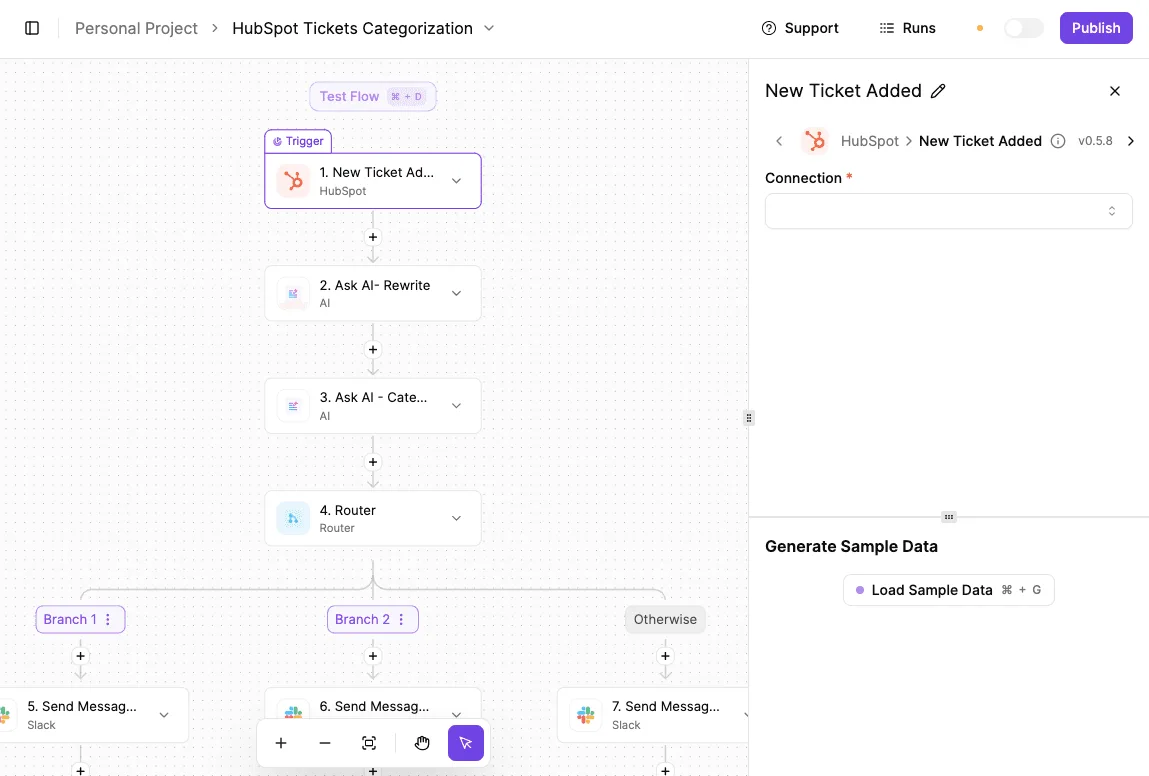
What follows from that is a budgeting question: price the workflow tool separately, then compare it with the Notion tier you would otherwise buy for automation alone.
Choosing a Notion plan this week
Buy the cheapest tier that clears your real editors, guests, history and upload needs, and verify it on a free workspace before paying. Having priced the automation separately, you can now settle the Notion tier in this order:
- Count editors versus viewers.
- List the guests who genuinely need access.
- Check how much page history and file upload you rely on.
- Trial the plan on a free workspace.
- Switch to annual billing only after a month of real usage.
- Put a calendar reminder in to recheck pricing.
Audit members and guests
Pull the member list and sort people by what they did last month: edited, commented, or only read. Everyone who only reads is a candidate for guest or view-only access, not a paid seat.
Then write down each outside person who needs a page, and what they need to do there. A contractor who comments is a different line item from a client who only reads.
Match needs to a plan
Take that list to the plan comparison and look for the first tier whose limits you don't hit. Check how far back history reaches, whether file uploads are capped, and which permissions you need.
If a tier's limits can't be read without a sales call, treat that as a cost in itself.
Stay on monthly billing for a month, then commit to annual if usage held steady. Set a reminder shortly before renewal. Headcount, guests and plan terms all drift, and the tier that fit at signup may not fit by then.
Frequently asked questions
Run the check in each answer below before the tier you picked at signup stops fitting.
Is there a Notion discount for students, nonprofits or startups?
Yes, Notion has run education, nonprofit and startup programs, but each has eligibility rules and the terms change, so the price you assume may not be the price you get.
For education accounts, a school email address has historically been needed. Nonprofits have had to apply and be verified. Startup offers have usually come as credits rather than a lower rate. Confirm the current terms on Notion's own pages before you budget around one.
Do guests cost extra?
Does Notion charge for guests? Guests aren't billed like members, but each plan caps how many you can invite before you must convert people to paid seats.
That cap is where a client-heavy team gets surprised, because the seat count on your invoice then stops matching your headcount. Count your regular external collaborators now, not your employees.
Can you mix plans in one workspace?
Can I mix Plus and Business seats in one workspace? No. A workspace sits on one plan, so every paid member pays that plan's rate.
If only a few people need Business features such as tighter permissions, you're paying the higher rate for everyone or splitting into separate workspaces. Price both routes, including the cost of moving content between them.

Is Notion AI included?
Is Notion AI included in paid plans? It depends on the tier. Higher plans have bundled it, while lower paid plans have treated it as an add-on or a limited trial.
If your team will use it daily, compare the add-on cost per member against the next tier up. The bundled option can come out cheaper than the add-on.
Can you get a refund?
Can I cancel Notion mid-month and get a refund? Don't count on one. Cancelling generally stops the next renewal and leaves access running until the period ends.
Annual billing is the riskier case because you've paid for the full term up front. Read the refund terms before you commit a team to a yearly plan.
Related reading
References
Running the numbers
See what the same workload costs here.
Free forever plan, and every paid plan self-hosts at no extra cost.
See pricing Talk to sales