Notion Auto Pricing: Credits Per Task (2026 Guide)

Oct 21, 202610 min read
Notion Auto is a new automation offering from Notion, the workspace software company, and the Notion help pages give no launch date we can quote.
That limit matters, because automation tools, whether built into a workspace or standalone options like Activepieces, tend to change quickly after launch, so here's what we can and can't say.
Notion Auto launched: what Notion released and when
What Notion's help page confirms about Notion Auto
In one line, Notion's automations help category describes its purpose: "Learn about how Notion can help you automate your workflows." That confirms the maker and the subject. It doesn't confirm pricing, limits, supported triggers or how reliable it is under load.
If you run production automations, treat those as unknown until you have tested them yourself. A help-page summary tells you what a vendor intends, not what survives a malformed payload at 3 a.m.
How Notion Auto fits your existing workflows
Because of that, nothing below ranks Notion Auto against anything. Instead it asks where the product sits next to the workflows you already run, and it limits its claims to what Notion's own pages state. Anything beyond that is marked as untested.
A help-page summary tells you what a vendor intends, not what survives a malformed payload at 3 a.m.
Connector catalogue for Notion Auto workflows
Start with the connector catalogue your current tooling offers, because a closed one only grows when its vendor decides it should, and a missing connector means waiting on their roadmap.
Activepieces lets you generate the missing integration with AI and add it privately to your own instance, and roughly 60% of its 743 integrations, counted from the open source monorepo, were contributed by the community.

So whatever Notion Auto does, it's entering a field where the basic plumbing, receiving a request, writing a row or sending a message, is already covered by a large, filterable catalogue.
Moving a workflow means giving up or gaining whatever those connectors define. The next section sets out which questions to ask first.
If you are running this arithmetic for your own team, see what the same workload costs on Activepieces.
Why Notion Auto matters to teams automating work
It launches inside Notion's automations area, and that is why it matters. That's the part of the workspace where teams already wire in other tools, so it lands next to workflows that exist today rather than in a separate product.
What it can't tell you yet is how it behaves under load, and Notion's page doesn't settle that either. Treat anything beyond the page as unproven until you've run it yourself.
Where it sits next to existing automations
Look at the illustration: the Notion workspace is at the centre, with three connections running out to an AI assistant, a calendar app and a chat app. A marker on the workspace edge labels the automations area, which is where Notion Auto sits.

Take from it that Notion Auto is part of the workspace's own side of those connections, not a fourth outside tool.
If you already run a flow between those apps and Notion, it passes through the same neighbourhood, so overlap is the thing to look for, not a clean replacement.
That overlap is the practical point. If a trigger or a sync you maintain already does a job inside that area, Notion Auto may duplicate it, collide with it, or make it redundant. Notion's page doesn't say which, so you have to find out.
What a team should check first
Start with what Notion Auto can't do, because that decides whether it touches your flows at all. Read the page for its stated limits, then list your current automations and mark any that act on the same pages or databases.
Next, run it against a copy of a workspace area, not your live one. Watch for double writes, repeated notifications and anything that changes a record your existing flows also edit.
A launch you haven't tested against your own triggers is a demo, and demos are marketing until they survive production.
What's measurably new in Notion Auto
Thin is the honest word for what Notion's pages let us measure: a per-task credit price, and little else. Everything below is limited to what Notion states, checked on 2026-10-21.
For specifics, the only page we can lean on is Notion's credits page, since Notion makes it. That page sorts Notion Auto work into simple, medium and complex tasks.
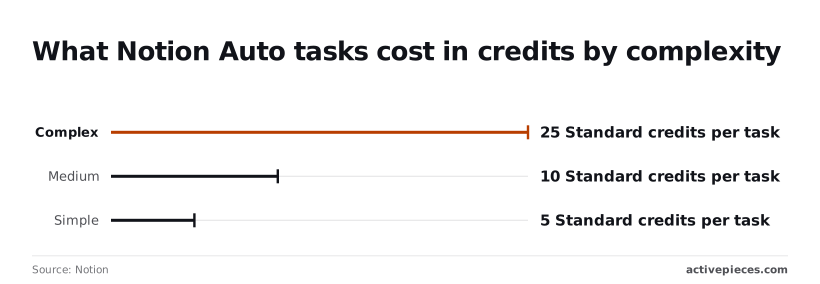
We have no definition of the tiers to report, so you can't predict which tier your own triggers land in without running them.
Don't design a workflow around it until Notion says which plans include it, because the credits page doesn't state access routes or plan availability.
What Notion Auto costs in credits
At 5 Standard credits, a simple task stays cheap, so a classification-style job costs little.
Read the table for what the page states in each row, with gaps marked. The takeaway is that price per task is known, but price per dollar is not.
| Row | What Notion's page states | Source link | Checked |
|---|---|---|---|
| Capabilities | Not stated on the page | Notion | 2026-10-21 |
| Access routes | Not stated on the page | Notion | 2026-10-21 |
| Plan availability | Not stated on the page | Notion | 2026-10-21 |
| Price | Simple 5, medium 10, complex 25 Standard credits per task; currency price not stated on the page | Notion | 2026-10-21 |

Prices and plan limits checked against notion.com and github.com on October 21, 2026.
What follows is a test plan: measure which tier your real triggers hit before trusting any budget.
Worth checking against a plan that does not meter every step: one credit covers a whole run on Activepieces.
What Activepieces has already shipped that touches Notion Auto
Nothing we found from Activepieces names Notion Auto. Its Notion integration moved from 0.7.5 to 0.8.0 in a pull request dated 2026-10-19, and that integration is what you can test against today.
We didn't use Notion Auto for any of this, so nothing here compares the two.
It is a modest update. Step forms now group fields into titled cards, which makes long actions easier to read. Update Database Item now says that empty fields keep their value, so you can stop worrying that a blank mapped field wipes data.
Custom API Call also changed, which matters most if your flow reaches past what the named actions cover. Re-check any flow that uses it after upgrading.
According to Activepieces, the integration's listing page shows 15 actions and 4 triggers. That imbalance means the integration is built mostly to write into Notion.
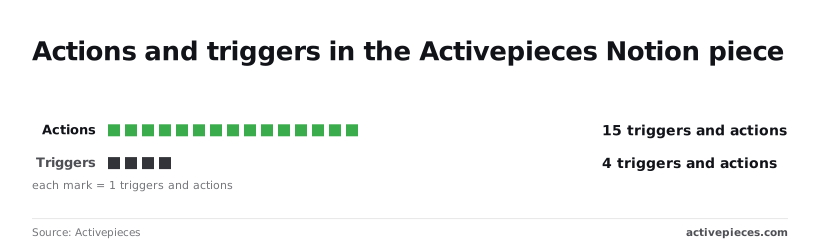
You get four ways to start a flow from a Notion event, so a flow that has to start from anything else needs a different entry point.
The list after it gives the ways to connect Notion in a flow today.
- The Notion integration, version 0.8.0, for its 15 actions and 4 triggers
- Custom API Call inside that piece, for Notion endpoints without a named action
- A webhook trigger, to start a flow from something other than the piece's four triggers
- An HTTP step, to call Notion directly when the piece does not cover it
Pick the first option and drop down the list only when a flow needs it, because each step down gives up some of the integration's built-in field handling.
What Notion Auto changes for cost and speed
We can't yet say whether Notion Auto beats your current flows on cost or speed: there are no published measurements, and the vendor pages leave most of the comparison blank.
Notion Auto cost against other AI models
To see how wide the cost range is, look at the models Notion measured Auto against. OpenAI and Anthropic's pricing pages list GPT-6 Astra, OpenAI's flagship, at $10 to $50 per million tokens.

Per Anthropic's page, Claude Opus 5.5 runs $4 to $20, and GPT-6.1 Sol, which balances intelligence and cost, runs $2 to $10. Astra costs five times Sol at both ends of the range.
A high-volume flow on the flagship model can cost far more than the same flow on a cheaper one. Those are model rates, not Notion's price, which is why the table leaves that column mostly open.
Side by side on price, setup effort and where each runs, the three options sit in the table below, and the unpublished cells show how little the vendor pages settle.
| Option | Price per vendor page | Setup effort | Where it runs |
|---|---|---|---|
| Notion Auto | Not published on pages we checked | Not published | Not published |
| Notion built-in automations | Not published on pages we checked | Not published | Not published |
| Workflows in an automation tool | Set by the tool you pick | Not published | Not published |
Until Notion states a dollar price, you can't put a currency figure on Auto, so budget against your current flows and the credit estimates rather than against a guess.
We have no speed figures for Notion Auto and won't invent them. Setup effort is also unpublished, so test Auto on one low-stakes flow before moving anything that matters.
What to watch as Notion Auto launches
Watch three things on Notion's own pages: the published price, which plans the help page says include Auto, and any change to the help page's wording. Everything below was checked on 2026-10-21, and nothing here predicts what changes.
I can't tell you what Auto will cost you or whether your plan gets it, because I'm only reporting what those pages said on that date.
Pages that say little today will say something different later, and you'll want to catch that before you build on a guess.
Run the check in this order:
- Open Notion's pricing page and write down the price shown for each plan. If Auto carries its own line item or add-on cost, that changes your per-seat arithmetic. If it's not priced separately, record that too, because a later appearance of a charge would be a real change.
- Open the help page for Auto and note which plans it lists as having access. This decides whether you can test on your current workspace or need an upgrade first, and an upgrade is a budget conversation.
- Compare the help page's text with what it said on 2026-10-21. Look for new limits, new setup instructions, or changed descriptions of what Auto does. Wording changes are the earliest sign that behavior has changed, and they are easy to miss without a saved copy to compare against.
- Record each change with the date you saw it. A dated log lets you tell a teammate "this changed between these two checks" instead of "I think it was different before."
Keep that log next to your test flow, so when Auto's behavior shifts you can see whether the docs shifted first.
Related reading
References
Running the numbers
See what the same workload costs here.
Free forever plan, and every paid plan self-hosts at no extra cost.
See pricing Talk to sales