
Muse Glimmer Self Hosted: Local Setup Guide (2026)

Oct 18, 202613 min read
You may host it yourself and use it commercially, because Meta's announcement licenses Meta Muse Glimmer 30B under Apache 2.0.
The pages checked state no price, hosted API terms or hardware needs, so plan a trial before any commitment, perhaps a small test wired into a workflow tool like Activepieces to see how it behaves on your own tasks.
Hosting Muse Glimmer 30B yourself
What Meta Muse Glimmer 30B is
Meta Muse Glimmer 30B is young, and that matters more than its size.
The "30B" in the name is Meta's size label, and it tells you the model is large enough that self-hosting is a real hardware question, not a laptop afternoon.
Little independent track record exists, so every claim you read comes from the maker or from people repeating the maker.
Muse Glimmer 30B intended purpose according to Meta
Treat Meta's own description of its purpose as the claim to test, not a result. The pages checked give no basis to promise strength at any particular task, and benchmark numbers from third parties aren't borrowed here.
Little independent track record exists, so every claim you read comes from the maker or from people repeating the maker.
What you take from that: your own sample of real work, run before you build anything around the model, is the only evidence that counts.
Muse Glimmer 30B vendor facts and check date
Where Meta states nothing, the list says so, because a gap in the source is information you should plan around. The vendor facts below were checked on 2026-10-18, each against Meta's own announcement page.
- Maker: Meta, per the announcement page.
- Licence: Apache 2.0, per the announcement page.
- Price: not stated.
- Hosted API access: not stated.
- Hardware requirements: not stated.
You have three to-do items before anything else, and they are the three "not stated" lines. Close them from Meta's pages before you spend on servers or write a single workflow step.

This takes minutes, not a project: automate it in Activepieces free.
Accessing Muse Glimmer 30B weights, APIs and pricing
You can run Meta Muse Glimmer 30B two ways: download the weights and host them yourself, or call a hosted API from a provider that already serves it.
Which one fits depends on how much control over your data you need and how much setup you can afford.
Downloading weights versus calling an API
If you take the weights, you get full control: the data never leaves your machines. You also take on the GPUs, the serving software and the upkeep.
A hosted API gets you a first test call in minutes, but your prompts pass through someone else's servers. For a small trial, start with the API and move to weights only if the model earns it.
Muse Glimmer 30B pricing across four routes
Read the table as a comparison of the four routes on cost, data control and effort to start. It ranks trade-offs: the hosts bill per token, while self-hosting bills you for hardware instead.
| Route | Price per million input/output tokens | Data control | Effort to start | Source |
|---|---|---|---|---|
| Downloadable weights | No token fee; you pay for your own GPUs | Full | High | Meta's model page |
| OpenRouter | Per-token, input and output billed separately | Passes through a router and then a host | Low | OpenRouter's model listing |
| DeepInfra | Per-token, same rate as OpenRouter | Prompts sit on DeepInfra's servers | Low | DeepInfra's model listing |
| Together AI | Per-token, a little higher than the other two | Prompts sit on Together's servers | Low | Together AI's model listing |
Prices and plan limits checked against openrouter.ai on October 18, 2026.
I haven't seen a first-party API from Meta, so don't assume one; Meta's own pages are where to confirm whether it runs one and what it charges. Check each host's listing again before you budget, because hosted prices change.
The announcement page names Apache 2.0, but a one-line label on a launch page is not the licence text. I haven't confirmed the licence terms by reading that text, so read Meta's licence before any client work. Look for three things:
- whether commercial use is allowed
- whether there are caps or conditions on large deployments
- whether you may fine-tune or redistribute the weights
If a client's contract depends on the answer, get it in writing.
Hardware and setup requirements for running it yourself
Because Meta's quantization page publishes download sizes for the Q4_K_M build and not much more, your hardware plan starts from those files and from what you measure yourself.
That's the same discipline as getting the contract terms in writing: trust what the maker states, and test the rest.
Hardware requirements Meta documents for Muse Glimmer 30B
The text weights rule out any machine that can't comfortably hold the file, before you start.
The vision projector is optional, and you need it only if your jobs read images. The optional DFlash drafter is a helper model that speeds up generation, and you can add it later if speed becomes the complaint.

That's storage, not the memory the model needs while running.
Put the model behind an HTTP endpoint on a machine you control, and let your workflows call it as they would any hosted API. That keeps the model swappable: if the trial fails, you change one address instead of rewiring every step.
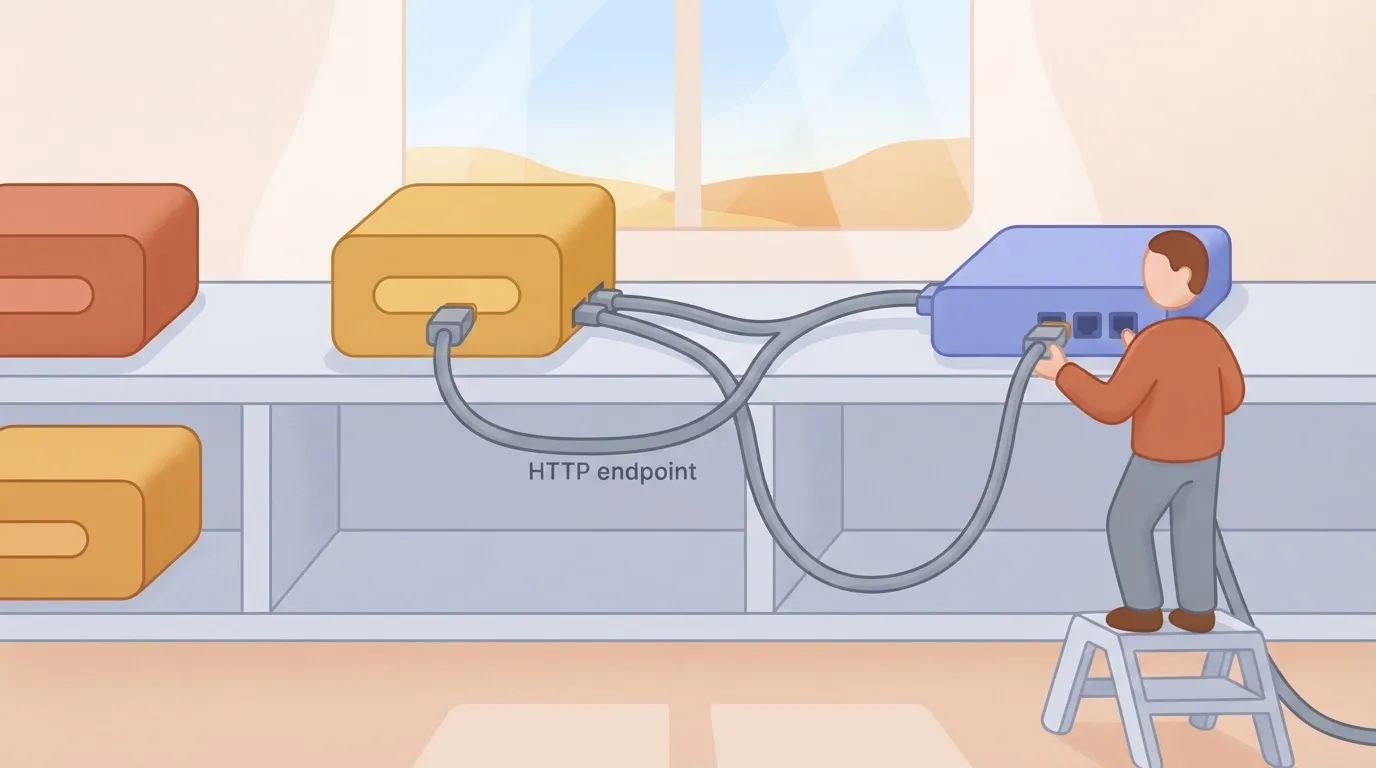
Check Meta's pages for which serving software they name before you pick your own.
Getting from downloaded files to a working endpoint
The path has three moves. First, download the files from Meta's model page into a folder of their own: the Q4_K_M text weights, plus the vision projector if you need images.
Q4_K_M is a 4-bit quantised build, meaning the weights are stored in compressed form to shrink the file, at some cost in precision.
Second, serve them with software that exposes an OpenAI-compatible endpoint. The llama.cpp server, Ollama and vLLM all do. I haven't confirmed which of them loads this model's files, so test one before you commit, and prefer whichever Meta's pages name.
Third, point the workflow at the server's address, through an AI step with a custom provider or a plain HTTP request step, and run your trial samples through it.
As a rule of thumb, running memory is roughly the file size plus the context cache, the working space that grows with prompt length. That is my estimate, not a figure from Meta.
Hardware details missing from Muse Glimmer 30B docs
You will not find a memory requirement while running, a speed figure, or how many requests one machine can handle at once in any of the pages I relied on.
A team has to work those out by loading the files on the actual hardware and running real client tasks through them. Write down what you measure, because those numbers decide whether self-hosting beats paying for an API.
You can follow the rest of this with the builder open. Start free, no card.
Testing Muse Glimmer 30B versus GPT-5.4 mini
In our small three-task test, Muse Glimmer 30B got every task right, as did GPT-5.4 mini. It ran about 3.6 times slower and cost about 4.8 times more per task. Meta's published numbers explain why the picture is mixed.
What Meta's benchmarks show
On MCP Atlas, Meta's model page puts Muse ahead, 75.5 to 57.7, so it handles tool-calling work better on that test.
No model wins everywhere, so the benchmarks alone can't settle your choice.

How the Muse Glimmer 30B three-task test ran
On 2026-10-18 the test ran meta/muse-glimmer-30b through OpenRouter at default settings, which reason before answering.
The same run covered openai/gpt-5.4-mini on the same three automation tasks: sort a support ticket, pull fields from an invoice, and summarise an email thread, enabling direct head-to-head comparison. We marked each answer correct or not.
Muse Glimmer 30B versus GPT-5.4 mini results
Quality doesn't separate them here, since both models passed all three. Speed and cost do.
Muse Glimmer 30B got 3 of 3 correct, with a median of 2.5 seconds per task at $0.000679 per task, combining perfect accuracy, sub-3-second latency, and negligible cost. openai/gpt-5.4-mini also got 3 of 3, with a median of 0.7 seconds at $0.000142 per task, achieving sub-second responsiveness at lower cost. Indicative, not a benchmark.
At 2.5 seconds against 0.7, Muse is fine for a background job but noticeable in a step a person waits on. At these per-task costs the gap is small in absolute terms, but it multiplies with volume.
With only three tasks, nothing can be ranked, and a clean 3-of-3 on both says only that these tasks were easy. Your own tickets, invoices and threads may be harder. Run your real samples, record the same three columns, and let those numbers decide.
Connecting Muse Glimmer 30B to a workflow in Activepieces
Because Activepieces hasn't shipped anything built for Muse Glimmer 30B, you connect it with its general building blocks, and you should take them in order of simplicity. Here are the three, each with the check that tends to fail first:
- An HTTP request step. Check authentication.
- An AI step pointed at a custom or OpenAI-compatible provider. Check timeout.
- An MCP server. Check output format.
Start at the top and move down only when the simpler option stops fitting.
If you host the weights to keep prompts on your own machines, the workflow tool shouldn't be where that control gets thinned out.
Activepieces doesn't sell a cut-down self-hosted edition: its air-gapped build carries SSO, SCIM, custom RBAC, audit logs, release management and secret managers just as the managed cloud does, and regulated and public-sector organisations run that edition in production.
Simplest: an HTTP request step
If Meta's own pages document an endpoint, one HTTP request step can call it and hand the reply to the next step. You see exactly what goes out and what comes back, which is what you want in a trial.

Test authentication first. Store the key in a connection rather than pasting it into the step, and confirm a deliberately wrong key fails loudly instead of passing silently.
An AI step with an OpenAI-compatible provider
If the model is served behind an OpenAI-style interface, whether by Meta or by your own hosting, the AI step lets you swap it in where another model sits today. That makes side-by-side comparison on your real samples cheap.
Check the timeout. A 30B model on modest hardware can answer slowly, and a flow that gives up early looks like a model failure when it's a configuration one.
Connecting Muse Glimmer 30B through an MCP server
Reach for MCP only when an agent must decide for itself when to call the model, or when several flows should share one tool. It adds a moving part you now have to run.

Check output format: whatever the server returns must match what downstream steps expect, or the agent will quietly work around the gap.
Whichever you pick, run the same samples through it that you used in the trial, so the workflow inherits the evidence rather than a launch-day impression.
Gating Muse Glimmer 30B before production
Gate Muse Glimmer 30B in five ordered steps, and let each one block the next. Only 31.4% of enterprise pilots reach production, according to Code Ninety, so assume yours is more likely to fall short than succeed, and use the gate to learn that cheaply.
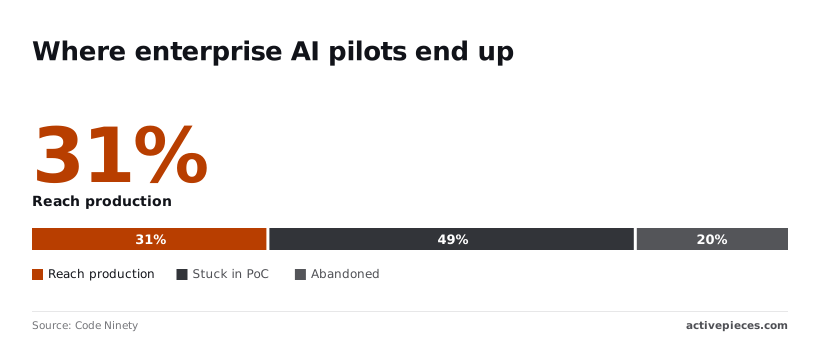
Another 48.6% stay stuck in proof of concept, which means they run on demos with no decision behind them. A further 20% are abandoned, so the money is spent and nothing is wired in. These steps keep you out of the last two groups:
- Run it beside your current model on your own samples.
- Set a spend cap.
- Add a fallback to the established model.
- Add a human check on outputs.
- Promote it.
Below, the first four are covered, followed by the check that comes just before promotion.
Send a few dozen real samples, the messy ones included, through both models and compare the answers without knowing which is which. If Glimmer doesn't match or beat what you run today on your tasks, stop here. You've spent an afternoon, not a quarter.
Set a hard monthly limit at the billing level, so a looping job stops instead of running up a bill.
Then route failures, timeouts and cap hits to the established model, so users see a slower answer, not a broken one. Keep a person reviewing a sample of outputs until you know the real error rate.
In the days after a launch, access, price and licence terms can shift. Reread them on Meta's own pages just before promoting, and note the date. If they no longer match what you tested against, rerun the trial before you promote.
Frequently asked questions
Is Meta Muse Glimmer 30B free to use?
Not necessarily, and only Meta's own pages can settle it. Access terms, price and licence are three separate questions.
Even if the weights are downloadable, you still pay for the hardware or hosting that runs them. A licence may also restrict commercial use, so read it before a client's work depends on the model.
Can Muse Glimmer 30B run on a single consumer GPU?
Possibly, but don't assume it. A model of this size usually needs a compressed (quantised) build to fit in one card's memory, and compression can cost quality.
Check the memory the weights need against your card, then run your real tasks on the compressed build you would actually deploy.
If it only fits by giving up accuracy on your work, a hosted API may be the cheaper route once you count your own time.
Is a native integration available?
I haven't confirmed one, so don't plan around it. Check the platform's own integration catalogue before you build.
If there's no dedicated integration and Meta offers an API, a generic HTTP request step can call the model, and you would set up authentication and response handling yourself. That works, but it's more to maintain than a ready-made integration.
Is Muse Glimmer 30B better than GPT-5.4 mini?
I can't point to a comparison I would trust, and a vendor's launch chart isn't your workload. "Better" depends on your tasks, your tolerance for errors, your latency needs and what each costs per run.
Put both models through the same set of real examples, score the outputs the same way, and compare cost alongside quality. If the difference is small, take the one that's cheaper and simpler to operate.
Related reading
References
Build it
Set this up in minutes.
No code required. Connect your accounts, and Activepieces runs it from there.
Start free Talk to sales