OpenClaw Alternatives: Options Compared (2026 Guide)

Nov 22, 202615 min read
OpenClaw's an open-source AI agent you host yourself. People leave it when recurring business work needs tighter permissions, longer records and predictable bills than a general-purpose agent offers, often moving that work to a workflow tool such as Activepieces.
As of 22 November 2026, its own docs describe it that way: software you run on your own server, not a service someone else operates.
Most people leave over four complaints, and each maps to a page in OpenClaw's documentation:
What OpenClaw is and why people leave it
- Records expire after 30 days: and are capped at 100,000 rows, so anything you might need for an audit can disappear.
- There are only three roles, so access can't mirror a team with more than three kinds of user.
- Model bills vary from month to month, so you can't budget them in advance.
- Self-hosting upkeep is yours: updates, uptime and fixes.

With three roles, you can't narrow its reach to match one narrow job, so a recurring task gets the same wide access as an experiment.
An agent that can do anything for you can also do anything to you. That suits personal errands and is a poor fit for work touching customer data.
An agent that can do anything for you can also do anything to you.
When an update, outage or failed restart hits, it lands on you, because self-hosting means you're the operations team. If you're a one-person shop, that's hours you don't bill, and nobody is on call when a scheduled run quietly stops.
Model costs that are hard to predict
You will pay least for the server. According to Botperch, the A VPS plan costs 5.72 $ per month, while model spend reaches 488.07 $ per month.
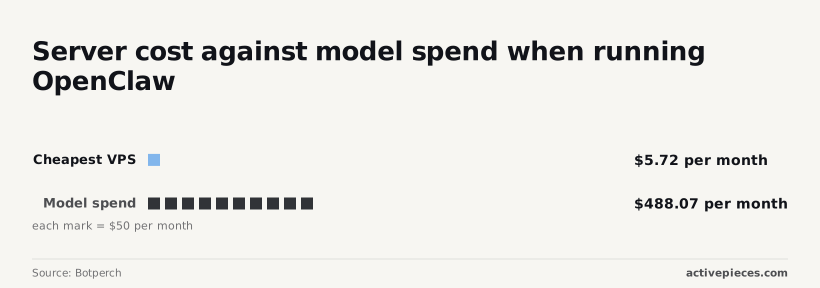
That makes the model bill roughly 85 times the hosting cost, so the server isn't what you're budgeting for.
Optimize the model line, not the hosting line.
Keep the cheap server, put a spending cap on the model account, and route routine steps to a smaller model. Reserve the expensive one for tasks that need it. That's the bootstrap version.
Why OpenClaw agents are unreliable for recurring work
Because an agent reasons afresh on every run, the same instruction can take a different path on Tuesday than it did on Monday. That variety is useful for open-ended personal work.

For a recurring, permissioned job, it means you can't promise the output will repeat. This is why teams move that work to a bounded workflow tool, and keep the agent for tasks with no fixed shape.
Activepieces is one such tool: its core is MIT-licensed, and its pricing page lists unlimited flows on every plan, including free.
The fastest way to settle a shortlist is to try one. Activepieces is free to try, no credit card.
OpenClaw alternatives compared in one table
If the work has a fixed shape, the choice comes down to three kinds of tool, and the table sorts the alternatives by kind before brand.
Read the type column first, because it tells you how much freedom, and how much risk, you're buying. Pricing is marked "not stated by vendor" wherever I couldn't confirm it from the vendor's own page.
| Type | Tool | Price | Core strength | Main limit | Who it suits |
|---|---|---|---|---|---|
| Self-hosted agent | NanoClaw / Nanobot | Not stated by vendor | Small, lightweight agent you run yourself | You maintain it and secure it | Technical solo operators |
| Self-hosted agent | Hermes Agent | Not stated by vendor | Open agent that builds up reusable skills | Still open-ended, so hard to audit | Tinkerers who want a personal agent |
| Hosted agent | Manus | Not stated by vendor | Hands off a broad task and gets a result | Little control over how it runs | Founders delegating one-off research |
| Hosted agent | Lindy | Not stated by vendor | No-code assistants for email and scheduling | Narrower than a general agent | Non-technical teams |
| Hosted agent | Zapier Agents | Not stated by vendor | Agents that reach into Zapier's app library | Cost scales with usage | Teams already on Zapier |
| Workflow platform | n8n | Not stated by vendor | Visual workflows with AI steps, self-hostable | Needs setup time | Cost-conscious teams with some technical skill |
| Workflow platform | Activepieces | Free: $0 with 1,000 credits a month and unlimited flows; Plus: $20 a month; Team: $200 a month | Open source (MIT core) with 750 integrations and unlimited flows on every plan | — | — |
Look down the rows and a pattern shows: the more open-ended the tool, the more you must supervise it. Only the workflow rows give you a fixed path to review.
If you pick NanoClaw, Nanobot or Hermes Agent, you keep the OpenClaw model: you run the agent, and it decides what to do. That suits personal tasks.
The bootstrap version is a small agent on a spare machine, with no hosted subscription. It won't give you an audit trail for client work.
Skip the server work with Manus or Lindy and you pay with control: you see results, but rarely the full reasoning behind them. Use them for research and inbox chores, not for anything that touches customer records.
For recurring, permissioned work, this is the type to move toward: n8n puts the model inside a defined sequence. If cash is tight, self-hosted n8n is the bootstrap route. Zapier is the premium, lower-effort one.
Reasons to stay with OpenClaw
Stay if your work's open-ended and personal. OpenClaw's free, open source, runs where you choose, lets you pick the model, and handles tasks nobody planned for. Each of those is true, and each has a cost.
OpenClaw price and model spend
Start with price. The software costs nothing, and OpenClaw's documentation presents it as something you install and run yourself. For a founder watching every dollar, that beats a per-task subscription.
Don't let "free" fool you: it covers the software, not the bill. Hosting's a small line, but model spend's the wide one, and it depends on how hard you work the agent.

So the bootstrap version is to route routine requests to a cheap model and save a premium one for hard problems.
Because you choose the provider, you can move to a cheaper or stronger model whenever prices change, and your data stays on infrastructure you run rather than in a vendor's workspace.
That swing's also the argument for control. A hosted automation tool gives you neither lever.
OpenClaw messaging access and flexibility
Third, messaging access: OpenClaw's docs describe connecting the agent to the chat apps you already use, so you ask for things the way you'd text an assistant. For personal errands, that low friction matters more than any dashboard.
Fourth, flexibility. A general-purpose agent can take a request nobody wrote a workflow for: reshuffling a calendar, drafting an awkward email, researching a vendor. A bounded tool can't improvise like that, and that gap is exactly why open-ended work belongs with an agent.
Switching costs when leaving OpenClaw
Last, switching costs. Your prompts, tool connections, and habits are built around OpenClaw, and rebuilding them elsewhere takes real hours that a small team doesn't have.
All five hold for personal work. They weaken only when the work becomes recurring, permissioned, and something you must be able to audit.
Reading a table only gets you so far. Build the same workflow in Activepieces and compare it yourself.
Why the job should decide the alternative
Pick by the job. Keep an agent where the task is open-ended and personal, and move work that repeats, touches other people's data, or needs sign-off onto something bounded.
The table below compares the three realistic paths on the four things that bite once work becomes routine, and shows that the more freedom a tool has, the less you can promise about any single run.
| Predictability | Permission scope | Cost per run | Who maintains it | |
|---|---|---|---|---|
| OpenClaw agent | Low; the model chooses its own steps | Broad, usually whatever you gave it | Varies with how long the agent wanders; billed by your model provider | You |
| Hosted agent (Manus, Lindy, Zapier Agents) | Moderate; guardrails differ by product | Scoped by the vendor's connectors | Bundled into a plan or credits, so hard to forecast per task | The vendor |
| Workflow platform (n8n, Activepieces) | High; the same steps every time | Narrow, one credential per step | Close to flat; on Activepieces a run is 1 credit however many steps it has, and an AI step costs 2 to 20 credits depending on the model | You if self-hosted, the vendor if cloud |
Read it as a trade: you give up flexibility to gain a log you can show someone. What follows is which swap fits which pain.
If the work is still exploratory, such as research, drafting or one-off cleanup, you don't have a job problem, you have an agent-quality problem. Swap the model underneath first.
The bootstrap version is pointing OpenClaw at a cheaper model like Gemini 3.6 Flash for routine turns and saving a stronger one for the hard steps.
When a hosted OpenClaw alternative fits
If your complaint is setup, uptime or patching, a hosted agent such as Manus, Lindy or Zapier Agents takes that off your plate. Zapier Agents is an agent layer inside the automation tool, so it already holds your app connections.
You still inherit the vendor's permission model, so check what a connector can touch before you trust it with client data.
When the work recurs with known inputs, such as invoice triage or lead routing, it belongs in a workflow. n8n lets you self-host on a small server, which is the cheapest route.
The model handles only the fuzzy step, such as classifying an email. Everything around it's fixed, logged and approvable.
Where Activepieces fits for OpenClaw users
Activepieces moves recurring, permissioned business work onto fixed steps you can read. Its core is MIT-licensed, so you can self-host it, and the open source monorepo on GitHub holds 750 integrations, which you can count in the packages/pieces/community directory.
Each step's fixed, logged and can stop for a human's approval. It isn't a chat-first personal agent, and it doesn't try to be.
What it automates better than an agent
Take a routine many small teams hand to an agent: every hour, check a sheet of incoming orders, flag the ones missing a field, and tell someone.
An agent will do it, but it re-decides how to do it on every run. A workflow decides once, and you can read the decision.
How the workflow is built
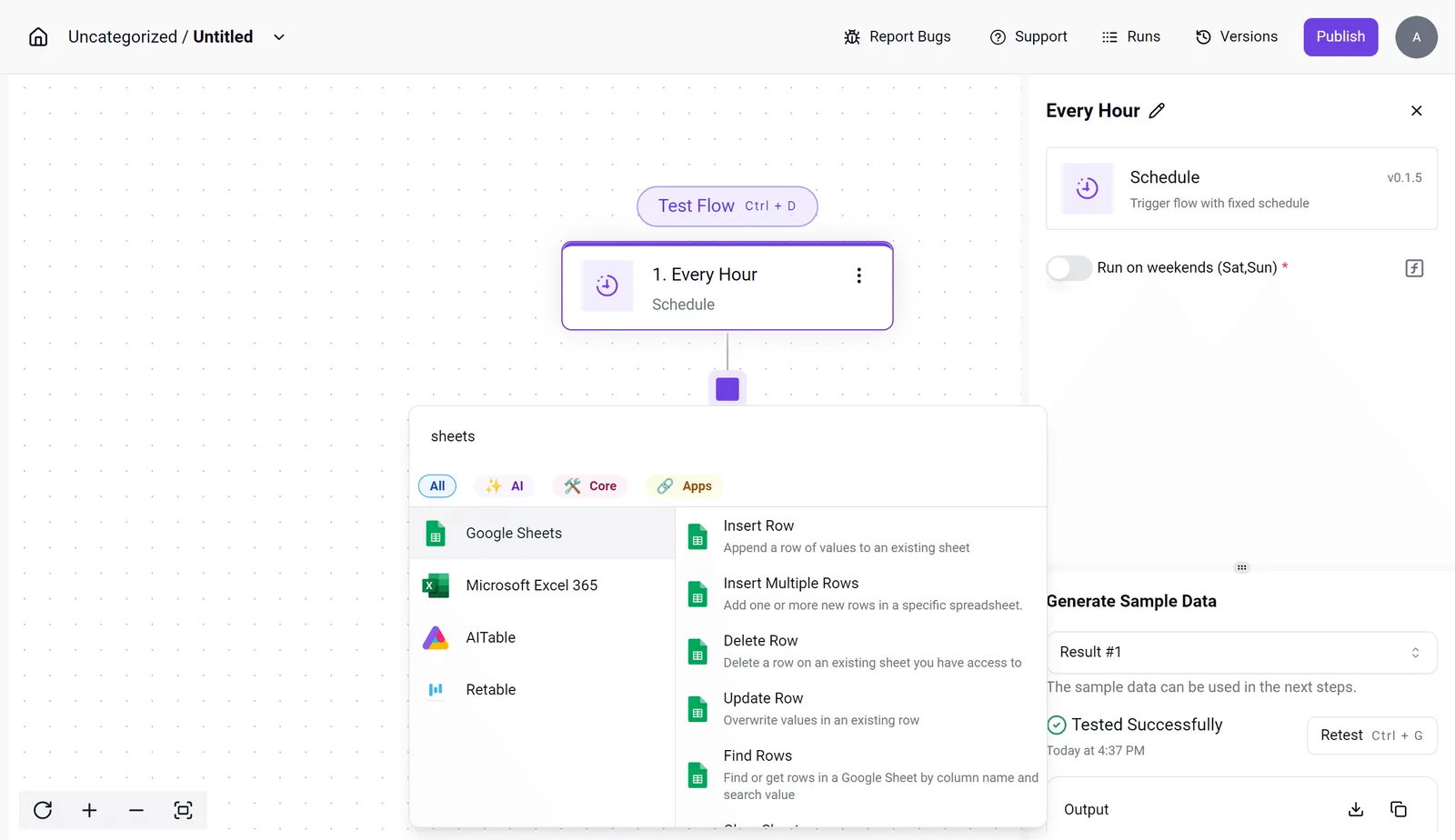
In Activepieces that routine is a short flow, and since a run is 1 credit however many steps it has, checking hourly comes to about 720 credits a month, inside the free plan's 1,000.
The screenshot below shows the builder with a test flow open: a Schedule trigger set to "Every Hour" is selected, the settings panel offers a "Run on weekends" toggle, and the integration selector is listing spreadsheet connectors (Google Sheets, Microsoft Excel 365, AITable, Retable) with actions such as Find Rows and Update Row.
The "Generate Sample Data" section shows a passing test.
What to take from it: the schedule, the data source and the action are separate, named steps, so you test each one before it touches real data.
What follows from that structure is the point. The trigger is a clock, not a prompt. The connector only has the access you gave it.
Where judgment and approval fit
Where judgment is needed, such as classifying a messy row, you add an AI step in one place, and where a person must sign off, you add an approval step before anything is sent or changed.
Per its docs, those are the building blocks: connectors, AI steps and approval steps.
If something goes wrong, the run detail view for an agent step lists each tool call separately, with its own input and output, so you read what happened instead of reconstructing what an agent was thinking.
The enterprise RBAC docs state that access policies cover what an agent may connect to, not only what a person may open.
What it costs to run
Self-host the open-source edition and you pay for your own server and whatever model you call, nothing else. That's the bootstrap version. Check its pricing page if you'd rather have the hosted option.
What it does not replace
It doesn't replace the agent you use for open-ended personal work: drafting, researching, untangling a problem you haven't defined yet. A workflow needs you to know the steps in advance. If you can't write them down, keep the agent.
It also isn't a conversation. You build flows in a canvas, and that takes more setup than typing a request. That setup is the price of repeatability, and it only pays off for work that actually recurs.
What tasks recur in your OpenClaw week
List what your agent does in a typical week, then move one repeatable task onto a bounded tool and leave the open-ended work where it is. The six steps run in order, because each produces the input for the next:
- List every task your agent handles in a week, including the ones you forgot it does.
- Sort the list into open-ended work and repeatable work.
- Check every credential the agent holds, and cut whatever the repeatable tasks don't need.
- Move one repeatable task to a bounded, auditable tool.
- Review cost after two weeks of running both side by side.
- Re-verify prices on each vendor's own pricing page before you commit.
Each step guards against a specific problem, covered below.
Because one task once needed them, a general-purpose agent usually holds keys to your inbox, files, and accounts. Step three exists for that reason.
Every credential a repeatable task doesn't need is exposure you carry for nothing, so revoke it first and re-grant only on demand.
Setup, hosting and upkeep of OpenClaw alternatives
Expect an afternoon of configuration to move a task, plus someone responsible for keeping it running. That's why you move one task, not all of them.
The bootstrap version is a free tier of a workflow tool or a scheduled script. The premium version is a managed platform with audit logs. Start with the cheap one and upgrade only when someone asks who changed what.

When an open-ended agent bills by how much it decides to think, a busy week can cost more than a quiet one for the same output. Fixed workflows call a model at set points, which makes the bill something you can forecast.
Two weeks of side-by-side running gives you a real comparison instead of a guess. Prices change often, so check each vendor's own page rather than trusting last quarter's numbers.
Give an agent room to improvise and it may take a different route on every run. That's useful when you're watching and a liability when you're asleep.
Anything that sends, charges, or edits records on a schedule belongs in the fixed path, where the same input produces the same steps.
Frequently asked questions
Is OpenClaw free to run?
You can download the software for nothing, but running it costs money. You pay for the machine it sits on and for every model call it makes, and an open-ended agent that loops on a task can make many.
The bootstrap version is to point routine steps at a cheap model such as Gemini 3.5 Flash-Lite or deepseek-flash, and reserve a stronger one for the steps that need reasoning.
Can you migrate OpenClaw tasks to another tool without rebuilding them? Not directly, because an agent's behaviour lives in prompts and judgment calls, while a bounded tool wants explicit steps.
What carries over is the thinking: the trigger, the inputs, the output and who approves it. Write those down for each recurring task before you move it, and the rebuild is mostly transcription.
Is a self-hosted agent safer than a hosted one?
Not by default. Self-hosting gives you control over where data sits, but it also makes you responsible for patching, credentials and logs.
It's safer only if you give the agent the narrowest permissions it needs, keep it away from systems it has no business touching, and record what it does.
A hosted tool with those same controls can be the safer choice for a small team with no one to maintain servers.
Are Zapier or n8n an OpenClaw alternative?
For recurring business work, yes. Zapier is a hosted service that connects apps through triggers and actions, and n8n is a workflow builder you can run on your own server.
Both do fixed steps with a visible history, which is what permissioned, repeatable tasks need. They're a poor substitute for the open-ended personal tasks where you want an agent to improvise, so keep OpenClaw or a similar agent for those.
How often do these prices and features change? Often enough that you shouldn't trust any comparison, including this one, past the day you read it.
Model names, free tiers and usage limits shift without much notice. Check each vendor's own pricing page before you commit, and again before any renewal, particularly if a workflow runs on a free tier you depend on.
References
Still comparing
The fastest way to settle it is to build something.
Open source under MIT, so you can self-host the same thing later.
Start free Talk to sales