
PasteGuard Review: Features, Setup and Limits

Nov 4, 202610 min read
PasteGuard is a new tool from its own maker, and that maker's pages are the only source for anything here.
It exists to keep sensitive text from passing unprotected through AI steps in an automation, whether that automation is built in a platform like Activepieces or wired together some other way.
Whether that matters to you depends on whether your workflows send such text to a model at all.
PasteGuard launch: who released what and when
What PasteGuard's maker has released so far
Where the maker's pages are silent, this article is silent too. The maker released PasteGuard recently and describes it on its own pages. This integration doesn't rest on reviews, independent tests or user reports.
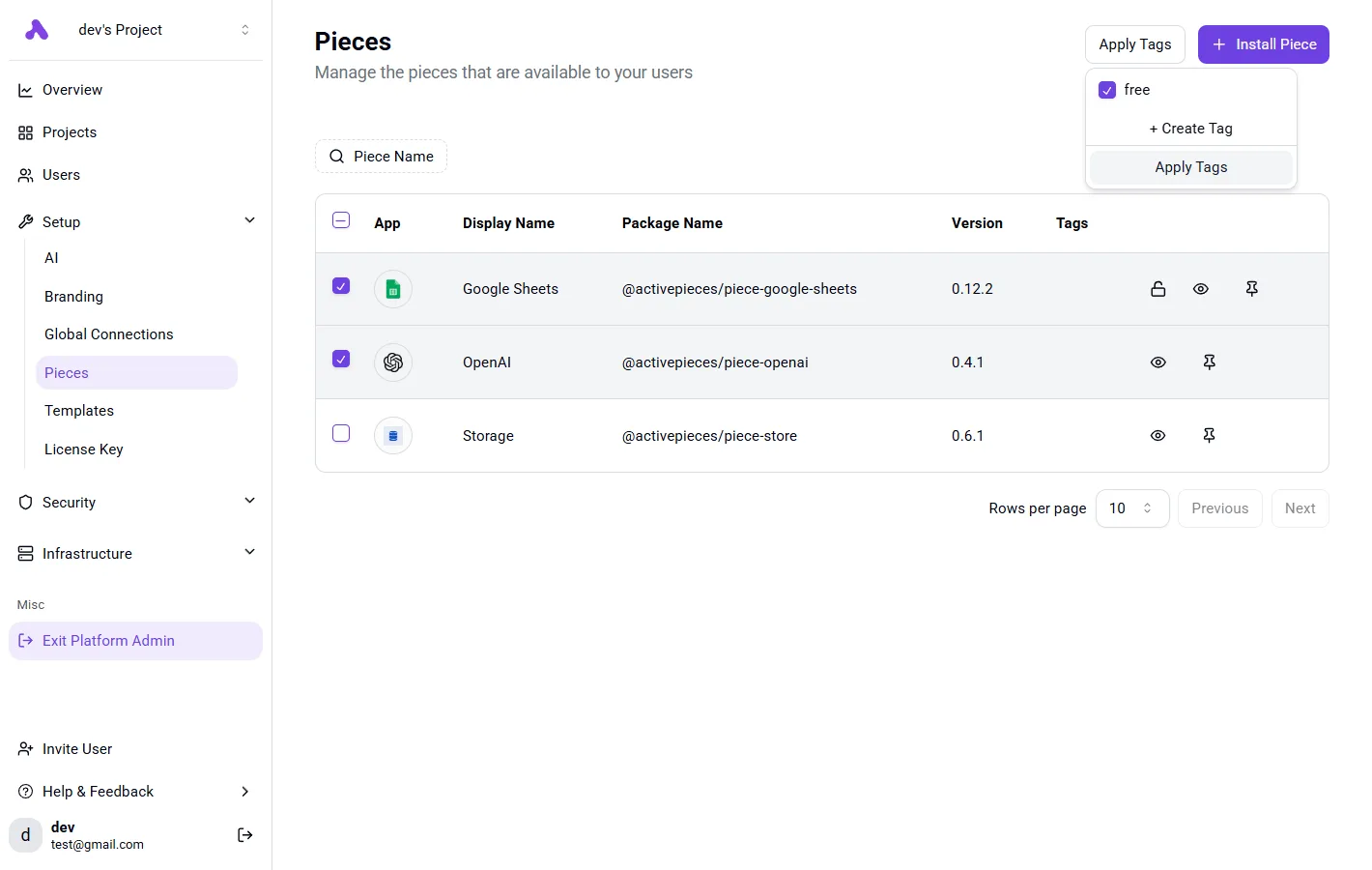
You will not find PasteGuard as a ready-made step inside any automation platform, because the release is a standalone tool. In a workflow builder, the admin Integrations page lists the connectors your team can use.
In the example below, Google Sheets and OpenAI are enabled and Storage is switched off. No PasteGuard entry appears. Nobody should expect to find it by searching a catalogue.
Once the screenshot is in place, the practical consequence is plain. Connecting PasteGuard today means wiring it in with general building blocks, such as a web request step, instead of ticking a native integration.
PasteGuard release sources and date checked
Read on 2026-11-04, everything about the release comes from the maker's own pages. A product this new can change its pages, its wording and its claims without notice.
I haven't confirmed the release date or the company details beyond what those pages say, so they're left out here instead of guessed.
Before you build on it, open the maker's pages yourself and compare them with what's written here.
Everything below works on Activepieces' free plan. Start without code or a credit card.
Why PasteGuard matters to automation teams
If your workflows hand business text to an AI model, it matters, because the maker describes PasteGuard as a checkpoint that masks sensitive content before the model sees it. If no such text passes through, there's little for it to do.
Where text leaves your control in an automated workflow
When a trigger fires, say a new support email or an uploaded contract, the next step sends the whole body to a model. Nobody reads that text on the way.
Names, account details and pasted credentials travel with the rest, because the step forwards whatever the trigger delivered.
That's the gap the maker positions PasteGuard to fill: it sits between the trigger and the model call. The flow below shows where it sits.
The document leaves the trigger with its sensitive lines highlighted, stops at PasteGuard, and reaches the model with those lines masked.
Take from it that the protection depends on placement. A checkpoint only helps if the text actually passes through it.
Since there's no native integration, you'd wire that placement yourself with general building blocks, such as an HTTP request step. Place that ahead of the model step.
Who should care and who can skip it
You should care if your AI steps process customer messages, internal documents, tickets or anything a person typed freely. Free text is where sensitive lines hide, and you can't predict which ones.
Skip it if your AI steps only handle content you already consider safe to share, such as public product descriptions or your own marketing drafts. Adding a checkpoint there buys nothing but an extra step to maintain.
What's measurably new from PasteGuard
Whether a checkpoint earns its place in a workflow that handles sensitive text comes down to a short list, because only a few of PasteGuard's claims can be checked against a number.
PasteGuard features and figures the maker states
10 secret entity types and 8 personal data entity types are what the PasteGuard docs document. The scanner is therefore tilted toward credentials and keys, with a smaller personal data list.

If your AI step receives support emails full of names and addresses, check that your data falls inside those 8 types before you trust the filter.
Read the table for each claim, where it appears, and whether a number backs it. The counts are the only figures I can confirm.
| Claim | Source page | Date checked | Number given |
|---|---|---|---|
| Secrets detection covers 10 entity types | Docs, PII detection | 2026-11-04 | yes |
| Personal data detection covers 8 entity types | Docs, PII detection | 2026-11-04 | yes |
| Detection accuracy | Pages checked | 2026-11-04 | none stated |
| Added latency per request | Pages checked | 2026-11-04 | none stated |
Nothing in the table tells you how often a given type is caught, because two counts are a scope, not a performance measure.
I have no confirmed price or licence term from the maker to report, so I list none. Read the pricing page and the licence yourself before budgeting, because both decide whether this fits a self-hosted workflow.
Because the maker's pages give no accuracy rate and no latency figure, a pilot has to produce them. Run your own sample of real payloads through it, and count the misses before the checkpoint goes anywhere near production.
Easier to see it running than to read about it: set it up free, no card.
How to connect PasteGuard in an Activepieces workflow today
Because Activepieces has shipped nothing specific to PasteGuard, you connect it through general building blocks. We checked its repository and integration catalog on 2026-11-04 and found no native support.
Once you've tested the checkpoint on your own payloads, the three routes below go from simplest to most involved. We haven't run PasteGuard ourselves, so each route is a plan to verify against PasteGuard's own documentation, not a tested recipe.
An agent that sends text through PasteGuard is not a snippet of code. It is a user with reach into your data, so it needs a role and a record, and a library supplies neither.
Activepieces puts agents under the same RBAC, SSO and SCIM as your staff, so policy decides which connections an agent may use, PasteGuard's endpoint included.
The run detail view lists every tool call on its own line with its input and output, which shows whether PasteGuard was called. MoneyGram, Moneypenny, Alan and FundingSocieties run it in production.
Option 1: an HTTP request step
Place a generic HTTP request step ahead of the AI step and send the text to PasteGuard's endpoint. Map the response field holding the cleaned text into the AI step's prompt, not the original trigger data.

The consequence is that the raw text still reaches the earlier steps in Activepieces, so decide where those runs live: the MIT-licensed core can run on your own servers, and the EU cloud is in Frankfurt.
You also need to decide what the flow does when the call fails: stop, or pass the text through unprotected.
Option 2: an AI step with an OpenAI-compatible provider
If PasteGuard can sit in front of a model as an OpenAI-compatible proxy, point an AI step at it through a custom provider, where one is available.
This needs the least wiring, because the protection happens inside the model call and no extra step appears in the flow.
You pay for that in coverage: only AI steps using that provider are covered. Any step you configure with a different provider bypasses it, and nothing in the flow will warn you.

Option 3 is an MCP server. MCP, the Model Context Protocol, lets an AI agent call external tools. Exposing PasteGuard that way makes it a tool the agent may call, and an agent can skip a tool it's never forced to use.
This is the heaviest route and the weakest guarantee, so it fits only where the agent's behavior is something you can test.
PasteGuard cost and speed against current options
Because its maker publishes no price and no latency figure on the pages we read, any cost or delay comparison here rests on what surrounds PasteGuard, not on a measured number.
PasteGuard cost against current AI model options
Start from what your AI step already costs, per Spendline, as input-to-output dollars per million tokens. Gemini 3.8 Flash runs $0.75 to $3.75, so a high-volume step stays cheap. Gemini 2.5 Pro, an older model, was listed at $1.25 to $10, which made long generated replies the expensive part.
GPT-5.6 Sol, an older model, was listed at $4 to $20. GPT-6 Astra runs $10 to $50. At Astra's rate, output costs many times Flash's input-side price, so any protection layer is a rounding error on one model and a visible line on another.
Read the table for what each route costs, how hard it's to set up and what delay it adds. Treat it as a list of gaps: only "doing nothing" has figures that are certain.
| Route | Cost | Setup effort | Added latency |
|---|---|---|---|
| PasteGuard | No figure published | No figure published | No figure published |
| Doing nothing | No added charge | None | None |
| Manual redaction | No figure published | A person edits every input | A human step before each run |
| Other approaches | No figure published | No figure published | No figure published |
Doing nothing is free only until sensitive text reaches the model.

PasteGuard speed and added workflow steps
Without any vendor number, you can still reason about manual redaction's delay: a person sits in the loop, so the automation is no longer unattended.
Doing nothing is free only until sensitive text reaches the model.
For PasteGuard, expect one extra step before the AI call, built from general building blocks. Its delay is unpublished, so time it in your own flow before trusting it with anything customer-facing.
What to watch next with PasteGuard
To see change, watch four public places: the maker's changelog, docs and pricing pages, and the Activepieces repository, where the community integrations folder counts 747 integrations and none is for PasteGuard as of 2026-11-04.
Until one of them shows something new, the delay question stays open and you keep connecting it by hand.
Because PasteGuard is new, what we know comes from the maker's own pages, with no independent testing behind it. There's no native integration, so a flow reaches it through general building blocks such as an HTTP request step.
That makes each page below a signal you can check yourself.
- The changelog: look for entries that touch request format, response fields or error behavior, since each can break an HTTP step you've already mapped. Also look for any change to the 10 secret and 8 personal data entity types the docs list today, and for any note on speed, which would finally address the unpublished delay.
- The docs: look for a page on automation platforms or webhooks. A documented setup for your tool is worth more than a claim that it "works with everything."
- The pricing page: look for a limit or tier boundary that applies to automated, high-volume calls, because that decides what a busy flow costs.
- The Activepieces repository, the open-source code behind that automation platform: look for a PasteGuard folder or an open pull request.
- The Activepieces integration catalog: search for PasteGuard by name. Until it appears, assume you're building the connection yourself.
If anything changes how you connect it, it's a listing in the catalog. Everything else only changes what you configure.