
Picovoice Pricing 2026: Free, Foundation & Enterprise

Nov 11, 202615 min read
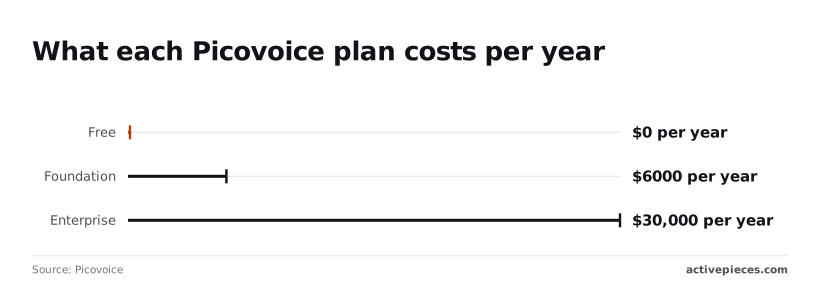
Picovoice's annual plans for on-device voice SDKs are: $0 for Free, $6,000 a year for Foundation and $30,000 a year for Enterprise.
Picovoice doesn't bill per minute or per call, so the real unit is the yearly licence, which makes it easy to budget for even if the voice features feed into a wider workflow built with a tool like Activepieces.
Picovoice pricing is a yearly licence model for its on-device voice SDKs, in which each plan (Free, Foundation or Enterprise) sets the licensing terms, device counts and usage limits a team can ship under, rather than charging per minute or per call.
When the user's hardware processes the audio instead of sending it to a cloud API, the cost moves from usage to licensing, and the licence is where the limits sit.
Picovoice plans and prices compared in a table
Start with the price steps. The table below shows the three plans on price, engines, usage limits, commercial use and support. Per Picovoice, Free costs $0 a year, Foundation costs $6,000 a year, and Enterprise costs $30,000 a year.

| Plan | Price per year | Included engines | Monthly minute limits | Commercial use | Support |
|---|---|---|---|---|---|
| Free | $0 | not published | not published | not published | not published |
| Foundation | $6,000 | not published | not published | not published | not published |
| Enterprise | $30,000 | not published | not published | not published | not published |
At $500 a month, Foundation is what a team that outgrows Free pays from day one, however few users it has.
Enterprise is five times Foundation, a $24,000 gap, so you need a concrete reason, such as a limit you can name, before paying it.
Where the cells say "not published", the headline price stops telling you anything. Read the limits on the vendor's pricing page before you commit to an architecture.
What the free tier allows
Free costs nothing, but it's the plan with the most unanswered questions. The cells above for engines, minutes, commercial use and support are the ones that decide whether a launch is possible.
The jump from $0 to $6,000 is the cost of leaving evaluation, so you can't test commercial use inexpensively. If your product ships to paying users, budget for Foundation at minimum until the page says otherwise.
Which Picovoice pricing details were verified
I confirmed the three yearly prices against Picovoice's pricing page on 11 November 2026. I didn't record the engines, minute limits, commercial terms or support terms for each plan. Those cells say "not published" and carry no guess.
Anyone budgeting a voice step in an automation tool should treat the yearly figure as the floor. Check the remaining limits on the pricing page before building, then price the plan you'll actually need.
Free plan limits during launch
The free plan stopped a small team's launch within the first morning, and the plan that fixes it targets a volume they hadn't reached. What follows is an illustrative scenario, not a real company.
Hitting the Picovoice free tier cap at launch
For a week the team tested a voice assistant on the free tier without trouble. At 09:40 on launch day they opened it to real users.
The meter counts minutes of audio, not sessions or users, so every live conversation drew down the same 250-minute allowance that their testing had already been spending.
Once the cap was reached, the app stopped doing what users had come for, because the cap exists for evaluation and doesn't degrade gracefully.
The team found out from users, because nothing in their own monitoring was watching the allowance. A launch plan needs an alert on minutes used, set well before the cap.
The bill at 1,000, 10,000 and 100,000 minutes
To see which plan covers each monthly volume, read the table. The Foundation plan, per Picovoice, costs $6,000 a year, which is $500 a month, and it covers up to 25,000 minutes.
The last column shows that nothing published prices the minutes beyond that.
| Minutes per month | Free (250 min cap) | Foundation (25,000 min cap, $6,000/year = $500/month equivalent) | Published rate beyond cap |
|---|---|---|---|
| 1,000 | Over the cap by 750 minutes | Covered, $500/month | Not published |
| 10,000 | Over the cap by 9,750 minutes | Covered, $500/month | Not published |
| 100,000 | Over the cap by 99,750 minutes | Over the cap by 75,000 minutes | Not published |
At 1,000 minutes the flat fee works out to $0.50 a minute, so a small launch pays a steep effective rate. According to Czlytech, at 10,000 minutes it falls to $0.05 a minute.
At the full 25,000 minutes it's $0.02, which is the best case the plan has.
You can't calculate the 100,000-minute bill from public information. A team expecting that volume has to ask the vendor for a quote before building, because the missing rate is the largest line in their budget.
If you are running this arithmetic for your own team, see what the same workload costs on Activepieces.
Picovoice free plan hidden limits to check
The missing rate is only the first surprise. Five more limits on the free plan appear as terms rather than prices, and each one lifts only when you move up. The list below shows which ones to check before you build:
Free is for evaluation, so the first wall is legal, not technical: a prototype that works can't go to customers on it.
The AccessKey, the credential every Picovoice engine checks at start-up, is what enforces this, since each key is tied to a plan and its activation limits.
Free is for evaluation, so the first wall is legal, not technical: a prototype that works can't go to customers on it.
Picovoice usage caps per engine and plan
Per engine, that's how usage is metered. Cheetah (streaming speech-to-text), Leopard (file transcription) and Falcon (speaker diarization) allow 250 minutes a month on Free and 25,000 on Foundation, so production use requires a paid plan.

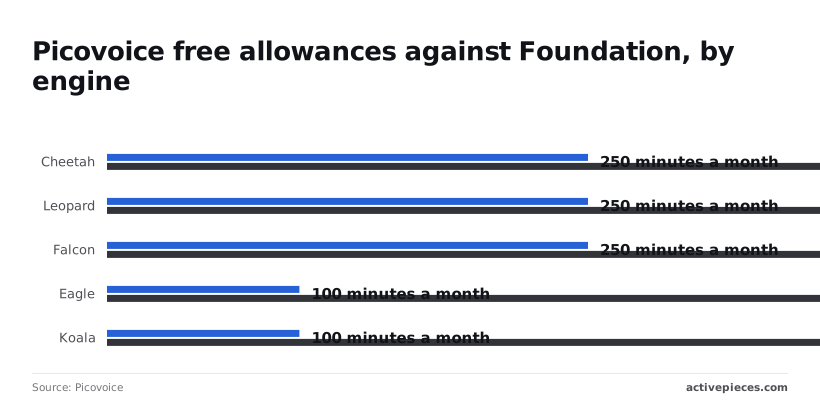
That's a hundredfold jump, and 250 minutes is about four hours, which one busy day of call transcription can use up.
A noisy-audio pipeline hits its ceiling even sooner, because Eagle (speaker recognition) and Koala (noise suppression) go from 100 to 10,000 minutes a month.
Language and device allowances follow the same plan logic, and the pricing page is where to confirm them for your target.
Custom models are the quiet cost. A team that needs its own vocabulary should check the allowance first, because a product built around a custom model has no free fallback.
Support works the same way: the response you get is part of the plan, so price it before an incident, not during one.
Picovoice Alternatives Priced the Following Week
Price the exit the same way as the entry: Vosk and whisper.cpp carry no per-minute fee but run on your hardware, while Deepgram and AssemblyAI meter minutes in the cloud.

The table shows where each one stands; "unverified" means I couldn't confirm the figure on the vendor's page, so check it there before you commit.
| Option | 1,000 min | 10,000 min | 100,000 min | Free tier | Where it runs | Latency | Languages | Terms |
|---|---|---|---|---|---|---|---|---|
| Picovoice Foundation | unverified | unverified | unverified | Evaluation | On-device | unverified | unverified | unverified |
| Vosk | $0 licence | $0 licence | $0 licence | Open source | On-device | unverified | unverified | Open-source licence |
| whisper.cpp | $0 licence | $0 licence | $0 licence | Open source | On-device | unverified | unverified | Open-source licence |
| Deepgram | unverified | unverified | unverified | unverified | Cloud | unverified | unverified | unverified |
| AssemblyAI | unverified | unverified | unverified | unverified | Cloud | unverified | unverified | unverified |
A $0 licence is not a $0 bill: you now pay for the devices, the engineering time and the model updates yourself.
At 100,000 minutes Vosk and whisper.cpp cost the same licence fee as at 1,000, which is nothing, because they remove the metered unit entirely. What you take on is accuracy tuning and hardware sizing, which no pricing page will itemise for you.
Cloud speech API pricing per minute
To see what the metered unit costs, look at the rates the big clouds publish. CzlyTech lists Google V2 at $0.016 per minute, which is $1,600 at 100,000 minutes.
Google batch is $0.003, so the same volume costs $300 if you can wait for results.
Live audio on AWS costs about 67% more than batch: AWS batch is $0.006 ($600) and AWS streaming is $0.01 ($1,000).
Azure real-time is $0.0167 ($1,670) and Azure batch is $0.003 ($300), which means organizations can't afford real-time speeds at the batch processing rate. Across all three, the real-time premium is the line to watch for a voice agent.
Choose on-device when audio can't leave the device or volume is high and steady. Choose batch cloud for recorded calls. Choose streaming cloud only when users are waiting, and price that tier, not the headline one.
Worth checking against a plan that does not meter every step: one credit covers a whole run on Activepieces.
Calling a Speech API from an Activepieces Workflow
Activepieces runs server-side transcription jobs as flows, with 747 integrations to connect the speech provider, storage and database around them.
It can send an audio file to a cloud speech API over HTTP, but it can't run Picovoice's on-device SDKs, which live inside the app on the phone.
When to use speech in a workflow
A workflow runs on a server, on a trigger, with no microphone in the loop. That makes it a fit for recorded audio: voicemails, uploaded meeting files, call recordings.
Nobody is waiting on the result, so the latency that justified a streaming tier in the previous section doesn't apply, and batch transcription is the cheaper path to price.
On the other side of that line sits the Picovoice SDK. It processes audio inside the phone app, and a workflow never sees that audio unless your app uploads it.
If your plan was to drop the SDK into a flow, the plan fails at the first step.
If you want the on-device pricing and limits to apply, the speech has to stay in the app. If you want a workflow, you're buying a cloud API and its meter instead.
On the left is the app with the SDK, marked as running on the device and not in workflows; on the right, a separate server lane carries an audio file through an Activepieces flow to a cloud speech API, then to text, then to a database.
Take from it that these are two different cost models, and your bill depends on which lane the audio travels.
- Start the flow when a file lands, whether by webhook from your app, a new object in storage, or a scheduled check of a folder.
- Use the HTTP integration to send the audio to the speech provider's endpoint, with your key stored as a connection, not pasted into the step. Read the provider's pricing page for the metered unit first, since audio length and request count are billed differently.
- Parse the returned text and keep the job or request ID, so a failed run can be retried without paying to transcribe the same file twice.
- Write the text and the ID to your database.
- End the flow by adding the audio length to a running total.
Those five steps are one run.
Activepieces's pricing page lists a run as 1 credit however many steps it has, whereas Zapier's pricing page bills per task and Make's pricing page bills per module, so the retry and bookkeeping steps cost nothing extra here and would add to the count there.
The free plan carries 1,000 credits a month with unlimited flows. The transcription meter that matters is still the speech provider's, not the flow's.
Setting usage alerts before the quota runs out
By step five, the headline plan stops being the whole story. Free tiers and entry plans cap usage, and a cap you discover by hitting it arrives as failed runs or an unplanned invoice.

Keep a counter of audio processed, compare it against the limit stated on the vendor's page, and have the flow send a message to your team when usage crosses a threshold you chose in advance.
Check the vendor's current limits when you set that threshold, because the number you copy today is the one that quietly goes stale.
Five Picovoice pricing checks before launch
Five checks, done in order on the Monday after you read this, turn a free-tier evaluation into a budgeted launch before any invoice arrives. The first two happen before you build; the last three keep the build from drifting once it is live.
The pre-build pricing check
Do the first two before a line of integration code exists, because their answers can change which engine you build on. The list below shows the order to work in and what each step buys you.
- Price the build at ten times your expected volume. Take the unit the vendor meters, whether that's minutes of audio, requests or devices, and multiply your forecast by ten. Read the plan the vendor's page says covers that volume, then write down the monthly cost. If a tenfold success would force an enterprise conversation, you've learned that while switching is still cheap.
- Read the commercial terms. Open the licence and check whether free-tier access permits production use, how many devices or users it covers, and what happens when you exceed them. A free plan written for evaluation can mean shipping to customers is a breach, however little you use.
- Set a usage alert at a stated percentage of the limit. Pick the number, write it into the runbook, and tie it to the limit as the vendor states it today. Your alert is only as good as the limit it's measured against.
- Set a hard cap. An alert tells you the problem's coming; a cap decides what happens when it arrives. Configure it in your own gateway or workflow if the vendor offers none, so a runaway loop stops at a ceiling you chose.
- Name the fallback engine. Choose the second speech or voice provider now, not during an outage, and record who approves the switch.
Arithmetic and reading, not engineering: that is why steps one and two matter most. A team that skips them is pricing the headline plan and discovering the licence later.
Runtime quota alert and fallback engine
Unless they're wired to something that acts, steps three to five don't work. Route the alert to a channel a person watches, and let the hard cap trip the fallback automatically where your workflow allows it.
Because the fallback engine will differ in accuracy, latency and price, test it once with real audio before you need it.
After that, put a recurring reminder in the calendar to reread the vendor's limits, since the thresholds you set this Monday are only correct until the vendor changes its page.
Frequently asked questions
Is Picovoice free for commercial use? No, not as a plan to launch on: the Free tier is built for evaluation and personal projects, so shipping a paid product on it puts you outside its terms.
Read the license wording on the vendor's pricing page before you build, and treat a paid plan as the baseline cost of a commercial release.
Does Picovoice charge per minute or per device?
It doesn't meter audio minutes the way cloud speech APIs do. Picovoice prices on the licensing side, through plan tiers tied to how many users or devices you deploy and what usage the plan allows.
Find the metered unit on the current pricing page first, then multiply it by your expected deployment. That product is your real bill, not the headline plan price.
Can Picovoice run fully offline? The main reason teams pick it is that audio processing runs on the device.
What you still need to confirm is how licensing is validated. If your product ships to hardware with no network access, ask whether your plan allows that, because a license check can be a dependency even when inference is not.
Is there an open-source alternative to Picovoice? Yes, several, and they cover different integrations. Whisper-family models and Vosk handle speech-to-text, and openWakeWord covers wake-word detection.
None is a drop-in replacement for the full Picovoice stack. You trade a license fee for engineering time, tuning and your own device-performance testing, so price both sides before deciding.
How often does Picovoice change its pricing?
There's no published schedule I can point you to, so assume plans, limits and allowances can change without notice. Vendors adjust tiers as products mature, and an evaluation-oriented free plan is a likely place for that to happen.
Record the date you checked each limit, save a copy of the terms you built against, and recheck before every renewal or scale-up.
Related reading
Running the numbers
See what the same workload costs here.
Free forever plan, and every paid plan self-hosts at no extra cost.
See pricing Talk to sales