
Grok Voice Agent API: Pricing, Speed and Setup (2026)

Oct 18, 202613 min read
Grok Voice 3.0 is xAI's speech-to-speech model, announced on x.ai and reachable today through the Grok Voice API for building realtime voice agents, which teams can then wire into their own workflows with tools like Activepieces.
Grok Voice 3.0 and the voice agent API
Most of what follows comes from xAI's own pages, because little independent testing has had time to accumulate.
"The world's most intelligent speech-to-speech model" is how xAI's post, Introducing Grok Voice 3.0, describes it. Treat that as the maker's claim, not a finding.
I won't give a release day here, because I haven't confirmed it on xAI's pages. Read the announcement for the date before you put one in a ticket.
On the Speech-to-Speech Index, RidgeBench puts Voice 1.0 at 73.7 points and Voice 2.0 at 81.3, a gain of 7.6. According to Artificial Analysis, Voice 3.0 scores 86.9, a gain of 5.6 over 2.0.
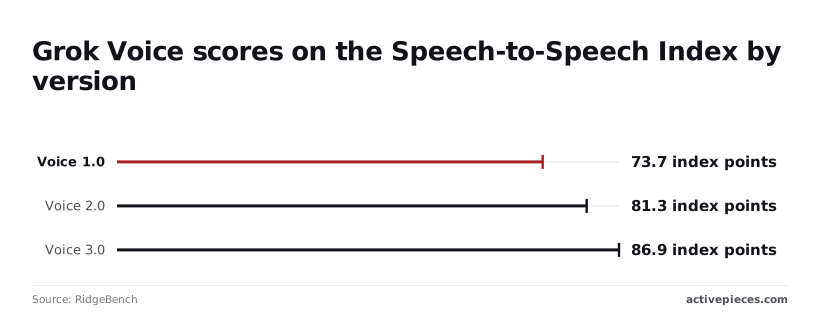
The direction is good, but the steps are getting smaller, so budget for steady improvement rather than another leap. The index is also a benchmark, not your callers' audio, so test on your own recordings before you trust it.

You can check each capability below yourself on the announcement and the voice API page, both checked 2026-10-18:
- A speech-to-speech model, so audio goes in and audio comes out without you stitching transcription and synthesis together (x.ai/news/grok-voice-3, checked 2026-10-18).
- Real-time voice agents as the stated use (x.ai/api/voice, checked 2026-10-18).
- 25+ languages, which you should match against your own caller mix before committing (x.ai/api/voice, checked 2026-10-18).
- Conversations over WebSocket, meaning a persistent connection your code has to hold open (x.ai/api/voice, checked 2026-10-18).
- A maker-claimed #1 on the Tau Voice Leaderboard, which is xAI's statement and worth reading on the leaderboard itself (x.ai/news/grok-voice-3, checked 2026-10-18).
None of these tells you how it behaves on a bad phone line, so the next step is to see what the API actually is.
What a realtime voice agent API is
It's a streaming connection where you send the caller's audio as it arrives and receive the model's spoken reply as it's generated, instead of waiting for whole turns.
In practice that makes it one step in a larger flow, say one you build in Activepieces. The voice model sits behind a boundary you can replace.
If you are running this arithmetic for your own team, see what the same workload costs on Activepieces.
Access, pricing and a first realtime session
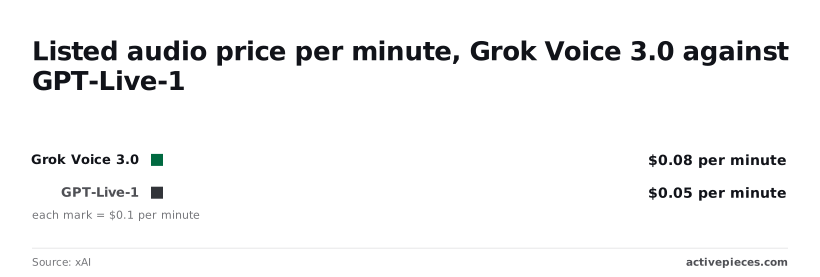
Before anyone commits to a rebuild, you can run a test call, which costs a listed $0.08 per minute of audio.
The numbered list below is the whole path from the xAI model page, and the three paragraphs after it say where each stage tends to go wrong.
- Get an xAI API key.
- Find the model name,
grok-voice-3.0. - Open a realtime WebSocket connection.
- Send audio input.
- Read the reply events.
Passing criteria for a Grok Voice API test
If you can finish all five against a recorded clip, the model's reachable from your stack. If you can't, you've learned that for the price of an afternoon.
The key, the connection and the audio
For the first stage, create the key in your xAI account and store it in your secrets manager, not in the workflow definition.
Give this one key to the test and nothing else, so you can revoke it the day the experiment ends without touching anything in production.
For the connection, the docs describe grok-voice-3.0 as a "speech-to-speech model for real-time voice agents" and list its region as us-east-1. Take the endpoint and connection parameters from that page, not from a blog post or from memory.
For a caller outside the US East coast, that region is a latency question to measure, not assume.
When you send audio, use a short recorded clip first, not a live phone line. Then read the reply events as they arrive and log them whole.
The event names and audio format belong to the docs, and a raw log of one real exchange is what your swap-out boundary will be written against.
What the minutes cost
At $0.08 per minute against $0.05 for GPT-Live-1, Grok Voice 3.0 costs $0.03 more per minute, or 60% more, on xAI's model listing, checked on 2026-10-18. At 1,000 minutes a month, that's $80 against $50, a gap of $30.
For a small desk the difference is noise, but at tens of thousands of minutes it decides whether the swap-out boundary matters.
These are list prices for audio only. Quality, latency and what your own calls cost end to end aren't in them, and your test clip is where you measure those.
Grok Voice 3.0 against established voice agent APIs
It lists at a higher price than GPT-Live-1, though.
If your flow needs to listen, think and speak, the Grok Voice API covers real-time conversation, speech-to-text and text-to-speech in one product. That's one vendor and one key to manage instead of three integrations to keep alive.
Unproven Grok Voice 3.0 latency and limits
Not xAI but a third party, RidgeBench, measured time to first audio. Grok Voice 2.0 came in at 0.7 seconds.
GPT-Realtime-2 took 1.14 seconds, Gemini 3.8 Live 1.18 and GPT-Live-1 Astra 1.34, Gemini 3.1 Flash took 2.99.
A caller notices a pause of about a second, so only the two Grok versions stay under it, and Gemini 3.1 Flash is too slow for a phone conversation.
This is one benchmark on one set of conditions, not your network or your audio, so treat it as a reason to test and not as a result.
Nothing in the material I have states rate limits, concurrency caps or maximum session length, so I leave them blank rather than guess.
Grok Voice 3.0 price, connection and limits compared
On price, Grok Voice 3.0 speech-to-speech lists at $0.08 per minute against $0.05 for a GPT-Live-1 voice session, so organizations choosing Grok must justify the higher per-minute cost.
Grok costs 60% more per minute, which at 10,000 minutes a month is $800 against $500, so the $300 gap is the premium you pay.
On capabilities, the vendors describe themselves like this:
Two things aren't stated in what I have: a Gemini price on a comparable basis, and the connection method for each vendor. I wouldn't fill them from memory. Read each vendor's docs for those two lines before you commit.
Because the price gap, the latency gap and the missing limits all point to the same step, make your one small realtime call against each vendor with your own clip, and record what a minute of it actually costs you.
Worth checking against a plan that does not meter every step: one credit covers a whole run on Activepieces.
Calling Grok Voice 3.0 from Activepieces workflows
Call it from an ordinary step inside an Activepieces flow. The evidence we found shows an xAI provider integration, but nothing that names Grok Voice 3.0. We haven't run the model ourselves, so everything below is a build plan, not a result.
Using Grok with your own key
Activepieces works with any major model, or your own provider key, so spend lands on your own account.
That matters for a swap-out boundary, because the xAI connection you register once is already a tool an agent can call, so a voice experiment never needs a second integration built for agents.
The same pull request gave the Grok (xAI) actions output schemas.
The action you run as a step in a flow is the same one exposed as a tool schema on the per-project MCP server, where Claude, ChatGPT, Cursor or an agent of your own can call it, with no export step and no separate catalog.
You can read the mechanism in packages/integrations in the open source repo, and the Integrations Framework and MCP Server documentation describe it.
We found nothing saying that integration exposes voice. xAI describes its Grok Voice API as speech-to-speech voice agents plus text-to-speech and speech-to-text APIs, so treat voice as something you reach through a plain request step until Activepieces says otherwise.
Open the Integrations page in your admin settings first, because it lists every installed integration with its package name and version. It tells you what your instance actually has, whatever the changelog promises.

With that confirmed, the build itself is short.
Build a minimal workflow in three steps
Start with a webhook trigger that receives a link to your own test clip, the same one you used with the other vendors.
Then add an HTTP request step that sends the clip to the request-response speech endpoint in xAI's documentation. A realtime session is a streaming connection, and a single flow step may not hold one open, so use the simpler endpoint for the smoke test.
Finally, write the transcript, the clip length and the date to a spreadsheet row. That row is your result, and it lets you work out what a minute costs you from the bill rather than from a launch page.
Keep the voice model swappable
Put steps two and three in their own sub-flow with a fixed contract: audio link in, text and duration out. The parent flow should never know which vendor answered.
When a better or cheaper voice model arrives, you change one step inside the sub-flow and leave every caller untouched. That's the whole defence against a launch that moves faster than its documentation.

Starting with a new voice API
Spend the first day reading and making one small call, not building anything. That's the only step that costs you nearly nothing and tells you what you're really dealing with.
Starting small with the Grok Voice API
Most organisations I talk to are still at the pilot stage with voice, and that's the right place to be with an API this new.
A client with a support line and a tight budget doesn't need a rebuilt call flow by Friday. They need to know whether the model hears their callers' accents, handles their product names, and stays affordable at their volume.
A pilot answers those questions. A migration only makes them expensive.
So treat Grok Voice 3.0 as a candidate for one narrow step, not a replacement for the whole stack. Keep your current voice provider running. The new call sits beside it, behind a workflow step you can unplug without anyone noticing.

That's the point of the checklist: each action below either gives you a fact from xAI itself or protects you from a cost you didn't choose. Work through them in this order.
- Read the three xAI pages (the launch announcement, the API documentation and the pricing page) and write down the date on each. A page with an old date next to a new feature tells you the documentation is lagging, and you plan around that gap.
- Make one realtime call on a throwaway key. If something leaks in a log or a screenshot, you revoke it and lose nothing.
- Set a spending cap before the second call. A looping test script can run up a bill while you're at lunch, and the cap turns that mistake into a small one.
- Write your pass criteria against your own recordings: real callers, real noise, your product names. Decide in advance what counts as good enough, so the result can't be argued after the fact.
- Recheck pricing on the day you decide, not the day you read it. Launch pricing moves, and a figure copied into a spreadsheet last week may already be wrong.
- Decide your pilot log fields now: timestamp, call length, outcome against your criteria, and any error returned. If you pick them after the pilot, you'll find the one you needed was never recorded.
Frequently asked questions
Every time, the same few questions come up that the launch coverage leaves open.
The table below lists them with an answer, the page to check, or "not stated" where xAI hasn't said. Treat "not stated" as a real answer: it means you shouldn't build on that point until xAI's own pages say otherwise.
| Question | Answer | Source page |
|---|---|---|
| Are the weights downloadable? | Not stated | Not stated |
| Which languages are supported? | 25+ languages | xAI's Grok Voice API documentation |
| What does it cost? | $0.08 per minute for speech-to-speech | xAI's pricing page |
| Which regions can use it? | The model page lists region us-east-1 | xAI's Grok Voice 3.0 model page |
| Does it top a leaderboard? | xAI claims #1 on the Tau Voice Leaderboard | xAI's Grok Voice API page |
Prices and plan limits checked against x.ai and docs.x.ai and x.ai and github.com and docs.claude.com and claude.com and openai.com and gemini.google on October 18, 2026.
Where a cell says to check a page, the reason is that prices and language lists change, and a copy in an article goes stale faster than the source. The sections below answer the four questions readers ask most.
Is Grok Voice 3.0 open source or can I self-host it?
Nothing on xAI's pages we relied on offers weights or a license for self-hosting, so plan on using it as a hosted API. If your design needs the model running inside your own network, treat that as unavailable until xAI says otherwise.
Keep the call behind a swappable step so that a self-hosted voice model could replace it later without a rebuild.
Does the Grok Voice agent API need a separate account from Grok chat?
That's not stated in the material we relied on, so don't assume either way. API access is normally set up through xAI's developer console with its own key, which is separate from a chat login.
Confirm this on xAI's account and API pages before you promise a client a start date. Make the first realtime call with a throwaway key, not a production one.
Can I use Grok Voice 3.0 without writing code?
Not through anything xAI documents that we can point to. A no-code route would mean an automation tool calling the API through a generic HTTP step, which is possible in principle but is your own wiring, not a supported feature.
Test it with one short call before you build a flow around it, and keep the step easy to swap.
Where do I check whether the price has changed? Check xAI's own pricing page and the Grok Voice API documentation, and nothing else.
Third-party roundups copy launch-day numbers and rarely update them. Before each billing cycle, reread the pricing page and compare it with your own usage records. The comparison tells you whether the pilot still pays for itself.
Related reading
References
Running the numbers
See what the same workload costs here.
Free forever plan, and every paid plan self-hosts at no extra cost.
See pricing Talk to sales