
Salesforce Alternatives and Competitors: Which to Choose?

Oct 1, 202616 min read
Modern CRM selection in 2026 centers on reducing the "Total Cost of Ownership" by replacing monolithic administrative burdens with modular, API-first architectures that prioritize speed over feature-bloat.
Where a flow runs should never decide whether you can leave. Activepieces runs the same codebase whether deployed on managed cloud or self-hosted via Docker and Kubernetes, allowing you to git-sync and promote logic to either side.
This prevents the functional lock-in of platforms that lack a self-hosted edition, ensuring that enterprise governance features like RBAC, SSO, and audit logs are available to customers like MoneyGram and Moneypenny regardless of infrastructure choice.
The 20 Best Salesforce Alternatives Compared for 2026
Direct Comparison Table: Price and Performance
By evaluating the top 20 alternatives based on their 2026 entry-level pricing and operational focus, the following table highlights how lower entry costs often correlate with higher specialized performance in specific niches.
| Provider | Entry Price (Per User/Mo) | Core Strength | Main Limitation | Ideal User Profile |
|---|---|---|---|---|
| HubSpot | $15 | Marketing/Sales Alignment | Limited Custom Objects | Mid-market Growth |
| Pipedrive | $14 | Visual Pipeline Management | Basic Reporting | Small Sales Teams |
| Zoho CRM | $14 | Feature Density per Dollar | UI Complexity | Budget-Conscious SMBs |
| Monday Sales CRM | $12 | Project-Based Selling | Weak Lead Scoring | Creative Agencies |
| Freshsales | $9 | AI-Powered Lead Insights | Limited Integration Library | Tech Startups |
| Close | $49 | High-Volume Cold Outreach | No Marketing Suite | Outbound Sales Units |
| Copper | $23 | Google Workspace Native | No Enterprise Workflows | G-Suite Power Users |
| Insightly | $29 | Project/CRM Hybrid | Steep Learning Curve | Professional Services |
| Nimble | $24 | Social Relationship Data | Low Storage Limits | Individual Consultants |
| SugarCRM | $49 | On-Premise Flexibility | High Admin Overhead | Regulated Industries |
| Creatio | $30 | No-Code BPM | Niche Community Support | Complex Ops Teams |
| Capsule | $18 | Contact Simplicity | Minimal Automation | Micro-businesses |
| Less Annoying CRM | $15 | Ease of Use | No API for Large Apps | Solo Practitioners |
| Affinity | $75 | Relationship Intelligence | High Price Floor | VC / Private Equity |
| Zendesk Sell | $19 | Support/Sales Synergy | Basic Lead Gen | Customer-Centric Orgs |
| Keap | $159 | E-commerce Automation | High Starting Price | Solo Retailers |
| Bitrix24 | $49 (Flat) | Collaboration Suite | Cluttered Interface | Distributed Teams |
| Apptivo | $8 | Multi-App Versatility | Dated Mobile App | Generalist SMBs |
| Vtiger | $12 | Open Source Roots | Inconsistent Support | DIY IT Departments |
| Scoro | $26 | End-to-End Utilization | Overkill for Basic CRM | Project-Heavy Firms |
Under $150 per month is now enough for a team of ten to operate a full-stack CRM. This makes the high seat-minimums of legacy providers difficult to justify for non-enterprise entities.
Why teams are migrating away from Salesforce in 2026
When ETR rates Salesforce at 68 on the "Entrenchment Difficulty" score, it signals the primary driver for migration. This means you'll face the highest friction in the industry when you attempt to modify or exit your stack.
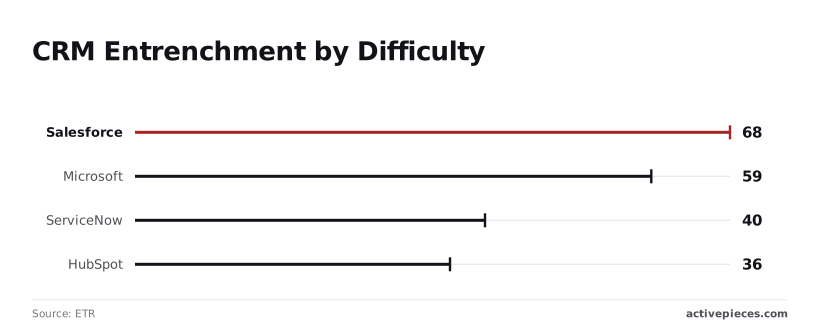
Microsoft holds a score of 59, which indicates a slightly more flexible but still rigid ecosystem that requires professional services to navigate.
ServiceNow follows at 40, reflecting its origin as an IT service tool rather than a nimble sales engine, while HubSpot sits at 36, suggesting it's nearly twice as easy to implement or transition away from compared to Salesforce.

Technical debt is the direct result of high entrenchment scores, where you spend more on maintaining the software than using it to generate revenue.
In 2026, the availability of advanced reasoning models like Claude Opus 5.5 and Gemini 3.8 Flash allows you to automate data migration and schema mapping, removing the "vendor lock-in" that previously protected legacy CRMs.
Technical debt is the direct result of high entrenchment scores, where you spend more on maintaining the software than using it to generate revenue.
Criteria for selecting a modern CRM stack
Rather than how many native features it lists on a pricing page, a modern selection process prioritizes how well a tool communicates with the rest of the tech stack.
API Latency and Rate Limits A CRM must support high-throughput workloads using models like Gemini 3.5 Flash. A rate limit below 100 calls per minute is a functional bottleneck for real-time lead enrichment.
Data Portability The platform must offer automated daily exports to a data warehouse. Without these, your customer intelligence is trapped behind a proprietary UI.
Agentic Readiness The system must provide "hooks" for autonomous agents (such as those running on GPT-6 Astra) to perform actions like updating deal stages or drafting follow-ups without manual trigger configuration.
The fastest way to settle a shortlist is to try one. Activepieces is free to try, no credit card.
Enterprise Competitors for High-Volume Sales Teams
Enterprise CRM selection in 2026 centers on the total cost of intelligence rather than just the sticker price of a seat.
While Salesforce maintains the highest switching costs due to deep-rooted custom Apex code, competitors now offer lower administrative burdens by shifting budget away from long-term maintenance and toward active model deployment.
The current Enterprise AI Budget Breakdown illustrates this shift in capital allocation: 42 percent Licensing Terence Kok, which means nearly half of all spending is locked into recurring vendor fees.
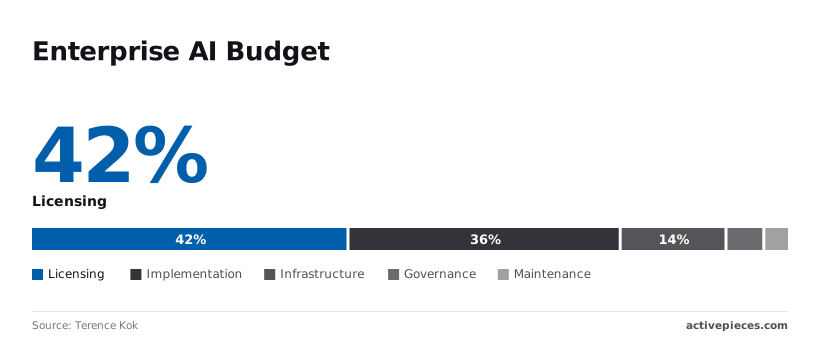
Nearly half of the budget is locked into recurring software access before a single lead is processed.
Implementation 36 percent, so over a third of your total investment is tied up in the initial configuration phase. You'll spend roughly $0.85 on setup for every $1.00 spent on the software itself, meaning the true cost of adoption is nearly double the sticker price.
Infrastructure 14 percent, leaving a relatively small portion of the budget for the underlying hardware and cloud resources. This covers the specialized compute required to run high-token workloads. A significant portion of the budget is dedicated to raw processing power.
Governance 5 percent. This ensures that automated outputs remain compliant with regional data laws so you avoid regulatory penalties.
Maintenance 3 percent. Modern modular systems require less ongoing maintenance than legacy monolithic suites, which translates to lower long-term operational overhead.
Integration of frontier models into your sales workflow is the primary financial hurdle, not simply keeping the lights on.
HubSpot: The leader in ease-of-use at scale
By consolidating the tech stack into a single codebase, HubSpot serves high-volume teams and reduces the "Implementation" cost cited by Terence Kok.
By utilizing Gemini 3.8 Flash for real-time lead enrichment, the platform allows your sales development reps to automate personalized outreach without needing a dedicated data engineer to manage the API calls.
One administrator can operate a team of 500 under this architectural choice, whereas a similar deployment in a more fragmented ecosystem typically requires a three-person operations team.
Microsoft Dynamics 365: The choice for Azure-first organizations
Dynamics 365 leverages existing Azure credits to offset the 14 percent "Infrastructure" cost identified in the budget breakdown.
Because it shares a common data model with the Microsoft 365 suite, it natively supports GPT-6 Astra for summarizing complex email threads directly within Outlook.
This deep integration ensures that data never leaves the tenant boundary, which satisfies the 5 percent "Governance" requirement without necessitating third-party security audits.
Oracle NetSuite: Integrating ERP and CRM for global operations
NetSuite targets organizations where the CRM must be a mirror image of the ledger to prevent reconciliation errors. By embedding Claude Opus 5.5 for contract analysis, NetSuite automates the transition from a closed-won opportunity to a recognized revenue event.
The 3 percent "Maintenance" figure is addressed by this tight coupling, ensuring that ongoing support costs remain a minor fraction of the total expenditure, which means your long-term budget is protected from unexpected overhead.
A change in a sales discount automatically updates the downstream tax calculations, removing the need for manual data syncs between disparate billing and sales tools. This eliminates the risk of human error in financial reporting.
SMB Alternatives Focused on Pipeline Velocity and UX
Immediate user adoption and reduced administrative friction are the priorities for Pipedrive, Copper, and Monday Sales CRM, rather than the exhaustive, multi-layered configuration required by enterprise platforms.
These tools replace the traditional relational database complexity with interface-first designs. Your sales representatives spend their time moving deals through stages rather than performing manual data entry or navigating nested menus.
Pipedrive for visual pipeline management
Pipedrive utilizes a primary Kanban-style interface to provide an immediate overview of deal distribution across the sales cycle.
Lead decay caused by forgotten follow-ups is prevented by activity-based selling, as the platform prompts users for the next specific action after every interaction.
The "Smart Docs" feature, a tool for managing proposals and contracts, centralizes document versioning within the deal view so that you avoid the risk of sending outdated pricing sheets to prospects.
Copper: The native CRM for Google Workspace users
Copper functions as a specialized extension of the Google Workspace productivity suite, embedding its interface directly into the Gmail sidebar and Google Calendar.
This architectural choice means that lead records and interaction histories are accessible without switching browser tabs, reducing the cognitive load associated with context switching.
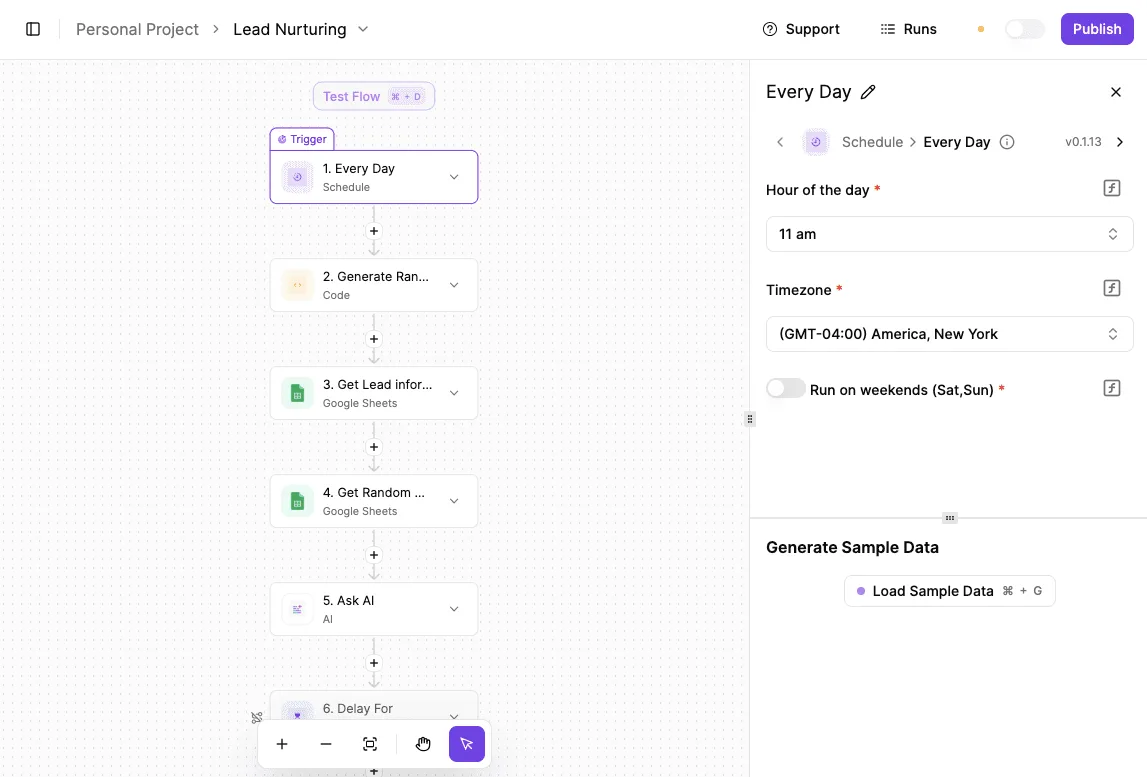
Because the system automatically scrapes contact information and email threads from your inbox, it eliminates the "data entry tax" typically responsible for low CRM adoption rates in small teams. The following interface shows how these platforms simplify the deployment of complex logic through pre-configured templates.

Following this deployment, the CRM maintains the link between the communication layer and the internal record without requiring manual synchronization.
Monday Sales CRM: Customization without the code
Monday Sales CRM is a highly adaptable table-based structure that allows you to build specific workflows for diverse industries, such as real estate or professional services, using no-code building blocks.
You can add "Status" columns or "Formula" columns to calculate commissions or expected close dates instantly.
This is the flexibility of a spreadsheet with the data integrity of a database. The platform includes a dedicated "Automations" engine where you define "if-this-then-that" rules (such as notifying a Slack channel when a deal value exceeds a certain threshold) to handle repetitive administrative tasks.
By adding specific functional columns rather than requiring a complete architectural overhaul, this modular approach ensures that the CRM scales without a certified consultant for minor adjustments.
Reading a table only gets you so far. Build the same workflow in Activepieces and compare it yourself.
Building a Modular CRM Stack with Activepieces
Every catalogue is a ceiling, but an open ecosystem acts as a floor for growth. While a closed library only expands at the vendor's pace, Activepieces allows you to generate missing integrations with AI and add them privately to your instance.
This community-driven approach, where roughly 60% of the 738+ integrations are contributed by users, ensures that your modular stack is never limited by a single company's development queue, effectively crowdsourcing the expansion of your system's capabilities, so you gain access to a far broader range of features than a single vendor could provide.
Modular CRM stacks vs monolithic suites
Every department is forced to use the same vendor’s mediocre sub-modules to maintain a single source of truth in a monolithic architecture. In a modular stack, the central database remains the anchor while you select the specific tool that maximizes your output.
This "Unbundled CRM" architecture utilizes a central Postgres database connected via Activepieces to specialized tools for Email (Postmark), Support (Zendesk), and Billing (Stripe), a strategy used by companies like Alan and FundingSocieties to maintain agility.
This separation of concerns ensures that a failure or migration in the billing layer doesn't paralyze the support desk or corrupt the primary contact record.
You gain the ability to adopt best-in-class features immediately rather than waiting for a single vendor’s roadmap to catch up.
Syncing data between niche tools and CRMs
Maintaining parity between disparate tools requires an orchestration layer that handles state changes in real-time. Activepieces manages these flows by listening for webhooks from specialized services and updating the central repository, utilizing an MIT-licensed core to ensure the logic remains transparent and extensible.
A "churned" status in Stripe instantly suppresses marketing sequences in Postmark.
To handle complex logic within these syncs, you can deploy specific intelligence models directly into the workflow.
Gemini 3.8 Flash is used for high-throughput classification of support tickets before they hit the database. Claude Opus 5.5 is employed for long-running agentic tasks, such as reconciling mismatched billing addresses across three different platforms.
GPT-6 Astra is utilized for complex reasoning when mapping unstructured sales notes into structured data fields.
Reducing 'Seat Tax' by offloading workflows to Activepieces
A "seat tax" that penalizes growth and cross-departmental visibility is created when traditional CRM vendors link pricing to the number of human users.
Activepieces bypasses this by executing administrative tasks, such as lead routing, contract generation, and data enrichment, via API rather than through a licensed user interface, offering unlimited flows on every plan to decouple operational volume from licensing costs.

By offloading these high-volume, low-discretion workflows to an automation engine, you can limit expensive CRM seats to only those employees who require manual data entry or high-touch relationship management.
This shift changes the cost center from head-count-based licensing to execution-based infrastructure, allowing the system to scale its workload horizontally without a linear increase in monthly recurring software costs.
By ensuring that the codebase remains consistent across Docker, Kubernetes, and managed cloud environments, this architecture prevents infrastructure from dictating operational freedom. Activepieces is the better fit for teams prioritizing long-term portability and modularity, as it guarantees that deployment choices never result in vendor lock-in.

Through its open ecosystem and Git Sync capabilities, the platform provides a stable floor for growth that scales independently of the provider's own development roadmap.
The Monday Morning CRM Migration Checklist
A 48-hour migration safety net prevents catastrophic data loss by enforcing a structured sequence of validation before the legacy system is decommissioned.
This protocol ensures that the transition from a monolithic architecture to a modular environment doesn't result in broken lead assignments or orphaned customer records.
- Set read-only lock on legacy CRM
- Run a 10% record sample import
- Validate field mapping and data types
- Bulk import remaining records
Auditing your current Salesforce technical debt house
Inventorying your existing Salesforce configuration reveals the hidden dependencies that increase total cost of ownership.
Salesforce has extensive custom Apex code and deeply nested Process Builder flows. These often act as "black boxes" that block migration until they're fully documented.
Identifying every active validation rule and custom object ensures that the new modular system doesn't fail to ingest data due to missing logic.
Mapping CRM data fields during migration
Aligning data structures between the legacy system and the new user-centric CRM prevents the corruption of historical customer insights.
Because modern CRMs often utilize flatter data structures than the relational complexity of Salesforce, every "Lookup" and "Master-Detail" relationship must be accounted for to maintain record associations.
To verify the integrity of these mappings, you can utilize Gemini 3.8 Flash to analyze the schema documentation. This model is designed to handle the complex coding and agentic workflows required for large-scale data translation.
Building a minimum viable CRM automation workflow
Establishing a baseline automation sequence ensures that your sales team can continue operating without manual data entry during the transition period. A modular CRM relies on external triggers rather than internal monolithic scripts to move data between departments.
- Lead Ingestion: Connect the website contact form to the new CRM lead object.
- Notification Loop: Set up an automated alert in your team’s communication tool for new high-value opportunities.
- Data Enrichment: Trigger an external lookup for company firmographics immediately upon record creation.
Stakeholders can see the value of the new system immediately through this foundational setup, before the full complexity of the legacy environment is replicated.
Frequently asked questions about Salesforce alternatives
Can I migrate my Salesforce data without losing history?
Data migration preserves historical records by mapping the relational schema of the legacy environment to the object structure of the new system.
Most modern platforms provide specialized importers that recognize Salesforce’s standard objects. Activities, notes, and task histories remain linked to the correct contact or account records.
To maintain data integrity, you'll typically perform a dry run using a subset of data to verify that date stamps and ownership assignments transfer correctly. This prevents the loss of the audit trail required for sales forecasting and performance reviews.
Which Salesforce alternative is best for small businesses?
Small businesses prioritize platforms that minimize the total cost of ownership by reducing the need for certified consultants and dedicated administrators. A user-centric CRM focuses on out-of-the-box functionality where core sales pipelines and email integrations are active immediately upon login.
Small teams can pay only for the specific features they use, such as lead tracking or automated follow-ups, by using platforms that offer a modular approach rather than purchasing a monolithic suite with unused enterprise capabilities.
Is there a free alternative to Salesforce?
Several CRM providers offer free tiers that serve as functional entry points for solo entrepreneurs or very small teams.
These free versions typically include essential contact management and basic pipeline tracking but impose limits on the number of users, total records, or the ability to create custom fields.
While these tiers lack the advanced automation and deep reporting found in paid versions, they provide a risk-free environment for you to validate your workflow before committing to a subscription.
How long does a typical CRM migration take?
The duration of a CRM migration depends on the volume of data and the complexity of existing business logic.
A phased approach allows you to move basic contact management quickly while complex workflows, such as automated lead scoring or custom Apex triggers, are rebuilt or streamlined in the new system.
| Migration Phase | Primary Focus |
|---|---|
| Planning and Mapping | Aligning existing data fields with the new CRM schema. |
| Data Extraction and Cleanup | Removing duplicate records and formatting legacy data for import. |
| Pilot Testing | Validating that workflows and integrations function with live data. |
| Full Cutover | Moving the entire user base and decommissioning the legacy system. |
Related reading
References
Still comparing
The fastest way to settle it is to build something.
Open source under MIT, so you can self-host the same thing later.
Start free Talk to sales