Why Webhook Triggers Time Out and How to Fix Them
Webhook timeouts occur when receiving systems process complex logic synchronously rather than using queues.

Covers scaling automation from pilot to enterprise: shared-services teams, onboarding that actually gets read, and governance that holds.
ContributorSeptember 25, 202612 min read
This article was researched and fact-checked by an advanced research system.
When Salesforce terminates a connection at 10 seconds, it leaves a silent data gap if an Apex trigger, or even a workflow managed via Activepieces, or an external callout lingers a moment too long.
A webhook timeout is the failure of a server-to-server communication that occurs when a receiving system attempts to process complex logic synchronously instead of offloading the task to an asynchronous queue.
This hardcoded waiting period creates an architectural mismatch when a receiving server attempts to execute complex logic before acknowledging the HTTP POST request.
To protect its own stability, the sender drops the connection. This causes the integration to fail even if the receiving server eventually finishes the task.
The 30-second industry standard limit
Strict response windows are enforced by platform providers to prevent their own outgoing request queues from clogging.
While serverless compute environments like Google Cloud Functions allow up to 540 seconds and AWS Lambda permits 900 seconds, standard SaaS platforms operate on a much shorter leash, forcing developers to architect for rapid, asynchronous task completion, which means applications must be designed to handle background processing rather than waiting for immediate synchronous responses.

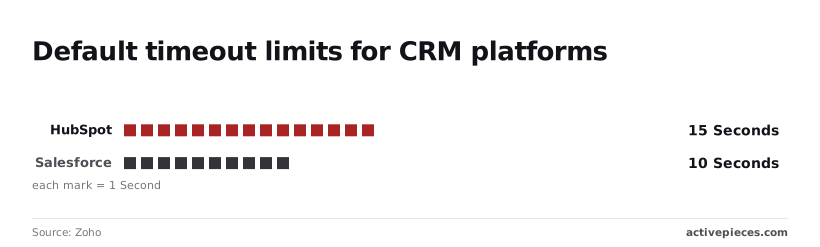
According to Zoho, Salesforce enforces a 10-second limit. Any Apex trigger or external callout that lingers beyond that window will result in a silent data gap.
By capping responses at 15 seconds, HubSpot prevents you from performing multi-step data enrichment during the initial handshake, effectively limiting the complexity of your integration logic so you must offload heavy processing to background workers.
Even more restrictive, the Slack messaging platform requires an acknowledgment in just 3 seconds, leaving almost no margin for error in your backend processing, which means your infrastructure must be optimized for near-instantaneous response times.
This forces you to move heavy lifting to a background process immediately or face a "Dispatch Failed" error.
Synchronous vs asynchronous processing loops
The sender is forced to wait during a synchronous loop while the receiver writes to a database, calls a third-party API, or generates a PDF.
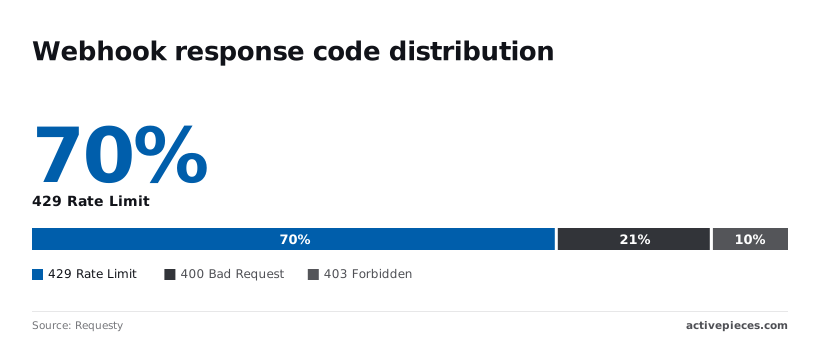
Data from Requesty shows that 65.8 percent of failed webhooks result in a 429 Rate Limit error, indicating that the majority of delivery failures are caused by exceeding the receiving server's capacity, so developers must implement exponential backoff strategies to successfully recover from these throttled requests.
| Error Code | Percentage of Failed Webhooks |
|---|---|
| 429 Rate Limit | 65.8 percent |
| 400 Bad Request | 19.4 percent |
| 403 Forbidden | 9.4 percent |
| Other categories | 5.4 percent |
This means nearly one-third of all attempts fail due to immediate validation or permission issues.
Activepieces manages these logic flows by syncing them to git and promoting changes through Release Management, ensuring that every environment transition is a versioned, reviewed deployment rather than a hidden change in a UI.
This structured promotion from test to production prevents the accidental configuration drifts that often trigger these validation errors, a process detailed in the Activepieces documentation for Git Sync.
Why the sender stops waiting
To protect its own stability, the sender terminates the connection. Holding a socket open for a slow receiver consumes memory and thread capacity.
When a platform like Adyen, the payment processor, sets a 10-second timeout, it does so to ensure its notification service remains highly available for all merchants.
If the receiver doesn't return a 2xx status code within that window, the sender assumes the delivery failed.
Without an asynchronous architecture, these retries often create a "thundering herd" effect where a struggling server is hit with repeated copies of the same heavy request.
The argument for treating timeouts as acceptable noise
Treating timeouts as acceptable noise is a common stage in the adoption curve for you if you prioritize immediate delivery over long-term system resilience.
The cost of over-engineering for 99.9% reliability
Only when the business impact of a failed webhook exceeds the cost of a dedicated message broker is the financial and operational overhead of high-nines reliability justifiable.
For many, the cost of a developer manually re-syncing a failed record once a month is significantly lower than the monthly bill for a managed Kafka instance.
Why simple retries are often 'good enough'
A safety net is provided by standard retry logic in most modern API gateways. It catches the majority of transient network blips without requiring infrastructure changes.
By relying on these built-in mechanisms, you can maintain a functional integration without writing a single line of error-handling code.
The hidden danger of unmanaged retries
Relying on automatic retries without implementing idempotency logic on the receiver side creates a significant risk of data corruption. If your server processes a request but the response times out before reaching the sender, the subsequent retry will attempt to perform the same action again.
Without a mechanism to recognize duplicate payloads, such as checking a unique transaction ID, your system may create duplicate invoices or double-count inventory updates. This architectural shortcut trades development time for potential data integrity failures that are difficult to audit and repair.
The myth of the perfectly stable API
It is a strategic risk to rely on a third-party API to remain performant under load.
Even industry-leading platforms experience latency spikes during peak hours. A webhook that responds in milliseconds today may take seconds tomorrow.
Upstream service degradation can trigger a cascade of timeouts that no amount of synchronous tuning can fix.
This takes minutes, not a project: automate it in Activepieces free.
Internal bottlenecks that trigger webhook expiration
Synchronous webhook failures occur when internal resource contention delays the acknowledgment signal beyond the sender’s rigid waiting period.
While a 200 OK response should be immediate, architectural bottlenecks often force the receiver to complete disk I/O or memory-intensive tasks before the socket can close.
Database contention and row locking
Data integrity requires concurrent updates, but database locks often prevent them.
When an incoming event from a CRM like Salesforce attempts to update a record currently held by a long-running reporting query, the webhook process sits in a wait state.
The sender terminates the request while the receiver is still stuck behind a locked row.
Large payload parsing overheads
To keep a network connection alive, the CPU must have available cycles, but heavy payload processing consumes them.
When a version control system like GitHub sends a "push" event containing metadata for hundreds of commits, the receiver must allocate significant memory to deserialize the JSON.
The sender perceives a functional server as a dead one simply because the CPU was too busy to say hello.
Serverless cold starts and execution limits
Latency spikes are introduced by serverless environments during infrastructure provisioning.
The sender perceives a functional server as a dead one simply because the CPU was too busy to say hello.
In platforms like AWS Lambda, the time required to pull a container image and initialize a runtime (the "cold start") is added to the total request duration.
The environment setup consumes the entire window the sender allocated for the actual business logic.
Asynchronous architecture ends the timeout cycle spinning
The primary architectural lever for eliminating webhook timeouts is decoupling the receipt of a payload from its execution.
Immediate 202 Accepted responses
Before attempting to process data, you must acknowledge its delivery. In this handshake, the server validates only the structural integrity of the request.
This allows the HTTP connection to close in milliseconds.
- Sender POSTs payload
- Receiver validates schema
- Receiver writes raw data to Message Queue
- Receiver returns 202 Accepted immediately
- Worker process pulls
Implementing a message broker or queue
Acting as a shock absorber for incoming traffic spikes, a dedicated buffer (such as the open-source message broker RabbitMQ or the managed streaming service Amazon Kinesis) protects your system.
The rate of ingestion is independent of the rate of processing.
Worker patterns for background execution
At a pace dictated by your system's capacity rather than the sender's urgency, background workers pull tasks from the queue.
These isolated processes handle the heavy lifting without the risk of a timeout killing the execution mid-stream.
You can follow the rest of this with the builder open. Start free, no card.
Activepieces manages webhook reliability at scale
Activepieces decouples the sender’s request from the actual execution by providing a self-hostable AI automation platform that runs on an MIT-licensed core.
It ensures that the source system receives an immediate success response while the workflow engine manages the heavy lifting in the background.
Automated retry logic for downstream failures
A durable execution layer is implemented by the platform. It automatically captures failed steps and re-runs them according to a defined backoff strategy.
Unlike basic scripts where a single 500 error kills the entire process, this system persists the state of the workflow.
MoneyGram and Moneypenny run Activepieces in production to manage these complex logic flows, where the engine running the automations sits in an MIT-licensed core.
You can inspect the Flow Execution Engine in the public monorepo to see how it handles state and retries for every run.
Visualizing execution bottlenecks in the dashboard
Granular views of every step’s duration and status are provided by centralized execution logs.
Because every webhook transformation is logged with its specific input and output, your support team can pinpoint whether a delay originated in the custom TypeScript code or a third-party API response.

Offloading heavy processing from the trigger point
By acknowledging the incoming webhook before running any logic, Activepieces ensures the sender’s connection is closed long before the workflow attempts complex data mapping.
The work is moved into a prioritized queue rather than being forced to complete within the rigid, five-second window typically demanded by external webhooks.
The Monday morning webhook audit checklist
Identifying synchronous bottlenecks before they degrade into system-wide timeouts requires a weekly audit of webhook performance.
A single slow integration can effectively starve the rest of your application's API capacity.
Identifying the 2-second latency threshold parade
Which specific integrations are operating at the edge of failure is revealed by monitoring the duration of incoming requests.
To prevent these silent failures, you must execute a systematic review of the previous week’s traffic:
- Export the last seven days of webhook logs from the monitoring tool.
- Filter for all request durations that exceed 2000ms.
- Identify specific logic steps within those requests that involve calls to external APIs.
- Wrap those identified long-running steps in a background job or a dedicated message queue.
Switching to asynchronous response patterns
Your server can acknowledge receipt of data immediately while the actual processing happens elsewhere.
By returning an HTTP 202 Accepted status within milliseconds, you free up the connection so that the sender doesn't mark the delivery as a failure.
Setting up dead-letter queues for permanent failures
A dedicated space for tasks that fail repeatedly despite retries is required when decoupling the webhook from the processing logic.
A dead-letter queue acts as a holding area for messages that can't be processed due to malformed data.
This structure allows your operations team to inspect and replay failed events manually without impacting the real-time flow of successful transactions.
Frequently asked questions about webhook triggers
How long should a webhook wait before timing out?
Typically within a few seconds, a webhook should time out as soon as the receiving server acknowledges receipt.
This prevents the sender’s connection pool from exhausting its available resources.
When a platform like the GitHub version control system sends a push event, it expects a rapid HTTP 200 response rather than waiting for you to finish a long-running task.
Prolonging this window forces the sending service to hold a socket open longer than necessary.
This increases the risk that a sudden spike in traffic will hit the sender’s concurrent connection limit and cause subsequent events to be dropped entirely.
Do retries cause duplicate data entries?
Unless your receiving logic is designed to recognize and ignore a transaction ID it has already processed, retries will inevitably cause duplicate data entries.
If a network hiccup occurs after the database has been updated but before the success response reaches the sender, the sender will assume failure and transmit the same payload again.
Without an idempotency key (a unique identifier included in the header), the system will treat the retry as a new request. This results in corrupted reporting and inflated transaction counts.
How do I test if my server is causing timeouts?
To see if the response time remains stable under load, you must isolate the ingestion point from the processing logic when testing for server-side latency.
You can use a tool like the k6 load testing framework to simulate a high volume of concurrent requests against the endpoint.
If the response time climbs linearly with the number of requests, your server is likely performing synchronous work before responding.
If the response time stays flat while the error rate increases, your server has reached its connection limit.
Can a firewall cause a webhook to time out?
By silently dropping packets from unrecognized IP addresses, a firewall or a web application firewall (WAF) like Cloudflare causes timeouts.
This prevents the handshake from ever completing. This creates a "black hole" effect where the sender waits for a response that you never even knew to send.
To resolve this, your network security team must explicitly allowlist the IP ranges provided by the webhook provider.
This ensures that legitimate traffic bypasses the automated bot-blocking filters that treat high-frequency webhooks as a potential denial-of-service attack.
Related reading
Build it
Set this up in minutes.
No code required. Connect your accounts, and Activepieces runs it from there.
Start free Talk to sales