
RevOps Automation Tools: 5 Compared (2026 Guide)

Nov 17, 202617 min read
Five tools fit most revops teams:
- Zapier for fast setup by non-engineers
- Make for cost per step
- n8n for control
- Workato for enterprise governance
- Activepieces for teams that want an exit route, backed by an MIT-licensed core
Each is judged below on the same criteria.
How We Judged Revops Automation Tools
What revops automation is
When a revenue team stops copying records by hand, revops automation is usually the reason. It is software that moves data and triggers actions between the systems the team runs on. Those systems include the CRM, the marketing platform, billing and support.
Routing a new lead to the right rep, creating a renewal task 90 days before a contract ends so reps have adequate time to execute renewals, and syncing closed-won deals into the invoicing system are the typical jobs, so they're the work that most sales ops people do daily.

Adoption is still uneven. The Duke University CFO Survey, as reported by 2am.tech, shows 6 companies with process automation introduced. That's too thin a base to call a benchmark, so don't let "everyone has it" stand in for evaluating your own stack.
The criteria every tool is judged on
What a small team feels in month six is not what the landing page shows, so the criteria are these:
- App coverage: whether the tool connects to the systems your revenue data already lives in.
- Whether an ops generalist or an engineer maintains the flows, which decides how much logic the builder can hold before it becomes unreadable.
- Whether it's cloud only or self-hostable. n8n and Activepieces both have self-hosting, Activepieces with an MIT-licensed core, which matters if customer data can't leave your network.
- Which plan unlocks SSO, roles and audit logs, because that's where an entry price quietly stops being the real price.
- Whether a failed step retries and alerts someone, and whether a human can sign off mid-flow.
- What you're billed per, because that sets your cost as volume grows.
Everything here was checked on 17 November 2026.
Because plan prices change often and Workato quotes by conversation, the table gives each tool's billing unit rather than a dollar figure that will be stale by your next renewal. Confirm the current number on the vendor's own pricing page.
Comparison table: price, strength, limit, best for
Read the billing unit first: it decides whether a busy month is a rounding error or a surprise invoice. The table shows how each tool bills, where it can run, and the limit to test before you commit.
| Tool | Best for | Hosting | Pricing unit | Limit to check |
|---|---|---|---|---|
| Zapier | Ops teams with no engineers | Cloud | Tasks | Cost climbs with task volume |
| Make | High-volume, multi-step flows | Cloud | Credits | Branching logic takes time to learn |
| n8n | Teams that want code-level control | Cloud or self-host | Workflow executions | Self-hosting means you run the upgrades |
| Workato | Enterprise governance | Cloud | Quote-based | No self-serve entry price |
| Activepieces | Teams keeping the option to move hosting | Cloud or self-host | Tasks | 750 integrations, a smaller app catalog than Zapier |
Starting with the one most teams already have open in another tab, the sections that follow take each tool through these criteria in turn.
The fastest way to settle a shortlist is to try one. Activepieces is free to try, no credit card.
1. Activepieces for RevOps teams
If you want the vendor to host today but need a way out later, Activepieces lets you start on its managed cloud and move to a self-hosted edition whose core is MIT-licensed.
Git Sync and a single codebase for cloud and self-host let a flow move between setups without being rebuilt.
Where Activepieces fits and where it doesn't
Judge it on the criteria that matter for lead routing: hosting choice, who maintains the flows, and what happens when you outgrow the setup. Activepieces wins on the last one, because its core is MIT-licensed and leaving never depends on the vendor's permission.
If your first year is on the vendor's cloud and your second is on your own server, the routing logic you wrote is the part that survives.
The maintenance cost of a flow is what you pay for years, so portability matters more than any feature on a comparison grid.
Activepieces isn't the best pick everywhere. With 750 integrations it has a smaller catalog than Zapier, which is also easier for a team with no builder at all. Make costs less per step when volume is high and flows are long.
The maintenance cost of a flow is what you pay for years, so portability matters more than any feature on a comparison grid.
n8n gives more control to engineers who want to write code inside the flow. Workato wins when the requirement is enterprise governance across many departments.
I won't quote Activepieces pricing here, since I can't point at a figure I've confirmed. Check the current plan page before you commit.
Stage 1: trigger on a new lead
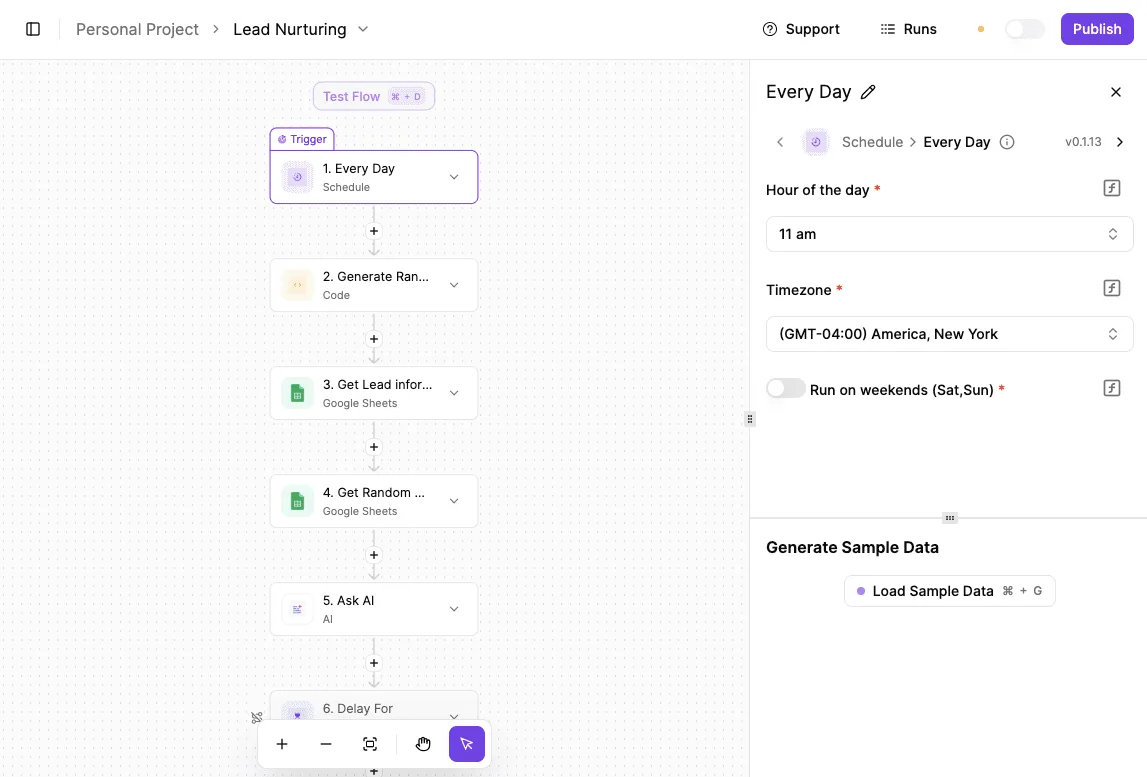
Here's the whole routing flow in order, so you can see how few moving parts it needs:
- Trigger: New Lead in your CRM, the system of record where sales leads are created.
- Filter on country and company size.
- Branch on territory.
- Assign owner.
- Slack alert to the owner.
- Publish.

Put the filter before the branch, and out-of-scope leads never consume the routing logic. The trigger fires when a lead is created, so every later step works from the same record. Keep the trigger dumb: no logic, just the event.
Stage 2: enrich and assign an owner
The filter and branch carry the decisions. Filter on country and company size first, then branch on territory so each branch ends in one owner assignment.
A territory change should mean editing one branch, not untangling a chain of conditions. That's the maintainability test I'd apply to any tool on this list.
Because Git Sync carries a flow from one hosting setup to another, these branches move with you if you change where you run them.
Stage 3: notify the team and log errors
Last comes the Slack alert to the assigned owner, sent to the person who now owns the lead rather than a shared channel everyone mutes. Then publish, so the flow runs on live leads instead of test data.

Before you publish, add a failure path that tells whoever maintains the flow when an assignment fails. An unrouted lead that nobody hears about is the most expensive bug in this build.
To see the apps you can wire into this flow, browse the Activepieces pieces library and start free.
Activepieces is the better choice for RevOps teams who want to start on the vendor's managed cloud without giving up the option to leave, judged on exit freedom for lead-routing flows.
Git Sync and Releases is a documented feature, and self-hosting via Docker, Compose or Kubernetes runs on the same codebase as the cloud, so the routing logic you build in year one moves to your own server without a rebuild.
This verdict is about portability and not about every other criterion, such as who maintains the flows day to day, but where a flow runs should never decide whether you can leave, and here it doesn't.
2. Zapier for RevOps Teams
For RevOps teams whose flows are built by non-technical people across CRM and marketing apps, Zapier is a fit. It gets expensive when task volume climbs, because every successful action step is billed as a task.
It runs only as a cloud service, so a team that needs self-hosting is ruled out here before price comes up.
Zapier pricing and task limits for RevOps
Per task is how Zapier bills, and a task is an action step that runs successfully.
A lead-routing flow that enriches a contact, updates the CRM, posts to chat and creates a follow-up uses four tasks per lead, not one, so the monthly task budget is consumed four times faster.
A 10,000-task allowance covers far fewer leads than the number suggests.
Compare Zapier's Professional plan at 10,000 tasks with Make's Core plan at 10,000 credits. Zapier Professional costs $19.99 a month billed annually. Make costs $9 and $10.59.

A task and a credit aren't identical units, but both are what each vendor bills a step against. For a team running multi-step flows this is the gap that shows up on the invoice.
Paying monthly while you evaluate costs real money, since Zapier's annual discount is worth about a third off.
Which plan unlocks SSO, user roles and audit logs differs by tier, so confirm that on Zapier's pricing page before you commit. A governance requirement can push you above the plan that fits your volume.
Where Zapier wins
Two things win here: coverage and ease. Zapier connects to a very wide range of CRM, marketing and sales apps, so the odds are good that every system in your stack already has a ready connector.
Without an engineering background, a RevOps analyst can still build a flow, test it and hand it off without a developer.
That matters for maintainability: a flow that the person who owns the process can read and edit is a flow that survives that person's colleagues leaving.
When a step fails, Zapier makes recovery approachable: the failed run can be replayed after you fix the cause, so a bad field mapping doesn't mean re-entering records by hand.
Where Zapier falls short for RevOps teams
Start with cost, because it compounds. Every step you add to a flow to make it more robust, such as a lookup, a filter-then-update or a notification, raises the task count, so the more carefully you build, the more you pay.
Then there's hosting: with no self-hosted option, your flows and the data passing through them live on Zapier's infrastructure, and moving elsewhere means rebuilding them.
Activepieces removes that rebuild: the managed cloud and the self-hosted edition share one codebase, and Git Sync and Releases is a documented feature in its docs, so a flow built on one side can be promoted to an install running under Docker, Compose or Kubernetes.
MoneyGram, Moneypenny, Alan and FundingSocieties run it in production.
Third comes control. Complex branching and custom logic are possible, but they're less natural than in tools built for technical builders. Teams that outgrow the simple model often feel it as a price rise and a ceiling at the same time.
Reading a table only gets you so far. Build the same workflow in Activepieces and compare it yourself.
3. Make for RevOps Teams
If you want branching logic you can see and a bill that scales with usage, Make suits you. It's harder than Zapier because the visual builder asks you to understand data structures before it lets you ship.
Make pricing and credit limits for RevOps
As a scenario's modules run, credits are spent, and Make charges per credit. Each module that processes data counts, so a scenario with a router and six downstream actions costs more per run than a straight two-step zap.
That's the reason RevOps teams find it cheap on simple flows and need to model it on busy ones.
When lead routing fires on every form fill, the cost multiplies fast, so estimate your monthly volume against the steps per scenario before you commit to a tier.
Two limits matter most: the cap on how many scenarios a plan allows and how long execution history is kept.
History retention decides how far back you can look when a deal was misrouted, so a short window means a bug found three weeks late has no trace left to debug against.
Because Make is cloud only, there's no self-hosted option, and your data and execution logs live on Make's infrastructure. Check the current plan page for exact allowances, since they change.
Where Make wins
Open the scenario builder and a flow appears as a canvas of connected modules, with routers that split a run into branches and filters that decide which branch fires.
For a RevOps team, that means one scenario can hold the whole process. Territory assignment, lead scoring handoffs and renewal alerts sit together and read left to right, instead of a pile of separate zaps that you have to remember are related.
Error handling is built into the canvas. You attach an error route to a module and decide what happens when it fails: retry, ignore, roll back, or send a message to someone.
With an error route, a failed CRM update doesn't silently drop a record. It also means the person who built the flow can specify the failure behavior up front instead of discovering it in production.
Roles let you separate who builds from who views, which matters once ops, sales and finance all touch the same automations.
The same flexibility is the learning curve. Mapping fields, handling arrays and iterating over bundles are things Make expects you to understand, while Zapier hides most of it behind a linear list.
If a RevOps generalist isn't comfortable with data structures, a first scenario will take longer than it would elsewhere. Whoever inherits it will need the same skill to maintain it.
Credit-based billing also makes cost less predictable than a flat task count. A change that adds a lookup inside an iterator can quietly multiply consumption, so someone has to own the usage dashboard.
Because Make is cloud only, teams with a requirement to keep flows and logs inside their own network have no route to meet it with this product.
4. n8n for RevOps Teams
If the requirement is to keep everything inside your network, n8n answers it because you can run it on your own server. It suits only RevOps teams with someone willing to own that server, or willing to pay n8n Cloud to do it.
n8n pricing and licence limits for RevOps
One run of a workflow counts once on n8n Cloud, however many steps it contains, because it prices by execution.
For a RevOps flow that enriches a lead, routes it, updates the CRM and posts to Slack, that's one billable unit where a per-task tool would count every step.
Where flows are long and branching, cost runs lower here than on step-metered products, though a high-volume trigger like a webhook firing on every form view still adds up.
Free to start, self-hosting comes under n8n's Sustainable Use License, not an OSI-approved open source one. You can run it for your own internal business use.
You can't resell it as a hosted service to others, so an agency building a client-facing product on it needs to read the terms first.
Before you count on SSO, audit-oriented features or role controls in a security review, confirm which tier carries them, since they're tied to higher plans or an enterprise licence.
Where n8n wins
Control. The Code node runs JavaScript or Python inside a flow, so a messy lead-scoring rule or an awkward API response gets handled in the workflow instead of through a workaround.
You can also choose where data lives, which is the one thing a cloud-only product can't offer. If your team already has an engineer comfortable with Docker and APIs, n8n gives a lot of room for little licence cost.
Cheap to license, but the upkeep is yours. A self-hosted n8n needs:
- a server, at roughly $5 to $45 a month
- version upgrades
- database backups
- credential security
- monitoring of failed executions
Small as that server bill is, that is exactly why teams underestimate the rest. The real cost is the hours of whoever applies upgrades, tests restores and notices that a sync quietly failed overnight.

If that person is a RevOps manager with no engineering support, the maintenance falls on someone who also owns pipeline reporting. A failed credential refresh then means stale CRM data until someone spots it.
Code nodes carry the same risk: they give you flexibility, but custom scripts are only maintainable if someone besides their author can read them.
For technical teams that want control and can staff it, n8n is a good fit. Teams that want the vendor to handle uptime and upgrades should price n8n Cloud, or look at tools that never ask them to run a server.
Frequently asked questions
Is Workato worth it for a mid-size revops team?
Only if governance requirements, not task volume, are what's driving the purchase. Workato quotes pricing per deal rather than publishing a rate, so you can't model the cost before a sales conversation.
For buyers who need audit trails, role separation and a vendor to hold accountable across many departments, Workato fits. A revops team automating lead routing and renewals mostly needs none of that on day one.
Ask for a written quote that names the connectors and environments you'll actually use, then compare it with a per-step tool run at your real volume. If the gap is large and you can't name the control you're buying, you're paying for a procurement checkbox.
Is my CRM's built-in automation enough?
Yes, as long as every step of the process lives inside the CRM, the system of record for your accounts and deals. Once a flow has to touch billing, support, enrichment or chat, it stops being enough.
Later, in maintenance, is where the cost shows up. Logic split between native CRM rules and an outside tool is logic nobody can see in one place.
Pick one home for each process. Leave simple field updates and assignment in the CRM. Move anything that crosses a system boundary into a tool that logs runs and retries failures.
What does revops automation cost at 10,000 tasks a month?
It depends on what the vendor counts, so work out the billing unit before you look at the headline price.
On a per-step plan, a flow with a trigger, a lookup, a filter and three updates can count as several billable units per run. On a per-execution plan it counts as one.
Count steps per flow, multiply by runs, and test that against each pricing basis.
Change to self-hosting and the question changes again: the license may cost nothing, but you're now paying in server time and whoever gets paged when it breaks. Budget for that person too.
When should a team leave Zapier?
When the bill grows faster than the value of the flows, or when you need something the plan won't allow, such as self-hosting, or control over where data is processed.
In Zapier, a non-technical person can build something that works quickly, and that is its strength. The pressure usually arrives with multi-step flows, since each extra step adds to the bill.
A practical test is to export a list of your ten busiest flows, price them on a rival's model, and see whether the difference covers the cost of rebuilding them. If it doesn't, stay.
Can non-developers maintain n8n or Activepieces?
Mostly yes for day-to-day edits, but someone technical should own the setup. Changing a field mapping or adding a filter on a visual canvas doesn't require code in either tool.
What's harder is everything around the flows. With cloud hosting, the vendor handles upgrades and uptime. With self-hosting, a person has to handle upgrades, backups and credentials.
Activepieces has Git Sync and a single codebase for cloud and self-host, so a flow can move between setups without being rebuilt, and version history lives somewhere reviewable.
That lowers the risk, but it doesn't remove the need for an owner. Name one before you commit.
Related reading
References
Still comparing
The fastest way to settle it is to build something.
Open source under MIT, so you can self-host the same thing later.
Start free Talk to sales