
Open Phone API (Now Quo): Access, Endpoints and Limits

Oct 31, 202614 min read
Open Phone API and Quo's changes
What the Open Phone API is
The Open Phone API is Quo's REST API for messages, call records, contacts and webhooks, authenticated with a single API key.
Anything the phone app does with those four things, your server can do too, whether it's a script or Activepieces, which has 746 integrations and an MIT-licensed core, so you'll almost certainly find support for any tool you need.

Your server sends one credential, the API key, to Quo, and Quo exposes four surfaces behind it.
That's why the API is easy to start with, and why a leaked key opens everything.
OpenPhone is now Quo: what stayed the same
Only the name changed. OpenPhone, the company that built this phone system, is now called Quo.
The rename touched the product and the docs but not the shape of the API: it's still REST, still authenticated with a key you generate in your workspace, and still organized around the same four resources.
If you land on an older tutorial, forum answer or sample code that still says OpenPhone, treat it as describing the same API under its former name, but confirm details against Quo's current developer docs before you copy anything.
Sources and verification for Quo API claims
As of 31 October 2026, the claims here come from Quo's own pages.
Where the docs are silent, the article says so instead of guessing. Quo can change any of this after that date, so re-check anything your production system depends on.
Everything below works on Activepieces' free plan. Start without code or a credit card.
API access and key generation
Getting a key depends on two things the docs tie to your account: the plan your workspace is on and your role in it. Either can change, as the previous section warned.
Plan and role requirements for API access
Nothing will be there to click for a teammate with a standard seat, because only a workspace Owner or Admin can create a key. Plan and role both gate API access.
If the API section is missing from your settings, check your role first, then your plan.
I'm not quoting a plan tier here, because the docs' wording is the only version that counts. Read it on the day you build and note the date in your own runbook.
Steps to create a Quo API key
Quo stops helping once the key appears on screen, so the last three steps are yours to do. The sequence below shows the whole path from a blank account to a working credential.
- Confirm your plan includes API access and that you hold the Owner or Admin role.
- Open workspace settings and go to the API section.
- Generate the key.
- Copy it straight into a secrets manager.
- Send it in the
Authorizationheader on every request. - Set a rotation date.
Sending and storing your API key securely
Do the copy in step four immediately. Treat the key as visible once, and plan to generate a new one if you lose it.
Put the key in the Authorization header and nowhere else, never in a query string, which ends up in server logs. Keep it out of the repository and out of front-end code, where anyone can read it.

For rotation, pick a date when you create the key and put it on a calendar.
Open Phone API endpoints available today
Behind that orphaned key sits a small set of resources: messages, calls, contacts, conversations, phone numbers and webhooks, with far more reading than writing. The table below shows what each resource lets you read and write, and where the documented limits or gaps sit.
| Resource | Path | Reads | Writes | Documented limits or gaps |
|---|---|---|---|---|
| Messages | /v1/messages |
List, fetch | Send | Cap on recipients per send |
| Calls, recordings, summaries | /v1/calls |
List, fetch, recordings, summaries | None | No call placement |
| Contacts | /v1/contacts |
List, fetch | Create, update, delete | Paginated lists |
| Conversations | /v1/conversations |
List | None | Paginated lists |
| Phone numbers | /v1/phone-numbers |
List | None | Numbers are managed in the app |
| Webhooks | /v1/webhooks |
List, fetch | Create, delete | Per-event registration |
When you send a text, you're using the one outbound action that matters, and it carries a recipient cap. Calls are read-only: you retrieve history, recordings and summaries, but you can't start a call, so any "click to call" feature has to live elsewhere.
If you want full create, update and delete, contacts are the only place to get it. Conversations are a read-only index.
Both return results in pages, so a loop that reads one page will quietly miss everyone after it.
To route messages or attribute calls, you can look numbers and users up. That's all you can do with them: provisioning and assignment happen in the Quo app, not through the API.
You register webhooks per event type, so a missed registration means silence rather than an error. The docs say little about retries or delivery guarantees, which is why verification and idempotent handling belong in your first build, not your fix list.
Your first working API request
Start with two curl calls: a read to prove the key is good, then a POST that sends one text. Neither takes more than a few lines.
Verify your API key with a read request
List your phone numbers before you send anything:
curl https://api.openphone.com/v1/phone-numbers \
 -H "Authorization: YOUR_API_KEY"
Don't add a Bearer prefix: the key goes in the Authorization header as-is. Adding one's the commonest cause of a rejected first call, and a rejection here costs you nothing.
The same response gives you the ID of each workspace number, which you need for the next step. Copy the ID of the number you want to send from.
curl -X POST https://api.openphone.com/v1/messages \
 -H "Authorization: YOUR_API_KEY" \
 -H "Content-Type: application/json" \
 -d '{
 "content": "Your appointment is confirmed.",
 "from": "YOUR_PHONE_NUMBER_ID",
 "to": ["+15555550123"]
 }'
Even for one recipient, to's an array, and the number must be in E.164 form: a plus sign, the country code, then digits with no spaces, dashes or brackets.
Reading the API response for a sent message
Once the call succeeds, a data object describes the message you just created, including a status that starts out as queued. Queued means the API accepted the request, not that the handset received it. Delivery status arrives later, which is where webhooks come in.
Once this works, the same two calls can sit inside any visual flow builder. The flow below collects a form submission, structures it with an AI step and writes a row, and a send-message step slots in after that.
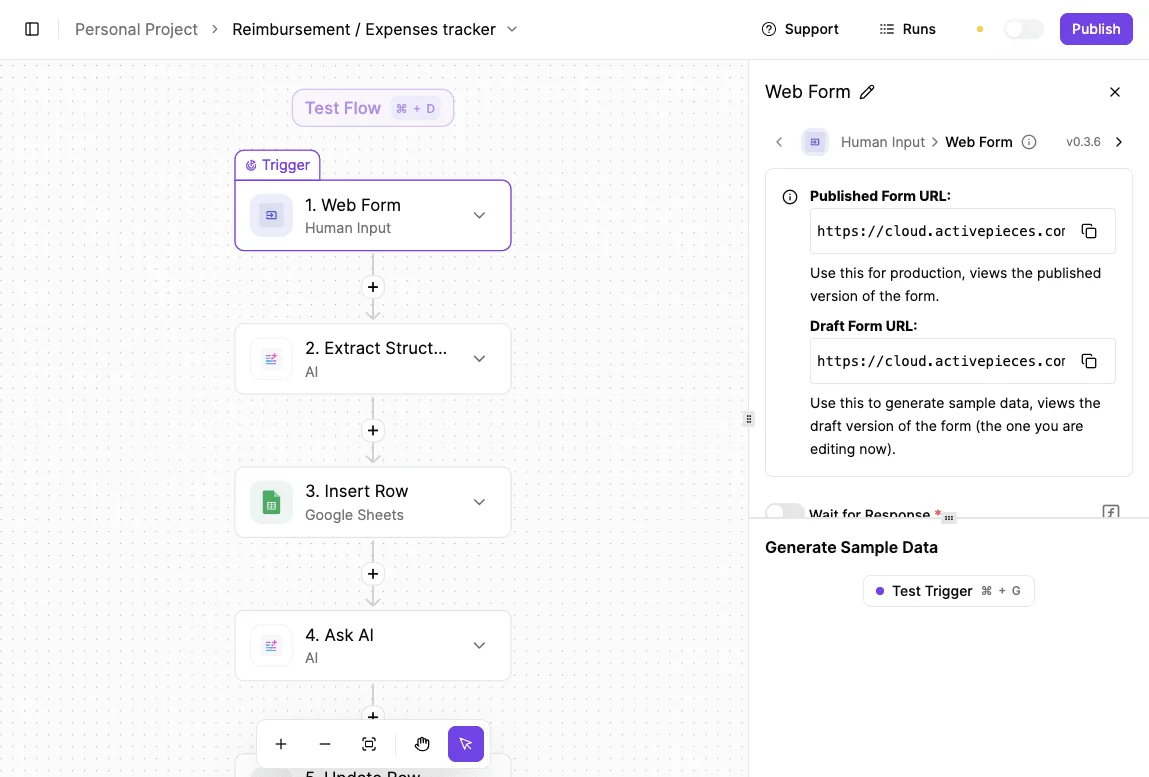
Easier to see it running than to read about it: set it up free, no card.
Pricing per unit and rate limits by tier
At the send-message step, the bill and the rate limit start to apply.
No dollar figures appear in this section. Quo's docs confirm the 10 requests-per-second limit, but its pricing page didn't confirm any costs as of 31 Oct 2026.
Plan prices and what the API costs
Quo prices its tiers per user per month, and the price differs between annual and monthly billing. Read the pricing page for the current tier names and figures.
Then check whether API access is listed as a line item or as a feature of a tier. If the page does not say, treat that as unanswered and ask support in writing, so you have a timestamped reply to point to later.
Per-message and carrier costs for API texts
Nothing about a seat price tells you what a thousand automated messages cost, because texting's metered separately. Confirm three things before launch: the charge per message segment and whether API-sent texts are charged differently from texts typed in the app.
Also confirm whether US and Canada numbers need carrier registration with its own fees.
10DLC is the US system where businesses register their brand and texting use case with carriers before sending business texts from standard 10-digit local numbers. Traffic from unregistered numbers gets filtered, sometimes silently after the API has already returned success.
Registration carries fees and an approval wait, so start it early.
When a long message splits into several segments, each one can be billed, so a flow that sends one confirmation per form can cost more than its message count suggests.
Documented rate limits and tiers
The docs state a limit of 10 requests per second per key, and I found nothing showing that it varies by plan. Don't assume higher tiers raise it.
Build as if the limit's fixed and low: back off when you get a rejection and queue sends. Log every rejected request with its time.
Common Open Phone API errors and fixes
Expect the same seven failures in your logs.
The table gives the cause and the fix for each, so match a status code to its row before debugging anything else.
| Response | Cause | Fix |
|---|---|---|
| 400 | Number not in E.164 form | Normalise before sending |
| 401 | Missing or wrong API key | Check the key |
| 403 | Valid key, no permission for that resource | Check the key's access and the number ID |
| 404 | Wrong phone number ID | Check the number ID |
| 429 | Over the rate limit | Back off and queue |
| Carrier-blocked text | US carrier filtering of unregistered traffic | Register for 10DLC |
| Duplicate webhook | Retried delivery | Make handlers idempotent |
Fix auth and input errors (401, 400 and 404) at the source, not with retries. Retrying a 401 only repeats the failure.
429: backing off under the rate limit
Written against Stripe's headroom, code will hit Quo's ceiling ten times sooner: Quo allows 10 requests per second, and Stripe's live mode allows 100.

HubSpot's 11 is nearly identical, so a HubSpot sync loop carries over almost unchanged. Slack's Tier 4 at 1.67 and GitHub at 1.39 are tighter, so Quo's cap isn't unusually harsh.
At 10 per second, a 1,000-contact import takes 100 seconds at best, so you must wait at least 100 seconds for any 1,000-contact import to complete. Put calls in a queue, and on a 429 wait with exponential backoff.
Getting a 200 from the API means Quo accepted the message, not that a carrier delivered it. Unregistered US business texting's filtered, so complete 10DLC registration before launch.
Expect webhooks to arrive more than once. Store each event ID and skip repeats, or customers get two replies.
Verify the signature before acting on any payload, which means recomputing it over the raw request body with the signing secret from Quo's docs and comparing the result to the signature that arrived.
Expect webhooks to arrive more than once. Store each event ID and skip repeats, or customers get two replies.
Calling the Quo API from Activepieces and other tools
When no-code tools replace the Open Phone API
Verification's the part a no-code tool may hide from you. For triggering a text or logging a call from another app, a native Quo integration or Zapier will usually do the job without code.
One event in, one API call out, a person nearby to notice a failure: that shape needs no retry logic.
Start with the native integration if it covers your case, because it's the one place you don't manage a key yourself. Move to Zapier or Activepieces, which has 746 integrations, when the trigger lives in an app Quo doesn't connect to.
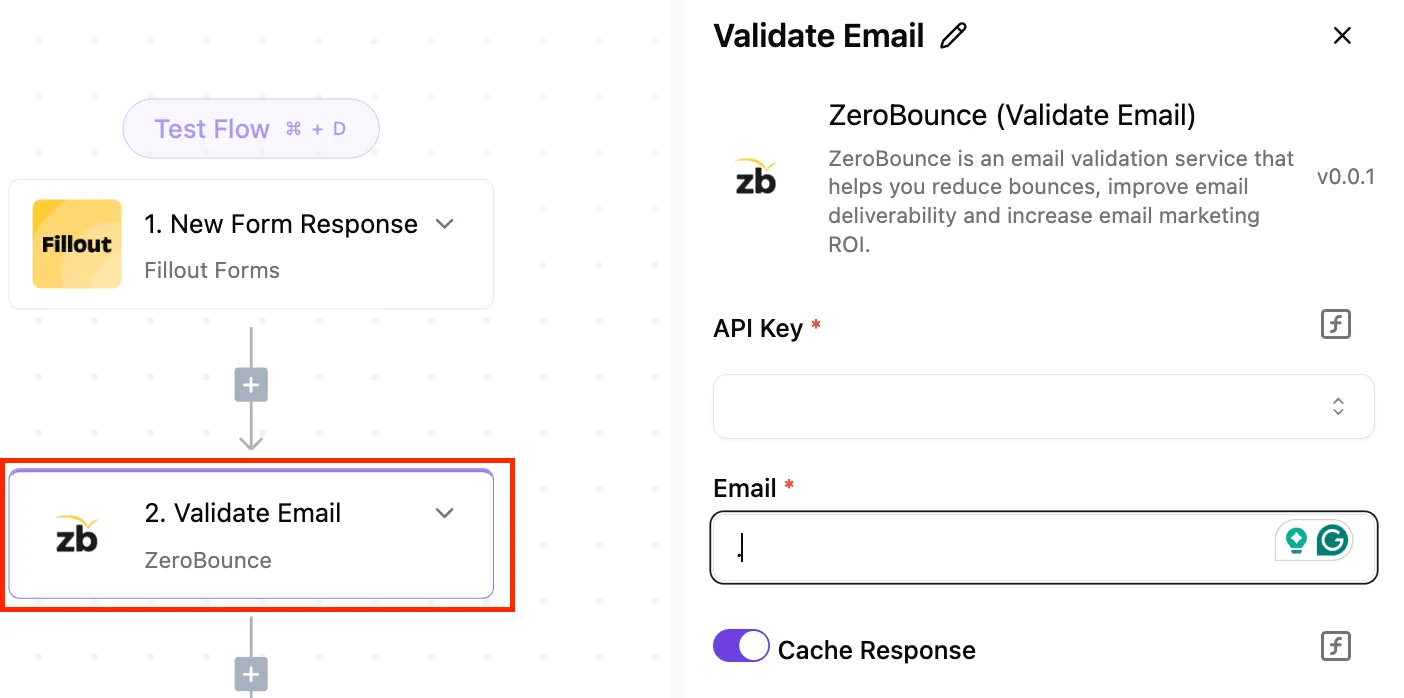
Access Quo using the HTTP step
In Activepieces, the generic HTTP step is the dependable route to Quo, and it matters here because of the one secret this article keeps returning to.
Activepieces can route connection secrets to your own secret manager instead of its database, on self-hosted and on the enterprise cloud tier, and the secret-manager integration sits in the enterprise feature set beside SCIM, custom RBAC, SSO/SAML and audit logs.

Point a self-hosted instance at your secret manager and the Quo key won't be in the Activepieces database at all, which is the arrangement MoneyGram, Moneypenny, Alan and FundingSocieties can choose too, as they run Activepieces in production.
Your Quo key can then live where step four put it, and no vendor, us included, holds it.
Otherwise, the HTTP step sends exactly the request you describe. Your API key goes in the header, the JSON body's yours, and the phone number must already be in international format. The step won't repair it.

Nothing in the step knows the API's rate limits either, so a burst of triggers becomes a burst of requests. Treat the step as a delivery truck: it carries what you load and reports what came back.
Visual tools run out where the earlier habits in this article begin. The signs that you've outgrown them:
- You need control over retries and backoff, not a fixed repeat.
- You must verify webhook signatures before acting on a payload. Your volume approaches 10 requests per second, where one unthrottled flow can start returning rejections, so your service cannot tolerate clients without request throttling.
- The connector lacks an endpoint you need.
- You need audit logging of what was sent and what came back.
Any one of these justifies a small service of your own. Until then, the HTTP step's a reasonable place to learn the API's behavior.
Frequently asked questions
Is the Open Phone API free?
You can't buy the API as a separate product: you generate a key inside a Quo workspace, so you need a workspace on a plan that exposes API access.
Check the pricing page for your plan before building, because a key that stops working after a downgrade's an outage, not a billing note. Source: Quo's API documentation and pricing page, checked 31 Oct 2026.
Is the old OpenPhone API URL still working after the Quo rebrand?
Use the base URL printed in Quo's current documentation, not the one in an older tutorial or your own old code.
Whether the legacy address keeps answering's a decision Quo can change without telling you, so a script that works today proves little. Put the base URL in configuration, not in code, so a change's one edit. Source: Quo's API documentation, checked 31 Oct 2026.
Can I receive incoming texts and calls through the API?
Yes, through webhooks. You register an endpoint, and Quo posts events for messages and calls to it, so you don't poll.
Treat each delivery as untrusted until you've verified its signature, and expect the same event to arrive more than once. A handler that sends a reply on every delivery will eventually text a customer twice. Source: Quo's webhook documentation, checked 31 Oct 2026.
Can I use the API to make outbound calls?
Not as far as the documentation shows. The endpoints cover sending messages and reading call records and contacts, and none places a call.
If your product needs to start a call, plan for the user to dial from a Quo app and use the API to log or react to it afterward. Source: Quo's API reference, checked 31 Oct 2026.