
Resend Inboxes: Draft and Agent API Endpoints (2026)

Oct 23, 202610 min read
Resend Inboxes is a new inbox API from Resend, the email-sending company. Its docs are current as of 2026-10-23. It gives automations a mailbox they can read and reply from, with draft and agent endpoints.
For teams running flows in Activepieces, which has a Resend integration built around sending, the question is which inbox plumbing it replaces.
It sits on top of Resend inbound email. The companion GitHub repository describes itself as the "framework-agnostic core of a shared inbox on top of Resend inbound email," and it's a PHP library.
In practice, you're not locked to one web framework, but the repository's code is PHP, so check that fits your stack before you plan around it.
Resend Inboxes release: who shipped what and when
Sources for Resend Inboxes facts and code
Before you build on any of this, know where it comes from: Resend's own docs and the ojessecruz/resend-inbox repository. To obtain the code, go to the repository, and read its README for the install route before you build a workflow around it.
This article quotes an install command for the repository, but its maker is not verified.
Anything you read later may have moved, because the product is new. That is why the check date matters.
Put plainly, the product is Resend Inboxes, made by Resend and documented in Resend's docs.
Those five items are all this article treats as settled. The next section covers what the inbox replaces in a typical automation.
Everything below works on Activepieces' free plan. Start without code or a credit card.
Inbox API for human-controlled AI automation
When software writes a draft, a person still decides whether it goes out. That is what the inbox becomes. The alternative is the automation sending on its own or dumping text somewhere a human has to copy from.

Resend's docs name the pieces that make this work: a draft endpoint for creating and holding messages, and an agent endpoint for updating the agent that works against the inbox.
In practice the duties split cleanly. An AI agent or a workflow tool calls create-draft and the message lands in the inbox, unsent.
Once it lands, a person opens the inbox, reads what the automation produced, edits it if needed, and sends it. Nothing in that path requires the automation to hold the final say.
The create-draft and update-agent arrows carry labels, and a person at a desk reviews before anything leaves.
Take from it that there's one review point, not one per tool: whatever you wire in, the drafts converge on a single place.
Resend Inboxes draft review point in automation jobs
When you quote an automation job, that single place is what to read closely. Check which of your current steps write straight to a send action, because those are the ones the draft endpoint can interpose a human on.

Check, too, whether your agent's behaviour needs changing as the work changes, since update-agent is the documented route for that.
Next is the list of things this inbox replaces in a typical automation, and which parts of your current wiring stay put.
What is measurably new in Resend Inboxes
Look at what is new and you find two documented endpoints: one that creates a draft inside an inbox, and one that updates the agent configuration of an inbox. Everything below stays within what Resend documents on those pages.
Read the blank spots as limits on what you can wire today. The table shows what each page covers and where the pages stop.
| Item | What it does | Parameters shown | Source | Checked 2026-10-23 |
|---|---|---|---|---|
| Create-draft endpoint | Prepares a message before sending it | Resend client initialised with an API key | create-draft | Yes |
| Update-agent endpoint | Sets the instructions, tone and actions the agent follows on the inbox's threads | Instructions, tone, actions | update-agent | Yes |
| GitHub repo | Framework-agnostic PHP library for a shared inbox on Resend inbound email | composer require ojessecruz/resend-inbox | resend-inbox | Yes |
| Pricing | Not stated on pages read | None | None | Not stated on pages read |

Prices and plan limits checked against resend.com and resend.com and github.com and activepieces.com on October 23, 2026.
Because the ojessecruz/resend-inbox repository exists as a PHP library, you can read its code alongside the API reference.
When a workflow step needs to write a reply and leave it unsent, a draft is what lets you prepare that message before sending it. A person or a later step can then review it first.
To change how the agent handles the inbox's threads, change the instructions the update-agent endpoint carries, through the API, not the workflow logic. Keep those instructions under version control on your side.
Budget nothing until Resend publishes pricing and availability; the pages read state neither.
Easier to see it running than to read about it: set it up free, no card.
Connect Resend Inboxes in Activepieces workflows today
The Activepieces Resend integration lists 22 actions and 1 trigger, and where an integration doesn't exist you can generate one with AI and add it privately to your own instance, with the credentials held centrally as a connection.
If you want an agent to write a draft reply instead of sending mail directly, so a person reviews it first, that is what Resend Inboxes, Resend's inbox API for AI automations with draft and agent endpoints, gives you.
The Resend piece on Activepieces lists 22 actions and 1 trigger. That's a sending-oriented integration.
Claude, ChatGPT, Cursor or an agent you built can therefore call the same Send action your flow uses.
PR #16610 moved the integration from 0.5.2 to 0.6.0 and grouped To, Cc, Bcc and Reply To into one Recipients control in Send. Recheck recipient mappings in any existing flow after upgrading.
Build the smallest flow first, with these steps:
- Create a Resend API key in your Resend dashboard.
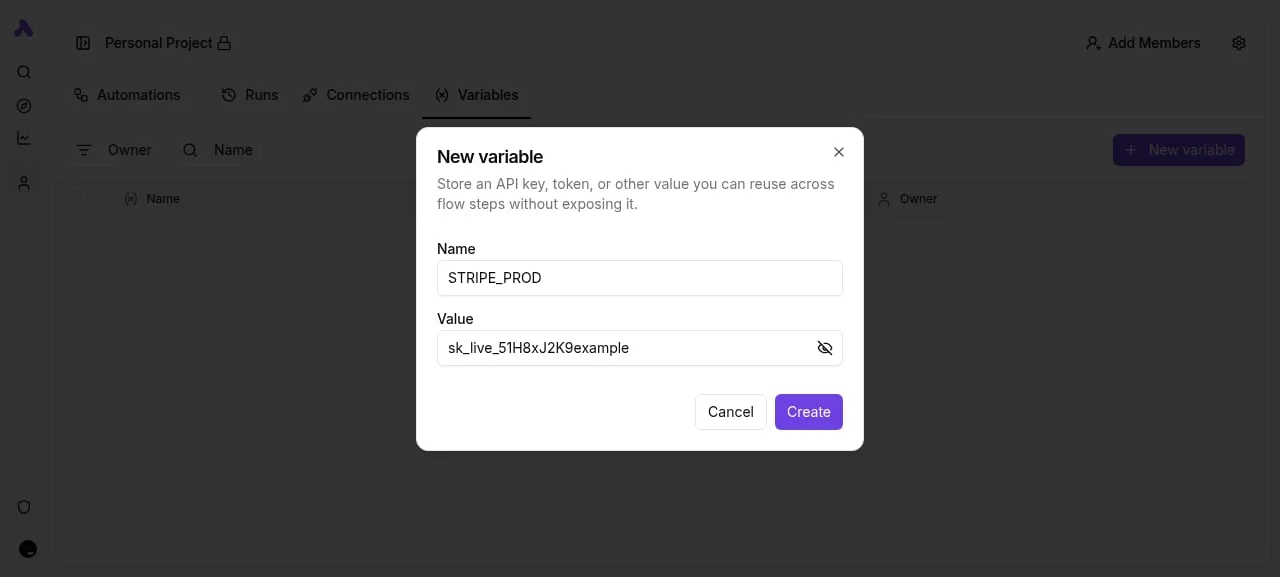
- Store it in Activepieces as a connection or secret, never typed into a step.
- Add a trigger that starts the flow, such as a webhook or schedule.
- Add a step from your privately added integration that calls create-draft, using the URL and body fields from Resend's documentation.
- Run a test, then open the draft in Resend and check that every mapped field arrived.
If a mapping is bad, it costs you a deleted draft rather than a sent email, because a draft is reversible. Only after that passes should you add agent endpoints.
No Inboxes-specific integration or test has been published by Activepieces, and Resend lists Inboxes as new.
Everything above rests on a generated integration and Resend's own documentation.
Resend Inboxes cost and speed compared with alternatives
Of the four routes compared here, Resend Inboxes is the one where drafting happens inside the mail service. The price isn't yet stated.
No benchmark was run; the table rests on what each vendor documents and on how each route is built.
| Option | Setup effort | Where drafting happens | Vendor-stated price |
|---|---|---|---|
| Resend Inboxes | One HTTP step per endpoint | Resend's draft and agent endpoints | |
| Shared mailbox via email trigger | Trigger plus parsing and reply steps | Your automation's AI step | |
| Mail provider's own API | Auth setup and message handling | Your code, then the provider's draft call | |
| Hand-built draft handling | Storage, state and review you write yourself | Your own code and database |
Because none of these routes has a published Inboxes-style price, the price cells are blank, so budget comparisons start from sending cost, not inbox cost.
There is one price ladder, and it covers sending on the Scale plan, not Inboxes. According to Resend's pricing page, 100k emails a month costs $90 and 200k costs $160, which means doubling your volume costs less than double the price.
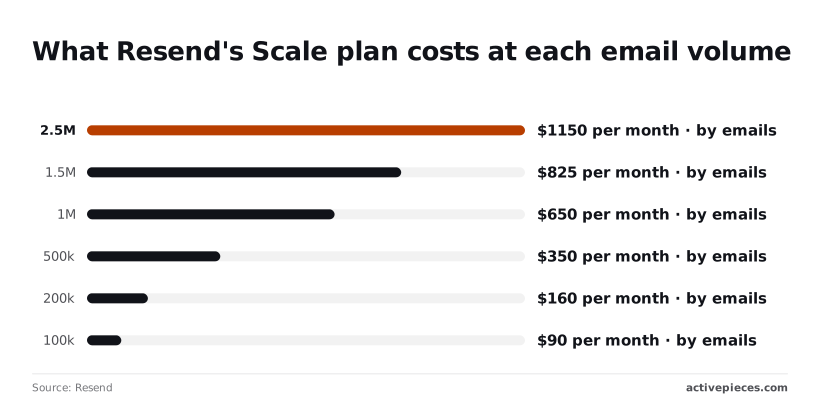
Treat that gap as the open item to confirm with Resend before committing.
What to watch next with Resend Inboxes
Watch five places: Resend's changelog and docs, the GitHub repository's releases and issues, and the integration page for the workflow tool you use. That gap will close or stay open there first.
Expect the endpoint names and field behavior to move. Resend Inboxes is a new inbox API that gives AI automations draft and agent endpoints, and it's new as of the pages read.
Pin your workflow to what the docs state today and not to what a blog post implies.
Confirm plan requirements and availability on Resend's own docs pages and its changelog, where the product is documented and announced, before you build. Those are the authoritative places. Anything a third party says about access is secondhand until it matches those pages.
How to re-check Resend Inboxes updates yourself
Repeat the check to see what's changed since 2026-10-23. The sources are the Resend changelog, the Resend docs pages, the GitHub repo releases, the repo issues, and the Resend integration page of your workflow tool.
Take from them a monitoring routine: the changelog tells you what shipped, the docs tell you how it behaves, and the repository tells you what's broken.
For a contractor-style read of the spec, open issues matter most. A field that the docs promise and an issue reports as failing is the one to test first, before any live mail depends on it.
Frequently asked questions
Is Resend Inboxes free to use? Not stated. The Resend pages read on 2026-10-23 describe the inbox API with its draft and agent endpoints, but give no pricing or free-tier terms for Inboxes.
Don't budget a workflow around it until the pricing page says so, and check whether Inboxes usage counts against your existing plan limits.
Can I use Resend Inboxes without writing code? Not through anything the docs describe. The documented surface is an API, so a no-code route means calling those endpoints from an automation tool's generic HTTP request step.
The docs show no point-and-click builder for Inboxes, so you still have to map the fields and handle authentication yourself.
Repository and integration questions
Who made the resend-inbox repository on GitHub? Not stated in the Resend pages read for this integration. Check the repository's owner on GitHub before you rely on it.
Unless the owner is Resend's own organization, treat it as a third-party project that may not match the documented API, and test it the way you would test any unverified code.
Does a workflow platform's Resend integration support Resend Inboxes? Not stated.
The Resend integration lists 22 actions and 1 trigger, and the pages read don't say whether a native Inboxes action exists there.
Look in the tool's own catalogue for the action by name. If it isn't there, fall back to an HTTP request step against the documented endpoints.