
RingCentral API Limits, Auth and Errors for Developers

Nov 22, 202616 min read
The RingCentral API is a REST platform that lets your code place and control calls, send texts and faxes, post to team chat and manage accounts, whether you call it directly or wire it into a workflow tool such as Activepieces.
RingCentral API access is the set of requirements for calling the API in production: registering an app with permission scopes, authenticating with OAuth tokens that expire, staying within rate limits, and handling error responses.
Access starts with a free developer account at developers.ringcentral.com, where you create an app in the developer console and choose its permissions.
Build calls and messages with RingCentral API
What you can build with the RingCentral API
When a rollout starts with one team and one use case, usually a sales or support group wiring call and SMS events into their own tools, that team tends to be the first to over-request permissions, because the console lets you tick scopes freely.
The list below shows the five API areas, and the practical point is that each one maps to a distinct scope, so you can start with the narrowest and add others later.
- Voice and call control: places calls, answers, transfers, holds and records, and reports call activity.
- SMS and messaging: sends and receives text messages and reads message history.
- Team Messaging (Glip): posts to chats and teams and manages them, which suits notifications.
- Fax: sends and retrieves faxes.
- Account and extension administration: reads and changes users, extensions and account settings.
Never let a workflow that only texts hold admin scope: each area is a separate set of endpoints with its own permissions. Treat the scope list as your first template: reuse it across apps and you cut review time.
RingCentral API documentation sources and review date
On 22 November 2026 this section was written against the structure of the developer documentation at developers.ringcentral.com.
It treats the limits as defaults, because they can be customized and vary by app. Where later sections give such figures, read them against the live docs on the day you ship.
If you'd rather not have every builder keep their own keys, Activepieces holds the RingCentral credentials centrally as a connection, so every flow points at one place, and its MIT-licensed core is public on GitHub, where the 750 integrations can be counted in the monorepo, so you aren't building them yourself.

Next, the access steps and where each setting lives.
Everything below works on Activepieces' free plan. Start without code or a credit card.
Get a RingCentral developer account and app credentials
You register at developers.ringcentral.com, create an app in the developer console, and copy its client ID and secret.
The order below matters because app type and scopes are fixed early and are tedious to change later. The steps run from sign-up to graduation, so a reviewer can see which stage a team has reached.
- Sign up at developers.ringcentral.com.
- Create an app from the console.
- Choose the app type and the auth type.
- Select the permission scopes the app needs.
- Copy the client ID and client secret.
- Test in the sandbox before graduating the app to production.
Starting with the environment that steps 1 and 6 depend on, each choice is explained below.
RingCentral sandbox versus production accounts
Nothing you send in the sandbox reaches real customers or real phone lines, because it is a separate environment with its own test accounts. That makes it the right place for a first rollout team to break things.
Treat it as a gate: an app shouldn't touch production until its calls behave in the sandbox.
Before you graduate an app, read the current graduation page in the docs on the day you ship and record that date in your runbook. RingCentral sets the requirements and they can change.
Choosing an app type and auth flow
Pick the app type that matches who will use it. A server-side automation that acts without a person present needs a different auth flow from an app where each user signs in and consents.
Choosing wrong means rebuilding the credential setup, so settle this with the team that owns the integration before you create the app. The console only offers the auth types valid for the app type you chose, which is why step 3 is a single decision.
Permission scopes to request
Request only the scopes the workflow uses. Every extra scope widens what a leaked secret can do, and a narrow request is easier for a security reviewer to approve.
Scopes are set on the app, and tokens only carry what the app declared, so a call that fails with a permission error usually means a missing scope. Confirm current scope names and plan requirements in RingCentral's docs on the date you ship.
Authenticate with JWT or OAuth and refresh tokens
Use JWT when one account's service runs unattended, use authorization code when each user grants access, and in both cases refresh before expiry and keep credentials on the server.
The table below compares the three flows; the practical takeaway is that the choice depends on who's logging in, while the refresh habit is the same everywhere.
| Best suited for | User interaction | Access token lifetime | Refresh token lifetime | Refresh handling | |
|---|---|---|---|---|---|
| JWT | Unattended jobs on one account | None after setup | Short; confirm in docs | Not the mechanism | Exchange the JWT again |
| Authorization Code | Multi-user apps with a server backend | Login and consent per user | Short; confirm in docs | Finite; confirm in docs | Swap the refresh token, store the new one |
| Auth Code with PKCE | Mobile and browser apps that cannot hold a secret | Login and consent per user | Short; confirm in docs | Finite; confirm in docs | Same as authorization code |
Because each flow ends at the same token endpoint, a rollout can standardise one shared token-handling template instead of three.
For a nightly call-log export or a sync that posts to a CRM, teams adopt the JWT flow first. A credential is generated once in the developer console, and the service exchanges it for an access token with no human present.
The team that breaks guardrails first is usually the one that pastes that credential into a script on a personal laptop, so put it in a secrets store from day one.

Where many people connect their own RingCentral accounts, authorization code is the fit. Each one signs in and consents, and your app receives tokens scoped to that user.
Choose PKCE where the client can't keep a secret, such as a mobile or single-page app. Request only the scopes the feature needs.
Because access tokens are short-lived by design, and refresh tokens expire too, a user who has been idle long enough must reauthorize. Read the current lifetimes from RingCentral's docs on the date you ship.
Always store the newest refresh token returned, because the old one may stop working, and alert on refresh failures so they surface before users notice.
Your first RingCentral API request
Two steps get you a working call: exchange your app credentials for a bearer token, then send that token to a read-only endpoint on the sandbox host before you ever touch production, so you can't reach production without first proving it works in sandbox.
Get an access token
POST to /restapi/oauth/token on the sandbox host, https://platform.devtest.ringcentral.com. Send an Authorization: Basic header built from your client ID and secret, with a form-encoded body. For server-to-server work, use the JWT grant type and pass your signed JWT as the assertion.
Enable the scope you need, such as ReadAccounts, in the developer console first, or the token won't carry it. Verify the current grant types and scope names in the quick start on the day you ship.
Call a RingCentral API endpoint with a token
Send GET /restapi/v1.0/account/~/extension/~ with Authorization: Bearer <token>. The tilde means "the account and extension this token belongs to," so you need no IDs. Swap the host to https://platform.ringcentral.com only after the sandbox call works, because production credentials are separate.
If you'd rather not hand-build these headers, there are official SDKs. On GitHub, JavaScript leads with 72 stars, so it's the most-watched and the likeliest to have answered questions already.
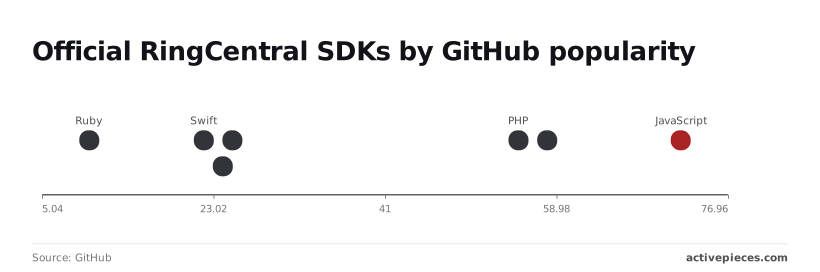
Python (58) and PHP (55) follow closely. .NET (25), Java (24) and Swift (22) are far smaller, so expect fewer community examples and plan to read the source.
Read the response
When a call is healthy, it returns HTTP 200 with a JSON body describing your extension. The run below shows that shape: a POST carrying an Authorization header, answered with status 200 and "OK" in 1271ms.
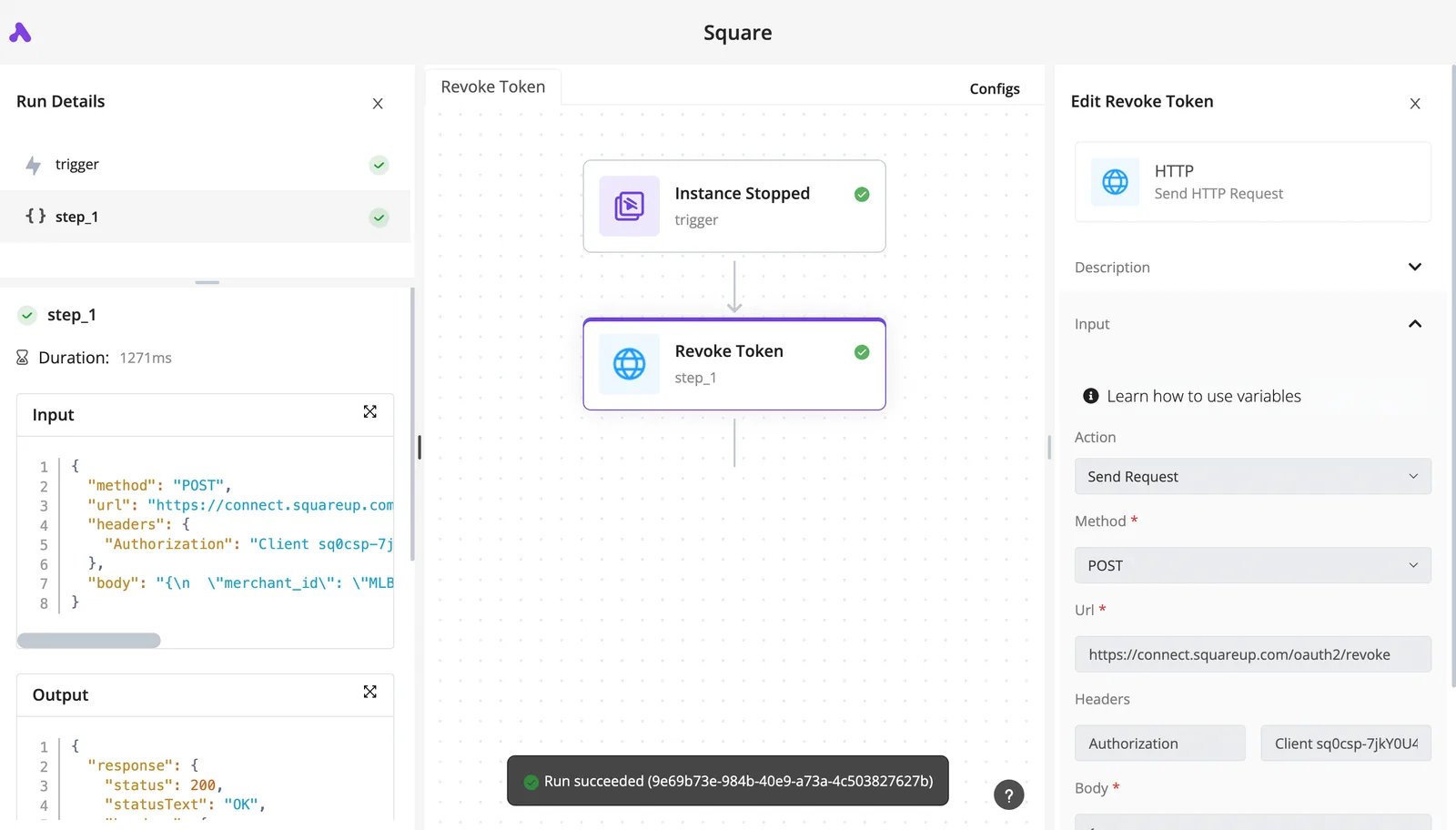
Treat that duration as a baseline for your own calls, since a sudden jump is often the first sign of throttling.
When a call comes back 401, the token is missing or expired; a 403 usually means a scope is missing, which sends you back to the app settings.
Easier to see it running than to read about it: set it up free, no card.
RingCentral API rate limits and pricing by plan
The next error to expect after a 401 or 403 is a 429, which means you spent a group's per-minute allowance. The allowances are Light 50, Medium 40, Heavy 10 and Auth 5, with no per-call price published in the sources checked.
Limit groups and headers
Every endpoint belongs to one group, and each group has its own budget. The table shows how steeply the allowances fall from Light to Auth; plan your call volume around the smallest group you touch, not the largest.
| Group | Requests per minute | What it means for you |
|---|---|---|
| Light | 50 | Reads and simple lookups have the most room |
| Medium | 40 | A batch job here stalls before a Light one does |
| Heavy | 10 | Roughly one call every six seconds, so queue these |
| Auth | 5 per user | Repeated token requests lock a single user out fast |
| Rate limit headers | Returned on responses | Show your remaining budget before you hit a 429 |
Those figures come from APIs.io. Limits can vary per app and plan, so confirm each number in RingCentral's developer docs on the day you ship.

The same goes for which endpoints sit in which group and how long the penalty period lasts. I haven't confirmed either, so don't assume them.
Five requests a minute is the limit that catches pilot teams first, and it is the Auth one, which means pilots will need to plan their Auth testing around this throttle. A workflow that requests a fresh token on every run burns the budget in seconds. Reuse the token until it expires.
**A workflow that requests a fresh token on every run burns the budget in seconds.
What the API costs
You will not find a per-call price in the sources checked. Treat API access as part of your plan, not a metered line item. Cost shows up as throttling instead: once you pass a group's allowance, calls fail until the penalty period ends.
For a rollout, count calls per run against the Heavy and Auth groups first. Those two set your ceiling.
Fix common RingCentral API errors
When RingCentral breaks in production, it is usually one of five failures: rate limiting, an expired token, a missing scope, a rejected JWT or a lapsed webhook subscription. Each has a distinct cause and a short fix.
The table below maps each one to its usual cause, so you can triage by status code before reading any logs.
| Status or code | Usual cause | Fix |
|---|---|---|
| 429 | Calls exceeded the limit for your app and plan | Wait for the Retry-After interval, then retry with backoff |
| 401 | Access token expired or invalid | Refresh the token, or re-authenticate if refresh fails |
| 403 | App lacks the permission the endpoint needs | Add the scope in the developer console and re-authorize |
| invalid_grant | JWT expired, revoked, or issued for a different app | Generate a fresh JWT for the correct app |
| Webhook subscription expiry | Subscription reached its expiration time | Renew or recreate it, and monitor its status |
Once handled, the 429 and 401 rows are routine and self-healing. The 403 and invalid_grant rows are configuration faults that retries will never cure.
Do not read a 429 as a bad call; it means you hit a ceiling. Read the Retry-After header, pause for that interval, then retry with increasing delays. Retrying immediately makes the problem worse.
Treat the 429 rate as a rollout metric: a rising count after a new workflow ships tells you which team's design needs batching.
If you get a 401, the problem is identity: the token is stale or wrong, so refresh it. A 403 is about permission: the token is valid but the app was never granted the scope.
Fix it in the app's configuration, then authorize again so new tokens carry the scope. An invalid_grant on a JWT is usually the same family of mistake, a credential tied to the wrong app or no longer valid.
When a webhook subscription lapses, nothing errors. Events simply stop arriving, because subscriptions carry an expiration time. Check subscription status on a schedule and renew before expiry, so silence is never your first signal.
Call RingCentral endpoints without code using Activepieces
Without writing code, you can call RingCentral through Activepieces, which is used by teams at MoneyGram, Moneypenny, Alan and FundingSocieties.
It holds the RingCentral credentials centrally as a connection, so every flow points at one place instead of each builder keeping keys, and it records every run so you can see where a limit or error was hit.

Open its built-in chat, describe a process that touches your RingCentral connection, and what it publishes is a live flow in your account, the same kind of flow a builder would assemble by hand, with a run trace showing exactly what happened at each step, including the one that returned the limit or error.
That matters most after a renewal check like the one above: you describe the process, and the run trace tells you whether it held.
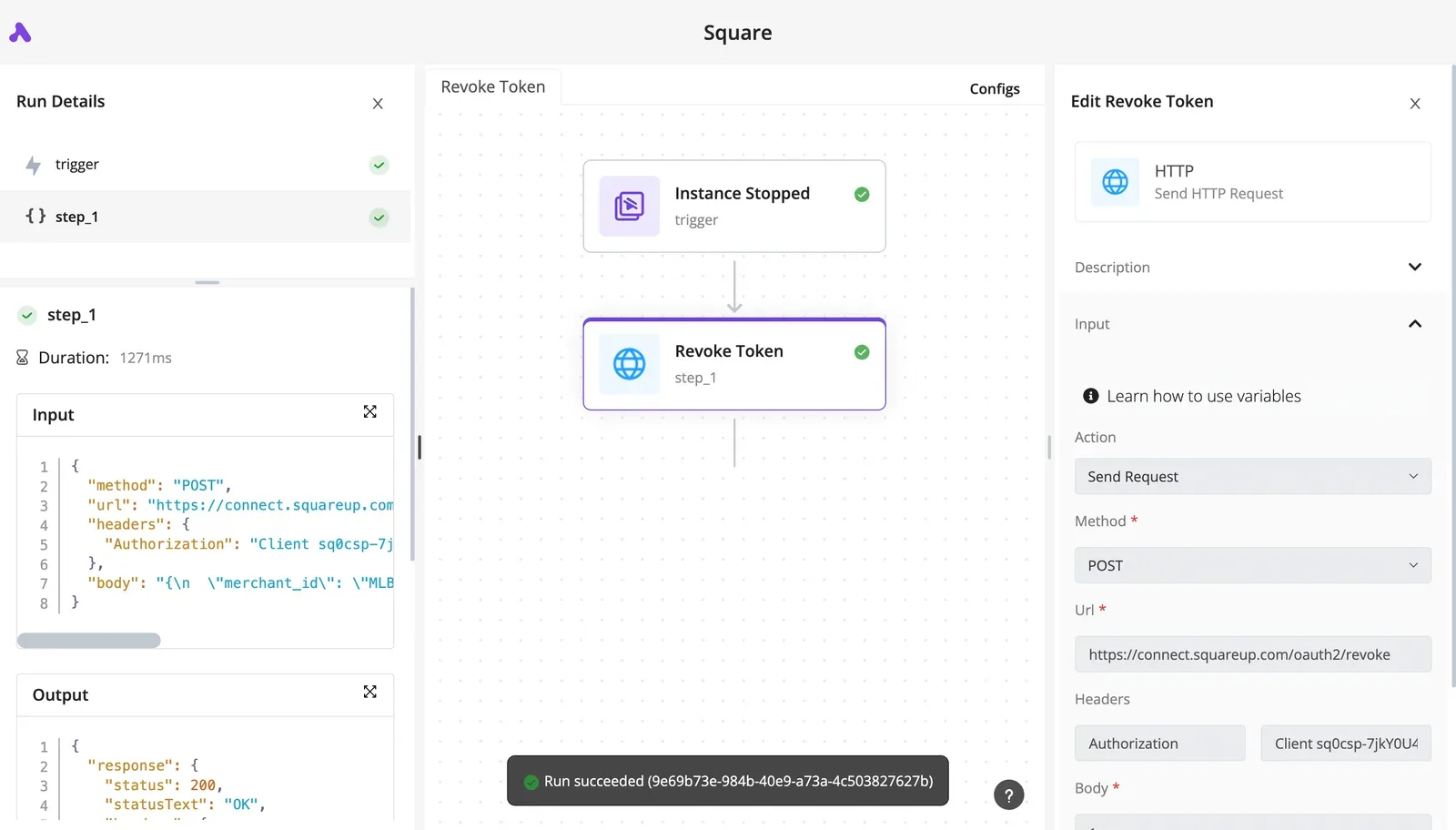
Read the flow below as the usual shape. A trigger starts the run, a RingCentral piece action does the work the piece supports, and a generic HTTP step calls any RingCentral endpoint the piece lacks.

The takeaway is that one workflow can mix both, so a missing action doesn't force you out of the tool.
When a no-code RingCentral workflow is enough
Use it when you can describe the process in a sentence: a message arrives, a record is created, a notification goes out.
Ops and support teams are usually the first to build these, and they are the ones to put in front of a template, because a shared flow carries its connection setup and error handling with it and the next team starts from something already tested.
For endpoints the integration doesn't cover, the HTTP step reuses the same RingCentral connection, so the credentials still live in one place.
Check the scopes your app grants against RingCentral's docs on the day you ship, since a step that works in testing can fail under a plan with different permissions. When it fails, open the run trace.
It shows which step returned the error and what RingCentral said, so you fix the cause instead of guessing.
When to stay with direct API calls
Stay with code when volume is high enough that you need to manage rate limits yourself. The same goes when you need retry logic the flow builder can't express, such as backing off differently per error type or queuing work across many accounts.
Those cases need control over timing and state that a visual step doesn't give you.
Test it with the trace. If you keep opening it to find the same limit being hit, the workflow has outgrown the tool, and a small service you own is the cheaper fix. Until then, describe the process, run it, and read the trace.
Frequently asked questions
Is the RingCentral API free to use?
You can create an app and test in the developer sandbox without a paid production plan, but running against live accounts depends on the plan behind them.
The docs publish no per-call price, so your cost is the plan plus any usage-based charges for things like messaging. Confirm both on RingCentral's pricing and developer pages on the date you ship.
Can I use the RingCentral API without a developer account? No. You need a developer account to register an app, which is what issues the credentials every call depends on.
Without it there's nothing to authenticate with. Treat account setup as the first item in the rollout plan, and assign it to a named owner so it doesn't sit in one contractor's login.
Does RingCentral have an official SDK? Yes. RingCentral maintains SDKs for several mainstream languages, and they wrap authentication and token handling.
A team that adopts the SDK ships faster than one that hand-rolls HTTP, and it inherits fewer token-refresh bugs. Check the SDK's repository for the date of its last release before you pin it, since a stale SDK can lag the API.
How do I move a RingCentral app from sandbox to production?
Build and test in the sandbox, then submit the app for review through the developer console so it can be promoted to production. The steps run in this order:
- Finish testing against sandbox data.
- Confirm the app requests only the permissions it needs.
- Submit the app for promotion in the console.
- Swap in the production credentials and server address.
Of these steps, permissions are the one teams most often get wrong, because a scope that worked in the sandbox may be reviewed more strictly. Re-read the current graduation requirements in the docs before you start.