
Discord API: Rate Limits, Errors and Auth (2026 Guide)

Nov 19, 202614 min read
Discord's API lets your code do what a user does in a server, whether that code is a hand-written bot or a workflow built in a tool like Activepieces.
It runs over plain HTTPS requests and a live event stream, and Discord's developer docs list no per-request charge for it.
As of 2026-11-19, the Discord developer docs are the source for everything below.
Your bot can read and send messages, manage channels and roles, respond to slash commands, moderate members and react to what happens in a server. Each action is gated by the permissions your bot was granted.

The Discord API is a free REST and Gateway interface
REST versus Gateway versus webhooks
REST is you asking: your bot sends an HTTPS request and gets JSON back. The Gateway is Discord telling you: your bot holds a persistent WebSocket open and events arrive as they happen.
A working bot needs both, so it has two separate failure surfaces.
Webhooks are the third path. They post messages into a channel through a URL, with no bot process and no Gateway connection. That makes them the simplest option for one-way notifications. They can't listen for anything, though.

Activepieces, with 750 integrations in its MIT-licensed core, is bound by the same restriction, because listening still depends on the Gateway.
You inherit different problems depending on which path you pick. REST brings rate limits. The Gateway brings intents, the settings that decide which events Discord sends you at all. A bot that receives nothing is usually an intents problem, not a bug in your handler.
This takes minutes, not a project: automate it in Activepieces free.
Getting access: create an application and a bot token
You create an application in the Discord Developer Portal, add a bot, copy its token and invite it with OAuth2 scopes. No paid plan is required, so the cost is your time.
A bot that receives nothing is usually an intents problem, not a bug in your handler.
- Open the Developer Portal and choose New Application, then name it.
- Open the Bot tab and reset the token to reveal it.
- Copy the token into a secrets store immediately, because the portal won't show it again and a lost token means a reset.
- On the same tab, switch on any privileged Gateway intents you need, such as Message Content. If you skip this, the bot connects but silently receives empty message bodies, which is a common first-day mystery.
Invite the bot with scopes and permissions
In the OAuth2 URL generator, tick the bot scope, plus applications.commands if you use slash commands. Then tick only the permissions the bot needs, such as Send Messages. Open the generated link, pick a server where you can manage the server, and approve.
Bot token, OAuth2 and webhook URL compared
The table below sets the three credentials side by side. The bot token is the default for anything that listens or acts on its own, while the other two are narrower tools.

| Credential | Purpose | How it is sent | When to choose it | Cost |
|---|---|---|---|---|
| Bot token | Acts as your bot: REST calls and Gateway connection | Authorization: Bot <token> header |
A bot that reads events, replies or manages a server | Free |
| OAuth2 bearer token | Acts on behalf of a user who authorized your app | Authorization: Bearer <token> header |
Reading a user's identity or acting within the scopes they granted | Free |
| Webhook URL | Posts messages into one channel | Token embedded in the URL itself | One-way alerts where no listening is needed | Free |
Because a webhook URL carries its own secret, treat it like a password.
Authenticating requests and sending a first message
To send a request you need three things: an Authorization: Bot <token> header, a versioned base URL, and a JSON body posted to a channel's messages endpoint.
Testing your Discord bot token with curl
Check the token first. A call to /users/@me returns the bot's own user object, so a 200 means the token is good and a 401 means it isn't:
curl -H "Authorization: Bot $DISCORD_TOKEN" \
 -H "User-Agent: DiscordBot (https://example.com, 1.0)" \
 https://discord.com/api/v10/users/@me
Then send the message:
curl -X POST https://discord.com/api/v10/channels/$CHANNEL_ID/messages \
 -H "Authorization: Bot $DISCORD_TOKEN" \
 -H "User-Agent: DiscordBot (https://example.com, 1.0)" \
 -H "Content-Type: application/json" \
 -d '{"content": "Hello from the bot"}'
Send a User-Agent in the form DiscordBot ($url, $versionNumber), as the docs ask. Don't skip it. A generic client string is an easy way to get requests blocked before they reach the API.

When the call succeeds, it returns the created message object, including its id, channel_id and your content. A 403 here usually means the bot can't view that channel or lacks permission to send in it.
If you use a webhook instead, you need no bot token and no Bot header. The secret is embedded in the URL Discord gives you for the channel:
curl -X POST "https://discord.com/api/webhooks/$WEBHOOK_ID/$WEBHOOK_TOKEN" \
 -H "Content-Type: application/json" \
 -d '{"content": "Hello from the webhook"}'
Keep the bot token and any webhook URL out of source control, client-side code, screenshots and log output. Load them from environment variables or a secrets manager.
If one leaks, reset the bot token in the developer portal or delete the webhook, because the old value keeps working until you do.
Discord rate limits and how the headers describe them
Read the headers on every response instead of hardcoding a number, because Discord reports your remaining room there.
Global and per-route limits
You are limited at several layers at once, and the limits apply per bot and per route. Your plan, server count or spend doesn't change them.
The table shows which layer you hit, what Discord sends back, and what it costs you. Match your handling to the layer, because a retry that suits one can make another worse.
| Layer | Scope | Signal received | Consequence |
|---|---|---|---|
| Global per-bot | All REST requests from one bot | 429 with a global flag set | Every call pauses, not just the busy route |
| Per-route bucket | One route and its major parameter, such as a channel | Bucket headers, then 429 if exceeded | Only that route waits; other routes keep working |
| Invalid-request limit | Bad responses from one IP address | Repeated 401, 403 and 429 responses | Temporary block on all requests from that address |
| Gateway send | One Gateway connection | Dropped or closed connection | Your bot disconnects and must reconnect |
Every response carries X-RateLimit-Limit, X-RateLimit-Remaining, X-RateLimit-Reset-After and X-RateLimit-Bucket. Queue requests by bucket ID, and when remaining hits zero, wait for the reset-after interval. A 429 body includes retry_after. Sleep exactly that long, because a blind retry loop only produces more 429s.

Because every 401, 403 and 429 counts toward a separate threshold, a bot looping on a permissions error or a revoked token can trigger a temporary block on your whole address, which stops healthy bots sharing it.
Treat 401 and 403 as bugs to fix, not conditions to retry.
You can follow the rest of this with the builder open. Start free, no card.
Gateway intents and permission errors that break bots
When you see a 401 or 403, your bot's misconfigured, so the useful question is which setting is wrong. The table below maps each error to its usual cause, the fix, and the Discord documentation that defines it.
| Error | Cause | Fix | Docs |
|---|---|---|---|
| HTTP 401 | Token missing, wrong or regenerated | Reset the token and check the Bot prefix in the Authorization header |
Status codes |
| HTTP 403 | Bot lacks permission for this action | Fix the role or channel overrides, then retest | Status codes |
| HTTP 429 | Rate limit hit | Wait the retry_after value, then queue requests by bucket |
Rate limits |
| JSON 50001 | Missing Access: bot can't see the guild or channel | Re-invite the bot or grant channel visibility | JSON codes |
| JSON 50013 | Missing Permissions for the action | Grant the permission and place the bot's role above the target | JSON codes |
| JSON 10003 | Unknown Channel: deleted or wrong ID | Validate stored IDs and handle deleted channels | JSON codes |
| Close 4004 | Gateway authentication failed | Fix the token used at identify | Close codes |
| Close 4014 | Requested a privileged intent that isn't enabled | Enable it in the developer portal or stop requesting it | Gateway intents |
| Interaction deadline | No response in the allowed window | Acknowledge immediately, then follow up | Interactions |
The status code tells you the category, and the JSON code in the body tells you the exact problem. A 403 can mean 50001 or 50013, and the fixes differ: one is visibility, the other is permission. Log the body, not just the status.
When you add a privileged intent to your code without enabling it in the portal, a 4014 usually follows. Once a bot passes Discord's verification threshold, those intents require approval. Request only what your handlers use.
Acknowledge slash commands and buttons within a short fixed window. Defer first, do the slow work after, and the user never sees "interaction failed."
Handling Discord API limits in production code
After the deferred reply, the next failure's your own code hammering a 429 response. Wait exactly as long as Discord says, then continue. Each of these practices removes a reason to retry blindly:
- Honour
retry_afterfrom the 429 body or theRetry-Afterheader - Queue requests per bucket, using the
X-RateLimit-Bucketheader - Prefer Gateway events to polling
- Cache what you've already fetched
- Resume dropped Gateway sessions instead of re-identifying
- Shard at the guild threshold in the docs
A retry loop that sleeps a fixed time guesses at a number Discord already gave you. Read retry_after, pause that route's queue, and let other buckets keep moving.
Use a library unless you have a reason not to. discord.js and discord.py already implement bucket tracking, global limits and session resume, which're tedious to build and easy to get subtly wrong.
| Approach | Control | Upkeep |
|---|---|---|
| Raw HTTP | Complete | You maintain queues, resume and sharding |
| Library | High, with hooks for most cases | You track library updates |
| No-code platform | Lowest | The platform carries the plumbing |
If you would rather describe the process than build the queue, Activepieces has a built-in chat for it.
Describe new-order alerts posted to a channel, and what it publishes is a live flow in your account, the same kind of flow you would have assembled by hand, open to read and edit.
Its run trace lists every step of every run, so a 403 or 429 appears as the failed step instead of a silent gap. MoneyGram, Moneypenny, Alan and FundingSocieties run Activepieces in production, under the same RBAC and audit logs as any other flow.
Calling Discord endpoints without code in Activepieces
For the jobs that need no Gateway connection, Activepieces covers you without code, and with unlimited flows on every plan, free included, each alert can be its own flow. Sending messages, reacting to new ones and posting alerts from other apps don't need one.
When no-code is enough
The Discord integration offers a Send Message action and a new-message trigger. For routes it doesn't wrap, an HTTP step can call Discord's REST API with the same bot token.
The table shows where each task sits. Every row is still subject to Discord's rate limits, so a no-code flow can be throttled just like a script.
| Task | Supported without code | Still needs code (Gateway bots) | Rate limits apply |
|---|---|---|---|
| Send Message | Yes | No | Yes |
| New-message trigger | Yes | No | Yes |
| HTTP step with bot token | Yes | No | Yes |
| Presence, voice, or sharded Gateway connections | No | Yes | Yes |
Plan for a 429 response in any flow that posts in bursts, and spread the sends out instead of relying on retries.
Setting up the Discord connection
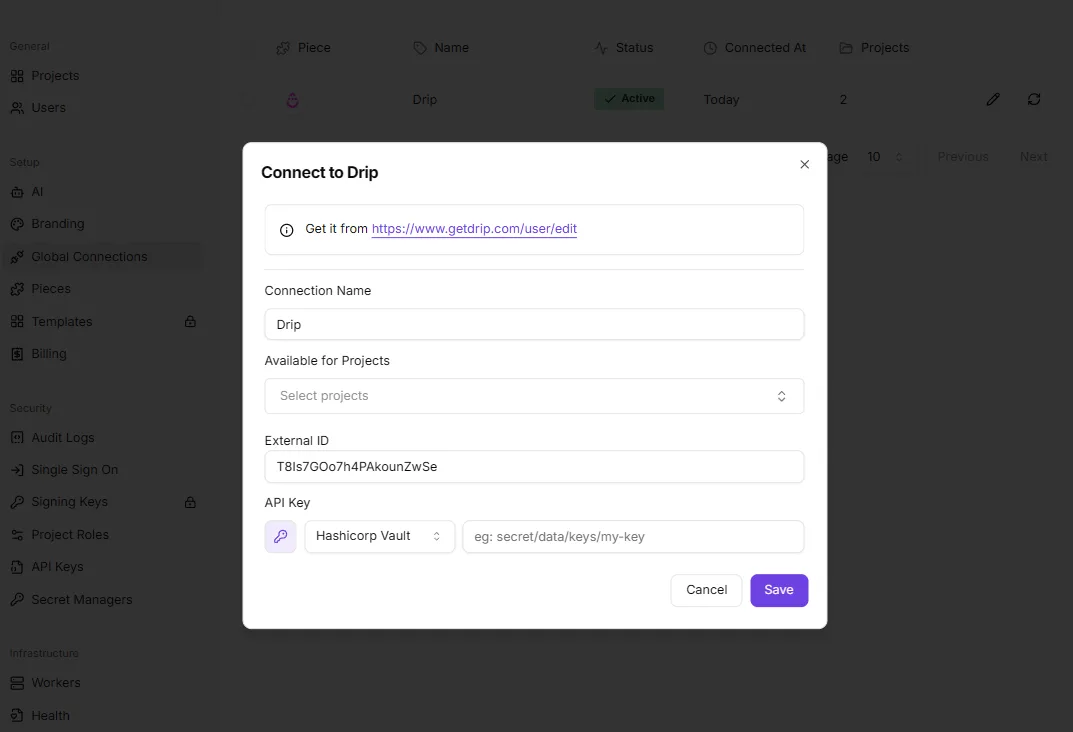
Create the bot in the Discord developer portal, copy its token, and add it as a connection in Activepieces. Invite the bot to your server with only the permissions the flow needs, because a missing permission shows up as a failed step.
A run costs 1 credit however many steps it has, so the extra HTTP step adds nothing to the bill.
Check each run's history to see which step failed and why.
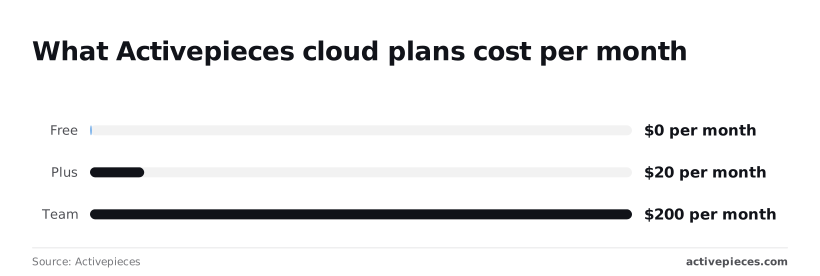
On cost, the Free cloud plan is $0 per month, enough to prototype an alert flow before spending anything. Plus is $20 per month. Team is $200 per month, ten times Plus, so move up only when you need what it adds.
If the bot must hold a persistent Gateway connection, handle presence or voice, or shard across processes, write code. The integration works with requests and triggers, not a long-lived connection. Everything else, start in Activepieces, whose MIT-licensed core is free to self-host.
Frequently asked questions
If you are chasing an error, start here: the table below covers the ones that tend to show up in your logs first.
It shows what each symptom points to and which Discord docs page to check, so you can read the headers or error code instead of guessing.
| Question | Answer | Docs source |
|---|---|---|
| Where do I find the limit for a given route? | Read the rate limit headers on every response; they name the bucket and the time remaining. | Discord Developer Docs, Rate Limits |
| What does a 429 response tell me? | You were limited. Wait for the retry-after value it returns instead of retrying immediately. | Discord Developer Docs, Rate Limits |
| What does a 403 mean? | The bot lacks a permission in that channel or server. Retrying won't fix it. | Discord Developer Docs, Permissions |
| Why does the Gateway close with a disallowed intents error? | You requested a privileged intent that isn't enabled for the application. | Discord Developer Docs, Gateway |
You won't pay Discord for API access, because Discord doesn't charge for it. Your real costs are hosting and the engineering time spent handling limits and errors.
While the bot is small, verifying it isn't needed. Verification becomes required as it grows, and it gates the privileged intents, so apply before growth forces the issue.
Don't use a user token in place of a bot token. Automating a user account is against Discord's terms and risks a ban, so use a bot token from the developer portal.
There's no single messages-per-second number to hardcode. Limits apply per route and per bucket, with a global limit on top. Read the headers on each response and honour retry-after on a 429.
If your bot receives events but empty message content, it is missing the Message Content intent, which is privileged. Enable it in the developer portal and request it when your bot connects to the Gateway. You need both, or content arrives empty.
Related reading
References
Build it
Set this up in minutes.
No code required. Connect your accounts, and Activepieces runs it from there.
Start free Talk to sales