
Discord Trello Integration Setup Without Code

Nov 16, 202614 min read
A Discord and Trello integration is an automated workflow where an event in one app, such as a new message, creates or updates something in the other, such as a card.
A direct no-code route is Activepieces, using its Discord piece and Trello piece, two of the 750 integrations counted from its MIT-licensed open source monorepo, so you can likely integrate your existing tools.
Discord Trello integration setup is the practice of connecting a Discord server to a Trello board, without writing code, so that chat events such as new messages automatically create or update Trello cards through a workflow of triggers and actions.
Details here were checked on 2026-11-16.
No-code Discord Trello integration
What people automate between Discord and Trello
The useful flows start with a Discord event and end with a Trello card. A message in a bug-report channel becomes a card in a triage list.
Going the other way, a card moving to a new list posts a note in a channel so the team sees it without opening the board.
Put a gate in front of card creation: a dedicated channel, a keyword, or a reaction from a moderator.
Everything below works on Activepieces' free plan. Start without code or a credit card.
How Discord and Trello exchange events
Any integration between the two solves the same problem: getting an event out of one app and a write into the other.
Getting events out of Discord
Discord does not push every channel message to a URL. A bot holds an open connection to Discord's gateway and receives events as they happen, and it only sees message text if the Message Content intent is on.

Discord's webhooks run the other way: they let you post into one channel without a bot, but they cannot listen.
Getting events out of Trello
Trello is simpler. Its REST API lets you register a webhook on a board, and Trello then sends a request to your URL whenever a card is created, moved or changed.
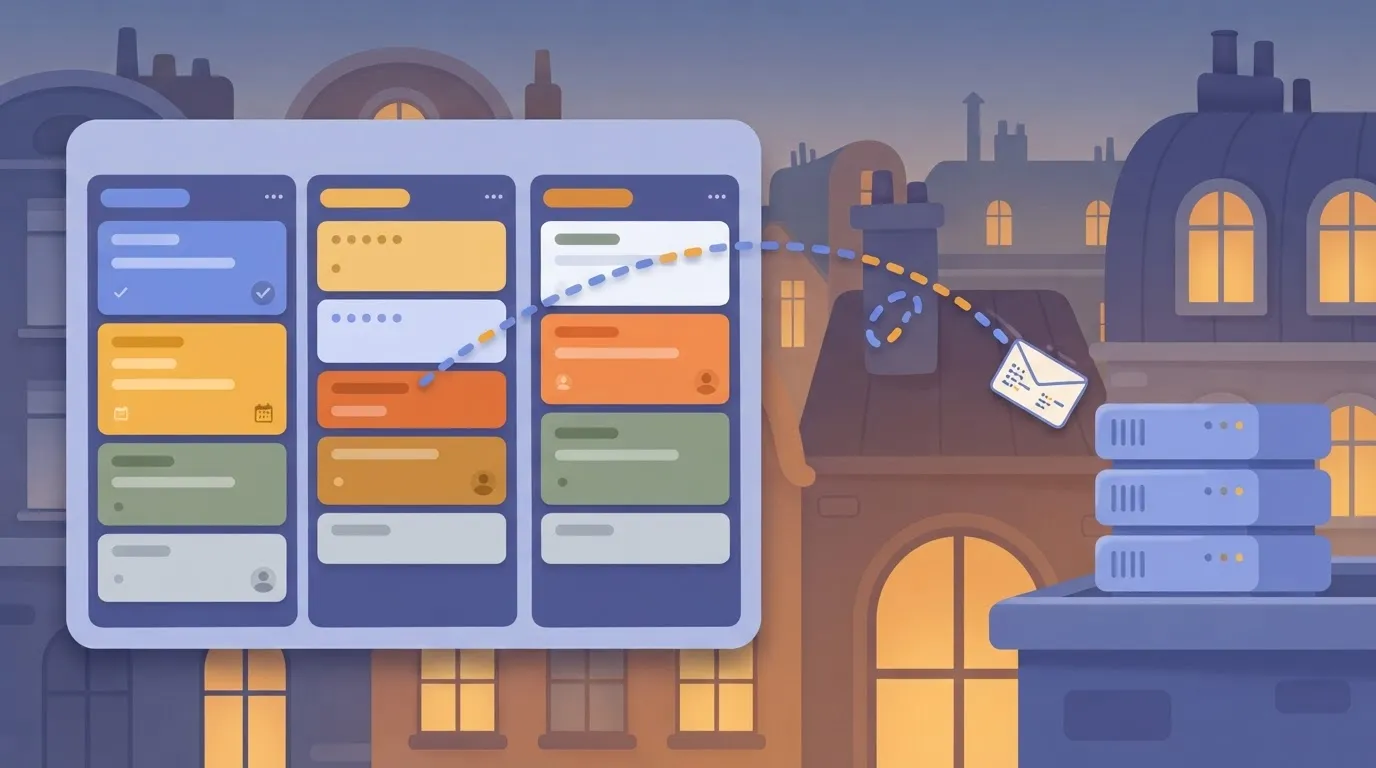
Writing back is a single authenticated call that creates a card in a given list.
Three ways to connect Discord and Trello
You can write a small bot yourself, using a Discord library to listen and the Trello REST API to write. That gives full control and costs you hosting, token storage and retry logic.
You can use a hosted automation tool that runs the listener for you. Or, if the work starts and ends inside Trello, its own rules may be enough.
Whichever you choose, the design questions are the same: what gates a message, which fields map where, and what happens when a retry fires twice.
Requirements for a Discord Trello integration
Three things must exist before you open the builder.
| What you need | Where to get it | Minutes to set up |
|---|---|---|
| Discord server with bot permission | Your own server, or ask the server admin to authorize the bot and grant it access to the channel you'll watch | A few, if you are the admin; longer if you must wait on one |
| Trello board and list | Trello: create a board, then a list that'll receive the new cards | A few |
| Activepieces account | Sign-up on the Activepieces site (the free plan is $0, needs no card and includes unlimited flows), then connect Discord and Trello from inside a flow | A few |
Prices and plan limits checked against activepieces.com and activepieces.com on November 16, 2026.
How long Discord Trello setup takes
A first flow takes a short session:
- Pick the Discord trigger.
- Add the Trello action that creates a card.
- Map the message text to the card title and description.
- Run a test.
Five Discord and Trello Workflows to Build in Activepieces
Five useful workflows sit between the two apps in Activepieces, each one trigger plus one action, as the table below shows. Flows are unlimited on every plan, including the free one.
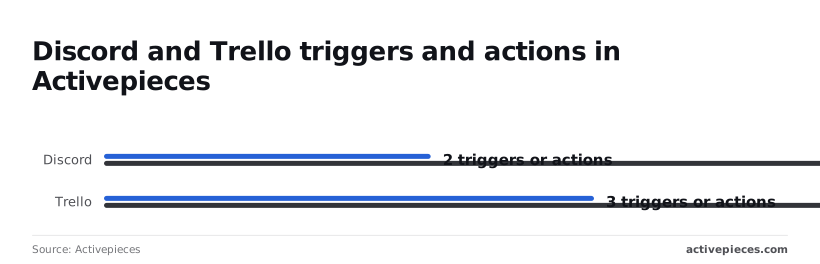
According to Activepieces, coverage is lopsided: Discord has 2 triggers and 16 actions, while Trello has 3 triggers and 9 actions.
| Workflow | Exact trigger | Exact action | The job |
|---|---|---|---|
| Chat to card | "New Message" | "Create Card" | Turns a request in a channel into a tracked card |
| Onboarding card | "New Member" | "Create Card" | Gives every joiner a checklist owner |
| Card announced | "New Card" | "Send Message with Bot" | Tells the channel work was logged |
| Status change | "Card Moved to List" | "Send Message with Bot" | Posts when work reaches Doing or Done |
| Deadline nudge | "Card Deadline" | "Send Message with Bot" | Pings the channel before something slips |
Turn a Discord message into a Trello card
Start on the Discord "New Message" trigger in Activepieces and end on the Trello "Create Card" action. Map the message text to the card name and the message link to the description. A run costs 1 credit however many steps it has.
Post Trello card activity to a Discord channel
Use the Trello triggers "New Card" or "Card Moved to List", then Discord's "Send Message with Bot". Post the card name and URL, not a paraphrase.
Route bug reports with a filter or branch
Keep "New Message" as the trigger, add a branch on a keyword such as "bug", and send matches to "Create Card" on the bug list. For anything ambiguous, insert Discord's "Request Approval in a Channel" before the card is created.
Summarise long threads into cards with an AI step
Place an AI step between "New Message" and "Create Card" to write a one-line card title and a short description from the thread. Check the first ten outputs by hand.
When the step you want is not listed
If you want a new comment or a label change, you won't find it among Trello's listed triggers. For those, Activepieces offers a webhook trigger, and an HTTP request step covers any Discord or Trello API call the pieces omit.
Roughly 60% of its 750 integrations were built by the community, and a missing one can be generated with AI and added privately to your own instance, with no vendor release to wait for.
Easier to see it running than to read about it: set it up free, no card.
Build the Discord-to-Trello card workflow step by step
Five stages, each leaving something that works.
Stage 1: Create the workflow and connect Discord
Create a new flow and pick the Discord trigger for a new message in a channel. Connect your Discord account, or a bot added to the server, and choose the one channel you want watched.
Stage 2: Test the trigger with a real message
Post a message in that channel, something like "Login page 500s on Safari", then run the trigger's test.
Look for the message text, the author's name and the message link, because those are the fields you'll map later.
Stage 3: Add the Trello action and pick the list
Add a step, choose Trello, and select the action that creates a card. Connect your Trello account, then choose the board and the list where new cards should land.
Point it at a dedicated intake list such as "Inbox", not your working list.
You can also skip the clicking: type the process into Activepieces' built-in chat, say "a message containing 'bug' in the bug-report channel becomes a card in Inbox", and it builds and publishes the flow you just assembled by hand in stages 1 to 3.
The result is an ordinary live flow in your account, under the same RBAC and audit logs as any other, and each run leaves a trace anyone on the team can read. MoneyGram, Moneypenny, Alan and FundingSocieties run Activepieces in production.
Stage 4: Map fields from Discord to the card
Map the message text into the card description, the author and message link into the description's first line, and the first line of the message into the card name.
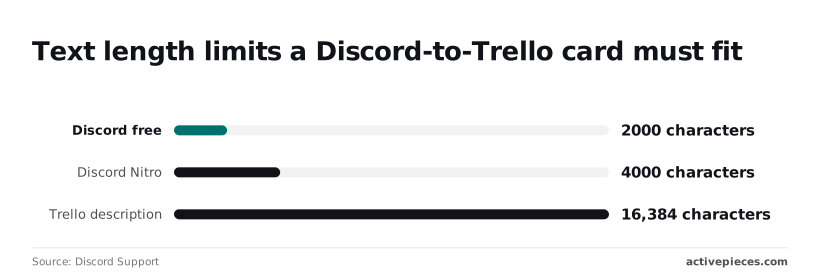
Discord caps a message at 2,000 characters on a free account and 4,000 with Nitro, while a Trello description holds 16,384, so even the longest Nitro message fits roughly four times over and you never need a truncation step.
The risk is the card name: map the whole message there and you get an unreadable title.
Test and publish the Discord-to-Trello workflow
Run the action test and open Trello. Check that the card sits in the right list, the title is short, and the link goes back to the message.
Then post two more messages: one with a line break and one with a mention.
Limits and Errors in Discord and Trello Connections
When a live Discord-to-Trello flow breaks, it is usually in one of six ways, shown below.
| Symptom | Cause | Fix |
|---|---|---|
| Trigger never fires, or the bot can't post | Bot lacks permission to view or send in the channel | Grant the bot View Channel and Send Messages on that channel |
| Run fires but the card title is empty | Message content isn't enabled for the bot | Turn on the Message Content intent in the Discord developer portal |
| 401 from Trello | Token invalid, revoked or expired | Reconnect Trello and issue a fresh token |
| 404 from Trello | Board or list ID doesn't exist or isn't visible to the token | Re-select the board and list; confirm the authorising account is a member |
| 429 from either service | Request limit exceeded | Slow the flow and retry after the wait the response gives |
| Two cards for one message | Same event delivered or triggered twice | Check for an existing card before creating one |
Discord permission and bot access problems
Because the run shows green, the empty-title card fools people. Discord only sends message text to bots that have the Message Content intent switched on.
Because the run shows green, the empty-title card fools people.
Trello authorisation and board or list errors
When Trello returns a 401, the credential is no longer accepted, so reconnecting is the only real fix; retrying won't help.
If a list was archived or the board was copied, re-pick it rather than editing the ID by hand.
Rate limits and duplicate cards
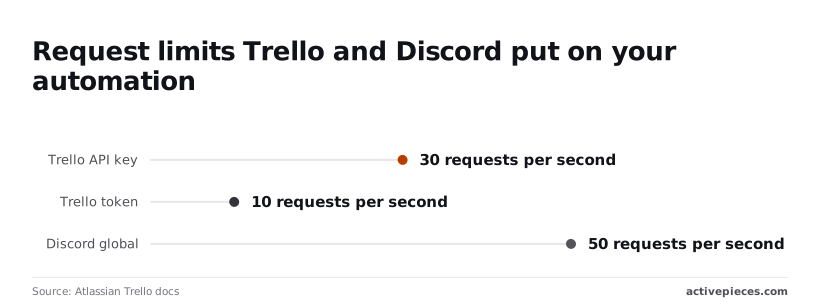
The token limit is 10 requests per second, so a single connected account is the first ceiling you hit.
Discord's global limit is 50 requests per second, well above either Trello figure.
When a step times out and reruns, the card may already exist, creating a duplicate. Search the list for the message link before creating, and keep the link in the card description so the check has something to match.
Other Tools That Connect Discord and Trello, and When Activepieces Fits
If you would rather not use Activepieces, Trello's Butler, Zapier and Make all connect these apps too; Activepieces is the one whose core is MIT-licensed, with 750 integrations counted from its open source monorepo.
| Tool | Best for | Limits | Hosting |
|---|---|---|---|
| Trello's own automation (Butler) | Rules that start and finish inside Trello, such as moving a card when a due date passes | Runs per month by plan: Free 250, Standard 1,000, Premium unlimited. It acts on Trello events, so a Discord message isn't its trigger. | Trello's cloud |
| Zapier | The fastest setup, with a large app catalog | Usage is metered by plan, so busy channels cost more | Zapier's cloud only |
| Make | Visual scenarios with branching and data reshaping | Usage is metered by plan, and complex scenarios take time to debug | Make's cloud only |
| Activepieces | Teams that want open source and control over where data runs | Smaller catalog, so unlisted calls go through an HTTP request | Cloud or self-hosted |
At 250 runs on the Free plan, a Butler rule that fires on every card move can use the month up in days on an active board.
When you want the code open and the option to host it yourself, Activepieces fits better: the core is MIT-licensed, and every plan can run on Activepieces Cloud or on-prem.
Next step: start the flow in Activepieces, with one Discord trigger and one Trello action, and add the rest only once that pair works. At 1 credit a run, the free plan's 1,000 credits a month go a long way for a flow that size.

Frequently asked questions
Can Discord and Trello be connected without code?
Yes: the basic flow is a Discord trigger, a Trello action and a few field mappings, all filled in through forms. Code only enters if you need something the built-in triggers and actions don't cover.
Then you use an HTTP request or webhook step, which still means pasting an endpoint and a payload, not writing a program.
Does the Discord and Trello integration cost anything to run?
It can cost nothing to start, but the bill comes from three places: your Discord setup, your Trello plan, and the automation platform's plan.
The one to watch is the platform. On metered plans, every run of the flow counts against your allowance, so a trigger that fires on every message in a busy channel burns through it fast.
Can I self-host the workflow so my data stays on my servers?
You can only self-host the automation layer, and only if the platform you pick offers that. The data still passes through Discord and Trello, which are hosted services.
Self-hosting keeps run logs, stored connections and any intermediate data on your infrastructure, but a message you turn into a card still lives on Trello's servers. If your concern is where the card content ends up, self-hosting doesn't change that.
How do I send a Trello card update to a specific Discord channel?
Use a Trello trigger for the event you care about, such as a new card or a card moving to another list. Follow it with a Discord action that sends a message, and choose the destination channel in that step.
Put the card name, the list it moved to and the card link in the message body, so people can act on it without opening Trello to find out what happened.
A Discord webhook URL pointed at one channel is an alternative if you would rather not give the flow a full bot connection.
Why did my workflow stop creating cards?
Open the run history and read the error on the failing step before you change anything. Most stops come from a short list of causes:
- The Trello connection expired or was revoked, so the action is no longer authorised.
- The bot lost access to the channel, or was removed from the server.
- The target board or list was archived, deleted or replaced, so the saved selection points at nothing.
- A mapped field came through empty, or with more text than Trello accepts, such as a long pasted message going into a card title or description.