
Smartsheet API: Rate Limits, Auth and Examples (2026)

Nov 1, 202614 min read
Smartsheet's REST API lets you read and write sheets, rows, cells, reports and users over HTTPS, authenticated with an access token, whether you call it from your own scripts or from a workflow tool such as Activepieces.
Plan eligibility is the part to verify before you build.
Each call runs as the token's owner, so the token can reach only what that person can reach. Read Smartsheet's API documentation for the full surface.
Smartsheet API access and eligibility
Which plans include API access
Per Ganttile, Pro costs $9 per member per month billed annually and $12 monthly, so month-to-month flexibility adds 33% per seat. Ganttile reports that Business costs $19 annually and $24 monthly, a $5 premium that adds up across a team.
I couldn't confirm which tiers include API access on 1 Nov 2026, so the table marks that column unverified. Check the Smartsheet pricing page before you commit a seat to an integration.
| Plan | API access included | Price per Member/month | Status as of 1 Nov 2026 |
|---|---|---|---|
| Pro | Not verified | $9 annual, $12 monthly | Price confirmed, API access unconfirmed |
| Business | Not verified | $19 annual, $24 monthly | Price confirmed, API access unconfirmed |
| Enterprise | Not verified | Not in our source | Unconfirmed |
viz type=step title="What a Smartsheet seat costs by plan and billing" unit="$ per member/month" source="Ganttile - https://www.ganttile.com/guides/smartsheet-pricing" xaxis="Plan and billing" yaxis="$ per member/month"9 a month per member billed annually and $24 billed monthly." Pro, annual: 9 Pro, monthly: 12 Business, annual: 19 Business, monthly: 24
If the plan you buy lacks API access, an integration built around it has no way to authenticate.
Rows and cells hang off a sheet, so most write operations need the sheet ID first.
Choosing the token, finding that sheet ID and planning for a 429 is the up-front work you would normally hand to an engineer.
You don't hire for this, you describe it: tell Activepieces' built-in chat the process, and it builds and publishes the flow a builder would have wired by hand.
That flow runs under the same RBAC and audit logs as any human-built one, and every run leaves a trace someone can read without knowing the Smartsheet API. MoneyGram, Moneypenny, Alan and FundingSocieties run Activepieces in production.
Requests go to https://api.smartsheet.com/2.0. Smartsheet publishes official SDKs for Java, C#, Python and Node.js. Each wraps the same REST calls, so the base URL and token behave identically with or without one.
Everything below works on Activepieces' free plan. Start without code or a credit card.
Token generation and first request
Create a personal access token and send it as a Bearer header to the /sheets endpoint. You can read a sheet and append a row in one sitting, with no SDK needed.

Generate the access token
In Smartsheet, open Account, then Personal Settings, then API Access, and choose to generate a new token. Smartsheet displays the value once.
Copy it into a secrets store immediately, because losing it means revoking and issuing a replacement, and every script using the old one breaks.
Use a dedicated integration account if the automation shouldn't inherit a person's access.
curl https://api.smartsheet.com/2.0/sheets \
 -H "Authorization: Bearer $SMARTSHEET_TOKEN"
If the call succeeds, you get a list of the sheets your token's user can see, each with an id and a name.
An authentication error here means you pasted the token wrongly or it was revoked. An empty list means no one has shared any sheets with the account, so the call itself is fine.
Take an id from that list and request it directly:
curl https://api.smartsheet.com/2.0/sheets/SHEET_ID \
 -H "Authorization: Bearer $SMARTSHEET_TOKEN"
The response contains the columns and the rows. Note the id of each column you intend to write to. Rows use column ID, not header text, so renaming a column doesn't break a call, but a deleted column will.

curl -X POST https://api.smartsheet.com/2.0/sheets/SHEET_ID/rows \
 -H "Authorization: Bearer $SMARTSHEET_TOKEN" \
 -H "Content-Type: application/json" \
 -d '{"toBottom": true, "cells": [{"columnId": COLUMN_ID, "value": "First API row"}]}'
Without a position, the request is ambiguous about where the row lands, which is why the toBottom flag places it at the end. The response returns the new row with its ID.
If the row appears, authentication, permissions and payload shape are confirmed.
Personal tokens and OAuth 2.0
Use a personal access token for a script one person owns. Use an OAuth 2.0 app when other people's accounts are involved, and a dedicated service-account user when a shared automation must outlive whoever built it.

The table shows how the three differ on the failures that matter in production.
| Attribution | Owner leaves | Revocation | Token lifetime | Setup effort | |
|---|---|---|---|---|---|
| Personal access token | Edits appear as the person who generated it | Stops working when the account is removed | Owner deletes it in their account settings | Valid until revoked | Minutes |
| OAuth 2.0 app | Edits appear as each authorizing user | Only that user's grant is lost | Per user, or by disabling the app | Access token 7 days, so refresh logic is required | Highest |
| Service-account user | Edits appear as one named automation account | Unaffected, because no person owns it | Admin removes the account or its token | Same as a personal token | Moderate |
Personal access token
A personal access token is one credential held by one person's account. It needs no registration and no refresh logic, which makes it right for a prototype or a script you run yourself.
Its weakness is ownership: Smartsheet credits every change to that person, and the token inherits their sharing permissions, so it can reach more than the automation needs.
Register a Smartsheet OAuth 2.0 app
When your code acts on behalf of several people, each of whom authorizes it individually, register an OAuth 2.0 app. Request only the scopes the workflow needs, so a consent screen doesn't over-promise.
The cost is operational. Access tokens last seven days, so a missed refresh means a failed run, and you must store refresh credentials securely.
Service account pattern for shared automations
Create an ordinary licensed user whose only job is the automation, share the target sheets with it, and generate the token from that account. Attribution reads as the automation, not a colleague.
Offboarding a developer no longer breaks the run, and an admin can revoke access in one place. The trade-off is a seat you must license and an account that needs a named owner.
API rate limits and quotas
Once a named account owns the integration, its request budget belongs to that account too. Smartsheet's budget is 300 requests per minute for standard calls, per Smartsheet Developers, and requests above it are throttled, so exceeding this rate will automatically slow down your API operations.
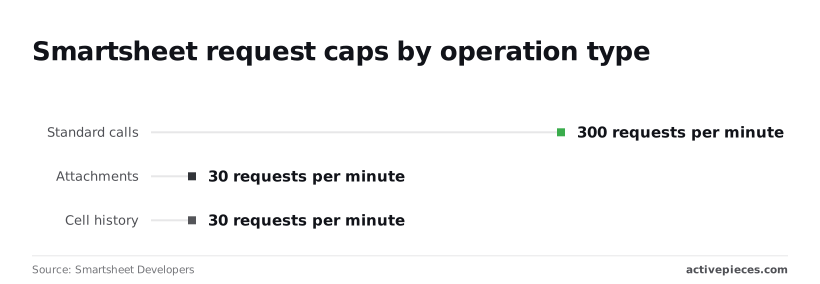
Attachment and cell history calls are capped at 30 per minute, a tenth of that.
Smartsheet API rate limit and 429 errors
Exceed the limit and Smartsheet returns HTTP 429 with error code 4003.
Per Primrose, at 300 requests per minute, one integration syncing a few hundred rows one call at a time can exhaust the budget in seconds, so serial processing is not viable at any scale. Every other script on the same token stalls with it.
Pulling history for 200 rows takes about seven minutes at best, so a "quick audit" is a scheduled batch job, not an interactive request.
When a 429 arrives, wait and retry with exponential backoff plus random jitter. Without jitter, parallel workers all retry on the same tick and collide again.
Smartsheet's row endpoints accept arrays, so one request can add or update many rows. Sending 100 rows in one call costs one request from the 300, where looping costs 100, so iterating row-by-row burns through your budget 100 times faster than batching.
Without jitter, parallel workers all retry on the same tick and collide again.
Smartsheet API webhooks instead of polling
If you poll a sheet every few seconds to detect changes, most of your budget goes on requests that return nothing new. A webhook has Smartsheet notify your endpoint when something changes, so you can react to events instead of polling.
Fetch the changed data once, then act on it. That leaves headroom for the 10x-weight calls, which are the ones you can least afford to waste, so even one unnecessary expensive call will consume a significant portion of the remaining capacity.
Easier to see it running than to read about it: set it up free, no card.
Smartsheet API errors and fixes
Most failures are permissions and malformed input rather than outages. Smartsheet's error-code reference documents 8 codes under 403 and 6 under 400, which is 14 of 22 codes. The table maps each status to its code, usual cause and fix.
| HTTP status | Smartsheet code | Usual production cause | Fix |
|---|---|---|---|
| 400 | 1008, 1012 | Unparseable body, missing required field | Validate payload against the schema before sending |
| 401 | 1002, 1003 | Invalid or expired token | Refresh the OAuth token or reissue the key |
| 403 | 1004 | Token owner lacks access to the sheet | Share the sheet with the token's user at the needed level |
| 404 | 1006 | Wrong sheet or row ID, or no access | Re-fetch IDs; confirm the owner can see the object |
| 429 | 4003 | Request rate over the limit | Back off, retry, spread calls over time |
| 500/503, timeouts | 4001, 4002 | Maintenance or server timeout | Retry with exponential backoff; keep writes idempotent |
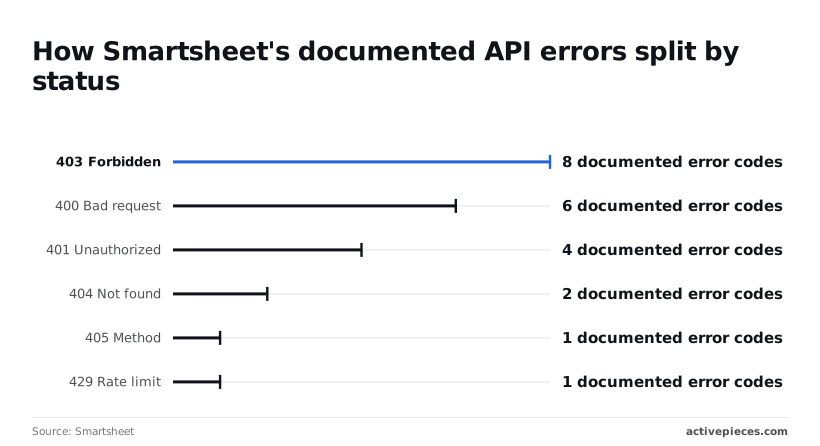
Treat 400 and 403 as design problems and 429 and 5xx as retry problems; only the second group fixes itself.
Token trouble is narrow, because 401 has 4 documented codes: a bad or expired token. 403 has 8, the largest group, so a valid token is no guarantee of access.
When a scheduled job runs as a departed employee's account, it fails here, and it fails on a single sheet while others still succeed.
The API rejects bad data in several distinct ways, since 400 carries 6 codes: wrong column types, missing required parameters, malformed JSON. 404 has 2 codes and 405 has 1, so you can diagnose a wrong ID or HTTP method quickly.
Log the response body, not just the status, because the code is what separates these causes.
Detection is simple for 429, which has exactly 1 documented code, 4003: any 429 means slow down. Retry with backoff rather than immediately, since an instant retry spends more of the same budget.
Treat 5xx responses and timeouts the same way, and check that a retried write didn't already succeed.
Call the Smartsheet API without code in Activepieces
If the failures above are yours to design around or retry, Activepieces moves that work onto the platform. You describe list, add and update row steps, and it carries the authentication, the retries and the record of each run.
The flow builder shows how little you configure. In the test flow, a Schedule trigger labeled "Every Hour" is selected, with a "Run on weekends" toggle in the settings panel and a successful "Generate Sample Data" result below it.

Under the trigger, the integration selector lists spreadsheet integrations and their actions: insert, update, delete and find rows.
Take from this that a step is chosen from a list and tested in place, so you see real output before the flow goes live. The Smartsheet integration is found the same way, by searching the Apps tab.
Use the Smartsheet integration for common actions
Start with the integration, because it covers the row operations most teams actually run: listing rows, adding them and updating them. You connect your Smartsheet account once, and every step reuses that connection, so no token is pasted into individual steps.
Before you design around the action list, verify it. Open the Smartsheet integration in your own builder and read which actions it has, since integrations change between releases and this article can't vouch for your version.
If list, add and update rows are there, you need no code for them.
Use the HTTP step for uncovered endpoints
When an endpoint has no action in the integration, use the HTTP step to call it directly. You supply the method, URL and body from Smartsheet's own API reference, so you take on the request details the integration would otherwise hide.
The trade is explicit: you keep the platform's run history and scheduling, but you own the correctness of that request.
Code still wins for bulk volume. If you are pushing very large batches of rows, a script gives you control over batching and backoff that a visual flow doesn't. Keep the flow for the process and the script for the load.
- Open the Smartsheet integration and write down the actions it lists.
- Connect your account once and run a test on a single sheet.
- Build the list, add or update flow from the integration's actions.
- Use the HTTP step only for endpoints the integration lacks.
- Read the run trace after the first scheduled run, and note any step that failed.
- Move any bulk-load job to code.
Frequently asked questions
Access and plans
Whichever side of that split a job lands on, five questions about access and environment come up before anything ships. Each answer points to the Smartsheet developer docs at developers.smartsheet.com, which are the authority on current terms.
Is the Smartsheet API free to use?
Smartsheet doesn't bill per API call, but access is tied to your plan, not offered as a standalone product.
Confirm that your plan includes API access before you design around it, because a token generated on an account without it won't help you. The plan and access details are in the developer docs.
Testing environments
Does Smartsheet have a sandbox or test environment?
Smartsheet documents a sandbox as part of certain plans, not as something every account gets. Without one, test against a dedicated sheet in a separate workspace so a faulty write can't touch production rows. Check the developer docs for whether your plan includes a sandbox.
Can I use the Smartsheet API on a free trial?
It depends on what the trial includes, and trial terms change.
Treat trial access as unconfirmed until you've generated a token and made a read call against a test sheet. If that call is rejected, the trial doesn't cover API use, and you shouldn't build a proof of concept on it.
The developer docs describe what access requires.
Regions and webhooks
Which Smartsheet region base URL should I use?
Use the base URL for the region where your account is hosted. Smartsheet runs separate hosts for its regional and government environments, so a token issued in one region will fail against another region's host.
The symptom is authentication errors on a token you know is valid. Check the host list in the developer docs before you hard-code anything.
Does the Smartsheet API support webhooks?
Yes. Smartsheet webhooks send a callback to a URL you control when a sheet changes, so you can react to events instead of polling.
Your endpoint must complete the verification handshake before callbacks are enabled, so build that first. The setup is in the developer docs.