Activepieces vs Zapier Pricing for Self-Hosted Teams

Oct 23, 202615 min read
Start with the cost: Activepieces is cheaper to enter. Free is $0 with 1,000 credits a month, Plus is $20 with 10,000, and Team is $200 with 50,000 credits, 25 users and SSO, per the vendor's published pricing.

Past your allowance, each extra credit costs $0.007, so overage's a predictable line item, not a forced plan jump.
The table sets those plans beside Zapier's free tier, the only Zapier plan whose allowance this section can state.
| Plan | Monthly price | Included usage |
|---|---|---|
| Activepieces Free | $0 | 1,000 credits |
| Activepieces Plus | $20 | 10,000 credits |
| Activepieces Team | $200 | 50,000 credits |
| Zapier Free | $0 | 100 tasks |
Prices and plan limits checked against zapier.com on October 23, 2026.
The 1,000-versus-100 gap isn't a tenfold saving, because credits and tasks are different units. Zapier's Professional price and limits are on its own pricing page; read them there before you finish any comparison.
Self-hosted paid licences, Ultimate and Embed (from $36k a year) are quoted by sales, and the quote moves with users, credits, deployment model and support level.
Before anything else, map one of your real workflows onto each unit, because Zapier bills in tasks and the other vendor in credits.
A workflow with many steps or high-frequency triggers can burn through a task allowance faster than its headline number suggests, whereas a run on the credit-metered platform is 1 credit however many steps it has (AI steps are the exception, at 2, 10 or 20 credits depending on the model).
Run your busiest flow through both definitions before trusting a plan name.
The five criteria used below
Every option is judged on the same five points:
- How usage is counted
- Where SSO sits in the plan ladder
- User limits per plan
- Whether you can self-host, and at what price
- Whether embedding is available, and how it is quoted
If your team is single and needs no SSO, the free Community Edition of an open-source platform covers you. It stops being enough once you need SSO beyond Team, a supported self-hosted deployment, or embedding.
Start with the vendor's pricing page for the self-serve plans at $0, $20 and $200 a month, and use the sales form for enterprise self-hosting, Ultimate or Embed (from $36k a year).
Current plans compared side by side
Figures for both vendors' plans were checked in October 2026, and they are below. The headline prices sit close together at the entry tier. The units differ (credits against tasks), so compare the usage column before the price column.
| Plan | Price | Included usage | Users, SSO and limits | Vendor page |
|---|---|---|---|---|
| Activepieces Free | $0/month | 1,000 credits/month | Listed on vendor page | Pricing |
| Activepieces Plus | $20/month | 10,000 credits/month | Listed on vendor page | Pricing |
| Activepieces Team | $200/month | 50,000 credits/month | 25 users, SSO included | Pricing |
| Activepieces Ultimate | Quoted by sales | Quoted by sales | Quoted by sales | Sales |
| Activepieces Enterprise (self-hosted) | Quoted by sales | Quoted by sales | Quoted by sales | Sales |
| Activepieces Embed | From $36k/year | Quoted by sales | Quoted by sales | Sales |
| Zapier Free | $0/month | 100 tasks/month | Listed on vendor page | Pricing |
| Zapier Professional | From $19.99/month | Listed on vendor page | Listed on vendor page | Pricing |
Where SSO and usage overage land on the credit-based plans
If a rollout needs identity-provider login, Team is the first tier with SSO, at 25 users, so you must budget $200 a month before anything else.
Usage beyond the included credits is billed at $0.007 a credit, which means a busy workflow raises the bill without a plan change.
Embed starts at $36k a year, which's a floor rather than a quote.

Over at Zapier, tasks are the meter, and its Free plan allows 100 a month. A multi-step workflow can exhaust that quickly, so count your runs before concluding the free tier covers you.
Professional starts from $19.99 a month, close to the credit-based Plus plan on price but not on unit, so the similar cost masks different offerings.
Where a cell says quoted, the figure depends on users, usage, deployment model and support level. Zapier's higher tiers are on its pricing page; check them there.

For self-serve plans, use the pricing pages. For self-hosted enterprise, SSO beyond Team, Ultimate or Embed, use the vendor's sales form.
If you are running this arithmetic for your own team, see what the same workload costs on Activepieces.
What each plan costs at realistic monthly usage
At 1,000, 10,000 and 50,000 monthly units, the credit-based cloud plans cost $0, $20 and $200 respectively, per the vendor's published pricing. Zapier bills in tasks and the other vendor in credits, so identical headline volumes can describe different workloads.
Count what one run of your workflow consumes before comparing.
The credit-plan bars step up rather than slope, because each tier's a flat fee ($0, $20 or $200) until its allowance runs out, after which each credit costs $0.007.
At 1,000 tasks a month the cost is $0, the Free plan, which means you can begin risk-free. A single builder running a few scheduled workflows pays nothing, and the only constraint is the allowance itself.
A workflow with several billable steps can exhaust 1,000 units well before the month ends, so measure per-run consumption first.
Small team at several thousand runs
Ten thousand tasks costs $20 a month, the Plus plan. That's a tenfold allowance for a flat fee, so a team moving from hundreds to several thousand runs gets a predictable bill rather than a metered one.

The risk is the edge: past 10,000, you either move up a tier or pay $0.007 for each extra credit, so you can't simply continue on the same terms.
25 users with SSO required
At 50,000 tasks the cost is $200 a month, the Team plan, which includes 25 users and SSO. The user cap and SSO sit in the same tier as the credit allowance, so there's no separate seat or identity add-on to price.

Even on a paid plan you don't escape per-credit charges: 60,000 credits would add 10,000 × $0.007, or $70, for $270 in total. Beyond 25 users or for self-hosted enterprise, the figure moves to a sales quote, so your pricing becomes negotiated, not automated.
Hidden costs and limits that change the bill
Even before a quote enters the picture, a plan card leaves out six things that move the real bill, and each needs checking against both vendors:
- which steps consume usage
- seat caps
- SSO gating
- overage behaviour
- support tiers
- self-hosting labour
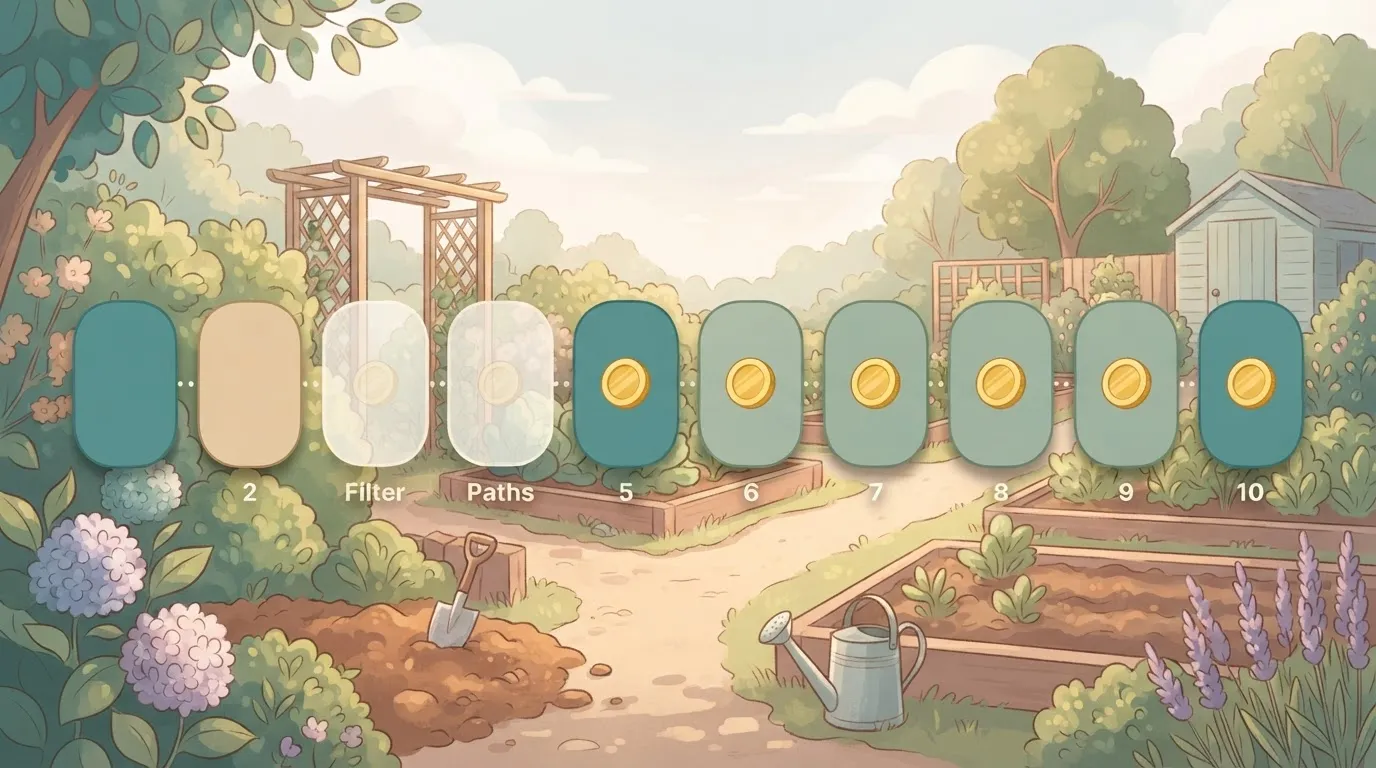
A ten-step workflow can bill as few as four or five tasks, because Zapier triggers, Filter and Paths steps count 0 tasks. Estimate from billable actions, not step count, or you'll overbuy.
Seat caps and SSO gating
When the security team asks for SSO, that is usually the line that forces a tier jump.
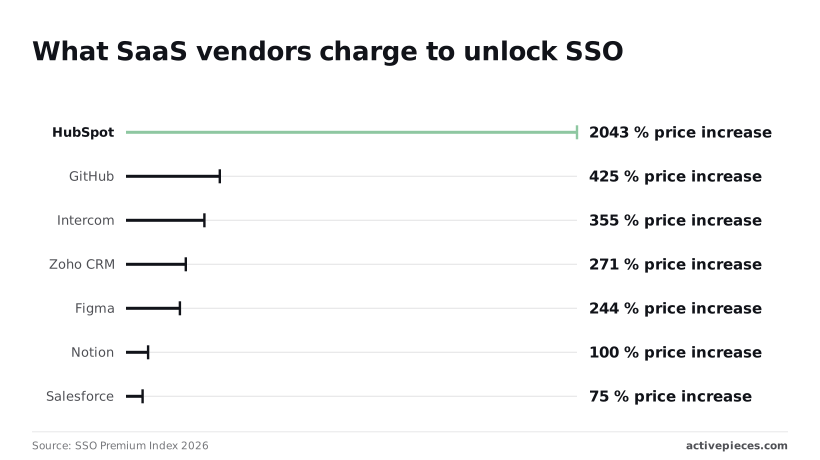
The SSO Premium Index 2026 shows how steep that jump gets across SaaS: Notion charges 100% more to unlock SSO, Figma 244%, Zoho CRM 271%, Intercom 355%, GitHub 425% and HubSpot 2043%.
When the security team asks for SSO, that is usually the line that forces a tier jump.
Those figures show that SSO is priced as a segmentation lever, not a cost-plus feature, so a modest per-seat price can hide a multiple of itself once your security team asks for it.
Compare each vendor's SSO tier against its seat cap, because a cap can force an upgrade even if SSO is not required.
Find out whether a workflow halts at the limit or keeps running at a metered rate. A halt mid-run can leave a record created in one system and not updated in another. Metered overage never interrupts, but it makes the invoice variable.
Running the free licence yourself still costs engineering hours: upgrades, backups, monitoring and an on-call owner. Zapier has none of that labour, but it also has no self-hosted deployment.
Support tiers matter here too, because on a self-hosted install the first responder is your own team.
Worth checking against a plan that does not meter every step: one credit covers a whole run on Activepieces.
Closest alternatives priced on the same measures
Who answers the pager is decided by self-hosting terms, and of the four platforms only n8n and one credit-based option let you run the software on your own servers, the latter with its core under the MIT licence.
The unit each vendor bills on is the other variable that moves your invoice.
| Platform | Usage unit | Self-hosting terms |
|---|---|---|
| Zapier | Tasks | Cloud only |
| Activepieces | Credits | Free Community Edition (MIT-licensed core); enterprise self-hosting through sales |
| Make | Credits | Cloud only |
| n8n | Workflow executions | Self-hostable under its Sustainable Use Licence |
"Usage" means four different things, as the table shows. Price columns are omitted because I have no vendor-page figures for every row, and a column with gaps would mislead a comparison.
A ten-step Make scenario costs roughly ten times a single-step one, because Make bills in credits and a multi-module scenario consumes credits per module run. Estimate from your longest workflow, not your average.
A platform that makes the run the meter and not the steps inside it charges 1 credit for a ten-step flow, the same as the two-step workaround it replaced, so splitting work into smaller, more reliable steps never raises the bill, and MoneyGram and Moneypenny run on it in production.
Make has no self-hosted option, so data residency and uptime stay with the vendor.
If you plan to embed n8n in a product you sell, read the licence terms before building on it. n8n counts one execution per workflow run, however many steps it contains, which favours long, branching workflows.
Its licence is source-available rather than open source, and it limits commercial redistribution.
When the alternatives beat both
Integration breadth is the practical test. Zapier and Make publish larger app catalogues than most self-hosted tools.
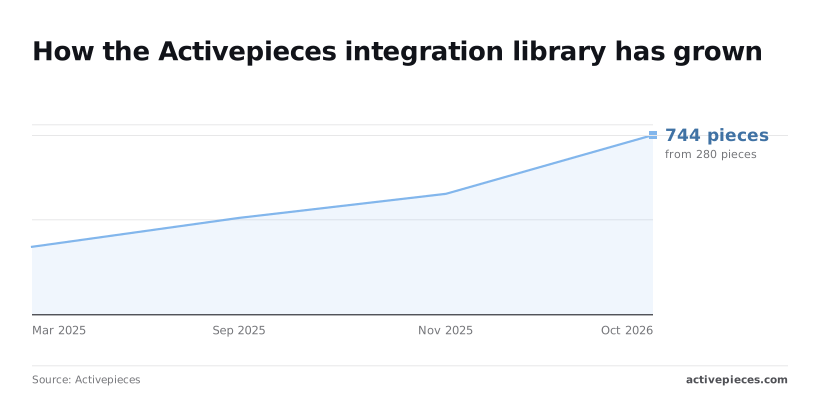
The open-source option's community integrations directory grew from 280 integrations in March 2025 to 400 in September, 500 in November and 744 by October 2026. That's 464 added in roughly nineteen months, so a gap you saw last year may be closed.
Check each app you depend on, not the headline count.
Self-hosting, SSO and embedding with Activepieces
You pay only when you need SSO, more than 25 users, or a vendor-backed enterprise or embedded setup, because self-hosting itself is covered by the free Community Edition.
The steps below show the order in which those needs push you up, so you know where self-serve ends.
- Start on the free Community Edition.
- Check whether you need SSO or more than 25 users.
- If self-serve covers it, move to Team.
- Take Ultimate, self-hosted enterprise or Embed (from $36k a year) to sales, since they need custom pricing.
It's enough when your team runs its own infrastructure, signs in with ordinary accounts, and can handle upgrades and backups itself. You pay nothing for the licence, so the only cost's the engineering time to operate it.
When the free plan is not enough
Once security review requires SSO, or the team grows past 25 users, it stops being enough. Team is the self-serve plan that includes both, so check it before opening a sales conversation.
Teams that need an enterprise licence for their own servers, or want to embed the product inside their own application, can't be served by Team. Those go to sales.
What drives enterprise and Embed sales quotes
You won't find Ultimate, self-hosted enterprise or Embed priced on a public page, and this article won't guess at them except for the Embed starting point of $36k a year. Expect the quote to follow four inputs:
- user count
- expected credit volume
- deployment model
- level of support
If your procurement process requires a SOC 2 report today, raise that in the first call, because SOC 2's in progress, not certified.
For self-serve plans, use the pricing page. For self-hosted enterprise, SSO beyond Team, Ultimate or Embed, use the sales form.
Verdict and what to do this week
Which tool to choose on cost and control
Choose the cheaper, self-hostable option on cost and control (Free is $0 with 1,000 credits a month, and the core is MIT-licensed), unless a workflow you can't drop depends on an app connection that only Zapier has.
Which page you land on, self-serve pricing or the sales form, depends on whether you need self-hosting, embedding or SSO beyond the Team plan.
Two facts explain the cost lead. The credit-based platform has a free self-hostable Community Edition with an MIT-licensed core, and its Free plan includes 1,000 credits a month against Zapier's 100 tasks, though the units differ and Zapier has no self-hosted equivalent.

The size of the gap, though, depends on how each vendor counts usage and where it puts SSO and seat limits. A comparison made on headline plan prices alone can point the wrong way.
If your workflows are short and your team is small, the difference may be modest. If they're long, branching and high-volume, the counting method decides the bill.
The inputs below determine how fast the conversation moves, since quotes for self-hosted enterprise, Ultimate and Embed are built from your usage. The steps run in order because each one feeds the next.
- Count your monthly steps from the last full month of run history, including steps inside loops and branches. Vendors meter these differently, so a count taken in one unit won't convert cleanly to the other.
- Price that count on both vendors using each one's own unit of measure, not an average, so the comparison reflects the bill you would actually receive.
- Check SSO and seats: list who needs single sign-on and how many people will build or edit flows. This tells you whether a self-serve plan covers you or whether you're already in quote territory.
- Open the vendor's pricing page and confirm the self-serve plan that fits steps one to three.
- If the answer is self-hosted enterprise, SSO beyond Team, Ultimate or Embed, send the vendor's sales form with your step count, user count, deployment preference and support needs.
Finish the first three steps before step four. A quote request with real numbers gets a specific answer, while one without them gets a discovery call.
Frequently asked questions
Is there a free plan for both vendors?
Yes, both vendors publish a free plan, but they count usage differently: one meters in credits (1,000 a month on Free) and Zapier in tasks (100 a month on Free).
Compare the two free allowances by running your own workflow through each counting method, because the same automation can consume very different amounts under each.
The credit-based vendor also has a free Community Edition for self-hosting, with an MIT-licensed core, which Zapier has no equivalent for.
Can I self-host Zapier?
No. Zapier's a hosted service, and its documentation describes no self-hosted deployment. If your data must stay inside your own network or cloud account, Zapier can't meet that requirement at any plan level.
The alternative can be self-hosted through the free Community Edition, whose core is MIT-licensed. Self-hosted enterprise licences are quoted by sales, and the quote depends on users, credits, deployment and support.
What happens when I go over my monthly limit?
It depends on the plan and the vendor's metering. On the credit-metered platform, usage beyond the included credits on paid self-serve plans is billed per credit. Zapier's documentation describes its own overage and pause behaviour, which differs between free and paid plans.
Before you commit, check whether a spike causes extra charges or halted workflows. A halted workflow can be the costlier outcome if it drives a customer-facing process.
Does the cheapest plan include SSO? No, not on either vendor's entry tiers. The credit-based vendor includes SSO from its Team plan upward, so Free and Plus don't have it.
Zapier places SSO on higher-tier plans, so confirm the exact tier on its pricing page. If SSO's a hard requirement, price the plan that includes it, not the entry plan.
How often do these prices change? Vendors revise plans, allowances and metering rules without a fixed schedule, so treat any comparison as a snapshot.
Check the live pricing page before you budget. For the self-serve plans, use the vendor's pricing page. For self-hosted enterprise, SSO beyond Team, Ultimate or Embed, use the vendor's sales form.
Related reading
References
Running the numbers
See what the same workload costs here.
Free forever plan, and every paid plan self-hosts at no extra cost.
See pricing Talk to sales