
Zapier vs IFTTT vs Activepieces: Make the Right Choice
Read our Zapier vs IFTTT review and find out how the two platforms compare. Discover what makes Activepieces the superior alternative to both.

September 9, 202513 min read @ashrafsam
Every day work comes with too many steps: adding contacts into a CRM by hand, copying files to cloud storage, or setting reminders you’ll forget later.
That’s why people turned to Zapier and IFTTT to automate tasks in the first place.
Zapier handles multi-step workflows that push bigger business processes forward, while IFTTT feels lighter with a user-friendly interface for personal use and smart home integrations.
These platforms offer free plans for easier testing. But in 2026, Activepieces comes in with a new way to get automation done right.
In this article, you’ll see Zapier vs IFTTT vs Activepieces compared on features, pricing, and use cases.
Take the next step beyond Zapier and IFTTT. Explore how Activepieces can run your workflow!
TL;DR
- Zapier fits business automation with thousands of integrations and multi-step workflows, though costs can rise as usage grows.
- IFTTT works well for simple automations and smart home routines, but lacks depth for complex business workflows.
- Activepieces offers AI-powered automation, self-hosting, and flexible workflows that support both simple tasks and advanced business use cases.
The fastest way to settle a shortlist is to try one. Activepieces is free to try, no credit card.
What Is Zapier?
Zapier is a no-code platform that enables users to connect apps together and to move data between multiple tools. At the same time, it also supports advanced users who want to add logic, filters, or even custom code steps.
The automation in Zapier runs on flows called Zaps. Each Zap runs on two parts: a trigger that starts the flow and an action that follows.
For example, a new email can trigger an action that stores the details in a spreadsheet.
Some highlights of Zapier include:
- Connections to thousands of apps across categories.
- Support for two-step Zaps or more complex workflow automation.
- Options that grow from basic flows into more complex business workflows.
Although there’s a steeper learning curve for more complex automations, especially if you’re new to it.
What Is IFTTT?
IFTTT, short for “If This Then That,” is a user-friendly automation platform for personal use. It automates everyday tasks across apps and devices with flows called applets.
These applets follow a basic pattern: a trigger starts the process, and an action happens right after.
For instance, you could trigger a task when a new email arrives and have the action save the attachment to Dropbox.
Many people choose IFTTT since it does a better job connecting smart home devices. You can:
- Turn on your smart lights when you arrive home.
- Get a text when tomorrow’s forecast predicts rain.
- Set your coffee maker to start when your alarm goes off.
However, it lacks the customization options that advanced platforms provide. You can’t build the same kind of deep logic or multi-step flows you’d find elsewhere.
What Is Activepieces?

Activepieces is an AI-powered no-code automation tool that gives you a way to eliminate repetitive tasks through automation.
It connects to hundreds of apps through pieces. These are connectors that let you save time with custom workflows for email, social media, CRM systems, and more.
The design makes it easy to get started, even if you’ve never touched automation before. Non-technical users can build flows in a visual editor, while developers still have the option to expand it with TypeScript.
Some of the automation capabilities people turn to again and again are:
- AI agents that write, analyze, or decide on actions.
- AI Copilot in the builder to guide you through flows.
- Self-hosting for privacy and control over your data.
- Human approval when a task needs a manual review.
- A community-driven library of integrations that keeps growing every month.
Activepieces vs Zapier vs IFTTT: Key Features Comparison
Each platform handles automation differently. The following is how Activepieces, Zapier, and IFTTT compare in terms of:
Automated Workflow
A workflow is a set of actions that run in sequence after you set a starting point. The flow begins with a trigger, like a form entry or an email, and continues with actions such as updating a spreadsheet or sending a message.
Activepieces
Activepieces lets you build workflows in a visual editor. You begin with a trigger, such as a new row in Google Sheets or a scheduled time, and add pieces that complete the next steps. Those pieces might send an email or post on Slack.
The platform supports:
- Branching logic
- Loops
- Human approval steps
That means you can pause a flow until someone signs off before moving forward. Built-in data tables further let you store and organize information directly inside Activepieces.
Zapier
Zapier organizes automation into Zaps. Each Zap starts with a trigger and continues through actions that pass data from one app to another.
The platform connects with over 8,000 services, so you can cover everything from email and CRMs to project tracking and reporting. Two-step Zaps work for quick needs, but do better for longer chains of steps.
IFTTT
IFTTT focuses on quick automations through applets. You set a trigger, like a motion sensor detecting movement, and then add an action, like turning on smart lights or sending a notification.
Many users use it for minimal setup tasks such as posting photos across platforms or syncing reminders to a calendar. IFTTT also integrates with apps for productivity and social sharing, but the scope remains narrow.
Applets generally connect two services at a time rather than building out large flows. While that makes IFTTT simple, you can’t automate complex workflows the way you can with Activepieces or Zapier.
App Integrations and Ecosystem
Integrations shape how useful an automation tool really is. The more you can connect, the easier it becomes to bring different apps and services together.
Activepieces
Activepieces gives you 645+ pre-built integrations called pieces. These cover almost every corner of daily work:
- AI tools like OpenAI, Gemini, and ElevenLabs.
- Project management tools such as ClickUp, Google Sheets, and Excel 365.
- CRMs like Zoho and Microsoft Dynamics.
- Finance apps like Zoho Books and Zoho Invoice.
You can connect multiple apps into one flow, and the process feels simple for beginners.
The library keeps growing because over half of the pieces come directly from the community. Developers can add new ones using TypeScript, while non-technical users can rely on the ready-to-use catalog.
Access 645+ pre-built integrations today with Activepieces!
Zapier
Zapier leads in size with over 8,000 integrations. It connects nearly every type of business app, from CRMs and marketing platforms to e-commerce and communication tools. When there’s an uncovered app, Zapier supports custom API integrations to fill the gap.
Teams rely on Zapier to sync data across tools and avoid manual updates. For example:
- A new lead from Facebook Ads goes into HubSpot.
- Details are logged in Google Sheets.
- Sales teams get a Slack alert instantly.
IFTTT
IFTTT integrates with over 900 services and automates smart devices. It can control lights, thermostats, cameras, and speakers, often with just a few clicks.
Common applets include:
- Turn on smart lights when motion is detected.
- Get a text if rain is in tomorrow’s forecast.
- Sync YouTube uploads with social media posts.
You can also connect two or more apps for online tasks like saving files to cloud storage or setting reminders. The setup is quick, but the platform is better for personal routines than business operations.
Support and Community
Support isn’t only about fixing problems. The right platform also gives you places to ask, share, and grow with other users.
Activepieces
With Activepieces, you’re not talking to a faceless support team.
Full-time engineers rotate through requests, so the people helping you are the same ones who built the product. For bigger companies, enterprise support is available through Slack, and email covers billing or account issues.
The community is where Activepieces really shines:
- A community forum with sections for support, bug reports, and new ideas.
- A Discord server where thousands of users share tips in real time.
- GitHub discussions for bug fixes, feature requests, and contributions.
On top of that, you’ll find blog guides, tutorials, and YouTube videos created by the team and the community.
Zapier
Zapier includes a mix of resources. There’s the Help Center with guides for setting up Zaps, fixing errors, and working with app integrations. An AI bot is on call 24/7 for quick answers.
Other than that, you get:
- The Zapier Community forum is full of people sharing workflows and troubleshooting tips.
- Certified partners step in to design custom automations for your team.
- Webinars, blog posts, and online courses help you grow from basic to advanced setups.
IFTTT
IFTTT starts with a Help Center that covers setup, billing, and common issues. When you’re on Pro or Pro+, you can file tickets directly inside the app for faster help.
The community fills in the rest. You’ll find:
- The r/ifttt subreddit, where people post their favorite applets and answer questions.
- Social channels that share updates and tips.
- Developer hubs for custom projects.
There’s also a status page that shows outages and service updates. Since many problems come from connected apps like Spotify or Wyze, IFTTT often points you to those providers for fixes. Between official resources and peer-to-peer help, you won’t have trouble finding answers.
Use Cases
Real wins show up in the day-to-day.
Activepieces
Activepieces doesn’t stop at simple automation. It covers more than basic tasks and gives you the depth to run business-level AI workflows without the stress of heavy setup. You can start small, but the power’s there when you need it.
Use cases include:
- Lead qualification with scoring, enrichment, and instant alerts to sales.
- Coupon automation that issues unique codes, marks them used, and updates records.
- Pre-call company research that pulls firmographics, tech stack, and news into the CRM.
- Email routing that reads intent, sends to the right queue, and pauses for approval.
- Expense tracking from a receipt photo to clean rows in Sheets with categories.
- CV screening that parses, scores, and sorts applicants for faster shortlists.
- Discord topic mining that turns hot questions into weekly community events.
- SEO audits that crawl pages, draft findings, and email a clean report daily.
- SEO blog creation from topic pick to draft with image, on a set schedule.
- An email autoresponder that drafts replies for human sign-off.
- Client onboarding that turns Typeform answers into Asana tasks with summaries.
Zapier
Zapier helps business users streamline processes without writing code. Typical use cases look like this:
- Grab new leads from Facebook Ads, add them to HubSpot, and send an alert to Slack.
- Cross-post newsletters or blogs to every social channel.
- Build internal workflows for HR or IT, like onboarding employees or tracking tickets.
- Handle e-commerce flows, including order processing, abandoned cart reminders, and automated sales reports.
For advanced workflows, Zapier’s filters, paths, and code steps take you beyond basic Zaps. You can even automate social media posts or connect flows between departments.
IFTTT
IFTTT is for smart home automation and light routines that make life easier. You can tie voice commands to daily shortcuts or link smart lights to your location so they turn on when you walk in.
Other automations include:
- Save your Instagram or X (Twitter) posts directly into cloud storage.
- Use voice commands with Google Assistant to run playlists or add reminders.
- Create shortcuts for daily tasks, like sending calendar alerts or adding to-dos with one tap.
Pricing
The cost of automation can be just as important as features.
Activepieces
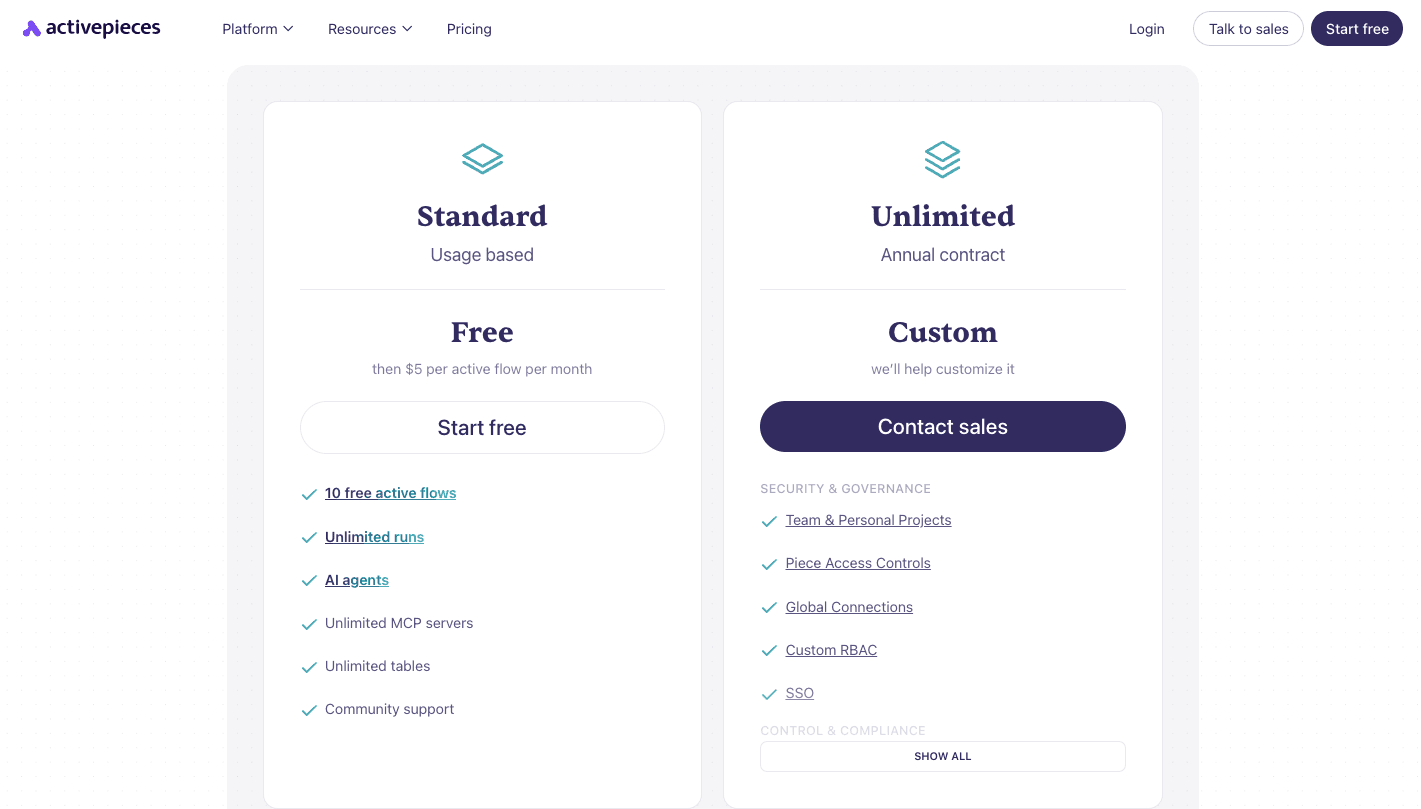
Activepieces keeps things simple with predictable costs. You get a free, open-source, self-hosted Community Edition.
Cloud pricing offers the following plans:
- The Standard plan lets you start for free with ten active flows. After that, it charges $5 per active flow per month and includes unlimited runs, AI agents, unlimited MCP servers, unlimited tables, and email support.
- The Unlimited plan with custom annual pricing that includes enterprise security, SSO, audit logs, private pieces, Git sync, and dedicated support with cloud or on-prem deployment.
- The Activepieces Embed plan starts at $30,000 per year with an embedded automation builder, AI agents, JavaScript SDK, custom branding, piece management, and dedicated support.
The flat-rate model means you can run heavy workloads without worrying about hidden charges.
Switch to Activepieces and stop paying more for less automation. Talk to our sales team!
Zapier

Zapier offers a free plan with basic workflows like two-step Zaps. You can connect two apps, build simple flows, and test the platform.
Paid plans unlock more:
- The Pro plan at $29.99 per month adds multi-step Zaps, premium apps, and webhooks.
- The Team plan at $103.50 per month includes 25 users, shared folders, and SSO.
- The Enterprise plan comes with custom pricing and allows unlimited users and annual task limits.
The pricing rises with the number of monthly tasks available.
No matter the plan, you can create unlimited Zaps. However, when you rely on many business tools or large workflows, you’ll likely hit task limits quickly. Heavy automation usually requires moving up into higher-paid plans.
IFTTT
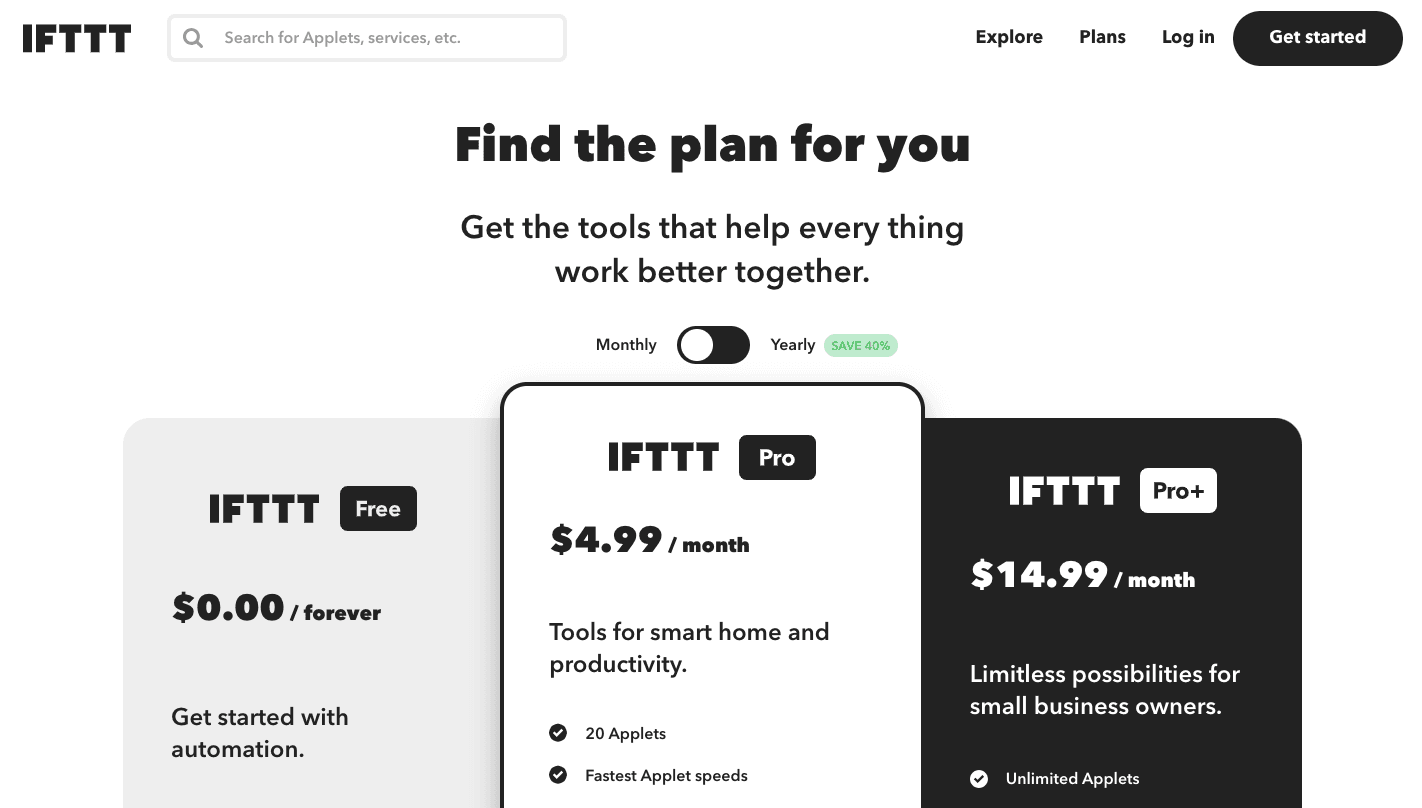
IFTTT’s free plan includes two Applets with unlimited runs. That’s enough for personal tasks like home controls or reminders.
Paid options:
- The Pro plan at $4.99 per month, with up to 20 Applets, faster runs, and access to multiple action Applets.
- The Pro+ plan at $14.99 per month with unlimited applets, advanced filters, AI services, and multi-account support.
Applets can post across multiple platforms, and you can also build custom applets or use developer tools if you want more control. But even with multi-step applets, IFTTT is still better for light automation than heavy business use.
Redefine Automation Beyond Zapier and IFTTT With Activepieces

Comparing the three platforms, you’ve probably noticed a pattern: Zapier connects thousands of apps, but pricing climbs quickly once your usage grows. IFTTT makes life easier for personal tasks, but falls short for heavy use.
Activepieces manages to cover both with flat-rate plans and features that support complex and simple workflows alike.
Here are a few reasons users lean toward Activepieces:
- Community-built pieces that expand the library faster than closed platforms.
- Self-hosting for full control of data and branding.
- AI agents that analyze information and take action in real time.
- Approval steps that mix automation with human oversight.
- Built-in tables that serve as a database for managing flow data.
Move beyond Zapier and IFTTT and run your workflows on Activepieces. Sign up for free now!
FAQs About Zapier vs IFTTT
Which is better, Zapier or IFTTT?
Zapier is better for business automation, and it handles more apps and helps you automate repetitive tasks. On the contrary, IFTTT fits personal productivity and smart home routines.
What’s better depends on your needs.
What’s better than IFTTT?
Activepieces is a better option than IFTTT when you need deeper automation and AI-powered workflows.
Is there anything better than Zapier?
Several platforms now compete with Zapier, including Activepieces, which offers more flexibility and better cost control.
Still comparing
The fastest way to settle it is to build something.
Open source under MIT, so you can self-host the same thing later.
Start free Talk to sales