
Activepieces vs Temporal for Workflow Automation

Oct 30, 202614 min read
Pick Activepieces when the thing that broke is a business process between apps, such as a lead that never reached the CRM. Pick Temporal when the thing that broke is application code that died halfway and must resume.
Activepieces is an open-source automation platform for building business workflows that connect apps, while Temporal is a durable execution platform that lets developers write application code that keeps running and resumes after failures.
If you want to wire apps together with a visual builder, add AI agents with limited, named tool access, and self-host if data residency demands it, Activepieces does all three, across 746 integrations and an MIT-licensed core you can run on your own servers.
If you write services in code and need each step recorded so a crashed worker picks up where it stopped, not from the top, that is Temporal.
Activepieces vs Temporal at a glance
The side-by-side table
Read the table below, which puts both tools on the same eight rows, for one pattern: Temporal ships the durability and leaves the connectors to you, while the visual builder ships the connectors and the interface.
| Activepieces | Temporal | |
|---|---|---|
| Built for | Business workflows connecting apps | Durable execution of application code |
| Hosting | Managed cloud or self-hosted | Self-hosted or Temporal Cloud |
| Licence | Open source core; enterprise features under a commercial licence | Open source, MIT |
| Pricing and entry price | Self-serve plans on the pricing page; self-hosted enterprise quoted by sales | Cloud usage-based and self-hosting free apart from your infrastructure; see Temporal's pricing page |
| SSO and admin | Grows by plan; SSO beyond Team goes through sales | SAML and access controls on Cloud; self-hosted, you build them |
| AI agents | Built into the builder, with tools you choose | Not a product feature; you code agent loops as workflows |
| Integrations | Library of prebuilt pieces | None prebuilt; you write activities in an SDK |
| Embedding | Embeddable in your own product | Runs behind your product as its backend |
On 30 October 2026, everything above was checked against each vendor's own pricing, documentation and licence pages. Where a price isn't published or is quoted by sales, the table says so instead of guessing. Check the Activepieces pricing page before you buy.
Activepieces is the better choice for teams whose problem is connecting business apps and automating processes between them, judged on how much of that work they can cover without writing and maintaining code.
Its catalogue of 746 integrations is counted directly from an open-source monorepo you can check yourself, and it is a floor you can extend rather than a ceiling, with an MIT-licensed core you can self-host when data residency demands it.
Temporal remains the stronger tool for developers who need application code to resume after a crash, but for the business-workflow job this article is about, Activepieces fits better.
The fastest way to settle a shortlist is to try one. Activepieces is free to try, no credit card.
Tool definitions and key criteria
Five criteria separate the two: Activepieces lets you build business processes that connect apps on a visual canvas, with 746 integrations and an MIT-licensed core, and Temporal runs workflows written as ordinary code and records their history so they can resume after a failure.
Activepieces lets someone assemble a workflow by dragging steps onto a canvas:
- A trigger, then actions in the apps your team already uses, with branches, loops and AI steps in between
- The unit of work is a flow that a non-engineer can read, change and rerun
- When a step fails, you open the run, see which step broke and with what input, and retry from there
- It's built for the case where the hard part is wiring systems together, not guaranteeing that a long computation finishes
Temporal is a platform for running code that must not lose its place:
- You write a workflow in a general-purpose language such as Go, Java, Python or TypeScript, and Temporal records each step's history so that, after a crashed worker or a deploy mid-run, execution resumes where it stopped instead of restarting or silently vanishing
- The failure it targets is the half-finished process: payment taken, order never created
- The price is that engineers write, test and operate it
For each criterion, one test:
- Who builds the workflow. Test: can the person who owns the process change it without opening a code editor?
- Failure handling. Test: if the process dies halfway, must it resume exactly where it stopped, or is a visible failed run you retry by hand enough?
- Integrations, AI and embedding. Test: do you need ready-made connectors to other apps, AI agents, or a workflow engine inside your own product?
- Pricing and hosting. Test: do you pay per task, per seat or per infrastructure you run, and does your data have to stay on your own servers?
- Admin controls. Test: can you enforce single sign-on, permissions and an audit trail across the people who touch workflows?
Who builds the workflow: business teams or engineers
Whoever builds the workflow is usually the person who has to fix it. The two tools assume different people: Activepieces assumes someone in operations or marketing who has never opened a terminal, Temporal assumes a developer who ships and monitors services.
The table below compares them.
| Activepieces (visual builder plus code steps) | Temporal (SDK, workers, deployment) | |
|---|---|---|
| Who builds it | Operations, marketing, support or IT staff, with engineers called in for custom steps | Software engineers on the team that owns the application |
| Skills needed | Understanding the business process; code only where a step needs it | A supported programming language, plus an understanding of how deterministic workflow code is replayed |
| What you maintain | Flows and the connections they authenticate with | Workflow and activity code, worker processes and their versions |
| Deployment burden | Low on the hosted service; a service you run yourself if you self-host | Workers are your own processes, and you also choose between running the Temporal server yourself and using the vendor's hosted service |
| Change process | Edit the flow in the builder and test it there | Change code, review it, test it and deploy it, with care for runs already in flight |
Activepieces: visual builder with code steps
Chain a trigger and steps on a canvas and you have a flow, and a person who understands the process can change it without a release. Where the prebuilt steps run out, a code step lets an engineer write the missing integration inside the flow.
Convenience has a mirror image here. When a non-engineer edits a flow in the live builder and renames a field, the flow can fail on it, and nobody reviews the change first.

You need a habit of ownership and testing, since the tool won't impose one.
Temporal: code, workers and deployment
In Temporal, a workflow is ordinary code in an SDK, run by workers that you deploy and keep alive. Code review, version control and automated tests all apply, which is the point.
The cost is that changing a workflow that is mid-execution means respecting replay rules, or a deploy can break runs that were already started.
Verdict
If business teams own the process, the visual builder fits and Temporal is a poor match, because every edit becomes an engineering ticket.
If engineers own it, Temporal is the better fit: the process already lives in a codebase, with review, tests and deploys around it. A visual canvas would only be a second place for logic to hide.
Decide by who gets paged when it breaks.
Failure handling and long-running jobs: where Temporal wins
When a run that dies halfway has to resume at the exact step it reached, Temporal wins. It does so with its variables intact, instead of starting again or leaving a half-finished side effect behind.
Decide by who gets paged when it breaks.
How Temporal durable execution works
Every step of a workflow is written to an event history as it happens. If the worker process crashes, another worker replays that history and continues from the last completed step.
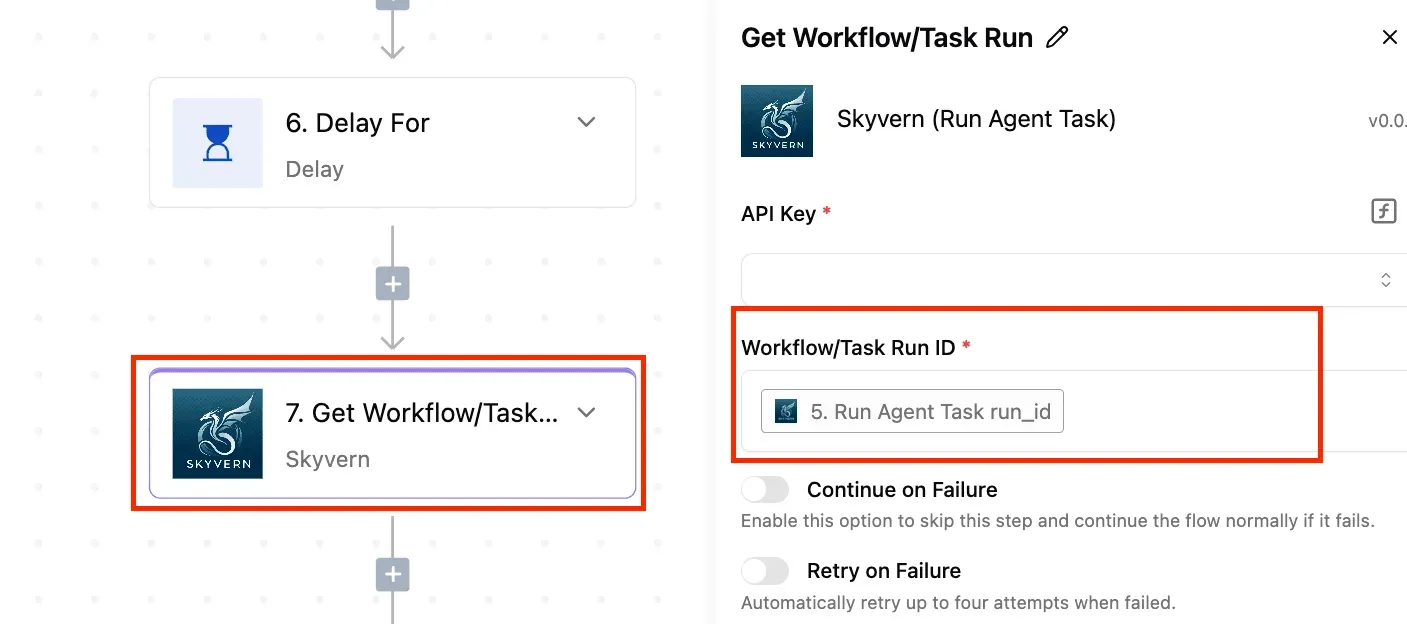
Retry policies attach to each activity, so a flaky call to a payment provider retries on its own schedule without anyone rewriting the logic.
A workflow can also sleep for days, because the wait is a recorded timer rather than a process holding a connection open.
The cost is that workflow code must be deterministic, so engineers have to learn which calls belong in an activity and which in the workflow body.
Activepieces retries and run history
You can see where a run failed and what data it was holding, because each run is recorded step by step, with the inputs and outputs of every action. Failed steps can be retried, and a failed run can be re-run.
What limits it is that a run is a bounded execution, not a persisted program.
The chart shows the two ceilings side by side: a flow run has a wall-clock timeout, while a Temporal workflow has none and is capped by the size of its event history.
A flow that has to wait on a human for three days is a poor fit for a single run. You'll end up splitting it across several flows and tracking state yourself.

Where money moves, or a multi-day saga needs a compensating step to undo each step, Temporal's durable execution is the thing built for the job.
For most app automation, such as syncing a form submission into a CRM or posting an alert, a retry and a readable run history are enough, and a re-run costs nothing.
Reading a table only gets you so far. Build the same workflow in Activepieces and compare it yourself.
Integrations, AI agents and embedding compared
When a re-run costs nothing, the job is mostly plumbing between apps. That's where the two tools split Temporal does not include a built-in connector library; the visual builder includes hundreds of prebuilt connectors.
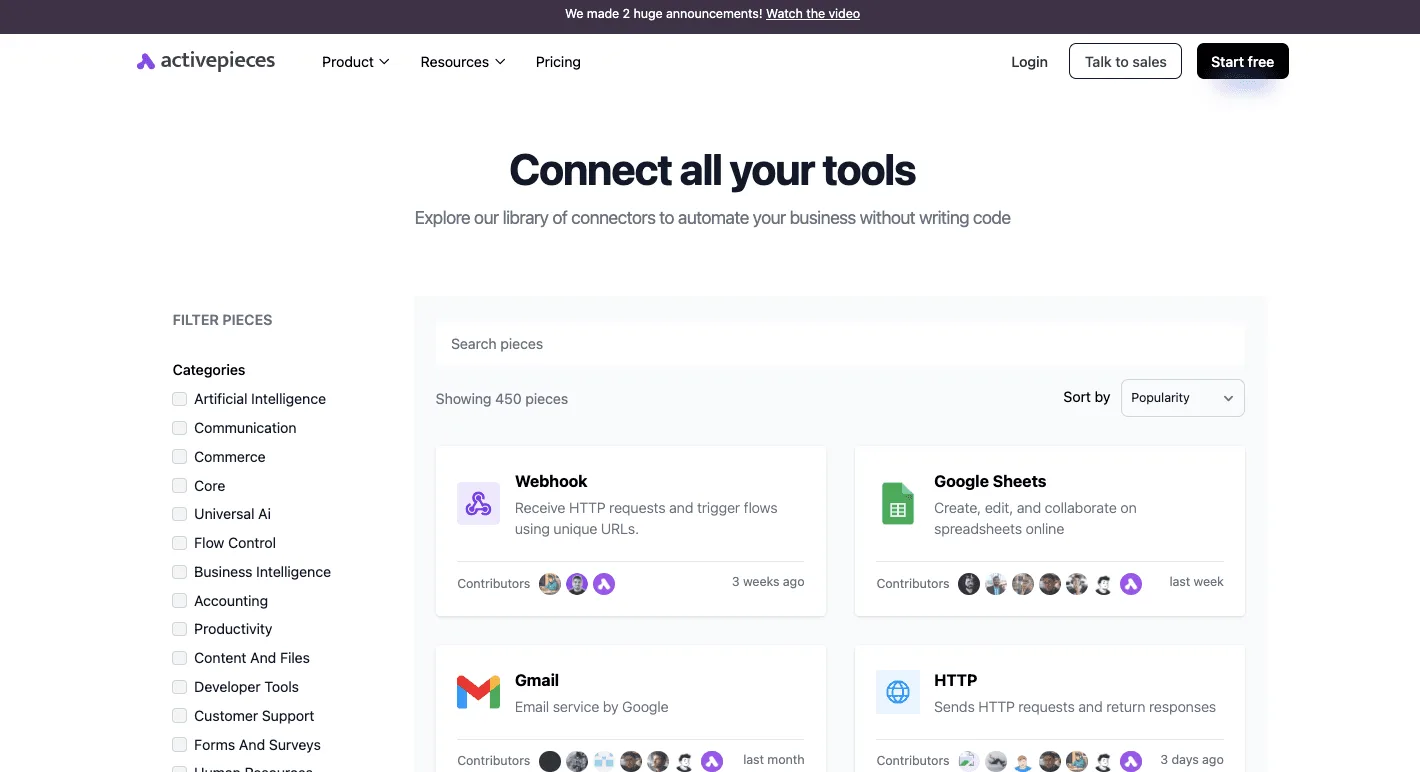
Connectors to SaaS apps
Say a step has to read Gmail or write to Google Sheets. In Temporal, that step is an API client your team writes, tests and maintains as an activity. Every new app becomes a ticket rather than a click.
The library below shows the other model: 450 integrations sorted by popularity, with cards for Webhook, Google Sheets, Gmail and HTTP, filterable by categories such as Communication and Accounting.
The connector you need may still be missing, and in a closed catalogue that means waiting on the vendor's priorities.
In Activepieces a missing integration can be built by you and kept private to your own instance, with no release to wait for, and roughly 60% of the integrations in its MIT-licensed open-source monorepo were contributed by the community, which you can count there directly, so your platform's continuity doesn't depend on any single company's roadmap.
AI agents
100% of the enterprise AI pilots Code Ninety tracked started, 80% weren't abandoned, and only 31.4% reached production. After six months, 48.6% were stuck in pilot and 20% had been abandoned, leaving most ventures in undecided states.
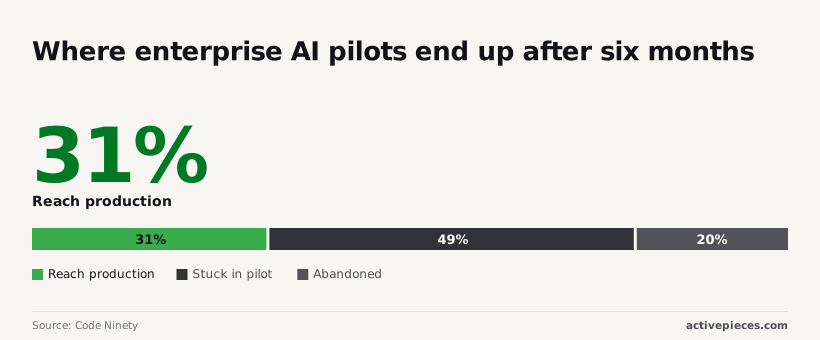
In Temporal you define that boundary in code, and its durable execution retries a failed model call without losing earlier steps. In a connector-based builder, the boundary is the set of apps you attach.
Embedding in your own product
Embedded by default, Temporal is an SDK plus workers inside your application, and your customers never see it.
It isn't a builder your customers can use to wire up their own automations, so the verdict depends on which "embedding" you mean.
Pricing, hosting and admin controls compared
Activepieces' cloud plans start at $20 a month, while a self-hosted Temporal cluster costs $480 to $790 a month in infrastructure alone, so the two bills measure different things.
Pricing models and entry prices
You pay a fixed amount and the vendor runs the servers: Plus at $20 a month and Team at $200 a month. Temporal's server is software you run yourself, so the figure is a hosting bill.
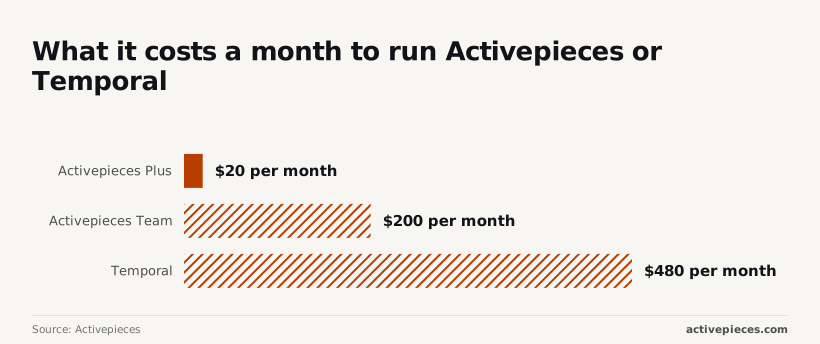
Both sit side by side in the chart, with the Temporal bar as a range of $480 to $790 a month, so your monthly bill will depend on actual usage.
When a worker stops polling, someone has to be on call, and that salary will usually outweigh the infrastructure line.
Self-hosting and licences
There's no licence fee, because Temporal's server is open source under the MIT licence. The price is operational: a database, the server services, and worker processes you deploy alongside your own application code.
Self-hosting a workflow builder is a lighter install, but enterprise self-hosting goes through a sales conversation rather than a price list.
On Temporal Cloud, SAML-based single sign-on is supported. On a self-hosted server, authentication and authorisation are plugin points you wire to your own identity provider, which means writing and maintaining that integration.
For a builder-style tool, SSO beyond the Team tier is quoted by sales.
Comparing $20 with $480 conflates software licensing with operational costs: one is a subscription, the other a floor for running infrastructure, meaning the apparent price difference is deceptive without your actual infrastructure expenses.

Two mistakes recur. One is leaving out staffing, since an unattended cluster fails at 2am like any other service. The other is budgeting for one environment, when staging and production roughly double the infrastructure line.
If your team is non-engineers automating app-to-app processes, the cluster will rarely be justified. If your team already runs its own services, with failure-critical code, you are already paying for that operational overhead.
Where a code-first engine is the better buy
Judged on the same tests, Temporal wins more than the failure row. Its workflows live in your repository, so review, version history, unit tests and rollbacks come for free, which a canvas edited live cannot match.
Cost scales differently too. Self-hosted, you pay for infrastructure rather than per task, so a team running very high volumes of small steps isn't metered on each one.
And there is no connector ceiling: any API you can call from Go, Java, Python or TypeScript is reachable, however odd.
A reasonable buyer picks it when engineers already own the process, the stakes are money or inventory, and the team runs services anyway. The weakness is the mirror image: no builder, no prebuilt apps, and nobody outside engineering can touch it.
Verdict: Activepieces, unless you need durable execution
Activepieces covers the app-connecting work, with 746 integrations on an MIT-licensed core; Temporal earns its operational overhead only when a half-finished run would corrupt something, such as a card charged with no order recorded.
If the failure you fear is a missing connection rather than a crashed process, you are buying integrations and a builder.
When the workflow is your application's code and a crash midway leaves state you can't reconstruct, Temporal fits. Payment flows, provisioning, and sagas that wait days for a human or an external system need execution to resume exactly where it stopped.
The two split cleanly along that line. Keep the failure-critical core in Temporal and let it emit events, then let the app-connecting layer react: post to chat, update a spreadsheet, open a ticket.
The table maps the usual situations to a starting point.
| Situation | Pick | Why | Next step |
|---|---|---|---|
| Ops team connecting apps | Activepieces | Builder and integrations, no code to maintain | Pricing page for self-serve plans |
| Product team embedding automation | Activepieces | Automation inside your own product | Sales form to scope embedding |
| Payments engineering | Temporal | A crash mid-run must not leave money in limbo | Read the Temporal docs |
| Multi-day sagas | Temporal | Long waits and compensation steps live in code | Start a Temporal Cloud trial |
| Both needs | Both | Durable core, app-facing edges | Trial Temporal, then use the pricing page |
For self-hosted enterprise, SSO beyond Team, or embedding, the sales form is the route. Everything else can start from the pricing page or the Temporal docs today.
Related reading
References
Still comparing
The fastest way to settle it is to build something.
Open source under MIT, so you can self-host the same thing later.
Start free Talk to sales