Activepieces vs Gumloop? Which to Choose in 2026

Oct 30, 202614 min read
Which tool fits, at a glance
The short answer
Pick Gumloop if non-technical staff will build AI workflows on a hosted canvas. Pick Activepieces if you need open source, self-hosting, wide app coverage (746 integrations, counted from its open source monorepo) or automation embedded in your own product.
The deciding question is who runs the tool and where it lives.
Activepieces vs Gumloop is a comparison of two workflow automation platforms: Gumloop, a hosted, AI-first visual canvas built for non-technical teams, and Activepieces, an open source tool that can be self-hosted, connects to a wide range of apps and can be embedded in other products.
If your security team says the data can't leave your infrastructure, the comparison ends there. Only the open source tool can be self-hosted. Its core is MIT-licensed.
The two suit different teams. An open source tool suits teams that want to own the thing they automate with: developers, IT and agencies who'll run it, extend it and maybe resell it. MoneyGram, Moneypenny, Alan and FundingSocieties run it in production.
Gumloop suits operations, marketing and sales teams who want to assemble AI-driven flows without engineering help and are happy for someone else to host it.
The comparison table
Eight points usually decide a purchase, and the table below sets the two tools side by side on each. Read the hosting, licence and embedding rows first, because they're the hardest to change after you've built workflows.
| Open source tool | Gumloop | |
|---|---|---|
| Built for | General workflow automation with AI steps, for technical and mixed teams | AI-first workflows on a visual canvas, for non-technical teams |
| Hosting | Cloud or self-hosted | Hosted only |
| Licence | MIT-licensed core, with enterprise features under a commercial licence | Proprietary |
| Pricing and entry price | Self-serve plans on its pricing page; self-hosted enterprise quoted by sales | Free and paid tiers on its site; enterprise quoted by sales |
| SSO and admin | Self-serve plans up to Team; SSO beyond Team via sales | Enterprise controls via sales |
| AI agents | Agents and AI steps inside flows | Core of the product |
| Integrations | Broad catalogue, extensible with community and custom pieces | Narrower catalogue centred on AI workflows |
| Embedding | Supported for putting automation inside your own product; sales-led | Not its focus |
Facts here come from each vendor's own product and pricing pages. They were checked on 30 October 2026. Anything marked as sales-quoted has no public price, so confirm it with the vendor before budgeting.
The fastest way to settle a shortlist is to try one. Activepieces is free to try, no credit card.
What distinguishes hosted from self-hosted builders?
Gumloop is a hosted AI workflow builder, while an open source builder runs on your own servers or on its managed cloud, with a core under the MIT licence, so the price lines above are paying for two different things.
How Gumloop works
Gumloop runs only as a hosted service. You build on a visual canvas, connecting nodes that call AI models, read from apps and pass results along.
The AI steps are part of the canvas itself, so a marketing or operations person can wire a model into a process without writing code or touching infrastructure.
The trade-off is that Gumloop operates the service and you don't. That keeps maintenance off your plate, but the tool lives on the vendor's platform and on the vendor's terms.
How visual workflow builders work
An open source flow builder is also visual, but the code is open (an MIT-licensed core with 25,286 GitHub stars), so you can run it on your own servers or use the hosted cloud.
It calls its integrations pieces, and the community can extend them, so a missing app is something you can build yourself rather than a feature request to file.
It includes AI agents alongside standard trigger-and-action flows. It also offers an embedded flow builder, which lets a software team put automation inside its own product.
If you're the one maintaining this long term, the self-hosted edition means you decide when to upgrade and where the data sits. You also take on the upkeep.
Where teams use each
Vendor documentation places Gumloop with marketing and operations teams that want an AI-centred canvas someone else hosts. It places the open source alternative with teams running self-hosted automations, embedding a builder in their product, or working with the open-source community and its agents.
Six criteria that decide this choice
Six criteria decide this choice: hosting and data control, price at the same usage, AI capability, app coverage, admin and SSO, and embedding.
The list below gives each one and the single published source used for both tools, so you compare like with like and can check every claim against the vendor's own pages.
- Hosting and data control: the deployment options each vendor documents, and whether you can run the tool on your own servers.
- Price at the same usage: each vendor's public pricing page, read at one identical workload.
- AI capability: what each vendor's documentation says its agents and AI steps can do.
- App coverage: the integration count each vendor publishes.
- Admin and SSO: which plan each vendor says unlocks single sign-on and admin controls.
- Embedding: whether the vendor documents a way to run the tool inside your own product.
Where sales quotes a plan, we say so rather than guess at a number.
Hosting control and code ownership compared
If you must know exactly where your data sits, start here. A hosted tool means your workflows and the credentials they use live on the vendor's infrastructure, and you accept its security posture.
A self-hosted one moves that burden to your team, along with patching and uptime.
Embedding belongs in this group too, because shipping automation inside a product you sell only works if you can control the runtime and the licence terms.
Look at what each vendor counts, not just the sticker price. One vendor meters runs, another meters credits or tasks, and a workflow with many steps or an AI call in a loop can cost very different amounts under each.

A long integration list matters only if your own tools are on it. Check your five most-used apps first.
For AI, ask whether agents are the core of the product or one step type among many, since that decides how much a non-technical teammate can build alone.
SSO often sits on a higher plan than the entry tier. If your security team requires it, price the plan that includes it, not the cheapest one.
Pricing and limits compared on the same terms
The open source tool is cheaper than Gumloop at 1,000 and 10,000 runs a month, making it the more economical choice at these volumes. Gumloop is cheaper at 100,000. Price the volume you actually run, not the entry tier.
Entry price and free tier
At 1,000 runs, [WorkflowMath] puts the bill between $0 and $37 a month, so your actual cost depends entirely on which plan you choose. The $0 is the open source tool's free tier.

The $37 is Gumloop's Solo plan, so a team testing one workflow pays nothing on one side and a full subscription on the other.
At 10,000 runs the range is $20 to $37, which means even the cheapest option will cost at least $20 at that volume.
Past that crossover, the open source tool's overage charges outweigh its cheaper start, so heavy hosted usage favors Gumloop's bill.
Task vs credit billing in each tool
The open source tool bills by task, and Gumloop bills by credit. The usual mistake is comparing the headline prices while ignoring those units, because a credit isn't a run.
If your flows lean on AI steps, check how many credits one run burns before you trust a monthly figure. A $37 plan that covers 10,000 credits may cover far fewer than 10,000 runs, meaning you could exhaust your credits before completing 10,000 runs.
The usual mistake is comparing the headline prices while ignoring those units, because a credit isn't a run.
At 10,000 runs, WorkflowMath ranks five tools from cheapest:
- The open source tool, $20 a month
- Make, $34.12 a month
- Gumloop, $37 a month
- n8n Cloud, $60 a month
- Zapier, $283.50 a month
The gap between first and third is $17, small enough that metering behavior can erase it. The gap to Zapier isn't.
Where SSO and admin controls start
Neither figure above's a price for SSO. Both are entry or mid-tier bills, and single sign-on usually sits on a higher plan.
With an open source tool whose self-serve plans stop at Team, SSO beyond that point goes through a sales form, so the vendor quotes the cost and doesn't list it. Confirm which Gumloop plan includes SSO on its own pricing page.

Then rerun the comparison on that plan, because your real bill's the one with your security requirements switched on.
Reading a table only gets you so far. Build the same workflow in Activepieces and compare it yourself.
When self-hosting, licensing, and embedding apply
If your data has to stay on servers you run, or your customers need automation inside your own product, Activepieces covers both: it self-hosts from an MIT-licensed core, and its embedded flow builder places automation inside your application.

A hosted-only canvas isn't built to do either.
Self-hosting and licence
Because Activepieces is open source, you can read the code, run it on your own infrastructure and keep every workflow and credential inside your network.
The practical consequence is a cost shape that differs from a per-seat or per-task bill: you pay for the server and for whoever keeps it patched, upgraded and backed up.
For a bootstrapped team with one capable engineer, that trade is often cheaper and easier to defend. For a team with nobody to own it, it's a chore that lands on the wrong person at the wrong time.

Gumloop's documentation describes a hosted product that you use through Gumloop's own cloud. Check its docs for any dedicated or private deployment option before you assume one exists.
If a data-residency rule forces the tool onto your own machines, the usual worry is that the self-hosted build is a stripped-down copy of the cloud.
With Activepieces the air-gapped edition carries SSO, SCIM, custom RBAC, audit logs, release management and secret managers, the same list as the managed cloud, and regulated and public-sector organisations already run it in production. MoneyGram, Moneypenny, Alan and FundingSocieties run Activepieces as well.
Self-hosted enterprise setups go through the sales form: https://www.activepieces.com/sales
Embedding in your own product
Your customers can build and run automations without leaving your interface or creating an account with a third party, because Activepieces lets you place its flow builder inside your own application.
That matters if automation is a feature you sell, because the alternative is sending customers to someone else's login screen and handing over a slice of the relationship.
It also means you carry the maintenance of that integration, so budget engineering time for it.
Embedding's a sales-led conversation, and the same form's where to start: https://www.activepieces.com/sales
Gumloop's docs position it as a workspace for your own team to build in. Read them for any embedding or white-label offer before you plan around one.
Security and SOC 2 status compared
Many security reviews are really asking where data lives and who can reach it, and self-hosting gives you control over both.
Activepieces isn't SOC 2 certified; that programme's in progress. If a certificate's a hard procurement requirement today, say so to sales early and ask what evidence they can supply in its place.
Read Gumloop's own security documentation for its current compliance statements rather than relying on a summary.
Gumloop's edge with AI agents and integrations
If your team's non-technical and most of the work is AI steps, Gumloop's hosted, AI-first canvas may serve you better than a bigger app library. Nobody has to run anything.
Building AI agents in Gumloop
Gumloop puts the model call at the center of the canvas, so an operations lead or marketer can chain prompts, documents and outputs without touching infrastructure.
That matters for maintainability: the person who built the flow's usually the person who can fix it at 9 a.m. on a Monday.
A more general automation tool asks for more setup before the first agent runs, and for a team with no technical owner that setup cost's real.

Integration coverage
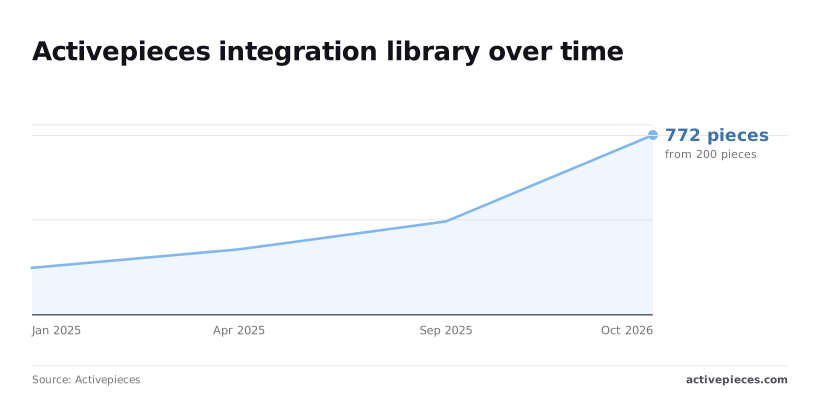
Breadth's where the open source library pulls ahead, and the trend's steep. It listed 200 pieces in January 2025, 280 by April 2025, 400 by September 2025 and 772 by October 2026.

That's roughly 570 added in under two years, so a gap you hit last year may already be closed.
Re-check the live list against your own apps before you decide.
Four errors cost teams money or months, and each's avoidable before you sign anything:
- Comparing headline price instead of credits, so a cheap plan runs out mid-month once agents loop or call models repeatedly.
- Assuming an integration count covers your apps, when you only need the six tools you use to be present and deep enough.
- Self-hosting with no one assigned to run it, which leaves upgrades, backups and outages to whoever notices first.
- Piloting agents with no route to production, so a demo that impressed everyone has no owner, permissions or budget behind it.
Verdict and next step for your team
Pick Gumloop unless you need self-hosting, open source, embedding or broad app coverage, in which case pick the open source tool. The deciding question's who runs the tool and where it lives, and everything below follows from it.
Choose Gumloop if
If your flows will be built and maintained by people in marketing, ops or sales who don't want to touch infrastructure, this is your tool. Gumloop is a hosted, AI-first canvas, so there's nothing to deploy, patch or upgrade.
If your data's fine living in a vendor's cloud and your workflows lean on AI steps more than on a long tail of app connections, you're paying for exactly what you'll use.
When data control and code access matter
When your data has to stay on servers you control, or you want to read and fork the code under an open source licence, this is the one.
It also fits if you need to embed automation inside your own product, or if your flows touch many different apps and a missing connector would stall the project.
You can't bolt these needs onto a hosted-only tool later.
Work through these in order. Each step can end the search early, so stop at the first one that settles it.
- Name who will build and run the flows. If it's non-technical staff with no engineering support, that leans hosted and canvas-first.
- Decide whether data must stay on your own servers. If yes, self-hosting's required and the decision's made.
- Check whether you need embedding in your product, or SSO and admin controls beyond what a basic plan offers.
- List the apps your flows can't work without, and confirm each one is supported before you commit.
- Pick your route: the pricing page for self-serve plans, or the sales form for self-hosted enterprise, SSO beyond Team, or embedding.
Do the first four on paper with the people who'll own the flows.
Related reading
References
Still comparing
The fastest way to settle it is to build something.
Open source under MIT, so you can self-host the same thing later.
Start free Talk to sales