
Activepieces AI Workflow Builder: A 2026 Review

Oct 27, 202614 min read
Describe a workflow in plain language and the Activepieces AI workflow builder turns it into a draft, one you can try on the free plan's 1,000 credits a month.
It's a drafter: you still review, configure and test what it produces before anything runs on real data.
The Activepieces AI workflow builder is a feature that generates a draft automation from a plain-language description of what you want, which you then review, configure and test yourself before it handles real data.
A prompt like "When a form is submitted, add a row to a spreadsheet and message the sales channel" is enough to start.
The split below shows what the builder takes off your plate and what stays with you.
The Activepieces AI workflow builder drafts workflows from plain language
- The builder turns your description into a draft.
- It picks the integrations, from the 744 in the open source monorepo, and the steps.
- It lays out the trigger and the actions in order.
- You review the draft against what you meant.
- You configure accounts, fields and mappings.
- You test with realistic data before you switch it on.
It doesn't replace the person who owns the process. A draft can look complete and still map the wrong field or send a message to the wrong place, and nothing in a tidy layout tells you so.

Teams get hurt when they publish the draft because it looks finished. Use it to skip the blank canvas, then do the checking yourself.
As of 27 October 2026, the product facts here come from Activepieces' own vendor pages. Anything those pages don't state is left out, and no claims are made about certifications beyond them. To try the builder yourself, you can start free.
Everything below works on Activepieces' free plan. Start without code or a credit card.
AI workflow generation mechanics and failures
Under the hood, a workflow generator translates a sentence into a structured graph: one trigger, an ordered list of actions, and the settings each action needs.
The model can only choose from the integrations and actions the platform actually offers, so well-built tools check the output against that catalog and a schema before showing it to you. What no check can supply is intent.
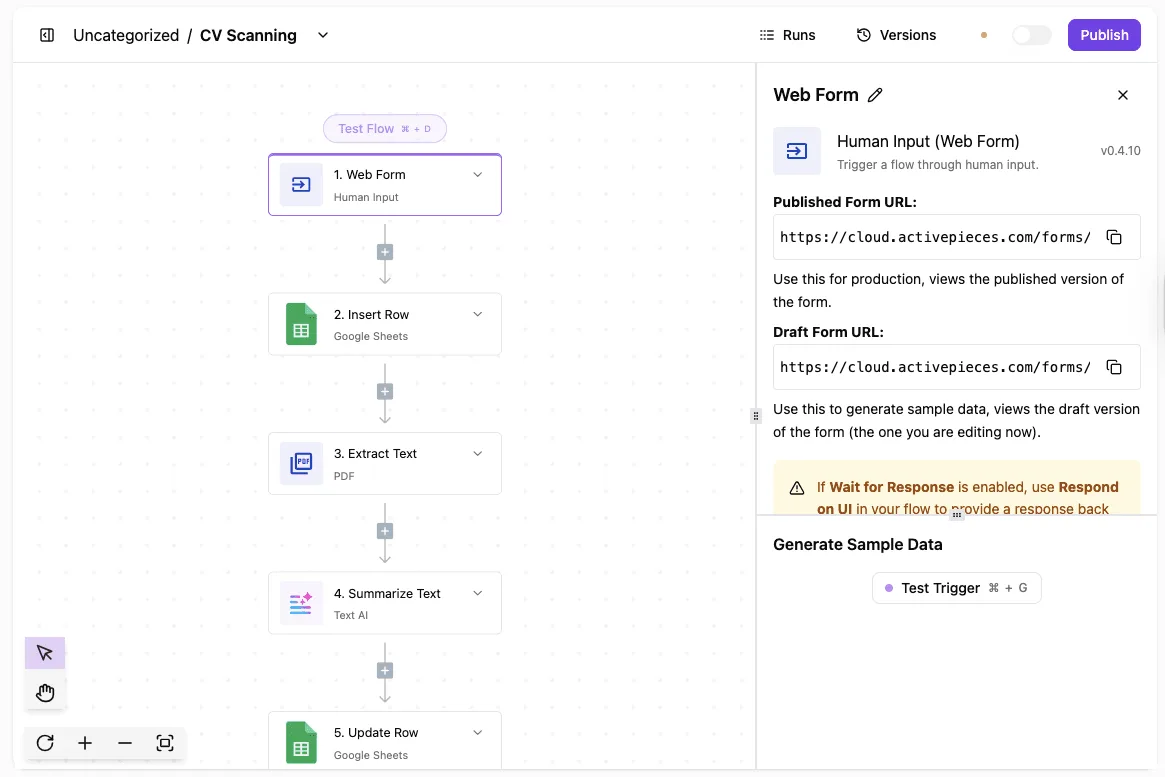
The model has to guess what your prompt left out: which calendar, which field, what counts as an error.
That guessing is the whole problem, and the general fixes look the same everywhere. Constrain the output to known building blocks, present the draft as something editable rather than something deployed, and run it on sample data before it touches live systems.
Around that sit ordinary engineering habits: narrow permissions, failure alerts, and a person who signs off before anything outbound.
Other ways to get a first draft
Prompt-to-workflow drafting is not unique to one product. Several automation platforms and open source tools offer something similar, and they differ mainly in how tightly they constrain the output and how much they show you before you commit.
The safer designs present the plan in readable form and let you approve it step by step.
Teams solved the same trust problem long before generated workflows. Treat a draft like a pull request from a new colleague: read the diff, run it in a sandbox, and keep a way to roll back.

Hand-building on a canvas is the slowest route, but it keeps your understanding attached to every step. A vetted template gives you a pattern whose edge cases someone has already tested.
Whatever the route, a draft is a hypothesis about your process, and review is how you test it.
Building workflows from plain language
Once you're signed in, the builder turns a plain-language description into a draft workflow, and you still connect, configure, test and publish it yourself. My prompt was: "When a form is submitted, summarize the answers with AI and post the summary to a Slack channel."
- Describe the workflow in the builder's prompt box, naming the trigger, the AI step and the destination.
- Read the draft before touching anything.
- Connect your accounts.
- Configure each step.
- Run the test step.
- Publish.
Expect the first draft to miss. Mine had the right shape, a form trigger, an AI step, a Slack step, but the AI step's instructions were generic.
Vague prompts get vague steps, so my second attempt named the channel and asked for a three-bullet summary.
You do the authorizing, not the draft. Each step that talks to an outside service needs a connection you create, and a step left unconnected is where a draft quietly stays unfinished.
Then fill the gaps: map the form fields into the AI step's prompt, choose the Slack channel, and fix any field the builder left empty or guessed.
Testing before publishing
Submit a real test entry through the form, then run the test step for each action in order. Check what the AI step actually returned, not whether it ran.
A step can succeed and still produce a summary that drops the answer you cared about. Fix the prompt, rerun, and publish only when the Slack message reads the way a colleague should see it.
Builder versus AI steps versus agents
Before you pick one, separate three things that share the word "AI." The builder is a drafting tool: it writes the workflow once, and then it's out of the loop.
Every time the workflow runs, the AI step inside it runs too, like the summary here. An AI step is a block inside the workflow. An agent is a separate feature for open-ended tasks that choose their own actions.
This example needs no agent, because every step is known in advance.
The strongest case against trusting an AI-built workflow
Easy to test beats fast to generate, and the sharpest critics say generation trades the first for the second. The prompt that goes wrong looks innocent: "When a form is submitted, add the contact to the CRM, send a welcome email, and notify sales."
Back come three tidy steps, with sensible names and every box filled in. That tidiness is the problem, because nothing on the canvas tells you which parts were reasoned out and which were guessed.

According to the critic, the failures are quiet. A mapping that puts a company name into a notes field raises no error. A flow with no failure branch simply stops when the email service rejects a request, and nobody is told.
When a lead without a work email finally arrives, the assumption the model invented, that every lead has one, shows itself.
| Failure | What it looks like in the draft | How it fails | How soon it is noticed |
|---|---|---|---|
| Wrong field mapping | A plausible value in every input, with names that nearly match | Data lands in the wrong field and the run still reports success | Late, usually when someone reads the record |
| Missing error handling | A clean straight line with no failure branch | One rejected call halts the flow and nobody is alerted | Late, after something expected never happens |
| Invented assumption | A filter or default you never asked for | Edge cases are dropped or misrouted without a trace | Slowly, once an unusual input arrives |
| Unreviewed publish by non-technical user | A flow that "worked" on one sample | Live traffic hits paths the author cannot read or debug | Often only after real damage |
Look at the last row, because it is the critic's strongest point: prompting lowers the barrier to publishing faster than it lowers the skill needed to debug.
Easier to see it running than to read about it: set it up free, no card.
The advantage of AI-reviewed workflows
Take a reviewed AI draft over a blank canvas. It gives you something concrete to test, and a blank canvas produces the same errors with nothing prompting you to look for them.
prompting lowers the barrier to publishing faster than it lowers the skill needed to debug
"Email me when a meeting changes" was the prompt that failed for me. The draft guessed which calendar, who "me" was, and what counted as a change.
- A vague prompt gets guesses filled in silently. Name the trigger, the recipient and the condition in the prompt.
- Skipped tests leave those guesses live. Run every step with real sample data before switching the flow on.
- Without failure alerts, a broken flow stays quiet. Add a notification on error.
- Broad permissions turn a wrong guess into damage. Connect accounts with the narrowest access that works.
- Without a human approval step, a bad draft can send email to real people. Put a review step before anything outbound or destructive.
What the test step and run history catch
Before anything runs live, testing a step shows the exact input and output of what the draft built, so a wrong recipient or an empty field is visible. The run history does the same afterward for flows already switched on.
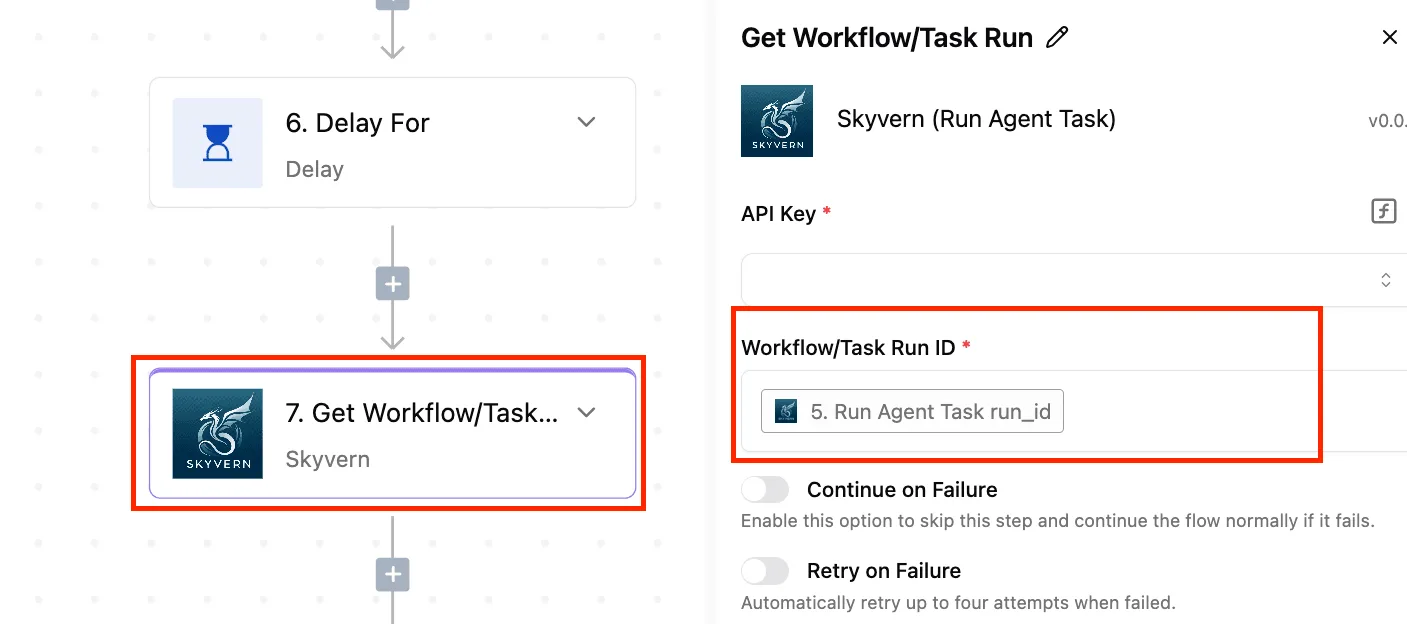
Read the failed run first: it tells you which step broke and what data it received, so you fix one field instead of rereading the whole flow.
That reading gets harder when judgment and rules live in separate systems, and Activepieces keeps them in one.
Place an Agent step beside a deterministic step, such as adding a spreadsheet row, in the same flow definition, and the run trace lists a single execution from trigger to final step, not two runs joined by a webhook callback, which means you can debug the entire workflow as one coherent trace.
MoneyGram, Moneypenny, Alan and FundingSocieties run Activepieces in production.
When hand-building or a template is better
Hand-build when the flow touches money, customer records or anything you couldn't undo, because you should understand each step before it runs.
For a common pattern where someone has already tested the edge cases, a vetted template suits.
What Activepieces costs: Community Edition, paid plans, self-hosting
Where reviewing drafts costs you time, the software costs little: the Community Edition is free under the MIT licence, and cloud runs from $0 to $200 a month.

The table shows that each step up buys credits, while the features teams ask about in procurement sit behind sales.
MIT Community Edition versus paid plans
| Option | Licence | Hosting | Credits per month | What needs payment |
|---|---|---|---|---|
| Community Edition | MIT | You host it | Not metered by a plan | Nothing for the code; you pay for your own server |
| Free | Hosted service | Cloud | 1,000 | Nothing |
| Plus | Hosted service | Cloud | 10,000 | $20 a month |
| Team | Hosted service | Cloud | 50,000 | $200 a month |
| Enterprise | Via sales | Cloud or self-hosted | Quoted by sales | SSO beyond Team, audit logs, embedding |
According to the pricing page, Free gets 1,000 credits, Plus 10,000 and Team 50,000. Plus gives you ten times the Free allowance for $20, so a drafting-heavy month stops being a rationing exercise.
Team is five times Plus for ten times the price, so pay for it when you need the team features.
Cloud versus self-hosted
Choose cloud if you don't want to run anything, and self-hosting if you want the MIT code on your own machine.
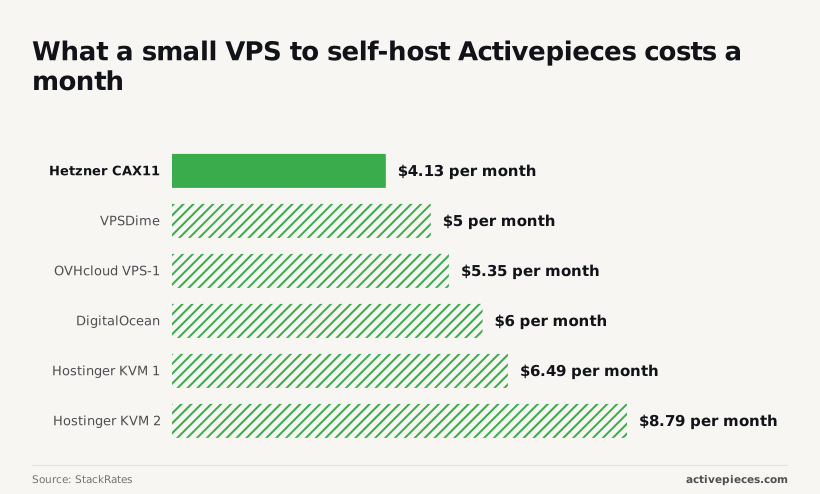
StackRates lists Hetzner CAX11 at $4.13 a month, VPSDime at $5, OVHcloud VPS-1 at $5.35, DigitalOcean at $6, Hostinger KVM 1 at $6.49 and Hostinger KVM 2 at $8.79. Every one undercuts Plus's $20, so the server bill isn't the deciding factor.
The real cost is someone to follow the self-hosting docs, apply upgrades, keep backups and fix it when a flow stalls.
Staff time is extra, and it can dwarf the $4 to $9 hosting fee. If nobody owns that, Plus is cheaper in practice.
Don't put SOC 2 in a security questionnaire as done: it is in progress, not certified. If you need SSO beyond Team, audit logs or embedding, you're talking to sales either way.
Monday plan for trying the Activepieces AI workflow builder
Spend Monday on one low-risk, repetitive workflow. Describe it in a specific prompt, review every step the builder drafts, test with real data, add failure alerts, publish, and watch the first runs.

Name the trigger, each action, and the destination. "Automate my leads" gets you a plausible-looking guess. "When a form is submitted, add a row to a spreadsheet, then post the name and email to a team chat channel" gets you something you can check.
- Pick a workflow where a wrong run costs you a few minutes, not a customer.
- Write the prompt, then expect to rewrite it once or twice after seeing what the draft got wrong.
- Open every step and check the app, the field mapping, and the conditions.
- Run it with real data, not the sample payload.
- Add an alert for failed runs before you publish.
- Publish, then read the first runs by hand.
It's a drafting tool: you describe a workflow in plain language and it assembles a first version of the trigger and steps for you to edit.
It doesn't verify that its draft matches your intent, and it doesn't replace testing. Another tool fits better when you need one of these:
- SSO or audit logs on a plan that doesn't include them
- Embedding automation inside your own product
- A vendor with SOC 2 certification, since that programme is still in progress here
- A workflow so critical that you can't monitor it closely
You can self-host the MIT-licensed Community Edition. Paid plans cover the rest. For self-hosted enterprise, SSO beyond the Team plan, audit logs, or embedding, talk to sales.
Start free at the cloud sign-up, compare plans on the pricing page, or use the sales form for the enterprise items above.
Pricing and plan questions
Trying the builder and budgeting
You can start free on the cloud sign-up and try the builder there, but which plan covers heavier AI use is a pricing-page question. Check the pricing page before you budget, because a limit you discover mid-rollout costs more than one you read up front.
Self-hosting and the Community Edition
If you want to self-host, the Community Edition is MIT-licensed and you run it on your own infrastructure. Activepieces' pages don't settle whether the drafting builder itself runs on keys you supply, so don't assume it.
If that decides your rollout, ask through the sales form and get the answer in writing.
I can't confirm from Activepieces' pages that the builder works in the MIT-licensed Community Edition, so test it on a self-hosted instance before you plan around it.
What's clear is the split: the MIT-licensed core is free, while SSO beyond the Team plan, audit logs and embedding need a paid plan.
Editing existing workflows
Whether the builder can edit a workflow you already have isn't stated on the pages, so treat it as a tool for drafting new flows.
If you try it on an existing one, duplicate the flow first, then read every changed step yourself and run a test before it goes near production.
SOC 2 and vendor reviews
If a vendor review asks for SOC 2, the answer is no. Activepieces isn't SOC 2 certified.
The SOC 2 programme is in progress, which means there's no certification to cite yet. If your procurement process requires one, say so early and ask sales where the programme stands.