
Activepieces Tutorial for Building Your First Workflow

Oct 27, 202613 min read
Activepieces connects your apps, with 744 integrations counted in its open source repository, so that an event in one starts work in another.
The quickest way to learn it's to build one small flow on the free cloud plan, which allows unlimited flows and 1,000 credits a month.
Its Community Edition is MIT-licensed and can be self-hosted; paid plans add things like SSO beyond Team, audit logs and embedding.
Activepieces is an open-source automation platform
What you will have working at the end
By the end you'll have one published workflow. It's a single trigger feeding a single action, tested with real data and switched on.
This guide was checked on 27 October 2026 against the Activepieces documentation and pricing page. Plans and limits change, so confirm anything you plan to budget against on the pricing page itself.
Trigger, action, step and run in plain words
Four terms carry the whole tool, and every screen in the builder uses them. The diagram that follows lays out how they relate: a trigger sits at the top, actions hang below it, and each pass through the chain is a run.
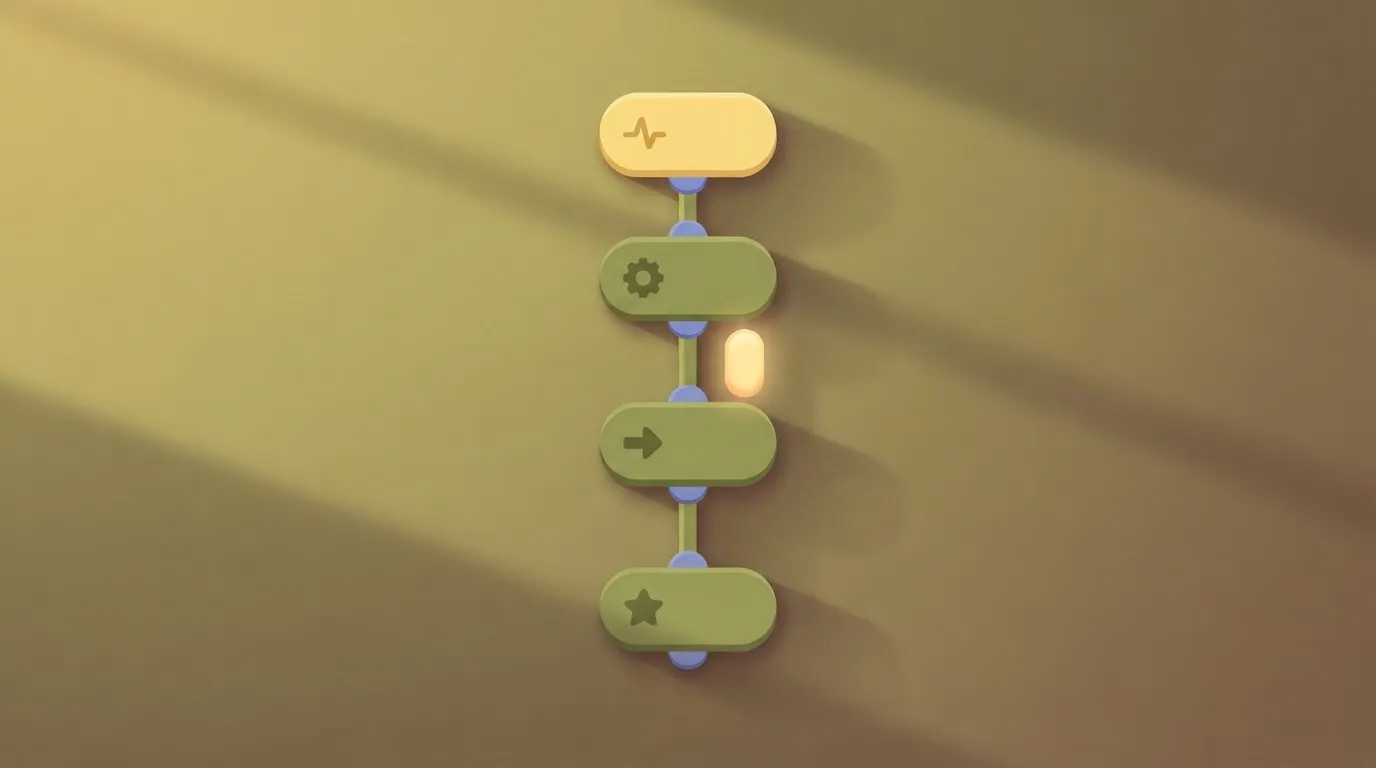
- Trigger: the event that starts a flow.
- Action: the work a step does.
- Step: one trigger or one action.
- Run: one execution of the flow.
What you need before starting
You need an Activepieces cloud account, which you can create at https://cloud.activepieces.com/sign-up. The free plan is $0 with no card needed. You also need two apps you already use, one to produce the event and one to receive the result.
Choose apps where you can safely create a test record, so the end-to-end test never touches live customer data.
This takes minutes, not a project: automate it in Activepieces free.
Build your first workflow in six stages
Build the flow in six stages, each ending with something that works, so that if you stop at any point you've a tested integration rather than a half-wired draft.
Stage 1: Create the workflow and name it
Sign up on the free cloud plan at cloud.activepieces.com/sign-up, then create a new workflow from the Flows page. A run costs 1 credit however many steps it has, so the free allowance goes a long way while you test.
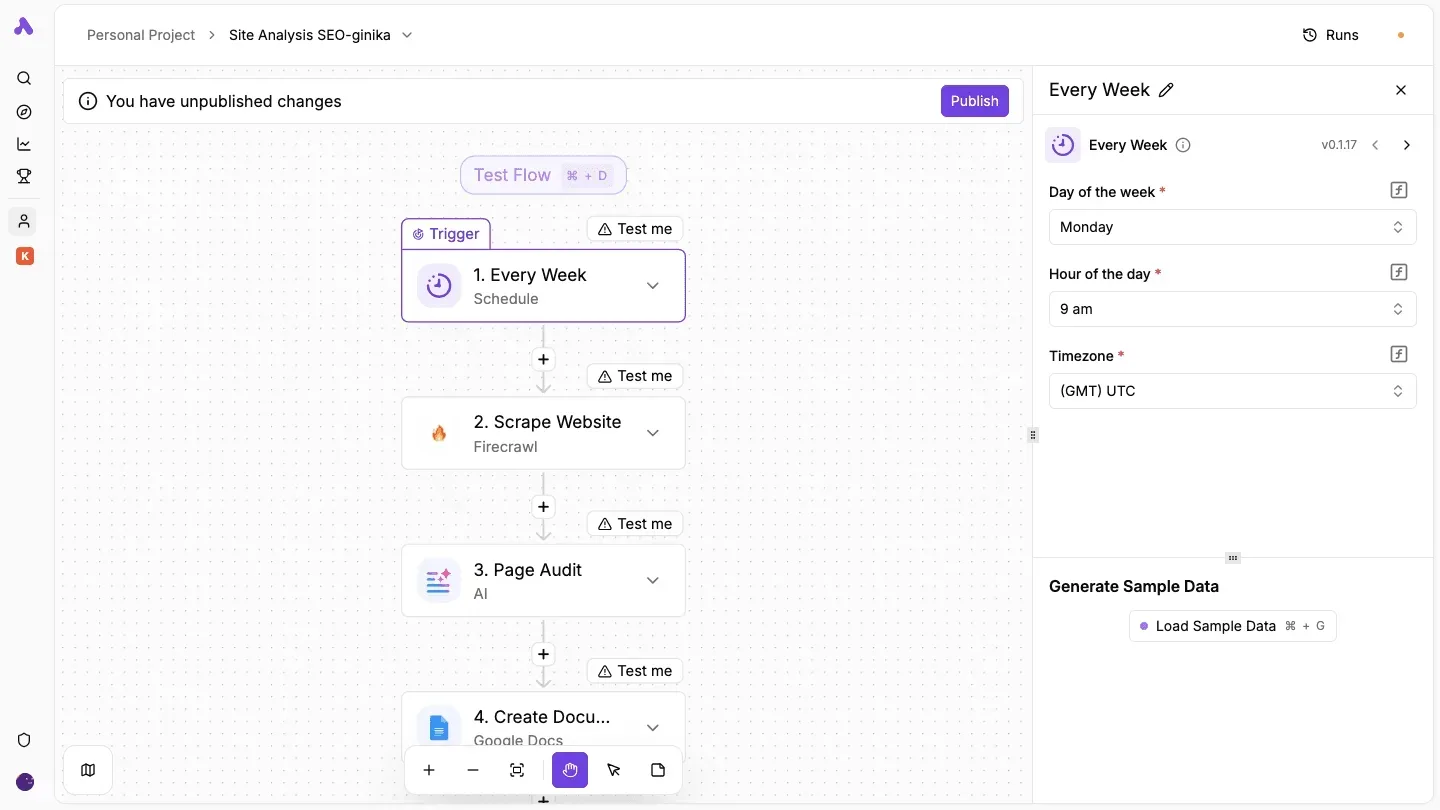
Rename it immediately to say what it does, such as "Weekly site audit", because default names turn a list of flows into a guessing game once a second person starts building.
Stage 2: Add a trigger and test it
Click the trigger slot on the canvas and choose one. A schedule trigger is the safest first choice, since it needs no outside account.
In the settings panel that opens, set the day, hour and timezone. Then use the sample-data option to load an example payload.
Every step carries its own test button, so you prove each one before adding the next. Once the trigger returns sample data, you have something real to map in Stage 4.
Stage 3: Add an action and connect an account
Click the plus beneath the trigger and pick one action, from an app you already use, such as a document or messaging tool. When prompted, create the connection by signing in to that app and granting access.
Where your organisation allows it, use a dedicated or shared service account, because a connection tied to one person's login stops working when that person leaves.
Stage 4: Map data from the trigger into the action
Open the action's input fields and click into one. The data selector lists the output of earlier steps; choose the field you want rather than typing it.
Map one field only on this first pass. A single working mapping is easier to debug than five separate ones.
Stage 5: Test, then publish
Press the test button on the action and check the destination app itself for the result. Only when it appears there should you publish, using the button at the top that warns of unpublished changes.
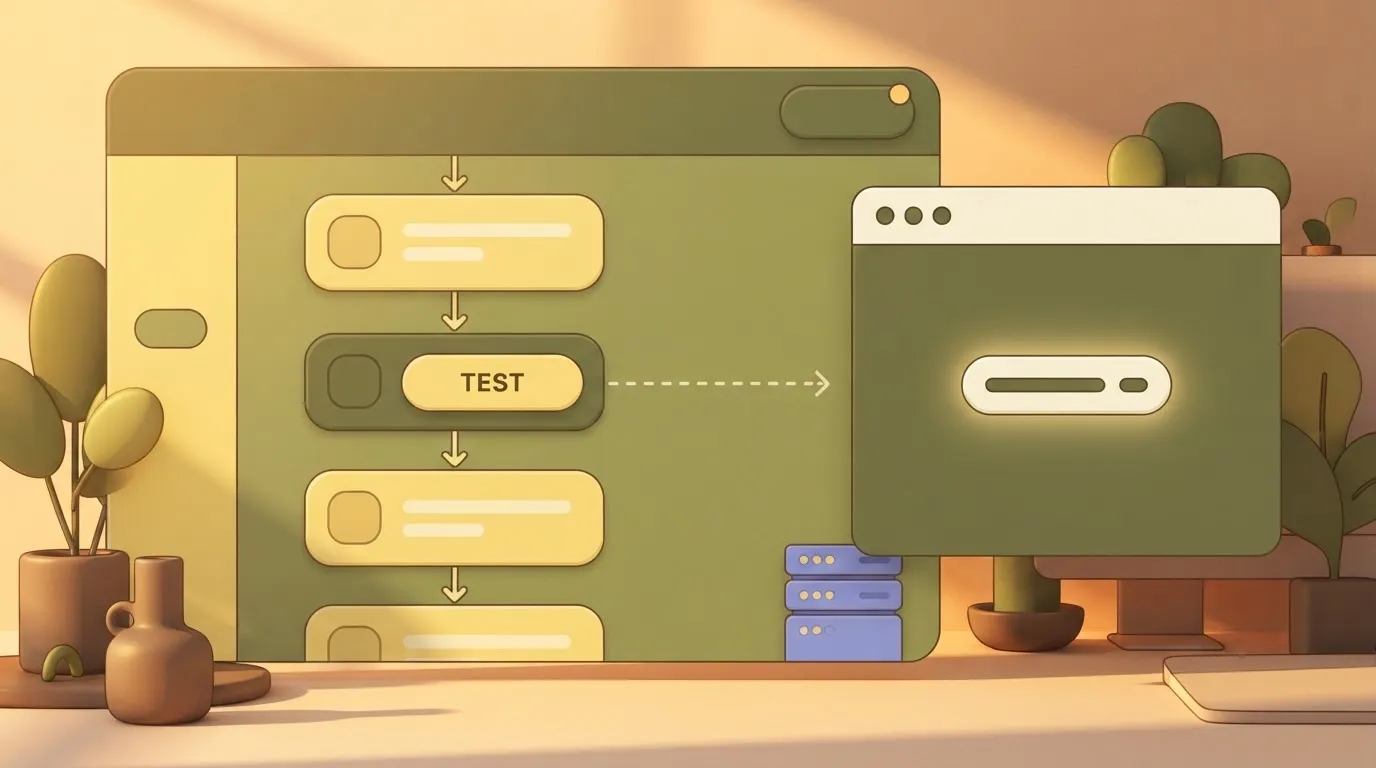
Until you publish, the flow won't run on its own, which is a common first-week surprise for new builders.
Stage 6: Read the Runs page
Open Runs to see each execution with its status and, inside it, the input and output of every step. When something fails, this is where you find which step broke and what it received.
With the first flow now live you can decide on evidence whether to stay on cloud, self-host or move to a paid plan.
The next flow doesn't need a builder at all. Open the built-in chat in Activepieces, describe a process that touches your connected apps, and it publishes a live flow in your account, the same artifact you just assembled by hand.
That flow runs under the same RBAC and audit logs as every human-built one, and its run trace shows exactly what happened, readable by anyone without a certification. You don't hire for this; you describe it. MoneyGram, Moneypenny, Alan and FundingSocieties run Activepieces in production.
You don't hire for this; you describe it.
Where teams use a first Activepieces workflow
Form-to-spreadsheet logging, Slack alerts, lead routing and a single AI step are the first workflows teams build. Each has one trigger, one visible result and a cheap failure.
Common first workflows
Form-to-spreadsheet logging is the usual opener: a submission arrives, a row is appended, and you can see the result in seconds.
Next most common is a Slack alert on a failed payment or a new support ticket, since the output is a message anyone can verify.
In lead routing, guardrails tend to break first, and it's usually the sales operations team that breaks them. Their flow touches real prospects, so a wrong branch means a lead sent to the wrong owner. Test it with sample records before it sees live ones.
Wait until the plain version works before you add an AI step, such as summarising a message or classifying an inbound request. That way you can tell whether a bad result came from the model or the wiring.
Activepieces versus other approaches
The table below compares five ways to automate a first job. The takeaway is that the right choice depends on who will maintain the flow and where it must run, not on which tool has the longest feature list.

| Approach | Best fit | Hosting options | Main trade-off for a first workflow |
|---|---|---|---|
| Activepieces | Teams that want a visual builder with the option to self-host later | Cloud, or self-hosted from the MIT-licensed Community Edition | Some enterprise controls need a paid plan, and you should check that the app you need is in the integration list |
| Zapier | Non-technical users who want the shortest path to a working flow | Hosted only | Per-task billing means cost grows with volume |
| Make | Visual builders who want detailed control over data shaping | Hosted only | The scenario model takes longer to learn than a simple trigger-and-action chain |
| n8n | Technical teams comfortable running and maintaining their own tooling | Cloud or self-hosted | Its licence is source-available rather than MIT, and self-hosting puts upkeep on you |
| Plain script | One-off jobs owned by a developer | Wherever you run it | You build scheduling, retries and run history yourself |
You can follow the rest of this with the builder open. Start free, no card.
Activepieces pricing and editions: Community versus paid
The free cloud plan and the MIT-licensed Community Edition cost nothing in licence fees. Your first flow's results should decide whether you stay hosted, run your own server, or pay for a tier.
Cloud plans and what the free tier limits
The table below sets the five editions side by side on price, hosting and inclusions. They're as listed on the vendor pricing page and checked on 27 October 2026.
Read it as a ladder: only the Free row lets you test a flow without spending anything, and only the last row requires a conversation with sales.
| Edition | Price | Hosting | Included per vendor page |
|---|---|---|---|
| Free | $0 | Vendor cloud | Entry cloud plan, enough to build and test a first flow |
| Plus | $20/month | Vendor cloud | First paid cloud tier |
| Team | $200/month | Vendor cloud | Top self-serve cloud tier |
| Community Edition | Licence free (MIT) | Self-hosted | The open-source core, run on your own server |
| Ultimate | Via sales | Cloud or self-hosted | SSO beyond Team, audit logs, embedding |
Move up only when a specific team need appears, not in anticipation of one: the gap between Plus and Team is $180.
Self-hosting the Community Edition
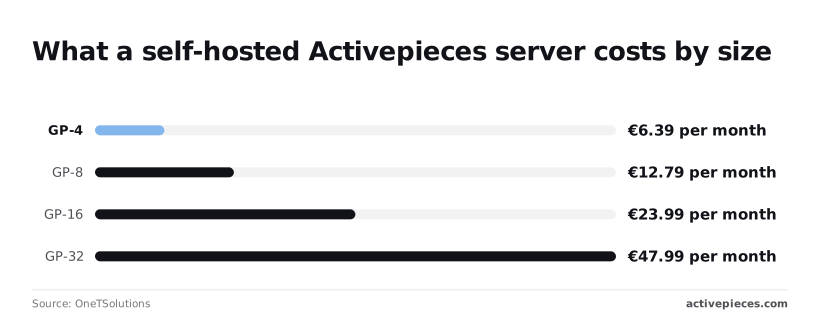
The licence costs nothing, but the server doesn't. A VPS provider, OneTSolutions, lists 6.39 € per month for its GP-4 size and 12.79 € for GP-8. Either is cheap enough for a pilot, though you now own updates and backups.
The bill roughly doubles with each size step, at 23.99 € for GP-16 and 47.99 € for GP-32.
Self-hosting against per-task pricing
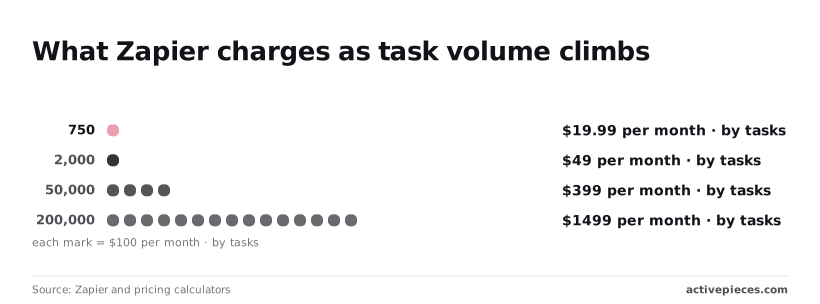
For scale, Zapier, a hosted automation service charging per task, asks $19.99 per month for 750 tasks. Its 2,000-task tier is $49.
At 5,000 tasks it's $133.5, which already exceeds the GP-32 server's 47.99 € several times over. At 50,000 tasks it's $399, and at 200,000 tasks $1,499.
Per-task pricing climbs steeply while a server's cost stays flat, so self-hosting pays off for high-volume flows. It pays off less for a handful of runs a week, where free cloud costs nothing and needs no maintenance.

Features that need a paid plan or sales
If your security review needs SSO beyond Team, audit logs or embedding the builder in your own product, skip the self-serve tiers and ask for terms now. Those go through the sales form, whether you host or the vendor does.
SOC 2 is in progress, not certified, so don't cite it to an auditor yet.
Everyone else can start free, run the one-trigger, one-action flow, and compare plans on the pricing page afterwards.
Mistakes people make with their first Activepieces workflow
Six mistakes sink a first workflow: publishing untested steps, hard-coding values and using personal accounts for team connections. The other three are ignoring failed runs, building one giant flow, and self-hosting before proving it on cloud.
Skipping the test step before publishing
A step published without a test run has never seen real sample data. So a missing field or a wrong mapping only shows up when a live record triggers it.
The fix is to test the trigger, then test the action against the output the trigger actually returned, and publish only when that pair passes.
Ignoring failed runs is the same mistake in slow motion. A flow that fails quietly teaches the team it's unreliable, and people go back to doing the task by hand.
Hard-coded values and personal connections
Typing a channel name, a spreadsheet ID or an email address into a step feels quick. It also means every change needs someone to edit the flow, and every copy of the flow carries the old value.
Map those values from the trigger's output, or keep them in one place you can change once.
When a flow runs on one person's login, it breaks the day that person leaves, changes a password or loses access.
Create the connection under a shared or service account the team controls, and name it for its purpose, not its owner.
The team that moves fastest tends to be the first to stack a dozen steps into one giant flow. Split it into small flows that each do one job.
When one fails, you know which, and a working small flow becomes a template the next team can copy.
Self-hosting too early
When you self-host, you own the server, the upgrades, the backups and the uptime. That's a reasonable trade for a team with a data-residency need. But it's a poor first step when you haven't yet shown that one trigger and one action work.
Prove the flow on the free cloud plan first, so you're deciding about infrastructure with evidence of what the flow needs.
Frequently asked questions
Is Activepieces free to use?
Yes: the free cloud plan lets you sign up and build a first workflow without paying. The Community Edition is MIT-licensed, so the open-source code costs nothing to run.
That's why a single trigger and a single action, tested end to end, is the right first test: it costs you nothing but an afternoon.
Paid plans exist for teams that outgrow the free tier, and the pricing page lists what each one includes. I'm not quoting limits here, because they change and the page is the authority.
Can I self-host Activepieces without paying?
Yes, the MIT-licensed Community Edition can be self-hosted at no licence cost, which means your only spending is the server and the person who looks after it.
If you self-host, upgrades, backups and uptime become your team's responsibility, because it's a deployment you run yourself.
Some capabilities sit outside the Community Edition and need a paid plan or an enterprise agreement: SSO beyond the Team plan, audit logs and embedding are the ones to check first.
If your rollout depends on any of them, talk to sales before you commit to an architecture.
Do I need to know how to code to build a workflow?
No, a first workflow is assembled in the visual builder: you pick a trigger, add an action, map fields between them and run a test. Coding is optional, so a non-developer can own the pilot and show a working result without waiting on engineering.
When the ready-made integrations don't cover a case, a code step is available, and that's where a technical colleague becomes useful, though not before.
How long does it take to learn Activepieces?
The first workflow is a short exercise, because one trigger and one action leaves little to learn beyond connecting an account and mapping data.
The slower part is not the tool but the judgement: knowing which of your processes are worth automating, and what a failed run should do.
Treat the first build as the learning curve's opening stage, and expect the real skill to grow with each flow you add.
What should I build after my first workflow?
Add one thing at a time to the flow that already works: a second action, a condition, or a notification that tells you when a run fails.
Each addition is tested the same way, so a break points to the last change rather than to the whole design.
Once two or three flows are stable, you have the evidence to choose between cloud, self-hosting and a paid tier.
To begin, start free. To compare plans, see the pricing page. For self-hosted enterprise, SSO beyond Team, audit logs or embedding, use the sales form.
Related reading
References
Build it
Set this up in minutes.
No code required. Connect your accounts, and Activepieces runs it from there.
Start free Talk to sales