RingCentral Pricing 2026: Plans, Fees & Add-Ons

Nov 2, 202613 min read
RingCentral pricing today: what the plans cost
Why RingCentral pricing is not the listed price
You will not pay the price you see. It is the entry price for a tier, not your bill.
RingCentral charges per user, per month, and tier, billing term and user count move that price, while add-ons and usage limits move it again, which is worth modelling before you wire the platform into automated workflows built with tools like Activepieces.
RingCentral pricing is the per-user, per-month charge for its cloud phone and unified communications service, set by plan tier, billing term and user count, and adjusted by add-ons and usage limits.
Read every figure here with two conditions attached: the billing term selected and the number of users. Every figure I cite comes from ringcentral.com's own pricing page, and a different term or headcount gives a different number.
How RingCentral prices: per user, per month, by tier
On paper it is simple. Each person on your account holds a seat, each seat sits on a plan tier, and the tier sets the monthly rate.
The gap opens in what the tier includes. Higher tiers unlock features and raise limits. Lower tiers cap them, so a team that outgrows a cap pays for an upgrade or an add-on.

Before you trust the advertised rate, check the billing term, because the rate usually assumes a commitment, and a shorter commitment costs more per seat.
If you are running this arithmetic for your own team, see what the same workload costs on Activepieces.
Every current RingCentral plan in one verified table
Three plans carry the caps. The pricing page publishes the toll-free and SMS cap values for each tier.
Plan table, checked 2 Nov 2026
Where a cell says "not stated", the page printed nothing and I did not guess, so treat those cells as open questions for the vendor. The table shows the per-user price on both billing terms and the usage limits that decide whether that price holds.
| Plan | Annual $/user | Monthly $/user | Toll-free minutes | SMS per user | Meeting participants | Storage | Fax |
|---|---|---|---|---|---|---|---|
| Ultra | $35 | $45 | not stated | not stated | not stated | not stated | not stated |

Because the monthly premium is $10 per user on every tier, the total premium grows dollar-for-dollar with team size. That's a 50% markup on Core, 40% on Advanced and about 29% on Ultra, which means Core customers absorb the largest proportional surcharge.
Decline the annual commitment with a 10-person Core team and you pay an extra $100 a month, or $1,200 a year, for the flexibility alone.
RingCentral pricing that requires a quote
Look at the blanks first.
Toll-free minutes and SMS allowances are both printed as numbers, and both decide what a busy sales or support team actually pays.
If you archive call recordings or still receive faxes, you have no way to price those needs from the page, because storage and fax are blank too. The only meeting cap shown is Core's 300 participants. Whether Advanced and Ultra raise it is unanswered.
Treat each "not stated" cell as a line item to get in writing before signing, and ask for it per user, per month.
What RingCentral plans cost at realistic team sizes
Once each per-user figure is in writing, the bill's plain multiplication: seats times rate times twelve, and the billing term moves the rate more than the headcount does.
It shows Ringcentral's arithmetic for 5, 25 and 100 users on Core, Advanced and Ultra, with annual and monthly billing as paired bars.
(chart)
At five seats, even the priciest tier is a modest monthly figure, so the annual-versus-monthly gap is $10 per seat multiplied by five. Pay monthly here if you might shrink or switch, because the premium is cheap insurance.
At twenty-five seats, tier choice starts to matter. Moving all 25 seats up one tier multiplies the per-user difference by 25, then by twelve, so a "small" upgrade becomes a recurring annual cost.
Price only the seats that need the higher tier, and ask whether mixed tiers are allowed in one account.
RingCentral pricing for a 100-user team
At a hundred seats, every dollar per user per month is $1,200 a year, which means headcount expansion directly affects budgets.
A volume discount of even a dollar or two per seat is worth negotiating, and a monthly-billing premium here is a large, avoidable expense unless you truly need the exit, so your contract terms matter as much as unit price.
Compare that with what buyers actually pay. Vendr puts the median RingCentral contract at $6,229 a year, about $519 a month. Spread across 25 users, that's roughly $21 per user per month, and across 100 users about $5.


Treat list price as the opening bid, not the invoice, since Vendr's tracked contracts run widely around that median. Work out your own seat count first, then negotiate against it.
Hidden costs and limits RingCentral buyers hit
The seat count gives you only the base bill; add-ons, usage caps and regulatory fees decide how far past it you go.
Fees added on top of the per-user price
Before anyone makes a call, ten extra numbers add $49.90, because an extra number costs $4.99 a month.
From $7 for the Poly Edge E100 to $9 for the E220, phone rentals climb with the model, meaning each equipment choice locks in a recurring cost. The E320 is $14 and the E350 $15.
Ten E320s is $140 a month, so buying handsets outright may beat renting past a year or so.
At $49 a month, the AI Receptionist costs more than three E350 rentals, and it adds $0.50 per minute in overage. Heavy call volume turns that flat figure into a variable one.
Here's the full set of lines outside the headline price:
- Toll-free minute caps of 100, 1,000 and 10,000 by tier
- SMS caps of 25, 100 and 200 by tier
- E911, 911, compliance and USF fee lines, none with a price on the page
- AI Receptionist at $49 plus $0.50 a minute over the allowance
Push on the four fee lines, because an unpriced line can't be budgeted.
Usage limits that cap the plan
For a support line, a 100-minute toll-free cap lasts about one busy afternoon, so a team with a toll-free number needs the 1,000 or 10,000 tier on usage alone.
Apply the same logic to texting: 25 messages is a handful of appointment reminders, and 200 is still tight for a sales team. Estimate your monthly volume first, then pick the tier.
If you want call logs in a CRM, the system where sales records live, price that integration too. A workflow tool can sync the logs, but someone has to build and maintain it, and that labor belongs in the total.
Worth checking against a plan that does not meter every step: one credit covers a whole run on Activepieces.
RingCentral against Zoom Phone, Teams Phone and 8x8
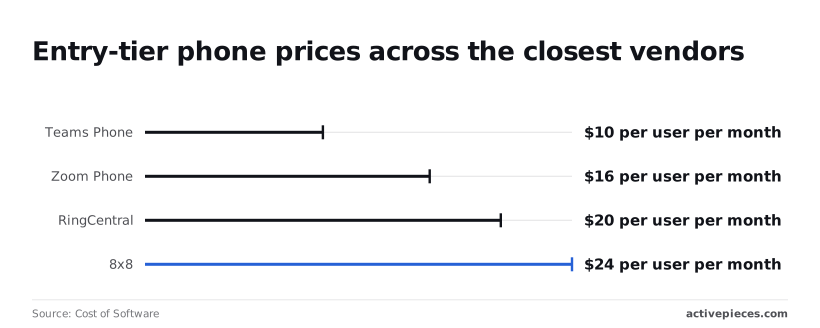
Two rivals are cheaper and one is dearer than RingCentral's $20 per user per month entry price, which makes it second-dearest of four. The sticker alone doesn't make it the expensive choice or the cheap one.
Every blank in the table below is marked unpublished, and each one's a number you'll only get on a sales call. It sets the four side by side, with entry prices from Cost of Software.
| Entry price | Mid-tier price | Calling region | SMS | Contact centre | Billing terms | |
|---|---|---|---|---|---|---|
| RingCentral Core | $20 | unpublished | unpublished | unpublished | unpublished | unpublished |
| Zoom Phone | $16 | unpublished | unpublished | unpublished | unpublished | unpublished |
| Teams Phone | $10 | unpublished | unpublished | unpublished | unpublished | unpublished |
| 8x8 | $24 | unpublished | unpublished | unpublished | unpublished | unpublished |
Only the first column is comparable today. Whoever is cheapest there still has to prove it on the other five.
At $16 per user per month, Zoom Phone lists $4 under RingCentral. At 50 users that's $200 a month, $2,400 a year. At 5 users it's $20 a month, which a single add-on could erase, and competitors with bundled features automatically beat it on cost.
At $10, half RingCentral's price, Teams Phone has immediate financial appeal for anyone thinking of switching, making the migration's financial case self-evident.
At 50 users the gap is $500 a month, or $6,000 a year, enough to pay for someone's time maintaining a workaround, which means the cheaper solution is only truly cheaper if you can tolerate the manual effort.
Teams Phone suits teams already living in Teams, where the phone is an extension of a tool they use. If the lower tiers lack what you need, the $10 stops being the real price.
8x8 is the most expensive entry tier at $24, $4 above RingCentral. At 50 users you'd pay $200 more each month for the same starting position, so 8x8 has to win on the unpublished columns to justify itself.
RingCentral beats 8x8 on entry price outright. It can also beat the cheaper two once calling region, SMS or contact centre pushes them into higher tiers. You can only know that by getting those quotes in writing and totalling them per user.
Getting itemised RingCentral quotes per user
Get every quote itemised per user, in writing, before you compare anything, because the per-user total is the only number that lets you set RingCentral against its cheaper rivals.
The sales call is where the real price gets decided. I distrust any tier you can't read without one, so the aim is to leave that call with a document you can add up yourself.
Ask these in order, and refuse to move on until each has a written answer. The quote is only as good as the first step, since a wrong headcount per tier corrupts every line after it.
- Count your users by the tier they need. Sort people into those who only make calls, those who need SMS or video, and those who need contact centre seats. A single team-wide tier overpays for most of them or underpowers a few.
- Request a quote that itemises every fee line: the per-user licence, add-ons, phone numbers, device or hardware charges, taxes and regulatory fees. Anything shown as "from" or "starting at" is the advertised price, not your bill.
- Ask for the annual-versus-monthly gap in dollars, not as a percentage. A discount for committing to a year only matters once you know what you owe if the team shrinks in month four.
- Confirm number porting and usage caps. Ask whether moving your existing numbers carries a fee or a delay, and what happens when you pass the limits on SMS, minutes or storage. Overage rules are where a tidy quote becomes an untidy invoice.
- Re-check the public pricing page on the day you sign. Prices and tier contents change, so a quote built from last month's page may not match what the rep is now offering.

Weekly checklist for negotiating RingCentral pricing
Spend the early days on steps one and two, so the rep has your numbers before the call rather than after it.
Put the annual-versus-monthly question and the porting and caps questions in the same email, so every answer arrives in writing together. Leave the pricing-page check for signing day.
When all of it is in, total each quote per user and compare. The choice comes down to two things: your headcount, and whether you need a contact centre.
What Activepieces does about this
The part of a RingCentral bill nobody quotes is the glue: getting call logs into a CRM, opening a ticket when a call is missed, texting a customer after a voicemail.
If you price that work at a per-task or per-module rate, the cost depends on how many steps you split it into, and it comes on top of the seat count and add-ons above.
Activepieces is an automation tool built so that this line item is easier to predict.
It bills by the run. A flow of ten steps costs 1 credit, the same as a two-step shortcut, so what you pay follows call volume and not how carefully the flow is built. The Plus plan is $20 a month for 10,000 credits.

A team handling a few hundred calls a day can work out its monthly automation cost before the sales call, then add it to the per-user total next to the add-ons and fee lines.
The core is open source under the MIT licence, so you can self-host it and keep the sync running even if you later switch from RingCentral to Zoom Phone, Teams Phone or 8x8. Your flows are not tied to one phone vendor's tier.
MoneyGram, Moneypenny, Alan and FundingSocieties run it in production.
None of this lowers RingCentral's per-user rate or fills in the "not stated" cells. Those still need written answers from the vendor. What Activepieces covers is the integration labour and the metering that would otherwise surprise you after signing.
Frequently asked questions
Does RingCentral offer a free trial?
Usually yes, but the terms depend on the plan and the region, so read the trial terms on the plan page you are buying from.
Check whether a card is required up front and what happens at the end of the trial. If it converts to a paid term automatically, the trial is the first day of a billing commitment.
Is RingCentral cheaper if you pay annually? Yes, the per-user price shown with annual billing is lower than the monthly price on the same pricing page. That discount is payment for commitment.
Run it as a simple comparison: the annual saving against the cost of being locked in if your headcount drops or you outgrow the tier.
Does RingCentral charge for international calls? Yes, beyond whatever calling regions your plan includes. Included calling covers a defined set of destinations, and everything outside it is billed by destination.
Look up the countries your team actually dials on RingCentral's international rates page before assuming the plan covers them. Don't infer it from the headline price.
Can you cancel RingCentral mid-contract?
You can ask, but a term agreement generally means you owe for the term you signed.
The pricing page does not control this; the order form and the terms of service do. If you may change headcount or vendors, the monthly rate costs more per seat but gives you a clean exit.
Get any exception in writing rather than from a sales call.
Is there a minimum number of users? Some tiers or products may set a floor, since per-user pricing implies a seat count. The pricing page for each tier is the place to confirm this.
It matters most for very small teams, because a floor turns a cheap-looking per-user price into a larger fixed monthly cost than the arithmetic suggests.
Related reading
References
Running the numbers
See what the same workload costs here.
Free forever plan, and every paid plan self-hosts at no extra cost.
See pricing Talk to sales