
Sora 2 API Pricing Per Second and Per Plan in 2026

Oct 31, 202617 min read
You pay for Sora, OpenAI's video model, in one of two ways: a flat monthly plan in the app, or a per-second rate through the API, which you might wire into a workflow tool like Activepieces if you're generating clips in batches.
Either way, the number you see is the starting point, not the bill.
Sora pricing is the cost of generating video with OpenAI's Sora model, charged either as a flat monthly subscription that includes a set amount of generation in the app or as a per-second rate through the API that varies with resolution and clip length.
Sora pricing plans and per-second rates
Sora 2 API pricing quick answer (checked 2026-10-31)
If you use the app, you pay by plan; if you build on the API, you pay by the second of finished video, at a rate that depends on the model. The plan structure was checked against OpenAI's own pages on 2026-10-31.
A guessed price is worse than a blank, because you'd budget around it.
App plans compared
Read the table for how the offers are built, not for amounts. Plus and Pro are monthly subscriptions, Free costs nothing, and the three API rows bill by the second, so your choice of service should match your usage frequency.

Any cell reading "not stated" is one you must confirm on OpenAI's page before you commit money.
| Row | Price | Unit | Included generations/credits | Max length | Resolution | Watermark | Commercial terms |
|---|---|---|---|---|---|---|---|
| Free | No charge | Not applicable | not stated | not stated | not stated | not stated | not stated |
| Plus | not stated | Per month | not stated | not stated | not stated | not stated | not stated |
| Pro | not stated | Per month | not stated | not stated | not stated | not stated | not stated |
| Sora 2 API | $0.10/s | Per second of video | Not applicable | not stated | not stated | not stated | not stated |
| Sora 2 Pro API | not stated | Per second of video | Not applicable | not stated | not stated | not stated | not stated |
| Batch | not stated | not stated | Not applicable | not stated | not stated | not stated | not stated |
Because the next sections turn on exactly those columns (length, resolution and the number of takes you pay for), the blanks matter.
Delete a clip and you have still paid for it. The API charges for every second you generate, including the clips you delete.
Longer clips and higher resolution raise the rate you pay per second, and each retry pays it again.
If you string generation steps together with a workflow tool, the same logic applies: automation runs the meter faster, it doesn't lower the rate.
Nobody quotes the cost that decides which route is cheapest for you. The page doesn't tell you how many takes a usable clip needs.
If you are running this arithmetic for your own team, see what the same workload costs on Activepieces.
Monthly costs for product video projects
$30 for the project is the cheapest route I can confirm: the Sora 2 API at 720p, at 30 ten-second clips and one take each, which means any variation in these parameters increases cost. That's before a single clip gets thrown away.
Picture a five-person marketing team that needs 30 finished product clips. At 10 seconds each, that's 300 seconds of video. Everything below is priced on that number, with no retries, so treat it as the floor of your estimate, not the bill.

With Plus and Pro the arithmetic is trivial: a flat monthly fee, $20 and $200, making monthly costs completely predictable. The question is whether the monthly video allowance stretches to 300 seconds.
If it doesn't, the flat fee tells you nothing, because you'll be buying a second month or switching routes mid-project. Check the allowance before you trust the sticker.
Cost through the API
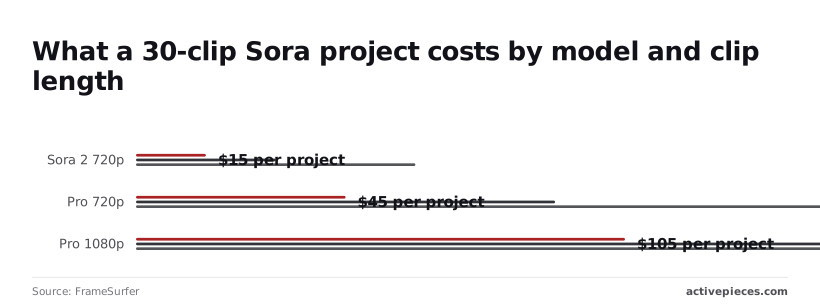
Because the API bills per second, the sum is rate times seconds. According to FrameSurfer, Sora 2 at 720p comes to $15, $30 or $60 for the project, depending on whether clips run short, ten seconds or long.
That works out to $0.10 a second, so doubling clip length doubles the bill.
Step up to Sora 2 Pro at 720p and the project runs $45, $90 and $180, three times the standard rate for the same pixels.
Sora 2 Pro at 1080p runs $105, $210 and $420, so the same team pays seven times the base price to get sharper footage.
Read the last column as the cost of one clean pass, which is why the cheap rows only stay cheap if your first takes are usable. This table puts all four routes on the 10-second case.
| Route | Rate | Arithmetic (30 × 10 s = 300 s) | Plan limits allow it? | Monthly total |
|---|---|---|---|---|
| Plus | Flat monthly fee | Fixed | Only if the allowance covers 300 s | $20 |
| Pro | Flat monthly fee | Fixed | Only if the allowance covers 300 s | $200 |
| Sora 2 API 720p | $0.10/s | 300 × $0.10 | No plan limit, you pay per second | $30 |
| Sora 2 Pro API 1080p | $0.70/s | 300 × $0.70 | No plan limit, you pay per second | $210 |
$30 against $210 is the first multiplier, and it comes from resolution alone, meaning resolution is your first major cost decision. Retries come next, and they multiply whichever row you land on.
Retries, Resolution and Limits That Inflated the Bill
By the second week the bill had grown, because every discarded take is billed at the same rate as the one you keep. The real price is the sticker price times your attempts.
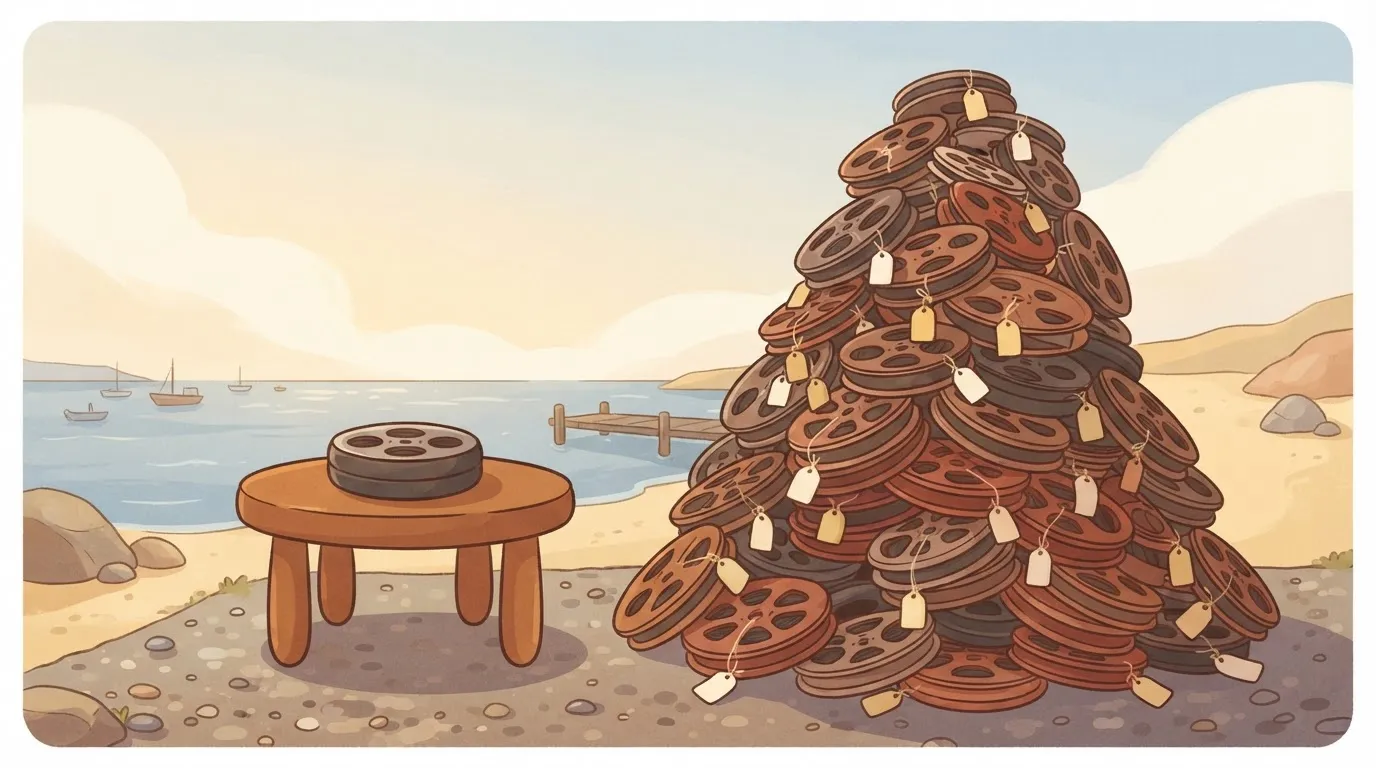
How discarded takes multiply Sora per-second cost
3 attempts per usable clip is what a shot-list project needed, where each clip stands alone, in the creator reports Invideo collected. A Sora fashion film needed 16.
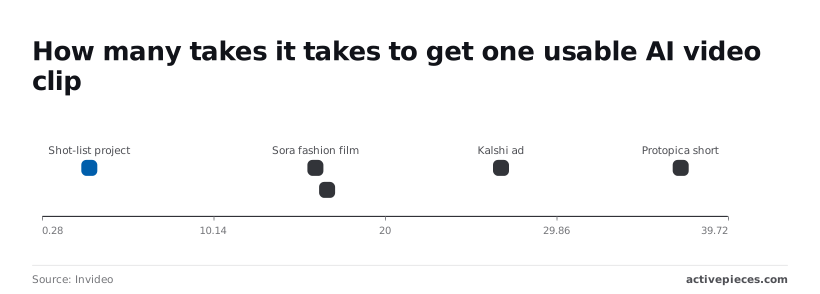
**The real price is the sticker price times your attempts.
Once scenes have to match each other, the count climbs: according to Invideo, connected scenes needed 16.67. A Kalshi ad, made for a prediction-market company, needed 26.67.
Per Invideo, a Protopica short needed 37. The more a clip has to match what came before, the more takes you throw away.
Sora retry costs for our shot list
Because our team's shot list looked like the first case, we re-ran it at three to one.
The chart shows the cost of one usable 10-second clip at 1, 3 and 16 attempts on both tiers, which means you see immediately how much retries multiply costs.
Three attempts triples the price, and 16 attempts turns $1.00 into $16.00 on Sora 2 and $7.00 into $112.00 on Sora 2 Pro, making any trial-and-error approach prohibitively expensive.
You can't assume the cheaper tier will cost less overall: retries can outweigh the tier choice, and Pro at 3 attempts costs $21.00, more than Sora 2 at 16, which means you must calculate your specific scenario before choosing.
(chart)
Resolution is the other multiplier, and it stacks on the retry count.
Sora resolution and duration cost multipliers
At $0.70 a second against $0.10, the 1080p Pro tier costs seven times the 720p Sora 2 tier for the same clip length, meaning this premium should be reserved for quality-critical work. The upgrade makes sense only for projects requiring 1080p.
Seven times the rate, times three attempts, is why the same shot list cost far more once we upgraded.
Double the length and you double the bill. Length scales it in a straight line, and a failed 20-second take wastes twice what a failed 10-second one does. Draft short and at 720p, then render the keepers at higher quality.
You will not see limits in the per-second rate, but they change what you spend. Check OpenAI's current terms for each before budgeting:
- How many clips can render at once, since a queue slows your retries.
- Whether a moderation refusal still consumes credit, because a refused prompt is an attempt that produced nothing.
- Whether the watermark rules fit your use, because a clip you can't publish is a discarded take.
- Whether prepaid credits expire, since unused balance can vanish.
Price them in before you commit, since each can add attempts or waste money.
Worth checking against a plan that does not meter every step: one credit covers a whole run on Activepieces.
Sora costs and limits versus Veo and Runway
On the same 30 clips of 10 seconds (300 seconds of footage), the rival rates run from $12 to $120 before a single retry, making vendor selection a critical decision for any project of this scope.
Sora is cheaper or dearer depending on which rival you compare it with.
Read the last column as the price of a project where every take is kept. The table shows each rival's per-second rate and what 300 seconds costs at that rate.
| Service | Price per second | 30 clips × 10 s |
|---|---|---|
| Pika API | $0.04 | $12 |
| Runway Gen-4.5 | $0.12 | $36 |
| Luma Ray 3.2 | $0.24 | $72 |
| Veo 3.1 with audio | $0.40 | $120 |
Confirm limits such as clip length, resolution and watermark on each vendor's own page before you budget, since they vary by plan.
Google Veo 3.1 per-second pricing
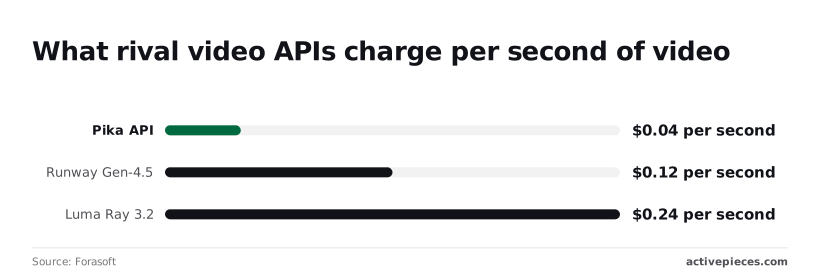
Budget $0.40 per second for Veo 3.1 with audio, according to Forasoft's comparison of video APIs. That's $120 for the 300-second project, and three times the Runway rate. If you keep one take in three, the real bill is closer to $360.
Veo makes sense when you need sound generated with the picture and would otherwise pay someone to add it.
Runway Gen-4.5 per-second pricing
For the project, Runway Gen-4.5 at $0.12 per second comes to $36. Two other rates frame it.
At $0.04 per second, Pika's API costs a third of Runway's price, so budget-conscious teams should default to Pika for this function. That leaves room for many more retries, though you still have to judge whether the footage is good enough to ship.
Luma Ray 3.2 is $0.24 per second, double Runway, so it needs a visible quality gain to justify itself.
Where Sora wins and loses
Sora's rate doesn't decide this on its own. Multiply your Sora per-second rate by 300 and compare the result with the table.
Sora beats Runway on price only if its rate is under $0.12 per second, and beats Veo with audio only under $0.40, which means its actual published rate is the deciding factor in both comparisons. It loses to Pika at anything above $0.04.
A cheaper rate with a low keep-rate can cost more than a dearer rate that works first time, which is why retries matter more than any of these gaps.
Before you commit, run ten test clips on each service and count how many you would actually use.
Capping Sora API Spend With an Activepieces Workflow
Ten test clips will tell you your keep rate, but they won't stop a bad week from burning through the budget once you're in production.
You need a guard that sits in front of every render. There are three generic ways to build one, and a workflow tool is the fourth.
Native budget limits first
Start with what OpenAI already gives you: project-level budgets and usage limits in your account settings. They're the cheapest guard because there's nothing to build.
Think of them as a circuit breaker, not a gatekeeper. They stop spending when a line is crossed, or warn you after, but they can't tell a careful test clip from an expensive long render someone queued by mistake.
Second comes a short script with a counter that tallies spend and refuses to run past a number.
It works, but someone has to write it, host it and fix it, and everyone else on the team has to ask that person to change the cap.
Third, a spreadsheet queue where people add prompts and one person runs them by hand. It's easy to read, yet nothing enforces the limit, and it relies on that person remembering to check.
Approval and cap workflow in Activepieces
To build the guard without writing a hosted service, you can use Activepieces, which holds the Sora API key centrally as a connection, so the flow doesn't carry it around.
Secret manager support comes with the enterprise tiers, next to SCIM, custom RBAC, SSO/SAML and audit logs.
It doesn't change what Sora charges. It decides whether a render is allowed to happen, and it puts a human in the loop only when the job is costly. Here's the flow:
- Read the next prompt row from the sheet, including the resolution and length requested.
- Check month-to-date spend against your cap, and stop the run if the render would push you past it.
- Request approval before a costly render, so a person says yes to the long or high-resolution clips while cheap drafts go straight through.
- Call the Sora API with the prompt and settings from the row.
- Post the result and its cost to Slack, and log both back to the sheet.
Of the five steps, the last matters most for the argument of this article.
Once every clip's cost lands in a log next to its prompt, you can count discarded takes against kept ones and see your real price per usable clip.
That figure, not the sticker rate, tells you whether pay-per-second or a plan is cheaper for you.
Monday Morning Rules for Budgeting Sora Video
Once you know your own cost per usable clip, five habits keep the bill from drifting away from it. Skip them and the drift is the expensive part, because every discarded take is paid for in full.
The rules, in the order you'll meet them:
- Draft at low resolution and render finals once.
- Set a retry ceiling for each project.
- Set a hard monthly limit on API spending.
- Re-check the pricing page every quarter.
- Choose the plan by how many clips you need, not by the sticker price.
The next three parts show when each one applies.
Before generating
Pick your plan by counting the clips the project needs, then adding the takes you expect to throw away. A cheap plan that runs out halfway through forces a top-up at a worse rate.
Draft every shot at low resolution first, because a bad composition costs the same to discover at any size and far less to discover small. Render the approved version at full quality once.
Then write down a retry ceiling for the project, the number of attempts any single shot gets before you rewrite the prompt or drop the shot. Without that number, one stubborn shot quietly eats the budget for five easy ones.

Monthly Sora API spend limits to set
If you pay per second through the API, set a hard monthly limit in your account's billing settings, so the service stops when the money does. A soft alert only tells you after the money is gone.
Let a script loop or a teammate retry overnight and a month's budget can be gone before anyone is awake to notice.
Check the running total against your retry ceiling each week. If one project is burning through its attempts, that's a prompt problem, and more money won't fix it.
Quarterly review of Sora pricing and budget
Open the pricing page and compare it with what you budgeted. Rates, plan allowances and resolution tiers on video tools change, and a change in either direction can flip which route is cheaper for you.
Rerun your cost-per-usable-clip arithmetic with your actual retry history from the last quarter, not the one you guessed. If the cheaper route has changed, switch at the start of the next billing period, not in the middle of a project.
Frequently asked questions
Switching at a billing boundary raises a few questions people ask again and again, and the table gives the short answer to each so you know where to read further.
| Question | Short answer | Where it is covered |
|---|---|---|
| Is there free access? | Only if the current offer says so; don't build a budget on it. | Is Sora free to use in 2026? (below) |
| Is Sora 2 still available? | Check the plan page before committing; availability is what you buy against. | Plan and rate comparison above |
| Plus or Pro? | The higher tier buys more room per clip and pays off only if you discard many takes. | Retry math above |
| Is there a batch discount? | Don't count on one; none is assumed in any estimate here. | Plan and rate comparison above |
Free access and commercial use
Use the table to find your question, then read the fuller answers below.
Is Sora free to use in 2026? Treat free access as a trial, not a production plan. Whatever is offered today can be limited or withdrawn, and a project that depends on it stalls the day it changes.
Budget as if every clip costs something, and consider anything free a bonus.
Can I use Sora videos commercially on a paid plan? Usually the paid terms are what grant commercial rights, but read the current terms yourself before client work.
The cost of skipping that check is a finished video you can't deliver, which is worse than any subscription fee.
Failed generations and billing
Does Sora charge for failed or blocked generations? Policies on this differ between plans and change over time, so confirm what your plan does with a blocked prompt or a render you reject. Until you know, assume a failed take is paid for.
That's the safe assumption because discarded takes are the whole argument of this article.
API versus subscription and price changes
Is the Sora API cheaper than a subscription? It depends on how many takes you throw away. Per-second billing charges you for every discarded attempt, while a subscription caps what the mistakes cost.
If you rarely retry, the API can come out ahead. If you retry often, the subscription usually does.
How often does Sora change its pricing? Often enough that you shouldn't lock in a plan for a long project on a single quote. Recheck the plan page at the start of each billing period, since that's the one point where switching costs you nothing.
Related reading
References
Running the numbers
See what the same workload costs here.
Free forever plan, and every paid plan self-hosts at no extra cost.
See pricing Talk to sales