
Sourcegraph Pricing 2026: Plans, Costs and Minimums

Nov 10, 202614 min read
The figure on the Sourcegraph pricing page tells you where you start, not what you pay, because it is priced as a per-seat enterprise product with a smaller entry plan, much as teams weighing Activepieces or any other tool find that the listed number is only the opening position.
Sourcegraph is a code search and code intelligence platform: it lets a team search, read and change code across many repositories at once, and it includes an AI coding assistant.
Sourcegraph Pricing Today, Plan by Plan
The plans and prices, with check date
Below is each plan I believe is current, with what it includes and the limit that decides whether you fit. I prepared it on 10 November 2026 and couldn't confirm prices against sourcegraph.com/pricing that day, so every price is marked unverified.
Hosted by Sourcegraph and aimed at smaller teams, Enterprise Starter turns on deployment (cloud only) and seat count.
Enterprise is quoted per contract, can be self-hosted or managed, comes with larger scale and admin and security controls, and depends on deployment choice, seat count and usage limits.
Enterprise Starter carries no price I could confirm, so treat it as a per-seat quote you request. Enterprise carries the $16,000 annual minimum used throughout this article: that floor applies to Enterprise, and it applies whatever your seat count.
The $16,000 comes from buyer-reported pricing data, not from a figure printed on Sourcegraph's own page, so I'd call my confidence moderate. Confirm it in writing before it goes into a budget.
The former $49 per user per month rate was the old per-seat list price. I believe it was retired in 2025, when Sourcegraph moved Enterprise to contract minimums, though I couldn't confirm the exact date.

Amp, Sourcegraph's separate coding agent, is billed on usage rather than seats and sits outside both plans.
Which limit decides your plan
If your security rules require the code to stay on your own servers, the hosted entry plan is off the table and you're in a quoted conversation. That makes deployment the first limit.
Seat count comes second, because every developer who touches the tool is a seat, including part-timers and contractors.
A team that leans heavily on the AI features can outgrow an allowance that looked generous on paper, because those features are metered. Usage limits come last. Skipping this step is the expensive mistake: you sign for the wrong plan, then pay again to move.
Plans Sourcegraph has retired or renamed
Old blog posts and comparison pages may quote plans you can no longer buy, because Sourcegraph has reshaped its lineup more than once.
As far as I know, the standalone Cody Free and Cody Pro assistant plans were wound down, and the coding-agent work moved into a separate product.
Activepieces sits beside Sourcegraph rather than against it, and it meters the run, not the steps inside it: its pricing page lists 1 credit per flow run, however many steps the flow has, so a ten-step flow costs what a two-step one does.

If you are running this arithmetic for your own team, see what the same workload costs on Activepieces.
What Each Sourcegraph Plan Costs at Realistic Usage
$16,000 a year is what a 10-person team pays, about $1,333 a month, because that annual minimum sets the bill, not the seat count.
The old $49 per user per month rate would have cost the same team $490 a month, which shows how per-user pricing scales to large aggregate amounts.
Quote the floor, not the old rate, or your budget will be off by a factor of nearly three.
A 10-person team, line by line
At the former $49 rate, ten seats come to $490 a month, or $5,880 a year. The $16,000 minimum is $10,120 higher, so a team that read an old comparison page budgets for a third of the real invoice.

Once discounts apply to the $16,000, the team pays less than that figure. VendorBenchmark puts deals under $250k at 10, 17 and 24 percent off list.
On $16,000 that's $14,400, $13,280 or $12,160, so a small buyer who negotiates still lands near $1,000 a month.
The same team at 5 and 25 seats
Read across the table and the minimum never moves with headcount, while the old per-seat math does. Take from it that five people pay for seats they don't have, and that 25 is the point where the old rate nearly catches up to the floor.

| Seats | $16K minimum, monthly | $16K minimum, annual | Former $49 rate, monthly | Former $49 rate, annual | Amp usage pricing |
|---|---|---|---|---|---|
| 5 | $1,333 | $16,000 | $245 | $2,940 | Usage-based, no seat bill |
| 10 | $1,333 | $16,000 | $490 | $5,880 | Usage-based, no seat bill |
| 25 | $1,333 | $16,000 | $1,225 | $14,700 | Usage-based, no seat bill |
Nobody can price Amp from headcount. Sourcegraph's separate coding agent bills on usage, so its cost follows how much your team runs it, not how many people have logins.
Quote-only plans and what to ask for
Anything negotiated is quote-based, and bigger deals earn deeper cuts. The same benchmark shows $250k to $1M deals at 21, 28 and 34 percent off list, and $1M to $5M deals at 29, 35 and 41 percent.
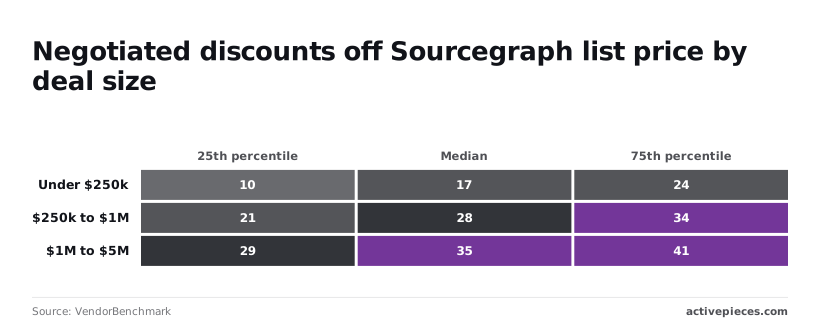
A 25-seat team never reaches those bands, so ask for the top of the under-$250k range, 24 percent, and get the usage limits in writing before you sign.
Hidden Costs and Limits Sourcegraph Buyers Hit
Beyond the seat price, the bill moves on five things. Those are contract minimums, how much AI you can use, which models you can run, who hosts it, and which security features sit on higher plans.
If the team shrinks or you leave early, what you owe depends on the minimum commitment and the annual-versus-monthly choice. Treat both as negotiable terms to get on paper, not defaults to accept.
Sourcegraph AI Usage Limits and Rate Caps
Hit a cap mid-sprint and you lose the work you planned around it. Seat price buys access, while usage limits decide whether the assistant still works on a busy Thursday. Ask what happens at the limit: throttling, a hard stop or an overage charge.
Seat price buys access, while usage limits decide whether the assistant still works on a busy Thursday.
When you self-host, the bill moves from the vendor to you: servers, upgrades and someone's hours keeping it running.
Features gated to higher plans
If your security reviewer requires single sign-on (one company login for every tool) or faster support, price that tier from the start. Those are the usual items that push a team up a tier.
The list below tags each open question as documented, meaning the vendor publishes it, or sales-only, meaning you only get it from a sales conversation.
- Annual minimum: sales-only
- AI credit limits: sales-only
- Model and bring-your-own-key terms: sales-only
- Self-hosting cost: documented for hardware sizing, sales-only for support and licensing
- SSO setup: documented
- Support tiers: sales-only
Send those questions in writing before the quote arrives, because most of the answers that move your bill sit in the sales-only rows.
Worth checking against a plan that does not meter every step: one credit covers a whole run on Activepieces.
Sourcegraph Compared With Copilot, Cursor and Other Alternatives
Against the three tools it's usually compared with, Sourcegraph costs more. It does a different job: searching all of your code at once, on servers you control if you need that. The others mostly help you write code.
Comparison table on price, limits and code search
Set the four side by side in the table below and what to take from it is that the three priced tools are cheap per seat and hosted by their makers, while Sourcegraph's price depends on a quote you have to ask for.
| Tool | Per-user price | Usage limits | Multi-repo search | Self-hosting | Check date |
|---|---|---|---|---|---|
| Sourcegraph | Quoted by sales | Set in the contract | Core feature | Offered | 2026-11-10 |
| Copilot Business | $19 | Metered, varies by plan | Not its main job | No, hosted by GitHub | 2026-11-10 |
| Cursor Teams | $30 | Metered, varies by plan | Works within the project you open | No, hosted | 2026-11-10 |
| Claude Team Standard | $25 | Metered, varies by plan | Not its main job | No, hosted by Anthropic | 2026-11-10 |
Where a row says "metered," heavy users hit a ceiling, so confirm each vendor's current limits against your team's real usage before you commit.
When Sourcegraph earns its price
It earns it when your code is spread across many repositories and people lose hours finding where something lives.
It also earns it when your security rules say code can't sit on a vendor's servers, because among these four it's the one that offers self-hosting.
When a Cheaper Sourcegraph Alternative Is Enough
If your team works in a handful of repositories and its main need is help writing and reviewing code, one of the three hosted tools covers the need at a lower seat price.
You'd be paying for search across a code estate you don't have. Price the workload first, then decide whether the premium buys anything you'd use.
Where Activepieces Fits Around a Sourcegraph Bill
Nothing here replaces Sourcegraph or competes with it. Activepieces can watch your Sourcegraph seat list and tell you when the bill is about to move, drawing on its 747 integrations to reach the spreadsheet and chat tools you already use.
Think of it as a smoke detector for the cost, not a different building.
When someone joins, a seat gets assigned; when someone leaves, nobody removes it, and the first sign is a larger invoice. That is the ordinary cost of doing nothing.
A small flow catches it earlier. It reads the current list of Sourcegraph users, writes one row per person to a spreadsheet, and posts a Slack message whenever the count changes.

The day a seat appears, whoever owns the budget sees it, not a month later on the invoice. The same pattern works for usage: if you can export a figure you care about, the flow can log it and flag it.
Left to right, the illustration below shows that path: the seat list, the Activepieces flow in the middle, and the spreadsheet row and Slack message at the end.
What to take from it is that the flow only reads and reports. It changes nothing in Sourcegraph, so the worst it can do is send a message nobody needed.
What running the workflow costs
Running it costs little, and Activepieces counts usage in credits. According to its 2026 Cloud pricing guide, the Free plan is $0 a month with 1,000 credits.
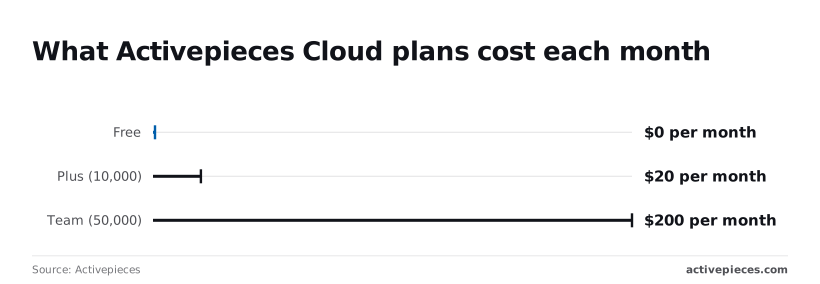
A seat-check that runs once a day uses a small fraction of that, so a small team can try the whole idea without paying.
For $20 a month, Plus gives you 10,000 credits, which leaves room for several flows or more frequent checks. Team is $200 a month for 50,000 credits, which means costs don't vary by team size.

For this job that's almost certainly more than you need, and it only makes sense if the same account is running many other automations.
Start on Free, and move up only if the flow starts hitting the credit ceiling.
A Monday Checklist for Buying Sourcegraph
Start this week by turning the headline price into a quote for your own team, because skipping that means finding out the real bill from an invoice.
The steps below run in the order that keeps you from paying for guesses, and each one feeds the next.
- Confirm the live price on Sourcegraph's pricing page and write down the date you checked it.
- Count the real seats: people who will actually search code, not everyone with a login.
- Trial on one repository, not the whole codebase.
- Send minimums, caps and billing questions to sales in writing.
- Set a review reminder on your calendar.
What to Prepare Before Contacting Sourcegraph Sales
Because prices on a pricing page change, a number you remember from a month ago is a number you can't defend. Note the date beside it.
Then count seats honestly. A contractor who searches once a quarter is a different purchase from an engineer who searches daily, and padding the count means paying for chairs nobody sits in. Undercounting is no better, since you'll meet the seat limit mid-project.
Pick one repository your team touches every week. Track who actually logs in, how often they search, and whether any limit on usage gets hit.
Because phone calls leave no record, send these by email and keep the replies:
- What is the minimum seat count or minimum spend for the plan you recommend?
- What usage caps apply, and what happens when we reach one: a throttle, a block, or an extra charge?
- Does annual billing change the rate, and what are the terms if we shrink the team?
- Which deployment options does that plan include?
The reminder from step five keeps that quote from going stale.
Frequently asked questions
Is there a free Sourcegraph plan?
There's no free Sourcegraph plan I can point you to as a standing offer. Sourcegraph has moved toward selling to organizations, so plan on a quote rather than a sign-up page.
The free trial or proof-of-concept you can request from sales is the cheapest way to test your real repositories before anything is signed.
Is it priced per user or per repository?
Per user, not per repository: that is how Sourcegraph prices, and seats are the main price lever. Repository count and size mostly shape the deployment you need, meaning how much infrastructure it takes to index your code.
Give sales both numbers, because a small team with a very large codebase can cost more to run than the seat count suggests.
Can you pay monthly instead of annually?
On monthly versus annual billing, expect annual contracts to be the norm for the business plans, since they're sold through a quote. Monthly billing, if offered, is something you have to ask for by name.
Get the answer in writing, because a team that assumes it can cancel in thirty days may discover it's committed for a year.
Is Amp included in the price?
No, Amp is priced separately, so treat it as a separate bill. Amp is the coding agent, and it's sold and metered on its own terms rather than folded into your Sourcegraph seat price.
Budget for the two independently, and check Amp's own pricing page for its current usage limits before you add it to a team estimate.
Does Sourcegraph offer discounts for startups or nonprofits?
I couldn't confirm a published startup or nonprofit program, so don't count on one. Ask anyway. The question costs nothing, and a small team that never asks pays whatever the first quote says.
If you get a discount, have it written into the quote along with the seat count it applies to. Otherwise it can disappear at renewal.
Related reading
References
Running the numbers
See what the same workload costs here.
Free forever plan, and every paid plan self-hosts at no extra cost.
See pricing Talk to sales