
StepFun API Pricing: Per-Model Rates (2026 Guide)

Oct 24, 202614 min read
You pay StepFun by usage: per million tokens for its text models, per 10,000 characters for speech, and per image or per minute for the rest, which makes the bill easy to track even when the calls come from an automated workflow built in Activepieces.
StepFun API pricing is the set of usage-based rates, plus the rate-limit tiers, context-length, cache and batch rules attached to them, that determine what you pay to call StepFun's text, speech, image and other models.
StepFun API pricing today, model by model
Speech and text prices are both confirmed as of 24 October 2026 on StepFun's pricing page.
The full price table, checked 24 October 2026
The table sets every model by name against the five things that set a bill, and the text rows have no confirmed figure, so you can't estimate a month from them yet. Prices come from StepFun's pricing page.
| Model | Input USD/1M | Cached USD/1M | Output USD/1M | Context | Tier |
|---|---|---|---|---|---|
| step-3.5-flash | $0.10 | $0.02 | $0.30 | not published | not published |
| step-3.5-flash-2603 | not published | not published | not published | not published | not published |
| step-3.7-flash | $0.20 | $0.04 | $1.15 | not published | not published |
| step-5-preview | $1.00 | $0.10 | $2.70 | not published | not published |
| image input | not published | not published | not published | not published | not published |
| Step Image Edit 2 | not published | not published | not published | not published | not published |
| stepaudio-3-tts | 2.5 CN¥ per 10k characters | not published | not published | not published | not published |
Cheapest model for each common job
For voice output, step-tts-mini is the cheapest model. It costs 0.9 CN¥ per 10k characters. stepaudio-3-tts costs 2.5 CN¥ and step-tts-2 costs 2.8 CN¥. stepaudio-2.5-tts costs 5.8 CN¥, about six and a half times the mini.

At a million characters, roughly a day of heavy narration, that's 90 CN¥ on the mini against 580 CN¥ on the top model.
For text, image and vision jobs I have confirmed figures, so I can name the cheapest model.
What the pricing page doesn't state
No cached rate, no context size, no rate tier: the speech prices come without any of them. Those three decide whether a busy afternoon gets throttled or a long document gets billed twice. The same gaps sit across the text and image rows.
If you are running this arithmetic for your own team, see what the same workload costs on Activepieces.
Fees and discounts behind the StepFun list price
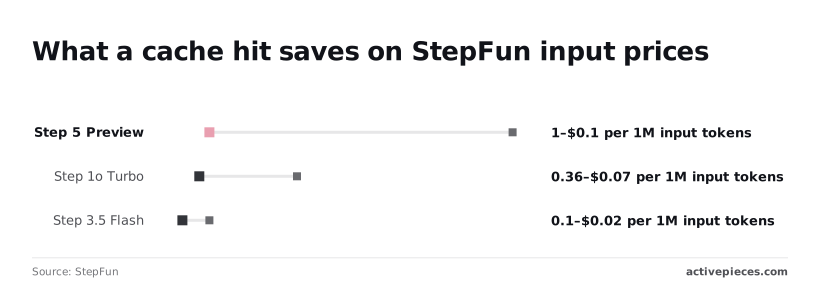
A cache hit cuts StepFun's input price by 80 to 90 percent. I could confirm no batch discount for Step 5 Preview, and I have no verified top-up or trial-credit figures, so treat those as open questions.
**A cache hit cuts StepFun's input price by 80 to 90 percent.
StepFun cache hit and batch discounts
When StepFun recognizes text you have already sent, such as a long instruction block repeated on every call, it charges a lower rate to read it again. That is a cache hit.
The chart below shows the miss-versus-hit gap per model, from StepFun's pricing page as read on 2026-10-24.
| Model | Input on a miss, USD/1M | Input on a hit, USD/1M |
|---|---|---|
| Step 5 Preview | $1.00 | $0.10 |
| Step 1o Turbo Vision | $0.36 | $0.07 |
| Step 3.7 Flash | $0.20 | $0.04 |
| Step 3.5 Flash | $0.10 | $0.02 |

On the most expensive model the gap is largest. A workload that resends the same long prompt pays a tenth of list price on Step 5 Preview, while one that changes its prompt every call pays the full $1.00.
Eight cents per million tokens is all a hit saves on Step 3.5 Flash, so caching matters far less there.
StepFun publishes no batch rate for Step 5 Preview. Until it states one, assume you pay the standard rate for work that could wait overnight.
I didn't find a confirmed trial-credit amount, expiry, or minimum top-up in the pricing page I read. Ask before you plan around either.
Those are dollar prices from the international platform. StepFun also runs a platform for mainland China, and I haven't compared its table with this one. Read the rates, the currency, and the cache rules on the platform that will actually bill your account.
StepFun rate limits by account tier
Your account sits in one of three tiers, V0, V1 or V2. Each step up raises concurrency, requests per minute (RPM) and tokens per minute (TPM) together, so the tier you hold caps how much work you can push through at once.
Limits per tier
Concurrency is how many requests can be running at the same moment. RPM is how many you may start in a minute. TPM is how much text, input and output counted together, you may process in that minute. Whichever you hit first stops you.
Take the exact figures for each cell from the limits page in your own StepFun console, since I won't quote numbers I can't confirm.
| Tier | Cumulative recharge needed | Concurrency | RPM | TPM |
|---|---|---|---|---|
| V0 | Lowest | Lowest | Lowest | Lowest |
| V1 | Middle | Middle | Middle | Middle |
| V2 | Highest | Highest | Highest | Highest |
How to raise your StepFun account tier
Your tier follows cumulative recharge, meaning the total you have added to the account over its life, not your current balance. Spending the balance down doesn't drop you a tier.
If your workload needs V1 or V2 throughput, count the required recharge as part of the project's cost.
What happens at the limit
When you pass a limit, the API refuses the extra requests instead of slowing them. Most APIs signal this with a "too many requests" error (HTTP 429), and you should confirm StepFun's exact wording in its error documentation.
Code that doesn't retry with a pause between attempts will drop work, and code that retries instantly will keep hitting the wall.
What a named StepFun workload costs per month
Once you've handled retries, the monthly bill comes down to one piece of arithmetic: your request count, times tokens per request, priced at each per-million rate and added up. These are the steps, and the three workloads below follow them.
- Count the requests you expect in a month.
- Set the input and output tokens for a typical request.
- Split the input into the part that repeats and can be cached, and the part that is new each time.
- Multiply each of those three integrations by its per-million rate from StepFun's pricing page, read on the day you do the sum, so your total is only accurate for that date's rates.
- Add the pieces together.
- Run the sum again with caching off and compare. The gap is what caching is worth to you.
In a support-ticket summariser, each ticket is mostly new text going in and a short summary coming out. Only the standing instructions repeat, so the cached share is small.
The link here is a weak one, but Activepieces charges 1 credit per flow run however many steps sit inside it.
A ticket summariser with a length check, the StepFun call, a retry step and a spend guard costs the same as the bare two-step version, so splitting the job into smaller, safer steps can raise the bill on per-task tools.
Zapier bills per task and Make per module, so on their pricing pages each of those guards adds to the price. StepFun's token meter still runs underneath either way.
In a long-document Q&A bot, caching does the heavy lifting. If every question re-sends the same long document, the document is your cached input and the question is your new input.
With caching off, you pay full input price for the whole document on every question, and this is the workload where that gap is widest.
Speech or image workload
These are billed in minutes, characters or images rather than tokens, so step two changes. Count the billing unit, not tokens, and price it at the rate for that unit. Everything else stays the same.
If part of the job also runs through a text model, such as a transcript you then summarise, price that part with the token steps and add the two totals.
Worth checking against a plan that does not meter every step: one credit covers a whole run on Activepieces.
Hidden StepFun costs and limits teams hit
Adding the two totals still leaves out the charges the price table never shows. These are output billed above input, reasoning counted as output, retries, and deprecations and residency limits that can force a rebuild.
Reasoning tokens and output multiples
On StepFun's pricing page, output costs more than input on its text models, step-3.7-flash included. A job that writes long answers from short prompts therefore costs far more than the input rate suggests.
It gets worse with reasoning models. Tokens the model spends "thinking" before it answers are billed as output, even though you never see them. A short reply can carry a long hidden bill.

Run a sample of your real prompts and compare the usage figures in the API response against the visible answer length. Price the workload on that ratio, not on what you read on screen.
StepFun 429 errors, retries and failed calls
When you exceed your tier's rate limit, the API returns a 429 error and asks you to slow down. Your code will probably try again, and each retry that gets through is a fresh call you pay for.
If a failed call is cut off partway, check the usage report to see whether you were charged for it.
Cap the number of retries, wait longer between them, and log every 429. Then add the retry share to your monthly volume.
Model deprecations and region constraints
To see what is being retired, read StepFun's changelog. Its image models are on that list, and a pipeline built on one has to be rewritten on a replacement, with fresh testing and possibly different pricing.
If you buy from outside China, check data residency and support. The documentation limits what is available outside China, so confirm in writing where your data is processed and what support you get.
StepFun against DeepSeek, Qwen and OpenAI on price
Region is one hidden cost. The other is that list prices across StepFun, DeepSeek, Qwen and OpenAI's small models now sit so close to the floor that the gap between them lives in the rules around the price.
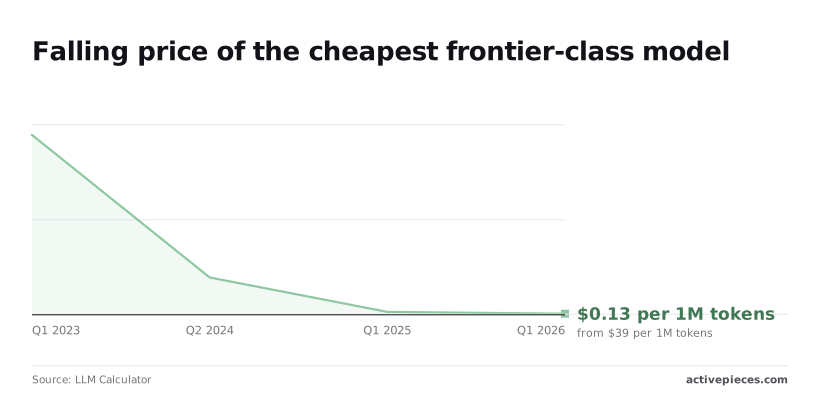
Roughly 300 times: that is how far the price of the cheapest frontier-class model has fallen in three years.
It cost $39 per 1M tokens in Q1 2023, $8 by Q2 2024, $0.52 by Q1 2025 and $0.13 by Q1 2026, meaning anyone starting with 2023 budget assumptions will massively overestimate required spend.
The table below sets the four vendors side by side for the same ticket-summariser job. Take from it which cells I couldn't confirm: I have no verified StepFun, Qwen or OpenAI figures dated to their own pricing pages.
Fill them in from each page before deciding.
| Row | Model | What the vendor positions it for |
|---|---|---|
| StepFun | step-3.7-flash | Fast, low-cost tier |
| DeepSeek | deepseek-flash | Fast and cheap, supports vision |
| Qwen (Model Studio) | Alibaba's small tier | Budget tier on Alibaba's platform |
| OpenAI small model | GPT-6 Luna | Efficient, high-volume tasks |
Those descriptions tell you which model each vendor expects you to run a summariser on. They don't tell you who is cheaper, and I won't claim StepFun wins or loses until the numbers are checked.
Because a summariser resends the same instructions with every ticket, a cache discount on repeated input is where most of the saving sits. If one vendor offers it and another doesn't, the cheaper list price can still produce the bigger bill.
Check whether unused credit expires and whether a minimum top-up locks money in before you have shipped anything.
What Activepieces does about this
The problem here is that StepFun's price table doesn't give you a bill. Activepieces lets you measure one.
Build the workload as a flow, with the StepFun call made through a standard HTTP request step, and run a week of real traffic through it before you commit a budget.

Put the guards in the flow: a length check before the call, a capped retry with a pause after a 429, and a spend alert. A run costs 1 credit however many steps it holds, so these guards add nothing to the automation bill.
The core of Activepieces is open source under the MIT licence, so you can self-host it and read how a flow behaves. Log each response's usage figures there and you have the numbers the pricing page omits.
Frequently asked questions
Is there a free StepFun API tier?
Treat any free allowance as a trial, not a budget line, and read the current terms on StepFun's own pricing page before you build on it. Free allowances tend to come with tighter rate limits and can change without much notice.
Price the workload at paid rates and count any free usage as a bonus. If it only works inside the free tier, it will stop working the day the tier changes.
Does StepFun charge for failed requests?
It depends on how the request failed, and the billing terms are the final word. A request refused before the model runs, such as a bad key or a rejected format, normally costs nothing.
A request that fails partway through, after the model has already read your input, may still be metered.
Skip the check and you pay for the same long prompt twice, once when it fails and again when your code retries. Compare your own request logs with the usage dashboard for a week and see whether the two agree.
How do I stop a StepFun bill from running away?
Set a spending cap or alert on the account first, then put limits in your own code. Cap how long a prompt can be, cap how long a reply can be, and cap how many times a failed call retries.
Overnight, a small job most often turns into a large invoice through a retry loop with no ceiling. Then give each project its own key, so one runaway script can be found and shut off without taking everything else down.

Can I call this API from automation tools?
Activepieces can usually make the call, provided it can send a standard web request with your key in the header, and the length and retry guards you add around the call still cost 1 credit per run however many steps they take.
Whether StepFun's endpoint follows the same request shape as other providers is worth checking in its documentation before you wire anything up.
Because automation tools run on a schedule or a trigger, one misconfigured trigger can fire hundreds of calls. Put the same length and retry limits in place there that you would in code.
Related reading
References
Running the numbers
See what the same workload costs here.
Free forever plan, and every paid plan self-hosts at no extra cost.
See pricing Talk to sales