
Stripe QuickBooks Integration: How to Connect (2026)

Oct 14, 202614 min read
Use the official Stripe-to-QuickBooks Online connector first. It takes an afternoon to switch on, and if your books are plain, it may be all you ever need.
The Stripe QuickBooks integration is Stripe's own app that posts your sales activity into QuickBooks Online (Intuit's cloud accounting product) so you stop retyping it.
If the connector's edges later become your daily job, Activepieces can run the same Stripe and QuickBooks steps as a workflow you control, across 740 integrations and with unlimited flows on every plan, which means tier doesn't gate your automation capacity, but earn that decision first.
Stripe QuickBooks integration: the fastest path
What the official connector syncs and what it leaves out
The connector moves the money events that a bookkeeper would otherwise key in by hand, and it stops where your own accounting rules begin. Here's what it carries across, per the Stripe and Intuit docs:
- Payments
- Processing fees
- Refunds
- Disputes
- Payouts
- Customers
What it leaves out is the judgment layer:
- Custom rules that send different products to different income accounts
- Matching a Stripe customer to a QuickBooks customer you created years ago under a slightly different spelling
- Any logic of your own, such as holding a sync until an order is fulfilled
What you need before you start
You will need admin access to both accounts, because you're authorizing one system to write into the other. Have your chart of accounts tidy before connecting, since the connector posts into whatever accounts you point it at, and a messy list becomes messy books quickly.
Decide which date you want history to start from, so you don't import old transactions you already entered manually.
Before you pay for anything, check the QuickBooks plan. Intuit often advertises a promotional rate for new subscribers, but that rate is temporary and the list price is what you pay once it ends.
The sync list and the setup requirements here are dated 14 October 2026 and drawn from Stripe's documentation for its QuickBooks Online app and Intuit's help pages for connected apps.
This takes minutes, not a project: automate it in Activepieces free.
Stripe app setup for QuickBooks in six steps
Setup is six steps: install the app, authorise QuickBooks, map accounts, set a start date, run a test payment and check it landed, a sequence that fits comfortably in one working day.
Steps 1-2: install the app and authorise QuickBooks
These two steps give you a live connection and nothing else, so building the actual workflows remains your responsibility.
For step 1, open the Apps marketplace in the Stripe Dashboard, search for the QuickBooks app, and choose Install.
For step 2, when prompted, choose to connect to QuickBooks Online, sign in as a user with admin rights on the company file, and approve the access request.
A bookkeeper's limited login will often authorise without error and then fail on the first sync, which is why the admin requirement matters.
According to Stackwatch, QuickBooks runs $38, $85 and $140 a month across its three tiers, against $27, $59 and $97 for Xero and $23, $43 and $70 for FreshBooks, putting it at the highest price point across every tier, so a cost-conscious buyer cannot select QuickBooks and minimize software costs.
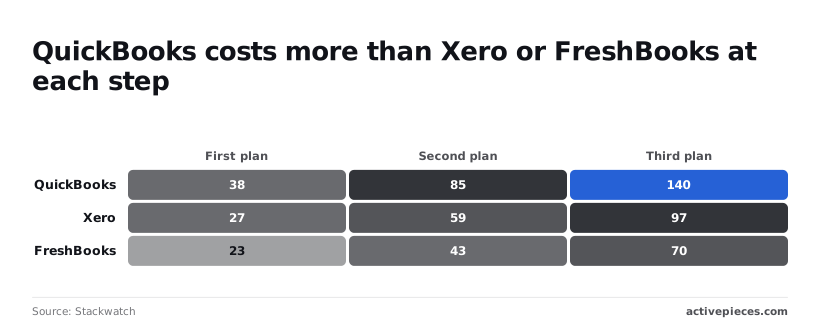
If the sync works on your current tier, moving up buys you nothing for this job, and the gap to the top tiers is $43 to $70 a month over the alternatives.
Steps 3-4: map accounts and choose a sync start date
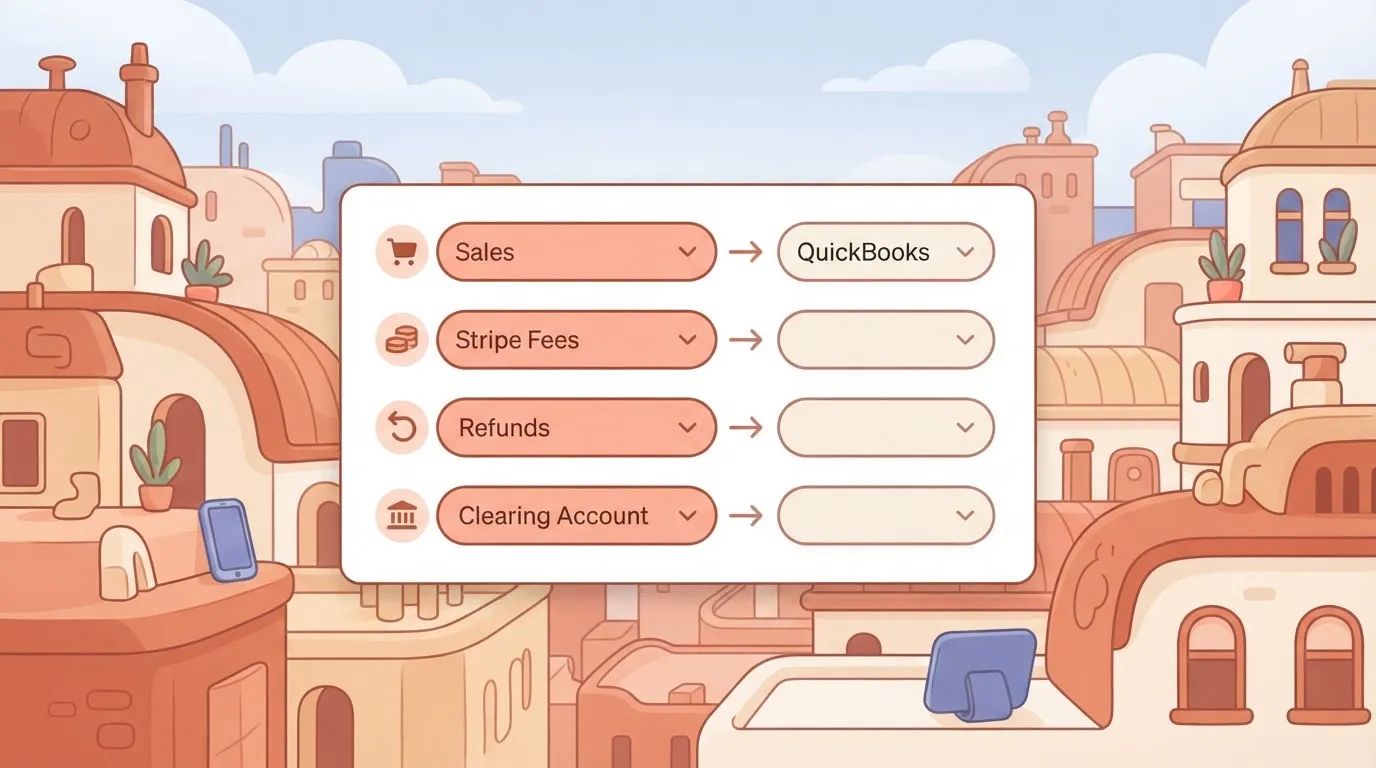
For step 3, assign each Stripe item to a QuickBooks account on the app's settings screen. The accounts are sales income, Stripe fees as an expense, refunds, and a clearing account that holds money between a charge and its payout.
For step 4, set the sync start date.
Set the start date to the first day of an open accounting period. An earlier date can pull in months of history you've already booked by hand, and you'll be deleting duplicates at 2am.
A date inside a closed period may be rejected or land in the wrong month.
Test the Stripe QuickBooks sync with a payment
For step 5, create a payment for a small amount, such as a low-price invoice or payment link, and pay it with a card you control.
For step 6, open the sales or banking view in QuickBooks and look for the matching transaction, with the right customer, income account and fee line.
If it appears under the accounts you mapped, the connector's doing its job and you can leave it running. If it's missing, wrong or doubled, you have found one of the edges the next section covers.
Official Stripe and QuickBooks settings and limits
When a payout total or a fee line is wrong in QuickBooks, start by checking what the official documentation says the connector does by default. For much of it, the answer is that nothing is published.
| Item | Default | Effect | Source doc |
|---|---|---|---|
| Payments | not published | Unknown how a charge is posted | not published |
| Fees | Base card fee plus add-on rates | Fees differ by payment type | Stripe pricing |
| Refunds | not published | Unknown whether they net or post separately | not published |
| Disputes | not published | Unknown treatment of held funds | not published |
| Payouts | not published | Unknown how deposits are matched | not published |
| Customer matching | not published | Unknown duplicate behavior | not published |
| Plans and currencies | Conversion fee applies | Cross-currency sales cost more | Stripe pricing |
| Sync timing | not published | No promised freshness | not published |
| Rate limits | not published | No ceiling to plan around | not published |
Every "not published" is something to test with a handful of real transactions before you trust it.
Plans and currencies matter here: Stripe's pricing page lists a 1% currency conversion charge, so a 1,000-unit foreign sale costs 10 more, and that amount needs an account to land in.
What Stripe data syncs to QuickBooks, including fees
Fees are the one category with published numbers.
Stripe lists these add-ons on top of the base card fee: 2.9% for domestic cards, 1.5% for international cards, 1% for currency conversion, 0.8% for ACH debit, 0.7% for Stripe Billing and 0.5% for manual entry, meaning your effective Stripe cost will reflect whichever of these fees apply to your transaction mix.
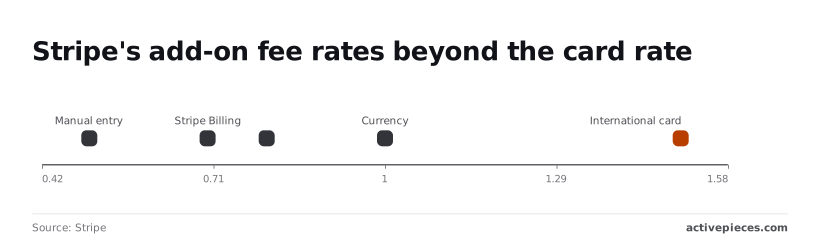
If your sales mix ACH and international cards, you will see fees that no one percentage explains. For refunds, disputes and payouts, the documents give no default, so check each against your Stripe dashboard.
When a busy day will lag, you can't calculate, because no sync interval or rate limit is published for the connector. Treat delayed entries as normal until you've measured the delay yourself.
You can follow the rest of this with the builder open. Start free, no card.
Stripe QuickBooks sync errors and fixes
Most failures are a dead connection, a doubled record, or a total that's off by a fee or a few days, and each has a known fix.
| Row | Symptom | Cause | Fix | Source |
|---|---|---|---|---|
| Expired authorisation | Sync stops; connector asks you to sign in | QuickBooks or Stripe access was revoked or lapsed | Disconnect and reconnect with an admin login | Intuit and Stripe help centres |
| Duplicates | Two customers or invoices for one buyer | Matching on name, not email or ID | Merge in QuickBooks, then match on email | Intuit help centre |
| Payout vs bank feed | Deposit differs from sales total | Payout batches charges net of fees | Reconcile against the payout, not the charge | Stripe docs |
| Refunds | Sales total overstated | Refund not posted as a credit | Record a credit memo or refund receipt | Intuit help centre |
| Fee and currency mismatch | Small gaps on every deposit | Fees and exchange rates not booked | Post fees to an expense account | Stripe docs |
| Backfill | Old transactions missing | Sync starts from connection date | Set the start date or import manually | Connector settings |
| Rate-limit retries | Gaps or repeats after bursts | Requests throttled and resent | Space out calls; dedupe on Stripe ID | Stripe and Intuit API docs |
Fix the rows in this order, because a duplicate you merge today will reappear if the authorisation problem behind it's still there.
When the sync goes silent, reconnect first. Sign in as an admin on both sides, disconnect the app, and connect again. Then check the start date, since records created while it was down won't appear on their own.
If your customer "Ada Bello" exists three times because one buyer used two spellings, merge them in QuickBooks, and match future records on email. If you retry failed runs, key each record on its Stripe ID.

Stripe payouts that don't match QuickBooks bank deposits
Rock Gym Pro, a third-party summary of Stripe schedules, lists US cards at 2 business days, so a Monday sale lands Wednesday. EU cards take 3, meaning a Friday sale reaches the bank the following Wednesday.
US ACH takes 4, and Hong Kong takes 7, so a bank feed there can trail QuickBooks by more than a week. The next-day option takes 1 business day. Compare against your own Stripe dashboard before relying on any of these.

Because each payout is net of fees, the bank line never equals gross sales. Book fees to an expense account, post refunds as credits, and expect small gaps when currencies convert. Those gaps are rounding, not a broken sync.
Custom Stripe to QuickBooks workflow versus built-in connector
You don't need a custom workflow until the connector's gaps are the work you're paid to do. For standard bookkeeping the native Stripe app's faster and has less to maintain.
If you're reconciling at 2am because refunds land in the wrong account every month, that's the signal. A few odd mismatches aren't.
If you're reconciling at 2am because refunds land in the wrong account every month, that's the signal.
| Setup time | Stripe events | Mapping control | Duplicate and retry handling | Cost | Dated vendor source | |
|---|---|---|---|---|---|---|
| Native Stripe app | Shortest: install and authorize | A fixed set chosen by the app | Account-level choices only | Handled by the app, with little you can adjust | No extra tool to pay for | Stripe's app listing for QuickBooks Online |
| Zapier | Short: one trigger, one action | Those its Stripe app exposes | Field by field, per step | You build your own duplicate check; replays are manual | Billed per task, so volume drives the bill | Zapier's Stripe and QuickBooks app pages |
| n8n | Longer: you build and host nodes | Stripe trigger node, or a webhook for any event | Full, including code steps | You design idempotency and retries yourself | Self-hosted costs server time; cloud is a plan | n8n's Stripe and QuickBooks node docs |
| Activepieces | Short to moderate | Stripe triggers, or a webhook for others | Full, with branching and code steps | Built-in retry on failed runs; duplicate checks are yours | Free cloud tier to begin, paid plans beyond | Activepieces' Stripe and QuickBooks piece pages |
If your needs sit in the native column, stop there.
If the native app's fixed events, duplicate handling or routing are what you keep fighting, the follow-up question is whether the tool you move to already has the connector you need.
Activepieces has 740 integrations, counted directly from the packages/pieces/community directory of its open source monorepo on GitHub, where the core is MIT-licensed, and roughly 60% of them were contributed by the community.
The Stripe and QuickBooks integrations used below are source files in that same directory, so the triggers and actions they expose can be read before you build anything.
If an action you need is missing, AI can generate the integration and it stays inside your own instance, so nothing waits on a vendor release. MoneyGram, Moneypenny, Alan and FundingSocieties run it in production.
Here is a case the native app leaves to you: a Stripe refund that needs its own credit memo against the right customer. This flow handles it.
- Trigger: the Stripe piece fires on a refund event.
- Look up the customer in the QuickBooks piece by email.
- Branch: if no match exists, create the customer; otherwise continue.
- Search for a credit memo carrying the Stripe refund ID in its memo field. If one exists, stop, so a replayed event can't post twice.
- Create the credit memo, mapping the refund amount to your refunds account.
You can start the flow free.
Step 4's the one that saves you, because retries are a feature of webhooks, not a fault.
Frequently asked questions
Does the Stripe QuickBooks integration work with QuickBooks Desktop?
No. The official connector is built for QuickBooks Online, so a Desktop file is outside what it supports. If your books live in Desktop, you're looking at a CSV export from Stripe, a third-party tool, or a custom workflow.
Moving to Online is often the cheaper fix for a small team, because it removes the problem instead of working around it.
Can I sync past Stripe transactions into QuickBooks?
Only for a limited window of history, and you choose the start date during setup. Anything older has to go in by hand, typically as a Stripe report exported and imported as a journal entry or bank-feed file.
If the start date overlaps months you already bookkept manually, you'll create duplicates that someone has to hunt down at month-end. Pick it carefully.
Does the integration cost extra?
The connector itself isn't sold as a separate paid add-on in the way many third-party sync tools are. You still need a QuickBooks Online subscription, and Stripe's normal processing fees apply as always.
Check both vendors' current pricing pages before you budget, since plan rules change. The real cost for a small team is the hours spent cleaning up mapping mistakes, not a line item on an invoice.
How do I stop the sync without losing data?
Disconnect the app from either side, and the entries already posted stay in QuickBooks. What stops is new activity, so you'll have a gap from the disconnect date onward.
Before you pull the plug, note the date of the last synced transaction and the last payout. Then you know exactly where to restart, whether that's reconnecting or importing the missing stretch manually.
What should I check the week after setting it up?
Compare each payout in QuickBooks against the matching deposit in your bank feed. If they disagree, the cause is almost always fees, refunds, or a payout split across days. Beyond payouts, check:
- Whether any customer appears twice under slightly different names.
- Whether refunds landed as negative sales or as separate entries.
- Whether Stripe fees went to the expense account you expected.
Do this while the volume is small. A mapping error found after a week's a quick fix, and one found after a quarter's a reconciliation project.
Related reading
Build it
Set this up in minutes.
No code required. Connect your accounts, and Activepieces runs it from there.
Start free Talk to sales