
Upstage API Pricing: All Models and Costs (2026)

Nov 9, 202616 min read
Which product you call sets the price at Upstage.
Its document products cost $4 to $60 per 1,000 pages, and its Solar language models charge per million input and output tokens, so you must evaluate which product line aligns with your data volume and processing needs, whether you call it directly or from a workflow built in Activepieces.
You must know which one you're calling to estimate your bill.
Upstage API pricing is the set of usage-based rates Upstage charges for its API products, billed per million input and output tokens for Solar language models and per 1,000 pages for document products such as Document Parse and Information Extract.
Upstage API pricing today, model by model
Upstage API pricing summary and date checked
Upstage sells two kinds of API: Solar language models, and Document AI (Document Parse, Information Extract, Classification).
The figures below date from 2026-11-09. The table shows the unit each product meters and whether I could verify its price.
| Product | Price and unit | Limits | Check date | Verified flag |
|---|---|---|---|---|
| Solar Pro 4 | Per million input and output tokens | No limit confirmed | 2026-11-09 | Unit only, price not verified |
| Solar Pro 2 | Per million input and output tokens | No limit confirmed | 2026-11-09 | Unit only, price not verified |
| Solar Mini 4 | Per million input and output tokens | No limit confirmed | 2026-11-09 | Unit only, price not verified |
| Document Parse Standard | $10 per 1,000 pages | No limit confirmed | 2026-11-09 | Verified |
| Document Parse Enhanced | $30 per 1,000 pages | No limit confirmed | 2026-11-09 | Verified |
| Information Extract | $40 (Standard) or $60 (Enhanced) per 1,000 pages | No limit confirmed | 2026-11-09 | Verified |
| Classification | $4 (Standard) per 1,000 pages | No limit confirmed | 2026-11-09 | Verified |

You can't directly compare a model that charges per token with a product that charges per page, so cost each workload in the unit it actually consumes.
Solar language models: input and output per million tokens
Send a long prompt and get a short answer, and the bill differs from a short prompt with a long answer on the same model. Solar Pro 4, Solar Pro 2 and Solar Mini 4 all meter input and output tokens separately.
I haven't verified the per-million rates, so I don't quote them. Multiply your measured input and output volumes by the rates on Upstage's own page.
Document Parse, OCR and Information Extract: per-page prices
$4 per 1,000 pages is what Classification costs at the Standard tier, according to Upstage. That works out to $0.004 a page, the cheapest document step.
Run a 100,000-page backlog through Document Parse Standard at $10 per 1,000 pages and it costs $1,000. Parse Enhanced is $30 per 1,000, three times as much, which means organizations must accept triple the per-page cost for enhanced accuracy.

The $2,000 gap on that backlog is the price of the extra accuracy, and your organization must decide whether that improvement justifies the additional cost.
$40 per 1,000 pages buys Extract Standard, and Extract Enhanced is $60, meaning customers must again choose between cost efficiency and enhanced extraction capability. Route documents by type first and send only the ones that need fields pulled out.
If you are running this arithmetic for your own team, see what the same workload costs on Activepieces.
Rate limits and quotas Upstage enforces by tier
For Solar Pro 4 the documentation gives no confirmed requests-per-minute or tokens-per-minute figure, though Upstage ties rate limits to a spending tier.
Upstage Solar requests and tokens per minute limits
Two meters govern Solar language model traffic: requests per minute (RPM), which caps how many calls you can send, and tokens per minute (TPM), which caps how much text those calls carry.
If you run a chat app with many short calls, you hit RPM first. A summarizer feeding long contracts hits TPM first. The table shows what the tier ladder looks like, with every cell I couldn't confirm marked as such.
| Tier | Minimum prepaid commitment | RPM | TPM for Solar Pro 4 | Source |
|---|---|---|---|---|
| Tier 0 | docs silent | docs silent | docs silent | docs silent |
| Explore ($100/mo) | docs silent | docs silent | docs silent | docs silent |
| Build ($500/mo) | docs silent | docs silent | docs silent | docs silent |
| Scale ($5,000/mo) | docs silent | docs silent | docs silent | docs silent |
Don't treat $100, $500 or $5,000 as a guaranteed entitlement, so you cannot safely assume these amounts without confirming them in your service terms. The tier names carry monthly spend figures, but the docs don't say whether those are prepaid minimums.
Nor should you derive a throughput from them.
Page and file-size caps on document products
Because Document Parse and Information Extract charge per page, the cap that matters is pages per request and file size per upload, not tokens. The docs I reviewed give no confirmed page or file-size ceiling by tier.
When a 400-page filing comes in, it may need splitting before it's sent, and each split is a separate request counting against your RPM. Test with your largest real document before you commit a batch job to a schedule.

How to request higher Upstage API limits
If you need higher limits, the documentation doesn't describe a self-serve form or a stated turnaround. The practical route is to contact Upstage sales or support.
Give them your tier, the product (Solar, Document Parse or Information Extract), your peak RPM and TPM or pages per minute, and the date you need them.
Until they confirm in writing, plan capacity on the tier you're on, not the one you hope to reach.
Monthly Upstage bill for a sample workload
$500 a month covers ten thousand one-page invoices on Standard parsing plus Extract, and $900 covers them on Enhanced parsing. Extract is the largest line in both cases.
Sample Document Parse workload and assumptions
Take each invoice as one page, since the page is the unit metered here: 10,000 invoices means 10,000 pages. Document Parse Standard is $0.01 per page, which is $100 if parsing were the whole job.
At $0.03 per page, Enhanced parsing is three times the Standard rate, so $300 for the same pages. Those two rates define the low and high scenarios.
Line-by-line monthly cost
Stacking Information Extract onto Parse Standard takes the rate to $0.05 per page. Subtract the $0.01 parse charge and Extract is $0.04 per page, or $400 a month, four times the parsing line.
Adding Classify lifts the stack to $0.054 per page, so Classify costs $0.004 per page, or $40 a month.
On Enhanced, Parse plus Extract is $0.09 per page ($900), and Parse, Classify and Extract together come to $0.094 per page ($940).
| Pipeline | Per page | 10,000 pages per month |
|---|---|---|
| Parse Standard + Extract | $0.05 | $500 |
| Parse Standard + Classify + Extract | $0.054 | $540 |
| Parse Enhanced + Extract | $0.09 | $900 |
| Parse Enhanced + Classify + Extract | $0.094 | $940 |
What changes the Upstage bill most
Moving from Standard to Enhanced parsing is a notable lever, but Extract stays the largest line. It adds $0.04 per page, $400 a month here, which nearly doubles the bill. Classify moves it by only $40, under 8% of the low scenario.
Before you pay for Enhanced, test whether Standard parsing already gives Extract clean enough input on your worst scans. If it does, you keep the $400.
Worth checking against a plan that does not meter every step: one credit covers a whole run on Activepieces.
Hidden costs and limits in Upstage billing
Only if your bill is made of the line items you priced does the $400 survive.
The extras that break that assumption are output tokens, long inputs, retried parses, how the vendor counts pages, and quotes that never appear on a price page.
Output tokens and long documents
On Solar language models, the meter is tokens, and output tokens cost more than input tokens. A workload that summarizes a long document is cheap to read and cheap to answer.
If a workload rewrites or expands text, it pays the higher rate on most of its volume, so estimate output length separately instead of applying one blended rate.
Attach long context and the opposite problem appears: each call bills every extra page of context you attach again. A chat that resends a whole contract per question multiplies the input meter by the number of questions.

Retries, page counting and rejected files in billing
When a parse fails and your code retries it, that is a second run on the same pages. Document Parse and Information Extract meter pages, not tokens, so if retries are automatic, your real page count is the document count times the attempts.
Count pages the way the vendor does, not the way your file viewer does. A scanned bundle, a file with blank separator sheets, or a PDF with long appendices bills by what the parser processes.
Sample a few real files and compare the billed count against your own before you extrapolate.
If you wrap those calls in an intake flow on Activepieces, from email attachment through Document Parse and Extract to a spreadsheet, the meter on the workflow side is the run, not the steps inside it: 1 credit per run, whether you built it as a two-step workaround or split it into ten smaller, safer steps.
Zapier bills per task and Make per module, so on their pricing pages the same discipline raises the cost of the flow. Upstage still bills each page at the per-1,000-page rates above, so the table remains what you budget from.
Batch and caching discounts: what exists and what does not
On other vendors' platforms, cached input and batch processing are the two levers that cut a token bill most. Treat them as unconfirmed for Upstage until the pricing page for the exact product you call lists them.
For Document Parse and Information Extract in particular, don't assume a token-style cache applies to a page-metered call.
Upstage enterprise and private deployment pricing
You won't find a unit price to put in a spreadsheet for private or on-premises deployment, because Upstage quotes it instead of listing it.
Ask for it in the same units you used above, pages for parsing and tokens for language models, so you can compare it with the public bill directly.
Upstage versus OpenAI, Google and Mistral on price
On neither meter is Upstage the cheapest option. Its plain parsing costs several times Google's OCR, and its language-model comparison only holds when you put input and output tokens side by side. Compare each service in the unit it bills in.
Language models: price per million tokens compared
Upstage bills Solar Pro 4, Solar Pro 2 and Solar Mini 4 per million input tokens and per million output tokens. OpenAI's GPT-6 Luna and Mistral's Small 4 and Ministral 3 8B bill the same way.
I have no price figures I can stand behind for those models, so there's no table of them here.
Read the input rate, output rate and context window from each vendor's own pricing page on the day you decide, and note the date.
A summarisation job reads a lot and writes little, so the input rate sets its bill. A drafting or extraction-to-JSON job writes a lot, so the output rate does. A model that wins on one rate can lose on the other.
When documents are long, context window matters, because a smaller window means splitting each file into several calls.
A model that wins on one rate can lose on the other.
Document parsing: price per page compared
Plain parsing against Google's OCR
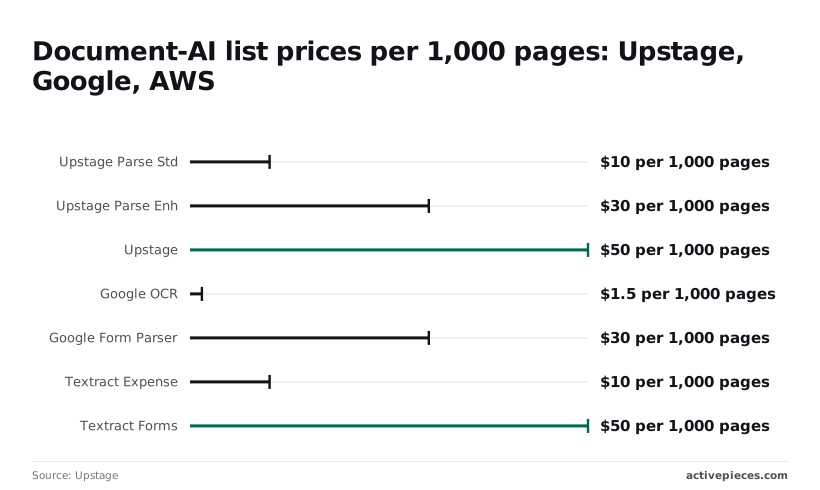
For plain parsing, Upstage's Parse Std costs $10 per 1,000 pages, which is a cent a page. Google's OCR processor, at $1.50 per 1,000 pages by the same source, is about a sixth of that.
For a 100,000-page month that's $1,000 against $150.
If you only need text out of clean scans, Upstage isn't the cheaper option.
Enhanced parsing and extraction tiers
For the same 100,000 pages, Parse Enh at $30 per 1,000 comes to $3,000. That's exactly what Google's Form Parser costs at $30 per 1,000, so at this tier the choice rests on output quality for your documents, not on price.
At $50 per 1,000 pages, or $5,000 for 100,000 pages, Parse+Extract is the most expensive line in the comparison, but it returns structured fields, so you aren't paying for a separate language-model pass afterwards.
Count that saved call before you call it dear.
Upstage Parse versus Textract Expense on your pages
At $10 per 1,000 pages, Textract Expense is level with Parse Std. That match is only a price match: Textract Expense is built for receipts and invoices, while Parse Std is general parsing. Compare them on your own documents.
Multiply each rate by your real monthly page count, and by the share of pages that need the higher tier.
What Activepieces does about this
The problem in this article is that the bill follows the product you call and the unit it meters, and most of the waste comes from sending pages to the wrong product or sending them twice.
A workflow tool can't change Upstage's rates, but it can control which pages reach which product. In the sample workload, Extract is $0.04 a page, the largest line at $400 a month. Routing keeps that line to the documents that need fields pulled out.
In Activepieces you can build that routing as a branch. An email attachment goes to Classification at $4 per 1,000 pages. Invoices continue to Parse and Extract, and everything else stops at a cheaper step or goes to a person.
You can also add a lookup step that checks a file hash against a sheet or table before upload, so a document you've already processed is never billed twice.
That covers the page-count and retry problems described under hidden costs, at the point where you control them.
There is no confirmed dedicated Upstage connector, so I wouldn't promise one. The practical route is the one in the FAQ: call the API with an HTTP request step, or have Activepieces generate a integration with AI and add it privately to your instance.
Either way you set the retry count and the delay yourself, which stops a failing parse from quietly multiplying your page count.
The workflow side has its own price, separate from Upstage's. Activepieces meters a run at 1 credit however many steps it contains, so adding a classify branch or a duplicate check doesn't raise that meter.
The core is open source under the MIT licence, so you can self-host it and read the code that makes the calls.
Frequently asked questions
Is there a free tier for the Upstage API?
Check the console before assuming one, because I have no confirmed free-tier terms to quote. Any allowance will be metered per product, so credits burned testing Solar tokens tell you nothing about what Document Parse pages will cost.
Run a small sample of your real documents through each product you plan to use, then read the usage dashboard to see which unit was charged.
Does Upstage charge for failed requests? I haven't confirmed how Upstage's billing terms treat errors, so don't assume failures are free. You can test it: send a few deliberately malformed calls, then compare your own log of failures against the usage dashboard.
For page-metered products the answer matters most, because a retry loop that re-bills the same page quietly multiplies your cost per document.
To keep Upstage spend from running over budget, cap the unit you're billed on, at the point where you control it.
For Solar language models that means setting a maximum output length and trimming input before it's sent. For Document Parse and Information Extract it means counting pages before upload and skipping files you've already processed. Beyond that:
- Use a separate API key for each workload, so the dashboard shows which one is spending.
- Limit retries and add a delay between them.
- Review usage on a fixed schedule instead of waiting for the invoice.
How to call the API from no-code tools?
Yes. If there's no ready-made Upstage integration, Activepieces lets you generate one with AI and add it privately to your own instance. However the call is made, the request needs:
- Set the method to POST.
- Enter the endpoint URL.
- Add your API key in an Authorization header, with no code involved.
I haven't confirmed a dedicated Upstage connector, so plan on generating your own.
Check that your tool can send a file as a multipart body, since document products take file uploads. Also check its retry settings, since automatic retries on a metered call raise the bill the same way a retry loop in code would.
What should I check before committing budget?
Work out the metered unit for each product you'll call: tokens for Solar, pages for Document Parse and Information Extract.
Then estimate your monthly volume in that unit, using real documents instead of averages. Confirm four things on Upstage's pricing page and in your own test runs:
- The current price for that unit, and the date you checked it.
- How failures and retries are billed.
- Your rate limits at peak volume.
- Any batch or cached discount that applies to your workload.
Price the workload by page or by token, not by vendor, and write the date next to the number.
Related reading
Running the numbers
See what the same workload costs here.
Free forever plan, and every paid plan self-hosts at no extra cost.
See pricing Talk to sales