What Is Chatway MCP? A 2026 Guide for AI Agents

Oct 15, 202612 min read
Chatway MCP is a connector from Chatway (chatway.app) that lets an AI agent read and act inside a Chatway inbox, much as workflow tools such as Activepieces let automations act inside other apps. It's new, and Chatway documents it on its own site at chatway.app.
I judge everything here only against what those pages state as of 2026-10-15.
Understand Chatway MCP and its creator
What MCP means for a business reader
Without MCP, an assistant can only talk. It can't see your customer threads or reply to anyone.
MCP stands for Model Context Protocol, a shared standard for plugging an AI assistant into another piece of software. With a connector the assistant can reach the inbox through a defined door instead of a custom integration someone has to build and maintain.
How the connector sits between agent and inbox
In the illustration below, an AI assistant sits on the left, the MCP connector in the middle, and the Chatway inbox on the right. Arrows show the agent reading conversations and replying through the same route.
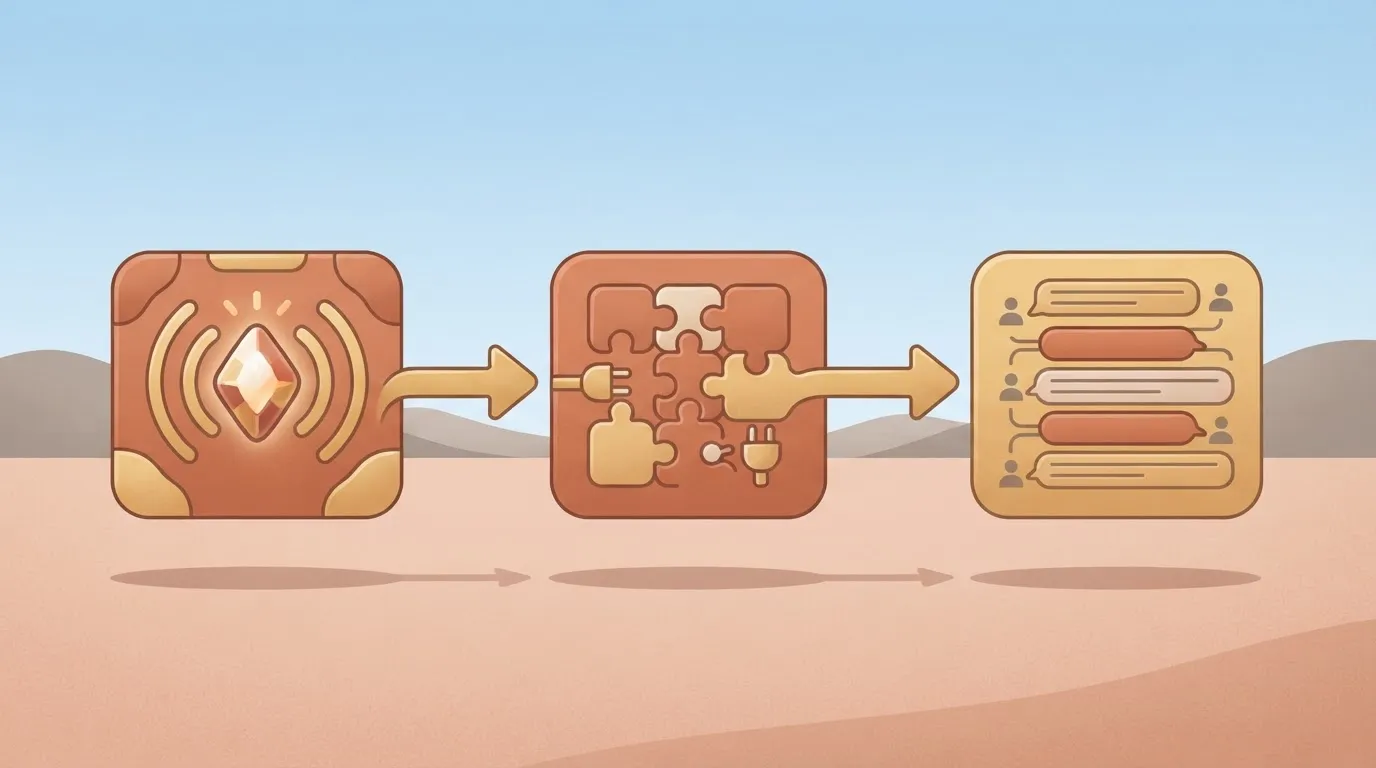
Take from it that the connector is the only thing the agent touches, so any limit on what the agent can do has to live there.
Questions to ask before using Chatway MCP
That matters because a vendor demo shows the best case. The questions that decide whether this is usable are about permissions, which actions Chatway exposes, and what happens when an agent writes to a live customer thread.
In Activepieces, every connector is an agent tool: once an integration is connected, it runs as a step in a flow and is also exposed as a tool on the project's MCP server, which Claude, ChatGPT, Cursor or an agent you built yourself can call.
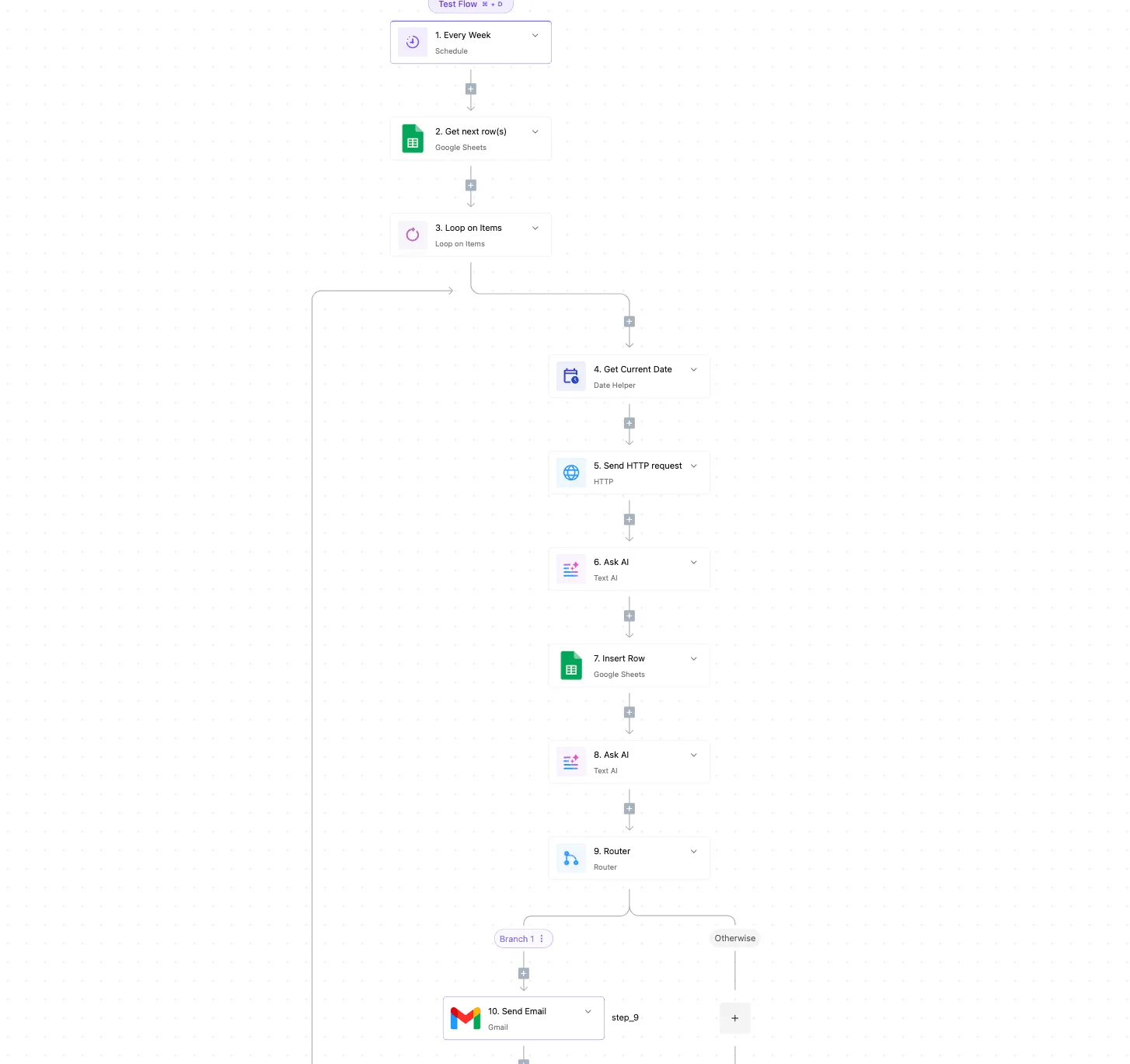
That is a different route from this one, and this article stays on the MCP one.
Confirm the release date on Chatway's own announcement or documentation page. I haven't assumed one here. Any capability those pages don't state, such as write permissions or audit trails, is an open question to verify before you rely on it.
This takes minutes, not a project: automate it in Activepieces free.
What Chatway MCP does
Do not expect a full specification from Chatway's pages. They document only a bounded set of tools, clients and agent examples.
Treat the tool list as the ceiling of what Chatway promises. The homepage and help pages describe Chatway MCP as a way for AI agents to work inside Chatway through MCP tools. If a tool isn't on it, don't plan around it.
If your client is VS Code, Devin or a custom MCP client, you can follow vendor instructions instead of improvising, because each has a dedicated page. Any other client is your own integration work, even if it speaks MCP.
On three points the pages are specific, and they're silent on a fourth group:
- 14 named clients, so compatibility claims are checkable by name rather than by "works with most tools".
- The Devin example prompt about checkout issues, which shows the intended use but is a vendor demo, not evidence of production results.
- Silent: write permissions, audit trails, rate limits, error behavior and how Chatway scopes access per agent.
Start your testing at that last item. Run each of those gaps as a question against a sandbox workspace before an agent touches live customer conversations.
How to connect and use Chatway MCP
You connect by copying Chatway's MCP address into your client, signing in, and choosing what the agent may touch. Your sandbox workspace should be the first to go through this setup. Chatway's help pages describe it for VS Code and for a custom client.
Chatway MCP account and plan requirements
If you want to connect your own agent, the pricing page says you can, including Claude Code, GitHub Copilot, Cursor and Devin, using MCP, webhooks and APIs.
The two help pages I read say it is available on all Chatway plans, including Free, so check your plan in the sandbox before you promise a client anything. You also need a Chatway account that can sign in through OAuth.
According to the VS Code page, the Chatway MCP integration lets the editor reach conversations, customer information and support data, based on the permissions you give.
Treat that as the ceiling: the agent sees only what you grant on the consent screen, so grant narrowly while testing.
Because the custom client guide also exists in a Russian-language version, that is the one I link here. The sequence is:
- Copy the MCP URL:
mcp.chatway.app/mcp. - Add it as a remote MCP server in your client.
- Sign in through OAuth.
- Choose a connection name, the widgets and channels the agent can see, its permissions, and who it replies as.
- Confirm.

Look to step 4 for the real decisions, because it fixes the agent's reach and its public identity. Once you've confirmed, the next job is checking what the agent can actually do inside that boundary.
What Chatway MCP costs on Chatway's pricing page
Chatway MCP plans and prices in 2026
You pay for MCP only through the plan you already hold, because Chatway publishes no separate MCP price. On its pricing page, Free costs $0 and Business $39 a month.
Pay yearly and Business drops to $31 a month, saving $8 a month. The table shows each plan's price by billing period and its MCP-specific charge.
| Plan | Monthly | Yearly (per month) | MCP-specific charge |
|---|---|---|---|
| Free | $0 | $0 | None published |
| Business | $39 | $31 | None published |
| Plus | — | — | — |
Prices and plan limits checked against chatway.app and chatway.app and chatway.app and chatway.app and chatway.app on October 15, 2026.
Watch conversations. The page counts 50 on Free and 200 on Business, and API and MCP conversations count toward those numbers.

Because an agent working through MCP draws on the same allowance your team does, a busy agent could use up Free's 50 quickly. Recheck the page before you budget, because prices change.
Don't read "None published" as "free." The pricing page doesn't say whether Chatway meters MCP calls beyond the conversation limit, whether an agent's actions cost anything, or whether any plan lacks MCP access. I wouldn't assume any of those answers.

Before you commit, ask Chatway directly:
- Does a single agent session count as one conversation or several?
- What happens when the limit is reached: is access blocked, or is overage billed?
- Is MCP available on Free, or only on paid plans?
You can follow the rest of this with the builder open. Start free, no card.
Where Chatway MCP excels and falls short
We haven't run it ourselves, so this is a reading of documentation, not a test. Chatway's own pages document the setup clearly, but nothing outside them confirms it holds up in production.
On the strong side, Chatway publishes client guides and a Russian-language guide. Because the tool list is public, you can see what an agent could call before you connect it, and Russian-speaking teams aren't left translating setup steps themselves.
What Chatway MCP has not yet proven
Read the right-hand column as your verification work, not as features to assume. The table below separates what Chatway's pages evidence from what they leave open.
| Evidenced by Chatway's pages | Unproven | |
|---|---|---|
| Client guides | Published setup steps | That they work in your environment |
| 21-tool reference | A named list of tools | Behaviour of each tool under real load |
| Russian guide | Exists | Whether it matches the English docs |
| Independent reviews | None found | Any third-party assessment |
| Track record | None found | Reliability over time |
| Stated limits | None found | Rate caps, permissions, data scope |
830 of the 11,524 MCP servers Canopii audited were graded D or F, about 7%, so roughly one in fourteen carries serious failures. That's general context, not a finding about Chatway, but it means "published" isn't "vetted."
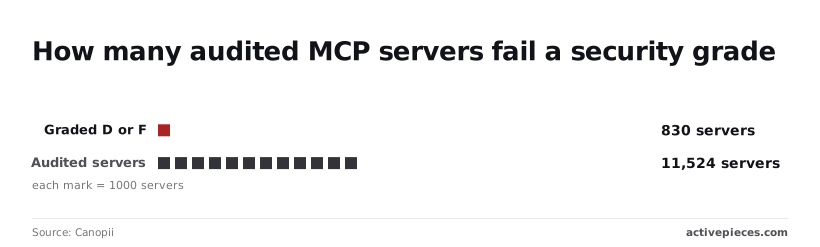
Ask which tools can write or delete, not just read. Ask how access is scoped per agent, what is logged, and what rate limits apply.
Ask whether any outside party has audited the server. Get the answers in writing before an agent touches live conversations.
Chatway MCP compared with established MCP options
Of the four routes, Chatway MCP is the newest and least proven, so the answers you collected in writing decide whether it beats an older one.
To compare them, the table rates each route on maturity, setup effort, documented actions and cost. "Check" marks anything only that vendor's own pages can settle, so read those cells as open questions, not verdicts.
| Route | Maturity | Setup effort | Documented actions | Cost |
|---|---|---|---|---|
| Chatway MCP | New, no production record yet | Agent connects through one protocol; confirm steps on Chatway's pages | Only what Chatway's pages list | Check |
| Larger helpdesk MCP server (Crisp as example) | Check | Check | Check | Check |
| Direct REST API | Long-standing pattern; check Chatway's API pages | You write and maintain every call | Check | Check |
| Automation connector | Check | Check | Check | Check |
An assumed capability is how an agent ends up failing on a live conversation, and every cell marked "check" is something you would otherwise assume.
When to choose an established MCP option
Pick the older route when a failure is expensive and you can't afford to be the first tester. With a larger helpdesk's MCP server or a connector, more users have probably already hit the edge cases, though that's for you to verify on their pages.
For a narrow, fixed job, a direct REST API call is the better fit, because you control exactly what runs and nothing is left to an agent's judgment.
Pick Chatway MCP when you already run Chatway and the actions you need appear on its pages. Start with a low-risk task, since the lack of a track record means your own testing is the evidence.
Connect Chatway MCP to a workflow with Activepieces today
That means any connection you build is a general-purpose route, not native support, and you're the one who has to prove it works.
Treat all three options below as untested with Chatway, and order your effort by how little can go wrong.
- An HTTP request step.
- An AI step with a custom or OpenAI-compatible provider.
- An MCP server.
Simplest: an HTTP request step
Send a call to a URL you specify and get the response back: that is all a plain HTTP request step does. It has the fewest moving parts, so a failure is easy to trace.

The catch: it only helps if Chatway's pages document an endpoint you can call this way. If they don't, you have nothing to point the step at, and that gap is a question for Chatway, not something to guess.
Next: an AI step with a custom provider
When a workflow needs a language model, an AI step calls one, and the custom or OpenAI-compatible provider setting lets you choose which. This adds a model's judgment to the flow, and with it, variability.
Because models misread instructions and make confident mistakes, keep the step's output away from anything irreversible until you've watched it behave. Whether such a step can reach Chatway on its own is unconfirmed.
This is the closest fit to what Chatway MCP is meant for, and the least proven.
Verify it end to end on a low-stakes task before you rely on it.
Frequently asked questions
Before you start
Where Chatway's pages are silent, the answer below says so; most of what you would verify comes down to five questions.
Cost and compatibility
Is Chatway MCP free to use? Partly: Chatway's pages say MCP is included on every plan, including Free, and its conversations count toward the plan's conversation allowance. They don't publish any separate MCP fee, so whether one exists is an open question. Ask Chatway before budgeting around it.
Does Chatway MCP work with Claude or ChatGPT? Check the supported-client list on Chatway's MCP pages rather than assuming.
The pages document a set of clients and a set of tools, but a client missing from that list is unsupported until Chatway says otherwise. A Russian-language guide also exists, which helps if your team works in Russian.
Safety and ownership
Is it safe to give an AI agent access to customer chats? Chatway hasn't published enough for me to call it safe. Agents act through the tools you expose, so treat every tool as a permission.
Start in a test workspace with the narrowest access, and look for documented limits on what the agent can read and send before connecting live conversations.
Who owns Chatway? The MCP pages I'm relying on don't answer this. Look at the company's terms, privacy policy, or legal page, which should name the contracting entity. You need that name for any data-processing agreement.
What to do first
What should I check before trying Chatway MCP on Monday? Confirm your client is supported, then confirm that usage stays within your plan's conversation allowance. Ask in writing about MCP fees and data handling, and run one low-stakes task in a throwaway workspace first.
Related reading
Build it
Set this up in minutes.
No code required. Connect your accounts, and Activepieces runs it from there.
Start free Talk to sales