
What On-Premise iPaaS Deployment Actually Means

Oct 23, 202612 min read
When you move to an on-premise iPaaS, the vendor-managed cloud environment is replaced by your own internal execution engines.
This shifts the responsibility for uptime and resource scaling, which remains a core consideration when deploying self-hosted solutions like Activepieces, from the provider to your local DevOps team.
On-premise iPaaS refers to the deployment of integration platform as a service software within a company's own data center or private cloud to maintain direct control over data sovereignty and security infrastructure.
On-premise iPaaS is infrastructure ownership for integration software
The shift from SaaS to self-hosted engines
This transition marks a move away from the "black box" model of integration. Data processing happens on third-party servers in the old model; the new model keeps the integration logic within your own security perimeter.
When you utilize an internal platform to automate workflows, the execution of sensitive logic remains under the direct supervision of your infrastructure team.
The platform's MIT-licensed core allows for a transparent audit of the execution engine, ensuring your security team, rather than the software vendor, becomes the final authority on patch management and access logging.
Private clouds vs. physical data centers
Physical server racks and virtualized private clouds, such as an isolated Virtual Private Cloud (VPC) within the Amazon Web Services (AWS) ecosystem, are both now encompassed by the term "on-premise."
While the physical location of the hardware differs, the operational outcome for payload data is identical: it never leaves your network to reach your integration engine.
By keeping the integration engine behind the same firewall as your systems of record, your IT team eliminates the need for inbound holes in the perimeter. This reduces the total attack surface available to external threats.
How the local execution agent processes tasks
Acting as the primary worker, the local execution agent pulls tasks from the orchestration layer. It processes them against internal APIs without exposing those credentials to a cloud provider.
This architecture allows your platform to interact with legacy systems, such as an on-site Oracle database, without requiring a complex VPN tunnel. Because the agent lives in the same subnet as your target applications, the latency of every API call is minimized.
Everything below works on Activepieces' free plan. Start without code or a credit card.
Operational trade-offs of managing integration layers
Manual scaling and patching for self-hosted platforms
Self-hosting an integration platform shifts the responsibility for version parity and resource allocation from the vendor to your internal DevOps team. An on-premise installation requires a staged rollout across dev, test, and production environments.
While some vendors gate security features behind their cloud, Activepieces provides the same enterprise-grade controls for air-gapped builds as it does for its managed cloud; its SOC 2 programme is in progress, and the penetration test summary, DPA and sub-processor list are available on request.
The self-hosted documentation confirms that SSO, SCIM, custom RBAC, and audit logs are available for local deployment, which is why regulated entities like MoneyGram and FundingSocieties run this edition in production today.

To scale manually, your infrastructure team must provision virtual machines in anticipation of peak loads. Failing to do so risks platform latency that stalls your automated business processes.
Staffing costs for self-hosted middleware administration
The administrative overhead of self-hosted middleware isn't a fixed cost but a tax that grows with the complexity of your data ecosystem.
| Enterprise Size | FTE Requirement | Primary Focus |
|---|---|---|
| Small | 0.25 FTE | Basic server hygiene and updates. |
| Mid-Market | 0.75 FTE | Monitoring and troubleshooting. |
| Large | 1.5 FTE | 24/7 coverage and connector maintenance. |
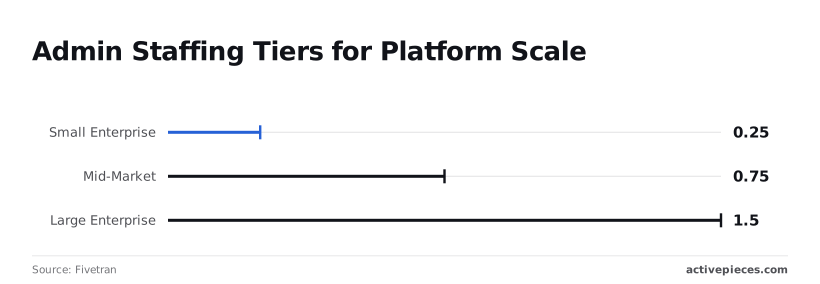
1.5 FTEs are required by large enterprises, according to the Fivetran Enterprise Data Infrastructure Benchmark.
This necessitates a primary and a backup administrator to ensure 24/7 coverage and prevent a single point of failure in your integration stack.
Finding talent for self-hosted middleware management
Maintaining an on-premise integration layer requires a specific intersection of networking expertise and application-level logic. This combination is increasingly rare in a cloud-first labor market.
Without niche expertise in both the underlying Linux kernel and the specific integration runtime, the security of a private cloud becomes an operational liability. The departure of a single architect can leave your entire automation strategy unsupported.
Without niche expertise in both the underlying Linux kernel and the specific integration runtime, the security of a private cloud becomes an operational liability.
Why enterprises choose self-hosted integration platforms
Data residency requirements for integration platforms
Enterprises adopt self-hosted integration platforms primarily to maintain physical custody of data. This keeps information within specific geographic borders or private infrastructure.
By hosting the integration engine on a private server, your infrastructure team ensures that sensitive packets never leave the local network. This effectively removes the risk of cross-border data transfers that violate sovereign data mandates.
Security and compliance as the leading deployment drivers
Your Information Security (InfoSec) team can apply the same hardened firewall rules and intrusion detection systems to the integration layer.
Public cloud environments often operate on a shared responsibility model. A misconfiguration by the provider could expose your entire logic flow to the public internet.
Cost of data breaches and integration security
The rising cost of security failures has turned infrastructure control into a primary business objective. According to the IBM Cost of a Data Breach Report, the global average cost of a data breach reached 4.88 million USD in 2024, representing a 10% increase over the previous year.
These figures confirm that for high-regulation sectors, the primary goal of self-hosting is to minimize the surface area available for such expensive exploits. The decision to self-host is an insurance policy against the rising costs of unauthorized data exposure.
Reducing third-party risk in vendor audits
Self-hosting simplifies the vendor risk management process by reducing the number of external entities that have administrative access to your internal systems.
By moving the integration platform behind your corporate perimeter, your compliance team can:
- Limit system access to internal service accounts that are monitored by your own Security Operations Center.
- Audit all logs locally without relying on the delayed or filtered logs provided by a third-party vendor’s dashboard.
- Enforce multi-factor authentication through your existing Identity Provider, such as Okta.
Easier to see it running than to read about it: set it up free, no card.
Three architectural models for local integration deployment
Comparing security and ease of use across models
The selection of a deployment model represents a direct trade-off between the granularity of security controls and the operational capacity of your DevOps team.
| Architecture | Data Residency | Management Overhead |
|---|---|---|
| Air-Gapped | Total | High: Requires manual updates and physical access controls. |
| Hybrid | High (metadata in vendor cloud) | Moderate: Control plane is managed by the vendor. |
| Private Cloud (VPC) | Total | Moderate: Relies on cloud provider infrastructure security. |

To ensure that workflow changes are treated as auditable code rather than opaque UI updates, a robust self-hosted architecture enables Git Sync and Release Management across all deployment models.
Engineering teams should utilize these features to version and review flows in a test environment before promoting them to production, ensuring that every logic change is a deliberate, reviewed step rather than an accidental click in a hosted dashboard.
The hybrid approach: cloud control vs. local runners
A hybrid architecture utilizes a cloud-hosted control plane to manage the user interface and metadata while deploying "local runners" within your internal network.
These are lightweight execution agents. This separation means that sensitive credentials and payload data stay inside your corporate firewall, while metadata is handled by the cloud control plane. The vendor handles software updates for the orchestration layer automatically.
Air-gapped vs. VPC deployment strategies
By severing all external internet connections, air-gapped deployments provide the highest level of isolation. This ensures that even a zero-day vulnerability in the software can't result in data exfiltration.
In contrast, a Virtual Private Cloud (VPC) deployment uses the Amazon Web Services or Microsoft Azure backbone to create a logically isolated network. This allows your security team to use existing cloud-native identity and access management tools.
How Activepieces enables secure self-hosted automation
By using the containerized automation engine provided by Activepieces, your engineering teams can host the entire workflow logic within your own Virtual Private Cloud (VPC).
This deployment supports 735+ integrations, roughly 60% of which are community-contributed, allowing for broad connectivity without sacrificing the isolation of your private network environment.
How to containerize the workflow platform
To package the workflow designer, the PostgreSQL database, and the Redis task queue into a single deployable unit, the platform uses a Docker-based architecture.
In a Kubernetes environment, this allows for the isolation of specific workloads into separate namespaces. A breach in a low-priority marketing automation can't pivot to access your production database credentials.
Rapid deployment timelines for self-hosted engines
From weeks of manual server hardening down to a single deployment pipeline execution, the use of standardized containers reduces the friction of on-premise setup.
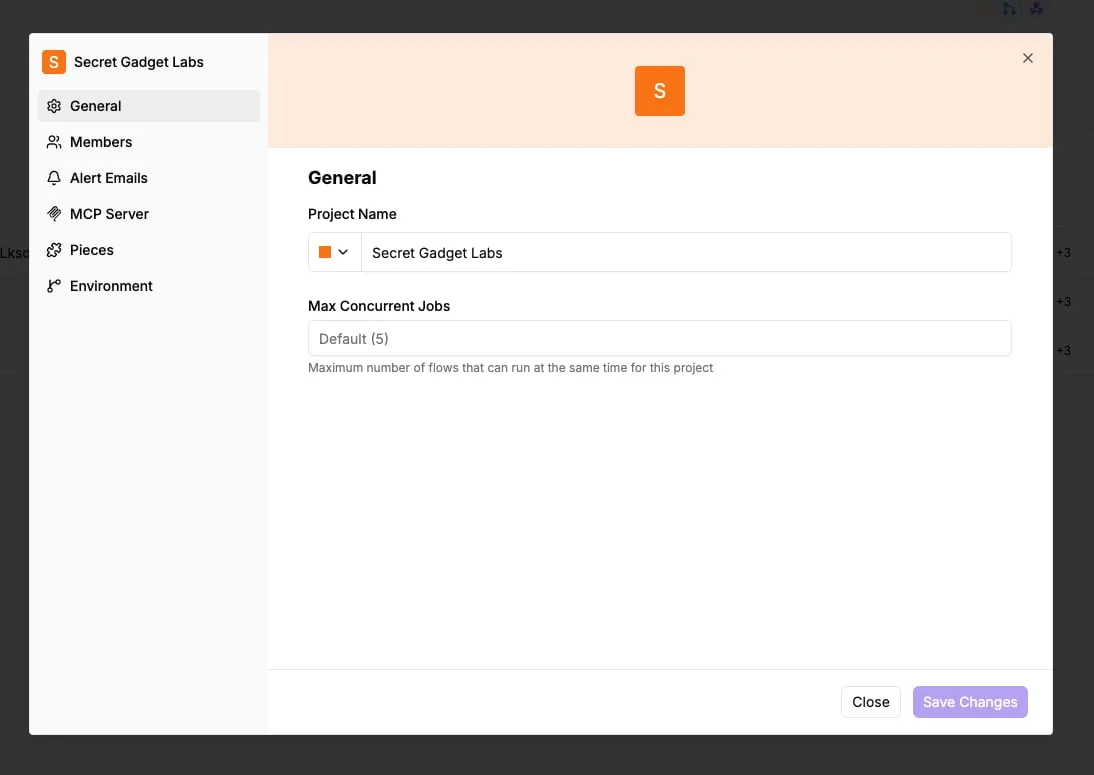
Because the environment is defined in code, the "Secret Gadget Labs" project settings allow your administrators to cap the maximum concurrent jobs. This prevents a single runaway loop from consuming all cluster resources.
Auditing the open-source engine for security compliance
Your internal security audit team can inspect the raw TypeScript source of every integration in an open-source codebase.
They can check the pre-built connectors for services like the Jira project tracker or the Slack communication platform to verify that no hidden telemetry is exfiltrating data. Every outbound request from a workflow is visible to your internal network firewall.
Implementation checklist for initial on-premise deployment
Mapping data sensitivity and compliance requirements
The initial phase requires a comprehensive mapping of every data classification that will pass through the integration engine.
If the platform will process Protected Health Information (PHI) under HIPAA regulations, the underlying hardware must be physically or logically partitioned from your general office network.
The 90-Day On-Premise Implementation Roadmap: 1. Audit data sensitivity and egress requirements, 2. Provision Docker-compatible environment, 3. Deploy the application via Docker Compose, 4. Configure.
Establishing a container orchestration strategy
Selecting the right container runtime determines the long-term maintenance overhead for your DevOps team.
Docker Compose is best for single-server pilot programs where the primary goal is rapid validation. Kubernetes (K8s) is necessary for production environments requiring high availability. It automates the restart of failed containers to prevent workflow downtime.

Configuring monitoring and alerting for self-hosted deployments
Self-hosting shifts the responsibility for performance monitoring to your internal SRE team. Without a centralized logging tool, such as the ELK Stack or Datadog, your team will lack visibility into why a specific automation failed. These logs must be ingested by your internal SIEM system.
Frequently asked questions about on-premise iPaaS
Can an on-premise iPaaS work in an air-gapped environment?
Provided the platform architecture supports local container registries and internal dependency management, an on-premise iPaaS can operate in a fully air-gapped environment.
This isolation means the integration layer has no physical or logical path to the public internet. This eliminates the risk of an external actor exploiting a zero-day vulnerability in the platform’s web-facing components.
To maintain this posture, the platform must be able to resolve all connector logic and data transformations using only resources within your private network.
If the software requires a "phone home" heartbeat for license verification, the air-gap is compromised. This forces your security team to create firewall exceptions that defeat the purpose of the isolated segment.
Is self-hosting always more secure than using a SOC2 cloud?
Self-hosting is only more secure than a SOC2-compliant cloud when your internal infrastructure team implements controls that meet or exceed the cloud provider’s baseline.
While a cloud vendor offers a shared responsibility model, an on-premise deployment places the entire burden of patch management and network hardening on your internal DevOps team.
If your internal team lacks the bandwidth to rotate secrets or update the underlying Kubernetes clusters, the self-hosted instance becomes a legacy liability.
In these cases, the "secure" on-premise environment actually increases the attack surface. It lacks the automated threat detection and rapid patching cycles that a dedicated cloud security team provides.
How do updates work if the system has no internet access?
When the system has no internet access, updates require a mediated "pull-through" process where artifacts are vetted in a staging zone before being moved to your production network.
This workflow ensures that no malicious code enters your environment through a compromised upstream package. The process generally follows these stages:
- Download images and binaries to a secure, internet-facing jump server.
- Scan all files for vulnerabilities using a static analysis tool.
- Transfer the verified files across a controlled gateway to a private internal registry.
- Trigger your internal deployment pipeline to update the iPaaS nodes.