
Workato Architecture Explained: Components and How It Works
Workato architecture explained: a cloud-native iPaaS built on recipes, connectors, triggers, actions, governance and hybrid deployment. See how it works.

May 14, 20244 min read
Workato architecture is a cloud-native integration platform (iPaaS) built from a few core parts: recipes (workflows made of triggers and actions), connectors to apps, a hosted runtime and governance controls. Users build recipes in a low-code, drag-and-drop interface, and Workato runs them in the cloud.
This guide covers each component, how a workflow is built step by step, how security, error handling and large workloads fit in, and how the architecture compares with Activepieces, an open-source alternative that can be self-hosted.
How does Workato work?
Workato automates processes by combining several components. Each has a specific role, and together they make up the Workato architecture.
Hosting
Workato is a cloud-native platform, so the workflows a user builds are hosted in the cloud. It is scalable (it handles large workloads) and reliable.
Connectors
Connectors are the apps and systems a recipe talks to. Workato offers a wide range of built-in connectors, and it allows custom connectors built with APIs and SDKs. More connectors are available on Workato's Marketplace.
Triggers and Actions
Triggers are the conditions that start a workflow. Actions are the responses to those triggers. Workato's triggers are event driven, while its actions are flexible.
Recipes
A recipe is a set of instructions that automates a series of actions in response to specific triggers. Recipes are made up of triggers, actions and connectors. They are modular and can be reused across projects and workflows. Workato is a low-code/no-code platform with a drag-and-drop interface, so users can build recipes without coding.
Security and Compliance
Although Workato is cloud-based, data sent or received is encrypted for safety and security. This may not suit sensitive data, which is why Activepieces can be a better alternative: it lets all data stay on-prem.
Error Handling
Workato provides error handling and debugging tools to detect and troubleshoot errors. It also makes recovery of workflows possible.
Governance
This part of Workato handles roles and permissions, especially for team-based projects. It also keeps a detailed audit of user activity.
API Management and Customisation
APIs are the entry points to applications. Through this component, Workato ensures that API gateways are secure and scalable. It also allows endpoints to be customised to the specific needs of the business.
Hybrid Deployment Options
Workato supports both on-prem and cloud hosting, although on-prem hosting still needs to connect with Workato in the cloud to function effectively.
Extensibility and Integration
More connectors are available on Workato's Marketplace for integration and extension of the platform.
Everything below works on Activepieces' free plan. Start without code or a credit card.
How is a workflow built with Workato?
Having known the architecture of Workato, let's take a look at how to combine these components to build a workflow and automate it. To build a workflow with Workato,follow these steps:
Set up the environment
Sign-up with Workato and pick any connector of your choice for linking to Workato
Create a Recipe
Define and configure triggers,set the expected action with the necessary details.
Confirm Data Mapping
Ensure that the data expected in the trigger event is correctly mapped in the action steps.
Test the Recipe
Test the entire workflow to confirm it functions as configured and the response received is as expected. Use the available debugging tools to debug where there are errors
Deployment
Upon successful testing, deployment can be instant or scheduled.This activates the automation.
While Workato is a well-established platform for integration and automation, Activepieces offers certain architectural advantages that makes it a preferable choice. Activepieces is open-source,self-hosted,safe and secure especially for sensitive data.
Workato architecture FAQ
Does Workato have a logo or brand mark? This post doesn't reproduce it.
How does Workato handle multi-app automation? Recipes chain triggers and actions across connectors.
How does Workato keep automations secure? Data sent or received is encrypted. Governance handles roles and permissions and keeps a detailed audit of user activity.
How does it cope with large data volumes? The cloud-native hosting is designed to scale for large workloads, and recipes can be reused rather than rebuilt.
Activepieces Architecture
Activepieces uses Redis for queueing messages to be processed,and PostgreSQL as its main database.Also,being an open source,it has a high speed of innovation based on the contributions.
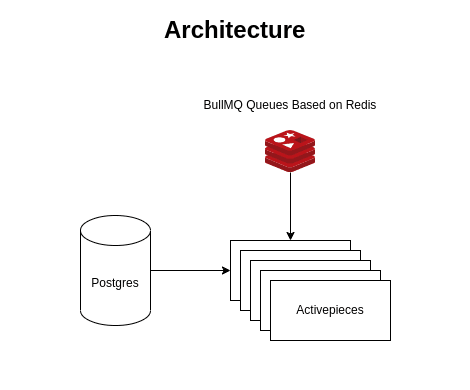
Benefits of Activepieces over Workato
Open Source Nature Being an open source platform, Activepieces allows users to see the code, modify and tailor it to their specific needs while also making room for contributions. Flexible Deployment Activepieces can be deployed both On-prem and in the cloud. Its on-prem capabilities allows for total ownership of the workflow; this means the data and the automation lives in the user’s server. This enhances data security and safe transfer. Security and Control Users can customize security protocols based on their needs.Activepieces on-premise deployment allows organizations to have full control over their data, enhancing privacy and compliance with stringent regulations such as HIPAA.