
Zoho Flow Free Plan: Limits, Trial, Alternatives

Nov 23, 202614 min read
Yes, Zoho Flow has a free plan, and it works as a real trial of the product rather than a time-boxed demo.
It's capped tightly enough that it suits people whose work already runs through Zoho apps, and few others, whereas anyone weighing it against open-source options like Activepieces will probably hit those limits sooner.
Zoho Flow's free plan is the no-cost tier of Zoho's workflow automation tool, which lets you connect Zoho apps and other cloud services into automated flows within a small monthly cap on tasks and a limited number of flows.
Before you build anything, know that Zoho's pricing page sets a monthly task allowance, a ceiling on how many flows you can keep, a polling interval, a window of run history, and a limit on users. It also decides which apps you can connect.
I read the page in November 2026 and am quoting only a few numbers here. Plan limits shift, and I'd rather you check the live figures than trust a stale one. The table shows each limit and how likely it is to bite first.
Zoho Workflow free plan features and limits
| Free plan limit | What it constrains | Which hits first |
|---|---|---|
| Tasks per month | Every action your flows execute | Most people, soon after a flow touches real volume |
| Flows | How many automations you can keep active | Second, once you automate more than a couple of processes |
| Polling | How quickly non-instant triggers notice new data | Anyone who needs near-real-time responses |
| Run history | How far back you can debug a failed run | Only when something breaks and you look late |
| App access | Which apps and actions you can connect | Anyone who leaves the Zoho ecosystem |
| Users | Who can build and manage flows | Teams, not solo users |
If you want a like-for-like comparison, Activepieces offers a free cloud plan of 1,000 credits a month with unlimited flows, which can be measured against the same six rows.
When a flow fires on every form submission or CRM update, it consumes allowance with each step it runs, so a handful of busy flows can use up the month well before it ends.
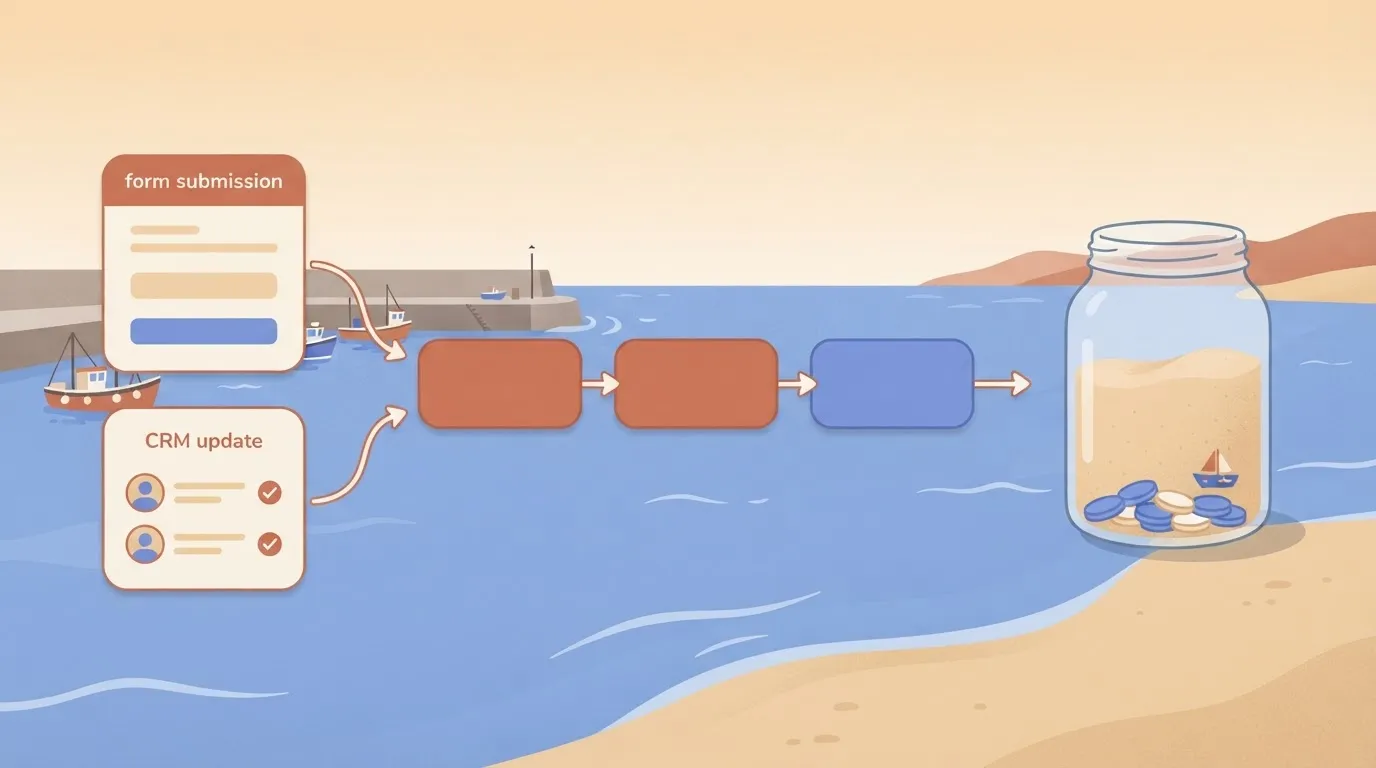
Once it's spent, the choice is waiting or paying.
As for a free trial of the paid plans, I can't confirm one from the page I read, so I won't promise one. Check the pricing page for a trial before you commit.

The fastest way to settle a shortlist is to try one. Activepieces is free to try, no credit card.
Reasons people leave Zoho Workflow
100 free tasks a month run out within days of a real workflow going live, so the trial period can't demonstrate real-world value, and that is why most people leave. The next plan is a 50-fold jump rather than a small step.
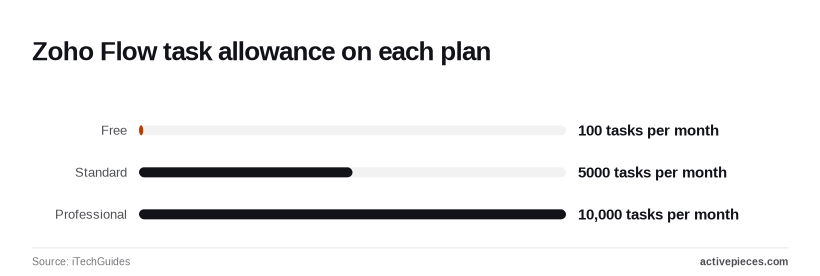
According to iTechGuides, the plans allow 100 tasks a month on Free, 5,000 on Standard and 10,000 on Professional. A task is each action a flow runs, so a three-action flow that fires just 34 times uses the entire free month.
The point to take is that Standard multiplies the free allowance by 50, while Professional only doubles Standard.
The decision sits at the first paid step. Standard is listed at $25 a month billed annually and $29 billed monthly, and Professional at $41 annually and $49 monthly, so you save money by committing to annual billing.

Paying monthly costs $4 more a month on Standard and $8 more on Professional, which is $48 and $96 a year for the freedom to cancel.
Professional's extra 5,000 tasks cost $16 more per month on annual billing, so buy it only if you can show you'll pass 5,000.
Fit outside the Zoho ecosystem
If most of your apps aren't Zoho, you're paying for a catalogue you barely use, because Flow is strongest when it connects Zoho's own products.
Access to some apps and the scheduling and flow limits differ by plan, and I have no verified figures for them here.
Check the plan page for each app you depend on before paying, because a free plan that can't reach your key app is useless at any task count.
Leaving can be the wrong call. If your CRM, helpdesk and accounting already run on Zoho and your volume stays under 100 tasks, the free plan costs nothing and moving gains you nothing.
If you outgrow it but live inside Zoho, Standard at $25 a month annually is likely cheaper than rebuilding your flows elsewhere.
Best reasons for staying with Zoho Workflow
Leaving means rebuilding each of those links elsewhere, because Zoho CRM (customer records), Books (accounting) and Desk (support tickets) already connect to Flow natively. That is the strongest case for staying.
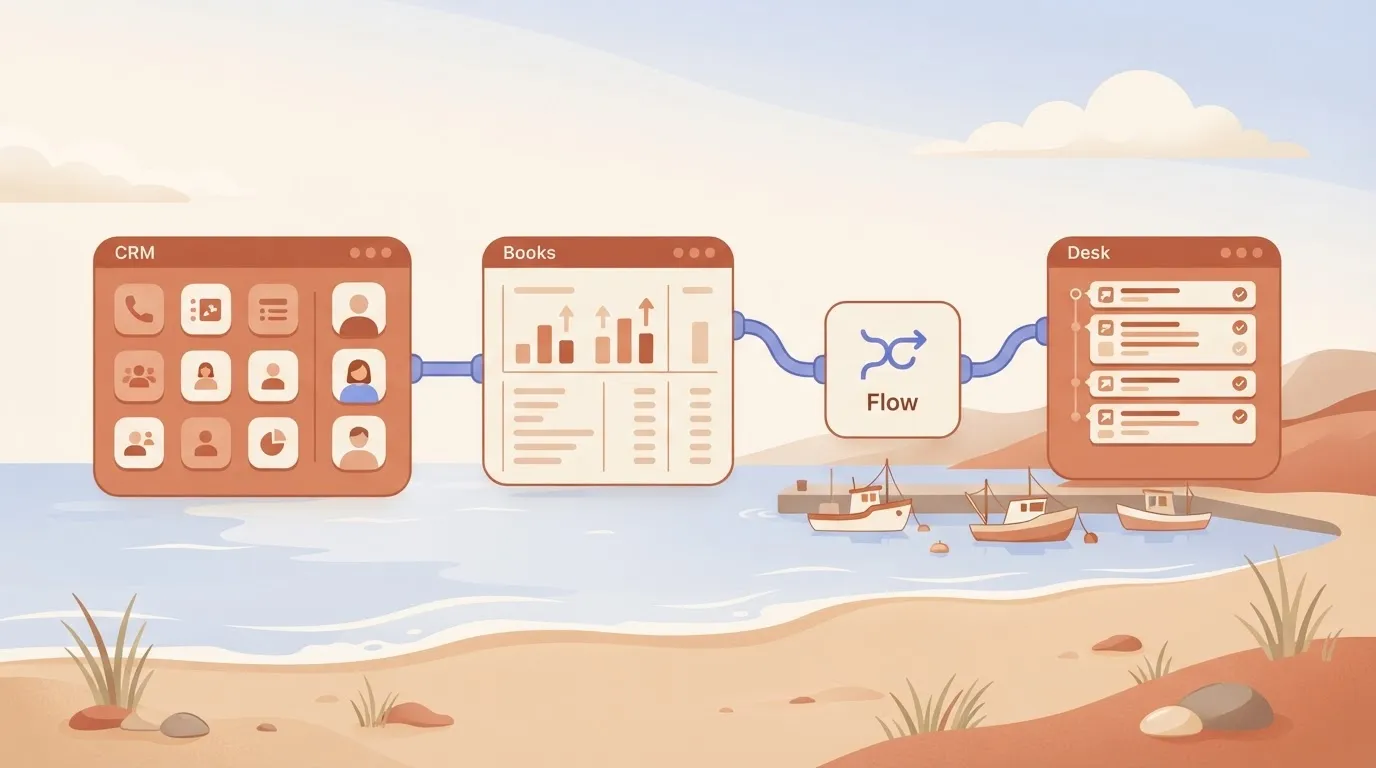
For a team already on those apps, the free plan's value is the connection, not the volume. Your flows reach CRM, Books and Desk without a third-party connector.
That saves setup time, and it means a migration has to beat a working integration, not a blank page.
Zoho One and the bundle
I couldn't confirm trial terms from the figures available, so verify them on Zoho's pricing page before counting on one. The bundle is where billing choice does the work.
According to SaaSSwapper, Zoho One's All-Employee licence runs $37 per user per month billed annually, or $45 monthly, so month-to-month access requires paying more.
The Flexible User licence runs $67 annually, or $105 monthly, meaning annual commitment is substantially more economical. Flow is among the apps the bundle includes, under both licences.
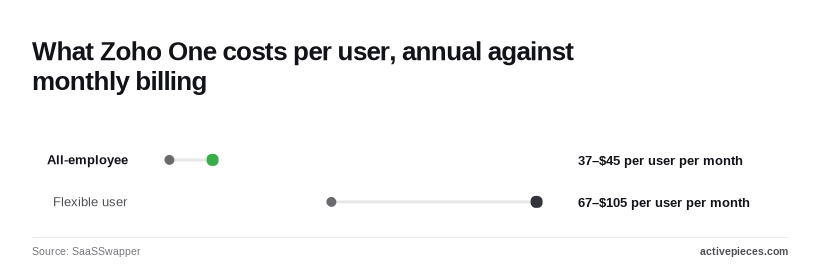
If you pay monthly on All-Employee, that's $8 more per user, which is the price of being able to leave after a month.
On Flexible User the gap is $38 per user, so annual billing saves far more there, and you're committed to it for the year.
If you only want Flow, the bundle is overbuilt. If you already pay for several Zoho apps, it can be the cheapest way to keep every flow in one place.
Zoho Workflow versus seven free alternatives compared
That advantage disappears once your apps aren't Zoho's. Against the other seven tools, Flow's free plan wins only on Zoho integration, and each rival's free tier is built around a different limit.
Zoho Workflow free plan alternatives comparison table
To compare fairly, the table below judges all eight tools on the same six points. The figures are as of November 2026. Read the "main limit" column first, because that's the wall you'll hit before any other. Read the "who it suits" column last.
| Tool | Free allowance | Main limit | Self-hostable | Next plan price | Core strength | Who it suits |
|---|---|---|---|---|---|---|
| Zoho Flow | Monthly tasks | Small task pool | No | Paid tiers by task volume | Zoho app depth | Zoho subscribers |
| Zapier | Monthly tasks | Task cap | No | Paid tiers by task volume | Largest app catalogue | Non-technical teams |
| Make | Monthly credits | Credit cap | No | Paid tiers by credit volume | Visual branching | Visual builders |
| n8n | Free community edition, self-run | You maintain the server | Yes | Paid cloud tiers by executions | Code-level control | Developers |
| Power Automate | Standard connectors with Microsoft 365 | Premium connectors need a paid plan | No | Per-user or per-flow plans | Microsoft integration | Microsoft 365 offices |
| IFTTT | A few applets | Simple, mostly single-step logic | No | Subscription for more applets | Consumer devices | Home and personal use |
| Pipedream | Monthly credits | Credit cap | No | Paid tiers by credit volume | Code-first steps | Developers |
| Activepieces | Open-source edition | Self-run upkeep | Yes | Paid cloud tiers | Open source | Self-hosters |
Because the vendors change them often, none of the cells carry price figures. Check the live pricing page before you commit.
How to read the units: tasks, operations, runs, credits
A bigger-sounding number can still run out first, because a task, a credit, an execution and an applet run are each counted differently. A tool that bills every step of a flow will drain a long workflow faster than one that bills the whole run.
A bigger-sounding number can still run out first, because a task, a credit, an execution and an applet run are each counted differently.
Activepieces bills the whole run: its published pricing is 1 credit per flow run, whatever the number of steps, so a ten-step flow costs the same as the two-step workaround it replaced.
Zapier's pricing page counts per task and Make's counts per module, which is the contrast your
Could you paste the full sentence so I can rewrite it? MoneyGram, Moneypenny, Alan and FundingSocieties run Activepieces in production.
Before comparing, count the steps in your busiest flow and how often it fires, then work out which unit that multiplies into. Whichever tool's limit that number hits last is your free option. If none survives, you know which paid plan to price.
Reading a table only gets you so far. Build the same workflow in Activepieces and compare it yourself.
Alternatives versus Zoho Workflow for most teams
Staying on Zoho Flow's free plan is sensible only if most of your stack is already Zoho. For everyone else, other free tiers give more headroom, and some let you host the tool yourself.
The question is how much of your work runs through Zoho apps such as Zoho CRM or Zoho Books. If the answer is most of it, Flow's native connections are hard to replicate.
If your stack is mostly non-Zoho
If Zoho is one app among many in your stack, that advantage shrinks, and the allowance becomes the deciding factor.
Zoho Flow and Zapier each give 100 tasks a month on their free plans, which is a small ceiling. A single workflow that fires on every new form entry can use it up well before the month ends.
On Make, the free plan gives 1,000 credits, ten times the number on the bar beside it, but a credit isn't a task.
Make's own unit means the real headroom depends on how many steps each of your workflows runs, so compare how each vendor counts before you compare the totals.
Plot each vendor's free monthly allowance in its own unit, as the chart does, and two things show. Two of the three named tools here share the same 100-task ceiling, so Zapier gives a Zoho-light team no extra room.
And the larger Make figure is only an advantage if your workflows are short.
That leaves a practical test:
- Take your busiest workflow.
- Count the steps in one run.
- Multiply by how often it fires in a month.
Whichever tool's unit that number overruns first is the limit you'll hit first. If it overruns Flow's free plan and your stack is mostly non-Zoho, trial a free tier with a larger or differently counted allowance before you price Flow's next plan.
Where Activepieces fits and where its free tier falls short
Activepieces gives you both routes: a free cloud plan with 1,000 credits a month and unlimited flows, or the open-source edition running on your own server, and either is worth testing.
Its core is MIT-licensed (the LICENSE file in the GitHub repository says so, and puts the packages/ee/ enterprise directories under a separate commercial licence).
Its 750 integrations are counted straight from the packages/pieces/community directory of that open-source monorepo, where roughly 60% are community-contributed, making broad ecosystem support come with decentralized maintenance, so each integration's sustainability depends on its maintainer's ongoing engagement.
It suits you if you can accept a smaller app catalog than Zapier's or Flow's Zoho depth in exchange.
What the free tier gives you
Two ways in, one product: you can use Activepieces' hosted cloud, or you can run the open-source edition on your own server. That second route is what separates it from Flow, which exists only as Zoho's hosted service.
If your worry is a per-task meter, self-hosting changes the question. You stop buying runs from a vendor and start paying for a server and the time to keep it up.
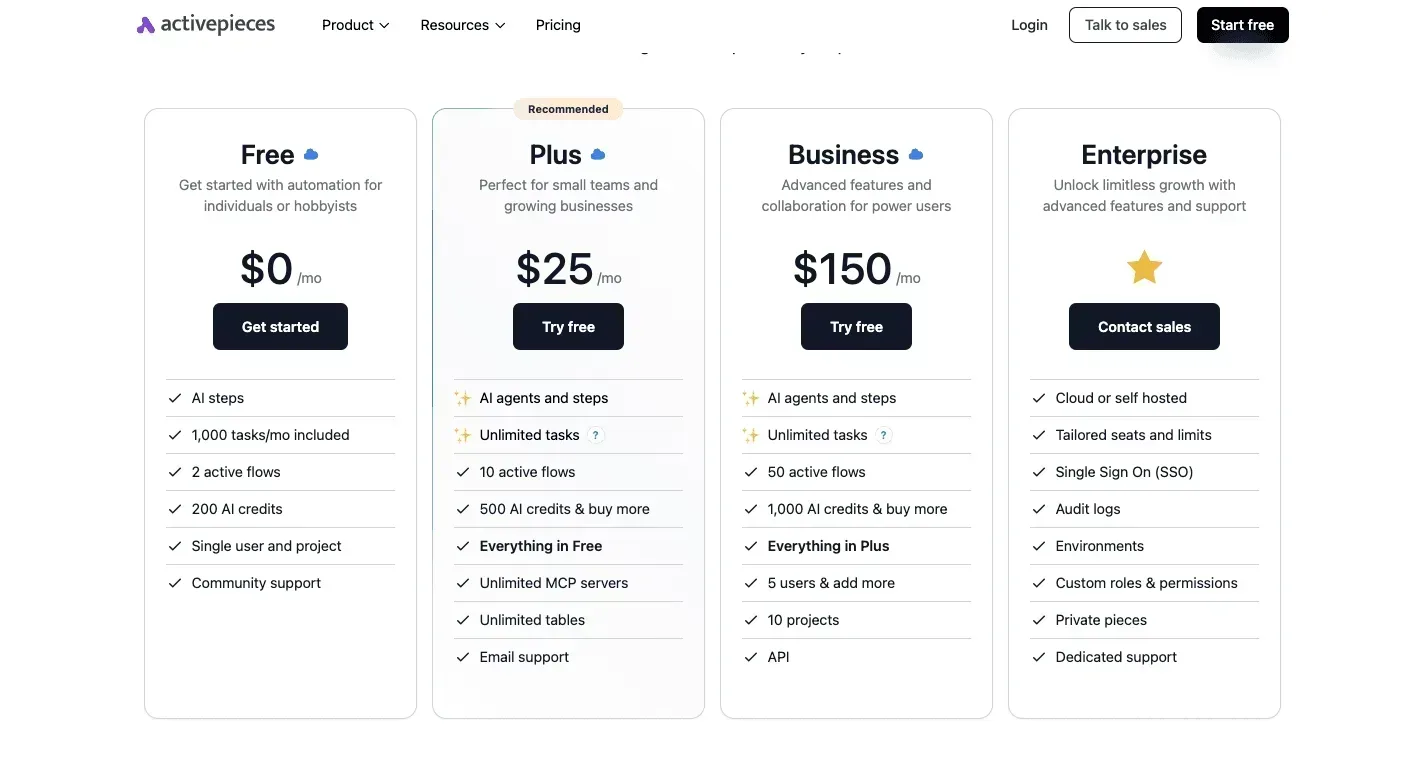
Shown below, the cloud plans are laid out on its pricing page. It lists four tiers: Free at $0 a month, Plus at $25 a month and marked Recommended, Business at $150 a month, and Enterprise on custom pricing with a sales contact.

Before you trust the headline price, read each tier's own list, covering AI steps, active flows, AI credits, users and support, against your own workload, because the allowance that runs out first is different for each person.

Free costs nothing, and the first step up is $25 a month, so you can find out cheaply whether the limit you hit is one you can live with.
Where it falls short of Zoho Workflow
Before you commit, know these four shortfalls.
Where one niche app in your stack has no Activepieces connector, you'll be building the integration through a generic HTTP step or writing it yourself. Zapier connects to far more apps.
For a stack centered on Zoho CRM and Zoho Books, Flow's free plan earns its place. Flow is built by Zoho, so its Zoho connectors are the deepest you'll find, and Activepieces' coverage of Zoho apps is thinner.
Self-hosting is your job: updates, backups, uptime and security fall to you. The software costs nothing, but the hours don't.
Caps apply on the free cloud tier too, set out on the pricing page. It's a trial of the product more than a permanent home for a busy workflow.
If your stack is mostly outside Zoho, those shortfalls are worth weighing against Flow's next plan. If it sits inside Zoho, stay on Flow.
Frequently asked questions
Is Zoho Flow free forever? The free plan has no stated end date, so it's not a trial that lapses, but "forever" isn't a contractual promise.
Zoho can change the allowance or the apps it covers, so check the plan page before you build anything you can't afford to rebuild. The plan's small task allowance is the limit most people hit first.
Does Zoho Flow have a free trial for paid plans? Zoho has offered time-limited trials of its paid tiers, but the length and terms change, so read the pricing page on the day you sign up.
The free plan is the better test: it doesn't expire, and you'll learn quickly whether your volume fits. Upgrade only when a specific limit blocks you.
Is Zoho Flow free with Zoho One? Flow is part of the Zoho One bundle, so you don't buy it separately.
That doesn't mean unlimited use: the bundle carries its own task allowance, and heavy workflows can still run into it. Look at what your Zoho One subscription grants before assuming your volume is covered.
What happens when I exceed the free task limit?
Your flows stop running until the allowance resets or you move to a paid plan. Anything that triggers in that gap may not be processed, so a missed order notification or lead handoff is on you to catch and re-run by hand.
If a flow is business-critical, treat the limit as a hard stop and set up a manual check for the end of each billing period.
Can I export my Zoho Workflow workflows to another tool?
Not in any way that carries over cleanly. Flows are built from Zoho's own triggers, actions and connections, and other tools don't import that format.
You can reuse the logic as a blueprint, but you rebuild each flow and re-authorize every connected app. If you may leave later, keep a written map of each flow's trigger, conditions and actions now.
Related reading
References
Still comparing
The fastest way to settle it is to build something.
Open source under MIT, so you can self-host the same thing later.
Start free Talk to sales