

Agents: Reusable, Chattable, and Yours to Place
Agents you can keep, talk to, and put where they belong
An agent used to be a bag of settings inside one flow step. Now it is something you name, brief, talk to, and reuse.Build one from a sentence- Describe the job: the Agents page opens with a prompt box. Write “summarise my unread emails every morning” and you get a drafted agent — a name, instructions, and the tools it needs from the apps you have already connected. See Create an agent.
- It only reaches for what you asked for: the draft picks actions that read your data, and adds one that sends, posts or files only when the sentence asks for it.
- Edit with AI: describe a change in the editor — “only reply to paying customers” — and the instructions and tools are rewritten for you. Edits stay a draft until you press Publish, and publishing updates every flow already using the agent on its next run, with nothing to republish.
- Choose the project up front: new agents no longer land wherever you happened to be. The prompt box names the project and lets you change it, because the project decides which connections, flows and files the agent can reach.
- Move one later: with a preview of what it costs first — the apps that have no connection in the new project, the people who lose a share, and the fact that tools which keep working now use the new project’s accounts. See Manage an agent.
- Deleting is honest about consequences: an agent still running inside a published flow cannot be deleted or moved, and the flows are named so you know where to look.
- The Agents page spans every project you can read, with search, sorting and a project filter answered by the server, so a long list stays complete and fast.
AI-Ready Pieces: Tool Search, AI Metadata & Audience
AI-ready pieces: tool search, AI metadata, and audience
The piece catalog is now built for AI agents as much as for humans. An agent connected through the MCP server can find the right action across hundreds of pieces by describing the task — then inspect its schema and run it.Tool search- Search by task, not by name: the new
ap_search_actionsandap_search_triggersMCP tools take a plain-language description (“send a message to a Slack channel”) and return the most relevant actions or triggers, ranked by semantic similarity. See Tool Search. - Honest no-match: results below a relevance threshold are dropped rather than padded, so agents don’t grab a wrong tool when nothing fits.
- Self-host ready: turn it on with
AP_TOOL_SEARCH_ENABLED; semantic ranking uses an OpenAI key, with a keyword fallback when none is configured.
- Agent-oriented descriptions: actions and triggers across the catalog carry
aiMetadata— a description written for agents plus an idempotency declaration for safe retries. See AI Metadata. - Audience targeting: actions can target humans, agents, or both — the visual builder shows the human view while agents discover the AI view, so agent-only atomic actions don’t clutter the piece selector.
- Output schemas: pieces can declare a labelled, formatted presentation of their step output, driving the builder’s data selector and output viewer. See Output Schema.
Production Setup: Lightweight Workers, Bundled Pieces & Predictable Scaling
Production setup: lightweight workers, bundled pieces, and predictable scaling
A ground-up overhaul of how Activepieces runs in production. The new shape is sized from a single number, your peak concurrent flows, and every piece of it is cheaper to run and easier to reason about. See the updated Production Setup.Workers- New lightweight worker image: a dedicated, slimmer Docker image for the execution tier.
- One flow per worker: run workers at
AP_WORKER_CONCURRENCY=1so each worker handles a single flow at a time. Recommended size is 0.5 vCPU / 1 GB per worker; about 300 MB is warm-process overhead, leaving ~700 MB for the flow. - No noisy neighbours: every flow gets its own guaranteed CPU and memory slice, so one flow can’t starve or crash another. See Reserved Resources.
- Less to provision: the pre-warm feature and worker persistent disks are no longer required; each worker fills its cache lazily and reaches steady-state on its own.
- Pieces are now bundled: each piece (and its dependencies) is compiled into a single small artifact, KB-scale instead of multi-megabyte module trees. Bundling is applied uniformly, so existing pieces shrink too.
- Faster cold boot: less code to compile and only a trivial amount of ephemeral disk needed per run.
- Served from S3: flow bundles and pieces are served and cached from your in-region object store (npm registry stays as a fallback), cutting install time from seconds to under 100 ms. See S3 Storage.
- Arithmetic scaling: for every 10 workers, add 1 app (a 1:10 app-to-worker ratio).
- Measured: throughput scales near-linearly through 80 workers / 8 apps (484 req/s warm) and keeps climbing to 777 req/s at 160 workers, though the per-worker rate tapers as the database takes more of the load. Full methodology in the Benchmark.
Waitpoints — Durable Pause & Resume for Flow Runs
Waitpoints — durable pause and resume for flow runs
Flows can now pause mid-execution and resume later without losing any state. The execution context is fully persisted so restarts, deployments, or extended wait times do not affect in-progress runs.Two pause types are available out of the box:- Webhook waitpoints — the flow pauses and resumes the moment a specific callback URL is called. The URL is unique to the run, carries the caller’s request body, headers, and query parameters through to the next step, and supports both async and synchronous (respond-when-done) modes.
- Delay waitpoints — the flow pauses until a scheduled timestamp and then resumes automatically, freeing up worker capacity during the wait.
Network Security
Network Security
Activepieces now ships with a built-in network proxy that protects your automations from network attacks.- One switch to turn it on — set
AP_NETWORK_MODE=STRICTand the protection is active. It’s opt-in today, but in an upcoming release it will become opt-out (on by default). - Allow list for trusted internal services — if a flow legitimately needs to reach an internal API or database, add its address (or a whole subnet like
10.10.0.0/24) toAP_SSRF_ALLOW_LIST. - Works with your corporate proxy — if you already use
HTTP_PROXY/HTTPS_PROXY, Activepieces respects them automatically.
Shared Concurrency Pools
Shared concurrency pools
Projects can now share a single concurrency limit through concurrency pools, giving platform operators finer control over how worker capacity is distributed.- Per-project concurrency — set Max Concurrent Jobs directly in Project Settings > General.
- Shared pools — multiple projects can be grouped into the same pool so they draw from one shared limit instead of each having its own.
-
Embedding support — when provisioning users via JWT, include
concurrencyPoolKeyandconcurrencyPoolLimitclaims to create or reuse a pool automatically. See Provision Users.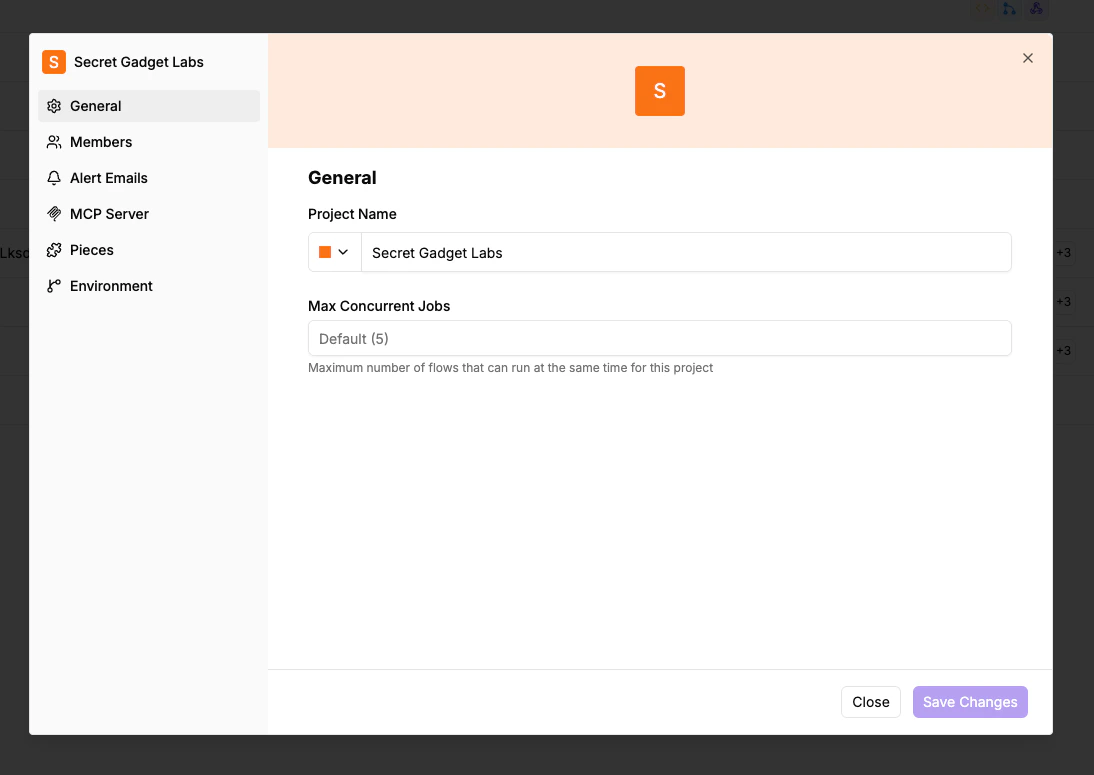
Stability & Reliability Improvements
Stability & reliability improvements
Major investments in worker architecture, testing, and resilience to ensure more reliable flow execution.Worker Architecture- Complete worker rewrite (worker v2) focused on stability and reliability
- New sandbox process model with improved error handling and resource cleanup
- Queue dispatcher (12 tests) — tests orphaned job handling when a job is dequeued but all waiters have timed out, prevents double-loop spawn during close with in-flight dequeue, verifies single dequeue concurrency control, tests waiter timeout and retry behavior
- Subflow resume (8 tests) — tests the race condition where the engine writes pause metadata to Redis before it’s persisted to DB, verifies Redis fallback when DB is stale, simulates concurrent reads/writes with spy mocks, covers sync endpoint with concurrent Redis updates
- Rate limiter (5+ tests) — tests concurrent job slot allocation, idempotency with concurrent dispatch, per-project isolation so different projects don’t interfere
- Concurrent flow execution — end-to-end test creating 5 concurrent flow runs verifying none get stuck or deadlocked
- Memory lock — verifies mutual exclusion (two concurrent lock acquire calls on same key are serialized)
- Worker polling — tests job execution lifecycle, resilience to invalid job data, null polls, unrecognized job types, mixed valid/invalid sequences
- Sandbox execution — tests sandbox creation, startup, RPC communication, stdout/stderr accumulation, resource cleanup on timeout or memory issues, process cleanup and listener removal
- Process forking — tests execArgv configuration (memory limits, node options), environment variable propagation
- Cache logic — tests cache hit/miss, disk persistence, memory caching, cache invalidation predicates
- Configuration — tests config loading for different container types (WORKER_AND_APP vs WORKER)
- Smoke tests in GitHub Actions — validates health checks and webhook flow execution on AMD64 and ARM64
- Benchmark tests in GitHub Actions — load testing across 6 app/worker configurations measuring throughput, mean latency, P50, P99 (see results)
- Worker gracefully handles invalid job data, null polls, and unrecognized job types
- Sandbox properly cleans up processes, listeners, and resources on timeout or memory issues
- Race condition fixes for subflow resume and user interaction jobs
Platform Admin
Platform Admin — full UI redesign
A comprehensive visual refresh across all Platform Admin and Project pages with a cleaner, more consistent interface.Platform Admin- Projects — filter chips, inline edit icons, and cleaner sidebar without branding
- Users — new Role and Last Active columns, dedicated Invite button, and per-row action menus
- Project Roles — switched from table to card-based layout with permission viewing
- Audit Logs — fully enabled with Action, Performed By, Project, and Date Range filters, plus detail slide-over panels with a full JSON payload viewer
- Secret Managers — card-based layout with Hashicorp Vault, AWS Secrets Manager, Cyberark Conjur, and 1Password
- Branding — refreshed page layout
- Automations — renamed from “Flows”, with Type and Owner filters, search, step icon details, status toggles, and favorites
- Connections — Pieces and Owner filters, flow usage count, inline edit and refresh actions
- Runs — updated tab navigation and consistent styling
- Unified tab navigation across Automations, Runs, and Connections
- Platform Admin link added to the bottom of the project sidebar
- Slide-over panels for detail views instead of full-page navigation
- Previous / Next pagination style throughout
- Sidebar header replaced with a “Back to app” link
Staging Environment & Release Process
Dedicated staging environment & improved release process
All changes now go through a dedicated staging environment before reaching production. Every update is validated internally for a minimum of 16 hours before being promoted, ensuring higher reliability and fewer disruptions for our users.- Staging-first deployment — every change is tested in a production-like environment before going live
- Daily production promotions — only validated, stable builds are promoted to production
- Weekly self-hosted releases — predictable, stable releases published every week for self-hosted customers
- Emergency hotfix path — critical fixes can still be fast-tracked to production when needed