AI Agent for Brand Mentions and Replies: 2026 Guide

Nov 22, 202615 min read
AI agents for brand mentions and replies
Pick by who posts the reply. Choose a dedicated social tool if a person approves each answer inside it, and a workflow platform such as Activepieces if replies must pass your own approval and logging rules. Autonomous posting is the option to justify.

Whatever the tool, the agent does four jobs:
- It fires on a brand mention
- It drafts a reply from the thread and your tone rules
- It hands the draft to a named approver
- It records who approved what and when
Drop the approval step and you have a posting bot. Drop the log and you can't explain a reply after a complaint.
Check whose API key the model runs on and where it runs, because that decides who pays and where the thread text goes. A connector count says nothing here. What matters is whether a "new mention" trigger exists for the network you use.

Best brand mention reply tools by team type
There are three options, and each is only right under one condition.
- A dedicated social tool, for teams where a person approves every answer inside the tool itself; right when the approver already lives in the inbox and no outside system needs a record.
- A workflow platform, for teams whose replies must pass your own approval and logging rules; Activepieces is one such platform, with 750 integrations and an MIT-licensed core, and it's right when compliance or legal needs the log in a system you control.
- Autonomous posting, for narrow, low-risk replies such as order-status answers; right only when you can show a wrong reply costs less than the review it removes.
50% of Gen Z said they notice AI sameness in brand content, according to a Markup AI survey, as did 41% of Millennials, 26% of Gen X and 16% of Baby Boomers, so your approval team will need to calibrate authenticity standards differently by demographic.

The case for human review is audience-specific.
So the younger the people mentioning you, the more likely they are to spot a templated reply, and the more an unreviewed agent costs you. The sections below test each platform against the four jobs above.
We checked prices on 22 November 2026, and they come only from each vendor's own pricing page. Where a page doesn't list a price, we say so rather than fill the gap from reviews or memory.
This takes minutes, not a project: automate it in Activepieces free.
Comparison table of brand mention reply tools
We couldn't cite a vendor page for most list prices, so those cells read "not confirmed". The table sorts the eight tools by what they do, not what they cost.
The strength and limit columns show where each one stops, and the best-for column shows which of the two approval models it suits.
| Tool | Price and plan | Strength | Limit | Best for | Checked date |
|---|---|---|---|---|---|
| Brand24 | not confirmed | Mention monitoring and alerts | Built around listening, so reply handling is thin | Teams that find mentions here and answer elsewhere | not confirmed |
| Mention | not confirmed | Mention tracking with alerts | Built around listening, so approval rules aren't its focus | Small teams watching for brand names | not confirmed |
| Sprout Social | not confirmed | Shared inbox with publishing and approval inside one tool | Your approval rules must fit its workflow, not the reverse | A human approves each answer inside the tool | not confirmed |
| Hootsuite | not confirmed | Scheduling and inbox across several networks | Custom logging beyond its own reports needs outside help | Teams that already publish from it | not confirmed |
| Brandwatch | not confirmed | Deep listening and analysis at scale | Analysis-heavy, which is more than a reply queue needs | Large teams that need research before replying | not confirmed |
| Zapier | not confirmed | Very wide app catalogue, no code | A long list of apps doesn't mean the specific trigger and action you need exists | Simple flows with one approval step | not confirmed |
| Make | not confirmed | Visual builder with branching and field mapping | Takes more setup than a linear flow | Replies that route by sentiment or channel | not confirmed |
| n8n | not confirmed | Can be self-hosted, which keeps logs and keys on your side | You run and maintain it | Replies that must pass your own approval and logging rules | not confirmed |
| Activepieces | Free: $0 with 1,000 credits a month and up to 5 users; Plus: $20 a month; Team: $200 a month | Open source MIT-licensed core with 750 integrations, self-hostable, unlimited flows on every plan | Enterprise directories (packages/ee/) are under a separate commercial licence, and credits cap runs on each plan |
Teams that want an open source, self-hostable builder with unlimited flows | 2026-10-23 |
Prices and plan limits checked against docs.claude.com and claude.com and openai.com and gemini.google on November 22, 2026.
Read the table in two halves: the first five rows suit a team that wants a human to approve each answer inside one product. The last three suit a team that must wire in its own approval and audit steps.
Neither half supports autonomous posting by default.
Dedicated listening and engagement tools, one by one
By default, dedicated tools keep a person between a drafted reply and the live post. What separates them is price and how much of the workflow you pay for around that click. The figures below come from Brand24's pricing comparison.
Cheapest because they do the least: monitoring tools find mentions and hand them to a person. They alert you, and you write and send the answer.
For each one, check whether the product can publish a reply at all, and whether a click is required. If it can't publish, it can't post autonomously either.
Social management suites for brand mention replies
Land on the wrong plan and you pay four times as much for the same brand. Hootsuite runs $99 to $399 per month, so the plan you land on matters more than the brand name.
According to Brand24, Sprout Social runs $199 to $399 per month. Its entry price is twice Hootsuite's, so you're paying extra for the same ceiling. Choose between them on the approval and inbox features each plan includes, not on the top-line price.

Enterprise listening platforms
$800 to $5,000 per month is what Brandwatch runs, so cost directly determines whether teams can adopt it. Its cheapest plan costs more than twice Hootsuite's most expensive one, and its top plan is roughly twelve times that ceiling.
That money buys listening scale across large volumes of mentions, not a safer reply step.
If a small team needs one approved answer per mention, it is paying for capacity it won't use.
Building a custom brand reply agent yourself
Nothing the agent can do exists until you add it. The configuration screen below belongs to the other route: an agent builder with an instructions box, an "Add tool" menu with "From integration" and "From flow", and a "No Tools Added Yet" notice.
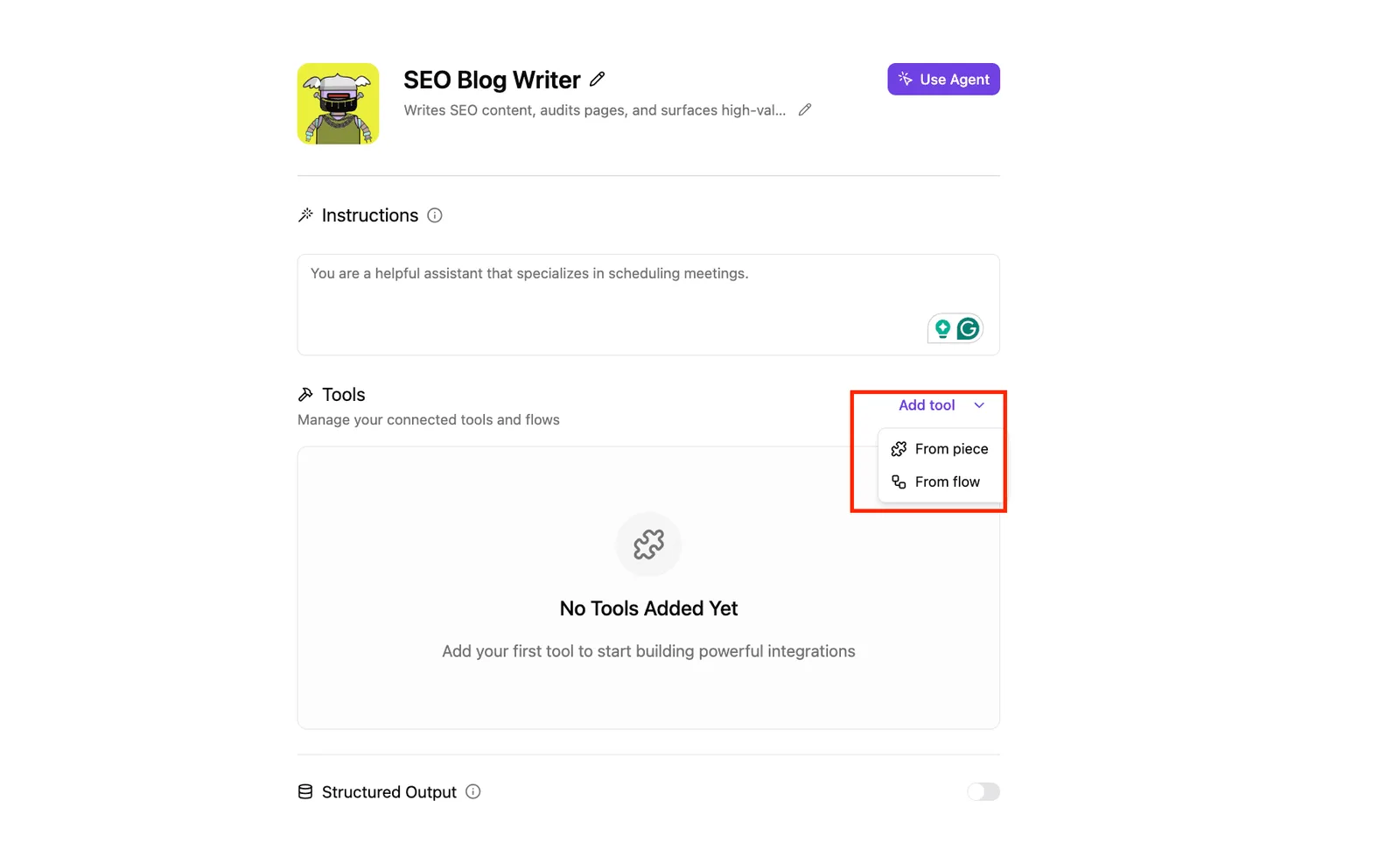
Buy a dedicated tool and its reply behavior arrives already decided; this screen leaves every decision, including approval, to you.
You can follow the rest of this with the builder open. Start free, no card.
Workflow platforms that build a custom reply agent
Start with a mention, draw up a reply with a model, approve with a person, log what went out: Zapier, Make and n8n can each run that chain.
The differences that decide whether it holds sit in five details, and a connector count tells you none of them. Check the same five on each:
- Whether a mention trigger exists for your network, or whether you must poll a search or feed and accept the delay
- Whose AI API key makes the model call, because that decides who pays and where the prompt text travels
- Whether the approval step pauses the run until a person answers, or only sends a notification and carries on
- Whether you can self-host it, which decides where reply text and logs are stored
- The task or execution limit on the vendor's pricing page, because every drafted reply and every rejected one counts against it
Read each answer from the vendor's own pages, then compare.
The platforms one at a time
When you want the steps visible, a Zap suits a reply flow, because it is a fixed trigger-and-action chain. Zapier's agents give the model more latitude over which tools it uses.

Pick the Zap if approval is the point; the agent is the autonomy you would have to justify.
If a negative mention should go to a different approver than a question does, Make helps, because it draws the flow as a scenario you can branch and route.
Confirm that the pause-for-approval step is a real hold on the run, not a branch you assemble yourself.
Of the three, n8n can be self-hosted, so reply drafts and logs can stay on your own server. The cost is that you maintain it, and your team needs someone comfortable doing so.
Check which AI key the workflow calls and whether you supply it.
If you reach for a code framework such as LangChain or CrewAI, you are using a library, not a platform. You write the mention listener, the approval gate and the audit log yourself, and you host the result.
Choose them only if you have engineers and a rule no workflow tool can express.
Where Activepieces fits for mention and reply workflows
A reply agent is not code to be run; it is a user posting under your brand, and a library gives it no tenant, no role and no audit log.
Activepieces treats it that way: admins control which apps a team may connect, credentials are held centrally, and the agent gets least privilege of its own, with custom RBAC, SSO and SCIM provisioning around it.
A reply agent is not code to be run; it is a user posting under your brand, and a library gives it no tenant, no role and no audit log.
In the run detail view each tool call is listed separately with its own input and output, so a bad reply traces back to the exact drafting call instead of one opaque result. Moneypenny and MoneyGram run it in production.
That follows from the last point. If your rule fits a workflow builder, you don't need engineers to enforce it.
What it can do for this job
Start with the trigger the screenshot below shows, the one that matters here: "Catch Webhook." Your social listening tool sends each mention to that URL. The next step can draft a reply with an AI model, using whatever key you supply.
Before anything posts, a flow can then pause for a person to approve, and the run history records what went in and what came out.
In the screenshot, the Version History panel shows two saved versions of one flow. Each has a timestamp and a status dot, with a "Push to Git" option in the menu beside it.
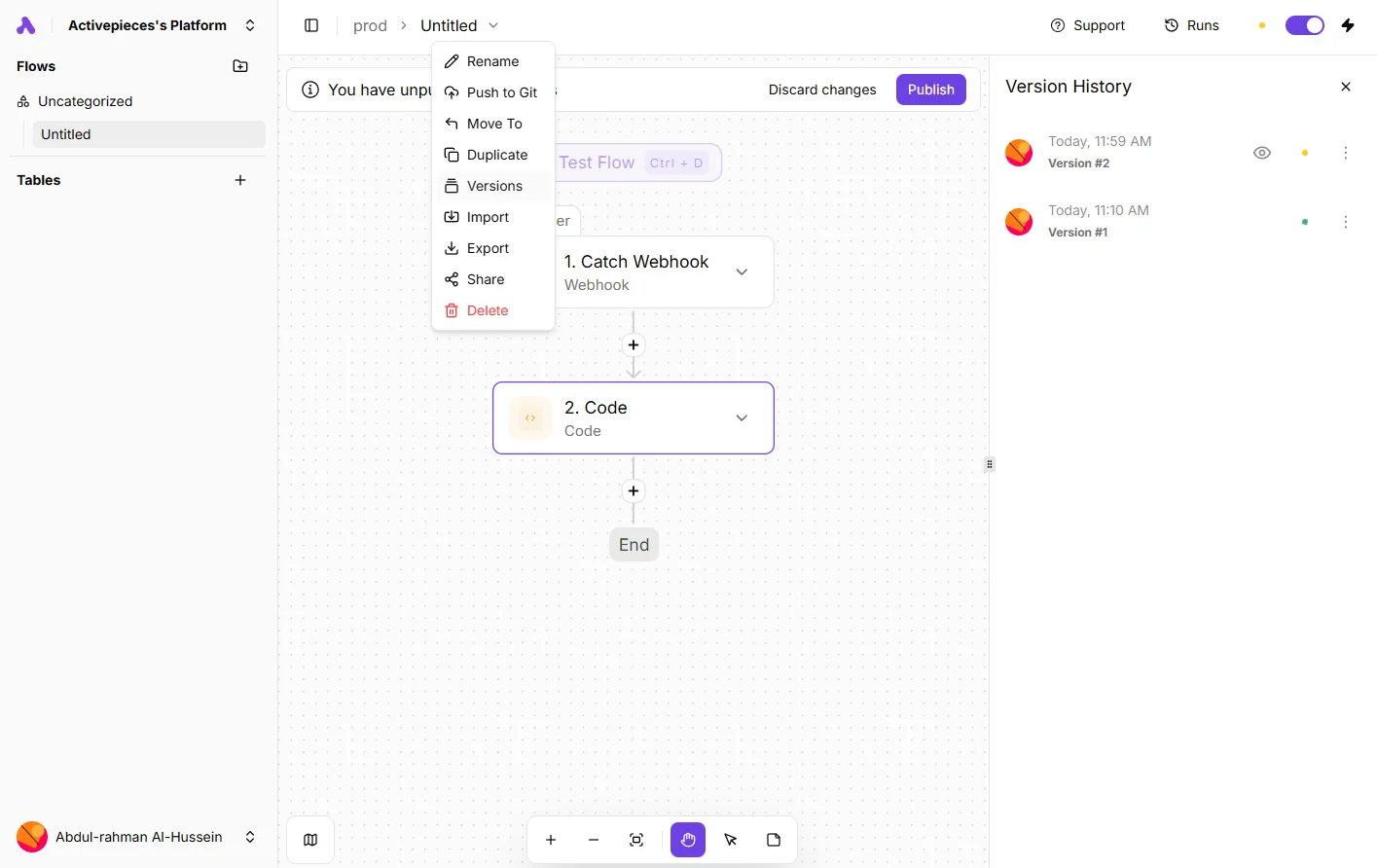
For a reply workflow, that means you can see which version of the drafting logic was live when a given answer went out, and roll back if a prompt change produced worse replies.
What it does not do
It doesn't find mentions. Without a listening tool feeding the webhook, the flow never starts.
It also has no inbox, no sentiment view and no thread context of its own, so a reviewer sees what you map into the approval step and nothing more. Map too little and they approve blind.

I couldn't confirm from its own pages whether every social network you care about has a ready-made posting step. Check the specific network and action before you commit. A long catalogue count tells you little; the one action your reply needs is what decides it.
Cost and hosting from its pricing page
If self-hosting matters, Activepieces has an MIT-licensed core that you can run on your own servers as the free Community Edition, and its free cloud plan includes unlimited flows with 1,000 credits a month. n8n is the It also has self-hosting.
Read the current pricing page for task caps, and for whether approval steps and Git versioning sit on the plan you would use.

For this job, the ranking splits in two: Activepieces and n8n suit teams that want self-hosting, and Activepieces allows unlimited flows on every plan, free included. Zapier and Make suit teams that would rather not run anything themselves.
Setting up a safe mention-reply agent on Monday
Set it up in five steps, in this order, and let nothing post without a person reading it first. The same sequence applies whether you land on a dedicated social tool or a hosted workflow platform.
- Choose the tool type. If a human will approve each answer inside the social tool itself, use a dedicated one. If replies must pass your own approval and logging rules, build on a workflow platform such as Zapier or Make. Decide this first, because the trigger (a new mention) and the approval step live in different places in each.
- Set the agent to draft-only. The final action should be "create draft" or "send for approval", never "publish". Open the finished workflow and confirm no step is mapped to a publish field, since a test run with a live account connected will post for real.
Guardrails, logging and approval for reply agents
- List the topics it never answers: complaints, legal questions and health questions. Add a filter ahead of the drafting step so a match skips the model entirely and assigns the mention to a named person. A prompt that says "don't answer these" is a request. A filter is a rule.
- Set up the reply log before the first draft. Give each mention one row holding the mention link, the original text, the draft, the edited version, the approver and the time it was posted. Without the edited version you can't see how often people rewrite the agent's work, and that's the number that tells you whether it's any good.
- Review the first 50 drafts before any auto-posting. That's enough real mentions to expose the pattern of misses, such as a tone that reads wrong or a topic your filter missed, rather than one-off slips. If you still want autonomy afterward, grant it to one narrow category of mention and leave everything else in the queue.
Frequently asked questions
Can an AI agent reply to brand mentions without human approval?
Yes, technically. Every platform in the comparison can be wired to post straight from a model's output. The better question is whether it should, and the answer is no until a human-approved version has run long enough to show how often reviewers change the draft.
If reviewers edit or reject drafts often, the agent hasn't earned unattended posting.
If they approve nearly everything for a sustained stretch, you can consider autonomy for a narrow class of mentions, such as thank-you replies to positive posts, while keeping complaints, pricing questions and anything legal or medical behind approval.
Do AI reply tools work on X, Instagram, Reddit and LinkedIn?
Check coverage first, before you commit, because it varies by tool and by network.
Dedicated social tools generally cover the big networks natively, but what you can do differs: reading a mention isn't the same as being allowed to reply to it through the network's API.
With workflow platforms, it depends on whether the app has a trigger for the mention and an action for the reply. A catalogue listing an app often means only a post action exists.
Look for the specific trigger and the specific reply action on each network. Where either is missing, you are building around an HTTP call, and that's more upkeep.
Is it cheaper to build a reply agent than to buy one?
Not reliably. On subscription cost alone, a workflow build can come out lower. But you also pay in setup time, in the approval and logging steps you have to design yourself, and in repairs when a network changes its API.
A dedicated social tool bundles the inbox, approval and history, so the cost is mostly the seat price.
When your approval rules, logging or routing can't be expressed in a social tool, building makes sense. If they can, buying is usually the cheaper path once labor is counted.
Who is responsible when an AI reply says something wrong?
You are. The brand's account posted it, so the brand answers for it, and neither the model vendor nor the automation platform takes that on.
That's why the audit trail matters: you need a record of the mention, the draft, who approved it and when. Without that record, you can't show what happened or correct the process afterward.
Check your own contracts and any rules for regulated claims, because those obligations stay with you whatever tool does the drafting.
Related reading
Build it
Set this up in minutes.
No code required. Connect your accounts, and Activepieces runs it from there.
Start free Talk to sales