




Why your AI agents need human approval gates
Activepieces
Jul 11, 20269 min read

AI agents fail spectacularly when they act without human oversight.
The solution isn't better prompts or smarter models, it's a simple approval gate that pauses execution until a human says "yes, proceed."
Here's how to build that safety net into any automated workflow:

• Set the pause point before irreversible actions Every workflow has a moment where it crosses from "gathering information" to "changing the world." Email sends, database updates, API calls that trigger billing, these need human eyes before execution.
The key is identifying this boundary early in your design process. I've seen teams place approval gates too late, after the agent has already committed to a course of action that's expensive to reverse. Map out your entire workflow first, then mark every point where the system moves from read-only operations to write operations that affect real systems or real people.
Consider a customer service agent that processes refund requests. Reading the customer's account history and calculating potential refund amounts? That's information gathering. Actually issuing the refund to their payment method? That's the irreversible action that needs approval.
The most effective teams I work with treat this boundary as sacred. They'll automate everything up to that line: data collection, analysis, even draft generation, but they never cross it without explicit human permission.
• Design the approval interface for speed, not perfection AI agent approval interfaces should prioritize speed over complexity. A simple approve/reject button with context beats a complex form, showing the agent's proposed action, supporting data, and clear outcome preview.
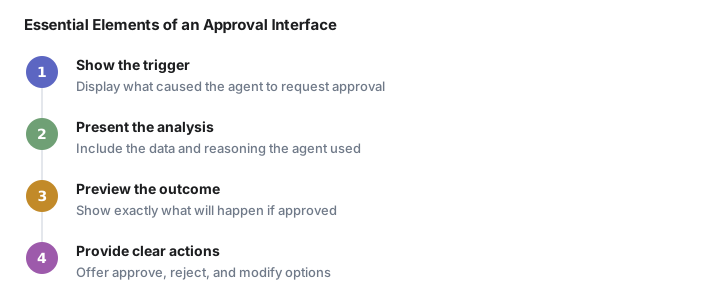
The approval screen should answer three questions instantly: What is the agent trying to do? What data is it basing this decision on? What exactly will happen if I click approve?
I've watched approvers struggle with interfaces that bury critical information in tabs or require scrolling to see the full context. The best approval screens put everything on one page: the original trigger, the agent's analysis, the proposed action, and a preview of the outcome.
Think of it like a surgical checklist. Surgeons don't want elaborate forms before making an incision, they want the essential information presented clearly so they can make a fast, informed decision.
Some teams add a third option beyond approve/reject: "approve with modifications." This lets humans tweak the agent's proposal without starting over. A manager might approve an invoice payment but change the amount, or approve an email but edit the subject line.
• Build timeout handling from day one AI agent timeout handling determines what happens when no human responds to approval requests. The safest default is do nothing and alert, though some teams set 24-hour timeouts that escalate to managers.
Timeout handling reveals your organization's true priorities. A marketing team might be comfortable with 48-hour delays on social media posts, while a customer service team needs approvals within two hours to maintain response time commitments.
The escalation path matters as much as the timeout duration. I've seen systems that escalate to managers who don't understand the context, creating approval bottlenecks that defeat the purpose of automation. Better to route timeouts to backup approvers who know the domain.

Some teams implement "soft" and "hard" timeouts. A soft timeout at 4 hours sends a reminder notification. A hard timeout at 24 hours either auto-rejects the request or escalates to a different approval tier. This gives humans multiple chances to respond while maintaining system momentum.
Consider time zones and business hours in your timeout logic. An approval request submitted at 6 PM on Friday shouldn't timeout at 6 PM on Saturday. Build in awareness of when your approvers are actually available to respond.
• Create approval batches for repetitive tasks AI agent approval batching handles high-volume repetitive tasks by grouping similar requests into single review sessions. If your agent processes 50 similar requests daily, batch them into a single approval screen where one human can review efficiently.
Batching transforms approval from an interruption into a focused review session. Instead of getting pinged 50 times throughout the day, approvers can set aside 15 minutes to review all pending requests at once.
The batch interface should support bulk actions while maintaining individual review capability. Show a summary view where approvers can quickly scan for outliers, then drill down into specific items that need closer inspection. A payment batch might highlight any invoice over $1,000 or from a new vendor, while auto-flagging the routine office supply purchases for bulk approval.
Smart batching groups similar requests together. Don't mix invoice approvals with content reviews in the same batch, they require different types of attention and decision-making criteria.
Some teams implement approval quotas within batches. An approver might have authority to approve up to $10,000 in total payments per batch, with larger amounts requiring additional sign-off. This maintains spending controls while enabling efficient batch processing.
• Log every approval decision with context AI agent approval logging should track who approved what, when, and with what information visible. When something goes wrong weeks later, you need to reconstruct the human's decision-making context, not just the timestamp.
The approval log should capture not just the decision, but the state of the system when the decision was made. What data did the approver see? What options were available? Were there any system alerts or warnings displayed?
This context becomes crucial during post-incident reviews. If an approved payment turns out to be fraudulent, you need to understand whether the approver had access to the fraud indicators, or whether the detection system failed to surface the warning signs.
Include the approval reasoning when possible. Some teams add an optional comment field where approvers can note their decision rationale. "Approved, vendor is on our preferred list" or "Rejected, amount exceeds customer's account balance" helps future reviewers understand the decision logic.
Version control matters for approval logs. If the underlying data changes after approval but before execution, that's a significant event that should be logged separately. The payment amount that was approved might differ from the amount that was actually processed due to currency fluctuations or system updates.
• Train your approvers on edge cases AI agent approver training should focus on edge case recognition beyond the happy path. The human in the loop needs to know what to look for: unusual amounts, unexpected recipients, data that doesn't match patterns.
Most approval training focuses on the happy path, but edge cases are where human judgment becomes essential. Create scenarios based on real incidents: What does a social engineering attempt look like in your approval queue? How do you spot a compromised vendor account?
The training should be specific to your domain and your agent's capabilities. A content approval workflow needs different red flags than a financial approval workflow. Content approvers watch for brand voice inconsistencies and factual errors, while financial approvers focus on spending patterns and vendor legitimacy.

Regular calibration sessions help maintain approval quality. Bring approvers together monthly to review borderline cases and discuss decision criteria. This builds shared understanding of when to approve, when to reject, and when to escalate for additional review.
Document the edge case patterns you discover. If three different approvers reject requests from the same suspicious vendor, that pattern should become part of the training materials for future approvers.
• Test the approval flow under pressure AI agent approval flow testing should simulate pressure scenarios where approvals pile up during vacation weeks or system outages. Your safety net becomes a bottleneck if it can't handle volume spikes or staffing gaps.
Load testing for approval systems isn't just about technical capacity, it's about human capacity under stress. How do approval times change when the queue has 200 items instead of 20? Do approvers start rubber-stamping requests to clear the backlog?
Simulate realistic pressure scenarios: Black Friday traffic spikes, end-of-quarter payment rushes, or key approvers being unavailable during critical periods. These tests reveal whether your backup procedures actually work and whether your timeout settings are realistic under load.
Cross-training becomes essential during pressure testing. If your primary invoice approver is unavailable, can someone else step in without creating security risks or approval delays? The backup approver needs both system access and domain knowledge to make good decisions quickly.
Consider implementing approval prioritization during high-volume periods. Critical payments and customer-facing actions get priority review, while routine administrative tasks can wait for normal processing times.
The best AI workflows feel fully automated to end users while maintaining human control over every consequential decision, that's the balance worth building toward.
Frequently asked questions
Why do AI agents need human approval gates?
AI agents fail spectacularly when they act without human oversight. Approval gates pause execution before irreversible actions like email sends, database updates, or API calls that trigger billing, ensuring human eyes review every consequential decision.
Where should you place approval gates in AI workflows?
Place approval gates at the boundary between information gathering and world-changing actions. Automate data collection and analysis, but require human permission before any write operations that affect real systems or people.
How long should AI agent approval timeouts be?
Timeout duration depends on your organization's priorities. Marketing teams might accept 48-hour delays, while customer service needs 2-hour approvals. Most teams use 24-hour timeouts with escalation to backup approvers.
What should AI approval interfaces show?
Approval screens should answer three questions instantly: what is the agent trying to do, what data supports this decision, and what exactly will happen if approved. Put all context on one page for fast decisions.
How do you handle high-volume AI agent approvals?
Use approval batching to group similar requests into single review sessions. Instead of 50 individual interruptions, approvers can review all pending requests in one focused 15-minute session with bulk actions and outlier highlighting.
Automate your work without writing code
Create an Activepieces account in seconds.
Written by
Activepieces
