
Aircall Pricing 2026: Plans, Add-Ons and Total Cost

Nov 23, 202614 min read
Aircall charges per user per month, with 25% off for annual billing, a three-seat minimum on Essentials and Professional, and 25 seats on Enterprise, so you can't start as a solo user. The list price is only the first line of the invoice.
Aircall Pricing in 2026: Every Plan Compared
What Aircall is and how it charges
Start the math with the seat, because Aircall is a cloud phone system billed per user and everyone who takes or makes calls needs a paid one.
If your team is two people, the three-seat minimum still bills you for three, so the effective per-person price is higher than the headline. Paying annually earns the 25% discount, per Aircall, but it also commits you for the year.

The plan table, verified 23 November 2026
Read the seat minimum and the last column first, because they decide your real cost before the per-seat price does. The table below shows every plan on Aircall's pricing page as of that date.
| Plan | Price per seat/month (annual billing) | Inclusions | Seat minimum | Usage limits and extras |
|---|---|---|---|---|
| Essentials | Listed per seat, 25% off when billed annually | Entry tier of the per-user phone system | 3 | Caps and add-ons sit outside the seat price |
| Professional | Listed per seat, 25% off when billed annually | Step up from Essentials for larger call workflows | 3 | Caps and add-ons sit outside the seat price |
| Enterprise (Custom) | Quoted by sales | Custom-scoped package | 25 | Terms set in the contract |
| AI Voice Agents | From $99 per month minimum | Automated voice agents, 38 languages with custom voices | Not seat-based | Billed on a monthly minimum, not per user |
Prices and plan limits checked against aircall.io on November 23, 2026.
With a 25-seat floor on Enterprise, that tier only makes sense for teams already near that size. The AI Voice Agents line stands apart: its $99 minimum is a base charge, and your call volume decides what sits on top of it.
Aircall Enterprise pricing is custom-quoted, not listed
You can't model Enterprise beforehand, because it has no public price. You learn the number only by talking to sales.
You can't model Enterprise beforehand, because it has no public price.
Before the call, write down your seat count, monthly call volume and the integrations you need.
If call data leaves Aircall through automation, Activepieces bills one credit per run whether the flow has two steps or ten, unlike Zapier's per-task and Make's per-module pricing, so splitting the work into smaller stages never raises that line of your budget.
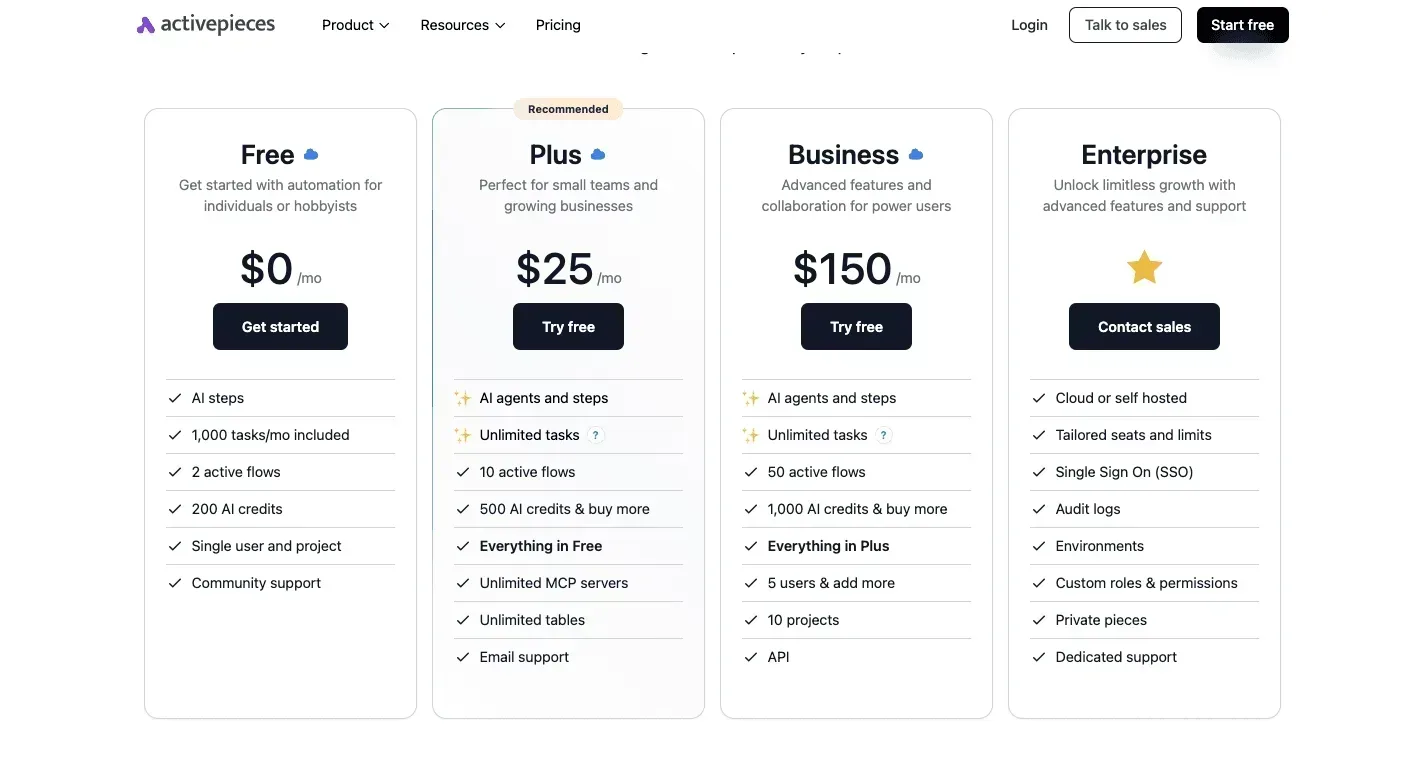
If you are running this arithmetic for your own team, see what the same workload costs on Activepieces.
Aircall pricing at realistic team sizes
$50 per month for a Professional seat, per Modern Leads, is only the starting line, so your actual monthly spend climbs well beyond this price. Once you know what you're asking Aircall to include, the bill follows from it.
Monthly cost for 5, 20 and 50 agents
Multiply that seat price across three team sizes, as the table below does, and then add Analytics+ at $15 per seat or AI Assist Pro at $49 per seat, which means upgrading to AI Assist Pro costs an extra $34 per team member each month.

According to Prospeo, Analytics+ raises the bill by 30% and AI Assist Pro nearly doubles it.
| Agents | Professional base | With Analytics+ | With AI Assist Pro |
|---|---|---|---|
| 5 | $250 | $325 | $495 |
| 20 | $1,000 | $1,300 | $1,980 |
| 50 | $2,500 | $3,250 | $4,950 |
At 50 agents, Aircall's data shows, AI Assist Pro alone adds $2,450 a month, which is $29,400 a year before anyone has made a call. Price the add-on against the work it removes, not against the seat.
At $15, Analytics+ looks cheap, but it's charged per seat, so your monthly bill increases by $15 for each new team member.
If only two supervisors read the reports, ask whether it can be limited to them or must cover the whole team. Get that answer in writing before you budget for 50.
Aircall calling, number and usage limits
Where pricing is usage-based, the math bends:
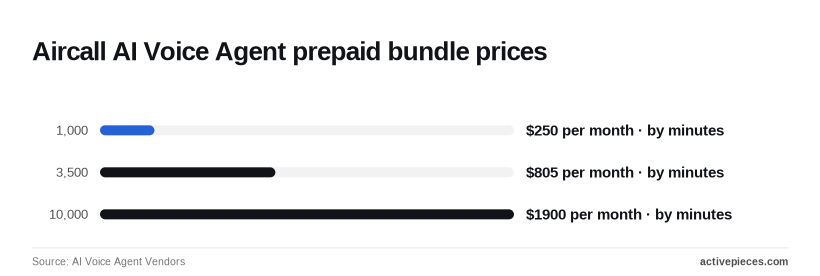
- According to AI Voice Agent Vendors, Aircall's AI Voice Agent bundles cost $250 a month for 1,000 minutes, $805 for 3,500 and $1,900 for 10,000.
- That works out to 25 cents a minute at the smallest bundle, 23 cents at the middle one and 19 cents at the largest.
- The discount only pays off if you actually use the minutes.
- A team that buys 10,000 but uses 6,000 is paying about 32 cents for each minute it used.
Neither calling charges nor phone numbers appear in the table, because both sit outside the seat price, and seat minimums can set a floor below which a small team can't go.
The Strongest Case That Aircall's Price Is Fair
Where defenders go wrong is in treating the floor as the bill. Aircall's price is fair for a team that needs nothing beyond the base plan.
Each of their five arguments is sound as far as it goes, and each has a boundary you can find before you sign.
- Per-user pricing is published, so you can multiply it by headcount without talking to anyone. That covers the base plan only, and the add-on and usage costs that decide the final invoice are where the arithmetic stops being simple.
- Add-ons are optional, so a team that skips them pays less. That's true only if the feature you skipped isn't one your workflow depends on, such as call analytics or advanced routing, in which case "optional" means "required, billed separately."
- Integrations come bundled, which saves a connector subscription. A bundled link to your customer relationship management system (the database where sales and support records live) isn't the same as the deeper sync some teams need, and that deeper tier can sit behind a higher plan.
- Setup is quick, so the first week costs little. Fast onboarding says nothing about month six, when volume grows and usage limits begin to matter.
- Rivals also charge extras, so Aircall isn't unusual. That's a reason to compare itemized totals instead of headline rates, not a reason to excuse any one vendor's extras.
Notice where every limit lands: at the moment a requirement goes beyond the base plan. Defenders describe a customer who never reaches that moment, and you should find out whether you're that customer before you accept their version of the price.
Worth checking against a plan that does not meter every step: one credit covers a whole run on Activepieces.
Aircall Against Its Closest Alternatives on Price
Against these four rivals, the entry rate doesn't decide the comparison. The structure around that rate does, and the table shows where each vendor puts its constraints, so read the minimum and limits columns before the price column.
| Vendor | Entry price per user/month | Billing model | Base inclusions | Seat minimum | Calling limits |
|---|---|---|---|---|---|
| Aircall | Per-user rate, rising by tier | Per seat, monthly or annual | Core calling, integrations on higher tiers | Yes, on lower tiers | Regional calling scope varies by plan |
| Dialpad | Per-user rate, rising by tier | Per seat, annual discount | Calling, AI features on upper tiers | None on entry tier | Domestic scope on base plans |
| JustCall | Per-user rate, rising by tier | Per seat plus usage | Calling and texting, number fees separate | None on entry tier | Minutes and credits metered |
| RingCentral | Per-user rate, rising by tier | Per seat, bundled tiers | Calling plus messaging and meetings | None on entry tier | Domestic scope, caps on extras |
| OpenPhone | Per-user rate, rising by tier | Per seat | Calling and texting for North America | None | North American scope |
Confirm each cell against the vendor's live page before you budget, because these structures change.
A seat minimum means a two-person team pays for seats it doesn't use.
JustCall is the odd one, since usage charges mean the invoice moves with call volume as well as headcount.
Aircall plan features and limits compared
If a team needs deeper integrations, it is buying the next tier up, because Aircall's base tier leaves out much of what makes it useful.
RingCentral bundles messaging and meetings, which helps if you'd otherwise pay for those separately and is wasted if you wouldn't. OpenPhone keeps scope narrow, so it's cheaper to reason about but weaker for international calling.
For a small team that wants simple pricing and North American calling, OpenPhone fits. A team with heavy outbound volume should model JustCall's metering first. A team that wants a unified suite fits RingCentral.
Aircall suits teams large enough to clear its minimum and to need its integrations.
Automating Aircall Call Data with Activepieces
What automation can and cannot do
Do not expect Activepieces to make Aircall cheaper.
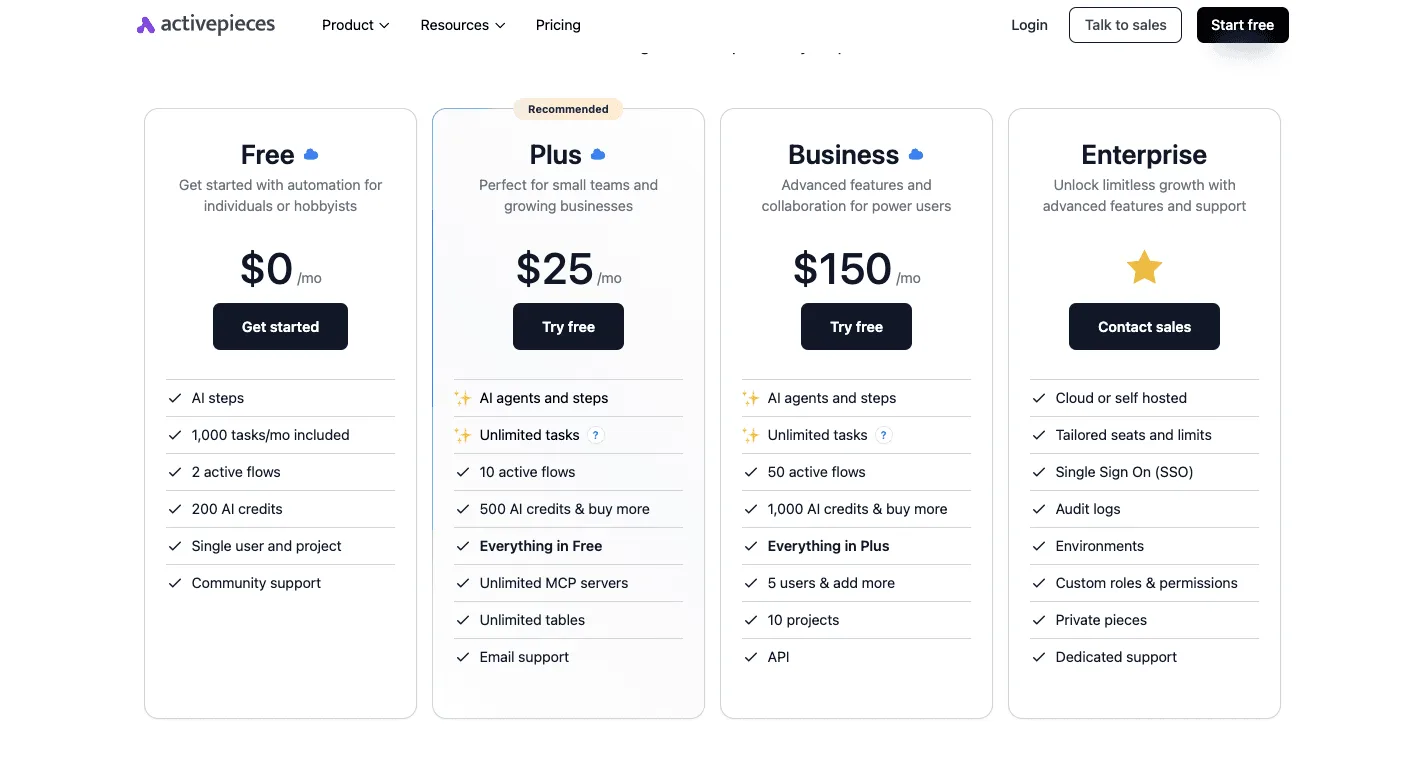
Its free plan costs $0 and covers the after-call chores, such as CRM logging, missed-call alerts and ticket creation, but only on Aircall plans that expose the events or API it needs, so you can't use it unless you already have a compatible plan.
Pricing your own call volume, as above, comes first. This is the question you ask once you have a plan in mind.
To an accountant it is simple. Every call ends with a small piece of admin: someone logs it, someone chases the missed ones, someone opens a ticket. That work costs agent minutes whether or not anyone counts them.
Once a workflow tool turns it into a trigger and a few actions, the same ending happens without a person doing it. It trims labour, not your phone bill, and it never lowers the per-seat or add-on charges you already face.

The plan gate that decides whether the workflow runs
A gate in front asks whether your plan exposes the event or API at all. Flows themselves are unlimited on every Activepieces plan, free included, so the three branches don't need three subscriptions' worth of headroom.
If the gate is open, the run is the meter on Activepieces: one credit per run, not per step, so the three-branch flow costs the same as a lone CRM-logging flow.

Zapier bills per task and Make per module, so on their pricing pages the same flow costs more with every action added, which penalises splitting work into smaller stages; here the free plan's 1,000 credits a month count runs only.
It's easy to miss on a pricing page, but that gate is the limit. Whether webhooks or API access come with your plan is something to confirm in Aircall's own documentation or with your account contact before you build anything.
If a plan withholds them, you may be paying for an upgrade just to make the automation possible. Put that upgrade in the cost comparison alongside seats and add-ons.
Other limits to count before you build
Two more limits are worth stating plainly. Activepieces reacts to events Aircall sends, and it can't recover data Aircall never exposes, however many of its 750 integrations sit downstream of the call.
Each flow run also draws on a credit allowance on the automation side, so a busy line multiplies runs: the free plan's 1,000 credits a month cover 1,000 plain runs, Plus at $20 a month includes 10,000, and anything over costs $0.007 a credit.

Count that against your own call volume before assuming the flow is free.
What follows from this is a short checklist: confirm the event access, count the runs, then price the whole stack.
What to Do Before Signing an Aircall Contract
Price your own team's agents, features, call minutes and countries first, get every extra cost in writing, then test one alternative against the same numbers.
Take from the list below that the quote comes last, not first.
- Count the agents who need a seat, not everyone who might take a call.
- Map the features you require to the plan that includes them.
- Estimate monthly call minutes and the countries you dial or receive in.
- Get add-ons, seat minimums, commitment length and renewal terms in writing.
- Trial one alternative with the same numbers.
Run the same arithmetic at three team sizes: seats times the plan price, plus add-ons, plus usage. Where the total stops growing in a straight line is where a minimum or a plan jump is hiding.
List the features your team can't work without, such as CRM integration, call analytics or power dialing, and ask which plan carries each one.
If a required feature sits one tier up, that tier's price is your real per-seat price. Anything sold separately goes on the bill as its own line.
Estimate minutes by country, since international calling and extra phone numbers are where a clean quote usually drifts. Ask what happens at the limit: a hard stop, an overage rate, or a forced plan change.
Then request the commitment length and renewal terms in writing. A price that can change at renewal is a different price from the one you were quoted.
If a vendor won't give you a number without a call, treat that as a cost too.
Frequently asked questions
Aircall's own pricing and help pages answer most of these. Where they stay vague, ask for the answer in writing, because a number you can't get before signing is a cost you'll meet after.
Is there a permanent free plan?
If you're hoping for a permanent free plan, Aircall has pointed buyers to a trial instead. That means you're evaluating on borrowed time, so test with real call routing and your actual integrations, not a demo account.
Confirm the trial's current terms on the pricing page before you start the clock.
Should I pay monthly or annually?
You will see both billing options on the pricing page, with the annual rate lower per user. The discount is a trade: you give up the ability to shrink the team without paying for seats you no longer use.
If headcount is uncertain, price the monthly rate for a realistic year and compare it with the annual commitment.
What happens outside the countries a plan covers?
Step outside the countries a plan covers and calls are billed on top of the seat price. Your cost therefore depends on where your callers and customers are, not on the plan name.
List your top destination countries and check each against Aircall's coverage and rate information before you compare totals.
Can I add or remove seats?
Because billing is per seat, adding users is generally straightforward. Removing them is where contract terms matter: a minimum seat count or annual term can leave you paying for empty licenses. Ask specifically whether reductions take effect immediately or only at renewal.
Does Aircall pricing include integrations like Salesforce or HubSpot?
Both are customer relationship management (CRM) systems, the databases where your sales and support teams log contacts and calls. Aircall's connectors to them are tied to plan level, so the integration you need may sit in a higher tier than the one you priced.
Separately, the CRM's own licenses are a different bill from Aircall's. Check the integration list against your plan, then add the CRM costs yourself.
Related reading
References
Running the numbers
See what the same workload costs here.
Free forever plan, and every paid plan self-hosts at no extra cost.
See pricing Talk to sales