Airtable Notion Integration: How to Sync Without Code

Nov 22, 202616 min read
An Airtable Notion integration is a trigger in one app that writes a record or page to the other, with no code. Pick one app as the source of truth, build a single flow, and test it with a real record.
Vendor facts below were checked on 22 November 2026.
Build an Airtable Notion integration
What people automate between Notion and Airtable
You will probably build one of three automations, because they cover most of what people actually build. A new Notion page creates an Airtable record, a new Airtable record creates a Notion page, and an edit to a record updates the matching page.
Activepieces, which counts 750 integrations in its open source monorepo, exposes each of these as a trigger plus an action. The third one is where the trouble starts, because it needs a stored ID linking the two items.
Read the table for which app fires, which app receives the write, and which app should own the data in each case.
Take from it that the system of record is always the trigger app in the one-way flows, and that the update flow is the only one where you have to choose deliberately.
| Automation | Trigger app | Action app | System of record |
|---|---|---|---|
| New Notion page to Airtable record | Notion | Airtable | Notion |
| New Airtable record to Notion page | Airtable | Notion | Airtable |
| Updated record to updated page | Airtable | Notion | Airtable |
Prices and plan limits checked against activepieces.com and activepieces.com on November 22, 2026.
Build one flow and test it before adding the next, since each row is one flow.
Choosing which app is the source of truth
Choose the app where people already edit the data, and let the other app display it. If both apps accept edits to the same field, the flow will overwrite one with the other, and you'll find out when a value you typed this morning reverts.
In the table, the update flow points from Airtable to Notion. That's a decision, not a technical limit: a reverse flow is possible, but running both directions on the same fields gives you two writers and no way to say which one wins.
If both apps accept edits to the same field, the flow will overwrite one with the other, and you'll find out when a value you typed this morning reverts.
Keep edits to a field in one app and treat the copy in the other as read-only.
Requirements for an Airtable and Notion sync
You need an account in each app on a plan that allows API access, plus a connector that can authenticate to both. The plans we priced are listed by Airtable Support, per seat per month:
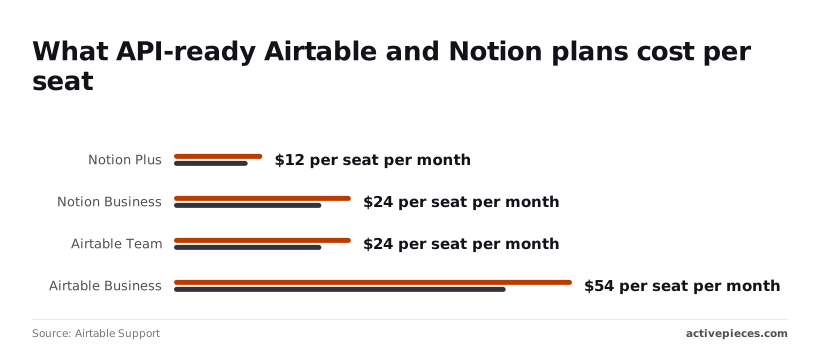
- Notion Plus: $10 to $12, depending on billing term
- Notion Business: $20 to $24
- Airtable Team: $20 to $24
- Airtable Business: $45 to $54
Pair Notion Plus with Airtable Team, the cheapest pairing, and it comes to $30 to $36 per person each month. The Business pairing comes to $65 to $78.
Since only the people who touch the flow need API-ready seats, count them before choosing a tier, because Airtable Business alone costs more than the whole Plus-and-Team pairing.
Last, have one real record ready in your source app. A test with a dummy row hides the failures that matter, such as an empty field or a select option that exists in one app and not the other.
This takes minutes, not a project: automate it in Activepieces free.
Five Notion and Airtable workflows to build in Activepieces
Run each of the five flows that cover the connection with a real record that has a blank field or an unmatched select option.
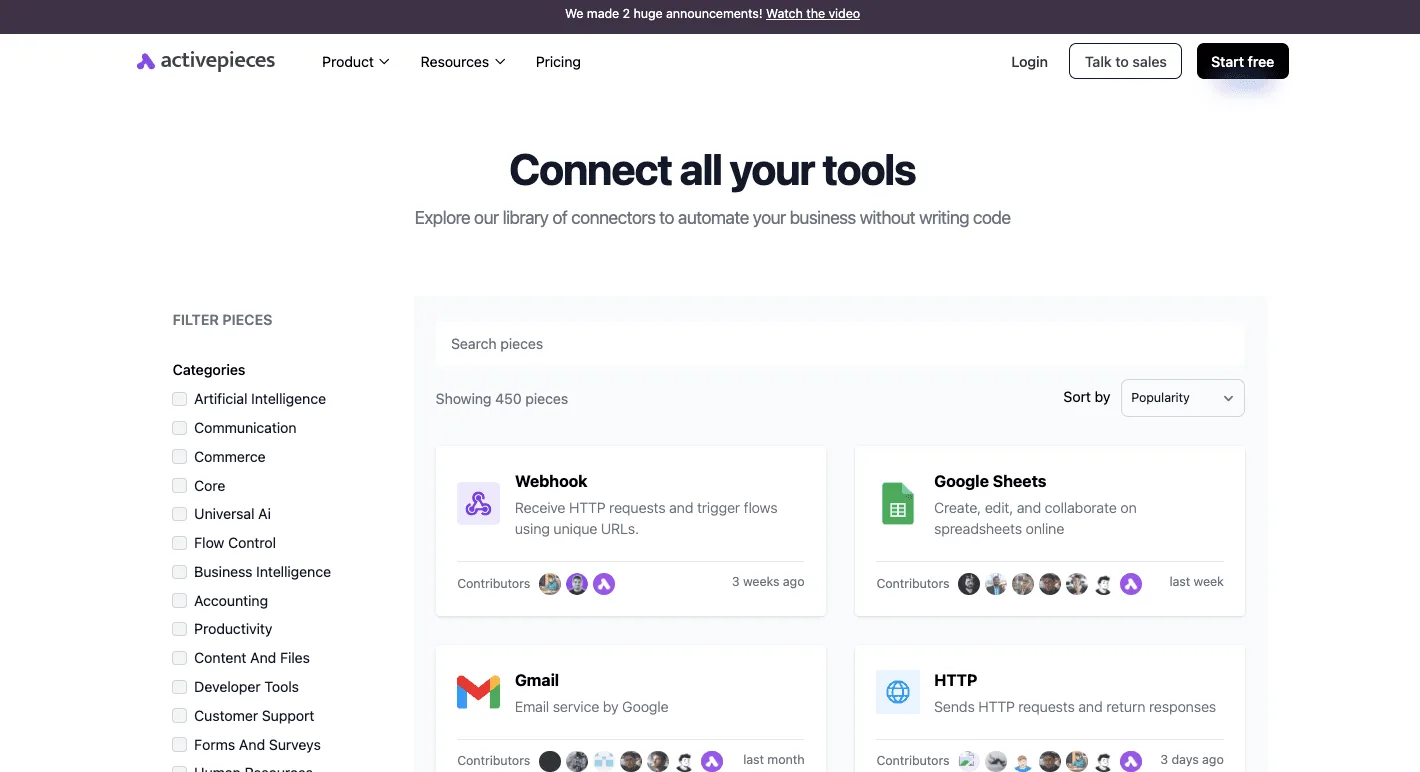
The trigger and action names below are taken from the public integrations for Notion and Airtable in Activepieces, an automation builder with an MIT-licensed core and 750 integrations in a public monorepo.
The table shows which app each flow treats as the source of truth, so you can pick one owner per data set before you build anything.
| Trigger | Action | App that owns the data | Job it does |
|---|---|---|---|
| "New Record" | "Create Database Item" | Airtable | Copies new records into a Notion database as rows |
| "New Database Item" | "Create Airtable Record" | Notion | Moves intake rows from Notion into Airtable |
| "New or Updated Record" | "Find Database Item", then "Update Database Item" | Airtable | Carries edits across to the matching Notion row |
| "Updated Database Item" | "Find Airtable Record", then "Update Airtable Record" | Notion | Carries Notion edits across to the matching record |
| "Updated Page" | "Update Airtable Record" | Notion | Copies a changed page's status into Airtable |
If the owner column isn't respected, a flow doesn't do its job. Build the first two, and a third or fourth only for the direction that doesn't own the data.
Use "New Record" as the trigger and "Create Database Item" as the action when Airtable owns the data. Map each Airtable field to a Notion property by hand.
A select option that Notion doesn't have is where this flow fails, so send a record with that gap before trusting it.
Reverse the pair: "New Database Item" triggers "Create Airtable Record", and Notion owns the data. Test with a row that has an empty property. The Airtable field will receive nothing, so check whether the field is required on the Airtable side.
Keeping updates in sync with a filter
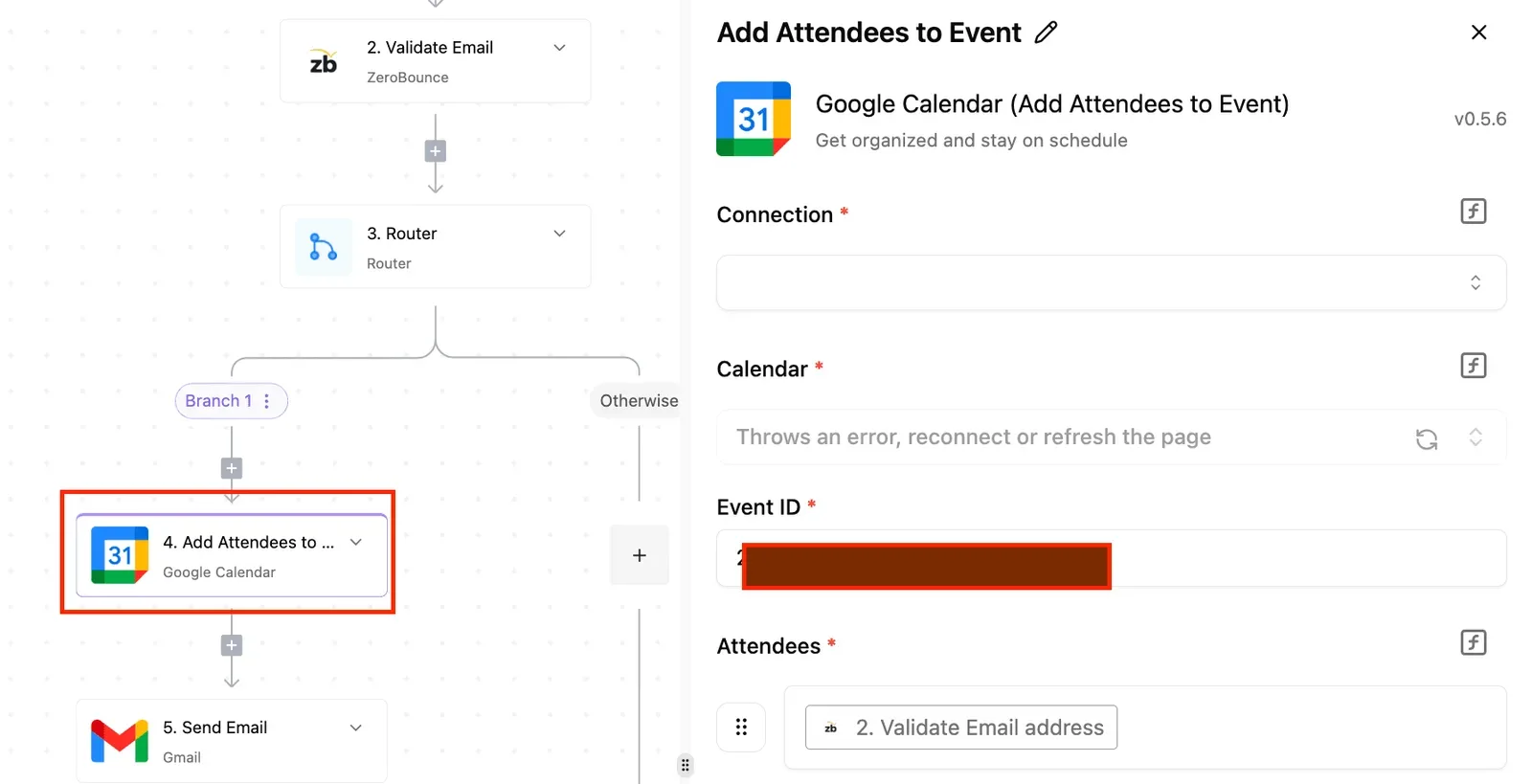
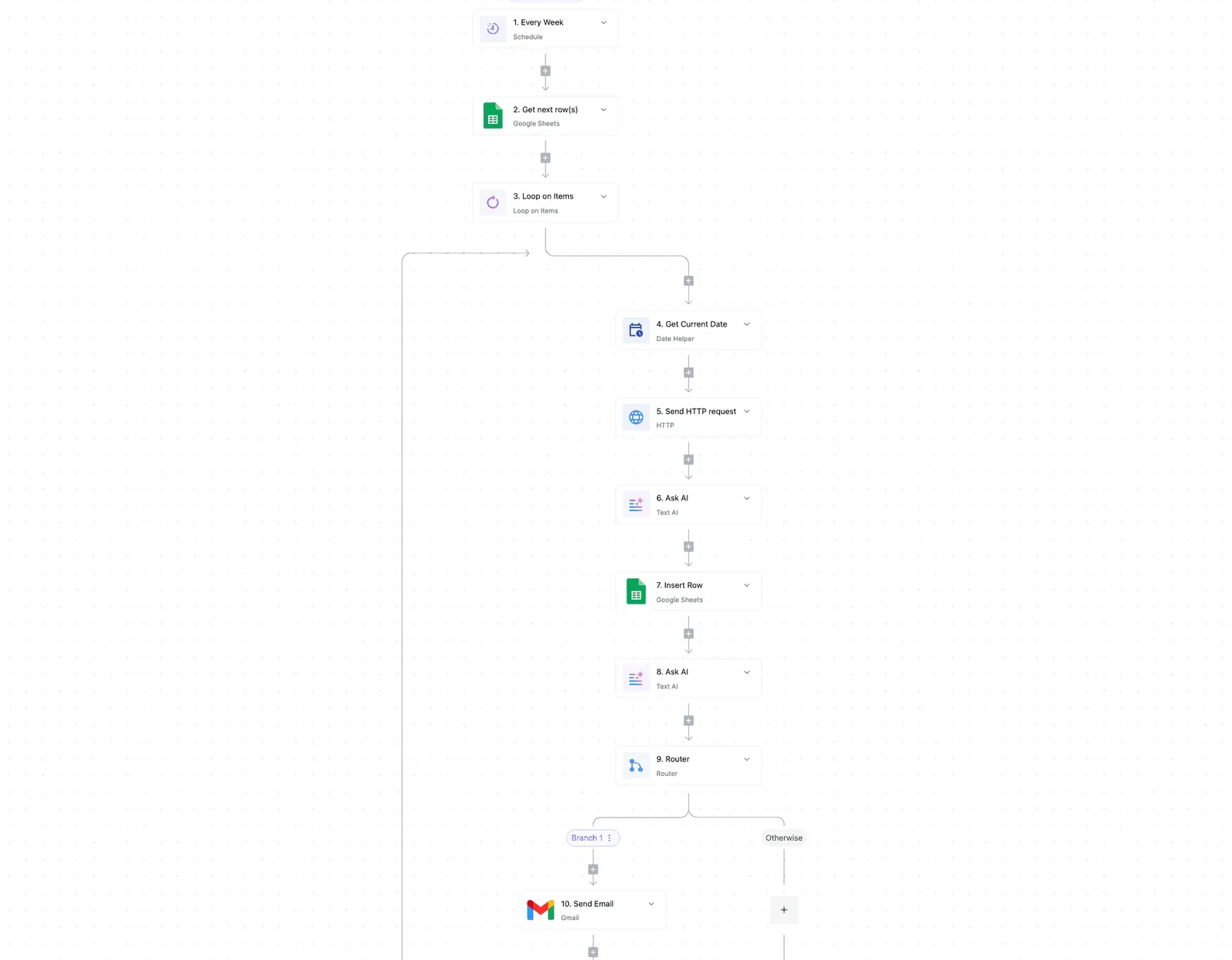
When your own flow writes back, "New or Updated Record" fires on that edit, so one app's change can trigger the other's. Run "Find Database Item" first to locate the matching row, then "Update Database Item".
Put a condition step ahead of the write that stops the run when the values already match. Without it, two flows pointed at each other will loop. Pick one owner and let the other app's updates flow only one way.
When a needed step is not listed: HTTP request or webhook
If you need to react to a deletion, there is no trigger for it in either list. Airtable has a "Delete Airtable Record" action, but its triggers are only "New Record" and "New or Updated Record".
For a missing step, use the HTTP request integration to call the vendor's API directly, or a webhook to receive a call from the other app.
This is also where the limits you hit will be the vendors' API limits, not a cap on how many flows you build, since Activepieces allows unlimited flows on every plan, including free.
Build a Notion to Airtable sync
Build the sync as one Notion trigger feeding one Airtable create-record action, in four stages, with the Notion page ID stored in Airtable so reruns never create duplicates.
- Add a Notion connection and sign in. When Notion asks which pages to share, select the database you're syncing. A database you skip here won't appear in the trigger's dropdown, which looks like a bug but is a permission.
- Add an Airtable connection with a personal access token. Grant it read and write access to records and to the one base you're targeting.
- Before leaving, add a text field named
Notion Page IDto the Airtable table. The mapping step depends on it.
Choose the Notion new-database-item trigger and select your database.
Then use the test option to load a real page rather than a sample. A sample payload shows field names that may not exist in your database, so your mapping would pass the test and fail on the first live record.
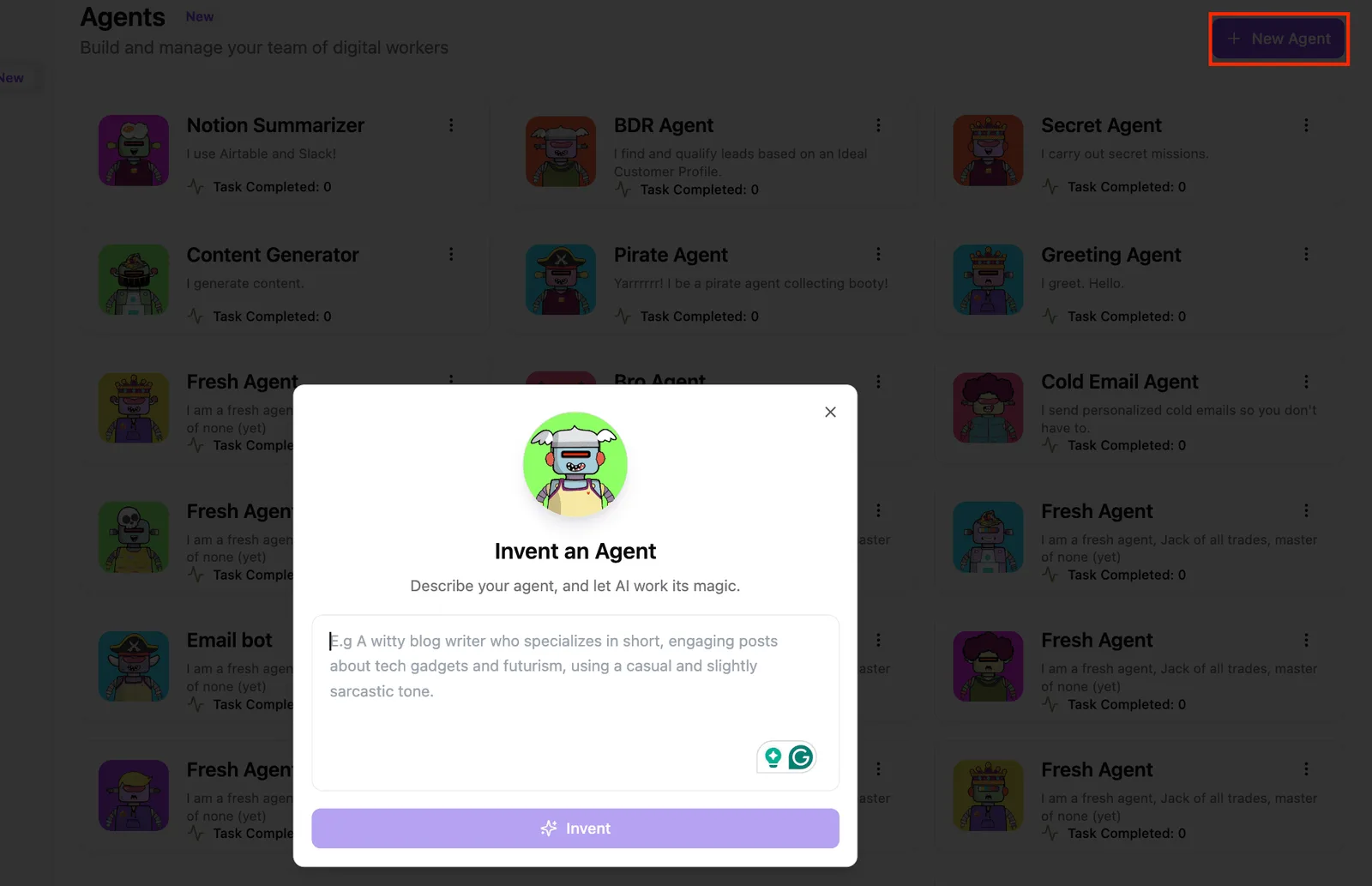
Inside the builder you will also find a library of pre-built AI agents, with an Invent an Agent dialog that turns a plain-language description into a new one.
Skip it for this job: a sync is deterministic, and an agent in the middle can reword the values you meant to copy exactly. The next stage uses only the plain Airtable action.
- Add the Airtable create-record action, then pick the base and table.
- Map the Notion page title to your primary field.
- Map
Notion Page IDfrom the trigger's page ID. Treat this as the system-of-record key. - Map remaining fields one at a time, matching types. Notion select values go to Airtable single-select fields, and a value Airtable doesn't already list as an option can be rejected.
- Leave relations and rollups unmapped for now. They don't convert cleanly between the two tools.
To avoid duplicates, put an Airtable find-record step before the create step, filtering on Notion Page ID. Branch on the result: if a record exists, update it, and if not, create it. Without that branch, a re-fired trigger writes the same page twice.

- Run the test step with the page you loaded and open the Airtable table. Confirm the new row has every mapped value, not just a title.
- Run it a second time with the same page. The row count shouldn't change. If it grows, the find-record filter isn't matching.
- Publish the flow.
- Add a fresh page in Notion and open the run history. A green run with no row in Airtable means the base or table selection is wrong, so check that before anything else.
You can follow the rest of this with the builder open. Start free, no card.
Limits and errors in Notion and Airtable syncs
When this sync fails, it fails in one of seven ways, duplicates among them, and each leaves a symptom you can match to a cause and a fix.
The table lists them as they appear in run logs. Read the symptom column first, because that's what your automation tool actually shows you.
| Symptom | Cause | Fix |
|---|---|---|
| 404 "object not found" on a database that exists | The Notion database was never shared with the integration | Open the database, use Connections, add the integration |
| 403 or "insufficient permissions" | Token lacks a scope, or Notion capability is read-only | Add data.records:write in Airtable; enable insert and update content in Notion |
| 429 responses mid-run | Notion averages 3 requests per second | Add a delay between actions; retry after the wait |
| Value rejected or blank | Target property is read-only (formula, rollup) or the type differs | Write to a plain field of the matching type |
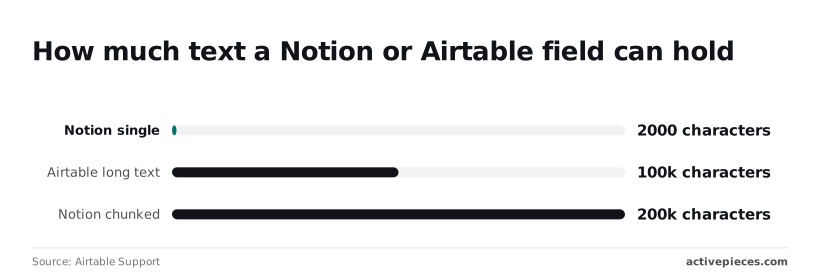
| Text cut off or request refused | Notion rich text object holds 2,000 characters | Split into chunks |
| Two pages for one record | Trigger re-fired with no lookup | Search by record ID before create |
| Change appears minutes later | Trigger polls instead of pushing | Accept the interval or switch trigger type |
Check each against the vendors' docs before relying on it; I didn't confirm the polling interval for any specific tool, so treat it as unconfirmed.
When a 404 comes back, it usually means a sharing gap, not a missing record, because Notion integrations see nothing until a page or database is explicitly shared with them.
A 403 points at scopes instead. A token created with read access will fetch records happily and then fail on the first write, so the test record is the moment to find out.
Rate limits and field type errors in syncs
At 3 requests per second on average, a flow that creates one page and updates two properties in separate calls can hit 429 on a burst of ten records, so the operation fails. Space the actions out.

Formula, rollup and created-time fields are read-only, so mapping to them fails whatever the value.
When a note runs long, the failure is the quietest of the lot. Notion accepts 2,000 characters in a single rich text request, while an Airtable long text field holds 100,000.
A long note therefore truncates or errors unless the tool splits it. Chunked, Notion can hold 200,000 characters, so the reverse direction can still lose text at Airtable's 100,000 ceiling.
When a trigger re-fires with no lookup, you get duplicates, so search by record ID first.
Two-way syncs add a loop risk: each write triggers the other side, so keep one system of record. Polling triggers also lag by the check interval, so a record you edit and immediately test may not move yet.
When Activepieces fits a Notion and Airtable sync
That lag follows the trigger type, not the tool, so choose on hosting and flow limits: Activepieces fits when you want an MIT-licensed core, self-hosting and unlimited flows on every plan, including free, and Zapier or Whalesync fit in the cases below.

How other tools compare for this job
You can use Zapier here: it connects both apps and is hosted, so there's nothing to install. If your team already pays for it and the flow is one trigger and one write, rebuilding it elsewhere buys you nothing.
Check its current plan limits on tasks and multi-step flows before you commit a long flow to it, because those limits are set by Zapier and can change.
You may want continuous two-way sync instead, which is a different job, and the one Whalesync is built for: keeping records in Airtable and Notion in step continuously, in both directions.
This article's approach picks one system of record and writes one way. If both teams really do edit the same records in both apps, you would have to build conflict handling yourself on top of a trigger-and-action flow.
Whalesync exists to take that problem off you, so use it for two-way sync and skip the trigger flow.
Three reasons favour Activepieces, which MoneyGram, Moneypenny, Alan and FundingSocieties run, and all three are about who controls the flow:
- Its core is MIT-licensed, so you can read how the Airtable and Notion integrations behave instead of inferring it from a vendor's help page.
- It can be self-hosted, so record data passes through a server you run. That matters if the Airtable base holds customer data you would rather not route through a third party's cloud.
- A run costs 1 credit however many steps it has. A sync that looks up a record, checks for a duplicate, maps fields and then writes won't cost more because you added a branch.
It isn't free: once you self-host, you own uptime, upgrades and backups, so if nobody on your team wants that job, the hosted route is the better fit. The trade is control for upkeep, and it only pays if you'll use the control.
Start the workflow in Activepieces
From here, the walkthrough builds the one-way flow in Activepieces, with Airtable as the system of record and Notion as the destination, on a free plan that gives you 1,000 credits a month at 1 credit a run.
Create a new flow, choose the Airtable trigger for new or updated records, and leave the Notion step empty for now.
Configure the trigger first and pull in a real record before you map a single field. A trigger that returns the wrong record will make every later error look like a mapping problem.
Frequently asked questions
Can Airtable and Notion sync both ways without creating loops?
Yes, but only if you stop the flow from reacting to its own writes. A two-way setup is two flows: Airtable writes to Notion, and Notion writes to Airtable.
Each write fires the other flow's trigger, so a single edit can bounce back and forth. Keep one system of record and send changes in one direction.
If you need both directions, add a field on each side that holds the other record's ID and a "last written by automation" marker, and have each flow skip any record carrying that marker. Test with one real record before you trust it.
Does Notion have a native Airtable integration?
Not one that copies records between the two, in either direction. Notion can embed an Airtable view as a live preview, which shows the data but doesn't create pages, update properties or give you anything to filter on.
Check Notion's integrations gallery, since that list changes. If you want rows to become pages, you still need a trigger and an action.
How often does the workflow check for new records or pages?
It depends on the trigger type. A polling trigger asks the app for changes on a schedule, so a new record can sit unseen until the next check. A webhook trigger fires when the event happens.
Your plan sets the polling interval, so read it before you promise anyone "instant". If a test record doesn't show up, wait a full cycle before assuming the mapping is broken.
Can I sync an entire existing Airtable base into Notion at once?
Not with the trigger, which only sees records created or changed after the flow is on. Existing rows need a one-off run that lists records and loops over them, creating a Notion page for each. Start with a small filtered view.
A bulk run is where you hit the vendors' rate limits and where field types that don't map cleanly, such as long text or attachments, start throwing errors. Fix those on ten rows instead of discovering them on thousands.
Is it free to connect Airtable and Notion with Activepieces?
Connecting them can cost nothing, because the tool is open source and can be self-hosted, and it also has a hosted tier with its own plan limits.
The real constraints are your Airtable and Notion plans and their API limits. Check how many runs your plan allows against how often your base changes, since a busy base can use up a small allowance quickly.
Related reading
References
Build it
Set this up in minutes.
No code required. Connect your accounts, and Activepieces runs it from there.
Start free Talk to sales