
Arcee AI Pricing: Models and Cost per Token (2026)

Nov 10, 202616 min read
The model you pick sets your Arcee AI bill before any plan does.
According to Price Per Token, Arcee AI's hosted models charge between $0.18 and $3.30 per million output tokens, an 18-fold spread, so the choice of model alone can multiply your invoice eighteenfold, whether you call the API directly or route it through a workflow tool like Activepieces.

Arcee AI pricing is the total cost of running Arcee's language models, set by the model chosen, the plan or deployment route (hosted API or self-hosted), the usage limits that apply and how the workload's tokens are metered, rather than by the per-million-token rate alone.
Both figures come from Price Per Token, a site that tracks API prices by provider.
Arcee AI Pricing in 2026 and What Its Models Really Cost
What Arcee AI is and what it sells
Arcee sells tokens. It is a model developer that sells its own language models through a hosted API, metered in tokens.
At the top of the range, Price Per Token shows Maestro Reasoning at $3.30 per million output tokens, which means organizations pay a premium simply for reasoning capability.
A reasoning-heavy job therefore costs more than seven times what Trinity Large Preview does at $0.45, which means teams adopting reasoning must multiply that budget line. Virtuoso Large sits at $1.20, which is 2.7 times the Preview, so each modest upgrade multiplies the cost substantially.
If you pay for a thinking model, you pay what a coding model costs: Coder Large and Trinity Large Thinking both charge $0.80, per Pricepertoken. Spotlight is cheapest at $0.18 according to Price Per Token, a quarter of the Preview's price.
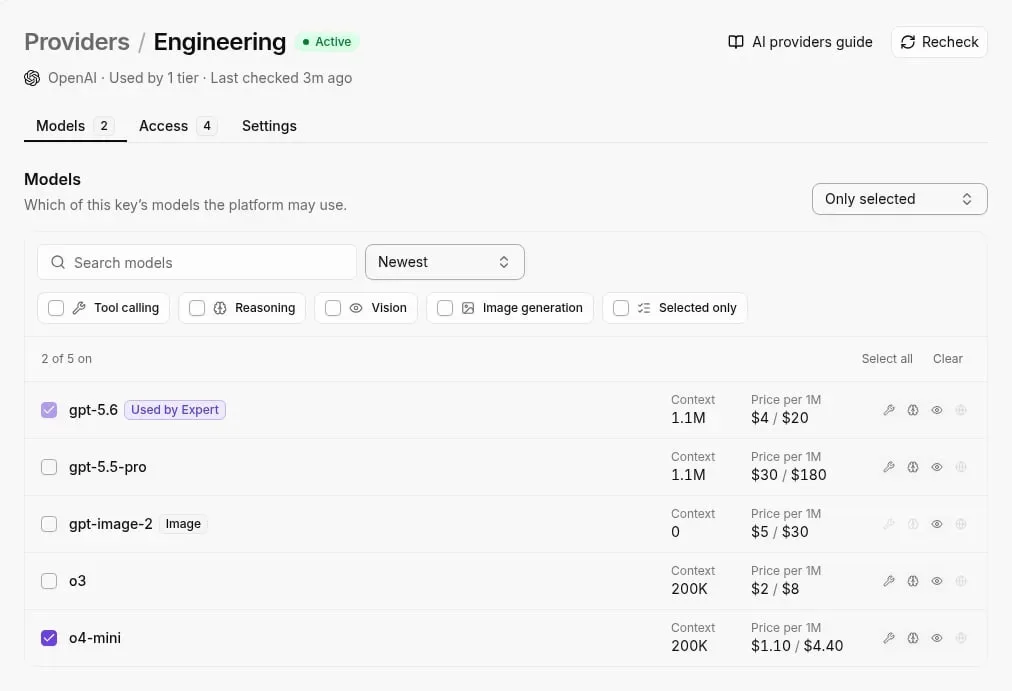
The plan and model table, checked 2026-11-10
Only output can be compared directly, because every input price, context window and limit reads "not published". The table lists the six models we could check, with the price as Price Per Token states it, and the output column is where the spread shows.
| Model | Input / output $ per 1M | Context | Limits | Source | Checked |
|---|---|---|---|---|---|
| Trinity Mini | not published / not published | not published | not published | not published | 2026-11-10 |
| Trinity Large Preview | not published / $0.45 | not published | not published | Price Per Token | 2026-11-10 |
| Trinity Large Thinking | not published / $0.80 | not published | not published | Price Per Token | 2026-11-10 |
| GLM-5.3-Flash | not published / not published | not published | not published | not published | 2026-11-10 |
| Spotlight | not published / $0.18 | not published | not published | Price Per Token | 2026-11-10 |
| Maestro Reasoning | not published / $3.30 | not published | not published | Price Per Token | 2026-11-10 |
Any bill built from this table is a partial one, because four of six rows have an output price and few have an input price. The next subsection covers the gaps.
Which prices Arcee does not publish
Look down the table and the blanks line up: input prices, context windows and rate limits are blank in every row. Trinity Mini and GLM-5.3-Flash have no price at all.
Without input rates, you can't cost a prompt-heavy workload such as summarising long documents into short answers, because input tokens would dominate it.
Without limits, you can't tell whether a model throttles before your monthly volume does. Until those figures appear, treat each row as an output-price ceiling and not a full quote.
If you are running this arithmetic for your own team, see what the same workload costs on Activepieces.
Arcee AI costs at realistic workloads
From 1.75 million tokens a month at 1k tickets to 350 million at 200k, the bill for a ticket summarizer grows in a straight line.
Yet only 11% of organizations forecast AI spend within 10%, according to Mavvrik. That means 89% miss by more than a rounding error.
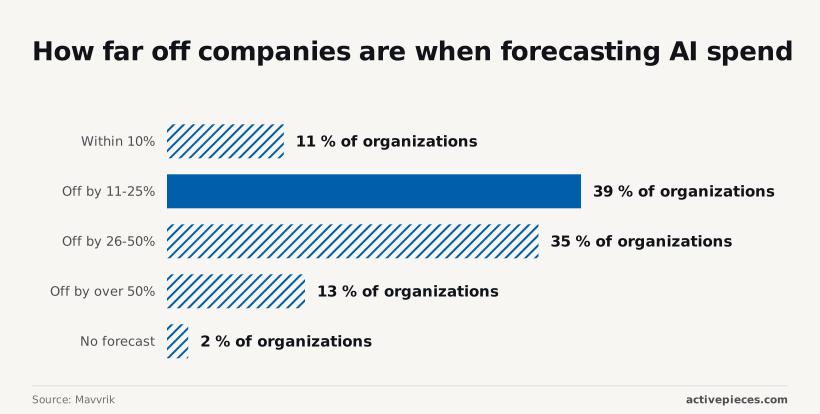
According to Mavvrik, the rest of the field: 39% are off by 11-25%, 35% by 26-50%, 13% by more than 50%, and 2% have no forecast.
So 87% of organizations are off by more than 10%, and 48% by more than a quarter, leaving most teams without any real visibility into their AI costs. A worked bill is how you avoid joining them.
Take one request per ticket as the meter. I assume each request sends 1,500 input tokens (the ticket thread plus instructions) and returns 250 output tokens (the summary).
Both numbers are mine, not Arcee's. If your threads run twice as long, the input column doubles and so does the input line of the bill.
Monthly bill at 1k, 20k and 200k requests
Read the first three columns as assumptions. The rates in the arithmetic column are Arcee's per-million-token input and output prices from the pricing table earlier in this article, using one model across all rows.
| Tickets per month | Input tokens | Output tokens | Model | Arithmetic | Monthly total |
|---|---|---|---|---|---|
| 1,000 | 1.5M | 0.25M | One Arcee model, same in every row | 1.5 × input rate + 0.25 × output rate | Sum of the two lines |
| 20,000 | 30M | 5M | Same | 30 × input rate + 5 × output rate | Sum of the two lines |
| 200,000 | 300M | 50M | Same | 300 × input rate + 50 × output rate | Sum of the two lines |

Whatever the small row costs, the large row costs 200 times that on a pay-per-token route. Each row is exactly 20 times, then 10 times, the one before it.
Output tokens are the smaller volume, but they usually carry the higher rate, so check how much of each total they make up.
Where the cost changes sharply
When you change the billing route, not the volume, cost jumps. There are three routes.
When you change the billing route, not the volume, cost jumps.
- On the metered API you pay only for tokens used, there's no minimum, and Arcee runs the infrastructure. A quiet month costs almost nothing.
- On a plan with included usage, a flat fee covers a quota. You overpay below it and hit limits above it.
- With a self-hosted deployment you rent the GPUs, so the bill stays flat whether you send 1k tickets or 200k, and your team runs the infrastructure.
To find the break-even, do simple division: fixed monthly infrastructure cost ÷ blended per-million rate gives the millions of tokens where self-hosting wins. At 350 million tokens a month, the large row is the only one likely to approach it.
Hidden costs and usage limits
Four costs move an Arcee AI bill. They are the free-tier allowance, the ceilings on requests and context, the gap between input and output pricing, and the absence of any documented discount for bulk work.
The checklist below covers what to confirm before you commit to a monthly volume, and the sections after it expand each item.
- A context cap limits how much of a long document fits in one request, so oversized inputs must be split and the same text gets billed more than once.
- Rate limits cap how fast you can spend, so a heavy batch job may need to run over days rather than hours.
- Output tokens cost more than input tokens, so generation-heavy workloads cost more than their input volume suggests.
- Arcee documents no batch or cache discount, so budget at the full list rate.
I couldn't confirm a current free allowance or whether starting credits expire.
Treat any trial balance as a test budget and not as offset against production. If credits lapse on a schedule, the first invoice arrives sooner than a forecast built on a free runway would suggest.
Arcee AI API rate limits and context limits
Check the ceilings for the specific model and route you'll use: Arcee meters limits per request and per minute, and ceilings differ across the places that offer Arcee models. A low ceiling forces queuing or a higher tier.
When a context cap forces long inputs to be chunked, chunking re-sends shared instructions with every integration, so billed input exceeds the raw document size.
Chunking also turns one call into several steps, and that is where the orchestration meter starts to matter.
Activepieces charges 1 credit per flow run, whether the flow has two steps or ten, so breaking a long document into smaller, more dependable calls adds nothing to that side of the bill.
Zapier's pricing page bills per task and Make's bills per module, so each extra step there is another charge, and the careful splitting is what gets taxed.
MoneyGram, Moneypenny, Alan and FundingSocieties run Activepieces in production, and the Arcee tokens still bill at the rates above.
I found no documented batch discount and no prompt-caching discount. Competing vendors often halve the price of asynchronous work or discount repeated prefixes, so the absence matters.
A workload that resends a long system prompt on every call pays for it in full each time. Until Arcee documents otherwise, model that repetition at the standard input rate.
Self-hosting and marketplace compute
If you run the weights yourself, per-token metering gives way to rented GPU time, which is billed whether or not requests arrive. That favors steady, high-volume traffic and punishes spiky use, since an idle instance still costs money.
On a marketplace listing, the cloud provider's compute rate comes on top of any software fee. Compare the monthly rental for the hardware that fits your chosen model against the API cost for the same tokens, and include the engineering time to keep it running.
Worth checking against a plan that does not meter every step: one credit covers a whole run on Activepieces.
Arcee AI against its closest alternatives on price
On price alone, Arcee AI's Trinity Large Think isn't the cheapest hosted option. Three smaller open models undercut it on input tokens, and only Llama 3.1 70B costs more per input token.
The table shows what each model charges per million tokens, so you can set that API price against the rental-plus-engineering total from the self-hosting comparison.
Price per million tokens, side by side
| Model | Input $/1M | Output $/1M |
|---|---|---|
| Arcee Trinity Large Think | 0.25 | 0.80 |
| Llama 3.1 70B | 0.72 | 0.72 |
| Mistral Small 24B | 0.05 | 0.08 |
| Qwen 3.7 Flash | 0.03 | 0.13 |
| gpt-oss-20b | 0.018 | 0.09 |
Check the source first: every figure comes from Arcee docs and Obolith. Trinity Large Think runs $0.25 to $0.80, so a reply-heavy job pays more than an input-heavy one.
Llama 3.1 70B is flat at $0.72 both ways, which makes it cheaper than Trinity on output by eight cents but nearly three times dearer on input.
All three come in well under Trinity: Mistral Small 24B at $0.05 to $0.08, Qwen 3.7 Flash at $0.03 to $0.13 and gpt-oss-20b at $0.018 to $0.09. These are smaller models, so the comparison is price, not like-for-like quality.
Before you commit, read free tiers, batch discounts and rate limits on each vendor's page, because they change the bill more than a few cents per million. This price data doesn't include them.
Arcee AI monthly cost versus other providers
Because the token is the metered unit, the ratio of output to input decides the winner. Trinity's output costs 3.2 times its input; gpt-oss-20b's costs 5 times; Qwen 3.7 Flash's about 4.3 times; Mistral Small 24B's 1.6 times.
A workload that returns long answers from short prompts feels Trinity's $0.80 more than a classifier that returns one label, so cost becomes the primary concern when choosing between them.
Count your monthly input and output tokens separately, multiply each by its own rate, and add them. Do that for each row before you compare.
When Arcee AI is the wrong choice
Choose another model when the job is simple, high-volume and cheap to get right. Extraction, routing and tagging rarely need a large reasoning model, and any of the three smaller models above would cost a fraction as much per token.
If your output tokens dwarf your input and a flat-priced model fits, Arcee makes little sense, since Llama 3.1 70B's $0.72 undercuts Trinity's $0.80 there. Pick Trinity when the task needs its capability and your token mix leans toward input.
Track Arcee AI spend with Activepieces workflows
Don't expect Activepieces to lower what Arcee AI charges. It's an open-source workflow automation tool that can show you what each automated call costs and warn you before a monthly budget is gone.
That matters because the price table tells you the rate, while only your own runs tell you how many tokens you consume.
Because a workflow that calls the Arcee AI API is already where those tokens are spent, it is the cheapest place to count them.
Log Arcee AI token usage per run
If Trinity is the model you picked, and your token mix leans toward input, the number to watch is input tokens per run. A short workflow, built once and attached to a schedule, will record it. The steps run in this order:
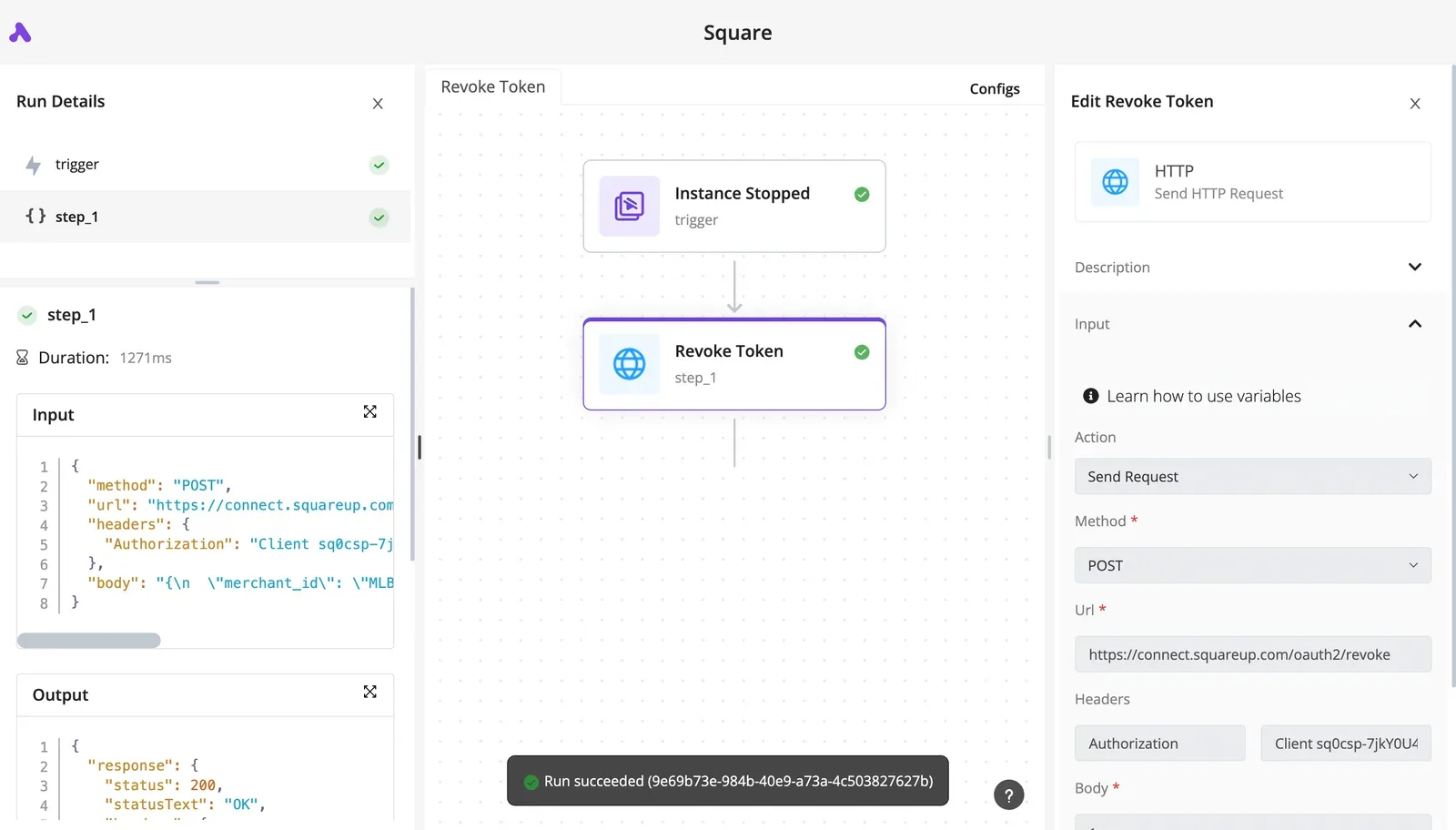
- A schedule trigger starts the flow at the interval you choose, so you are sampling spend on a clock instead of when someone remembers to look.
- An HTTP step calls the Arcee AI API with your key and a representative request, so the usage you log comes from the same kind of call your production automations make.
- A following step reads the usage fields from the response, namely input and output tokens. These come from the vendor's own count, so you aren't estimating with a character-length guess.
- A calculation step multiplies each count by the per-million price from your pricing table and appends a row to a Google Sheet or similar. Keep the date, the model name and both token counts in the row, so a price change later doesn't rewrite old costs.
- A final branch compares the running monthly total with your threshold and sends an alert when it is passed.
Your production flows can use the same pattern: add the read-and-append steps after any existing Arcee AI call, and each real run writes its own row. The scheduled version is only a probe; the appended rows after live calls are the bill.
Set Arcee AI budget alerts before the limit
Fire the branch in step five on a fraction of the limit, not the limit itself. Set a warning at a level that leaves room to act, and a second alert at the cap.
By the time a message at the cap arrives, the money is already spent; one sent earlier tells you which workflow to throttle or which model to swap.
Send the alert to a channel someone reads, such as email or a team chat, and include the month-to-date total and the workflow name. An alert without the source sends you hunting through rows.

What you send through the API is all this setup counts. It won't see discounts, plan terms or invoice adjustments, so treat the sheet as a running estimate and reconcile it against the vendor's invoice.
- Confirm every workflow that calls Arcee AI writes a usage row after each call.
- Check that the price table in the sheet matches the current published rates.
- Review last week's rows for the workflow with the highest input token count.
- Verify the warning and cap alerts reach a person, not an unread inbox.
- Compare the month-to-date total with the vendor's usage page and note any gap.
Frequently asked questions
After the invoice check, a few questions remain that the bill can't answer by itself, so here are the short versions as of 2026-11-10, each with what to do about it.
Is Arcee AI free to use? The model weights Arcee publishes openly are free to download, but its hosted API is a metered service, and I haven't confirmed a standing free allowance for it.
Assume your first API call is billed unless the console shows a credit. Test with a small prompt set first so a mistaken loop costs you little.
Does Arcee AI charge per token or per seat?
I have found no per-seat fee on the API itself: the hosted API meters tokens, with input and output priced separately. The consequence is that cost follows your prompt length and reply length, not your headcount.
Adding a colleague costs nothing extra, but a verbose system prompt sent on every request raises every bill. Enterprise agreements may be structured differently, so confirm the unit in any contract before you sign.
Can I run Arcee models myself without paying Arcee?
For models released with open weights, yes. You can host them on your own hardware or a cloud GPU and pay no per-token fee to Arcee.
You then pay for compute, engineering time and idle capacity, and the idle part is what catches people out: a GPU bills whether or not requests arrive.
Read the licence on each model's page first, because open weights don't always mean unrestricted commercial use. Arcee's own cloud-marketplace listings are a separate route with their own billing.
How often does Arcee AI change its prices?
I have no confirmed history of change frequency, and the vendor hasn't, to my knowledge, committed to a schedule.
Treat any rate in this article as accurate on the check date only. If a workload is sensitive to price, keep the rate in a single cell of your estimate sheet, as described earlier, so a change is one edit and not a rebuild.
Does Arcee AI offer discounts for high volume?
I haven't confirmed a published volume-discount ladder. Where discounts exist for a vendor of this size, they are usually negotiated, with committed spend traded for a lower rate.
Ask sales once your monthly usage is stable enough to forecast. Also ask whether batch processing or cached input is priced differently, since those apply to specific request patterns and not to your total volume.
Related reading
References
Running the numbers
See what the same workload costs here.
Free forever plan, and every paid plan self-hosts at no extra cost.
See pricing Talk to sales