
Jira Pricing in 2026 and How to Work Out Your Bill

Nov 1, 202614 min read
Jira Cloud pricing plans compared in one table
How much Jira Cloud costs per user
Jira Cloud pricing means four plans (Free, Standard, Premium and Enterprise) billed per user.
The number on the page is only your starting rate, so the actual cost scales with your team size, and it can creep up further if you bolt on extras such as Activepieces to automate the work around your tickets.
Jira Cloud pricing is the per-user, subscription-based cost of Atlassian's hosted Jira, set by which plan you choose, how many users you have, and any Marketplace apps or add-ons you pay for on top.

Because cloud is where Atlassian puts its effort, the self-hosted editions get less attention and this article focuses on cloud. Its FY2026 results show cloud as the bulk of the company's business.
Free, Standard, Premium and Enterprise side by side
Read the limits first, because the cap that bites you decides your tier, and the tier decides the rate. The table below shows what each plan caps and withholds.
Dollar rates change with user count and billing period, so confirm them live.
| Plan | User cap | Storage | Automation runs | Support | Uptime SLA | Gated features |
|---|---|---|---|---|---|---|
| Free | 10 users | 2 GB | 100 per month | Community forums | None | Basic boards and workflows only |
| Standard | 35,000 users | 250 GB | 400 per user per month | Business hours | None | Audit logs, project roles |
| Premium | Same site cap as Standard | Unlimited | 1,000 per user per month, pooled | 24/7 for critical issues | 99.9% | Advanced Roadmaps, sandboxes, release tracks |
| Enterprise | Larger multi-site setups | Unlimited | 1,000 per user per month | 24/7 | 99.95% | Analytics, data residency, multiple sites |

Count how many rules you plan to run before anything else, because Standard's 400 automation steps per user per month sound generous until a team automates ticket routing.
The jump from Standard to Premium is where the SLA first appears, which means anyone who needs a written uptime promise can't stay on Standard.
Monthly versus annual billing and tiered per-user rates
Pay month to month and you pay a premium for flexibility: each paid plan has a monthly price and a cheaper annual one. Per-user rates also step down as headcount rises, so ten extra people cost less per head at 200 users than at 20.
On top of the plan, Marketplace apps are billed separately, whereas a flow that connects Jira to other tools in Activepieces carries no per-flow cap: it offers unlimited flows on every plan, including free, on an MIT-licensed core.
If you are running this arithmetic for your own team, see what the same workload costs on Activepieces.
Jira pricing at 10, 50 and 250 users
Before add-ons, Jira's seat price alone comes to $1,164, $5,820 or $29,100 a year on Standard at 10, 50 or 250 users, which means a four-figure annual commitment is unavoidable before you've activated any features. On Premium it's exactly double that.
Everything beyond those numbers is extra.
Count everyone who'll log in and work tickets, not just your core team. Multiply that headcount by the rate for your plan. A contractor with a login is a seat, so leaving them out understates the bill.
At $9.70 per user per month for Standard and $19.60 for Premium, the table shows that Premium costs twice as much at every size, so the gap grows from $1,188 a year at 10 users to $29,700 at 250.

| Users | Standard monthly | Premium monthly | Standard annual | Premium annual |
|---|---|---|---|---|
| 10 | 10 × $9.70 = $97 | 10 × $19.60 = $196 | $1,164 | $2,352 |
| 50 | 50 × $9.70 = $485 | 50 × $19.60 = $980 | $5,820 | $11,760 |
| 250 | 250 × $9.70 = $2,425 | 250 × $19.60 = $4,900 | $29,100 | $58,800 |
Marketplace apps priced per user
Marketplace apps are add-ons sold by other companies, and most charge per seat on top of Jira. Tempo Timesheets, a time-tracking app, costs $5.99 per user per month. For 50 users that's $299.50 a month, roughly three-fifths of the $485 Standard seat bill.


Then there is Xray, a test-management app, which costs $7.28 per user per month on its Standard level and $8.74 on Advanced, so testing infrastructure scales with headcount rather than operating as a flat license fee.
At 50 users, Xray Advanced adds $437 a month, or $5,244 a year, meaning this add-on alone rivals the cost of many standalone software licenses. Two apps can cost more than Jira itself.
Automation-run and file-storage caps can change, so confirm them on the pricing page for your tier. If you outgrow a cap, the fix is usually a higher tier, which the headline price hides.
Two apps can cost more than Jira itself.
When a feature exists only on Premium, teams usually upgrade for it. Related Atlassian products, such as its service-desk tool, are billed separately.
Jira pricing compared with Asana, ClickUp and Linear
At the entry tier, Jira is competitive. Once you need the features a growing team actually uses, all four tools charge noticeably more, so the business tier decides your bill. Skip that comparison and you'll be pricing the wrong plan.
Entry price and free-tier limits
Read the gap between the two bars: a small gap means upgrading later costs little, and a large gap means the cheap plan is mostly a way in.
Free tiers work the same way. Each vendor caps users, storage or history so a growing team hits the wall at a predictable point.
Open each pricing page, note the date it shows, and count your own people against the free limit before you assume you can stay free.
Jira automation and reporting limits by plan
By the end of the first month, teams have adopted automation and reporting, and by then they often turn out to sit above the entry plan.
Lower tiers typically cap how many automated rules can run, or limit dashboards to basic views. Cross-project reporting tends to sit higher still.
If your team already knows it needs "when this happens, do that" rules or a weekly status view for a manager, price the tier that includes them. Don't price the tier on the banner.
When Jira is the cheaper choice and when it is not
For software teams that need issue tracking, sprints and release tracking and have no use for a polished project-management layer, Jira tends to win on price. You pay for what you use, and the Marketplace fills gaps.
Jira stops being the cheaper choice in two cases: your team is mostly non-technical, so you pay for engineering features nobody opens, or you'd need several paid apps to match what a rival includes in its own business tier.

Switching also costs real money. Moving tickets, rebuilding workflows and retraining people takes weeks of lost time.
A saving of a few dollars per user rarely covers that for a team that's already settled, so switch for a clear fit problem, not for a small price gap.
Worth checking against a plan that does not meter every step: one credit covers a whole run on Activepieces.
Connect Jira to other tools with Activepieces
If the gap is a missing connection rather than a high price, Activepieces sits beside Jira and moves issues to and from other apps outside Jira's own automation quota.
The run is its meter, not the steps inside it: a flow is 1 credit whether it has two steps or ten, so splitting a job into smaller, more reliable steps never raises the bill.
Zapier's per-task billing and Make's per-module billing both charge more as a flow gets finer-grained, which taxes the builder for doing it properly.
It doesn't replace Jira or lower what you pay for it. It covers the work Jira's own automation doesn't reach.
When Jira's built-in automation is enough
When the whole job happens inside Atlassian, stay with Jira's own automation. That covers assigning an issue, moving it to a new status when a linked one closes, or commenting when a field changes. Those rules cost you nothing extra to set up.
There is a catch: each plan caps how many times rules can run in a month, and the rules mostly act on Atlassian products.
So if your rules are modest and stay inside Jira, adding another tool only gives you one more thing to maintain. Check the run limit for your plan on the pricing page before deciding, because a busy team can hit it sooner than expected.
Building a Jira to Slack workflow
Once the job leaves Atlassian, Activepieces is where I'd build it, and MoneyGram, Moneypenny, Alan and FundingSocieties already run it.
That means posting to Slack, writing a row in Google Sheets or updating a customer record in a CRM (the system your sales or support team keeps customer details in).
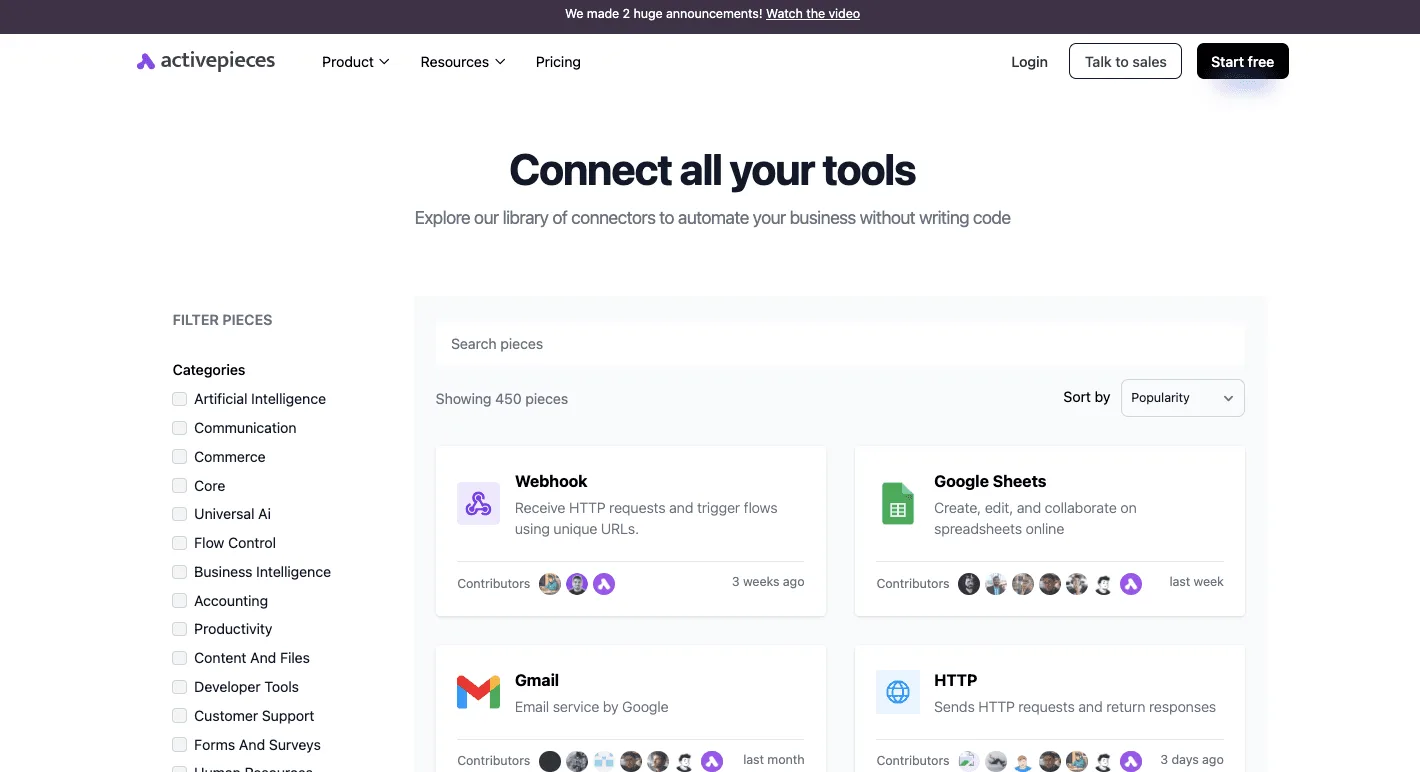
There are 450 integrations in the connectors library, sorted by popularity, and the first screen already shows the plain building blocks: Webhook, Google Sheets, Gmail and HTTP.
That breadth means the tool you need is probably already there, so you're not paying someone to wire it by hand.
- Set the trigger to a new or updated Jira issue.
- Add a condition so only the issues you care about continue, such as high priority ones.
- Send a Slack message with the issue key, title and a link.
Step 2 matters for cost. Every run uses up part of your monthly allowance, so filtering early keeps noise out of the channel and keeps the allowance from draining.
The allowance is the figure to plan around.
Activepieces' pricing page shows the free plan at 1,000 credits a month with unlimited flows; a run costs 1 credit however many steps it has, and if credits run out, flows stay on and runs wait until they refresh.
For testing a flow and running a small team's alerts, the free plan is enough, but a busy project can use it up in days, and then the flows may stop or you pay, depending on the plan.
Activepieces' paid entry plan, Plus, includes 10,000 credits a month, so a team sending a few hundred notifications a week has room to grow.
Zapier, a comparable tool, sets its entry allowances differently, so compare them against your own issue volume, not the headline price.
Your Monday checklist for pricing a Jira purchase
Price Jira this week by working through five steps in order, each of which swaps a guess for your own number, so by the time you finish the fifth, you've replaced industry averages with your organization's actual licensing cost.
Skipping them means finding out your real bill from the first invoice, when changing course costs the most.
- Export the user list from whatever tool your team uses now, and strip out people who have left or never log in.
- Pick a plan by checking your headcount and needs against the limits table earlier in this article.
- List every Marketplace app (Atlassian's add-on store) that your team relies on today.
- Start an Atlassian trial on the plan you picked.
- Reconfirm the live price on the pricing page before you buy.
Count your Jira users and list apps
Start with the export, because user count is the number every other cost multiplies. If you guess high, you pay for seats nobody uses. If you guess low, you hit a plan limit mid-project and get pushed into a higher tier on someone else's schedule.
Count only people who will actually work in Jira, and ask whether occasional viewers need a seat at all.
Then write down the apps. Many teams don't realize their daily workflow depends on an add-on until it breaks. Each app is usually priced on its own, often per user, and sits on top of the Jira price.
For every app, note what it does, who uses it, and whether a built-in feature could replace it. An app you can drop is money you keep.
Trial the plan you actually need
Run the trial on the tier your limits table result points to, not the cheapest one. A trial on the wrong plan tells you nothing about the plan you'll pay for.
Load in real projects, invite the real people, and install the apps from your list. If something you depend on is missing or locked behind a higher tier, you want to learn that while it is still free.
Last, open the pricing page again on the day you buy. Prices and plan limits change, and the page, not this article, is the source of truth.
Put your user count, plan, and app costs next to the figure shown, and that total is your number.
Frequently asked questions
Once you have your own total, these are the questions it tends to raise. Confirm each against the Atlassian pricing page you have open, because plan terms change.
Is Jira free for small teams?
Yes, Atlassian has a Free plan for Jira Cloud aimed at small teams, with a cap on how many people can use it.
Once you pass that cap you must move to a paid plan, so a team that is growing should price the paid tier now rather than discover it on the day someone new joins.
The Free plan also carries tighter limits on features and storage than the paid tiers, so check that your workflow fits before you build on it.
Does Jira charge for users who never log in?
Yes, if they still hold product access. Billing follows the number of people you have given access to, not how often they sign in.
An old contractor account or a colleague who left costs you the same as your busiest user until you remove their access. Doing nothing here is the expensive option, so audit your user list before each renewal.
Can I downgrade from Premium to Standard mid-contract?
Treat a mid-contract downgrade as something to arrange with Atlassian, not something to assume. Moving up is usually easy and takes effect quickly.
Moving down tends to be tied to your billing period, and you shouldn't expect a refund for the months you already paid at the higher tier.
Ask Atlassian billing support before you commit, and get the answer in writing. If you're unsure you need Premium, start on Standard and upgrade later.
Is Jira Cloud pricing the same as Data Center pricing?
No. Cloud is a hosted subscription that Atlassian runs for you, priced per user on the plan you choose. Data Center is software you run on your own servers, and it's licensed on a different basis, with its own tiers and annual terms.
A per-user figure from the Cloud page tells you nothing reliable about the Data Center bill. When you compare the two, add the cost of the servers and the staff time to keep them running.
Does Jira offer discounts for nonprofits or education?
Atlassian has programs for qualifying nonprofits and for academic use, and they can lower the price meaningfully.
You usually have to apply and prove eligibility, and the discount isn't applied automatically. If your organization might qualify, apply before you buy, because it changes the number you're working out.
Related reading
References
Running the numbers
See what the same workload costs here.
Free forever plan, and every paid plan self-hosts at no extra cost.
See pricing Talk to sales

