Mintlify Pricing 2026: Plans, Costs and Overages

Nov 4, 202615 min read
Mintlify is a hosted documentation platform, much as Activepieces is a hosted home for automation workflows. Its Pro plan costs $450 a month billed annually or $540 billed monthly, so the monthly option adds $90 a month, or $1,080 a year, for flexibility.
Mintlify pricing today: every plan, price and limit

Mintlify pricing is the set of tiered subscription plans through which Mintlify charges for its hosted documentation platform, with each plan's price and limits on seats, AI usage and features determining when a team must upgrade.
The plan table, checked 4 November 2026
If your docs budget was approved on an older quote, it's probably wrong. Pro launched at $150 a month. The Growth plan ended at $250, Pro then sat at $300, and it now sits at $450.

That's a threefold rise from launch, so any spreadsheet built on the early number understates the bill by $300 a month.
As of 4 November 2026, two tiers have figures I can confirm. Pro is $450 a month billed annually or $540 billed monthly, so month-to-month costs $90 more.
Nobody can tell you the Enterprise price from the page. It's "Contact us", which means it's unpriced and you only learn the figure after a sales call. Read this as a price check, then use the sections below to find where the limits sit.
Because Enterprise has no public price, you can't budget for it from the page alone. Assume a quote conversation and a timeline to match.
What counts as a seat on each plan
You will undercount seats, because the people who edit docs are rarely the people you first count. Engineers, a technical writer, a support lead fixing one broken page: each may need an editor login.
You will undercount seats, because the people who edit docs are rarely the people you first count.
Count every person who will touch the content in a quarter, not just the owner. Check how the pricing page defines an editor before you sign, because that definition sets how fast the plan outgrows you.
Which Mintlify plan limit forces an upgrade
Whichever line you hit first forces the upgrade: editor seats, AI usage, or a feature locked to a higher tier. The sticker price is the smaller part of the decision.
Price your actual workload against each of those three before choosing. Ask how many editors you have, how often your team will use the AI features, and whether any must-have feature sits above Pro.
If your docs team also runs automations, those have their own meters, so compare each tool against your workload, not against each other's headline price.
If you are running this arithmetic for your own team, see what the same workload costs on Activepieces.
Invoice alert on the growing team
In this illustrative scenario, the billing alert lands because the team crossed a plan's gating line without noticing, not because anyone did anything unusual. The team and its numbers are invented to show the mechanics. It's a developer-tools startup, and five people touch its docs.
Example team's Mintlify editor seats and workload
Because all five commit to the docs, all five count as editors, so seats are the first line the plan measures. Two engineers write reference pages, one technical writer owns the structure, one support lead patches gaps from tickets, and a contractor drafts migration guides.
The team also leans on AI. The writer asks the assistant to restructure pages and the support lead uses it to draft answers from tickets.
Meanwhile a weekly job, set for Monday at 10 am New York time, reads the next row of a changelog sheet and asks an AI model for a summary. It then stamps the date and creates a draft document, as the workflow below shows.

That job makes AI usage steady and invisible. Nobody opens it, so nobody feels it accumulate.
Expected Mintlify cost versus plan price
They read the pricing page, saw a per-month figure for the tier that fit a small team, and multiplied by the people they thought of as "the docs team."
That was the writer and two engineers, which is why the contractor and the support lead never entered the sum.
Nobody had asked which feature or limit would push them up a tier, so nobody had a number to compare against. The expectation came from the sticker, not from the workload.

What the Mintlify invoice showed
At 09:12 on the first, after the invoice was cut overnight, the alert arrived, so there was no chance to adjust anything before the charge. It showed a higher tier than planned.
Two things had crossed a line: the editor count, once the contractor and support lead were included, and a feature the team had switched on weeks earlier that only the higher plan carries.
Before you subscribe, count every person who edits, estimate the AI calls your automations make, and price both, along with the features you actually need, against each plan's limits. That order is the lesson.
What the surprise cost in dollars and hours
If a five-person team budgets at $450 a month for Pro, it can still receive a $1,600 monthly bill. The cause is $1,150 of overage credits landing on top of the plan, so the actual monthly bill far exceeds plan pricing.

Monthly and annual difference
$1,150 a month is $13,800 a year, making the annual damage impossible to ignore. That's more than two and a half times the $5,400 you planned to spend on the plan, meaning overages alone cost more than your entire planned year.
The overage is the whole story.
For a small team the docs tool is one line in a thin budget. $13,800 is a hire's partial salary or a year of other subscriptions, gone to AI calls nobody counted, which means you're not hiring or funding those other tools.
Set against that, billing cadence is a much smaller leak. Pro billed monthly costs $540 against $450 billed annually, so choosing flexibility costs $90 a month, or $1,080 a year.
The forced upgrade isn't the expensive part. The usage that quietly spends credits after you have subscribed is. Fixing the billing cycle saves $1,080 a year, while capping or forecasting AI use protects $13,800.
Hours lost tracing the Mintlify charge
The dollars are only half the damage. An invoice that reads $1,600 against an expected $450 sends someone looking for the cause, making cost management reactive rather than preventive.
On a five-person team that someone is usually the person who builds things, not a finance person with a billing dashboard.
They have to work out which automations call the AI, which editors triggered them, and whether the credits were spent on real work or on a loop nobody noticed.
That's an afternoon of reading usage logs and arguing about what counts as normal, taken from product work.
Because the overage accumulates across the whole month, you often learn about it only after it has been billed, so the hours are spent reconstructing history rather than preventing it.
Without a usage estimate made before subscribing, you pay twice: once in credits, once in time. That same estimate is the document you use to explain the invoice afterwards.
Worth checking against a plan that does not meter every step: one credit covers a whole run on Activepieces.
Surprising limits and add-on costs
The sticker price hid three cliffs: the sixth editor, the 10,001st credit, and anything behind "contact us" each add cost the plan price never shows.
The five gating lines below are in the order a growing team hits them, with seats biting first and credits second.
- Five editor seats on Starter
- $20 per month for each extra seat
- 10,000 credits included on Pro
- $0.01 per credit once those run out
- Everything left to "contact us"
Each is worked through below, in that order.
When your sixth writer arrives, whether a new hire or a contractor, Starter's five included editor seats have run out, and that writer triggers $20 per month per extra seat.
That's small for one person, but a docs team that adds three part-time contributors pays $60 a month before anyone touches AI. Count editors, not employees.
I couldn't verify a complete feature-by-feature list against Mintlify's pages, so I won't guess which plan has which feature. Before you commit, check each feature you need against the plan you plan to buy.
Mintlify AI assistant credits and overage costs
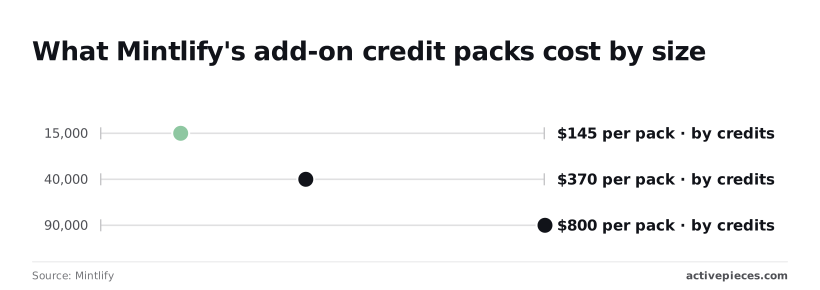
10,000 credits come with Pro, and overage is $0.01 per credit. That is $100 of metered usage, so a busy month with 5,000 extra costs $50 more. Mintlify's credits page sells add-on packs, and the packs beat overage:

- 15,000 credits cost $145, about $0.0097 each, so you save roughly 3% against overage.
- 40,000 credits cost $370, about $0.0093 each, saving about 7%.
- 90,000 credits cost $800, about $0.0089 each, saving about 11%.
Buy a pack only if you'll use it. Credits you never spend are money you handed over early, and the saving is only worth it at volumes you can predict.
Whatever sits behind "contact us" has no public number I could confirm, so you can't budget it from the page. Ask for a quote before you plan around it.
Automating the monthly plan limit check
In the month everyone is busy, a reminder that depends on memory fails.
We run a scheduled flow on Activepieces that posts a seat-and-usage reminder to Slack, our team chat, on the first Monday of each month, so the plan limit gets checked before invoice day.
It's a single trigger and a single message, so each monthly run costs 1 credit against the 1,000 credits a month on the free plan, which also carries unlimited flows and up to 5 users, all listed on the Activepieces pricing page.
Alan and Funding Societies run production automation on the same platform, and those free-plan terms are the published ones, not a trial arrangement.
Mintlify against other platforms
On five editors and one public site, Mintlify has the better polish and AI features out of the box, while self-hosted Docusaurus is cheaper on licence cost. The quote you asked for only means something if every vendor prices the same job.
Monthly cost at the same workload
Picture the team that has docs scattered across a wiki, a shared drive and a README nobody owns. They want one site, five people editing, and an AI assistant that answers reader questions.
The table below holds that job constant, so you can see which cost is a licence and which is your own time. Read the dollar figures off each vendor's pricing page on the day you buy, because they move.
| Tool | Monthly cost for five editors, one site | Limit forcing upgrade | AI credits included | Who runs hosting |
|---|---|---|---|---|
| Mintlify Pro | Paid plan that grows with editor seats | Seat count and AI usage allowance | Allowance included, capped | Mintlify |
| GitBook Essential | Paid plan priced per user | Advanced features sit on higher tiers | Limited on this tier | GitBook |
| ReadMe | Paid tier, with higher tiers quoted by sales | Feature gating between tiers | Varies by tier | ReadMe |
| Self-hosted Docusaurus | No licence fee | None from the software | None; you build or buy it | You |
Treat the first row as the benchmark and ask what each other row makes you build yourself.
Where Mintlify and GitBook limits bite
On Mintlify, the limit is usage: the AI assistant is what readers lean on, so a busy site hits the allowance first, and you only learn that after launch. GitBook bites on features, since the tier you need often isn't the one you priced.
ReadMe bites at the point where the plan you want stops being self-serve and becomes a sales call.
Free to license, Docusaurus still needs someone to own the build, the hosting, search and any AI layer.
If that someone is a developer already stretched thin, the "free" route is the most expensive one on the table. If you have an engineer with spare hours, it's the cheapest.
What changed to control costs
An engineer's spare hours only keep the bill low if someone is watching the limits. The team now prices the workload before upgrading, caps editor seats under a named owner, and alerts before any allowance runs out.
Three rules for controlling Mintlify costs
First, every upgrade starts with a workload-to-limit check. Our actual workload (editors, AI questions asked, features we depend on) is written down, and each item is checked against the plan's gating line. If nothing maps to the line, we don't upgrade.
Second, editor seats have an owner. One person approves each new seat, because the seat count is the limit that quietly forces a tier jump when a contractor gets "just a login."
Third, any allowance alerts at 80%, and the renewal gets checked ten days ahead. That leaves time to downgrade, negotiate or fix the cause, instead of finding out on the invoice.
This list is the order to work in. Each step feeds the next, so a skipped step leaves the later ones guessing.
- Your workload numbers: editors, monthly AI usage, and the features you rely on.
- Map each number to the gating line of the plan you're on and the one above it.
- Name the seat-cap owner and write their name next to the seat count.
- Set the alert at 80% of your AI credit allowance.
- Put the renewal check in the calendar ten days ahead.
Once these five are done, the only remaining job is making sure nobody has to remember them.
What Activepieces does about this
The problem in this article is a limit nobody was watching: a seat count, a credit allowance, a renewal date. Activepieces doesn't change what Mintlify charges.
What it does is turn the check from section one into something that runs on a schedule, so the workload-to-limit comparison happens before the invoice.
The simplest version is the one we run: a scheduled flow that posts the seat-and-usage reminder to Slack on the first Monday of each month, with the seat owner's name and the 80% credit threshold written into the message.
It's one trigger and one message, so it costs 1 credit a run. The free plan gives you 1,000 credits a month, unlimited flows and up to 5 users, so the monitoring is not the line item that surprises you.

From there you can extend it as far as your workload needs. A second flow can read a sheet of current editors and compare it to the seat count you've approved. Another can put the renewal check on the calendar ten days ahead.
Each is a few steps on a schedule, which keeps it cheap against the free allowance, and each replaces a habit that fails in the month everyone is busy.
Activepieces is open source under the MIT licence for the community edition, so you can self-host it if you'd rather not depend on another hosted meter. Alan and Funding Societies run production automation on the platform, and the free-plan terms above are the published ones.
Price your own flows against the credit count before you build more than the reminder, the same way this article asks you to price Mintlify.
Frequently asked questions
Is there a free plan?
Does Mintlify have a free plan? Yes, Mintlify has a free entry tier for personal projects and small docs sites.
It's a place to test, not to run a team on, because the seat and AI usage limits are exactly where the upgrade pressure starts. Price your real editor count and AI usage before you commit a site to it.
Is annual billing cheaper?
Is Mintlify cheaper billed annually? Check the billing toggle on Mintlify's pricing page before you assume it is. The annual rate is the discount: it is $90 a month cheaper, so treat the monthly rate as your worst-case budget.
If annual turns out cheaper, count it as savings only once you are sure the plan's limits fit your workload for the full year.
Can I switch plans mid-month?
Can I switch Mintlify plans mid-month? Assume you can upgrade whenever a limit bites, but don't assume the refund or proration terms for a downgrade. That's the question to put to Mintlify's billing team in writing.
Until you have the answer, the safe move is to start on the plan whose limits you'll actually hit, not the one you hope to stay under.
Are viewers charged, or only editors?
Does Mintlify charge for viewers or only editors? The gating line is editors, not readers. People who read your public docs aren't seats. People who edit them are.
So the headcount to price is everyone who touches a page: writers, engineers who fix code samples, and the contractor you bring in for a launch. Count them all before choosing a tier.
Is there a startup or open-source discount?
Is there a Mintlify discount for startups or open source? I have no confirmed program to point you to, so don't build a budget around one.
If you run an open-source project or an early-stage company, ask Mintlify's sales team directly and get any discount in writing. Until then, price the plan at list, and treat a discount as a bonus if it arrives.
Related reading
References
Running the numbers
See what the same workload costs here.
Free forever plan, and every paid plan self-hosts at no extra cost.
See pricing Talk to sales