
Automating Coding Workflows with OpenCode 2.0

Oct 14, 202612 min read
These models and their specific performance benchmarks, which may eventually be orchestrated through platforms like Activepieces to streamline complex workflows, represent a predictive analysis of how specialized coding agents might evolve.
Launch specialized LLMs for code automation
OpenCode 2.0 is an open-source AI coding agent designed to automate software development tasks across terminal, desktop app, and web app environments.
While general-purpose models like GPT-6 Astra or Claude Opus 5.5 handle broad reasoning, OpenCode 2.0 functions as a dedicated server. It exposes an HTTP API to provide identity and readiness status for programmatic execution.
Release date and developer origin
When the OpenCode team released this version, it replaced its predecessor as a unified CLI tool.
You can't install the two versions side-by-side by default according to the migration guide. This means you'll have to commit to the new architecture to access the updated server-side capabilities.
The model is specifically optimized for high-stakes environments where generalist models fail. Research on arXiv shows that 99% of hallucination triggers involve fabricated names, meaning nearly every instance of model error stems from the invention of non-existent entities.
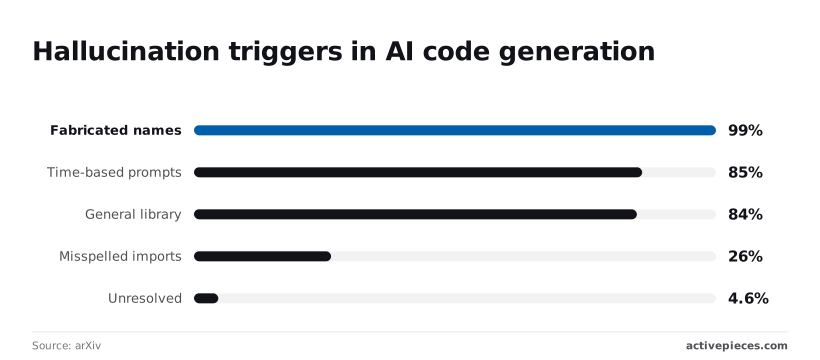
A standard LLM will likely invent a function that crashes your production build.
Research on arXiv shows that 99% of hallucination triggers involve fabricated names, meaning nearly every instance of model error stems from the invention of non-existent entities.
Core capabilities for automation teams
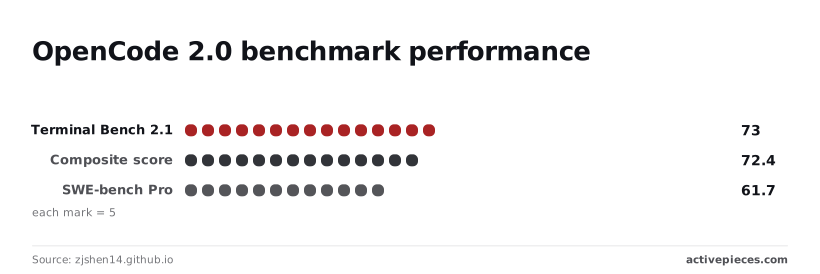
By achieving a 73.0 on the Terminal Bench 2.1 benchmark, OpenCode 2.0 targets the specific failure points of automated workflows.
This score indicates it can navigate real-world shell environments without manual intervention. This specialized focus is critical because general library errors plague 84% of AI-generated code snippets, leading to failed deployments if the model isn't strictly grounded in syntax.
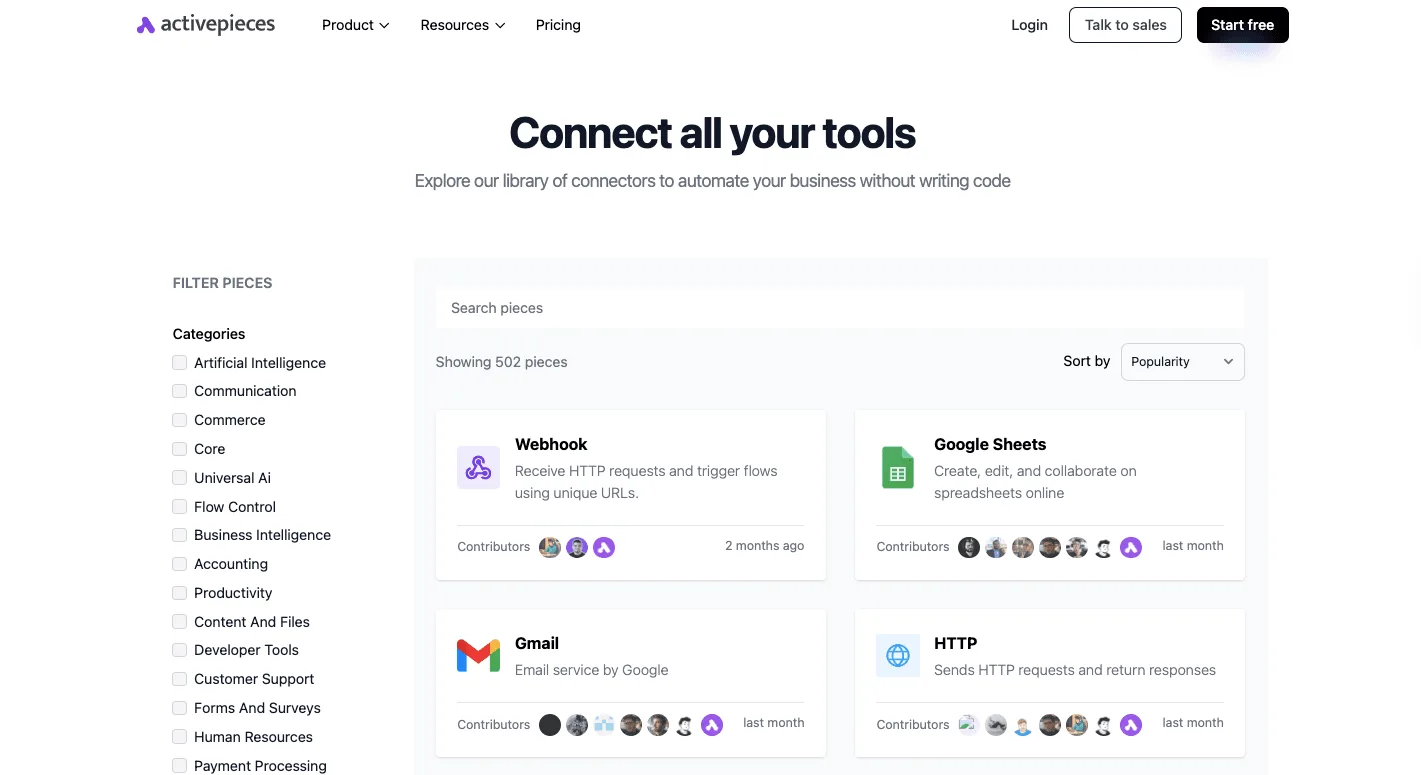
Activepieces exposes every connected integration as an agent tool, allowing a single integration to run as a step in a flow and as a schema on a per-project MCP server.
OpenCode 2.0 performance benchmarks explained
Nobody wants a trivial "Module Not Found" error to stop a deployment.
This effectively insulates the vast majority of outputs from common chronological confusion.
The Method is set to POST and the URL points to the /api/session endpoint to initiate a secure connection.
This setup demonstrates how the JSON body carries the pairing code to authenticate the agent for remote tasks. Once authenticated, the agent can receive and execute complex terminal commands.
Everything below works on Activepieces' free plan. Start without code or a credit card.
Technical improvements in the OpenCode 2.0 architecture
OpenCode 2.0 introduces a modular architecture that enables you to route complex coding tasks through a unified interface to over 75 different LLM providers.
This design allows the opencode command-line interface (CLI) to act as a central traffic controller. It receives instructions from the Web App, Desktop App, or Terminal and passes them to Models.dev, a multi-model aggregation service.
Using Models.dev as a local gateway
Models.dev is a lightweight binary that functions as a local proxy and router for your AI traffic. You download it as a standalone package or install it via the OpenCode CLI to bridge the gap between your local environment and various model endpoints.
By acting as a local gateway, this tool standardizes the communication between your automation scripts and the diverse APIs of different providers. It handles the translation of request formats and manages the secure storage of your API keys locally.
The illustration of this architecture demonstrates how the CLI abstracts the complexity of different API schemas.
You can swap from a local model to a cloud-based powerhouse without rewriting your automation scripts. This structural flexibility ensures that as new models launch, the underlying workflow remains unchanged.
OpenCode 2.0's 128k context window
For a developer working on a legacy monolith, this means you can provide context from multiple files at once. The agent understands cross-file dependencies rather than hallucinating functions that don't exist.
Claude Sonnet 5.5 and GPT-6.1 Sol achieve a perfect score of 100 on the BigCodeBench leaderboard.
Programming language support in OpenCode 2.0
This breadth ensures that teams managing polyglot architectures can use a single agent for systems-level tasks in Rust or Go, data engineering pipelines in Scala or R, and legacy maintenance in COBOL or Fortran.

According to the OpenCode documentation, this support is available across the terminal-based interface, the desktop app, and the web app. You can switch from a GUI-based code review to a CLI-based deployment script without losing language-specific linting or logic capabilities.
OpenCode 2.0's Mixture-of-Experts architecture
The transition to a Mixture-of-Experts (MoE) architecture optimizes performance by activating only a fraction of the total parameters for any given token.
This change reduces the hardware requirements for local hosting. You can run a high-capability model on a single consumer GPU rather than requiring a dedicated server rack.
By routing "expert" sub-networks to handle specific tasks like SQL generation or CSS styling, the model maintains the 73.0 BigCodeBench performance level mentioned by zjshen14.
Furthermore, this significantly lowers latency. For teams scaling across concurrent workflows, this efficiency prevents the compute bottleneck that typically occurs when general-purpose models like Claude Opus 5.5 or Grok 4.7 are hammered with high-frequency, small-scale syntax corrections.
Integrating OpenCode 2.0 into your existing workflows
You can bridge OpenCode 2.0 into your current automation stack by using generic API connectors to bypass the lack of a dedicated native integration.
While heavyweights like GPT-6 Astra or Gemini 3.8 Flash come with pre-built modules in most orchestrators, OpenCode 2.0 requires you to manually define the handshake between your workflow and the model’s endpoint.
Option 1: The HTTP Request integration for API calls
Because it allows you to send raw JSON payloads to any REST endpoint, the HTTP Request integration is the most direct way to trigger OpenCode 2.0.
Since this model is often hosted on independent inference providers or private servers, you use this integration to define the POST method and headers manually.
For specialized coding models, this approach is the only way to access non-standard parameters used for repository-wide context.
This means you aren't limited by the simplified fields of a generic "AI" module. You'll need to map the "Response Body" from the HTTP integration into your subsequent steps, such as sending the generated code to a GitHub repository or a Slack notification.
Option 2: OpenAI-compatible custom provider settings
Most automation platforms offer a "Custom OpenAI" or "OpenAI-Compatible" configuration that lets you swap out the base URL while keeping the familiar chat completion structure.
Because OpenCode 2.0 follows the standard ChatCompletions API format, you can simply point a generic AI integration to your specific host URL and input your API key.

This is the fastest setup for high-volume routing. It allows you to use the same logic you've already built for Claude Sonnet 5.5 without rewriting your variable mapping.
It effectively turns a specialized open-source model into a drop-in replacement for proprietary APIs, cutting your per-token costs significantly if you're running hundreds of small debugging tasks daily.
Connecting OpenCode 2.0 to MCP servers
Using the Model Context Protocol (MCP) allows OpenCode 2.0 to interact with your local file system or private databases through a standardized interface.
Without uploading the entire directory to a third-party cloud, this is the only secure method for letting an AI model read your local codebase.
To set this up, you run an MCP server (a small bridge program) on your machine that the automation tool calls via a webhook or a local tunnel.
| Connection Method | Primary Benefit | Technical Requirement |
|---|---|---|
| HTTP Request | Full control over model-specific parameters | Manual JSON schema mapping |
| OpenAI-Compatible | Fastest setup for existing workflows | API provider supporting ChatCompletions |
| MCP Server | Secure access to local files and tools | Local server instance running the protocol |
Prices and plan limits checked against dev.opencode.ai and opencode.ai and opencode.ai and opencode.ai on October 14, 2026.
Easier to see it running than to read about it: set it up free, no card.
Next steps for evaluating OpenCode 2.0 in production
You can validate OpenCode 2.0’s performance by swapping it into your existing CI/CD pipelines to see if it catches the edge cases that general-purpose models often overlook.
While a model like Gemini 3.8 Flash is a beast for high-speed agentic routing, OpenCode 2.0 is built specifically for the syntax-heavy heavy lifting that usually costs a fortune in token overages.
If you're already running local infrastructure, you can bypass the per-request fees of proprietary APIs and keep your proprietary logic within your own firewall. To get a baseline on whether this shift actually improves your sprint velocity, follow these steps on your next deployment cycle.
How to install and configure OpenCode 2.0
- Run the curl installer to replace V1. This ensures your environment is running the latest binaries rather than deprecated libraries.
- Connect a local model via Models.dev, which is a local gateway tool, to route traffic away from expensive public endpoints.
- Execute a 'roborev refine' command with a 10-iteration limit to test auto-fixing. You can then see if the model resolves linting errors without human intervention.
Testing this sequence allows your team to measure the "fix rate" against your current benchmark. This is the only metric that matters when you're trying to justify moving away from a flagship like GPT-6 Astra.
If the model fails to resolve the 'roborev' loop within those iterations, it means your codebase has architectural debt that even a specialized model can't parse. This signals you need to refactor before automating.
Once these local tests clear, you can start looking at how to scale these workflows across the rest of your engineering department. You can do this without hitting the rate limits that typically throttle growth on shared cloud tiers.
How Activepieces operationalizes OpenCode 2.0 workflows
Activepieces provides the orchestration layer needed to turn OpenCode 2.0 from a standalone CLI into a functional member of your engineering team.
By using the platform's native HTTP integration, you can build flows that monitor GitHub pull requests and automatically send the diffs to your self-hosted OpenCode endpoint for review.
This setup ensures that every line of code is vetted by a specialized model before a human developer even opens the PR, catching the syntax errors that plague 84% of AI-generated snippets, so teams spend significantly less time on manual code reviews.
The platform handles the complex JSON mapping required to feed repository-wide context into the model's 128k window.
Because Activepieces is MIT-licensed and can be self-hosted via Docker, you can maintain a completely private automation stack where both the orchestrator and the OpenCode 2.0 model reside behind your firewall.
This architecture is what allows customers like ContentReel to automate high-volume technical tasks without risking data leaks to third-party LLM providers.
Beyond simple API calls, Activepieces exposes every connected integration as an agent tool. This means when OpenCode 2.0 identifies a bug, the workflow can immediately trigger a Jira ticket creation, a Slack alert to the on-call engineer, or a direct commit back to the branch.
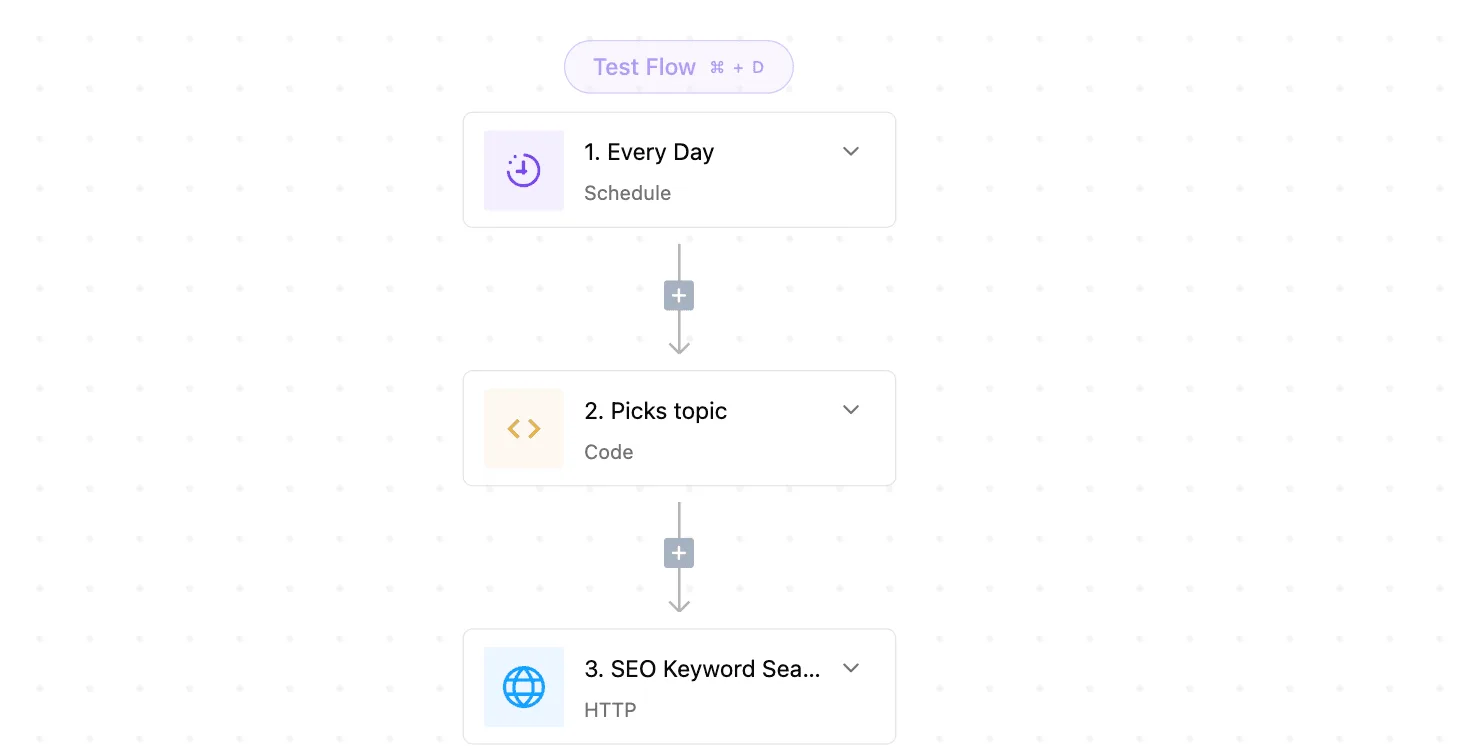
You can verify this tool-calling capability in the packages/pieces directory of the core repository, which contains over 739 pre-built integrations ready for programmatic execution.
By using the "Custom OpenAI" configuration within the Activepieces AI integration, you can treat your OpenCode 2.0 instance as a drop-in replacement for expensive proprietary models, which allows organizations to scale their automation infrastructure without increasing their software budget, effectively removing the financial barrier to deploying advanced AI workflows, so teams can prioritize innovation over licensing costs.
This allows you to route high-frequency, low-complexity debugging tasks to your local infrastructure while reserving flagship models for broad reasoning. The result is a significant reduction in per-token costs without losing the ability to scale your CI/CD automation across polyglot architectures.

Frequently asked questions about OpenCode 2.0
Can I self-host OpenCode 2.0 on private infrastructure?
You can self-host OpenCode 2.0 on any private infrastructure that supports Docker containers and meets the GPU memory requirements for the model weights.
Deploying locally means your proprietary source code never leaves your internal network. This ensures that sensitive intellectual property remains compliant with strict data residency policies.
If you're already running vLLM, you can swap the model path to OpenCode 2.0 to immediately benefit from its specialized logic without rewriting your deployment scripts.
This setup avoids the per-token costs of proprietary models like GPT-6 Astra, which can become a significant financial drain as your CI/CD pipeline scales.
Does OpenCode 2.0 support legacy COBOL or Fortran?
OpenCode 2.0 includes specific training data for legacy languages including COBOL and Fortran to assist in modernizing mainframe applications.
Having this support allows your team to generate documentation or refactoring suggestions for decades-old systems that general models often hallucinate on. This reduces the risk of breaking critical business logic during migrations.
While a general-purpose model like Claude Sonnet 5.5 is excellent for modern web stacks, OpenCode 2.0 stays focused on the syntax quirks of these older languages.
This means you spend less time manually correcting indentation errors in fixed-format code. It's an ideal bridge for banking or government sectors that need to port legacy functions into modern microservices.
How do I migrate my API keys from v1.0 to v2.0?
Because the v2.0 architecture uses a different authentication header format, migrating your API keys requires generating a new credential set through the provider dashboard.
Updating these keys ensures your requests are routed to the optimized inference endpoints. Your developers won't experience the latency spikes associated with the deprecated v1.0 clusters.
To complete the switch without downtime, follow this sequence:
- Generate a new Secret Key in your provider console to enable v2.0 access.
- Add the new key as an environment variable in your GitHub Actions or GitLab CI settings.
- Update your orchestration tool, such as Make or Pipedream, to point to the v2.0 endpoint URL.
- Revoke the v1.0 key only after confirming the new logs show successful 200 OK responses.