
Automation Templates: 6 Platforms Compared (2026)

Oct 15, 202615 min read
If your stack's mainstream and you want the most ready-made workflows to start from, Zapier suits you, because its gallery covers more apps than any other library here. The tradeoff shows up later, in how it bills.
1. Zapier: best for the widest template library
What it is and who it suits
Zapier's a hosted automation platform. Its gallery holds pre-built "Zaps": a trigger in one app, then one or more actions in others. It suits non-technical teams who run no infrastructure.
Activepieces handles the headcount problem differently: of its 740 integrations, roughly 60% were contributed by outsiders rather than written by its own staff, because the MIT-licensed core lets anyone build an integration and submit it for merge.
Zapier and Make take no outside contributions to their catalogs.
Pricing as published, checked 15 October 2026
Price the overage rule before you rely on a template, because the free plan's only for trying one.
| Zapier | |
|---|---|
| Starting price and billing period | Paid tiers sit above a free plan, billed monthly or annually; check the pricing page for your tier |
| Free plan allowance | A small monthly task cap, enough to test a template, not to run one |
| Overage rate | Extra tasks cost a premium over your plan's per-task rate |
| Integration count | Thousands of apps, the widest catalog in this comparison |
| Best for | Mainstream stacks that want a template for almost every pairing |
| Main limit | Every action step counts as a task, so multi-step templates get expensive at volume |
Starter template: form submission to CRM record and Slack alert
The trigger is a new form submission. The apps are your form tool, your CRM (where customer records live), and Slack (team chat).
- Trigger: a new response arrives in the form.
- Action: search the CRM for the email address.
- Action: create the contact if none exists, or update it if one does.
- Action: post a message in a Slack channel with the name, email, and a link to the record.
At low volume that's free; at real volume, it's your first bill.
Zapier template strengths for small teams
A template probably already exists for your exact pair of apps, and setup takes minutes.
Zapier template limits and task-based pricing
Task-based billing punishes long workflows, and a busy month costs more than a quiet one. Test your busiest template at realistic volume first.
The fastest way to settle a shortlist is to try one. Activepieces is free to try, no credit card.
2. Make: best for visual multi-step templates
Make is the library where that volume test matters most: its templates are visual scenarios with branches and loops, and its bill counts every module step, not every run.
Make is a drag-and-drop automation builder. Each template's a canvas of connected modules, with routers that split a flow into branches. It suits people who want to see the whole flow, such as an operations lead or a finance assistant.

Make has a free plan with a monthly cap, and paid tiers that raise the allowance. Each module step in a scenario uses one credit.
According to Help, a five-step scenario needs 5,000 credits a month at 1,000 runs, 25,000 at 5,000 runs and 100,000 at 20,000 runs, so higher test volumes require significantly more credits.
Starter template: invoice email to spreadsheet row via AI extraction
The trigger's a new email in Gmail, the inbox service, with an invoice attached. An AI module reads it, and a Google Sheets module adds a row.
The prompt that worked: "Extract vendor, invoice number, date, total and currency from this email. Return JSON only, no commentary. Use null for anything missing." Run it on a few messy real invoices before you trust it.
You can see every branch, so debugging means clicking the module that failed.
Routers, iterators and filters all add to the bill, because credits climb with step count. Count the steps on your busiest path, multiply by your monthly runs, and compare that to the plan before you commit.
3. How to edit templates with n8n
If someone on your team is comfortable reading JSON and HTTP errors, n8n suits you. Its execution-based pricing means step count matters less here than on tools that bill per task.
n8n's a workflow builder with a visual canvas and a community library of shared templates. Each template imports as a full workflow you can open, rewire and extend. It suits developers, ops engineers and technical founders.
Pricing and licence as published, checked 15 October 2026
n8n sells a hosted cloud plan and also lets you self-host. Cloud plans are priced by workflow executions, and a whole run counts as one execution however many steps it has, so long templates cost no more than short ones.
Read n8n's own licence terms before you build a paid product on top of it: self-hosting falls under a source-available licence, not a standard open-source one. Current prices and limits are on n8n's pricing page.
Starter template: support ticket triage with an AI model
My first prompt in the model node was "Classify this ticket." It returned a friendly paragraph, and the Switch node after it matched nothing. The version that worked: "Classify this support ticket as billing, bug, or how-to. Reply with exactly one word."
The trigger is a new ticket arriving through a webhook. The model node labels it, the Switch node routes by label, and a final node posts to the right team channel.
A template that's 80% right's a quick fix instead of a rebuild, because every node's editable. Self-hosting keeps ticket text on your own servers.
Import a template and you get the structure of someone else's workflow, not your logins. Every credential node's flagged red until you connect your own account, and HTTP Request nodes often hold hardcoded URLs or headers from the author's setup.

Clear both before you trust a single run.
4. Activepieces: best for open-source, self-hostable templates
If you'd rather pay for a server than per run, Activepieces has an MIT-licensed core, so you can host the templates yourself and volume costs become your hosting bill. Its 740 integrations sit in the open monorepo, and the cloud free plan carries unlimited flows.

Activepieces is open source and MIT-licensed at the core, and it ships a library of ready-made templates. It runs as a hosted cloud service or as software you install yourself, and MoneyGram, Moneypenny, Alan and FundingSocieties run it in production.
It suits teams with someone who can maintain a server, or teams whose data can't sit on a third party's infrastructure.
The free cloud plan costs $0, with no card needed. It includes 1,000 credits a month, unlimited flows and up to 5 users, and when the credits run out, flows wait for the next day's credits.
Paid cloud plans are Plus at $20 a month and Team at $200 a month, with Ultimate through sales. The self-hosted community edition is also available.
If a template will run constantly, weigh those 1,000 monthly credits against your expected runs to decide whether cloud or self-hosting's cheaper.
Starter template: new lead to Slack alert and CRM update
The trigger's a new lead arriving through a webhook, such as a form submission.
- Catch the webhook and read the lead's name, email and company.
- Look the contact up in HubSpot, the CRM here.
- Create or update the contact record.
- Post an alert to a channel in Slack.
Start this flow free in Activepieces
You can inspect and modify the code. Self-hosting keeps lead data on your own infrastructure. And you aren't charged per run on a server you control.
Next to Zapier's 9,000+ apps, the Activepieces catalogue looks small, so check that every app in your stack has an integration before you build. A missing one means writing a custom step or an HTTP call yourself.

That's the main reason some buyers should pick Zapier or Make instead:
- A smaller app catalogue than Zapier's 9,000+
- Fewer templates to start from
- Self-hosting upkeep, which lands on you
- Gaps for niche apps
- Less vendor support
If two or more of those would hurt, the Platform size is one factor buyers weigh when making a purchase.
If none do, Activepieces' free cloud plan, with unlimited flows and 1,000 credits a month, lets you test your own busiest template before you spend anything.
Reading a table only gets you so far. Build the same workflow in Activepieces and compare it yourself.
5. Microsoft Power Automate: best for Microsoft 365 teams
If your apps are Outlook, Teams, SharePoint and Excel, start with Power Automate. Its templates for those apps run on standard connectors already bundled into the Microsoft 365 plan you pay for.
Power Automate is Microsoft's own workflow builder, and its template gallery leans hard on Microsoft apps.
On Microsoft's plan comparison, Business Basic is listed at $7 per user per month, Office 365 E1 at $10 and Business Standard at $14.
It puts Business Premium at $22, Office 365 E3 at $23 and E5 at $57. The plans span an eightfold spread, so check which plan you actually hold before assuming a flow's free.
Premium connectors are never part of the Business plans. The table shows what each tier gives you for automation.
| Price | Standard connectors | Premium connectors | Cost outside Microsoft apps | |
|---|---|---|---|---|
| Microsoft 365 Business Basic | $7/user/month | Included | Not included | Premium connectors need a separate license |
| Microsoft 365 Business Standard | $14/user/month | Included | Not included | Premium connectors need a separate license |
| Power Automate Premium per user | Priced per user, on top of Microsoft 365 | Included | Included | Covers premium connectors for that user's flows |
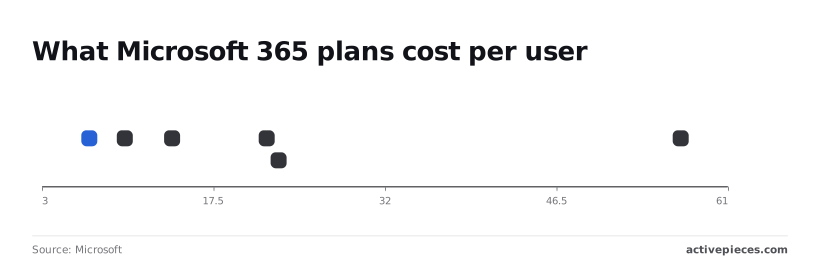
The $7 Basic plan and the $14 Standard plan therefore automate the same things. Standard's extra $7 buys desktop apps, not connectors.
Once a flow touches a premium connector, such as the HTTP connector that calls any web API, every user running it needs the per-user license.
Starter template: approval request in Teams with SharePoint logging
The trigger's a new item in a SharePoint list. The flow posts an approval card in Teams, waits for the approver, then writes the decision and timestamp back to the list. All three steps use standard connectors, so it costs nothing beyond your existing plan.

- Templates for Microsoft apps work with little setup.
- Sign-in and permissions follow your existing Microsoft accounts.
A flow that calls a non-Microsoft system through a premium connector adds per-user licensing, so price it at your real headcount, not at the one person who built it.
6. How to build simple applets with IFTTT
If you're one person with simple automations, IFTTT is built for you.
Because it prices by applets (its name for a saved trigger-and-action pair) rather than by seats, what you count here is how many applets you need.
Each applet's one trigger and one action: "if this happens in app A, do that in app B." It fits a freelancer, a small shop owner, or anyone whose automations are one-step chores.
IFTTT publishes a free tier with a small applet cap and a paid Pro tier with a higher one. I'm leaving the exact figures out here, so confirm them on IFTTT's pricing page before you commit.
Install ten ready-made applets because a template library tempted you, and you can be pushed off the free tier quickly.
Starter template: saved email attachment to cloud folder
The prompt I'd give IFTTT's applet search is plain: "save Gmail attachments to Google Drive." Gmail's the inbox and Google Drive's the cloud folder.
The trigger's a new email with an attachment arriving in Gmail, and the action uploads that file to a chosen Google Drive folder. That's one applet, so it costs one slot against your cap.
There's no builder to learn, and setup takes minutes. It also covers consumer services and smart-home devices that business-focused platforms often skip.
One trigger, one action: that's the whole model. If you need "only save invoices from this sender, rename the file, then notify the finance channel," you're stacking applets or giving up.
How to choose an automation template library
Pick the library whose templates already connect to the apps you pay for, then price one busy workflow at your real volume. A template that fits your stack but bills per task can still sink the budget.
Match the template to the apps you already pay for
The table shows which platform fits each situation and what to check before committing.
** A template that fits your stack but bills per task can still sink the budget.
| Situation | Recommended platform | The reason | The watch-out |
|---|---|---|---|
| Non-technical marketer | Zapier | Largest set of plain-language templates | Costs the most at volume |
| Microsoft shop | Power Automate (Microsoft's own tool) | Native links to the Microsoft 365 apps you already license | Templates for non-Microsoft apps are thinner |
| Developer team | n8n Cloud | Code steps and branching | Someone must maintain the logic |
| Privacy-restricted data | Self-hosted n8n | Data stays on your own servers | You own uptime and updates |
| Tight budget | Activepieces | Lowest cost in the comparison below | Check that your apps have templates |
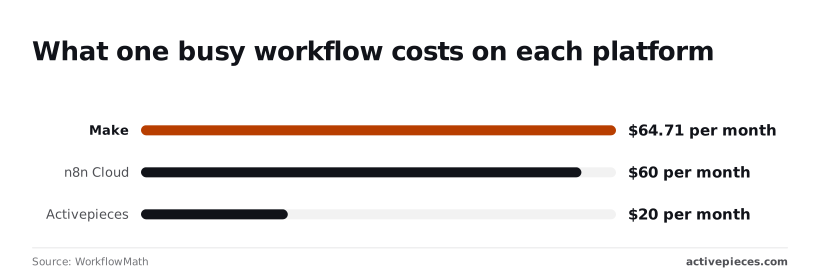
Now the volume math. WorkflowMath priced one 5-step workflow at $433.50 a month on Zapier, $64.71 on Make, $60 on n8n Cloud and $20 on Activepieces.
Zapier's price is roughly seven times Make's, so a free template there can become your The text came through as just a fragment, "largest automation bill.", with no numbers, product names, or competitor claim to work from.
Could you paste the full sentence so I can rewrite it?
Mistakes that break templates in production
- Running a template unchanged, so it still points at the demo's fields and filters.
- Ignoring per-task billing, so every extra step multiplies the monthly cost.
- Skipping error handling, so one failed step silently drops records.
- Using over-permissioned accounts, so a bad step can edit or delete far more than intended.
Checks before running an automation template live
- Run it on five test records and compare each field against the source.
- Add an alert on failure, so you hear about errors the same day.
- Swap any admin login for an account limited to the data this flow needs.
- Multiply steps by expected runs per month and check the total against the figures above.
FAQ on automation templates
These are the questions that come up once a template meets real accounts and real data.
What is an automation template?
An automation template's a prebuilt workflow, with a trigger, the steps after it, and the apps connected, that you copy into your own workspace instead of building from scratch.
The logic is already written. You supply the logins and the details that are specific to you, such as which channel or which spreadsheet.
Are automation templates free?
Usually the template itself costs nothing, but running it can. Most platforms let you import a template on any plan, and the bill arrives through how many tasks or runs it consumes.
If you're weighing a free template, check the pricing of the plan you'd be on, because one that fires on every incoming email is a different cost from one that runs once a day.
Can I edit a template after importing it?
Yes. Once imported, the workflow's a copy that belongs to you, and you can change any step, swap an app, or delete a branch without touching the original.
The card lands on the canvas as a finished flow. The work's in the one connector block you adjust by hand, with a permissions checklist beside it showing what that block can read and write.

When you edit an imported template, most of the changes happen at the connectors, and each one's also a permissions decision. After you adjust a block, run it once on a test record and see whether it did what you meant, not what you typed.
Do templates work with any app?
No. A template works with the apps it was built around.
Some platforms can swap one app for a similar one only when both have a connector in that platform. If your tool has no connector, you're rebuilding that step by hand or going through a generic web request step.
Is it safe to connect company accounts to a template?
It's as safe as the permissions you grant. Read what each connection asks for before approving it, give it the narrowest access that still works, and prefer a dedicated service account over a personal login.
Then confirm who in your company is allowed to authorize connections at all.
Related reading
References
Still comparing
The fastest way to settle it is to build something.
Open source under MIT, so you can self-host the same thing later.
Start free Talk to sales