
AWS PrivateLink Pricing: Monthly Cost Guide (2026)

Nov 22, 202615 min read
PrivateLink pricing fundamentals
PrivateLink pricing for multi-AZ endpoints in short
PrivateLink bills each interface endpoint by the hour in every Availability Zone it occupies, plus a per-GB processing charge that falls as volume grows. Your bill therefore tracks how many endpoints you deploy, not the unit rate.
AWS PrivateLink is the service that lets one VPC reach another VPC's service, or an AWS service, over private addressing without crossing the public internet.
Compliance teams like that private path for a plain reason. Article 32 of the GDPR asks for security appropriate to the risk, and keeping traffic off public routes is an easy control to evidence.
Say a self-hosted automation platform such as Activepieces calls a private database. The cost of that control depends on how many copies of it you run.
Every price line in one table
Read the limits column first: it shows which lines you can avoid by choosing a different endpoint type. The table lists each charge PrivateLink can generate, with what it covers and where it stops.
| Price line | Rate | Inclusions | Limits | Free tier | Check date |
|---|---|---|---|---|---|
| Interface endpoint | Per AZ, per hour | An elastic network interface in each AZ you select | Billed for every AZ, whether or not it carries traffic | None | November 2026 |
| Data processing | Per GB, in descending tiers | Traffic through the endpoint | Tiers apply to volume, not to endpoint count | None | November 2026 |
| Gateway endpoint | No charge | Private routing to S3 and DynamoDB | Supports only those two services | Nothing to bill | November 2026 |
| GWLB endpoint | Hourly plus per GB | Traffic steering to a security appliance fleet | Billed like an interface endpoint | None | November 2026 |
| Provider load balancer | Hourly plus capacity units | Fronts the service you expose | Paid by the provider, not the consumer | None | November 2026 |
Only the gateway row costs nothing, and the rest scale with deployment shape. The next question is whether the date and region on this table apply to your account.
Before you budget, confirm the rates against the AWS pricing page for your own region, because they are a snapshot.
If you are running this arithmetic for your own team, see what the same workload costs on Activepieces.
What charges count on your PrivateLink bill
Those rates land on your invoice as four separate lines, and which account pays each depends on which side of the connection it sits.
- Endpoint-hours for each endpoint in each AZ: the consumer pays.
- GB processed through the endpoint: the consumer pays.
- Load balancer hours and LCUs for the service behind it: the provider pays.
- Transfer lines, such as cross-region traffic, billed separately from the above.
Consumer side: endpoint-hours and GB processed
Run one service in three AZs across four VPCs and twelve hourly meters are ticking, because every endpoint in every AZ accrues hours.
Data processing is the second line. AWS charges $0.01 per GB for the first 1 PB, so any workload below a petabyte pays that rate.
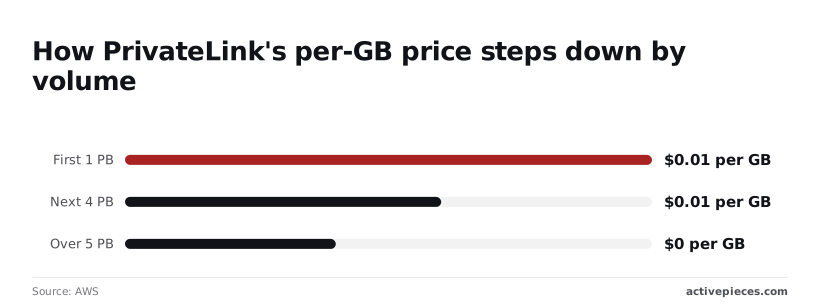
The rate falls to $0.006 per GB for the next 4 PB and $0.004 per GB beyond 5 PB, so only organizations storing multiple petabytes achieve these lower rates.
If you expose a service, you need a Network Load Balancer, which bills hours and LCUs whether one consumer connects or fifty. That cost sits with the provider, so a vendor may pass it back through its own pricing.
If you are the provider, it's a fixed cost you recover across consumers.
Which AWS services need an endpoint at all
Interface endpoints and Gateway Load Balancer endpoints are both PrivateLink-billed kinds. According to Pinpole, gateway endpoints for S3 and DynamoDB carry no hourly or data processing charge, so use them where they fit.
Private subnets with no NAT or internet route need interface endpoints for other AWS services, and each is another multiplier.
Keeping traffic inside one region means deploying endpoints there, since they are regional, which is a related point for data residency.
Below 1 PB the rate never moves, and that flat stretch is where nearly every bill sits, so only a small minority benefit from the tiered discounts.
Monthly PrivateLink cost at three realistic sizes
A 730-hour month costs about $74 for a small estate, $378.50 for a mid-size one and $1,814 for a large one, which means costs scale substantially with deployment size.
Nearly every bill sits on the flat $0.01 per GB rate, and endpoint-hours are the bigger share in all three.
The table multiplies endpoints by Availability Zones (AZs) at $0.01 per hour, then adds data at $0.01 per GB, so endpoints accrue continuous monthly costs while data transfer is usage-dependent.
Read the endpoint-hours column first: it grows with the footprint you build, not with the traffic you send.
| Estate | Endpoint-hours | Data cost | Total |
|---|---|---|---|
| Small (5 endpoints, 2 AZs, 100 GB) | $73.00 | $1.00 | $74.00 |
| Mid-size (15 endpoints, 3 AZs, 5 TB) | $328.50 | $50.00 | $378.50 |
| Large (60 endpoints, 3 AZs, 50 TB) | $1,314.00 | $500.00 | $1,814.00 |
Traffic grew 500-fold from the first row to the last, but the bill grew about 25-fold, which tells you the hourly charge, not the data charge, is what you control.
At 100 GB, data adds only $1 against $73 for ten endpoint-AZ pairs, which makes endpoints the overwhelming cost driver.
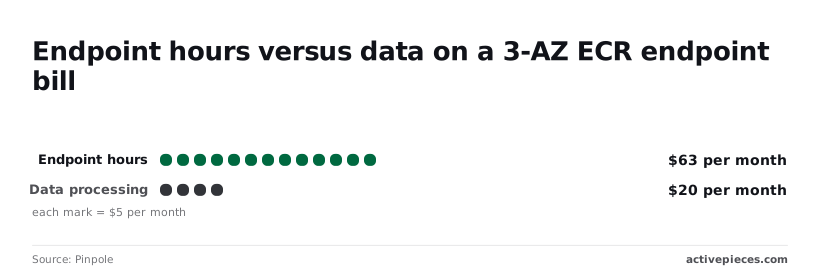
Pinpole's ECR pull example shows the same skew: $63 in endpoint hours against $20 in data processing. At modest traffic, you pay mostly for endpoints sitting idle, so removing one saves more than any traffic tuning.
$328.50 is what forty-five endpoint-AZ pairs cost, against $50 for data. Endpoint-hours are still about 87% of the bill, so consolidating services onto fewer endpoints is the first saving to look for.
At modest traffic, you pay mostly for endpoints sitting idle, so removing one saves more than any traffic tuning.
At the large size, 180 pairs cost $1,314 and data adds $500, so endpoint-hours dominate the expense. Repost reports that even at 50 TB, endpoint-hours are roughly 72% of the total, suggesting endpoint optimization deserves priority over data optimization.
Dropping one AZ across all 60 endpoints would save $438 a month, nearly as much as the whole data charge, making infrastructure architecture a major cost lever.
The next question is which of those endpoints you can actually remove.
Hidden PrivateLink costs and limits that surprise teams
Most of the surprise comes from multiplication, transfer charges that sit beside the endpoint fee, quota ceilings and endpoints nobody remembers creating. Each of these points to an endpoint you can remove.
Per-AZ and per-VPC multiplication
You get one network interface in every Availability Zone subnet you attach, and an interface endpoint is billed per network interface.
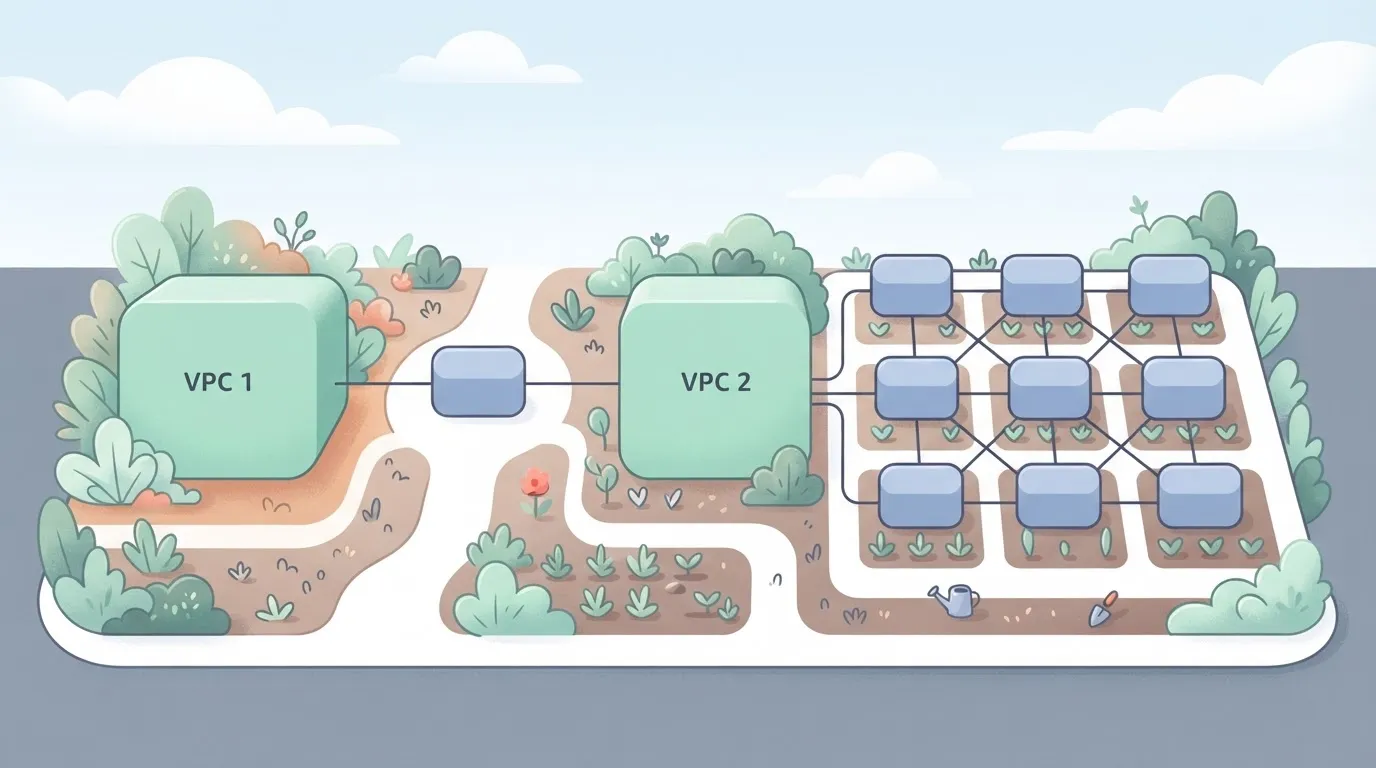
Picture one service's endpoint drawn once, then copied into 3 AZ subnets in each of 3 VPCs, with a running count of 9 endpoint-ENIs and the hourly fee beside each.
Read it as one line item on the architecture diagram becoming nine on the invoice, so a design that looks like a single connection is billed nine times over. Every additional service repeats the whole grid.
Data transfer charges beside the endpoint fee
When a client reaches an endpoint interface in another zone, inter-AZ data transfer adds no charge, and only the per-GB processing charge applies to traffic through the endpoint. Inter-region paths add more.
Under GDPR Chapter V, moving personal data out of the EEA triggers transfer obligations, so region choice is also a legal question. You can't consolidate endpoints into one cheaper region without checking where the data lands.
Quotas and throughput limits from the AWS docs
If you replicate endpoints per workload, you can hit a quota before you hit a budget.
Each account has default quotas on endpoints per VPC, and each endpoint interface has bandwidth limits that scale up under sustained load rather than instantly. Check the current figures in the AWS documentation before you plan.
Then a bursty batch job gets throttled by a limit nobody sized for.
Idle and forgotten endpoints
Whether or not any traffic crosses it, an endpoint bills for every hour it exists. Test VPCs, migrated services and abandoned proofs of concept keep their interfaces and their fees.
Quieter still is private DNS: records for a retired endpoint can still resolve and mask the fact that nothing uses it. An inventory of endpoints with zero processed bytes is the cheapest saving you'll find.

Worth checking against a plan that does not meter every step: one credit covers a whole run on Activepieces.
PrivateLink versus connectivity alternatives
PrivateLink is rarely the cheapest way to move bytes in this comparison. It's the only option that exposes one service, not a whole network, and tolerates overlapping address ranges.
The table sets the five options side by side, so you can see where cost and isolation pull apart.
| Option | Hourly cost | Per-GB cost | Reachable traffic | Overlapping CIDRs | Cheapest at 100 GB | Cheapest at 5 TB | Cheapest at 50 TB |
|---|---|---|---|---|---|---|---|
| Interface endpoints | Per endpoint, per AZ | Per GB processed | One AWS or partner service | Tolerated | Rarely; hourly fees dominate | Often, against NAT, for service traffic | Compare processing rates first |
| Gateway endpoints | None | None | S3 and DynamoDB only | Tolerated | Yes, for those two services | Yes, for those two services | Yes, for those two services |
| NAT Gateway | Per gateway | Per GB processed | Internet and any routable destination | Not a constraint for outbound internet traffic | Rarely | Seldom for AWS-service traffic | Seldom for AWS-service traffic |
| VPC peering | None | Data transfer only | Whole peered VPC | Not allowed | Yes, for VPC-to-VPC | Yes, for VPC-to-VPC | Yes, for VPC-to-VPC |
| Transit Gateway | Per attachment | Per GB processed | Many VPCs and on-premises | Not supported without workarounds | No | Only with many VPCs | Only with many VPCs |
Read the table by destination first. The cheapest option is usually decided by what you're reaching, not by the rate.
When PrivateLink is cheaper than a NAT Gateway
Suppose traffic to an AWS or partner service would otherwise cross a NAT Gateway. An interface endpoint removes one per-GB charge and keeps the path off the public internet.
That helps with the "appropriate technical measures" expected under GDPR Article 32, and it keeps data inside a boundary you can describe to an auditor.
The saving grows with volume, provided each endpoint carries real traffic.
For S3 and DynamoDB, gateway endpoints beat it at any size, because they carry no charge. Between two VPCs with distinct CIDRs, peering beats it. PrivateLink wins only when isolation or overlapping ranges rule those out, so fewer endpoints is the design goal.
Ways to reduce PrivateLink costs while maintaining isolation
Cut the number of endpoints rather than the rate: remove idle ones, use free gateway endpoints, and share what remains. Every step keeps the private path, so isolation stays intact. Work through them in this order:
- Tag every endpoint and group spend by tag in Cost Explorer, so each hourly fee has an owner.
- Delete endpoints that carry no traffic.
- Move S3 and DynamoDB access to gateway endpoints, which have no hourly or per-GB charge.
- Run two Availability Zones, not three, in non-production.
- Consolidate into a shared VPC, once you've priced the Transit Gateway.
The last step is the one that needs arithmetic, and the paragraphs below cover the decisions behind it.
Centralise or distribute endpoints: the trade-off
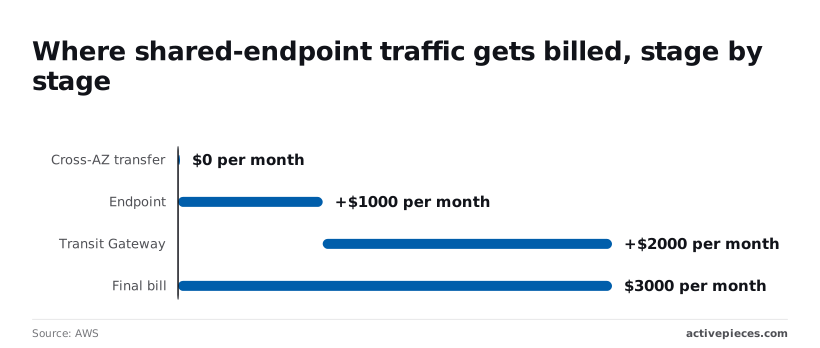
Centralising removes duplicate endpoints but adds a Transit Gateway hop. At 100 TB a month, endpoint processing costs $1,000 under AWS PrivateLink pricing, and Transit Gateway data processing adds $2,000 under AWS Transit Gateway pricing, meaning data costs double the endpoint fees at this scale.
That makes a $3,000 final bill, three times the endpoint charge alone.
On this path, cross-AZ transfer adds $0, so it's not worth optimising. Centralise low-volume services; for high-volume ones, the hop can cost more than the duplicate endpoints it replaces.
Dropping from three AZs to two removes a third of the hourly endpoint fees in each environment. Production needs the resilience; a test environment rarely does, and its data should be synthetic.

Without cost allocation tags, an unowned endpoint is just a line item nobody will delete. Activate them, then filter Cost Explorer by tag.
Report PrivateLink spend weekly with Activepieces
Activepieces can't replace PrivateLink or cut an endpoint's rate. A scheduled workflow can pull your AWS cost data every week and tell a named person which endpoints are costing money and which look idle.
The steps it uses are integrations in the open source repository, which counts 750 integrations under an MIT-licensed core, so you can read what each one does before you run it.
Describe the weekly report to the built-in chat and it publishes a live flow in your account, the same kind of flow a builder would assemble by hand.
That gives the owner an unowned endpoint needs: a recurring prompt, in a channel they already read, that someone has to answer.
What the workflow does
In the screenshot below, the flow is titled "Test Flow" in the Activepieces builder and is a general-purpose template rather than a PrivateLink-specific one.
It starts with a schedule trigger and passes through Google Sheets, a loop, a date helper, an HTTP request, two AI steps and a Sheets insert, so any single step failure blocks the entire workflow.
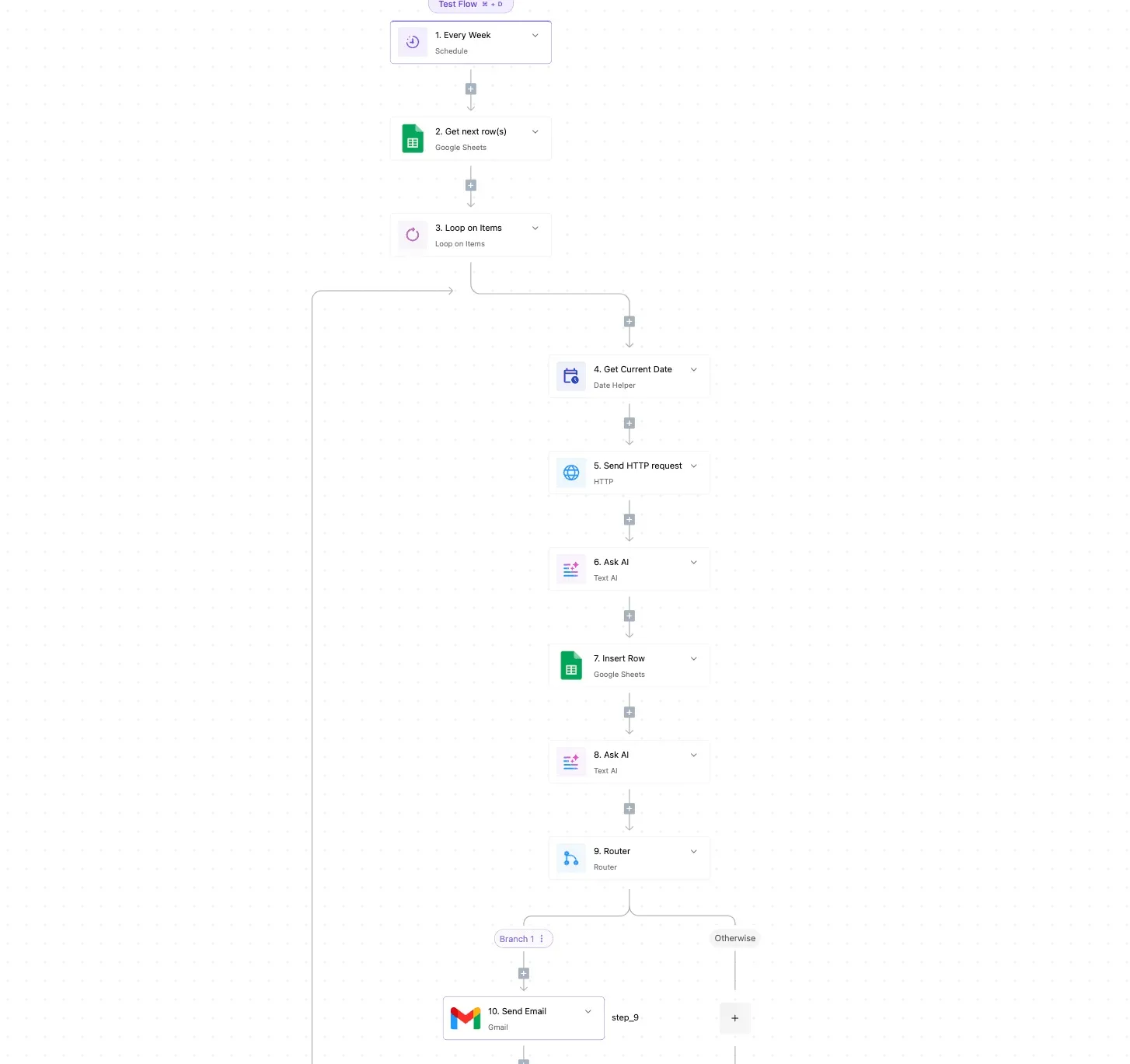
After that comes a router with a "Branch 1" and an "Otherwise" path, then a Gmail send step.
Read it as a shape to adapt: every step is a box you can swap for the one your reporting needs.
For this problem, the schedule trigger fires weekly. The HTTP request calls the AWS Cost Explorer API, filtered to VPC endpoint usage, and the loop walks through each result.
The date helper sets the reporting window, and the Sheets insert keeps a running record, so you can see whether an endpoint's cost is growing or flat.
The router then separates endpoints with meaningful spend from those showing little or no traffic, and the last step sends each group to its owner by email or Slack.
Because the output lands in a sheet, the history becomes evidence when you argue for consolidating endpoints.
Each weekly run also leaves a run trace in your Activepieces account, so when a figure in the report looks wrong you can open that run and read what happened step by step.
What the PrivateLink spend workflow does not do
It doesn't delete, resize or merge anything. Removing an endpoint stays a human decision, which is the right place for it, since a quiet endpoint may serve a monthly job.
Whatever Cost Explorer reports is all it sees. Cost data arrives with a delay, so a freshly created endpoint can run for a while before it appears. And a low-traffic flag is a prompt to investigate, not proof the endpoint is unused.
You must supply the AWS credentials and the filters yourself, and the owner mapping lives in your sheet, so it's only as accurate as you keep it.
Frequently asked questions
Pricing and free tier
Is AWS PrivateLink free for the first 12 months?
No, don't plan around a free year. Interface endpoints bill by the hour from the moment they exist, plus a per-GB data charge, so a new account pays for them like any other.
Check the current free tier terms on AWS's pricing page before assuming otherwise.
Do I pay for PrivateLink if no traffic flows?
Yes, the hourly charge accrues whether or not a single byte moves. It's charged per endpoint per Availability Zone, so an idle endpoint left in a forgotten VPC is pure cost.
Gateway endpoints for S3 and DynamoDB are the exception: they carry no hourly or per-GB fee.
Comparing with NAT and cross-region costs
Is PrivateLink cheaper than a NAT Gateway?
It depends on how many endpoints you run, not on the rate. A NAT Gateway charges hourly plus a per-GB processing fee on everything it handles.
An interface endpoint removes that processing fee for the service it fronts, but adds its own hourly fee in every zone.
A few busy endpoints usually beat NAT. Dozens of quiet ones, multiplied across VPCs, usually don't. Moving S3 and DynamoDB traffic to gateway endpoints is the cheapest change of all.
Does PrivateLink charge for cross-region traffic?
Yes. Traffic that crosses regions incurs inter-region data transfer charges on top of the usual endpoint fees.
This also matters for compliance: if GDPR Chapter V transfer rules apply to your data, a cross-region path is a data-location decision, not just a billing line, and should go through the same review.
Finding the costly endpoints
How do I find which endpoints are costing me most?
Group your costs by usage type in Cost Explorer, filtered to the VPC service, to separate hourly charges from data processing.
For per-endpoint detail, enable resource IDs in the Cost and Usage Report and join them to the ownership sheet. Any endpoint with no owner and little traffic is your first candidate for removal.
Related reading
Running the numbers
See what the same workload costs here.
Free forever plan, and every paid plan self-hosts at no extra cost.
See pricing Talk to sales