
Hunter API: Endpoints, Credit Costs and Pricing (2026)

Nov 2, 202615 min read
The Hunter API is the REST API for domain search, email finder and verification, and it slots easily into Activepieces flows or any other tooling you already run.
The right plan is the smallest one whose monthly credits cover your call volume across the endpoints you actually use.
The table below maps four common situations to a plan and shows what forces each upgrade. Read the last column first, because it names what will page someone at 2am.
Which Hunter plan fits your build
| Situation | Recommended Hunter plan | Monthly cost | The catch that forces an upgrade |
|---|---|---|---|
| Solo tester | Free tier | No charge | Credits run out mid-test, and verification calls draw from the same pool |
| Team of 5 | Entry paid tier | Entry paid rate | Shared credits get drained by one noisy job, and nobody owns the budget |
| Team of 25 needing admin controls | Mid-tier or above | Mid-tier rate | Seat management and usage oversight sit on higher plans |
| Heavy API volume | Highest self-serve tier | Highest published rate | Rate limits and retries consume credits faster than forecasts assume |
Prices and plan limits checked against hunter.io on November 2, 2026.
The pattern is that cost follows credits, not headcount, so the catch is almost always a usage ceiling rather than a missing feature.
For a solo builder or prototype, the free tier is enough to prove the integration works. It's not enough to learn how it behaves under load, so treat results as a feasibility check only.
For a team of 5 enriching leads, an entry paid tier fits, whether calls come from a script or from a workflow in Activepieces. Decide on day one who owns the credit pool, because a looping job will drain it without warning.
For a team of 25 needing admin controls, the question is who can see usage and who can stop a runaway job. Pick the tier that gives administrators that visibility, and confirm it on the pricing page before you buy.
For heavy or API-volume use, go to the top self-serve tier and budget for retries as billable calls. Failed or repeated requests are where forecasts break first.
If you are running this arithmetic for your own team, see what the same workload costs on Activepieces.
Hunter API endpoints and what each returns
When a sync stalls at 2am on a Tuesday, whoever is paged needs to know which call was running.
Each Hunter endpoint takes a different input and returns a different result, and billing follows the call type, so the endpoint mix in your workflow sets your cost.
Read the table below as a map of which calls your automation makes. Those calls, not the plan name, decide where credits go.
| Endpoint | Input required | What it returns |
|---|---|---|
| Domain Search | A domain | Addresses found for that company, with sources |
| Email Finder | A domain plus a person's name | The most likely address, with a confidence score |
| Email Verifier | An email address | A verification status |
| Email Count | A domain | How many addresses Hunter knows for it |
| Enrichment | An email address or a domain | Person or company attributes |
| Leads | Contact details to save | Stored lead records and lists |
Domain Search answers "who works there?" and Email Finder answers "what is this person's address?". Use Finder when you already hold a name, because it returns one candidate instead of a list you must filter.
Its confidence score is a threshold you set, so someone must own that number.
Checking addresses: Email Verifier
A found address isn't a checked one. The Verifier returns one of four statuses. Valid means the mailbox appears deliverable. Invalid means it should not be mailed.
Accept-all means the server accepts every address, so the mailbox can't be confirmed either way. Unknown means no answer came back. Treat accept-all and unknown as separate queues, and cap retries on unknown, since a loop there spends credits without producing certainty.
Once automation writes to Leads, it becomes a system of record, so decide who cleans it. It stores contacts you have already chosen.
Call Email Count before Domain Search to see whether a domain is worth a paid lookup, since it costs nothing. Hunter's API page says enrichment covers more than 100 attributes, so store only the fields you use.
Hunter API key and first request
Before you design any storage, make one verification call. It shows what Hunter returns and who on your team owns the credential behind it.
Create the account and copy the key
Register the account under a shared team address, not one person's inbox. The key is tied to that account, and if the person who created it leaves, whoever gets paged when verification starts failing at 2am will be locked out of it.

Once you're signed in, open the API section of the dashboard and copy the key. Keep it in your secrets store, never in a repository or a workflow's plain-text field.
Each step in the sequence below is a prerequisite for the next, and together they are the whole path from nothing to a first usable answer:
- Create the Hunter account.
- Open the API section.
- Copy the key.
- Send a curl GET to the Email Verifier endpoint, passing the address and your key as
api_key. - Read the
statusandresultfields in the response.
The request itself looks like this:
curl "https://api.hunter.io/v2/[email protected]&api_key=YOUR_KEY"Run it from a terminal first, not from your automation, so a failure points at the key or the address and not at your tooling.
Reading the Hunter API email verification response
When the response comes back, the verdict lives in its data object. status is Hunter's classification of the address, and result is a coarser deliverability summary.
Treat status as the field you branch on, since it separates cases such as accept-all domains and disposable addresses that a simple yes or no would hide.
When a domain is accept-all, it accepts any recipient, so Hunter can't confirm that one mailbox, and your code should handle that case deliberately. Log the full response on your first runs, then keep only the fields your logic reads.
Hunter API pricing and rate limits
According to Hunter's plan calculator, Hunter bills 1 credit for a Domain Search, 1 for an Email Finder call, 0.5 for an Email Verifier call and 0.2 for Enrichment. The fields you log are the calls you pay for.
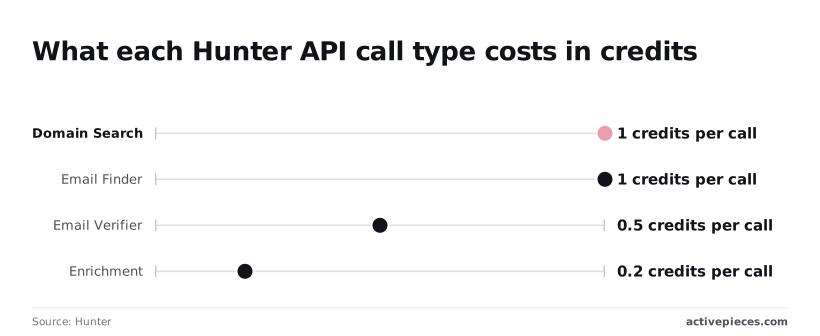
Finding costs twice what verifying does, and enrichment costs the least. A pipeline that verifies every address it finds spends 1.5 credits per lead, and one that adds enrichment spends 1.7. Someone must own that arithmetic before the first invoice, not after.
Yearly versus monthly pricing
Annual billing saves 15 dollars a month on Starter, 45 on Growth and 90 on Scale. The table shows what each paid plan costs per month at the yearly rate and the monthly rate, per Hunter's pricing page. Figures were checked in November 2026.
| Plan | Billed yearly (per month) | Billed monthly (per month) |
|---|---|---|
| Starter | $34 | $49 |
| Growth | $104 | $149 |
| Scale | $209 | $299 |
Only if the volume holds for twelve months is the saving real. Commit yearly after a quarter of stable usage, not before.
On rate limits, I have no verified per-tier figures from this check, so read the limit for your plan on Hunter's own pages before you size a batch.
Whatever the number, treat every retry as a call you pay for, and count it when you estimate volume.
10,000 leads through Email Finder cost 10,000 credits. Verifying every result adds up to 5,000 more, for 15,000 in total. Enrichment on the same list adds 2,000.
Pick the plan whose credit allowance covers that total plus a retry margin, and name the person who gets paged when the allowance runs out mid-run.
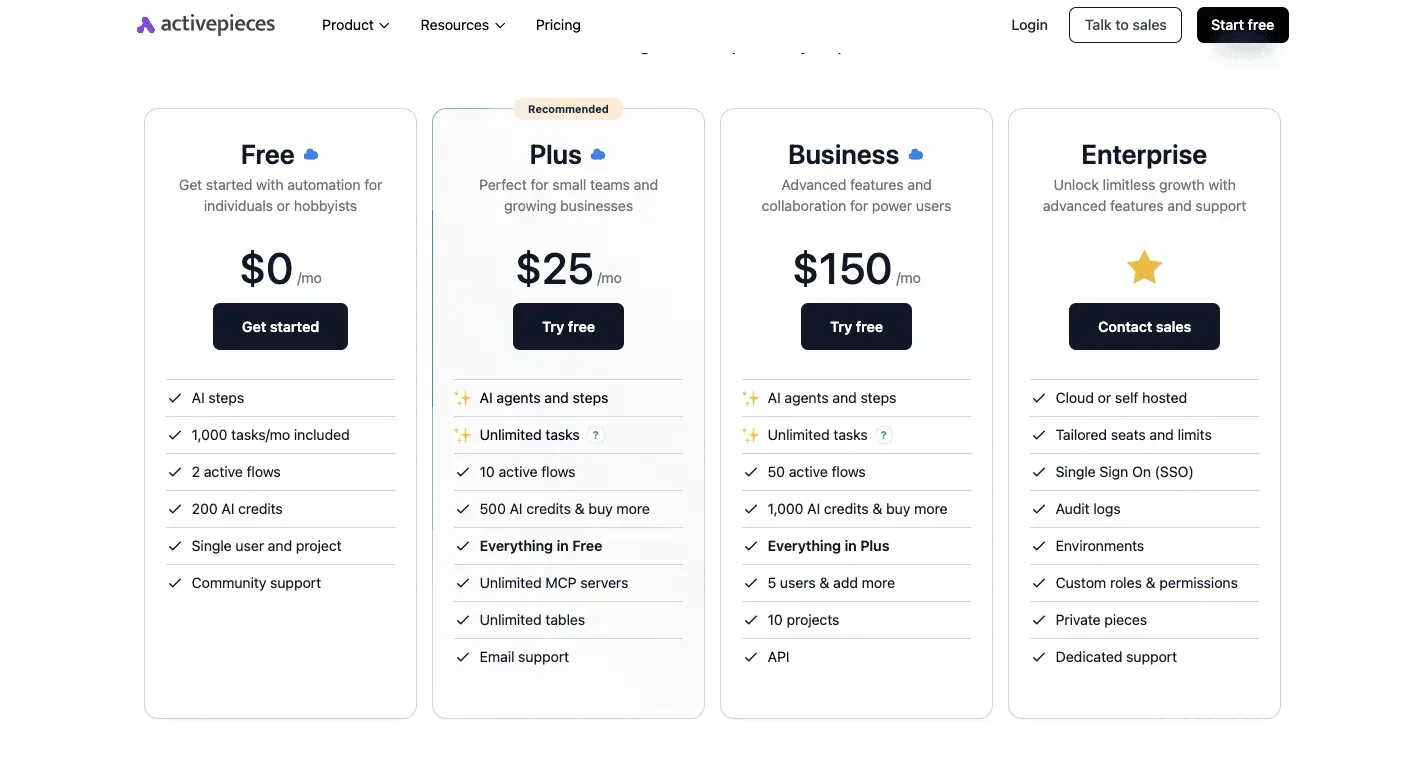
Worth checking against a plan that does not meter every step: one credit covers a whole run on Activepieces.
Hunter API errors and production limits
Seven failures can page someone at 2am, and an empty allowance is only one of them. Each arrives as a status code or result your code can handle. The table shows what each means and the first fix to try.
| Signal | What it means | The fix |
|---|---|---|
| 400 | A parameter is missing or malformed | Validate domains and names before the call |
| 401 | The API key is wrong or revoked | Rotate the key and alert its owner |
| 429 | You exceeded the request rate | Exponential backoff with jitter |
| Plan or usage-limit error | Your plan does not cover that call or volume | Check the plan against the endpoints used |
| Out of credits | The allowance is spent | Credit check before each batch |
| 202 on verification | Verification is still running | Poll again later, never re-bill |
| Accept-all, unknown | The server gives no verdict | Quarantine, do not send |
Four of these need more than a line.
Retry a 429 after a growing, randomized delay, and cap the attempts. A tight retry loop keeps you rate limited and costs you a run.
Cache every result by domain and drop duplicates before the batch starts. Otherwise a crashed job that restarts from row one pays twice for work it already did.
Accept-all and unknown verification results
In Prospeo's test, 1,000 domain lookups found emails for 325 domains, so about two in three lookups return nothing to use. Of those 325, 289 were deliverable, so only 28.9% of lookups end in a usable address.
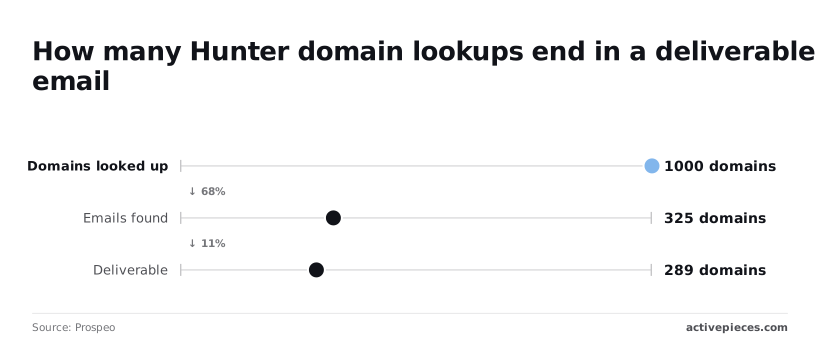
Plan for roughly 3.5 lookups per usable domain. Accept-all and unknown results sit in the gap between 325 and 289, so route them to a review queue, not your sender.
Any key in browser code can be copied by every visitor, and they spend your credits. Call Hunter from a server route that holds the key and enforces its own per-user limit.
Running Hunter lookups in Activepieces workflows
When the work starts from a form submission or a CRM record rather than from a user action in your product, a workflow tool is the right home for Hunter lookups.
The person paged when it fails is then an operations owner, not your application's on-call engineer.
When a workflow beats custom code
Activepieces is an MIT-licensed core with 746 integrations, and a run is 1 credit however many steps the flow has, so a Hunter flow that finds, verifies and writes back costs the same as one that only finds.
Unlimited flows on every plan, including free, means splitting the work into small steps never changes the bill.
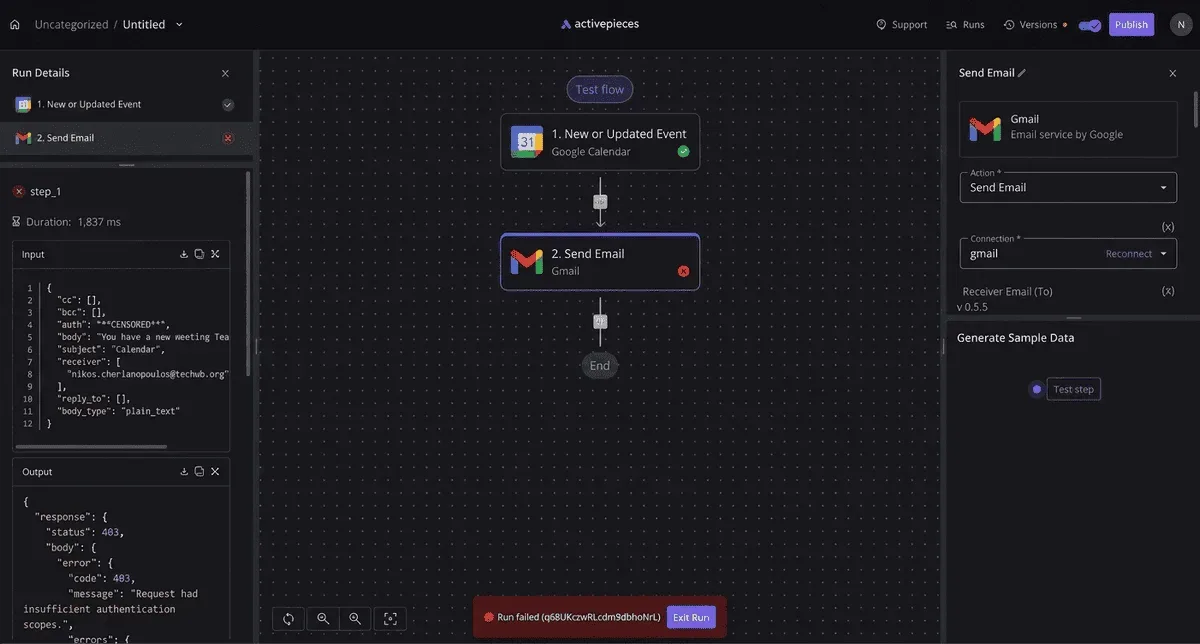
When a verification call fails or comes back unusable, you open the run and see the exact input and output of each step, instead of grepping application logs for a request you never tagged.
Your Hunter key is the credential this article keeps asking someone to own, and Activepieces lets you keep it out of its database entirely: on the self-hosted edition and the enterprise cloud tier, connection secrets can be routed to your own secret manager.
Point a self-hosted instance at one and the key won't appear in the Activepieces database, which you can inspect yourself; Zapier and Make keep connection credentials in their own cloud. MoneyGram, Moneypenny, Alan and FundingSocieties run Activepieces in production.
Keep direct code for anything a customer touches inside your product. A signup form that must reject a bad address in the moment belongs behind your server route, with your own limits and error handling.
A workflow suits the back-office cases: leads arriving from a form, records created in a CRM, a nightly sweep of unverified contacts. Those tolerate a delay, and the people who own them aren't engineers.
Verify-on-arrival pattern with the key stored as a connection
The pattern has four steps:
- A trigger fires when a form entry or CRM record arrives.
- A step sends the email address to Hunter's verification endpoint.
- A branch reads the returned status and decides what the record is.
- A final step writes that status back onto the record.
Store the Hunter key as a connection, not pasted into a step, so it lives in one place and a departing contractor's flow doesn't carry a copy of it. Name an owner for that connection when you create it.

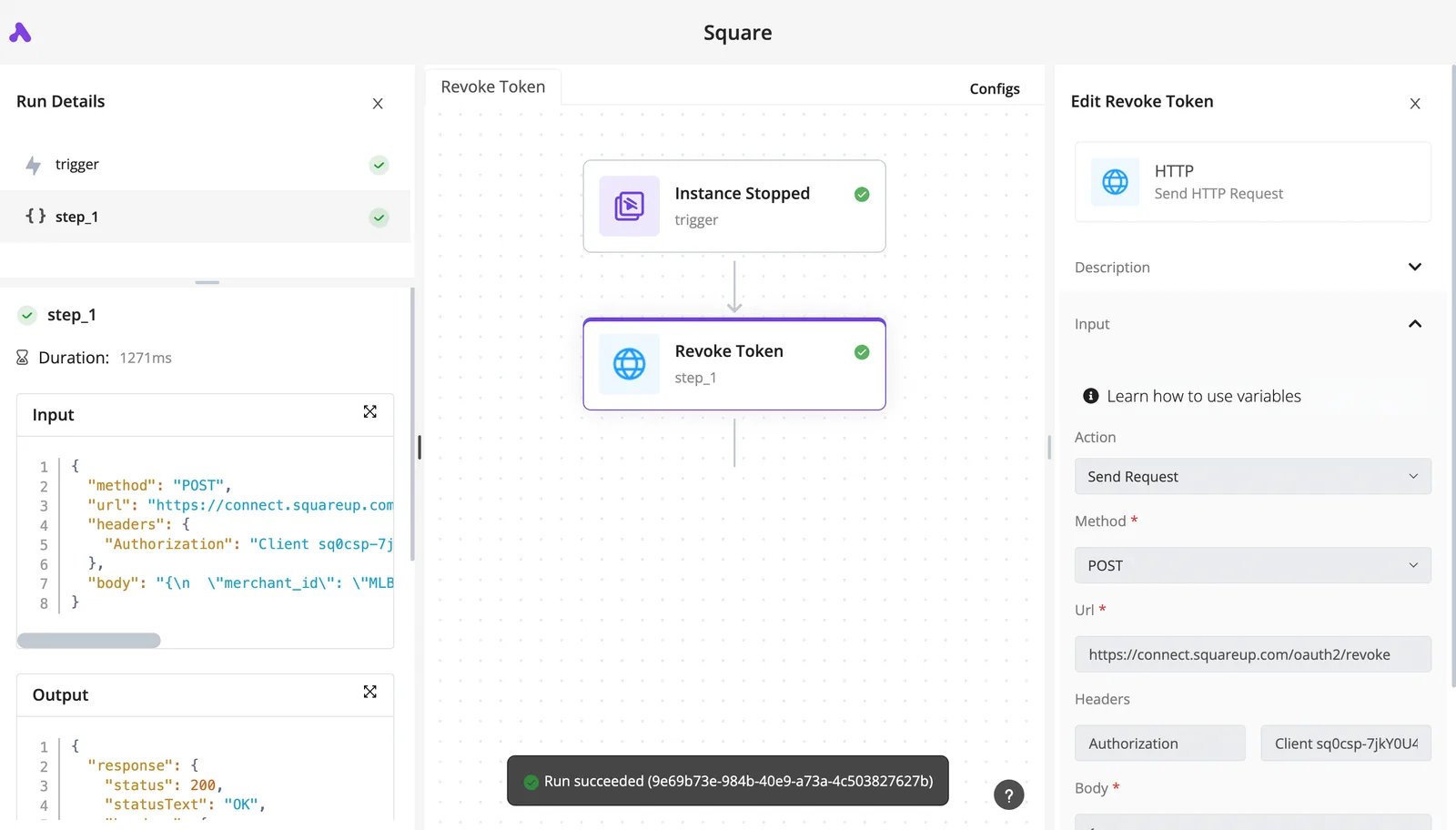
In the screenshot below, a completed run in Activepieces shows the trigger and its single HTTP step both carrying green checkmarks. The step's panel lists its duration, the JSON request sent with its Authorization header, and the response with a 200 status.
That's the evidence you want per call, since it lets you tell a Hunter failure from a mapping error without guessing.
Next, add the retry and failure handling deliberately: a retried step spends credits again, so decide how many attempts a record gets before the flow stops and flags it.
A Monday-morning checklist for your Hunter integration
Work through these steps in order. Write down who gets paged when credits run dry, because a retried step has already spent credits and someone must own that spend before it runs unattended at 2am.
- Pick the plan by monthly request volume and by which endpoints you call, since each call type draws credits differently.
- Create an API key for this integration alone, so revoking it never breaks another workflow.
- Run one verification on a known address and read the full response before building around it.
- Add backoff on rate-limit responses and a credit check before each batch, so a retry loop can't drain the balance.
- Cache results by address, so the same record never costs credits twice.
- Set a usage alert below your limit, routed to the named owner.
- Decide what unknown verification results do: hold, retry once, or discard.
Step 7 matters most, because an unverifiable result is a decision your flow makes by default if you don't make it.
For a solo builder or prototype, take the smallest plan that covers your test volume. The catch is that a loop with no credit check can burn a month's allowance in an afternoon, so do steps 3 and 4 before any bulk run.

For a team of 5 enriching leads, pick by which endpoints the team actually calls, not by headcount. Shared lead lists make duplicate lookups likely, so caching pays for itself here first.
For a team of 25 needing admin controls, check on Hunter's pricing page whether the admin features you need sit on a higher tier than your volume alone suggests. If they do, that feature, not usage, is what pushes you up a plan.
For heavy or API-volume use, plan for rate limits before credits. Queue requests, back off, and alert early, because at this volume unmetered retries are the likeliest source of surprise spend.
Frequently asked questions
Is the Hunter API free to use? Yes, up to a small monthly credit allowance on the free plan, and the same API key works there.
That's enough to prototype a call, not to run a workflow someone will be paged for, because the allowance runs out and calls then fail until the next period.
Does a failed or unknown verification cost a credit?
Treat it as possibly yes until your own account shows otherwise. Hunter's docs describe credit use per call type, and the finder and verifier endpoints don't all behave identically on empty or inconclusive results.
Run one inconclusive case, compare your usage page before and after, and write down what you saw. Whoever owns the budget should hold that note.
Can I use the Hunter API for bulk lists?
Can I use the Hunter API for bulk lists? Yes, in two ways. The dashboard accepts uploaded lists for bulk finding and verifying, and the API lets you loop over records yourself.
The loop is where the cost risk sits: every record is a billable call, and a retry is another one. Queue it and cap it, as covered above.
Do unused Hunter credits roll over?
Do unused Hunter credits roll over? No. Hunter's pricing page describes allowances per billing period, and unused credits don't carry into the next one.
Size the plan to your steady monthly volume, not to a single large import. Handle one-off imports by planning the month they land in.
Is there a Hunter API sandbox or test mode?
Is there a Hunter API sandbox or test mode? Not that I can point to in Hunter's docs. The free plan is the closest substitute, and its calls spend real credits from a small allowance.
Keep test keys separate from production keys so a contractor's experiments can't drain the credits your live workflow depends on.
Related reading
Running the numbers
See what the same workload costs here.
Free forever plan, and every paid plan self-hosts at no extra cost.
See pricing Talk to sales