AWS Textract Pricing 2026: Cost per 1,000 Pages

Nov 4, 202616 min read
AWS Textract pricing per page by feature
How much AWS Textract costs per 1,000 pages
Anywhere from $1.50 to $50 per 1,000 pages: that is what Textract, AWS's pay-per-page document extraction service, charges depending on the feature, according to AI Tools Atlas, and it is a figure many teams weigh up when wiring extraction into workflows built with tools like Activepieces.

AWS Textract pricing is the pay-per-page billing model for Amazon Textract, in which each page processed is charged at a rate set by the extraction feature called, such as text detection, forms, tables, queries or specialized document analysis, rather than at a single flat price.
That's a 33-fold spread, so the feature you call, not the page count, sets what lands on the invoice.
Ranked by first-tier price per 1,000 pages, checked 4 November 2026 against the same listing:
- Text detection: $1.50, which makes plain OCR the cheap baseline and the line to hold the others against.
- Expense: $10, so a purpose-built invoice and receipt parser costs about seven times raw text.
- Tables and queries, tied at $15, which means asking targeted questions of a page costs the same as extracting its grid.
- ID: $25, so identity documents carry a premium over any general layout feature in this set.
- Forms: $50, the most expensive here, and the one a shared account quietly cross-subsidizes when one client's key-value extraction lands on everyone's volume, so other clients absorb costs they didn't incur.

Pricing table: every feature, tier and free tier
At 10,000 pages, a monthly client run usually becomes a line item you have to defend, so the table converts each confirmed rate into a per-page and a 10,000-page figure.
Signatures, layout and lending are not in it because I have no confirmed rate for them, and a guessed price is worse than a missing row.
| Feature | Price per 1,000 pages | Price per page | 10,000-page run |
|---|---|---|---|
| Text detection | $1.50 | $0.0015 | $15 |
| Expense | $10 | $0.01 | $100 |
| Tables | $15 | $0.015 | $150 |
| Queries | $15 | $0.015 | $150 |
| ID | $25 | $0.025 | $250 |
| Forms | $50 | $0.05 | $500 |
Read down the last column: the same 10,000 pages cost $15 or $500 depending on one API choice, and only the second figure needs a conversation with the client.
How features stack when combined on one page
Ask for two features on one page and Textract bills both separately, so the rates add up. Forms plus tables on one page comes to $65 per 1,000 pages, and 10,000 pages of that is $650, not the $500 the forms line suggests.

Whether the calls come from a script or from Activepieces, Textract's meter reads the same $65 per 1,000 pages for that pair, so quote the stacked rate, not the headline one.
If you are running this arithmetic for your own team, see what the same workload costs on Activepieces.
Hidden Textract costs and limits teams hit
Switch on every feature and each one bills per page on top of the last, so an invoice run costs far more than the text-only line implies. That is the hidden cost: the stack.
Stacked feature charges
If a client expects invoice pricing near the text-only rate of $1.50, they are about thirty-three times off the moment you ask for key-value pairs, because Forms cost $50 per 1,000 pages.

Adding Tables costs another $15 per 1,000 pages, which brings Forms plus Tables to $65, so each document processed with both features costs roughly 6.5 cents.
Adding Queries costs a further $5, and a run with everything on reaches $70 per 1,000 pages, so you're paying 7 cents per document for complete feature coverage.
What to take from the chart, which shows one invoice workflow built up this way, is that the jump from text to Forms is the real decision, while the later add-ons are small by comparison.
So the quote should name the feature set per document type. Bill every client at one blended page rate on a shared account and the Forms-heavy client quietly rides on the cheap ones.

Surrounding AWS service costs
Look past Textract and the bill keeps going. Source files sit in Amazon S3, and any Lambda function that triggers extraction or post-processing the output carries its own charge.
Both are small per page, but they scale with volume and with retries, so they belong on the line items rather than in overhead.
If you route low-confidence results to Amazon A2I, the human review service, each reviewed document carries its own charge. The review rate you assume changes the per-page cost more than any extra Textract feature.
Page, file-size and rate limits
For multi-page PDFs, synchronous calls will not do. They suit single images and short documents, while multi-page PDFs need asynchronous jobs, where you start a job and collect results later.
The practical consequence is that a batch of long invoices needs job tracking and polling logic, and that's engineering time to price in.
Check the current page and file-size caps in the AWS quotas documentation before promising a turnaround, since a file over the cap fails and gets re-run.
Textract regional pricing and quota limits
When a client has data residency rules, they may pay more than your quote assumed, because per-page rates can differ by region. Default rate quotas also apply per account and per region.
When one client's burst hits a shared account, it can throttle another's jobs, and the retries that follow add pages you didn't plan for and still pay for. Separate accounts, or a quota increase requested before launch, keep one client's spike from becoming everyone's cost.

Textract against Azure, Google and open-source OCR
Once you have isolated each client's usage, the next question is whether Textract is the right rate to bill against. The answer changes by task: all three cloud services price plain text cheapest, with forms, tables and prebuilt models stepping up in cost.
Per-page price by task across vendors
I've left out dollar figures from this comparison of the four options by task because rates change by region and volume, so pull current numbers from each vendor's pricing page before quoting a client.

The pattern to take from it is the shape of the price ladder, which is similar across the clouds.
| Text | Forms | Tables | Prebuilt invoice/ID | Free tier | Best fit | |
|---|---|---|---|---|---|---|
| Textract | Cheapest tier | Priced above text | Priced above text | Separate invoice and ID calls, each billed on its own | Limited allowance for new accounts | Mixed documents already in AWS |
| Azure AI Document Intelligence | Read model, cheapest tier | Layout and prebuilt models cost more | Layout model costs more | Prebuilt invoice and ID models, above Read | Limited free tier | Invoice-heavy work in a Microsoft shop |
| Google Document AI | OCR processor, cheapest tier | Form parser costs more | Layout and form parsers cost more | Specialized processors, above plain OCR | New-customer cloud credit | Teams standardized on Google Cloud |
| Self-hosted Tesseract | No per-page fee | Not built in | Not built in | None | Free software | Clean text at high volume |
Because every cloud ladder has the same shape, a quote built on the text rate will understate any client whose documents need forms or tables.
Textract free tier and volume discounts
For testing a pipeline, free allowances are enough; for carrying a client, they are not. Treat them as a trial, and keep them out of the retainer math, or the first invoice after the allowance runs out will look like an overrun.
Ask about volume discounts only for a client who will sustain high volume on one feature, since the discount applies per feature.
When self-hosted OCR is cheaper and when it is not
When documents are clean, mostly text, and arrive in large batches, Tesseract is cheaper. There's no page fee, so the cost is servers and the engineer who maintains them.
The moment a client needs key-value pairs, tables or invoice fields, Tesseract stops being cheaper, because you would have to build and maintain that extraction layer yourself.
That labor is usually the most expensive line, and it lands on your team's hours unless you bill it.
Choose on the documents the client sends, then price the feature that handles them.
Worth checking against a plan that does not meter every step: one credit covers a whole run on Activepieces.
Estimating your monthly Textract bill step by step
Count pages by document type, assign each type one feature, enter those lines in the AWS Pricing Calculator, then add the services around Textract. The total only holds up if it matches what you could put on a client invoice.
Step 1: count pages by document type. Pull a month of real uploads and tally pages per type: plain letters, forms, invoices, ID documents, multi-page contracts.
Don't use a single average page count, because one blended number hides which client's documents are expensive. Keep each client's tally separate, so a shared account never quietly makes a cheap client pay for a costly one's tables and forms.
Step 2: Map each type to one feature
Give every document type exactly one feature. Use text detection for plain pages, forms or tables extraction for structured ones, the invoice and receipt analysis for those, and the ID analysis for identity documents.
Keep each client's tally separate, so a shared account never quietly makes a cheap client pay for a costly one's tables and forms.
Where a type needs two features on the same page, price both, because AWS bills that page twice.
Add a re-run allowance for pages you expect to reprocess after a bad scan or a changed rule. Re-runs are billed like first runs, so they belong in the estimate, not in a footnote.
Step 3: Enter it in the AWS Pricing Calculator
Add one Textract line per feature, entering the pages from Step 2. Check whether the free tier applies to each feature and whether volume tiers lower the rate once you pass a threshold. Both are per-feature, so a low-volume feature may never reach a discount.
Then add the surrounding services as their own lines: storage for originals and outputs, the compute that triggers each job, queues or workflow orchestration, and any human review step. These often decide whether the total is believable.
On the orchestration line, Activepieces meters the run rather than the steps inside it: its published pricing page lists 1 credit per flow run, any number of steps, where Zapier's pricing page lists billing per task and Make's lists billing per module.
Splitting a Textract hand-off into smaller, safer steps therefore doesn't raise that line, and AI steps are the only ones credited at a different rate.
Worked examples at three volumes
Build the same model at 1,000, 50,000 and 500,000 pages a month and compare the shape, not just the totals.
At 1,000 pages, the free tier may cover much of the Textract line, so the bill is mostly the surrounding services. Don't set a client price from that month.
At 50,000 pages, the feature mix dominates. A few structured document types can outweigh a large pile of plain pages, so price per document type, not per page.
At 500,000 pages, tier discounts and re-run rates move the total most. A small drop in re-runs can matter more than a rate change.
On Monday, pull last month's uploads, tally them by client and type, and build the calculator lines before you quote anyone.
Connect Textract to a workflow with Activepieces
Do not expect Activepieces to make Textract cheaper: the $1.50 to $50 per 1,000 pages stays exactly as AWS sets it, so these charges apply regardless of which workflow platform you use.
It supplies the trigger and the hand-off that Textract leaves to you, and that gap is where hidden labour and accidental re-runs creep into a client's bill.
Once you have last month's tally by client and document type, the next question is what moves each file into Textract and each result out of it. Every manual step there is time you either bill or absorb.
What Textract does not automate
Give Textract a document and it returns text, tables or fields. It doesn't notice that a file arrived, decide which feature to call, check the output, or put the result in front of the person who approves it. Someone or something has to do that.
If that someone is a staffer dragging files into a console, you're paying for the extraction twice: once to AWS and once in salary. If it's a script nobody owns, the risk is quieter.
When a failed run is retried by hand, the same pages are processed again, and the repeat lands on the shared account. No single client sees it, and the clients with messy scans end up subsidised by the ones with clean PDFs.
What Activepieces does here is the plumbing around Textract, not the extraction.
It is a workflow builder with 747 integrations in an MIT-licensed core, which connects triggers, apps and custom HTTP calls, meaning you probably won't need custom code for most services you want to integrate.
The per-page price, the feature you choose and the pages you re-run stay exactly as AWS meters them.
A trigger-to-spreadsheet workflow
You build the flow below in the Activepieces canvas in ten steps, so each step is a discrete configuration block, and because flows are unlimited on every plan, including free, you can give each document type its own.
It runs from a schedule trigger through Google Sheets, a loop, a date helper and an HTTP request.
After that come two AI steps, a Sheets insert, a router with a branch and an Otherwise path, and a Gmail send, so AI processes your data before it reaches the routing decision.
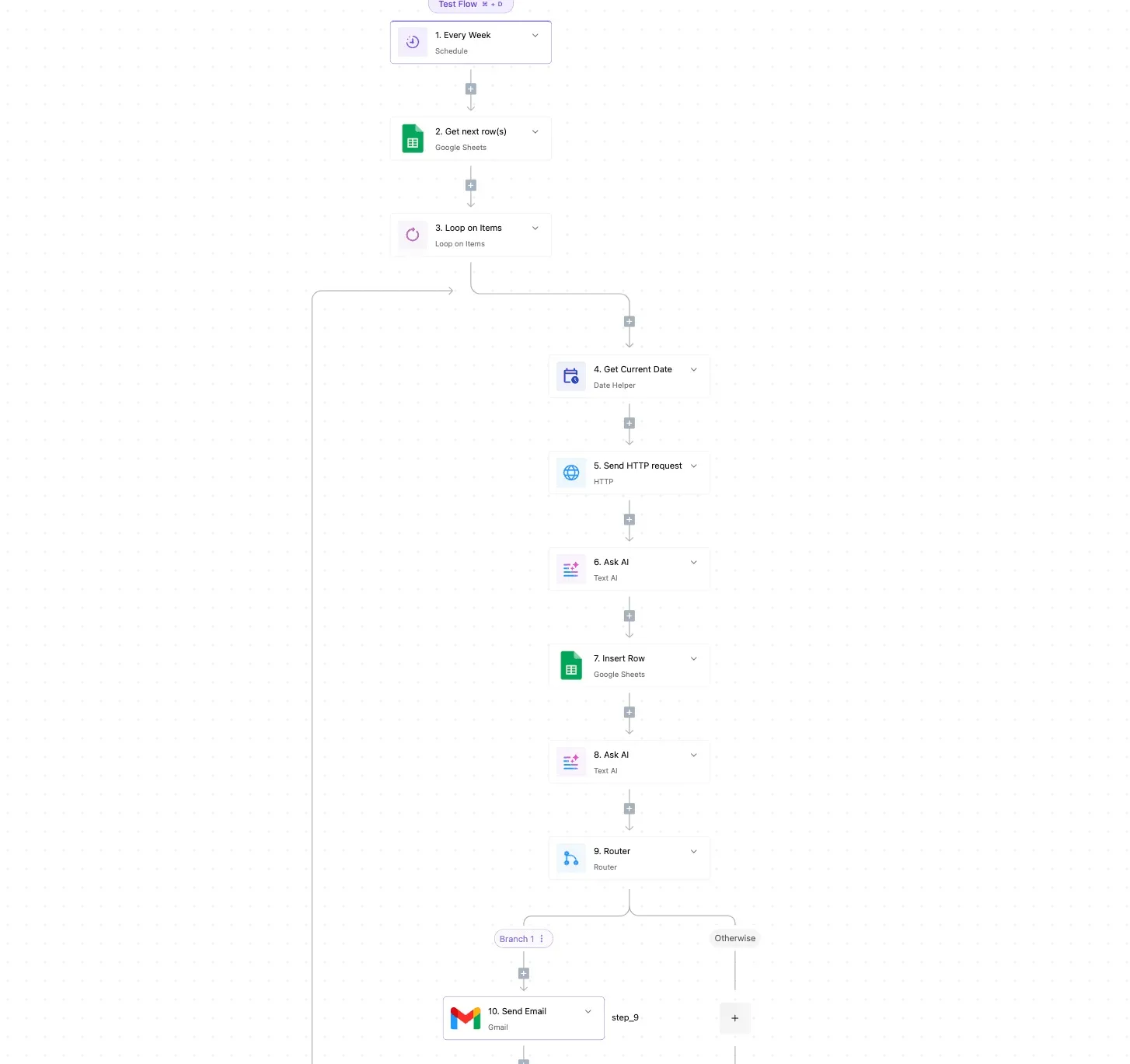
Take from the flow the shape, not the exact steps: one trigger, one loop over new items, one call out, one write-back, and a router that separates clean results from ones needing a human.

For Textract, swap the trigger for a watch on a folder or inbox and point the HTTP request at the Textract API with the one feature that document type needs.
Write each result to a sheet row tagged with client and document type. That tag is what lets you bill by feature next month, and it's what your calculator lines were built to match.
Use the router to catch low-confidence or empty extractions and send those to a person before anything is resubmitted. A deliberate, logged re-run is a cost you can quote; a silent retry is one you can't.
Frequently asked questions
When a per-client estimate meets the invoice, five questions come up, and the answers below are short because the rate card does the real work. Four items the body leaves open are worth keeping on your checklist before you quote a client:
- Does the free tier renew, or is it a one-time allowance?
- Are failed pages billed?
- Do queries on top of forms or tables cost extra?
- Do regions change the rate?
The first two are answered below. For the last two, read the current pricing page for the region your account runs in, and log the features each document used so you can apply the right rate per client.
Is there a free tier for AWS Textract?
Yes, but treat it as a trial, not a monthly allowance. It applies to new accounts for a limited period, so it won't offset a recurring client workload.
In a shared account it's also the easiest thing to cross-subsidize: whoever runs first consumes it, and every later client looks cheaper than they are. Leave it out of per-client rates.
Does Textract charge for failed or blank pages?
Expect to be billed for a blank page that processes successfully, since it is still a processed page. A request that errors out before producing a result is generally not billed, but confirm that against current AWS documentation.
Either way, a failed run you retry is paid for on the successful attempt, so retries belong in your estimate as a re-run allowance, not as free.
Is Textract cheaper with committed spend or enterprise discounts?
It can be. AWS has private pricing and committed-spend arrangements that may lower effective rates, but the terms depend on your agreement, not on the public rate card.
Ask your account contact what applies to Textract specifically. Bill clients at the public rate if the discount belongs to the agency, and pass savings through only when the contract says so.
Can I pay less by using only text detection? Yes, if the documents need nothing beyond raw text. Plain text detection is the lowest-priced feature, while forms, tables and queries cost more per page.
The saving disappears if someone then has to rebuild the structure by hand or re-run the page with a richer feature. Choose the cheapest feature per document type, not per account.
How often does AWS change Textract pricing? Pricing changes infrequently, and new features launch with their own rates.
Keep rates in a single configuration file with a date, not scattered through spreadsheets. Check the pricing page whenever you renew a client quote, so an old rate doesn't quietly turn into an unbilled cost.
Related reading
References
Running the numbers
See what the same workload costs here.
Free forever plan, and every paid plan self-hosts at no extra cost.
See pricing Talk to sales