Camtasia Pricing 2026: Plans, Costs and Renewals

Nov 13, 202614 min read
Camtasia's headline price is only the start of the bill; seats, renewals, bundled extras and trial limits all change what you actually pay.
Price it at your real usage from TechSmith's own page, then decide whether an alternative is cheaper for your job, whether that means a free editor for simple trims or a workflow tool such as Activepieces for the repetitive publishing steps around the edit.
Camtasia pricing is the set of licence costs TechSmith charges for its screen recording and video editing software, covering per-seat plans, renewal and maintenance fees, bundled add-ons, and the limits placed on the free trial.
According to Toollers, as checked on 13 November 2026, a solo creator starts at Starter ($39 a year) or Essentials ($179.88 a year) on TechSmith's store page.
Once you need teams, admin controls or institutional licensing, you move to quote-driven or differently licensed options, so the headline price stops applying.
Solo creator or course maker
$140.88 separates Starter, the $39-a-year entry point, from Essentials at $179.88, which means upgrading multiplies your annual cost more than four times.
You are safe on Starter only if its feature list covers your export, asset and support needs.
Team of 5 sharing licences
If the store prices them per seat, five Essentials licences come to $899.40 a year, which is a different number from the one on the headline.
The catch is sharing: a licence is typically tied to a person, so passing one login around the team is a licence problem, not a saving.
Team of 25 needing admin controls or SSO
Here the store-page prices stop being the number to use. Single sign-on and centralised licence management aren't things the two cheap plans advertise, and at 25 seats a per-seat price multiplies quickly, so you hit an affordability ceiling around that point.

You'll be asking for a quote, and that is the catch: your real price is whatever sales offers. Ask in writing what the quote includes, how renewals are priced, and whether the seat count can drop at renewal.
Education or government buyer
Because both buyer types are normally priced separately from consumer plans, neither Starter nor Essentials applies by default.
The catch is eligibility: you may need to prove status, and the discount may come with a different renewal term.
Camtasia pricing table checked 13 November 2026
Click a different card and the price of the same software changes by more than 419 $.
Camtasia is TechSmith's screen recorder and video editor, and on 13 November 2026 the four plans I could price ran from 179.88 $ a year to 599 $ a year, so you need to match the tier to both your budget and requirements.
The prices come from Toollers; the table shows each as billed per year, with my own division by twelve beside it.
| Plan | Price as stated | Billing period | Divided by 12 | Check date |
|---|---|---|---|---|
| Essentials | 179.88 $ | per year | 14.99 $ | 13 Nov 2026 |
| Create | 249 $ | per year | 20.75 $ | 13 Nov 2026 |
| Pro | 599 $ | per year | 49.92 $ | 13 Nov 2026 |
| Business | 198 $ | per year | 16.50 $ | 13 Nov 2026 |
Which plan costs more than it looks
Per Toollers' analysis, Pro at 599 $ is roughly 2.4 times Create and 3.3 times Essentials, so choosing it by habit is the costliest mistake on the page.
Business at 198 $ sits below Create at 249 $, which means the plan names aren't a ladder, and you can't assume the higher-sounding tier costs more.

Record the prices properly
Open TechSmith's own pricing page, not a reseller's, and write down the date and time before you read anything. Prices move, and a quote with no date can't be argued with at renewal.
Business at 198 $ sits below Create at 249 $, which means the plan names aren't a ladder, and you can't assume the higher-sounding tier costs more.
Copy the number and the period together: Essentials at 179.88 $ per year, Create at 249 $ per year, Pro at 599 $ per year and Business at 198 $ per year.
A bare number is how a yearly charge gets mistaken for a monthly one.
Camtasia free trial and licence terms to check
Start the trial and screenshot the screen that lists its limits. Look for a watermark, an export cap, a time limit and any features switched off.
Read the licence text on TechSmith's site for the plan you intend to buy, and look for the words "commercial" and "client".
If the licence is silent on paid client work, ask support in writing and keep the reply with the timestamp.
If you are running this arithmetic for your own team, see what the same workload costs on Activepieces.
Camtasia pricing across usage and renewal
At the 1-9 user business rate of $198 per seat, one seat costs $198 in year one, meaning there's no volume discount even at small scale. The renewal terms decide whether year two repeats that number or something larger.
Cost per seat at 1, 5 and 25 seats
Buy five seats and the first year costs $990, exactly five times the single-seat price, so a small team gets no break for buying together.
At 25 seats the first year comes to $4,702.50, below the $4,950 that straight multiplication gives. A volume reduction applies somewhere before 25, so a buyer at that size should ask TechSmith, Camtasia's maker, for a quote and not multiply the list price.
Seat pricing charges you more as you add people, and the work after export shouldn't charge you more as you add steps.
Activepieces, which takes over once the file is exported, bills 1 credit per flow run however many steps it holds, so a ten-step client handoff costs the same as the two-step version.

The run is the meter, and breaking delivery into smaller, safer steps never raises the bill.
The three-year bars move only as far as the renewal terms allow, so read the gap between the bars as the cost of the renewal clause.
Renewals, updates and version upgrades
Because a renewal of maintenance and a paid upgrade to a new version are different line items, Camtasia's price page doesn't settle what year two costs. Before approving a three-year budget, find on TechSmith's own page what the renewal covers and whether it lapses silently.
When a renewal lapses, the seat still opens but stops receiving updates, and nobody notices until a macOS or Windows release breaks something.
Camtasia asset library and add-on limits
Build a project around library music and then lose access, and the project won't relink. That is the gap: TechSmith bundles a library of stock assets with some purchases and sells access separately for others.

Check which assets are included at your seat count, what the licence allows for client work and monetized channels, and whether access renews on the same date as the software.
Camtasia trial watermark and export limits
Don't expect deliverables from the free trial; it exists to show you the editor. Confirm on TechSmith's trial page what the trial stamps onto exports and how long it runs.
If a laptop stutters on the timeline during the trial, it won't improve after you pay, so test with your longest real recording.
Camtasia against Screen Studio, Descript and Loom
Of the four, Camtasia is the deepest editor and the one whose pricing page takes the most reading.
The other three are narrower tools that cost less when your job fits them. I've left exact prices out below, because they change and the maker's own page is the only version that counts.
Price and free-plan limits side by side
| Tool | Monthly price | Yearly price | Free-plan limits | Editing depth | Commercial licence | Best fit |
|---|---|---|---|---|---|---|
| Camtasia | On TechSmith's pricing page | On TechSmith's pricing page | Time-limited trial, exports watermarked | Full multitrack timeline | Per plan terms | Tutorials and training |
| Screen Studio | On its pricing page | On its pricing page | Check export limits before relying on it | Light, automated polish | Per plan terms | Mac product demos |
| Descript | On its pricing page | On its pricing page | Free tier with caps on exports and features | Edit video by editing text | Per plan terms | Talking-head and spoken video |
| Loom | On its pricing page | On its pricing page | Free tier with caps on recording length and library size | Trim and basic tweaks | Per plan terms | Quick team messages |
Look at the free column first, because that is where surprises hide. A watermark or a recording-length cap only shows up on export day, so run your longest real recording through each trial.
Camtasia editing depth versus recording focus
Camtasia is an editor first. It gives you a multitrack timeline, annotations and effects, so you can build a course lesson from many clips.
Screen Studio is a Mac-only recorder that polishes the capture automatically and offers little beyond that.
Descript works from a transcript: cut a sentence and the footage goes with it, which suits spoken content and punishes anything visual. Loom records and shares a link, with trimming as an afterthought.
If you rebuild the same footage several times, editing depth is what you pay for. If you record once and send, it's cost you never use.
Which tool wins for tutorials, demos and team video
For tutorials that need callouts, cutaways and a timeline, Camtasia earns its price. For a clean Mac product demo, Screen Studio gets there faster.
For interviews, voice-led explainers and podcasts with video, Descript is the better fit. For a quick walkthrough sent to a colleague, Loom is enough, and a free tier may cover it.

Whenever you'd never open Camtasia's timeline, a cheaper tool is enough. Test that with one real job in each trial before you commit.
Worth checking against a plan that does not meter every step: one credit covers a whole run on Activepieces.
Automate Camtasia exports and client handoff with Activepieces
After you export, Activepieces can take over from the finished file: it shares it, emails the client and logs the job.
The Free plan includes unlimited flows and 1,000 credits a month, and a run costs 1 credit, so that's the job to put through a trial before you pay for anything.
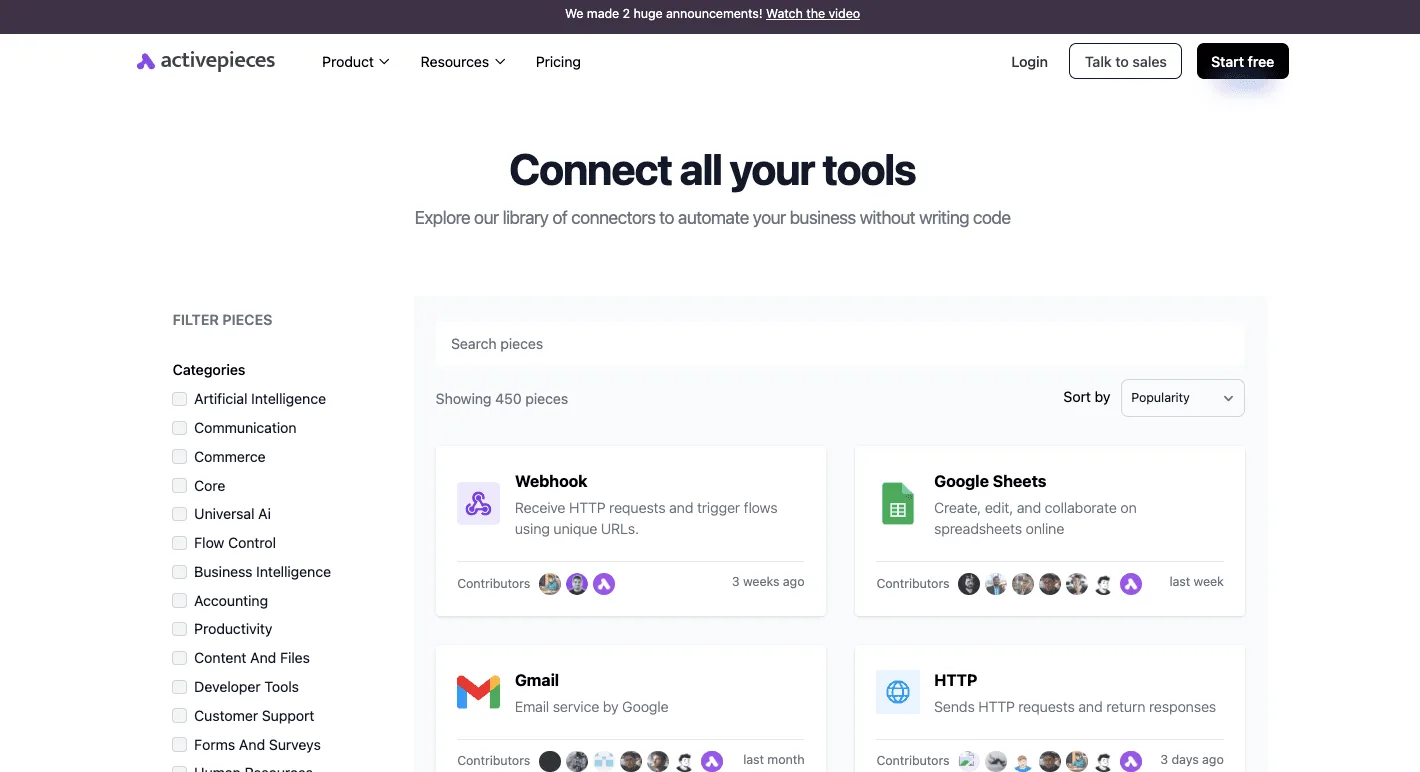
Search the connectors library for your storage and mail apps before you build anything, because a flow is only as good as the integration it depends on.
It lists 450 integrations, sorted by popularity, with Webhook, Google Sheets, Gmail and HTTP at the top, suggesting most of your core tools are already supported, which means you can start implementation without waiting for custom integrations. The three stages below assume those integrations exist.
Stage 1: trigger on a new exported file
Point Camtasia's export at a folder that syncs to your cloud storage. Then use that storage app's new-file trigger as the flow's start.
Activepieces runs triggered flows across the apps a company already has, so the handoff should start from the app where the exported file lands, such as a storage app with an integration.
Roughly 60% of the integrations are community-contributed, so a new-file trigger for your storage app may already exist. If it doesn't, the Webhook integration is the fallback: something you run calls a URL and the flow starts.
For stage 2, add a step that copies the new file into the client's shared folder on Google Drive or Dropbox. Map the file from the trigger, and set the destination folder by hand for each client.
Keep one flow per client at first. A single flow that guesses the folder from the filename will eventually send one client's video to another.
Stage 3: notify the client and log it
Add a Gmail step that sends the client the share link from stage 2, with the filename in the subject. Then add a Google Sheets step that appends a row: filename, client, link, date sent.
If a client disputes whether the cut arrived, the row settles it: it is your record of what went out and when, and a timestamp beats memory.
Next steps for Camtasia export automation
Do these in order:
- Export one real project from your Camtasia trial into the synced folder.
- Build the three steps above for one client and send the email to yourself, which lets you test the entire workflow before wider rollout, so you catch configuration issues before they affect the wider deployment.
- Check that the link opens without a login the client lacks, and that the sheet row is correct.
- Only then switch the recipient to the client.
If the flow breaks on a real file, you've found a limit of your setup before a client did.
Frequently asked questions
Read the vendor's rule before the invoice, not after it: the same habit that catches a broken file flow catches a billing surprise.
Here are five questions, answered from TechSmith's support pages. Confirm each one on the live page before you pay, because the terms change.
Is Camtasia a one-time purchase or a subscription?
It depends on which offer you pick at checkout, because TechSmith has sold both a perpetual licence and a subscription.
With a perpetual licence, the version you bought keeps working, but upgrades and ongoing maintenance are a separate decision, so the cost returns at your next upgrade.
Stop paying and a subscription stops too, though for as long as you pay it keeps you current. Compare the two against how long you expect to keep editing, not against the day-one price.
Does the Camtasia free trial add a watermark? Yes, exports from the trial carry a watermark.
Treat the trial as a test of your workflow, not a way to deliver finished work. If a client or a public channel would see the output, the watermarked file isn't usable, and the trial has told you what you needed to know.

Can I use Camtasia videos on a monetized YouTube channel?
You can generally publish videos made with a licensed copy of Camtasia commercially, including on a monetized channel. The catch is the material inside the video.
Inside the video, stock assets, music and effects have their own terms, and footage or audio from other sources is covered by whoever owns it, not by your Camtasia licence. Read the asset terms before you build a channel on them.
Is there a discount for students or teachers? TechSmith runs education pricing, and it's aimed at students, teachers and schools.
It usually requires proof of eligibility, so have your school email or documentation ready. If you're buying for a classroom or a department, ask about education terms before you buy individual seats at the standard rate.
Can I get a refund after buying Camtasia?
On TechSmith's support pages, the refund policy comes with a limited window from the purchase date. The window is the limit that matters: if you plan to evaluate the paid version, do it immediately after buying, and keep your order confirmation.
Before you let a subscription roll over, check whether the same window applies to the renewal, since a renewal is a separate purchase.
Related reading
References
Running the numbers
See what the same workload costs here.
Free forever plan, and every paid plan self-hosts at no extra cost.
See pricing Talk to sales