
Cerebras API Pricing 2026 — All Models and Plan Limits

Oct 30, 202613 min read
Compare every Cerebras plan and model
Cerebras API pricing at a glance
Your bill depends on which plan's rate limits you fit inside and which model you call, though Cerebras bills by the token.
Treat every rate below as a pointer to Cerebras's own pricing page, and confirm it there on the day you budget, much as you would check any step in a workflow you've wired up with Activepieces before trusting its output.
The Cerebras API is a hosted inference service that meters input tokens and output tokens separately, with a different per-million rate for each model. The table below shows the plan tiers and models side by side.

I have left out per-token rates that I couldn't confirm. Where a cell says to read a figure from the pricing page, that's the figure to copy, dated, into your own budget sheet.
| Row | Price | Input/output $ per 1M tokens | Rate limits | Context window | Cheapest job |
|---|---|---|---|---|---|
| Free Trial | No charge | Not billed | Lowest ceiling of the tiers | Can be capped below the model maximum | Prototyping a prompt |
| Developer | Pay as you go | Billed at each model's rate | Higher than the trial | Set per model and tier | Exploration and development workloads |
| Pro $50 | $50 | Model rates apply | Raised ceiling | Set per model and tier | Steady, predictable volume |
| Max $200 | $200 | Model rates apply | Highest self-serve ceiling | Set per model and tier | Heavy concurrent workloads |
| Llama 3.1 8B | Per token | Smallest model, lowest rates | Set by your plan | Read from the model page | Classification, extraction, routing |
| GPT OSS 120B | Per token | Larger model, higher rates | Set by your plan | Read from the model page | Reasoning and coding agents |
| Qwen3 32B | Per token | Mid-sized model, mid rates | Set by your plan | Read from the model page | General chat and summarization |
Test the $50 and $200 tiers first. Each only pays off if your traffic would otherwise hit the Developer ceiling, because then the higher limit is what you're buying, not extra tokens.
Start with Llama 3.1 8B for narrow, high-volume steps, such as a routing step inside an automation.
Move to Qwen3 32B or GPT OSS 120B only when the cheaper model fails your test set, since each step up multiplies the per-token rate across every run.
If you are running this arithmetic for your own team, see what the same workload costs on Activepieces.
What Cerebras charges beyond per-token rates
Fees, limits and rate changes
Beyond the per-token rate, you pay for plan-tier rate limits,, and the absence of any published batch or cache discount,
Rates move, too. Cerebras moved gpt-oss-120b input from $0.25 to $0.35 per 1M tokens and output from $0.69 to $0.75. For a job that sends 1M tokens in and gets 1M out, that's $0.94 becoming $1.10, about 17% more for the same work.

Budget from the current page, not from a launch-day number.
, and scaling past them requires upgrading to a paid tier, which means any non-trivial development quickly exhausts the daily quota.
After 30 days the $5 promo credit expires, which sets a hard deadline before any remaining balance evaporates.
Plan limits and what the Free Trial allows
I have no per-plan request or token limits from Cerebras that I can confirm, so treat them as not published here. The limit sets your throughput ceiling, and a ceiling you hit means queued work or a plan upgrade.
At 5 requests per minute and 1M tokens per day, the Free Trial lets a test harness fire one call every 12 seconds at best, so a 200-case test set takes about 40 minutes.
Cerebras discounts, minimums and spend caps
Assume you pay full price for every repeated system prompt and every bulk run, because Cerebras publishes neither a batch discount nor a cached-token rate. If your workload resends a long fixed prompt, Cerebras charges that repeated input at the full input rate each time.

Spend the $5 promo credit on evaluation, not on a reserve.
I found no confirmed spend-cap or overage terms, so check those on the billing page before you leave a job running unattended.
What Cerebras costs for typical workloads
Without a confirmed spend cap, your only budget control is arithmetic:
- Tokens metered, divided by a million, times the per-million rate for the model you pick
- I have no verified Cerebras rates to plug in, so the table shows each workload's sum and what drives it
| Workload | Tokens | Model | Arithmetic | Monthly cost | Plan fit |
|---|---|---|---|---|---|
| Support chatbot (20,000 conversations) | Input and output per conversation, summed over its turns | Smallest model that holds answer quality | Total input ÷ 1M × input rate, plus total output ÷ 1M × output rate | Rises with conversation length, because each turn resends history | Depends on peak requests per minute, not the monthly total |
| Nightly summariser (5,000 docs) | Document length in, summary length out | Cheapest model with enough context for your longest document | Same two-part sum, with input dominating | Grows with document length, and output stays small | Fits if the nightly run stays under the token-per-minute limit |
| Coding assistant (10 devs) | Code context in, completions out, per developer per day | Strongest model your team will accept | Same two-part sum, multiplied by developers and working days | Highest per request, because context is large | Ten people prompting at once is the test |
What Cerebras costs for a support chatbot
20,000 conversations is only a multiplier, because the metered unit is the token, not the conversation. A long conversation costs more than a short one because every turn resends the earlier history as input.

Measure your average turns before you multiply. The plan question is concurrency: a lunchtime spike can hit a requests-per-minute limit even when the month's total looks small.
What Cerebras costs for nightly document summaries
Here 5,000 documents is a fixed batch, which makes the bill the easiest to predict. Input tokens dominate because you read whole documents and write short summaries.
The risk is your longest document, which sets the context window you need and may rule out the cheapest model. If the run is spread over the night, it's far less likely to trip a per-minute limit.
For the coding assistant, ten developers sounds small, but each request carries file context, so tokens per request run high. This is the workload where model choice moves the bill most, because a premium model's output rate applies to every completion.
Budget it per developer per working day, then check that ten simultaneous users fit inside your plan's limits before you commit, so you won't ship with an undersized plan.
Worth checking against a plan that does not meter every step: one credit covers a whole run on Activepieces.
Guard against hidden Cerebras rate limits
Outside the per-token price, four limits can still change what you pay or whether a request succeeds. Ten simultaneous users is where most of them first show up, so stress-test at that concurrency.
- Bursts of requests that pass your plan's requests-per-minute ceiling come back as 429 errors.
- Models can be deprecated, and the notice appears in the changelog rather than on the pricing table.
- Context windows on lower tiers can sit below the model's stated maximum.
- Output tokens are priced above input tokens, so long answers cost more than long prompts.
For chat and agent workloads, the last point matters most. Your bill follows how much the model writes, not just how much you send, so estimate output length per call before you multiply by volume.
Output tokens are priced above input tokens, so long answers cost more than long prompts.
Handle Cerebras 429 errors during burst traffic
When a request returns a 429, you exceeded a limit, usually requests per minute. The average can look safe while a burst breaks it, such as a batch job firing at once or several users pressing enter together.
Retry with exponential backoff and a little random jitter, so failed calls don't all return at the same instant.
Read your plan's actual limits on Cerebras's rate-limit page, since they differ by tier and the same code can behave differently after an upgrade or downgrade.
Model deprecations and changes
If you hard-code a model today, it can be retired later, and a retired model name returns errors, not a cheaper substitute. Watch the changelog, and keep model names in configuration, not scattered through code.
Name a fallback model in advance, and test it against your real prompts, because a different model may produce different output length and therefore a different cost.
Control Cerebras spend with retries and caps
Activepieces can make the Cerebras calls for you, with retries on failure, and per-project and per-person AI caps with usage visible by team before the invoice, and it bills a run as 1 credit however many steps it has.
A ten-step flow with a retry branch therefore costs what the two-step workaround would, where Zapier's per-task billing charges for every step you add. It does nothing to Cerebras's token price, and a small wrapper in your own code does the same job.
Whichever you use, set a hard monthly cap, alert well before it, and cap retries so a failing loop can't multiply your token use.
Compare Cerebras to Groq, Together AI and Fireworks
On the same open model, gpt-oss-120b, the four hosts differ most in speed: Artificial Analysis measures Cerebras at 2004.6 tokens per second, well ahead of the rest.
Price for the same open model
For each host, the table shows measured output speed, the one column I can source from a third-party benchmark. Take from it how much faster Cerebras is, then check the per-token rate yourself.
| Provider | gpt-oss-120b output speed (tokens per second) |
|---|---|
| Cerebras | 2004.6 |
| Fireworks | 740.4 |
| Together AI | 596.9 |
| Groq | 480.4 |

Fireworks, at 740.4 tokens per second, is 2.7 times slower than Cerebras. Together AI, at 596.9, is 3.4 times slower, and Groq, at 480.4, is 4.2 times slower. SambaNova, a fifth host, sits at 689.6.
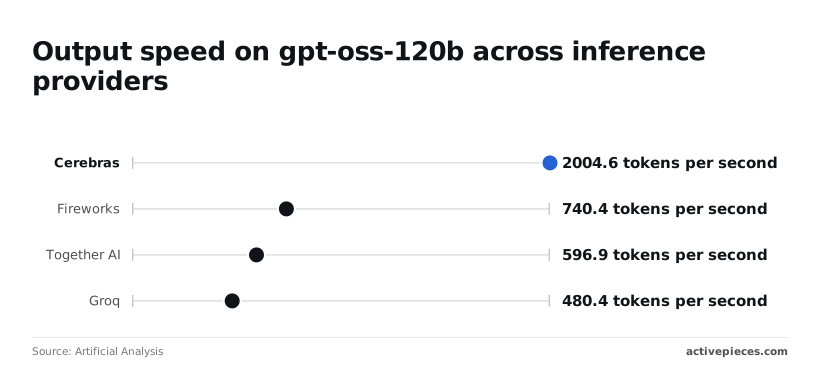
A 2,000-token reply takes about one second on Cerebras and about four on Groq.
Since prices, free tiers, batch discounts, rate limits and context windows change, and I haven't verified them here, read the input and output rate per million tokens, the batch discount, the free allowance and the rate limits on each vendor's own pricing page.
Write down the date you checked.
Free tier and limits compared
On all five hosts the billed unit is the token, so speed doesn't raise your per-token rate. Limits are where the plans diverge: a free or entry plan with a low requests-per-minute ceiling will throttle a fast model long before it uses its speed.
Compare the limits for the plan you'd actually be on. If your peak traffic doesn't fit, you're budgeting for the next tier up, not the list price.
When Cerebras is worth choosing
Choose Cerebras when latency is part of the product: voice, live coding assistance, or agent loops where each step waits on the last. In those cases, 2004.6 tokens per second against 480.4 to 740.4 elsewhere shortens every step.
If your work's overnight batch processing, nobody waits on the output. Then the batch discount and the per-million rate matter more than speed, and a slower host may cost less. Price your real monthly token volume at each vendor's current rates before you decide.
What Activepieces does about this
Most of the cost surprises above come from traffic you can't see until the invoice arrives: bursts that hit a 429, retries that resend long prompts, a model name that gets retired. Activepieces sits in front of those calls.
Since Cerebras documents an OpenAI-compatible interface, a flow can call it through an HTTP step with a changed base URL, your key and a model name. You can put the retry, backoff and fallback logic on the canvas instead of in code.
Spend control is the part to check against your own budget sheet. A flow can route narrow steps to Llama 3.1 8B and send only the failures to a larger model. Per-project and per-person AI caps let you see usage by team before the bill.
A run costs 1 credit however many steps it has, so a retry branch doesn't raise the Activepieces side of the bill.
The community edition is MIT-licensed, so you can self-host it and read how a flow behaves. It does not change Cerebras's per-token rates or its plan limits, so keep checking those on Cerebras's pages.
Frequently asked questions
Which questions change a budget
Pricing your volume still leaves a few questions that only Cerebras's own pages can settle, and four of them change a budget more than the rest.
- Whether the promotional credit on a new account expires, which decides if it covers a real test or lapses unused. Check the billing section of the Cerebras docs.
- Whether there is a minimum top-up, which sets the smallest amount you must commit before running anything. Check the same billing pages.
- When a Free Trial account moves to the Developer plan, which decides when rate limits and billing change under you. Check the plans and rate-limits pages in the docs.
- Whether cached tokens count toward your limits, which decides how much headroom a prompt-heavy workload really has. Check the rate-limits page.
Free tier, billing and compatibility
There is a free entry tier, but it's metered by rate limits, not by an open-ended allowance. Treat it as a way to test, not to run production traffic. Read the plan's limits on the Cerebras pricing and rate-limits pages before you build on it.
Yes, Cerebras bills input and output separately. The meter is the token, and input and output are priced as separate per-million-token rates for each model.
A workload that sends long prompts and returns short answers costs very differently from the reverse, so price each direction on its own line. Take the rates from the pricing page, not from a summary.
Cerebras documents an OpenAI-compatible interface, so an existing client generally needs a changed base URL, an API key and a model name. That keeps switching cost low, but test your specific calls, since compatibility rarely covers every parameter.
Plan limits and price changes
Check which plan you're on and what it allows, because limits are tied to your plan. Higher tiers carry higher limits, and larger needs generally go through Cerebras directly.
Assume rates can move whenever models or plans change, since Cerebras publishes no schedule I can point to. Date every figure in your budget to the day you read the pricing page, and recheck it before each renewal or volume increase.
Related reading
References
Running the numbers
See what the same workload costs here.
Free forever plan, and every paid plan self-hosts at no extra cost.
See pricing Talk to sales